Our readers keep the lights on and my smoothie glass nicely filled. As an Amazon Associate, I earn from qualifying purchases.
The front door ritual — turning a key, shifting a bag, balancing a cup of coffee while your toddler waits on the other side — is the exact friction a smart deadbolt eliminates. The best automatic door locks for home don’t just swap metal for electronics; they replace the entire physical unlock motion with a touch, a wave, a glance, or a voice command, so the door opens before your hand even leaves the handle.
I’m Mohammad Maruf — the founder and writer behind WellFizz. I’ve spent hundreds of hours cross-referencing biometric sensor accuracy, BHMA certification grades, battery chemistries, and real-world user reports to filter the seven automatic door locks that genuinely solve the daily entry friction.
This guide walks through how each lock’s specific technology — from palm vein scanning to self-learning AI fingerprints — changes the way you move through your own home, and why the best automatic door locks for home must balance response speed with fail-safe mechanical backup.
How To Choose The Best Automatic Door Locks For Home
Automatic door locks are security hardware first and convenience gadgets second. The wrong choice — a fingerprint reader that fails with dry hands, a deadbolt that draws too much power, a Wi-Fi radio that drops the signal mid-schedule — creates more frustration than it removes. The selection framework below isolates the four decision points that separate a lock you’ll love for years from one you’ll replace in a month.
Biometric Sensor Technology — Speed and Reliability in Real Conditions
The sensor defines the user experience. Optical fingerprint scanners (found on budget-tier locks) read the visible ridge pattern and struggle with wet, dirty, or worn fingertips. Capacitive or semiconductor sensors (mid-range and above) read deeper into the dermal layer and reject false prints. Palm vein recognition — like the technology in the Wyze Palm Lock — maps the hemoglobin pattern beneath the skin and cannot be spoofed by a lifted print. Facial recognition adds a fully hands-free layer but demands more processing power and battery capacity. The fastest capacitive fingerprint sensors on this list unlock in 0.3 seconds; a facial scan takes 1 to 2 seconds. Your daily scenario — returning with wet hands from the rain, carrying groceries, or managing children — determines which tolerance matters more.
BHMA Certification — The Real Durability Benchmark
The Builders Hardware Manufacturers Association (BHMA) grades locks on three criteria: security, durability, and finish. Grade 3 is the industry minimum for residential locksets. Grade 2 — which locks like the Kwikset SmartCode 270 and the Tapo DL110 carry — withstands 2.5 times more operational cycles than Grade 3 and resists physical tampering for longer. Grade 1 is commercial-grade and rare on smart locks under . If the product page does not list a BHMA grade, assume it is unrated Grade 3. For a primary front door that cycles ten or more times per day, Grade 2 should be your floor.
Battery Architecture and Power Reserve
A smart lock with a dead battery is just a very expensive metal brick with a keyhole. Three battery configurations appear across this list. Standard AA trays — like the Kwikset’s four-AA setup — offer predictable 12-month life and instant replacement anywhere. Dual-battery systems — one main pack and one reserve — prevent total failure, but the reserve must be dedicated, not shared. Rechargeable lithium packs (Tapo’s 1-year battery, Lockly’s 10,000mAh cells) reduce waste but require you to remember to charge. The critical spec is the low-battery alert: visual (flashing LED), audible (beep), or app-based. The best locks give you all three plus a physical backup key that works even when every circuit is dead.
Connectivity — Built-in Wi-Fi vs. Hub-Gateway Dependence
Some locks ship with built-in Wi-Fi (Schlage Encode, Tapo DL110, Lockly Visage) and connect directly to your router no extra hardware needed. Others (Sifely O, Veise VE07-H) require a separate gateway to enable remote control, which adds – and occupies one Ethernet port. Hub-dependent locks often use lower-power Bluetooth or Z-Wave for local communication and relay only through the hub to the cloud, which extends battery life but adds a single point of failure. If you want remote lock status, code sharing, and notifications without buying accessories, choose a lock with native Wi-Fi. If you already run a smart hub ecosystem, gateway-based locks can integrate more cleanly.
Quick Comparison
On smaller screens, swipe sideways to see the full table.
| Model | Category | Best For | Key Spec | Amazon |
|---|---|---|---|---|
| Wyze Palm Lock | Biometric (Palm Vein) | Hands-free entry, no-touch access | Millimeter-wave radar auto-lock | Amazon |
| Lockly Visage Zeno | Biometric (Face) | Apple Home Key, highest tech integration | Dual 10,000mAh rechargeable batteries | Amazon |
| Schlage Encode Lever | Keypad / Wi-Fi | Maximum brand reliability, lever handle style | BHMA Grade 2, built-in Wi-Fi | Amazon |
| Veise VE07-H | Biometric (Fingerprint) | 8-in-1 unlock options, handle set included | 0.3 second fingerprint recognition | Amazon |
| Tapo Smart Lock DL110 | Biometric (Fingerprint) | 1-year rechargeable battery, Tapo ecosystem | USB-C rechargeable lithium pack | Amazon |
| Kwikset SmartCode 270 | Keypad / Mechanical | Landlord/rental use, no app complexity | Grade 2 BHMA, 12-month AA battery life | Amazon |
| Sifely Model O Deadbolt | Biometric (Fingerprint) | Budget-friendly 5-in-1 keyless entry | 100+ fingerprint / 100+ code capacity | Amazon |
In‑Depth Reviews
1. Wyze Palm Lock
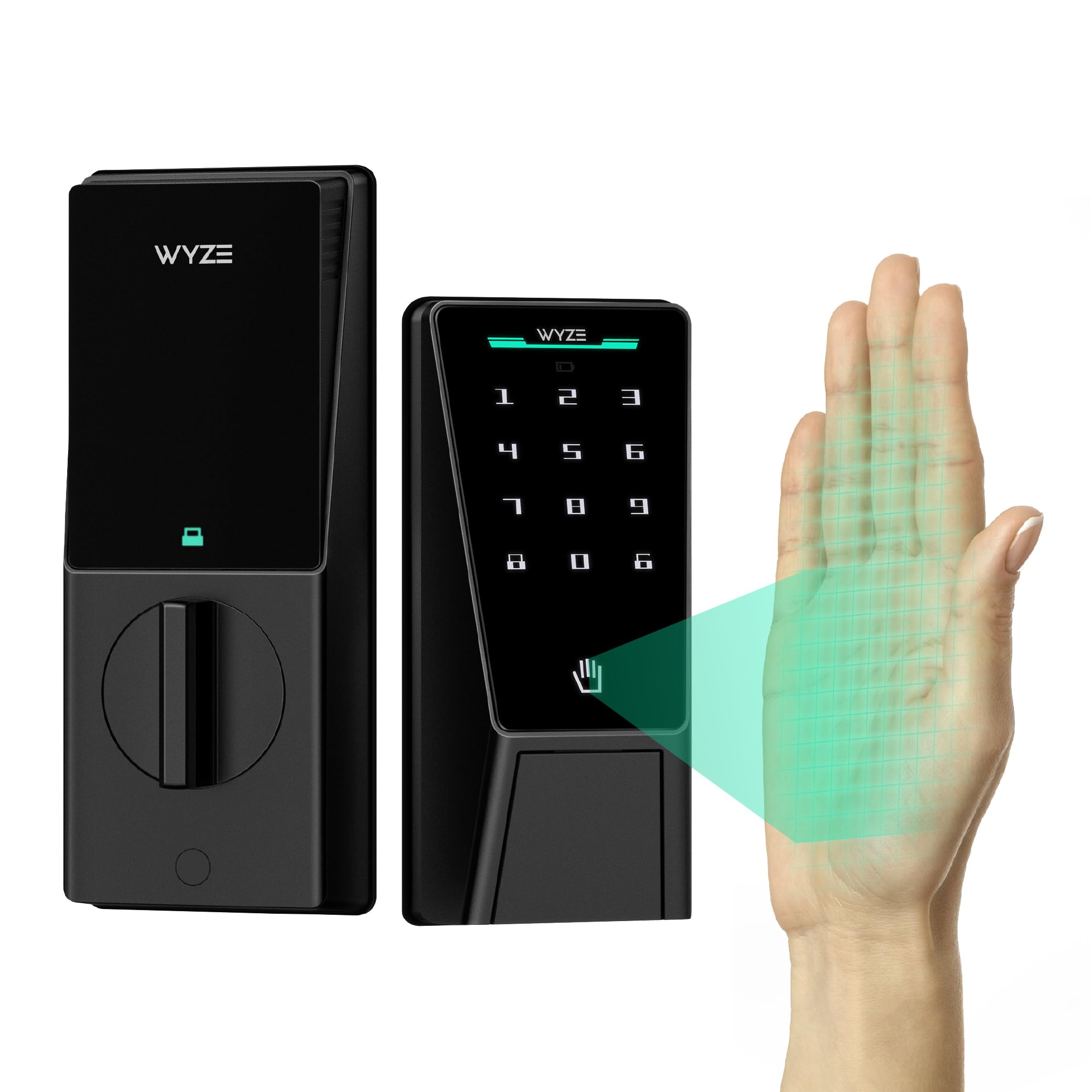
The Wyze Palm Lock replaces fingerprint scanning with palm vein recognition, a biometric method that reads the hemoglobin pattern beneath your palm’s surface. Hover your hand an inch above the sensor and the deadbolt retracts — no physical contact, no smudged glass, no false reads from wet or dirty fingers. The millimeter-wave radar detects human presence rather than simple motion, so the lock only wakes when someone actually approaches, preserving the dual battery system’s runtime.
The auto-lock gyroscope senses the door’s angle and movement in real time, engaging the deadbolt only after the door fully closes. This prevents the half-locked jam that cheaper locks trigger when a door rebounds off the strike plate. The keypad includes Anti-Peep Technology that lets you pad your real PIN with extra digits, and the IP53 weather rating handles rain and dust without issue. Wyze rated it BHMA 3, which is adequate for interior or secondary doors but slightly below the Grade 2 found on the Kwikset and Schlage models.
Several users noted the palm sensor’s position must be learned for consistent fast reads, and the battery saver mode’s radar drain increased when a storm door blocked the sensor’s field. The included physical key and USB-C emergency charging port ensure you never get locked out even if both batteries deplete. For a family that wants contactless entry without carrying anything, this lock’s sensor technology sits above anything else at the price.
Why it’s great
- Palm vein scanning works reliably with wet, dirty, or gloved hands
- Gyroscope-based auto-lock prevents false jams from door rebound
- Dual battery system with USB-C emergency backup
- No subscription fees for biometric or app features
Good to know
- BHMA Grade 3 durability rating — better suited for moderate-use doors
- Radar battery saver mode can drain faster behind a storm door
- Requires precise palm placement for first-time recognition
2. Lockly Visage Zeno Series Smart Lock
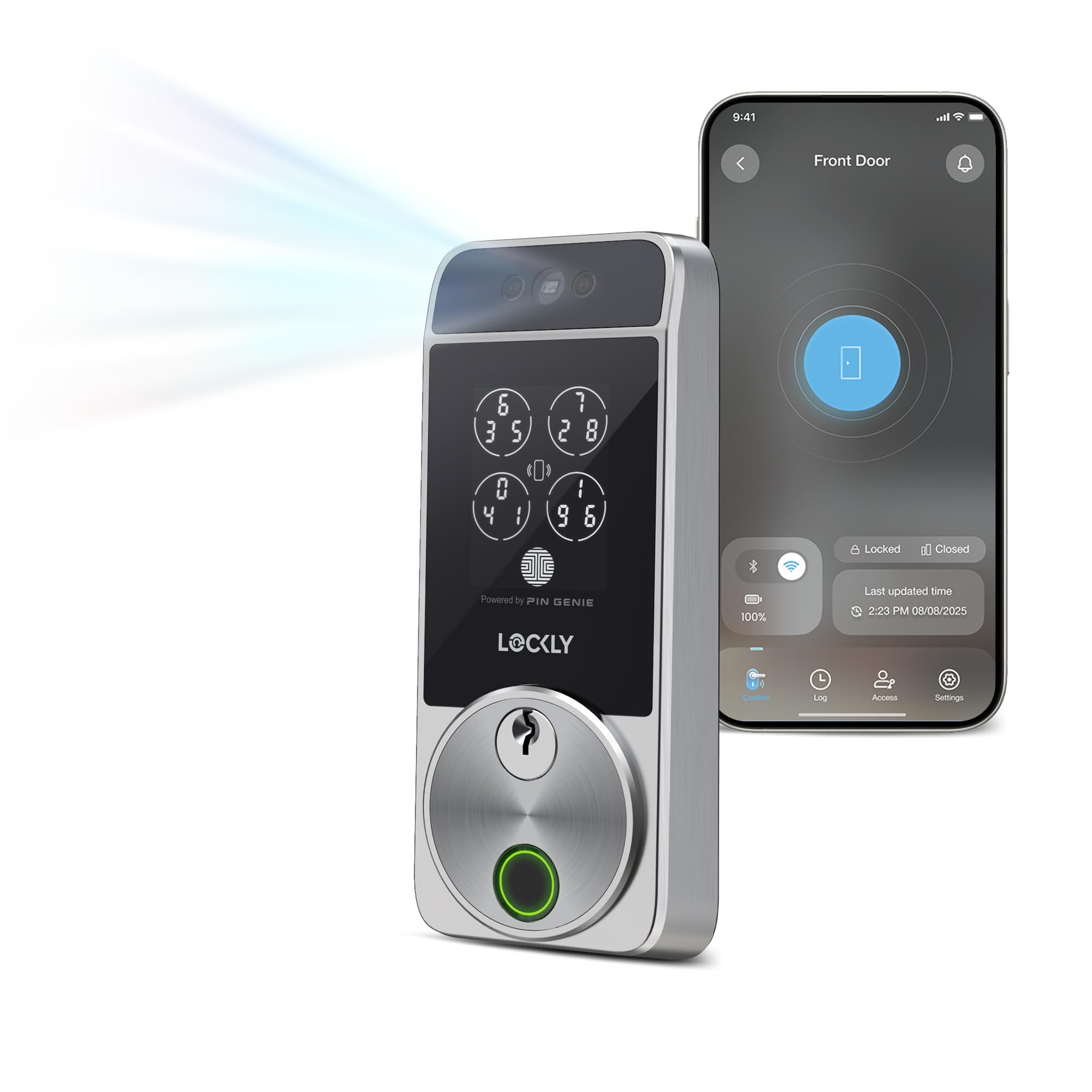
Lockly Visage Zeno is the only lock on this list that combines facial recognition with Apple Home Key support. Walk up to the door and the dual infrared sensors scan your face in any lighting condition, including complete darkness, triggering the deadbolt before you reach for the handle. The facial data stays encrypted on the device itself — no cloud storage, no privacy leak. The self-learning AI fingerprint sensor underneath the handle adds a second biometric layer that improves recognition accuracy the more you use it.
Built-in Wi-Fi eliminates the need for a separate gateway, and the 10,000mAh dual lithium battery pack delivers up to six months between charges. The PIN Genie keypad scrambles the number positions every time you use it, preventing shoulder-surfing attacks. Installation takes about 15 minutes with common household tools, and the lock fits both right and left-swing doors between 1.375 and 2 inches thick. The metal construction and smooth manual thumb turn give it a solid, premium feel that matches the price.
A small number of users reported initial Wi-Fi instability on certain routers, though a firmware update resolved the issue for most. The facial recognition unlocks in about 1.5 seconds — slightly slower than the fastest capacitive fingerprint sensor — but the hands-free convenience outweighs the half-second delay for most users. For an apartment building or Airbnb where different people enter at different hours, the combination of face, fingerprint, Apple Watch tap, and voice commands covers every possible access scenario.
Why it’s great
- Facial recognition works in total darkness with dual IR sensors
- Apple Home Key support allows iPhone/Apple Watch unlock even with dead battery
- Self-learning AI fingerprint sensor improves with repeated use
- PIN Genie keypad scrambles numbers to prevent code theft
Good to know
- Facial recognition adds a 1-2 second delay compared to fingerprint models
- Initial Wi-Fi setup can be finicky on mixed-band router networks
- Premium price reflects the advanced biometric sensors
3. Schlage Encode Smart Wi-Fi Lock with Lever Handle
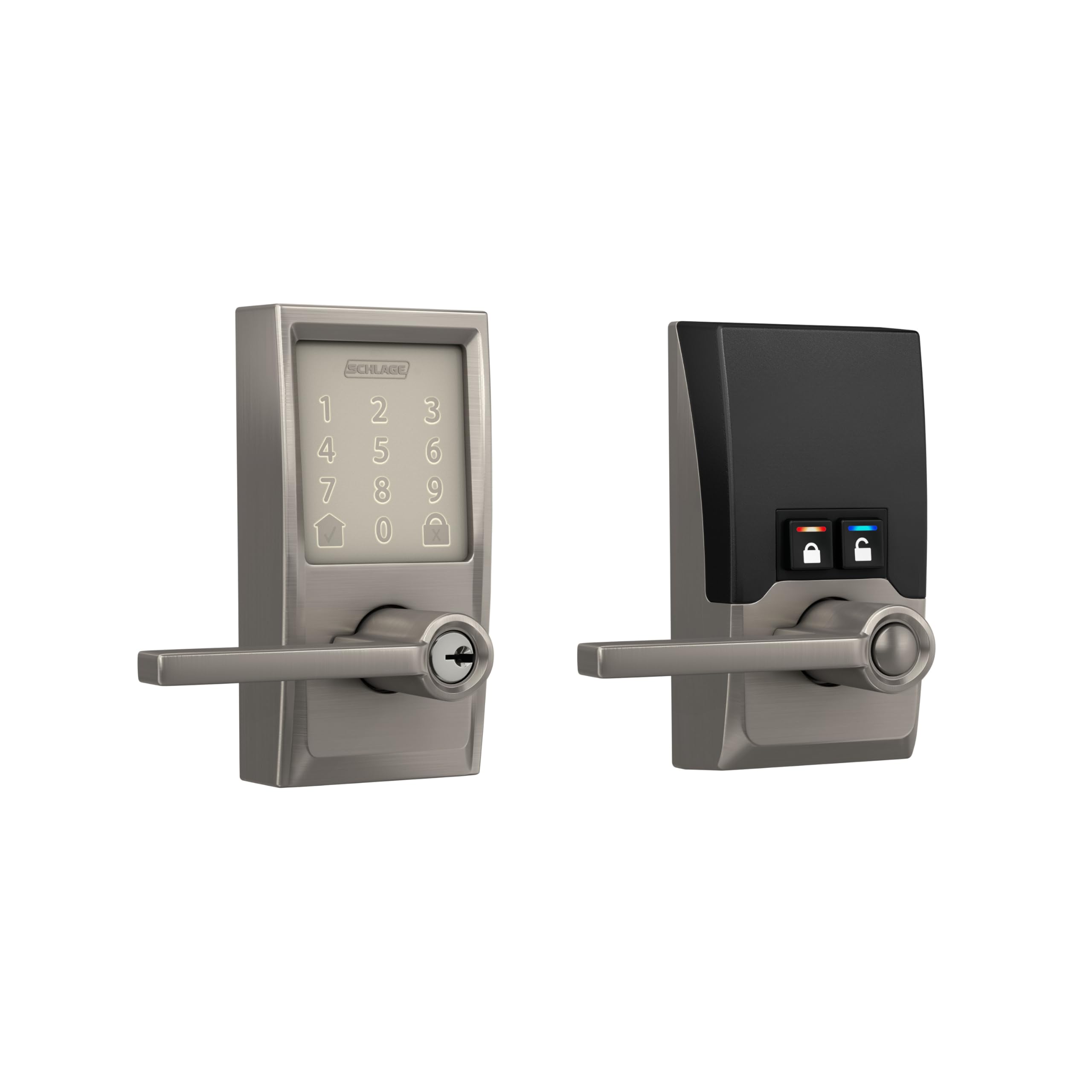
The Schlage Encode lever is the quietest lock in this roundup — the motor retracts the latch with a smooth, low-decibel hum rather than the click-whir deadbolts produce. This makes it the best choice for interior office doors, basement entries, or any situation where a loud lock would disturb sleeping children or household members. The BHMA Grade 2 certification means the mechanism has been tested to withstand over 150,000 cycles, and the satin nickel finish resists corrosion even in coastal salt air.
Built-in Wi-Fi connects directly to your router — no extra hub — and the Schlage Home app manages up to 100 access codes with full history logs. The auto-lock timer offers adjustable delays from 15 seconds to 4 minutes, and the built-in tamper alarm sounds if someone tries to force the door or enter incorrect codes repeatedly. The lever style fits doors with a smaller backset requirement than many deadbolt-only locks, and the reversible design accommodates both left and right-handed doors.
Several long-term users noted the keypad is sensitive — a light touch registers reliably, but accidental brushes against the buttons can trigger unintended inputs. The backup key slot accepts traditional Schlage keys, but the lock ships with only one physical key. Four AA batteries last about six months with typical use, and the low-battery indicator appears both on the keypad and in the app. For homeowners who prioritize a trusted brand name, proven durability, and lever-handle operation, the Schlage Encode is the most consistent performer.
Why it’s great
- Very quiet motor operation ideal for interior or bedroom-adjacent doors
- BHMA Grade 2 durability provides commercial-grade cycle testing
- Built-in Wi-Fi with no extra hub required for remote access
- Salt-air resistant finish holds up in coastal environments
Good to know
- Sensitive touchscreen may register accidental brush contact
- Only one backup key included in the box
- No biometric fingerprint or facial recognition option at this price
4. Veise VE07-H Fingerprint Smart Lock
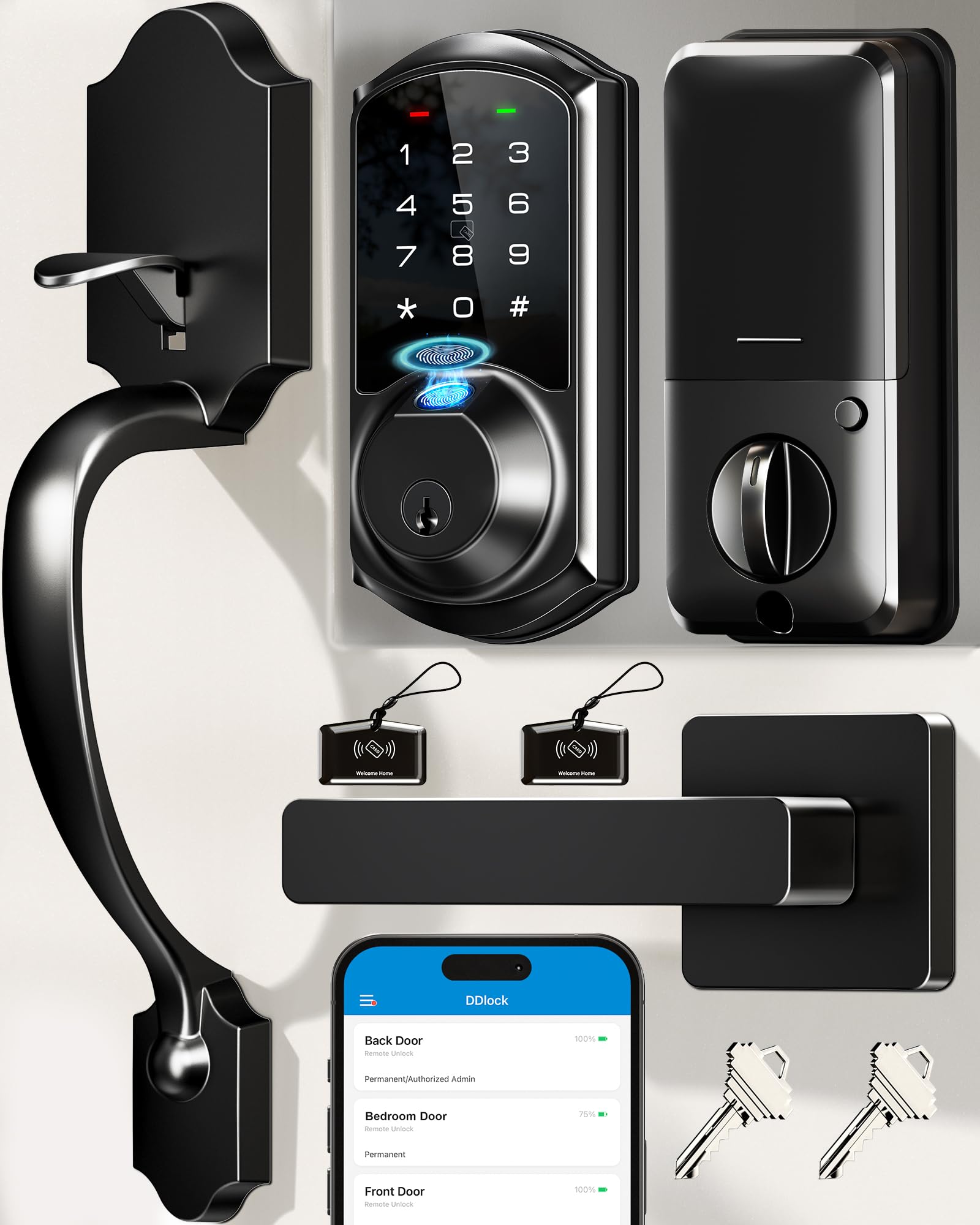
The Veise VE07-H delivers the widest array of unlock methods in the mid-range tier: fingerprint, keypad code, phone app, Apple Watch, web portal, eKeys, fobs, and a physical backup key. The capacitive fingerprint sensor reads ridges in 0.3 seconds with 99.99% claimed accuracy, and the sensor sits flush in the handle’s ergonomic thumb groove for natural one-motion entry. The included full handle set (both levers and deadbolt) upgrades the look of any door without requiring a separate purchase.
The app supports up to 250 access codes with categories for permanent, timed, recurring, one-time, and erased profiles — perfect for managing a busy household with cleaners, dog walkers, and guests. The auto-lock timer adjusts from 5 to 900 seconds, and passage mode keeps the door unlocked during the day. The Veise G2 gateway is required for full remote access and Alexa/Google voice control, which adds an accessory step and cost. The lock itself runs on 4 AA batteries, and the manufacturer claims 12 months of typical life.
Users with metal doors reported the installation required drilling extra holes for the full handle set, which added about 30 minutes to the process. Children’s fingerprints registered less consistently than adults’, likely because the sensor area is optimized for adult finger size. The zinc alloy and aluminum construction feels dense and substantial, and the matte black finish matches modern door hardware well. For households that want the maximum number of entry options without jumping to the premium tier, this lock packs the most flexibility per dollar.
Why it’s great
- 8 different unlock methods cover every possible access preference
- 0.3 second capacitive fingerprint sensor is among the fastest available
- Full handle set included saves the cost of separate hardware
- Up to 250 customizable user codes with scheduling options
Good to know
- Remote access requires purchase of separate G2 Wi-Fi gateway
- Metal door installation may need additional drilling for handle set
- Small children’s fingerprints may not register consistently
5. Tapo Smart Wi-Fi Door Lock DL110

The Tapo DL110 solves the battery anxiety problem differently than the rest of the list: a removable rechargeable lithium pack that the manufacturer claims lasts a full year on a single charge. USB-C recharging means you can top it up with the same cable your phone uses, and the app shows exact battery percentage rather than just a vague low-battery warning. The fingerprint sensor reads in a claimed 0.42 seconds and stores up to 100 prints, and multiple users confirmed the reader works reliably with wet or slightly dirty fingers.
The six unlock methods include fingerprint, keypad code, Bluetooth, Wi-Fi remote, voice assistant, and physical backup key. Built-in Wi-Fi connects directly to your router, so there’s no extra hub to buy. The Tapo app integrates seamlessly with other Tapo smart home devices, allowing multi-device automations like unlocking the door to trigger lights. BHMA Grade 2 certification puts its mechanical durability on par with the Schlage, and the IP53 weather resistance covers rain and dust.
A few users reported that the included silicone cover over the interior assembly can trap heat against the battery, potentially reducing long-term lifespan in direct sunlight. The lock dimensions are slightly bulkier than average, so it may not fit narrow door stiles. After two months of daily use, multiple reviewers reported the battery indicator still showed 100%, confirming real-world runtime aligns with the advertised one-year claim. For anyone who hates swapping AA batteries, the DL110’s rechargeable architecture is the most convenient power solution here.
Why it’s great
- Removable rechargeable battery lasts up to a full year per charge
- USB-C charging eliminates the need for disposable AA batteries
- Built-in Wi-Fi with no additional gateway for remote control
- BHMA Grade 2 durability matches premium-tier mechanical locks
Good to know
- Silicone cover may trap heat and affect battery life in hot climates
- Bulkier dimensions may not fit narrow door stiles
- Rechargeable pack is a proprietary shape, not standard USB-C device
6. Kwikset SmartCode 270

The Kwikset SmartCode 270 deliberately strips away smartphone connectivity, app management, and biometric scanning in favor of a purely keypad-driven experience with exceptional mechanical quality. BHMA Grade 2 certified, the deadbolt mechanism is built to withstand twice the cycles of a standard Grade 3 lock, and the SmartKey feature lets you rekey the cylinder yourself in seconds using the included tool — critical for landlords who need to reset a lock between tenants without calling a locksmith.
Up to 50 user codes plus 10 one-time codes can be programmed directly on the keypad with no app or internet connection. The auto-lock timer offers five delay options from 30 seconds to 10 minutes, and the intrusion alarm sounds after three incorrect code attempts then disables the keypad for one minute. Vacation mode keeps the keypad disabled entirely while you are away, and the bright backlit keypad ensures clear visibility in total darkness. Four AA batteries average 12 months of life, and the low-battery chirp gives weeks of warning before failure.
The lock mechanism produces an audible click-whir when cycling — louder than the Schlage lever but within typical deadbolt range. A small but vocal set of users experienced flashing red LED failures that rendered the lock inoperable, though Kwikset’s warranty support resolved the issue for most. The SmartCode 270 lacks any Wi-Fi, Bluetooth, or remote access capability, so you cannot check lock status from your phone or share codes remotely. For property managers who prioritize mechanical reliability and code-only access over smart home integration, this is the most straightforward lock on the list.
Why it’s great
- BHMA Grade 2 certified for double the cycle life of standard residential locks
- SmartKey feature allows instant rekey without removing the lock
- Runs for 12 months on 4 AA batteries with clear low-battery alerts
- Intrusion alarm and vacation mode for added security
Good to know
- No app, Wi-Fi, Bluetooth, or remote access of any kind
- Audible click-whir is louder than some competing deadbolts
- Small percentage of units may experience electronic failure on arrival
7. Sifely Model O Deadbolt

The Sifely Model O deadbolt is the most affordable biometric lock in this guide, offering fingerprint, keypad code, RFID fob, app control, and physical key access starting at a price that undercuts most basic keypad-only models. The optical fingerprint sensor stores up to 100 prints and 100 codes, and the sensor’s surface is large enough to accommodate most finger angles. Installation takes about 15 to 20 minutes with a single screwdriver and works on both left and right-hand doors without any drilling or modifications.
The free app (iOS and Android) allows unlimited code generation and shares eKeys through the web portal, though remote access requires the optional Sifely Gateway. The auto-lock engages immediately after each entry, and the one-touch lock button on the interior panel lets you secure the door without holding the knob. Privacy mode disables external keypad operation, and passage mode keeps the door unlocked during daytime when security is less critical. The zinc alloy and aluminum construction feels solid for the weight, and the matte black finish resists fingerprints.
Several reviewers noted the fingerprint sensor occasionally required a second attempt unless the finger was placed squarely in the center of the scanner, and the physical key backup uses a standard design that works reliably. The lock does not carry a BHMA rating, so long-term mechanical durability is unverified compared to Grade 2 competitors. For a first-time smart lock buyer who wants biometric entry without a significant financial commitment, the Sifely delivers the core features at the lowest entry point.
Why it’s great
- Most affordable way to add biometric fingerprint scanning to a front door
- 15-minute DIY install with no drilling or modifications
- 100 fingerprint and 100 code capacity for large households or rentals
- Multiple unlock methods cover common entry preferences
Good to know
- Fingerprint sensor sometimes needs a second attempt for accurate read
- Remote app control requires purchase of separate Sifely Gateway
- No BHMA certification for mechanical durability
FAQ
Can I install an automatic door lock myself without hiring a locksmith?
What happens if the battery dies while I am outside?
How does the auto-lock feature know the door is fully closed?
Do I need a smart home hub to use these locks remotely?
Final Thoughts: The Verdict
For most users, the best automatic door locks for home winner is the Wyze Palm Lock because it offers genuinely innovative palm vein biometric technology at a price that undercuts traditional fingerprint locks while including a gyroscope-based auto-lock that prevents jams. If you want the most seamless smart home integration with Apple Home Key and facial recognition, grab the Lockly Visage Zeno. And for a no-Wi-Fi, bulletproof mechanical lock that survives decades of rental turnover, nothing beats the Kwikset SmartCode 270.

Mo Maruf
I created WellFizz to bridge the gap between vague wellness advice and actionable solutions. My mission is simple: to decode the research and give you practical tools you can actually use.
Beyond the data, I am a passionate traveler. I believe that stepping away from the screen to explore new environments is essential for mental clarity and physical vitality.