Our readers keep the lights on and my smoothie glass nicely filled. As an Amazon Associate, I earn from qualifying purchases.
For decades, the mechanical keyboard market was defined by a single binary question: is the key pressed or not? Analog keyboards shatter that constraint, replacing fixed metal contacts with magnetic Hall-effect sensors or optical beams that measure how far a key travels. The result is an input method that can behave like a hair-trigger gaming switch at 1.2 mm of travel or a deliberate typing switch at 3.5 mm—all on the same board, per key, without touching a soldering iron.
I’m Mohammad Maruf — the founder and writer behind WellFizz. I’ve spent the last fifteen years analyzing peripheral hardware, cross‑referencing switch‑response curves, and comparing real‑world latency figures so you don’t have to guess which spec sheet actually matters.
Whether you are a competitive FPS player chasing sub‑millisecond strafe resets or a hybrid worker who needs precise actuation for both spreadsheets and shooters, this guide cuts through marketing jargon to deliver the only analog keyboards list built on measurable performance data and long‑term durability reports.
How To Choose The Best Analog Keyboards
Switching from a traditional mechanical board to an analog one requires understanding three core variables that manufacturers rarely explain in plain language: sensing technology, actuation flexibility, and polling overhead.
Sensing Technology: Hall‑Effect vs Optical Analog
Hall‑effect switches use a magnet and a sensor to detect position without physical contact. This eliminates debounce delay and gives a theoretical lifespan of 100 million presses or more. Optical analog switches, like Razer’s Analog Optical Gen‑2, use light beams that pass through a shutter on the stem. Both avoid metal‑on‑metal wear, but Hall‑effect boards generally offer finer sensitivity increments (0.02 mm versus 0.1 mm on many optical units), making them better for ultra‑fine actuation tuning.
Rapid Trigger, Snap Tap, and SOCD
Rapid Trigger resets the key as soon as it travels upward a tiny amount, allowing repeated presses without returning to the top. Snap Tap (or SOCD — Simultaneous Opposing Cardinal Directions) prioritizes the latest directional input, perfect for counter‑strafing in Valorant or CS2. Not every analog board includes these features; the SteelSeries Apex Pro TKL Gen 3 and Razer Huntsman V3 Pro have them built‑in, while some budget options omit it entirely.
Polling Rate and Real Latency
A standard gaming keyboard polls at 1000 Hz (1 ms report interval). Premium analog boards now push 8000 Hz (0.125 ms). The difference is measurable in high‑speed input scenarios but irrelevant for typing or casual gaming. Focus on 8000 Hz only if you are a competitive player using a 240+ Hz monitor; otherwise, 1000 Hz with a low‑latency analog switch is more than sufficient.
Form Factor and Build Materials
Analog keyboards come in 60%, 65%, tenkeyless (TKL), 75%, and full‑size layouts. Smaller form factors (60–65%) save desk space and improve mouse‑swipe clearance but often lack dedicated arrow keys and function rows. Full aluminum frames (GravaStar Mercury V60 Pro) add heft and rigidity, reducing plate flex during rapid presses, while plastic frames keep weight down for portability.
Quick Comparison
On smaller screens, swipe sideways to see the full table.
| Model | Category | Best For | Key Spec | Amazon |
|---|---|---|---|---|
| Keychron K4 HE 96% | Premium Full | Full layout with numpad | 0.1‑3.8 mm actuation / 1000 Hz | Amazon |
| Razer Huntsman V3 Pro TKL | Premium Esports | 8 kHz / Snap Tap | 0.1‑4.0 mm / Optical Gen‑2 | Amazon |
| GravaStar Mercury V60 Pro | Premium Compact | 8 kHz / 0.005 mm steps | 0.005‑3.5 mm / CNC Alum. | Amazon |
| SteelSeries Apex Pro TKL | Premium Esports | Protection Mode / OLED screen | 0.1‑4.0 mm / OmniPoint 3.0 | Amazon |
| Logitech G PRO X TKL Rapid | Mid‑Range Pro | Esports / Logitech ecosystem | 35 g actuation / Hall‑Effect | Amazon |
| Keychron K2 HE 75% | Mid‑Range | Wireless + wood accents | 0.2‑3.8 mm / BT+2.4G+USB | Amazon |
| Nuphy Halo65 HE | Mid‑Range | 65% / 8 kHz / web config | 0.1‑4.0 mm / 8 kHz polling | Amazon |
| Razer Huntsman V2 Analog | Mid‑Range | Optical analog / leather wrist rest | Analog Optical / 1‑4 mm | Amazon |
| Turtle Beach Vulcan II TKL Pro | Budget Entry | Low‑cost Hall‑Effect entry | Hall‑Effect / 1.2‑3.0 mm | Amazon |
In‑Depth Reviews
1. Keychron K4 HE 96% Wireless Hall Effect Keyboard

The K4 HE packs a rare combination in the analog market: a full‑size layout with a dedicated numpad and 96% footprint, cutting 20% desk space compared to traditional full‑width boards. Gateron Double‑Rail Magnetic switches deliver 0.1 mm sensitivity steps over a 0.2–3.8 mm actuation range, and the hot‑swap PCB is tailored for these double‑rail switches only. Real wood side panels and a black aluminum frame give it a build quality that rivals boards costing significantly more.
Rapid Trigger and Snap Tap technology are both onboard, making it immediately competitive for FPS strafe mechanics. The tri‑mode connectivity (2.4 GHz, Bluetooth 5.2, USB‑C) with a 1000 Hz polling rate in wireless mode means you do not sacrifice latency for desk cleanliness. Owners consistently praise the near‑silent “thock” and the web‑based Keychron Launcher that sidesteps bloated desktop software.
The main compromise lies in the non‑shine‑through OSA PBT keycaps — legends are dim in low light — and the slight scratchiness of the factory‑lubed switches until break‑in. Battery life hovers around two weeks with moderate usage, though heavy RGB use cuts that down. For anyone who needs a numpad and refuses to tolerate plastic chassis flex, this is the most well‑rounded analog board available today.
Why it’s great
- Full‑size utility without full‑size footprint
- Genuine wood side panels, rigid aluminum frame
- Tri‑mode wireless with 1000 Hz polling
- Rapid Trigger and Snap Tap for competitive gaming
Good to know
- Keycaps are non‑shine‑through — hard to see in dark rooms
- Switches feel slightly scratchy out of the box
- No dedicated wrist rest included
2. Razer Huntsman V3 Pro TKL 8KHz Esports Gaming Keyboard
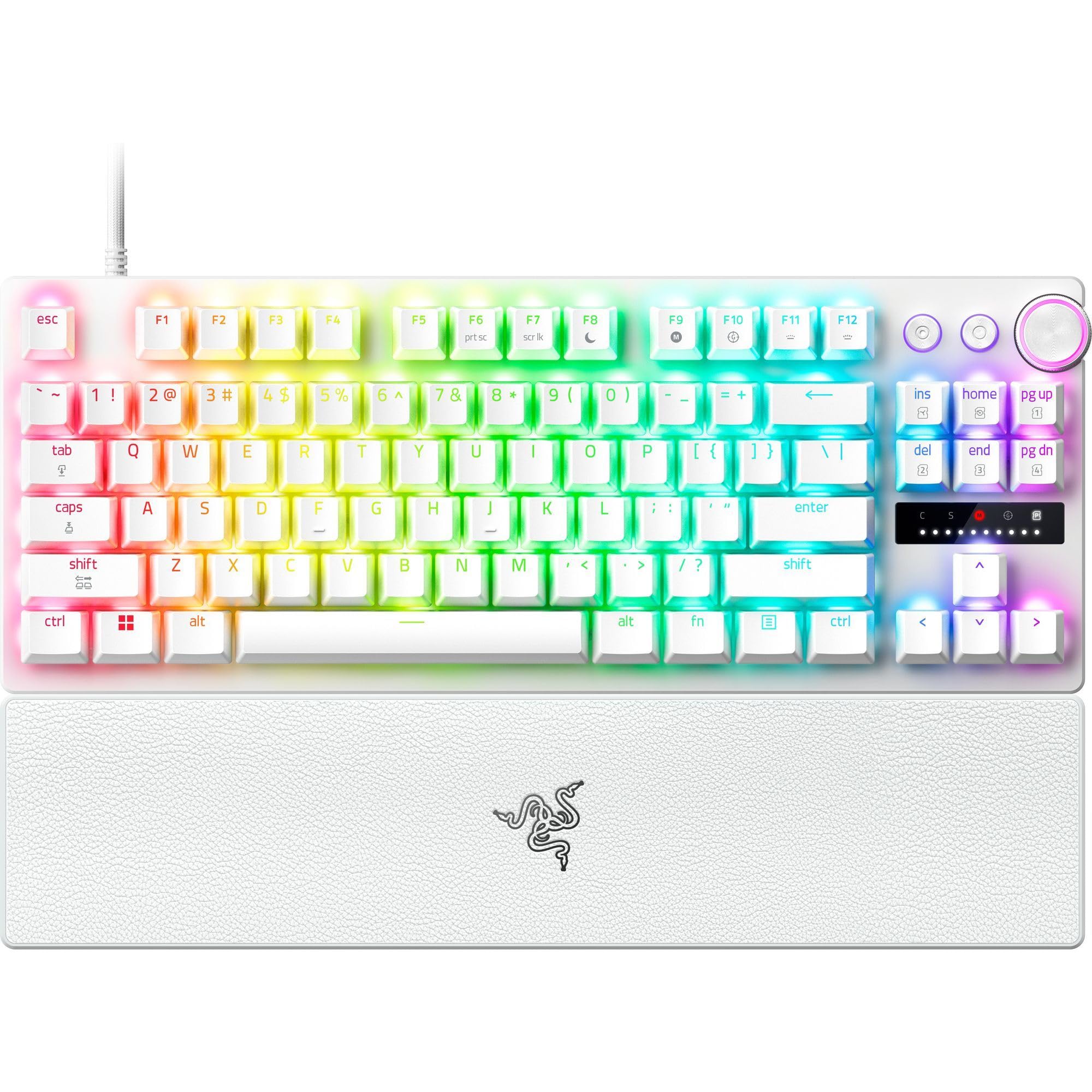
Razer’s third‑generation analog optical switch pushes polling to a true 8000 Hz, translating to a 0.125 ms report interval — eight times faster than the standard 1000 Hz board. The Analog Optical Gen‑2 switches allow per‑key actuation adjustment from 0.1 mm (hair‑trigger) to 4.0 mm (full deliberate press), and each switch is individually lubricated and seated in foam for a clean acoustic profile. The white edition reviewed here uses textured doubleshot PBT keycaps that resist shine even after heavy use.
Razer Snap Tap prioritizes the latest input between two selected keys without requiring a full release, making directional changes in Valorant or CS2 nearly instant. A multi‑function digital dial and dedicated media controls sit at the top right, and the snap‑on magnetic leatherette wrist rest provides palm support without sliding. The onboard LED array lets you adjust actuation height and Rapid Trigger sensitivity on the fly without opening Razer Synapse.
The most commonly cited drawback is that Steam sometimes detects the board’s built‑in controller emulation as a gamepad, which can cause conflicts in certain titles — an issue Razer could fix with a firmware toggle. The wrist rest, while magnetic, is firm and some users find it uncomfortable. Overall, for competitive players who want the lowest measurable latency and per‑game profile storage on the keyboard itself, the V3 Pro is the current benchmark.
Why it’s great
- True 8000 Hz polling with 0.125 ms latency
- Per‑key analog adjustment from 0.1 mm to 4.0 mm
- Doubleshot PBT keycaps resist shine and fading
- Onboard LED array for quick settings without software
Good to know
- Controller emulation may conflict with some Steam games
- Magnetic wrist rest is firm, not plush
- Optical switches are not hot‑swappable with Hall‑effect types
3. GravaStar Mercury V60 Pro 60% HE Magnetic Gaming Keyboard
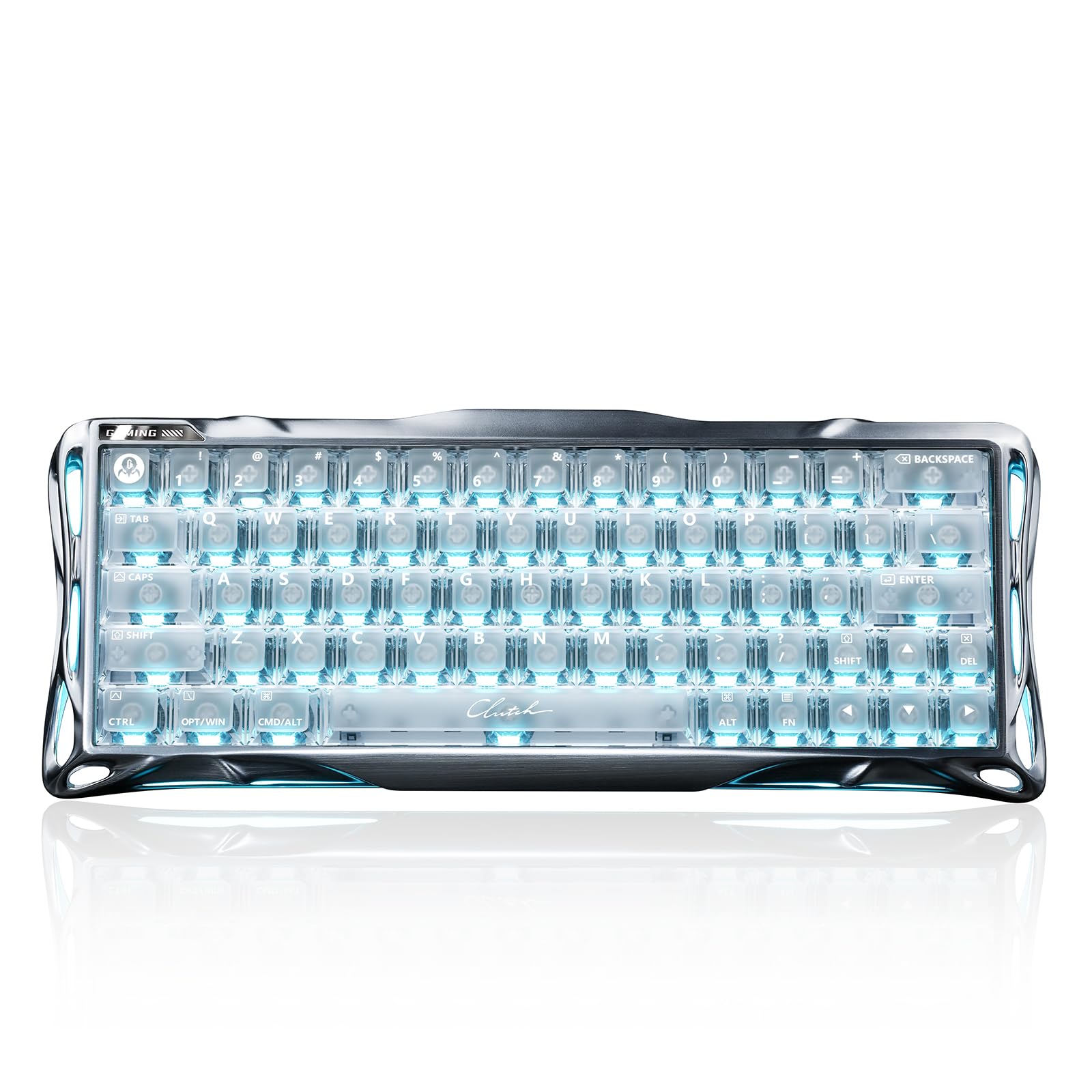
The GravaStar Mercury V60 Pro is a statement piece that backs up its industrial aesthetic with extreme technical specs. Custom UFO Magnetic switches offer an industry‑leading 0.005 mm resolution over a 0.005–3.5 mm range, and the true 8000 Hz USB polling rate yields a 0.125 ms total latency — identical to the Razer V3 Pro on paper but achieved through a different sensor architecture. A 256 kHz key‑position scanning rate means the board reads analog depth 256,000 times per second.
The chassis is milled from a single block of 6063 aluminum alloy, giving it a weight that sits firmly on the desk with zero flex. Five layers of acoustic foam inside produce a deep, creamy “thock” that enthusiasts hunt for. Dynamic Rapid Trigger and SOCD control (with LKP and Snap Click) are all adjustable through a web‑based driver — no installation required. Controller Mapping lets you bind analog press depth to throttle or steering axes, bridging the gap between keyboard and controller in racing or flight sims.
At current pricing, it sits at the top end of the mid‑range and enters premium territory. The 60% layout means no dedicated arrow keys, F‑row, or navigation cluster — a dealbreaker for productivity users. Some units have been reported with slightly uneven switch lubing, though the stock sound profile is still excellent. The Mercury V60 Pro is for the desk‑space‑conscious enthusiast who wants 8 kHz performance in the smallest possible footprint.
Why it’s great
- 0.005 mm actuation step — finest on the market
- Full CNC 6063 aluminum frame, zero flex
- 8 kHz polling with 0.125 ms latency
- Controller mapping for analog steering/throttle
Good to know
- 60% layout lacks arrow keys and F‑row
- Heavy and not designed for portability
- Premium price tag; occasional uneven lubing on early units
4. SteelSeries Apex Pro TKL Gen 3 OmniPoint 3.0

The third generation of SteelSeries’ OmniPoint switches claims 20× faster actuation and 11× quicker response than the previous iteration, with 40 levels of per‑key adjustability from 0.1 mm to 4.0 mm. The signature feature here is Protection Mode — a SteelSeries exclusive that dynamically reduces sensitivity on keys adjacent to your pressed key, effectively preventing accidental inputs when your finger rests near WASD during intense gameplay. Rapid Tap (similar to Snap Tap) and a full SOCD implementation round out the competitive toolkit.
A small OLED Smart Display sits at the top right, letting you cycle profiles, check actuation settings, or even display a custom GIF without tabbing out. The TKL form factor with textured PBT keycaps and a USB‑C connection keeps the desk clean. The keyboard is built around a rigid plastic frame with a steel backplate — not as luxurious as full aluminum, but lighter and still very sturdy. The GG QuickSet software offers game‑ready presets that automatically apply per‑game actuation profiles.
Some users note that the OLED screen drains the RGB controller’s attention, leading to slightly less vibrant backlighting compared to the Apex Pro without the screen. The plastic enclosure, while durable, does not match the premium feel of CNC‑machined competitors at this price point. However, Protection Mode alone solves a real ergonomic problem for players who accidentally brush adjacent keys, making this a smart choice for high‑stakes competitive play.
Why it’s great
- Protection Mode prevents accidental adjacent‑key inputs
- OLED display for on‑the‑fly profile and setting previews
- 40 levels of actuation per key via OmniPoint 3.0
- Game‑ready presets in SteelSeries GG software
Good to know
- Plastic chassis feels less premium than full‑aluminum alternatives
- OLED can slightly dim RGB backlight brightness
- Hot‑swap not supported for third‑party switches
5. Logitech G PRO X TKL Rapid

Logitech’s PRO X TKL Rapid is a purpose‑built esports tool, designed in collaboration with pro players to hit a 35 g actuation force — among the lightest magnetic analog switches available. The Hall‑effect sensors and Rapid Trigger mode allow key reactivation without full release, making double‑taps in tracking scenarios feel almost effortless. KEYCONTROL lets you assign multiple actions to a single key across different layers, which can be configured in Logitech G HUB for advanced combos.
The enclosure is remarkably lightweight at 150 g (claimed), a deliberate choice for traveling competitors who bring their own gear to LAN events. The detachable USB‑C cable and three‑zone LIGHTSYNC RGB keep the profile clean. On‑the‑fly actuation and Rapid Trigger adjustments are accessible via the FN key, so you do not need software to tweak settings mid‑match. The included volume roller and media buttons are a under‑appreciated convenience for quick adjustments between rounds.
The most consistent complaint is the USB‑C port’s fragility — multiple users report disconnection issues after a few months of use, and the lack of redundant connectivity means a failed port effectively bricks the board. The keycaps are ABS rather than PBT, which will develop shine faster than the competition. At a mid‑range price, it offers the core analog features for competitive play, but the build concerns make it a risk‑reward choice rather than a universal recommendation.
Why it’s great
- Very light 35 g actuation for fatigue‑free rapid presses
- Ultra‑lightweight TKL design for LAN portability
- On‑the‑fly FN‑key adjustments without software
- KEYCONTROL enables multi‑action layers per key
Good to know
- USB‑C port fragility reported after extended use
- ABS keycaps will shine faster than PBT
- Not hot‑swappable — switches are soldered
6. Keychron K2 HE 75% Wireless Custom Keyboard

The K2 HE takes the wildly popular K2 mechanical chassis and retrofits it with Gateron Double‑Rail Magnetic switches, bringing analog adjustability to a 75% layout that already had a cult following. The aluminum frame with genuine rosewood side panels is visually striking — warm wood grain contrasts with the machined metal edges, making it one of the most aesthetically distinct analog boards on the market. The 0.2–3.8 mm actuation range and 0.1 mm sensitivity steps are on par with other mid‑range Hall‑effect boards.
Rapid Trigger is supported, and the Keychron Launcher web configurator (compatible with QMK/VIA) handles key remapping, macro creation, and actuation profiles. Wireless connectivity includes 2.4 GHz (1000 Hz polling) and Bluetooth 5.2, allowing low‑latency gaming without a cable. PBT double‑shot keycaps resist shine, though they are non‑shine‑through, which can make legends hard to read in dim environments. The stabilizers are factory‑lubed and the spacebar includes sound‑dampening foam, producing a soft “thunk” that pleases typists.
The battery life is modest — about two days of heavy wireless use with RGB on, though using wired mode bypasses this entirely. The plastic bottom case contrasts with the premium top frame, and the switches are compatible only with Gateron Double‑Rail magnetic switches, limiting hot‑swap flexibility. The K2 HE is the right pick for someone who wants analog performance wrapped in a design that looks like furniture, not a gaming rig.
Why it’s great
- Beautiful rosewood and aluminum combination
- QMK/VIA compatible web configurator — no bloatware
- Tri‑mode wireless (BT/2.4G/USB) with 1000 Hz polling
- Factory‑lubed stabilizers with foam for quiet typing
Good to know
- Battery life is short (~2 days) with RGB enabled
- Plastic bottom case feels less premium than top half
- Keycaps are non‑shine‑through
7. Nuphy Halo65 HE Rapid Trigger Gaming Keyboard

Nuphy’s Halo65 HE delivers an 8 kHz polling rate and Hall‑effect adjustable actuation at a price point that undercuts most competitors offering similar polling performance. The 65% layout (67 keys) is compact yet still includes dedicated arrow keys — a rare compromise that makes it usable for productivity without sacrificing mouse space. Two switch options are available: Magnetic Coral (0.1–4.0 mm sensitivity) and Magnetic Jade Pro (0.1–3.3 mm), both rated for high precision with maximum adjustment accuracy of 0.02 mm.
The aluminum frame provides a sturdy, balanced feel, and the surround RGB light bar at the bottom adds immersion without looking tacky. NuPhyIO, the web‑based driver, allows real‑time key sensitivity tweaks, macro assignments, and actuation profile management — all without installing software. One‑Key Dual Action lets you assign two different behaviors to a single key based on how deep you press, bridging the gap between analog depth control and traditional keyboard inputs. The typing sound is described as “thocky” and smooth out of the box.
The board is wired‑only (USB‑C), so wireless convenience is absent. Some reviewers note that the plastic back housing feels less premium than the aluminum front, though it has no functional impact. The included keycaps are high‑quality PBT, and the package comes with keycap and switch pullers. For a budget‑conscious gamer who wants 8 kHz analog performance in a small form factor, the Halo65 HE punches well above its tier.
Why it’s great
- 8 kHz polling at a genuinely affordable price
- 65% layout retains dedicated arrow keys
- Web‑based configurator with real‑time sensitivity adjustment
- One‑Key Dual Action per key based on press depth
Good to know
- Wired‑only — no wireless connectivity
- Plastic back panel detracts from overall premium feel
- No dedicated volume roller or media keys
8. Razer Huntsman V2 Analog Gaming Keyboard

The Huntsman V2 Analog is Razer’s first‑generation analog optical implementation, offering a 1–4 mm adjustable actuation range driven by light‑based sensing. The switches are faster than traditional mechanical because there is no contact bounce to debounce, and they include Rapid Trigger Mode for quicker repeated key registration. The full‑size layout includes a dedicated media dial, playback controls, and a magnetic leatherette wrist rest with built‑in RGB underglow — a comfort feature that few analog boards at this price include.
Doubleshot PBT keycaps ensure the legends never fade, and the military‑grade steel top plate gives the chassis a heft (5 pounds) that feels tank‑like. Razer Synapse provides per‑key actuation tuning and profile storage, and the Chroma RGB ecosystem (16.8 million colors) syncs with over 150 games. The PBT keycaps have a slightly textured, heavy‑duty feel that resists finger oils. The wrist rest attaches magnetically and is genuinely comfortable for long sessions.
The analog feature set is less flexible than second‑gen optical or modern Hall‑effect boards — the actuation range is coarser (1 mm increments rather than 0.1 mm), and game support for the analog input mode is still niche. Some users report that the space bar is noticeably louder than the rest of the switches, which can be distracting. The V2 Analog is an excellent entry point into the analog world for someone who wants a full‑size, sturdy keyboard with a premium wrist rest, but power users will quickly outgrow its limited granularity.
Why it’s great
- Full‑size layout with dedicated media dial and controls
- Magnetic leatherette wrist rest with RGB underglow
- Steel top plate and PBT keycaps for long‑term durability
- Rapid Trigger Mode for faster key repeats
Good to know
- Analog actuation is coarser (1 mm steps) than modern Hall‑effect
- Limited native game support for analog input mode
- Space bar is noticeably louder than the rest of the switches
9. Turtle Beach Vulcan II TKL Pro Magnetic RGB Gaming Keyboard

The Vulcan II TKL Pro is a budget‑tier Hall‑effect keyboard that brings magnetic switch adjustability to a tenkeyless form factor at a price that undercuts most analog competition. The magnetic switches are rated for a 150 million click lifespan, and they support multi‑point actuation adjustment per key (1.2 mm gaming preset, 3.0 mm typing preset). Rapid Trigger and anti‑ghosting are included, along with a push‑to‑mute volume wheel and five onboard profiles stored directly on the keyboard.
The board features AIMO intelligent RGB lighting, which can be synced with other Turtle Beach peripherals without requiring software configuration. The Swarm II software offers deeper customization for those who want it, including per‑key actuation tuning and macro assignment. The floating switch design and aluminum top plate make cleaning easier than recessed designs. Users consistently describe the typing sound as “smooth and thocky” with no spring rattle — impressive for a product at this tier.
The keycaps are low‑profile ABS, which some users find causes typos during fast typing because the finger doesn’t have a tall surface to find. The board is not truly hot‑swappable — the switches are soldered in place, so you cannot replace individual switches if one fails. A few long‑term reviews report keycap post breakage after roughly a year of use. The Vulcan II TKL Pro is a strong entry point for someone curious about analog technology but not ready to invest in premium hardware.
Why it’s great
- Lowest‑cost entry into Hall‑effect analog technology
- 150 million click lifespan per switch
- Five onboard profiles, push‑to‑mute volume wheel
- Aluminum top plate with floating switch design for easy cleaning
Good to know
- Low‑profile ABS keycaps cause frequent typos for some users
- Switches are soldered — not hot‑swappable
- Reported keycap post breakage after extended use
FAQ
Can analog keyboards be used for typing, or are they only for gaming?
What is the difference between Hall‑effect and optical analog switches for durability?
Do I need an analog keyboard if I only play single‑player games?
Can I use analog keyboard features without installing software?
Final Thoughts: The Verdict
For most users, the analog keyboards winner is the Keychron K4 HE 96% because it combines a full‑size layout with genuine wood/aluminum build, tri‑mode wireless, and Hall‑effect performance at a price that doesn’t punish you for wanting a numpad. If you want the absolute lowest latency for competitive esports, grab the Razer Huntsman V3 Pro TKL. And for the smallest high‑performance desk footprint, nothing beats the GravaStar Mercury V60 Pro.

Mo Maruf
I created WellFizz to bridge the gap between vague wellness advice and actionable solutions. My mission is simple: to decode the research and give you practical tools you can actually use.
Beyond the data, I am a passionate traveler. I believe that stepping away from the screen to explore new environments is essential for mental clarity and physical vitality.