Our readers keep the lights on and my smoothie glass nicely filled. As an Amazon Associate, I earn from qualifying purchases.
A keyboard with a lifeless, unlit board in a dim room forces you to hunt and peck, killing your flow. Whether you’re grinding through late-night work sessions, gaming after the kids go to bed, or simply need to see the legends clearly, a backlit keyboard isn’t a luxury—it’s a core tool for productivity and accuracy. The wrong choice means uneven lighting, blinding LEDs, or keys that feel mushy under your fingers.
I’m Mohammad Maruf — the founder and writer behind WellFizz. For years I’ve been deep-diving into peripheral hardware, analyzing switch actuation forces, keycap materials, and backlight diffusion layers to separate genuine quality from flashy marketing specs.
This guide breaks down the real-world performance of membrane and mechanical boards, from creamy typing experiences to silent office-appropriate clicks, so you can confidently choose the best backlit keyboard for your specific setup.
How To Choose The Best Backlit Keyboard
Not all backlights are built the same. A cheap board might blast uneven blue light that strains your eyes, while a premium one diffuses the glow evenly across every keycap. Before you buy, understand what actually dictates your day-to-day satisfaction.
Switch Type: Membrane vs. Mechanical
Membrane keyboards use a rubber dome layer under the keys, giving a soft, quiet feel with lower upfront cost. Mechanical keyboards rely on individual spring-loaded switches (linear, tactile, or clicky) that provide distinct feedback, durability measured in millions of keystrokes, and much better typing precision. If you type for hours or game competitively, mechanical is the long-term win.
Backlight Quality and Customization
Look for per-key or zone-based RGB that allows you to adjust both brightness and color without relying on third-party software. Solid white backlighting is easier on the eyes for pure typing, while multi-color RGB helps with key identification in fast-paced games. The best backlit keyboards let you switch between static, breathing, and reactive lighting modes.
Keycap Material and Print Method
Double-shot PBT keycaps resist wear and shine far longer than painted ABS caps. For backlit keyboards, legends must be translucent and evenly lit—laser-etched or pad-printed legends fade over time. Side-printed (or shinethrough) PBT caps are the gold standard for durability and brightness.
Quick Comparison
On smaller screens, swipe sideways to see the full table.
| Model | Category | Best For | Key Spec | Amazon |
|---|---|---|---|---|
| RK ROYAL KLUDGE R98 Pro | Premium Mechanical | Gaming & Typing Enthusiasts | Hot-swappable, 98-key, PBT, Gasket Mount | Amazon |
| Logitech Alto Keys K98M | Premium Wireless | Office & Productivity | White backlight, 12mo battery, Clicky Switch | Amazon |
| AULA F99 Pro Silent | Mid-Range Wireless | Quiet Work & Multi-Device | Tri-mode, 8000mAh, Side-print PBT | Amazon |
| HUO JI E-Yooso Z-99 | Mid-Range Mechanical | Customization & Value | 99-key, Hot-swap, 5-layer Foam, RGB | Amazon |
| Corsair K55 CORE | Entry-Level Membrane | Budget Gaming & Everyday Use | Ten-zone RGB, Spill-resistant, Media Keys | Amazon |
| KOPJIPPOM Large Print Keyboard | Budget Membrane | Seniors & Low Vision Users | 7-color Backlight, Spill-proof, 104-key | Amazon |
| KOPJIPPOM Wrist Rest Keyboard | Budget Membrane | All-Day Comfort & Visibility | Built-in Wrist Rest, Large Print, RGB | Amazon |
In‑Depth Reviews
1. RK ROYAL KLUDGE R98 Pro Wired Mechanical Keyboard

The RK R98 Pro nails the balance between a creamy typing experience and deep RGB customization. Its gasket mount with five layers of sound-absorbing foam delivers a thocky sound signature that enthusiasts chase, while the hot-swappable PCB allows you to experiment with different switches without soldering. The 98-key layout keeps a dedicated number pad and arrow cluster without wasting desk space.
Every keypress on the pre-lubed cream linear switches feels buttery smooth out of the box. The double-shot PBT keycaps with an MDA profile offer a matte texture that resists shine over time, and the legends remain perfectly crisp under the customizable backlight. The included aluminum volume knob adds a tactile, premium touch for adjusting audio on the fly.
Users consistently praise its solid build weight, straightforward driver-based macro programming, and side lighting that enhances the desk aesthetic. The lack of wireless connectivity keeps the price accessible, and the detachable USB-C cable makes it travel-friendly. For anyone wanting a high-end mechanical backlit board without breaking the bank, this is the standout choice.
Why it’s great
- Pre-lubed linear switches deliver a creamy, thocky sound with zero scratchiness
- Hot-swappable PCB accepts both 3-pin and 5-pin switches for easy upgrades
- Detachable aluminum volume knob adds tactile convenience
Good to know
- Wired-only connection—no Bluetooth or 2.4GHz option
- Some users note the side RGB is more prominent than direct keycap shine-through
2. Logitech Alto Keys K98M Wireless Mechanical Keyboard
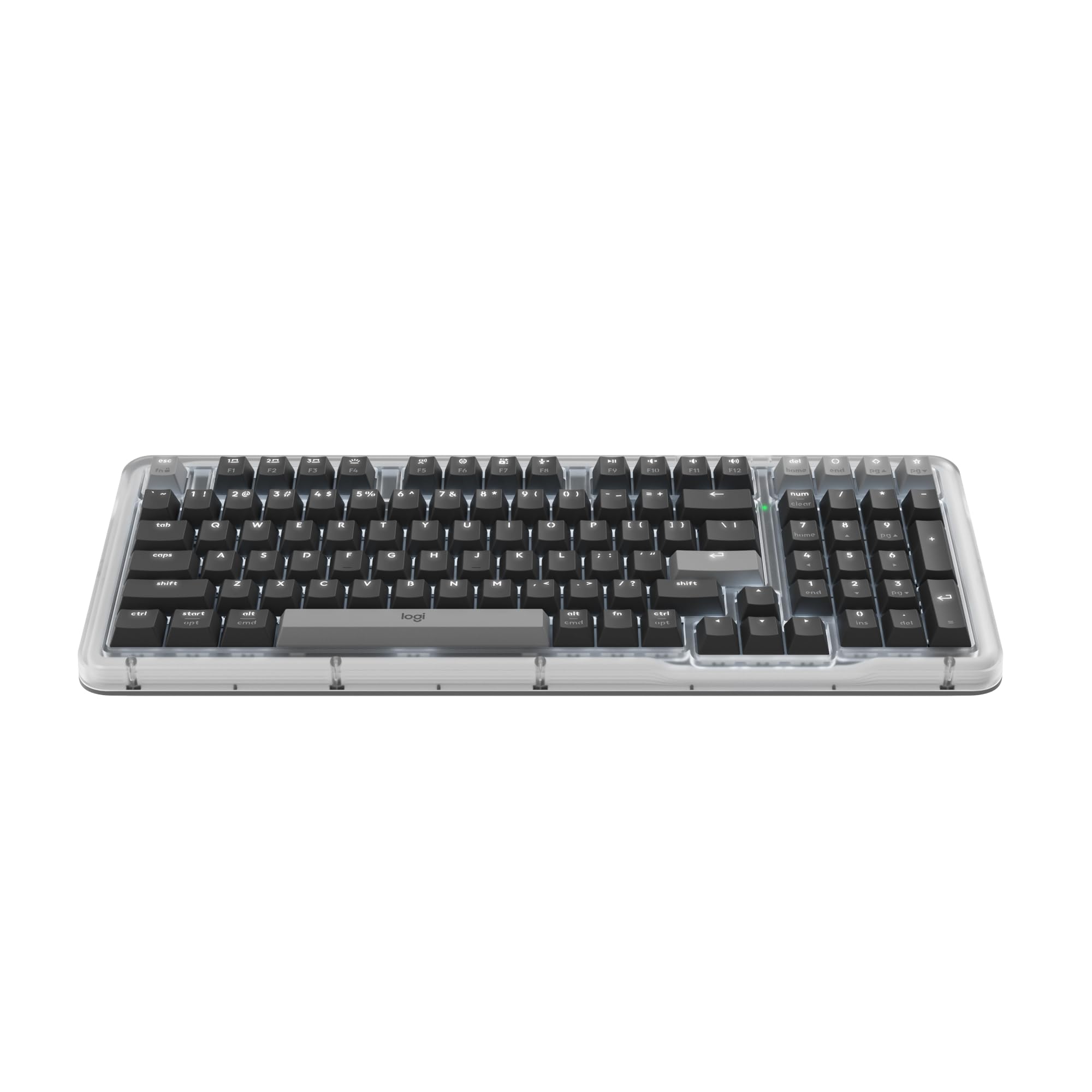
Logitech’s K98M redefines the premium wireless typing experience for productivity-focused users. The white backlighting is intentionally non-RGB, reducing eye strain during long work sessions while clearly illuminating every key. Its UniCushion gasket mount and hot-swappable Marble switches deliver a satisfying clicky feel without the hollow ping common in cheaper boards.
The 98-key compact 1800-style layout integrates a number pad in a footprint smaller than a traditional full-size keyboard. Connectivity is seamless via Bluetooth Low Energy or the included Logi Bolt USB receiver, and the battery life stretches to roughly 12 months before needing a USB-C recharge. The programmable Action Keys through Logi Options+ let you automate repetitive tasks with one click.
Customer feedback highlights its solid build quality, beautiful aesthetic with the transparent top case, and comfortable concave keycaps that improve all-day typing accuracy. The lack of a wrist rest and the slightly lighter switch feel may surprise tactile enthusiasts, but for anyone seeking a polished, non-gaming backlit board, this is a top-tier pick.
Why it’s great
- Exceptional battery life—up to 12 months on a single charge
- White backlight is easy on the eyes for long work sessions
- Programmable Action Keys boost workflow efficiency
Good to know
- No included wrist rest
- Clicky Marble switches produce moderate sound in open offices
3. AULA F99 Pro Silent Version Wireless Mechanical Keyboard

The AULA F99 Pro is engineered for anyone who needs a whisper-quiet mechanical keyboard. Its silent pre-lubed linear switches, combined with a five-layer dampening foam and gasket structure, produce a soft “snow-walking” sound that is barely audible even in shared office spaces. The tri-mode connectivity (Bluetooth 5.0, 2.4GHz, and USB-C) lets you instantly switch between up to five devices without fumbling with cables.
One standout feature is the 8000mAh battery—nearly double the capacity of most wireless mechanicals—which ensures weeks of heavy use between charges. The side-printed PBT keycaps allow light to shine through the sides, creating a unique under-glow effect without wearing off over time. The multifunction knob controls backlight brightness or system volume depending on the mode, adding true utility.
Users love the fixed RGB color options that avoid flashy cycling modes, the solid weight that prevents sliding on the desk, and the dedicated numpad with a generously sized zero key. The front-printed legends can appear dim in complete darkness if you rely on shine-through, but the side glow compensates well. For silent productivity across multiple devices, this is the board to beat.
Why it’s great
- Extremely quiet switches suitable for libraries and open offices
- Massive 8000mAh battery offers extended wireless life
- Tri-mode connectivity works seamlessly across PC, Mac, and tablets
Good to know
- Front-printed legends are less visible in low light compared to top-printed caps
- Charging instructions require careful attention to preserve battery health
4. HUO JI E-Yooso Z-99 Creamy Mechanical Keyboard

The HUO JI Z-99 brings a creamy sound and feel to a mid-range price point that typically demands a higher investment. Its gasket structure with five layers of sound-dampening foam reduces hollow cavity noise by a claimed 80%, resulting in a deep, satisfying thock with every keystroke. The 99-key 96% layout retains all essential keys, including the arrow cluster and function row, while shaving off precious desk space.
Hot-swappable sockets support both 3-pin and 5-pin switches, so you can swap in your preferred tactile or clicky switch without soldering. The double-shot PBT keycaps ensure the legends never fade, maintaining legibility under the 15 RGB backlight effects and 8 solid color options. The included keycap and switch puller make the customization process immediate out of the box.
Users highlight the satisfying sound profile, no missed key presses thanks to full N-key rollover, and the straightforward lighting controls that don’t require software. The keyboard is slightly heavy due to the internal foam and metal plate, but this adds to its stable, premium feel on the desk. A few wish the backlight was brighter for daytime use, but for evening sessions the glow is ample.
Why it’s great
- Five-layer foam produces a deep, creamy sound with minimal hollowness
- Hot-swappable PCB and included tools enable instant switch customization
- PBT keycaps resist shine and maintain legend clarity over time
Good to know
- Backlight brightness could be stronger for brightly lit offices
- Smaller layout may feel cramped for users with larger hands
5. Corsair K55 CORE RGB Membrane Gaming Keyboard

The Corsair K55 CORE proves that a membrane keyboard can still deliver a satisfying gaming and typing experience without the high cost of mechanical switches. Its quiet, responsive membrane keys provide tactile feedback that is noticeably snappier than older rubber dome boards, and the ten-zone RGB backlighting can be customized via Corsair’s iCUE software or onboard controls for quick effects.
Durability is addressed with a spill-resistance rating of up to 300ml of liquid, plus dedicated media keys and a brightness toggle that keep essential functions at your fingertips. The 12-key rollover with 1,000Hz polling ensures that complex key combinations in fast-paced games register reliably. The included detachable wrist rest adds comfort for extended sessions.
The membrane switches are quiet enough for shared living spaces, and the zone-based RGB is bright and vibrant. Some note the absence of per-key lighting granularity, but at this tier the value proposition is clear: a durable, well-lit gaming keyboard at a friendly price.
Why it’s great
- Quiet, responsive membrane switches with tactile feel
- Spill-resistant design handles accidental liquid spills
- Dedicated media keys and detachable wrist rest included
Good to know
- RGB is zone-based, not per-key, limiting granular customization
- Non-detachable USB cable reduces portability
6. KOPJIPPOM Large Print Keyboard – 7 Color Backlight

For those who need maximum key legibility, the KOPJIPPOM Large Print keyboard offers fonts four times larger than standard keys, combined with a 7-color backlight adjustable across three brightness levels. The membrane switches are whisper-quiet and require only a light touch to register, reducing finger fatigue during long typing sessions. Its plug-and-play USB connectivity works with Windows, Mac OS, and even Raspberry Pi devices without drivers.
The full-size 104-key layout includes a number pad, while the fold-out feet on the underside provide two ergonomic tilt angles. The spill-proof design protects against accidental coffee or water splashes, and the keycaps are rated for over 5 million keystrokes. Users appreciate the heavy, stable base that keeps the keyboard planted during use.
Customer feedback highlights the brightness and color variety—blue, green, red, cyan, purple, yellow, and white—as well as the responsive key feel. A few note that the keyboard flashes when the PC enters sleep mode and lacks an Fn lock or preference memory. For seniors, visually impaired users, or anyone working in dim environments, this keyboard delivers unmatched readability.
Why it’s great
- Extra-large print with bright, customizable backlight improves visibility
- Spill-proof design protects against common accidents
- Plug-and-play USB works across multiple operating systems
Good to know
- Keyboard flashes when PC enters sleep mode
- No onboard memory to retain backlight settings after power loss
7. KOPJIPPOM USB Wired Keyboard with Wrist Rest & 7 Color LED
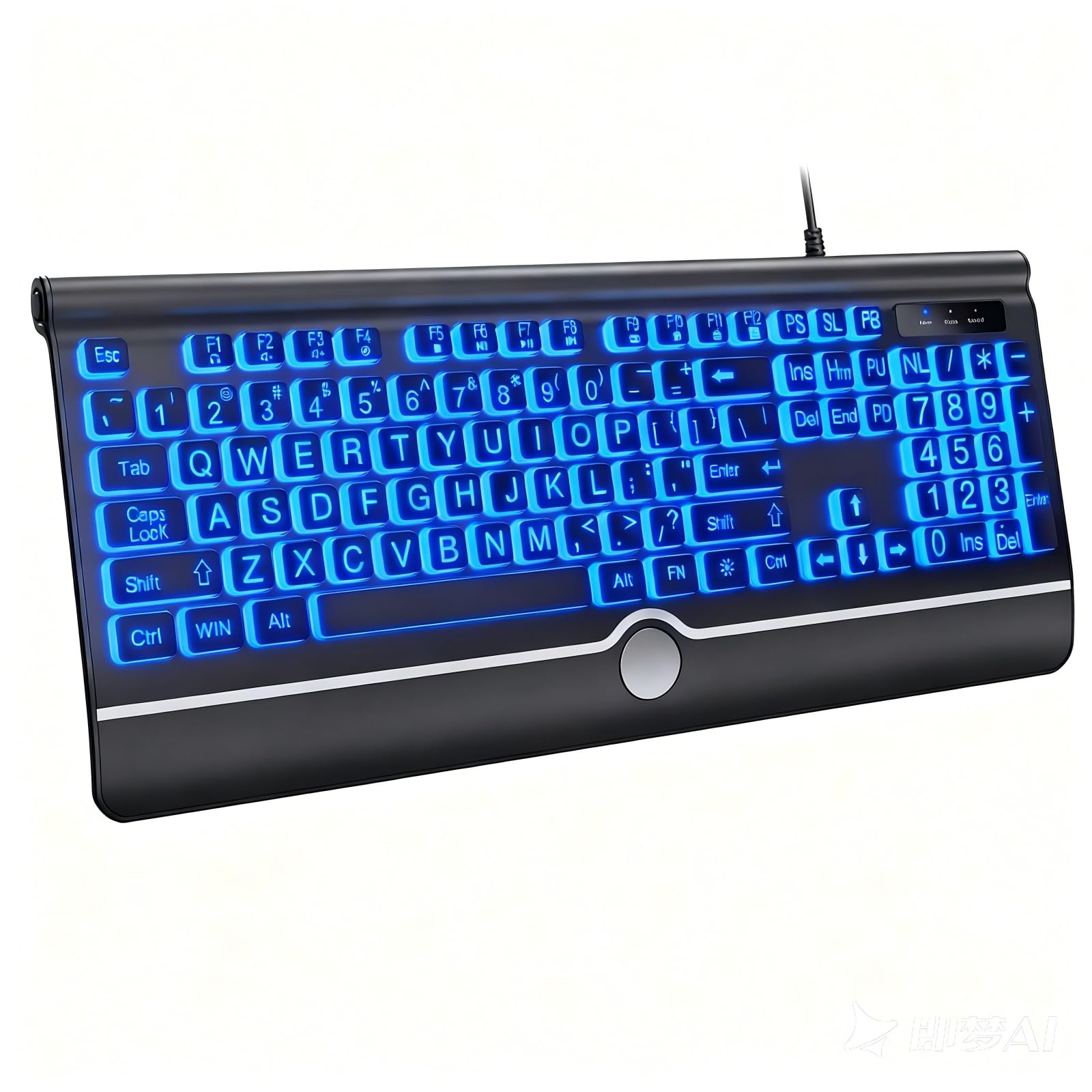
This KOPJIPPOM model builds on the large-print concept by adding an integrated ergonomic wrist rest, pinky-friendly key spacing, and a 7-color rainbow backlight with breathing and static modes. The large print keys are slightly spaced apart, which reduces accidental presses for elderly users and children learning to type. The membrane switches are soft, quiet, and responsive enough for everyday computing tasks.
The full-size layout includes a number pad and dedicated hotkeys for media and web functions. Its USB-A wired connection ensures zero input lag and no battery anxiety, and the spill-resistant chassis can handle minor liquid accidents. The fold-out feet allow for a comfortable typing angle, and the lightweight ABS plastic enclosure keeps the board easy to reposition on a crowded desk.
Users with visual impairments and seniors consistently rate this keyboard highly for its readability and comfortable key feel. The backlight offers permanent and automatic breathing options, with brightness adjustments accessible through simple key combinations. A few customers mention that the included wrist rest could be wider, and volume control requires two hands. For an affordable, accessible entry into backlit keyboards, this is a solid recommendation.
Why it’s great
- Built-in wrist rest reduces strain during extended use
- Large, spaced-out keys minimize typing mistakes
- Breathing and static backlight modes add visual appeal
Good to know
- Wrist rest area is narrower than some users prefer
- Volume controls require simultaneous two-hand operation
FAQ
Does backlight color affect typing accuracy in the dark?
Can I replace the switches on a backlit keyboard myself?
Is a wireless backlit keyboard worth it for gaming?
Final Thoughts: The Verdict
For most users, the best backlit keyboard winner is the RK ROYAL KLUDGE R98 Pro because it combines a creamy gasket-mounted feel, hot-swappable switches, and dynamic RGB at a mid-range price that outperforms boards twice its cost. If you want a silent wireless board for a quiet office, grab the AULA F99 Pro Silent Version. And for pure, distraction-free productivity with a polished white backlight and multi-month battery, nothing beats the Logitech Alto Keys K98M.

Mo Maruf
I created WellFizz to bridge the gap between vague wellness advice and actionable solutions. My mission is simple: to decode the research and give you practical tools you can actually use.
Beyond the data, I am a passionate traveler. I believe that stepping away from the screen to explore new environments is essential for mental clarity and physical vitality.