Our readers keep the lights on and my smoothie glass nicely filled. As an Amazon Associate, I earn from qualifying purchases.
An all-in-one webcam that packs a camera, microphone, and speaker into a single device is the simplest way to upgrade your home office or conference room. Instead of juggling an external mic and speaker bar, one USB connection handles your entire audio and video setup, cutting cable clutter and simplifying your daily calls.
I’m Mohammad Maruf — the founder and writer behind WellFizz. I have spent years analyzing the consumer electronics market, cross-referencing technical specifications with real-world user feedback to identify which all-in-one webcams actually deliver on their promises of integrated audio and video performance.
Finding the right 3 in 1 webcam with microphone and speaker depends on understanding the trade-offs between sensor resolution, speaker wattage, microphone array design, and field of view, all while matching the device to your specific room size and call frequency.
How To Choose The Best 3 In 1 Webcam With Microphone And Speaker
When you combine camera, microphone, and speaker into one package, each component must pull its weight. A great image sensor is useless if the speaker sounds tinny, and a powerful speaker won’t help if the microphone can’t pick up your voice. Focus on these key areas before you buy.
Speaker Power and Clarity
The built-in speaker is often the weakest link in an all-in-one webcam. A 5W driver or higher delivers enough volume and clarity for a standard conference room or home office. Check whether the speaker provides full-range audio without distortion at maximum volume, especially if you regularly host calls with multiple participants in the room.
Microphone Array and Pickup Range
Single microphones struggle with noise cancellation and consistent pickup. Dual or quad-omnidirectional MEMS microphone arrays with noise reduction can filter out keyboard clicks and background chatter. Look for a pickup range of at least 6 feet for small rooms or 10 feet for conference tables. The number of mics and the quality of the DSP matter more here than the advertised maximum range.
Video Resolution and Field of View
1080p at 30 fps is the baseline for professional video calls, but 4K sensors provide extra detail for cropping and digital zoom without losing sharpness. An adjustable field of view between 60° and 100° lets you frame a single person or a small group. Fixed wide angles above 90° can feel unnatural for solo use, so narrower options or digital zoom controls help maintain a flattering framing.
Privacy and Ease of Use
A physical privacy shutter is a non-negotiable feature for any webcam used in a home or office setting. Look for a built-in sliding cover rather than an aftermarket sticker. True plug-and-play operation with standard USB Video Class (UVC) drivers ensures compatibility with Windows, macOS, and Linux without extra software, while a remote control adds convenience for muting and zooming during calls.
Quick Comparison
On smaller screens, swipe sideways to see the full table.
| Model | Category | Best For | Key Spec | Amazon |
|---|---|---|---|---|
| EMEET C980 PRO | Premium | Conference rooms | 4 Mics + 2 Speakers | Amazon |
| TONGVEO 4K | Premium | Large group calls | 4K + AI auto-framing | Amazon |
| RayBit 2K | Mid-Range | Hi-fi audio quality | 2K + omnidirectional mics | Amazon |
| NUROUM C10 | Mid-Range | Huddle rooms | 4-mic MEMS array | Amazon |
| RayBit 5-in-1 | Premium | Streaming with fill light | 4K + integrated fill light | Amazon |
| Ynoonvon | Mid-Range | Remote control users | 5W speaker + 5x zoom | Amazon |
| AIRHUG | Budget | Simple desk setup | 5W speaker 90dB max | Amazon |
In‑Depth Reviews
1. EMEET C980 PRO

The EMEET C980 PRO stands out by pairing two 5W speakers with a four-microphone array, a configuration usually reserved for dedicated speakerphones. This hardware setup delivers rich, full-range audio for small conference rooms and eliminates the need for a separate conference call device. The 1080p sensor produces bright, clear video even in dim lighting thanks to effective automatic low-light correction.
Its adjustable field of view spans from 60° to 98°, letting you frame a single speaker tightly or open up the lens for a small team around a table. The fixed-focus system keeps everything between 2 inches and 200 inches sharp, which is ideal for presentations where you might hold up a whiteboard. The two speakers produce enough volume for a room of five to eight people without noticeable distortion at typical call levels.
Plug-and-play compatibility with Windows, macOS, and Linux makes deployment simple, and the included privacy cover protects the lens when not in use. Some users report that the wide-angle setting can show too much of the room, but the adjustable FOV feature directly addresses this. For teams that need reliable all-in-one conferencing without a separate audio system, the C980 PRO is the most complete package.
Why it’s great
- Quad-microphone array with active noise cancellation
- Dual 5W speakers deliver room-filling audio
- Adjustable 60°-98° field of view
Good to know
- Fixed focus, not autofocus
- No manual zoom control during calls without external software
2. TONGVEO 4K
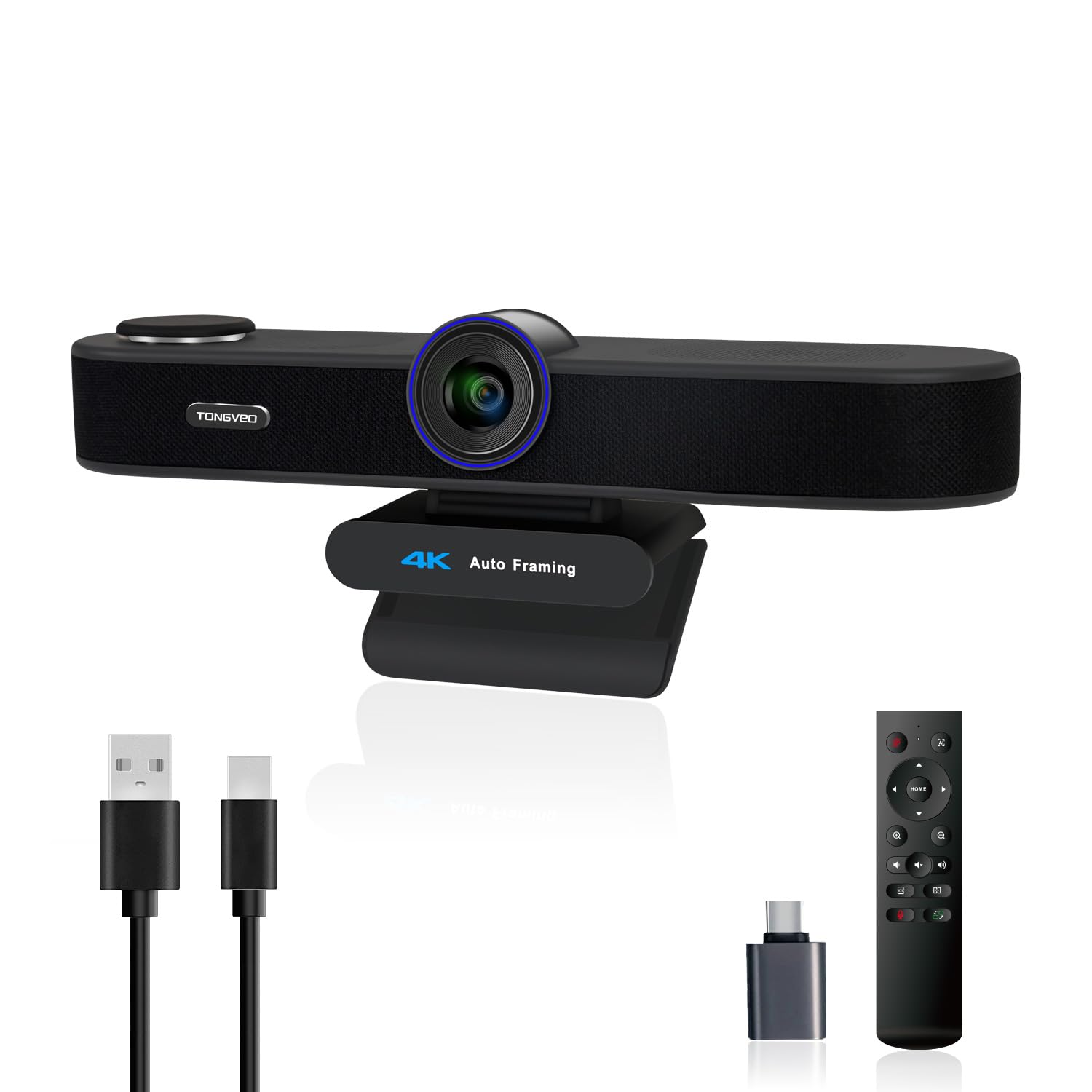
The TONGVEO 4K webcam brings premium features like AI auto-framing and voice tracking to the 3-in-1 category, making it a strong candidate for larger conference rooms. The 1/2.8-inch 8.29-megapixel sensor captures 4K video at 30 fps, and the AI auto-framing crops the image to keep active speakers centered without manual adjustment. The three adjustable FOV modes — 118°, 100°, and 88° — let you match the view to the room size.
Dual microphones with 360° omnidirectional pickup reach up to 16 feet, and the 3W speaker provides clear audio for up to eight participants. The included infrared remote controls zoom, volume, mute, and camera off, which is practical for setups where the webcam is mounted on a TV or high monitor. The voice tracking feature locks onto the active speaker within three seconds, making it useful for meetings where multiple people speak sequentially.
Setup is driver-free on Windows and macOS, and the removable privacy cover doubles as a lens protector. A few users noted that the speaker sound can be slightly tinny at first, but the manufacturer replaces faulty units quickly. If your meeting space requires flexible framing options and 4K resolution, the TONGVEO delivers features usually found in dedicated conference cameras.
Why it’s great
- 4K resolution with 5x digital zoom
- AI auto-framing and voice tracking
- Three adjustable FOV modes
Good to know
- Speaker quality can vary between units
- 4K requires good bandwidth for high-quality streaming
3. RayBit 2K

The RayBit 2K webcam focuses on sound quality with Hi-Fi stereo speakers that deliver 360-degree sound diffusion and low distortion. The 2K sensor provides more detail than standard 1080p, which helps with digital zoom and cropping without visible pixelation. Its 94° wide-angle view is well-suited for solo users who want to show a bit of their surroundings without making the room look huge.
Omnidirectional microphone arrays with noise cancellation claim a 15-foot pickup range, and the autofocus system keeps faces sharp during movement. The built-in privacy cover is a simple slider that sits flush with the body, avoiding the bulky add-on look of some competitors. Low-light correction adjusts brightness and contrast automatically, producing natural skin tones even under desk lamps.
Compatibility covers Windows, macOS, Linux, and Chrome OS, and the included USB-C to USB-A adapter ensures it works with older ports. The speaker quality significantly outperforms typical laptop speakers, making it a good drop-in replacement for laptop users. Over two years of use, some users reported the speaker eventually developing scratchy audio, but the overall value for the price point remains high.
Why it’s great
- 2K resolution with autofocus
- Rich, full-range Hi-Fi speaker sound
- Wide 94° field of view
Good to know
- Speaker durability may be an issue after extended use
- 94° FOV can feel too wide for solo users at close range
4. NUROUM C10

The NUROUM C10 adopts a portable, puck-like design that sits on a desk or mounts to a monitor, making it as easy to move between meeting rooms as it is to leave permanently on your desk. Its 1080p sensor with a 90° glass lens delivers clear, color-accurate video with automatic light correction. The four MEMS microphones with AI noise cancellation capture voices from up to 10 feet away, and the full duplex technology allows simultaneous speaking and listening without echo.
The integrated touch buttons let you mute the microphone, turn off the camera, and adjust volume without reaching for your computer. The light ring on top glows red when muted, providing immediate visual confirmation. The USB-C cable folds neatly into the base, and the small footprint means it takes up almost no space on a crowded desk.
Works instantly with Zoom, Teams, and Google Meet on Windows and macOS. Some users found the speaker a bit quiet for rooms larger than a small conference room, but for huddle spaces and individual desks, the volume is adequate. The C10 is a strong choice if you value portability and clean desk aesthetics over maximum speaker output.
Why it’s great
- Compact all-in-one design with integrated cable storage
- 4-mic MEMS array with AI noise cancellation
- Touch controls with status light indicator
Good to know
- Speaker may not be loud enough for large rooms
- No remote control included
5. RayBit 5-in-1
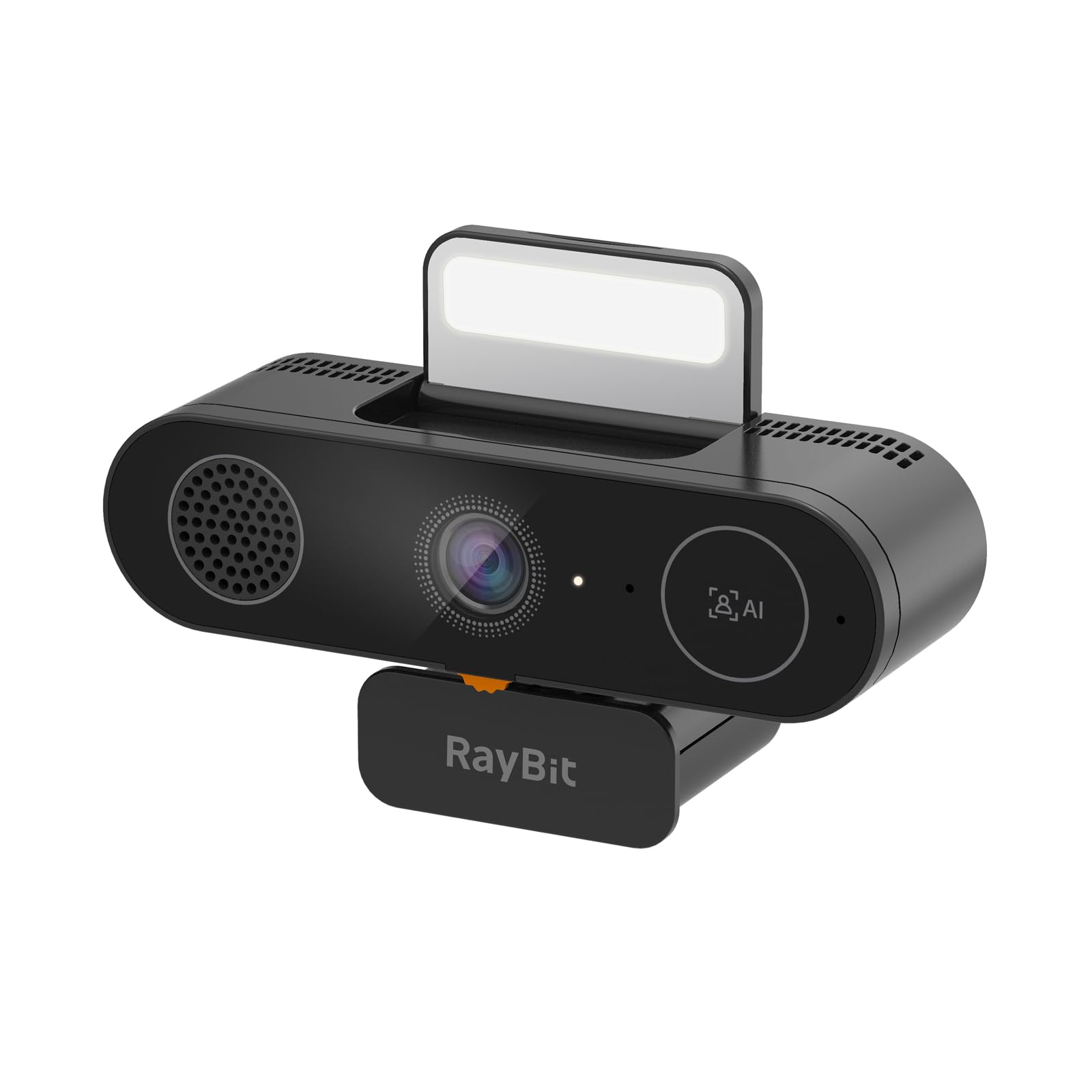
RayBit packs a 4K webcam, stereo speaker, dual microphones, a built-in fill light, and a privacy cover into one unit — effectively a video bar in a traditional webcam form factor. The 4K sensor delivers sharp detail for streaming and professional video calls, and the AI auto-framing keeps you centered when you move around. The integrated fill light has three brightness levels and is a practical solution for poorly lit rooms.
The Hi-Fi stereo speaker produces 360-degree sound with low distortion, and the microphone picks up voice clearly up to 15 feet with noise reduction. The physical privacy cover is built into the body, so there is no separate cap to lose. Setup is driver-free on USB-C or USB-A, and compatibility spans major conferencing platforms like Teams, Zoom, and Twitch.
The fill light is fixed to one brightness setting when activated, which may be too bright for some users, and the microphone quality is adequate for calls but not as refined as quad-array systems. For streamers and remote workers who need an all-in-one solution with integrated lighting, the 5-in-1 design eliminates the need for a separate ring light.
Why it’s great
- 4K video with AI auto-framing
- Built-in fill light for low-light environments
- All-in-one design eliminates separate lighting
Good to know
- Fill light brightness is not adjustable
- Microphone quality is adequate but not outstanding
6. Ynoonvon Webcam
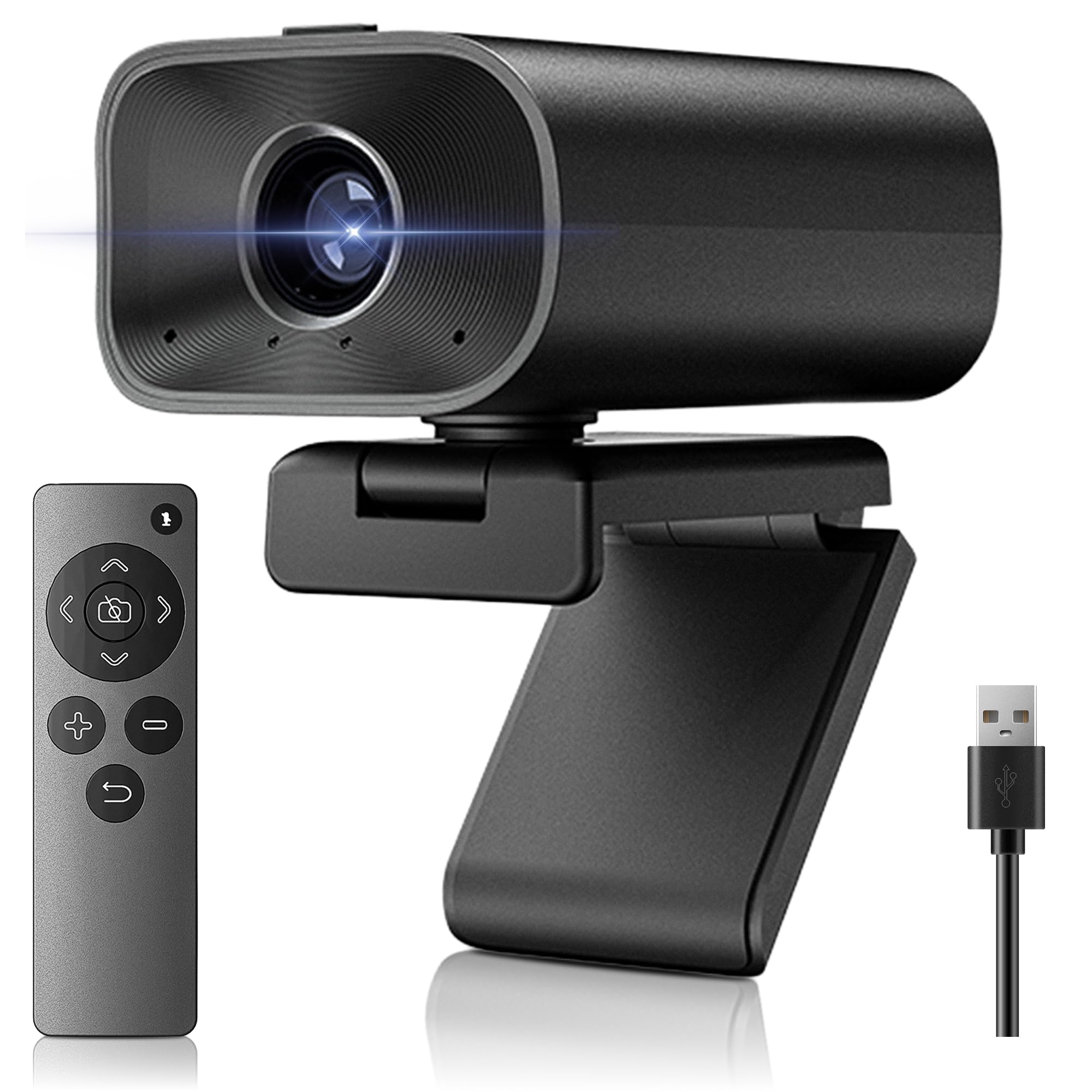
The Ynoonvon webcam includes a full-featured remote control for muting audio, turning off the camera, and controlling volume — a rare convenience at its price point. Its 1080p sensor with a 90° wide-angle lens provides clear video for solo and small-group calls, and the 5W speaker delivers enough volume for a standard home office. The dual omnidirectional microphones capture voice from multiple angles, and the 5x digital zoom lets you focus on specific details during presentations.
A sliding privacy cover is built into the top of the unit, and the flexible base rotates 360° horizontally and tilts 180° vertically for precise angle adjustment. The mount works with monitors, laptops, and tripods, making it versatile for different setups. It supports plug-and-play operation on Windows, macOS, and Linux.
Some user reviews reported inconsistent video quality, with one noting extremely grainy output, which may indicate unit-to-unit variation. The remote control requires a CR2025 battery, and the 5x zoom is digital, not optical, so image quality degrades at high zoom levels. If you frequently need remote control functionality and value an all-in-one design, the Ynoonvon is a solid option, but be prepared to test the unit promptly.
Why it’s great
- Includes remote control for mute, zoom, and camera off
- 5W speaker delivers clear audio for small rooms
- Versatile 360° rotational mount
Good to know
- Unit-to-unit video quality can vary
- Digital zoom reduces image quality at maximum magnification
7. AIRHUG 3-in-1

The AIRHUG 3-in-1 is an entry-level all-in-one webcam that covers the basics without unnecessary frills. Its 1080p sensor with a 76° field of view and fixed focus gives you a standard, no-nonsense video feed for daily meetings. The 5W speaker outputs up to 90dB, which is loud enough for small to medium rooms, and the built-in microphone captures voices up to 6 feet away with 65dB noise reduction.
The compact form factor — just 5.5 × 2.8 × 2.3 inches — fits easily into a laptop bag, and the universal clip works with laptops, monitors, and even curved screens. Setup is truly plug-and-play on Windows 7 through 11 and macOS, with no driver installation required. A physical privacy cover slides over the lens for security.
The 76° FOV is narrower than most competitors, which is actually a benefit for solo users who don’t want their entire background visible. The microphone and speaker quality are functional but not exceptional — suitable for one-on-one calls but not ideal for large group discussions. For budget-conscious buyers who want a single USB device that handles audio and video, the AIRHUG delivers reliable baseline performance.
Why it’s great
- Compact and highly portable
- 5W speaker with 90dB maximum volume
- Narrower 76° FOV flatters solo users
Good to know
- Fixed focus, no manual adjustment
- Microphone quality is average for group calls
FAQ
Can a 3-in-1 webcam replace a dedicated conference speakerphone?
Why does the field of view matter for a 3-in-1 webcam?
Do I need 4K resolution for video conferencing?
Why does my 3-in-1 webcam sound worse than my laptop microphone?
Final Thoughts: The Verdict
For most users, the best 3 in 1 webcam with microphone and speaker winner is the EMEET C980 PRO because it combines quad microphones, dual 5W speakers, and an adjustable field of view in a package that handles both solo calls and small group meetings. If you want 4K resolution and AI auto-framing for dynamic meetings, grab the TONGVEO 4K. And for an entry-level option that covers the basics without breaking the bank, nothing beats the AIRHUG 3-in-1.

Mo Maruf
I created WellFizz to bridge the gap between vague wellness advice and actionable solutions. My mission is simple: to decode the research and give you practical tools you can actually use.
Beyond the data, I am a passionate traveler. I believe that stepping away from the screen to explore new environments is essential for mental clarity and physical vitality.