Our readers keep the lights on and my smoothie glass nicely filled. As an Amazon Associate, I earn from qualifying purchases.
The chaos of a busy household often lives on sticky notes, fridge magnets, and three different phone calendars that never talk to one another. A dedicated digital hub changes that — it places every appointment, chore, meal plan, and grocery list onto one clear, interactive screen that the whole family can see and use.
I’m Mohammad Maruf — the founder and writer behind WellFizz. I spend my time analyzing the hardware specifications and real-world usability of smart home organizers, focusing on screen quality, sync reliability, and family-friendly feature sets.
After evaluating dozens of models, I’ve narrowed the field to the seven that deliver on their promises. This guide covers everything you need to make the right choice for your best family calendar system.
How To Choose The Best Family Calendar System
A family calendar system is more than just a screen on the wall. It replaces paper calendars, scattered apps, and verbal reminders with one unified command center. The right model will simplify your daily routines; the wrong one adds another layer of digital clutter. Here is what matters most.
Screen Size and Placement
Screen size directly affects readability and interaction. A 10-inch model fits well on a kitchen counter or a small wall space, while a 15.6-inch display offers a more expansive view, readable from across the room. Consider whether you want a desk stand, a wall mount, or a magnetic fridge attachment — each placement changes how often the family engages with the screen.
Calendar Sync and Platform Compatibility
The core function of a digital family calendar is to pull in events from every family member’s personal calendar. Look for models that support two-way sync with Google Calendar, iCloud, Outlook, and Yahoo. Real-time sync ensures that when you add an appointment on your phone, it appears on the home screen within seconds — no manual updates required.
Chore Chart and Reward System
A static to-do list is not enough. The best systems assign tasks to individual family members using color-coding, set deadlines, and track completion with stars or points. Kids can redeem earned points for pre-set rewards, turning daily chores into a game that builds accountability. This feature is what separates a simple digital frame from a true family management tool.
Meal Planning and Grocery List Integration
Weekly meal planning eliminates the nightly question of what to cook. A strong system includes a recipe library, the ability to assign meals to specific days, and an auto-generated grocery list that updates as you plan. This turns the screen into a practical kitchen tool rather than just a schedule display.
Photo Frame and Extra Features
When not showing the daily agenda, the screen should double as a digital photo frame. Remote photo sharing via an app allows grandparents to receive new pictures instantly. Models running Android also offer access to streaming apps, smart home controls, and voice assistants — features that add convenience but also increase complexity.
Quick Comparison
On smaller screens, swipe sideways to see the full table.
| Model | Category | Best For | Key Spec | Amazon |
|---|---|---|---|---|
| Dragon Touch 15.6″ | Premium | Full-featured family command center | 15.6″ FHD touchscreen | Amazon |
| Apolosign 15.6″ | Premium | Android flexibility & smart home controls | Android OS + Google Assistant | Amazon |
| Anyuse 16″ | Premium | Largest screen & senior-friendly text | 16″ HD touchscreen | Amazon |
| JSUSOU 15.6″ | Mid-Range | Fridge mounting & counter use | Magnetic refrigerator mount | Amazon |
| CAZOKASI 10.1″ | Mid-Range | Compact space & easy readability | 10.1″ HD touchscreen | Amazon |
| Annalivkg 10.1″ | Budget-Friendly | Budget entry with full sync | Multi-platform calendar sync | Amazon |
| Oqsonwu 10.1″ | Budget-Friendly | Best value for essential features | Color-coded chore chart | Amazon |
In‑Depth Reviews
1. Dragon Touch 15.6″ Digital Calendar Chore Chart

The Dragon Touch delivers a premium all-in-one experience with its 15.6-inch full HD touchscreen that makes every schedule, chore, and meal plan readable from across the kitchen. Setup takes under ten minutes — plug in, connect to Wi-Fi, and sync with iOS or Google calendars through the companion app. The interface uses color-coding for each family member, so you can see at a glance who has practice, who has a dentist appointment, and when dinner is planned.
The interactive chore chart stands out as a genuine motivator for children. Assign tasks with star rewards, and a chime signals completion — kids learn responsibility while parents get a break from constant reminders. The meal planning feature eliminates the nightly scramble for dinner ideas, and when the screen is idle, it transforms into a digital photo frame that displays your favorite family memories.
One minor drawback is the lack of a built-in search function for events, and some users wish the meal planner could connect directly to grocery delivery services. The companion app also offers paid features like Magic Import for advanced users, but the core functionality remains free and fully usable. For any family ready to centralize their schedules, this is the most complete package available.
Why it’s great
- Large 15.6″ FHD display with crisp, clear text
- Fun chore chart with star rewards and chime feedback
- Seamless calendar sync with iOS and Google platforms
- Doubles as a beautiful digital photo frame
Good to know
- No native search function for past or upcoming events
- Meal planner lacks direct grocery delivery integration
- Some advanced features require a paid subscription
2. Apolosign 15.6-inch Digital Family Calendar
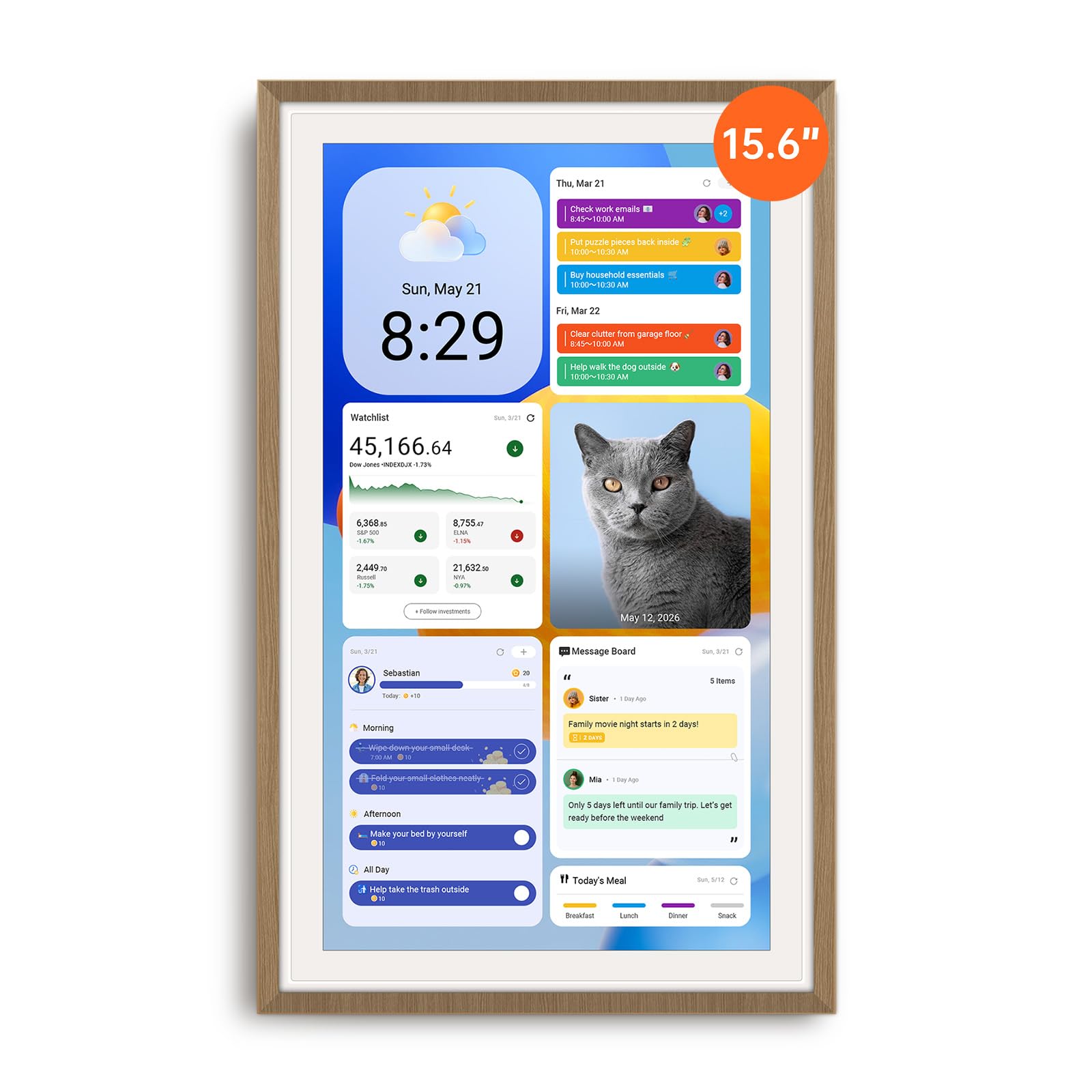
The Apolosign pushes beyond basic calendar functionality by running a full Android operating system. This means you get access to Google Play apps, including YouTube, Netflix, and smart home controls, directly from the 15.6-inch anti-glare touchscreen. You can switch between a simplified Calendar Mode for quick scheduling and a fully customizable Android Mode with widgets for weather, clocks, meals, and music. The built-in Google Gemini voice assistant lets you check schedules, set reminders, or control compatible smart lights and cameras hands-free.
The chore and reward system is the most customizable on this list. Each child gets a color-coded profile, and you can set up a prize wheel that makes earning rewards genuinely exciting. The device syncs seamlessly with Google and Apple calendars, and the companion app requires no subscription — a direct advantage over competitor systems like Skylight. The digital photo frame feature pulls from Google Photos, showing a rotating slideshow of memories during idle time.
On the downside, the device must remain plugged in at all times — there is no battery backup. The power plug itself is somewhat bulky, which can make cable management tricky in portrait orientation. The built-in speakers are average, adequate for alerts but not for music playback. Despite these minor quirks, the Apolosign offers unmatched flexibility for tech-savvy families who want their calendar to double as a smart home hub.
Why it’s great
- Full Android OS with access to Google Play apps
- Google Gemini voice assistant for hands-free control
- No monthly subscription fee for core features
- Customizable child reward system with prize wheel
Good to know
- No built-in battery — must stay plugged into power
- Power adapter is bulky and limits cable routing options
- Average speaker quality for audio playback
3. Anyuse 16″ Smart Digital Calendar

The Anyuse commands attention with its 16-inch HD touchscreen, the largest display among the models tested. This size advantage matters most for families with seniors or visually impaired members — the 4-level font size adjustment and adjustable brightness make it easy to read from across the room. The screen offers four placement modes: wall-mounted, desk-standing, horizontal, or vertical. The included mounting kit accommodates most home layouts, whether you want it in the kitchen, home office, or entryway.
Calendar sync is two-way and real-time across Google, iCloud, Outlook, Cozi, Yahoo, and TeamSnap. You can filter events by family member or category to avoid screen clutter. The chore chart uses color labels for each person, and kids earn stars that they can redeem for pre-set rewards like toys or outings. The meal planner includes a built-in recipe library where you can assign multiple recipes to a single day and add cooking notes.
One thoughtful detail is the ability to add virtual family members for young children who do not have email addresses — they can still participate in the reward system. The Account Protection feature prevents kids from accidentally deleting events or lists. The only real limitation is that the 16-inch size may feel imposing on a small countertop. If you have the wall space, though, this screen provides the clearest, most accessible view of your family’s schedule.
Why it’s great
- Largest 16-inch HD display with adjustable font sizes
- Two-way sync with Google, iCloud, Outlook, Cozi, and TeamSnap
- Virtual member profiles for kids without email
- Account protection prevents accidental deletions
Good to know
- Large footprint may not suit small countertops
- Limited photo size adjustment options in slideshow mode
- Setup of second phone sync can be finicky
4. JSUSOU 15.6 Inch Digital Smart Calendar

The JSUSOU distinguishes itself with a built-in magnetic refrigerator mount that makes it the most space-efficient option for kitchens. The 15.6-inch HD touchscreen attaches securely to any flat metal surface, keeping the calendar at eye level and freeing up counter space. For those who prefer a desk setup, the included stand works well on a counter or home office desk. Calendar sync supports Google, iCloud, and Outlook with one-click updates, and changes made on your phone appear on the screen instantly.
Setup is straightforward, though the printed instructions are minimal — most users figure it out within minutes. The companion app allows both parents to add appointments and photos, and multiple family members can send pictures to the screen remotely, which is a welcome feature for grandparents who want to see new photos of their grandchildren. The display is bright and sharp, and the touchscreen responds accurately to taps and swipes.
The main issue reported is that the magnets may struggle on textured refrigerator doors — some users needed a 3M strip to keep it from sliding. Additionally, connecting a second phone to the calendar can be difficult; several reviewers noted it took days to get the sync working on a second device. If your fridge is smooth and you only need one primary phone managing the calendar, this is an excellent mid-range choice. For larger families that need multi-user management, look at one of the higher-end models.
Why it’s great
- Magnetic fridge mount saves counter space
- Sharp 15.6-inch HD touchscreen with responsive controls
- Seamless sync with Google, iCloud, and Outlook
- Includes both wall mount and desk stand options
Good to know
- Magnets may not hold on textured refrigerator doors
- Second phone connection can be difficult to establish
- Printed instructions are sparse and unclear
5. CAZOKASI Smart Digital Calendar 10.1″
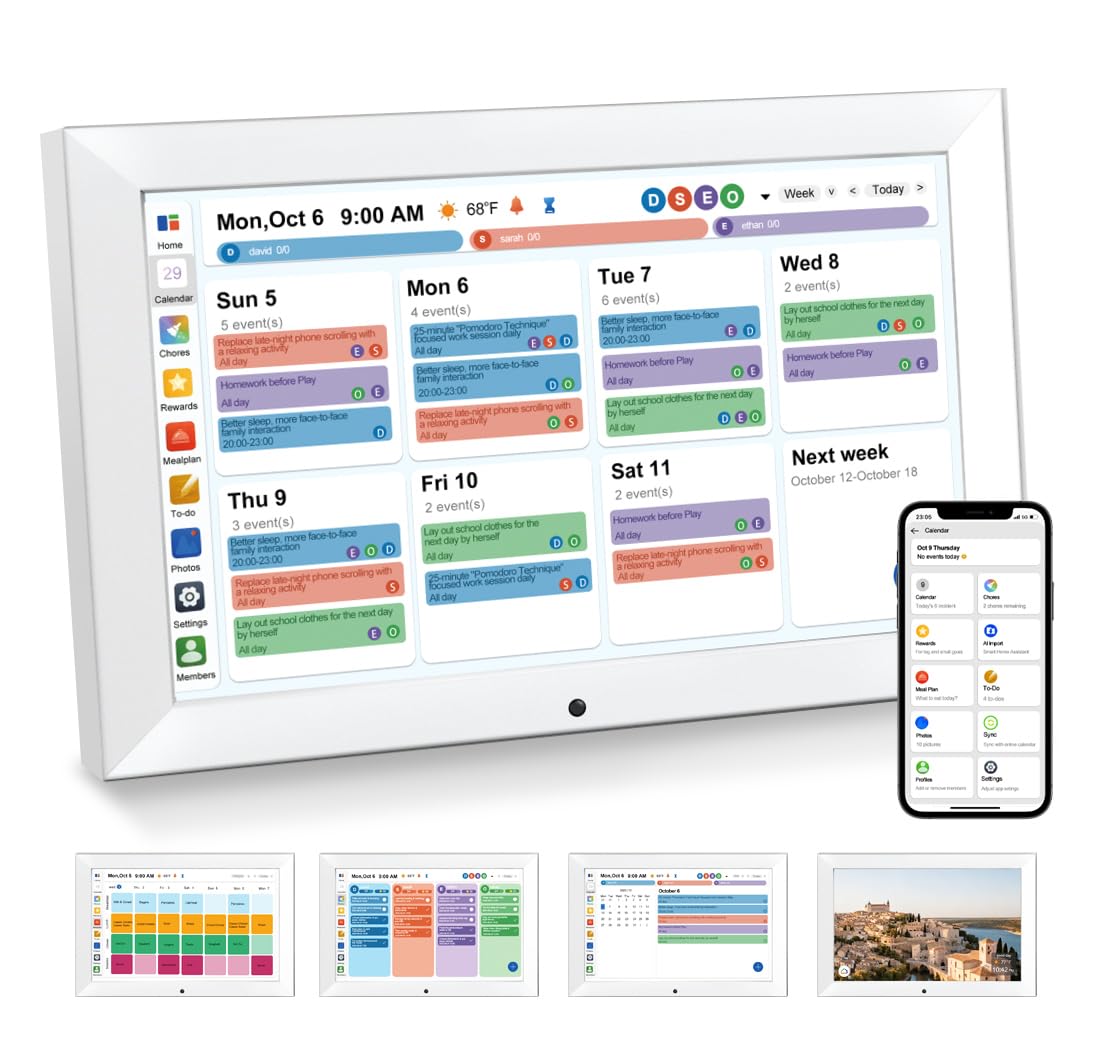
The CAZOKASI packs core family calendar features into a compact 10.1-inch touchscreen that fits on any desk or wall without dominating the room. The HD display is crisp and bright, and the responsive touchscreen makes navigation straightforward — you can add family members, assign tasks, and sync your phone calendar with minimal effort. The device includes both a desk stand and wall mount hardware, giving you flexibility in placement.
The chore chart and meal planning functions work as expected, though they lack the advanced reward gamification found on pricier models. You can assign tasks to each family member and build weekly meal plans, but there is no point system or prize wheel to engage younger children. The digital photo frame mode automatically syncs media from your phone to display a rotating slideshow of memories during idle time. The alarm and auto-dimming features are nice touches for bedside or kitchen use.
Where the CAZOKASI truly shines is readability — the oversized day and time display is bold enough to be seen from across the living room, making it a strong choice for elderly family members or those with visual impairments. One drawback is that the AM/PM indicator cannot be removed from the screen, which some users find distracting. The unit is lightweight and sturdy, and the adjustable brightness range works well in both bright kitchens and dim hallways. For smaller homes or families who want a simple, readable display without extra frills, this is a solid mid-range pick.
Why it’s great
- Bold, easy-to-read display visible from across the room
- Compact size fits small spaces and countertops
- Includes both desk stand and wall mount
- Auto-dimming and adjustable brightness for any lighting
Good to know
- AM/PM indicator cannot be removed from the screen
- No reward system or gamified chore tracking
- Lightweight build feels less premium than larger models
6. Annalivkg Digital Calendar Wall Planner 10.1″
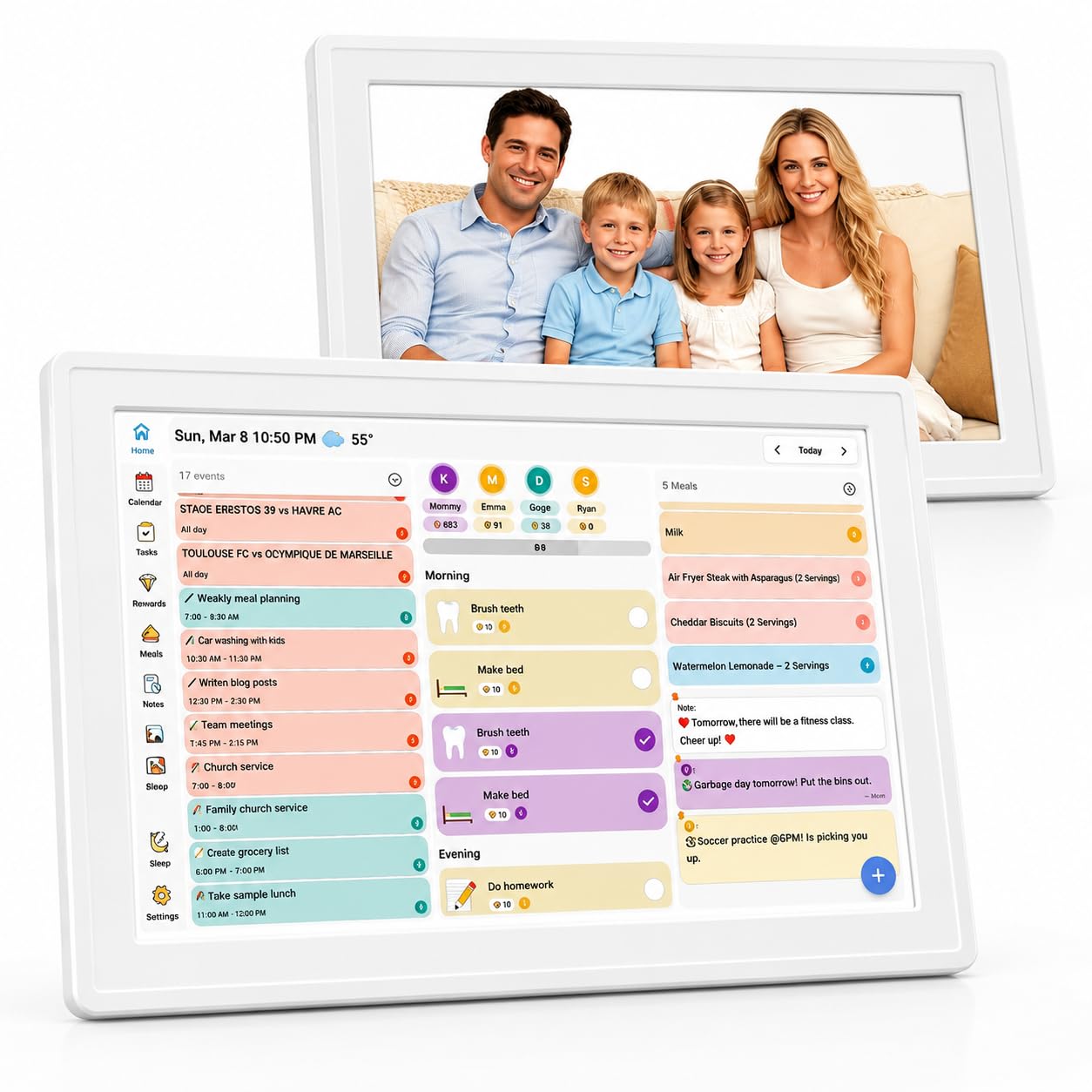
The Annalivkg offers a budget-friendly on-ramp to digital family planning without sacrificing essential sync capabilities. The 10.1-inch touchscreen connects to Google, Apple, Yahoo, Outlook, and Cozi calendars, pulling all events into one unified view. Setup takes roughly five minutes through the Wanmine app, and the 16GB of built-in memory — plus a micro SD card slot — ensures ample space for photos, videos, and app data.
The color-coded chore and reward system is surprisingly robust for the price point. You can assign different colored tasks to each family member and set custom reward rules that make chores feel like a game rather than a burden. The meal planner includes a one-click recipe save function and generates grocery lists automatically, which simplifies weekly shopping trips. The digital photo frame mode supports remote photo sharing — grandparents can receive new pictures instantly from anywhere with internet access.
The most common complaint involves the initial photo upload speed, which some users described as a bit sluggish. There is no battery backup, so the unit must stay connected to power at all times. The video playback feature works well, though there is no built-in music player. For families looking for a fully featured digital calendar at a lower entry point, the Annalivkg delivers strong value — just be prepared to exercise a little patience during the initial photo sync.
Why it’s great
- Multi-platform sync including Cozi and Yahoo
- 16GB internal storage plus micro SD expansion
- Color-coded chore chart with custom reward rules
- Remote photo sharing via companion app
Good to know
- Initial photo upload speed is noticeably slow
- No battery backup — must remain plugged in
- No built-in music player for video content
7. Oqsonwu Digital Calendar 10.1″ Touchscreen
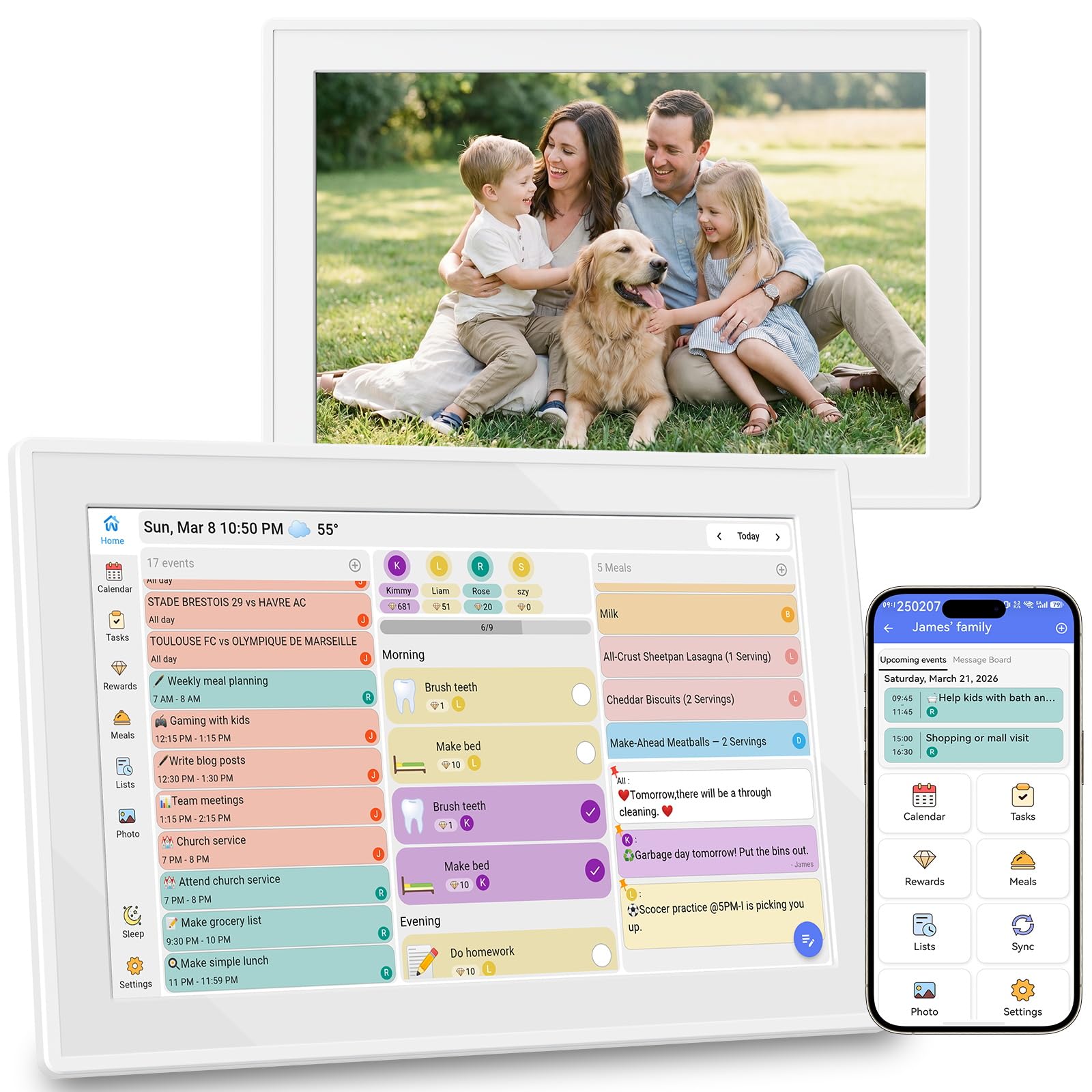
The Oqsonwu delivers a compelling value proposition by packing all essential features — calendar sync, chore chart, meal planner, and digital photo frame — into a 10.1-inch touchscreen with no subscription fees whatsoever. The screen syncs with Google Calendar, iCloud, and Outlook in real time, and every feature is unlocked out of the box. The color-coded chore chart assigns tasks to each family member, and children earn stars for completing their responsibilities, turning household duties into a fun competition.
The weekly meal planner displays menus in a clean visual layout, and the recipe upload function automatically generates your grocery list. When the screen is idle, it cycles through family photos as a digital picture frame. The wall-mountable design and smart sleep mode — which auto-wakes when motion is detected — make it a low-maintenance addition to any home. The 1-year manufacturer warranty adds peace of mind for a product in this price class.
Build quality is good for the price, though the plastic frame feels light compared to the premium models. The 10.1-inch screen is adequate for a small kitchen or home office, but families with more than four members may find the display cramped when showing multiple events at once. Some users noted that the frame occasionally takes a moment to respond after waking from sleep mode. Overall, this is the ideal entry point for families who want a reliable digital calendar without committing to a larger investment.
Why it’s great
- No subscription fees for any feature
- Real-time sync with Google, iCloud, and Outlook
- Star-based chore reward system engages kids
- Automatic grocery list generation from meal plans
Good to know
- 10.1-inch screen feels small for larger families
- Plastic build is lightweight and less premium
- Occasional delay waking from sleep mode
FAQ
Can I sync both my Google Calendar and my spouse’s iCloud Calendar on the same device?
Will a digital calendar work if my internet goes down?
How do I set up a chore reward system for my kids?
Can I hang a digital calendar on the wall, or does it need to sit on a desk?
Final Thoughts: The Verdict
For most users, the best family calendar system winner is the Dragon Touch 15.6″ Digital Calendar Chore Chart because it combines a large full HD screen, seamless calendar sync, and the most engaging chore-and-reward system at a mid-range price. If you want Android flexibility with smart home voice control, grab the Apolosign 15.6-inch Digital Family Calendar. And for a tight budget or smaller space, the Oqsonwu Digital Calendar 10.1″ delivers all essential features without any subscription fees.

Mo Maruf
I created WellFizz to bridge the gap between vague wellness advice and actionable solutions. My mission is simple: to decode the research and give you practical tools you can actually use.
Beyond the data, I am a passionate traveler. I believe that stepping away from the screen to explore new environments is essential for mental clarity and physical vitality.