Our readers keep the lights on and my smoothie glass nicely filled. As an Amazon Associate, I earn from qualifying purchases.
Scanners that double as printers often compromise scan speed, paper handling, and image quality—forcing you to choose between a dedicated document feeder and a compact footprint. The challenge is finding a unit that digitizes multi-page stacks without babysitting each sheet through a flatbed.
I’m Mohammad Maruf — the founder and writer behind WellFizz. I’ve spent the last 15 years analyzing office hardware specifications, comparing duplex mechanisms, optical sensor arrays, and sheet feeder reliability across hundreds of consumer and pro-grade models.
Whether you’re digitizing receipts for tax season or archiving client contracts, the best all in one scanner balances automatic document feeding, double-sided speed, and accurate color reproduction.
How To Choose The Best All In One Scanner
A scanner that also prints, copies, and faxes is only as useful as its document feeder and optical system. The wrong pick will leave you flipping pages on a flatbed for hours. Focus on these three pillars to avoid that fate.
Automatic Document Feeder (ADF) Capacity
The ADF determines how many pages you can load at once before the machine stops. A 35-sheet feeder is fine for light home-office use—a dozen invoices plus a few receipts. A 50-sheet ADF suits small teams that batch scan contracts or double-sided memos. For serious paperless workflows—hundreds of pages daily—look for 100-sheet feeders paired with rated duplex speeds above 30 images per minute.
Duplex Scanning Versus Duplex Printing
Many all-in-one units advertise automatic duplex printing (two-sided printing), but that does not guarantee automatic duplex scanning (two-sided scanning in one pass). The difference matters: duplex printing saves paper; duplex scanning saves time. If you regularly scan double-sided documents, confirm the spec says “duplex scanning” or “two-sided scanning” rather than just “duplex printing.” A monochrome laser with duplex scanning can digitize 20 pages into 10 scans; one without requires manually flipping each sheet.
Connectivity and Software Ecosystem
Wireless connectivity frees you from running a USB cable across the room, but a weak Wi-Fi radio can make an otherwise fast scanner feel sluggish. Look for dual-band wireless (2.4GHz and 5GHz) or Ethernet if your network is crowded. The bundled software also matters: tools that auto-crop, de-skew, rotate, and remove blank pages cut post-scan editing time significantly. Some dedicated scanners include full-featured management apps; printer-centric models may offer only basic scan-to-email or scan-to-folder functions.
Quick Comparison
On smaller screens, swipe sideways to see the full table.
| Model | Category | Best For | Key Spec | Amazon |
|---|---|---|---|---|
| ScanSnap iX2400 | Dedicated Sheet-Fed | High-speed batch scanning | 45 ppm duplex / 100-sheet ADF | Amazon |
| ScanSnap iX1300 | Compact Sheet-Fed | Small desk / home office scanning | 30 ppm duplex / Wi-Fi + USB | Amazon |
| Brother MFC-L2820DW | Monochrome Laser MFP | Small office / fax + scan | 34 ppm print / 50-sheet ADF | Amazon |
| HP LaserJet Pro MFP 3101fdw | Monochrome Laser MFP | Office teams up to 7 people | 35 ppm print / 50-sheet ADF | Amazon |
| Brother HL-L2480DW | Monochrome Laser MFP | Budget-friendly monochrome scanning | 36 ppm print / 250-sheet tray | Amazon |
| Canon imageCLASS MF275dw | Monochrome Laser MFP | Value monochrome with fax | 30 ppm print / 35-sheet ADF | Amazon |
| HP LaserJet Pro MFP 3101sdw | Monochrome Laser MFP | Small team / primarily printing | 40 ppm print / 50-sheet ADF | Amazon |
| Canon PIXMA TS7720 | Color Inkjet MFP | Home photo scanning occasional docs | Flatbed only / 2.7″ touchscreen | Amazon |
| LAUNCH X431 CRP919EBT | Automotive Diagnostic | Vehicle ECU scanning and coding | CANFD / DoIP / 35+ services | Amazon |
In‑Depth Reviews
1. ScanSnap iX2400

The iX2400 is a pure dedicated scanner, not an MFP—it does not print or copy, but it destroys any printer-scanner combo on scanning throughput. Its 100-sheet automatic document feeder and 45 page-per-minute duplex speed mean you can digitize a 300-page contract in under seven minutes without touching the machine. The USB-only connection (no Wi-Fi) keeps data transfer stable and consistent, which is exactly what high-volume scanning demands.
ScanSnap Home software handles auto-crop, deskew, rotation, and blank page removal out of the box, producing searchable PDFs with minimal user intervention. The unit also swallows mixed document sets—business cards, receipts, envelopes, and standard letter-sized sheets—without requiring manual sorting between scans. The 600 dpi optical resolution delivers sharp text and legible small print, though photo enthusiasts may want a higher-end model for critical image work.
Some users note the software interface requires a few clicks to set up a fully automated scan-to-folder workflow, and the lack of TWAIN support means it will not integrate with legacy document management systems. The price leans toward the premium end, but for anyone whose daily routine involves scanning multiple reams of paper, the time saved pays for itself within weeks.
Why it’s great
- 45 ppm duplex with a 100-sheet ADF—class-leading batch speed
- Reliable paper path; rarely jams on mixed media
- Strong automatic image correction and searchable PDF output
Good to know
- USB-only; no wireless connectivity
- No TWAIN driver; software has a learning curve for advanced automation
- Premium investment; best for high-volume rather than occasional scanning
2. ScanSnap iX1300

The iX1300 is the smaller sibling that does not sacrifice duplex capability for desk space. Its foldable design measures just 4.5 inches deep when closed, yet it still handles 30 pages per minute in duplex mode via a manual feeder and an integrated ADF. This makes it the best fit for home offices where the scanner shares a desk with a monitor and keyboard.
Unlike the iX2400, the iX1300 adds both Wi-Fi and USB connectivity, so you can scan wirelessly to a laptop or mobile device without being tethered. The Quick Menu software lets you drag and drop scans directly into folders or cloud apps with one click. It also handles thick items like plastic cards and laminated photos without jamming, which is rare for a compact sheet-fed design.
Users report occasional paper skew on damaged or curled sheets, and the manual feeder is better suited for small batches than the 100-sheet ADF of the larger model. The 600 dpi CIS sensor produces clean results for documents and receipts, but the iX1300 is not ideal for high-volume continuous scanning marathons—after 50 pages the feeder needs reloading. For a balanced, space-saving dedicated scanner, this is the pick.
Why it’s great
- Compact folding design frees up desk space when not in use
- Dual Wi-Fi and USB connectivity for flexible placement
- Handles photos, cards, and receipts without jamming
Good to know
- Manual feeder limits batch size compared to 100-sheet ADF models
- Occasional skew on curled or damaged paper stock
- Software interface requires initial tweaking to automate workflows
3. Brother MFC-L2820DW

The MFC-L2820DW is a monochrome laser MFP that balances print speed, scan capability, and cost-of-operation better than most mid-range options. Its 50-sheet ADF supports duplex scanning, so double-sided documents are digitized in a single pass without manual flipping. The 34 ppm print engine keeps up with small office demands, and the 2.7-inch touchscreen provides direct access to cloud apps like Google Drive, Dropbox, and Evernote for scan-to-cloud workflows.
Unlike many all-in-one units that treat scanning as an afterthought, the MFC-L2820DW includes a 50-sheet ADF that reliably feeds mixed page sizes without jamming. The flatbed glass is also available for scanning thick items like books or folded papers. Brother’s Mobile Connect app extends wireless scanning and printing to smartphones, making this a flexible choice for teams that need both paper and digital output.
A minor drawback: the setup guide is sparse, and some first-time Brother users find the initial Wi-Fi configuration unintuitive. The scan speeds (23.6 ipm black-and-white) are adequate for light-to-moderate use, but power users scanning hundreds of pages daily will notice the difference versus a dedicated scanner. For general office scanning where print volume is moderate, this is the best price-to-performance ratio.
Why it’s great
- 50-sheet ADF with duplex scanning and fast 34 ppm laser printing
- Direct scan-to-cloud via 2.7″ touchscreen and Brother apps
- Low cost per page with genuine Brother TN830 toner
Good to know
- Initial Wi-Fi setup is less guided than some competitors
- Scan speed (23.6 ipm) is moderate; not ideal for very high-volume digitization
- Monochrome only—no color document scanning
4. HP LaserJet Pro MFP 3101fdw

The 3101fdw is built for teams of up to seven people, combining a 35 ppm monochrome laser engine with a 50-sheet ADF and automatic duplex printing. HP’s Intelligent Wi-Fi seeks the best connection to avoid dropouts, and the inclusion of Ethernet plus USB gives IT administrators flexible deployment options. The addition of HP Wolf Pro Security adds a layer of data protection that enterprise environments will appreciate.
Scanning is handled through the 50-sheet ADF, and the unit supports duplex scanning to one-sided and two-sided output. The bundled software provides basic scan-to-email and scan-to-folder functions, but lacks the advanced image correction found in dedicated scanners from Canon or ScanSnap. Users have reported that the auto-feed scanner can jam with stacks larger than 25 sheets, though single-sheet and small-batch scanning runs smoothly.
One red flag recurring in customer reports is the aggressive DRM on toner cartridges: HP firmware updates may block third-party cartridges, forcing users to buy OEM replacements at higher cost. Some users suggest declining firmware updates to preserve aftermarket compatibility. If your priority is secure, fast printing with moderate scanning needs in a corporate setting, this machine is a solid choice—just budget for official HP consumables.
Why it’s great
- Fast 35 ppm print speed with reliable automatic duplex printing
- Intelligent Wi-Fi and Ethernet for stable office connectivity
- HP Wolf Pro Security for data protection in shared environments
Good to know
- ADF jams with stacks over 25 sheets; best for smaller batches
- Firmware updates may lock out third-party toner cartridges
- Scan software is basic—lacks advanced image processing features
5. Brother HL-L2480DW

The HL-L2480DW is a monochrome laser 3-in-1 (print, copy, scan) that strips away the fax module to hit a lower entry point while keeping the core scanning function. Its 36 ppm print speed is among the fastest in its price tier, and the 2.7-inch touchscreen provides easy access to scan-to-cloud apps. The flatbed scan glass handles documents up to legal size, and the 250-sheet input tray reduces paper refill frequency for light-to-moderate offices.
Where this unit differs from the MFC-L2820DW is the absence of an ADF: you must lift the lid and place each page individually, which makes it unsuitable for multi-page scanning marathons. For occasional document scanning—a few pages per day—the flatbed is perfectly fine. The print quality is crisp and consistent, and Brother’s TN830 toner series offers long yield and low cost per page, especially with the Refresh subscription program.
Users praise the wireless reliability—Brother printers consistently maintain Wi-Fi connections without the random dropouts that plague some HP and Canon models. The setup process is straightforward for Android and iOS devices, and the dual-band wireless (2.4GHz and 5GHz) ensures compatibility with crowded home networks. If your scanning volume is low but you want fast, high-quality monochrome printing, this is the budget-friendly pick.
Why it’s great
- Fast 36 ppm print speed for monochrome documents
- Reliable dual-band wireless; rarely drops connection
- Very low cost per page with Brother Refresh toner subscription
Good to know
- Flatbed only—no ADF; manual page flipping required for multi-page scans
- Monochrome only; no color scanning capability
- Print engine is noisy compared to mid-range laser models
6. Canon imageCLASS MF275dw

The MF275dw is Canon’s entry-level monochrome laser MFP that includes a 35-sheet ADF, which puts it ahead of flatbed-only budget lasers for small office scanning. Its 30 ppm print speed is respectable for the price, and the 6-line adjustable touchscreen makes navigation straightforward whether you are standing or sitting. It also incorporates a fax modem, which is still required in medical and legal offices.
The scanner portion delivers clean black-and-white scans with crisp text reproduction, though color scans (on documents that have color elements) appear slightly faded because the sensor is optimized for monochrome. Users note that the ADF handles mixed page sizes well but lacks duplex scanning—each two-sided document must be manually flipped and reloaded. The 150-sheet paper cassette is adequate for low-volume offices but will require refilling for teams printing more than 100 pages a day.
Setup is generally smooth for iOS users via AirPrint, but some Windows users report the installation process is more cumbersome than Brother’s guided approach. The starter cartridge yields about 700 pages, and replacement Canon 071 cartridges offer competitive cost-per-page for a monochrome laser. If you need a fax line plus a 35-sheet ADF at the lowest investment, this Canon fills that niche.
Why it’s great
- 35-sheet ADF for hands-free multi-page scanning
- Includes fax—rare at this price point
- Adjustable LCD touchscreen for easy interface access
Good to know
- No duplex scanning; must flip documents manually for two-sided pages
- 150-sheet paper tray is small for moderate-volume offices
- Color scans appear faded; best for monochrome-only document workflow
7. HP LaserJet Pro MFP 3101sdw

The 3101sdw is the sibling of the 3101fdw, omitting the fax module but retaining the same fast print engine: 40 ppm black-and-white. It targets small teams that prioritize printing throughput over scanning complexity. The 50-sheet ADF supports duplex scanning and copying, and the 250-sheet input tray handles most office paper loads without frequent refills.
HP’s Smart App integration allows wireless scanning and printing from mobile devices, though the app is less intuitive than Brother’s or Canon’s equivalents. The scanner delivers crisp black-and-white copies and scans, but color scanning of original documents shows slightly reduced saturation compared to dedicated scanners—expected for a monochrome laser MFP. Users have reported that the 50-sheet ADF works reliably for up to about 25 sheets at a time; beyond that, occasional jams may occur on curled or lightweight paper.
A notable issue: HP’s toner DRM locks out third-party cartridges after firmware updates, so long-term cost depends on using official HP toner. The entry point is attractive for teams that print heavily but scan only moderate volumes. For a printer-first device with competent scanning, it is a legitimate choice, but scanning-centric users should look at the ScanSnap options or Brother MFC series.
Why it’s great
- 40 ppm print speed—one of the fastest in its class
- 50-sheet ADF with automatic duplex scanning
- Reliable HP Smart App for mobile scanning and printing
Good to know
- Firmware updates may block aftermarket toner cartridges
- ADF can jam with loads over 25 sheets; best for small batch scanning
- Scan software is basic; lacks advanced OCR and image correction
8. Canon PIXMA TS7720

The TS7720 is a color inkjet MFP designed for home users who need occasional scanning with good photo output. Its flatbed scanner delivers decent color accuracy for photos up to 8×10 inches, and the 2.7-inch LCD touchscreen makes standalone copy and scan operations easy. The automatic duplex printing feature saves paper on two-sided documents, though the unit lacks any ADF—every multi-page scan requires manual page placement on the glass.
Users report that the scanner quality is acceptable for family photos and basic document archiving, but the unit struggles with text-heavy documents where higher contrast is needed. The wireless setup, while generally smooth for iOS and Android, can be finicky for users who skip the manual Wi-Fi configuration steps. Some customers noted that the trial ink cartridges included in the box are low-yield and need replacement after only a few dozen color prints.
Where the TS7720 excels is its compact footprint—it occupies less desk space than laser MFPs—and its ability to print borderless photos up to 5×7 inches with vivid color reproduction. If your scanning needs are limited to occasional single-page documents and the occasional photo digitization, this Canon is an affordable entry. But if your workflow involves more than five pages of scanning per day, the lack of an ADF will become a bottleneck.
Why it’s great
- Good color photo scanning and borderless photo printing
- Compact footprint and intuitive 2.7-inch touchscreen interface
- Automatic duplex printing for paper savings
Good to know
- No ADF—must manually flip each page for multi-page scans
- Trial cartridges run out quickly; budget for full-size replacements
- Wireless setup can be inconsistent without manual configuration
9. LAUNCH X431 CRP919EBT
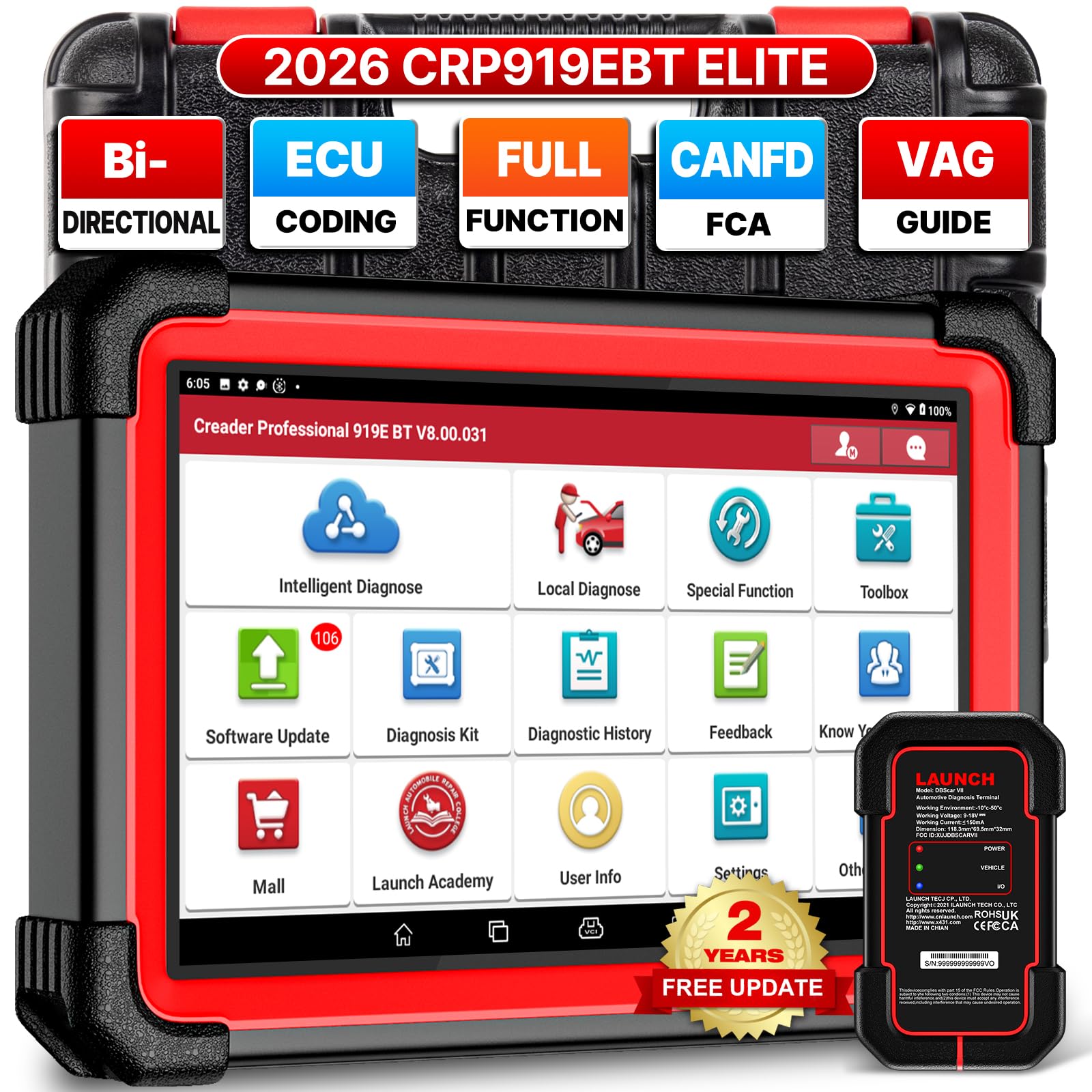
The LAUNCH X431 CRP919EBT is a specialized automotive diagnostic scanner, not a document scanner—it belongs in this list because it is an all-in-one scanner for vehicles, capable of reading and clearing fault codes, performing ECU coding, and running 35+ service resets across 160+ makes. For mechanics and advanced DIYers, it replaces multiple dedicated tools: multimeter, code reader, and oscilloscope all in one tablet form.
Its 7-inch Android tablet runs a full diagnostic suite with bi-directional control, allowing you to actuate components like windows, valves, and cooling fans directly from the tool. The included DBSCar VII Bluetooth connector supports CANFD and DoIP protocols, making it compatible with post-2020 GM vehicles and BMW models from 2017 onward. Users report that the initial VIN auto-detection and system scan complete in under 30 seconds, a speed that matches professional-level tools at a fraction of the cost.
Some buyers note that the registration process can be tricky—the device may show as already registered if it was pre-inspected by LAUNCH’s quality team—but customer service handles replacements promptly. The 6300mAh battery lasts several days of intermittent use, and the rugged case protects the tablet during shop use. If you need a full-system automotive scanner that can code, adapt, and reset modules, this is the one to get.
Why it’s great
- Full-system diagnostics with bi-directional control for 160+ makes
- Supports CANFD and DoIP for modern vehicles
- 35+ service resets, including ABS bleeding, battery registration, and steering angle calibration
Good to know
- Setup can be verbose; registration process may require contacting support
- Not for document scanning—entirely automotive-specific
- Higher initial investment; professional-grade tool
FAQ
Do I need an ADF if I only scan one page at a time?
What is the difference between duplex printing and duplex scanning?
Can I scan documents directly to cloud storage without a computer?
How much does the LAUNCH X431 CRP919EBT differ from a regular document scanner?
Final Thoughts: The Verdict
For most users, the best all in one scanner winner is the Brother MFC-L2820DW because it combines a 50-sheet ADF, duplex scanning, fast 34 ppm laser printing, and low cost per page in a compact footprint. If you prioritize raw scanning speed for digitizing large archives, grab the ScanSnap iX2400 with its 100-sheet feeder and 45 ppm duplex throughput. And for professional automotive diagnostics covering 160+ makes with bi-directional control, nothing beats the LAUNCH X431 CRP919EBT.

Mo Maruf
I created WellFizz to bridge the gap between vague wellness advice and actionable solutions. My mission is simple: to decode the research and give you practical tools you can actually use.
Beyond the data, I am a passionate traveler. I believe that stepping away from the screen to explore new environments is essential for mental clarity and physical vitality.