Our readers keep the lights on and my smoothie glass nicely filled. As an Amazon Associate, I earn from qualifying purchases.
That hollow, roomy echo or hiss ruining your latest podcast episode or gaming clip isn’t your room acoustics — it’s a poor mic capsule fighting to hear you over your own keyboard. Finding a microphone that captures clean, defined vocal clarity without draining your wallet is a specific search, but the market is flooded with cheap options that promise crystal sound but deliver flat, muddy, or overly sensitive recordings that annoy your audience more than your content does.
I’m Mohammad Maruf — the founder and writer behind WellFizz. I spend my time analyzing frequency response curves, self-noise floors, and polar pattern consistency across dozens of affordable USB microphones to separate the genuinely decent from the overhyped noise.
After hours of combing through technical spec sheets, customer experiences with gain staging, and reports of background noise handling, I’ve assembled a tight list of the best-performing options that actually deliver clean spoken-word audio. Whether you need a static desktop mic for a polished podcast or a wireless lavalier for on-the-go interviews, here is your definitive guide to the best budget microphone options that do not sound cheap.
How To Choose The Best Budget Microphone
Picking a mic on a budget is about knowing which compromises hurt your audio and which are harmless. You rarely get a premium large-diaphragm studio sound at this price, but you can absolutely get a clear, usable, and quiet recording that works for streaming, podcasts, or video calls. Here are the three specs that matter most.
Polar Pattern: Cardioid vs Supercardioid vs Omnidirectional
The polar pattern defines what the mic hears. For a typical home setup with a noisy PC fan, keyboard clicks, or room echo, a cardioid or supercardioid capsule is essential. Cardioid rejects sound from the sides and rear, keeping your voice prominent. Supercardioid is even tighter, rejecting more side noise at the cost of a small rear pickup lobe. An omnidirectional pattern, which captures sound equally from all angles, is a bad choice for a desktop mic unless you are in a treated studio or doing a quiet interview with someone across a table. Budget lavalier mics are often omnidirectional by design, which is fine when clipped near your mouth, but don’t expect background rejection.
Self-Noise and Frequency Response
Self-noise, measured in dBA, is the electronic hiss the mic produces. Entry-level budget mics often have a self-noise of 20 dBA or higher, which becomes audible in quiet passages of a podcast or ASMR recording. Look for a mic with a self-noise of 18 dBA or lower for cleaner recordings. Frequency response for a budget voice mic should ideally be smooth from around 80Hz to 15kHz. Many cheap mics boost the low-end around 100-150Hz to sound “warm,” but this can cause boominess on untreated desks. A flatter response that you can EQ in post is often preferable to a hyped curve.
Connectivity: USB-C vs XLR vs Wireless
Your interface choice is your first compatibility check. USB mics (USB-C or USB-A) offer plug-and-play simplicity with your computer, requiring no additional audio interface. They are ideal for podcasting, streaming, and remote work. XLR mics require an external audio interface with phantom power but offer higher fidelity and the ability to swap preamps or chain with other mics later — they are the long-term investment path beyond the budget tier. Wireless lavaliers that connect via USB-C or Lightning are unbeatable for on-camera video work where you need to be mobile, but they often sacrifice wireless range and battery life at the very low end. For a stationary desktop setup, a USB condenser is almost always the better value.
Quick Comparison
On smaller screens, swipe sideways to see the full table.
| Model | Category | Best For | Key Spec | Amazon |
|---|---|---|---|---|
| HyperX SoloCast 2 | USB Condenser | Streaming & Gaming | 24-bit / 96kHz, 79dBA self-noise | Amazon |
| ZealSound K66 | USB Condenser | ASMR & Close-Up Voice | 40Hz-18kHz, 66dBA audible noise | Amazon |
| NPTCL Wireless Lavalier | Wireless Lavalier | Vlogging & Mobile Recording | 70 ft range, 24H charging case | Amazon |
| Razer Seiren V3 Mini | USB Condenser | Compact Desktop & Travel | Supercardioid, 20dBA self-noise | Amazon |
| Mackie EM-91CU | USB Condenser | Budget Studio & Home Office | 16-bit / 48kHz, 78dBA self-noise | Amazon |
| ZealSound A68S RGB | USB Condenser | RGB Gaming & Live Streams | 96kHz sampling, 110dBA max SPL | Amazon |
| Mackie EM-91C | XLR Condenser | Long-Form Voiceover & Music | XLR, Cardioid, 78dBA self-noise | Amazon |
In‑Depth Reviews
1. HyperX SoloCast 2

The SuoloCast 2 sets the standard for what a budget USB mic should deliver: studio-quality 24-bit depth at a 96kHz sampling rate, which captures vocal transients with noticeably more presence than the 16-bit/48kHz standard found on cheaper competitors. Its built-in internal suspension system and foam pop filter eliminate the need for an external shock mount, keeping desk bumps and plosives out of your streams without adding bulk to your setup.
The tap-to-mute sensor is intuitive and responsive, with a bright red LED that clearly signals when the mic is live, which is a godsend for live streaming or sensitive conference calls. The compact tiltable stand feels solid and has a weighted base that resists tipping, plus embedded 3/8″ and 5/8″ threads for boom arm mounting if you want to get it closer to your mouth.
On the downside, the default cardioid pattern is sensitive enough to pick up keyboard clatter in a silent room, so you will likely want to use the built-in high-pass and low-pass filters via the NGENUITY software to tighten the sound. The USB-C port on the rear is also not the most secure, requiring careful cable management to avoid accidental disconnects during a heated gaming session.
Why it’s great
- 24-bit / 96kHz for higher vocal detail than typical budget mics.
- Built-in shock mount and pop filter keep setup simple and clean.
- Customizable audio filters via HyperX NGENUITY software.
- Weighted base and standard mounting threads for flexible positioning.
Good to know
- Rear USB-C connection can become loose with cable movement.
- Cardioid pattern still picks up keyboard and fan noise in quiet rooms.
- No onboard gain control requires software adjustment for input levels.
2. ZealSound K66 Podcast Microphone

The K66 is specifically tuned for close-up, intimate recordings, making it a hidden gem for ASMR creators and whisper artists. Its 40Hz to 18kHz frequency response extends lower than many budget mics, capturing the subtle rumble of deep voice tones and the texture of quiet sounds like tapping or brushing without muddying the midrange. The -45dB sensitivity rating means it handles quiet dynamics gracefully without introducing harsh distortion.
The standout feature is the dedicated one-button noise reduction mode that actively tames keyboard clicks and PC fan hum when enabled, while preserving the warmth of the voice. The onboard echo knob is a rare addition at this price, allowing you to add a subtle room ambience for immersive ASMR roleplays or keep it dry for clean podcast voiceovers.
Build quality is decent for the price with a metal chassis and weighted base, but the plastic construction on the bottom feels less confidence-inspiring than the all-metal HyperX. The included Lightning and USB-C adapters make it broadly compatible with iPhones and Android tablets, but be aware that the noise reduction mode can sound a bit processed on less demanding recordings like standard speech.
Why it’s great
- One-button noise reduction effectively quiets keyboard and fan noise.
- Broad 40Hz–18kHz response captures deep vocal tones and subtle textures.
- Onboard echo knob adds ambience without plugins.
- Comes with Lightning and USB-C adapters for mobile devices.
Good to know
- Build uses some plastic parts; not as rugged as metal-bodied alternatives.
- Noise reduction mode can sound slightly synthetic on clear speech.
- Top-address design requires precise aiming for optimal clarity.
3. NPTCL Wireless Lavalier Microphone
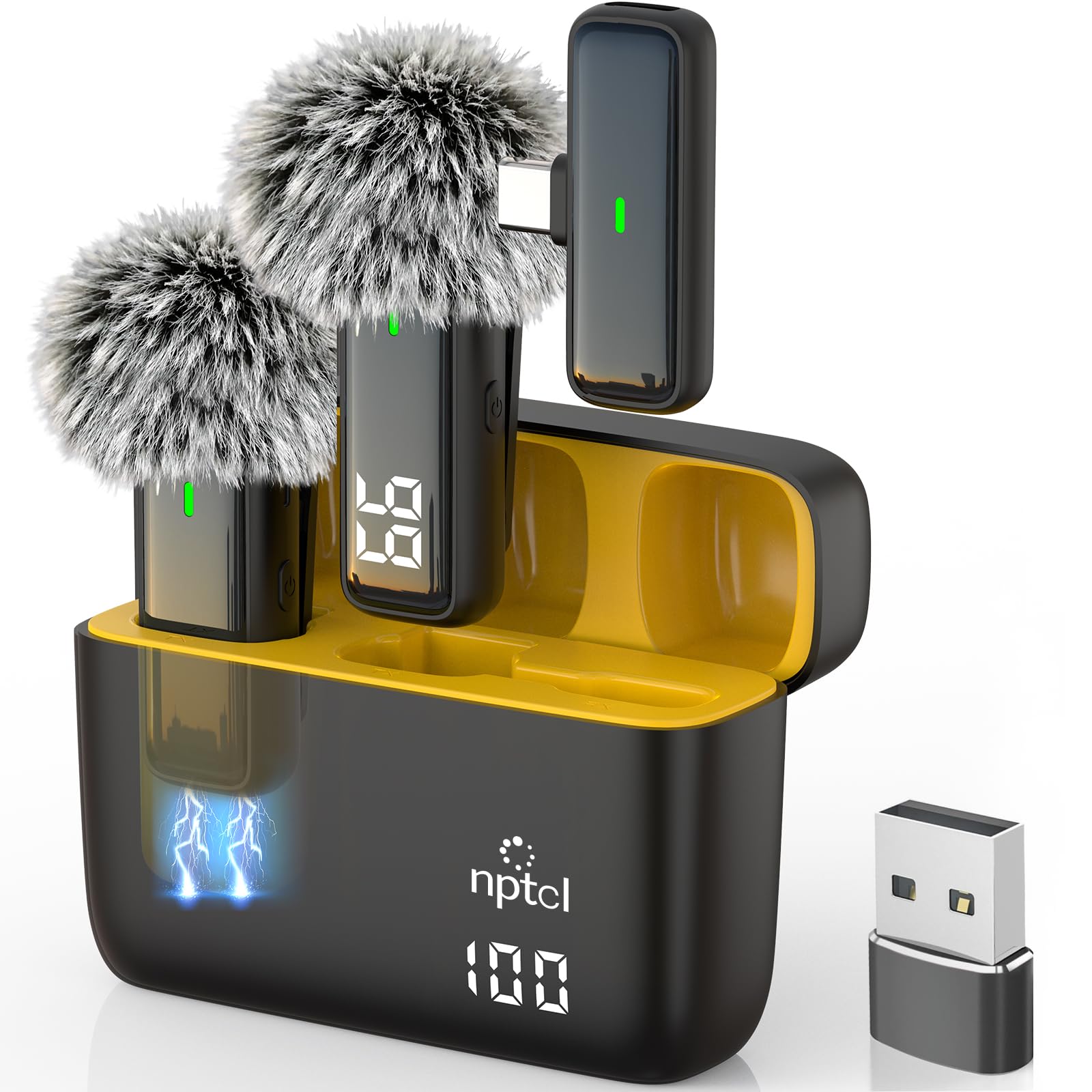
This wireless lavalier set is the best solution when you need to move around while recording, or when you are interviewing two people and want both voices captured clearly. The clip-on design attaches to a shirt collar and connects to your phone, laptop, or camera via USB-C (with included USB-A adapter) using automatic pairing — no Bluetooth, app, or audio interface required. The 70-foot effective range is generous for a mic in this segment, offering steady, low-latency audio even during walking tours or classroom setups.
The charging case delivers up to 24 hours of total battery life, with each individual mic lasting around six hours per charge. The built-in DSP chip does a respectable job reducing background HVAC hum and traffic noise, keeping the dialogue crisp. The design is minimal and unobtrusive, fitting easily under a jacket lapel or on a collar without being visually distracting on camera.
Sound quality is a clear step above typical phone or webcam microphones, but it does not rival a dedicated USB condenser for pure vocal warmth and depth. The omnidirectional pickup means it captures more room sound than a cardioid would, so you still need to be in a reasonably quiet space. The charging case itself is made of a lightweight polycarbonate that feels slightly cheap in hand, though it holds up fine to daily use.
Why it’s great
- 70-foot wireless range with stable, low-latency connection.
- 24-hour total battery life with convenient charging case.
- True plug-and-play auto pairing with no app needed.
- Compact clip-on design is camera-friendly and portable.
Good to know
- Omnidirectional pickup picks up more room echo than a cardioid mic.
- Audio quality is good but lacks the warmth of a desktop condenser.
- Charging case feels somewhat cheap despite functional reliability.
4. Razer Seiren V3 Mini

The Seiren V3 Mini is Razer’s solution for gamers and streamers with limited desk space who still want a notable upgrade over a headset mic. Its supercardioid pickup pattern is tighter than a standard cardioid, doing a surprisingly good job of minimizing side noise from mechanical keyboards and mouse clicks while keeping your voice in focus. The compact 6.38-inch tall body sits on a tiltable stand with a built-in shock absorber that dampens desk vibrations.
The best feature is the unique tap-to-mute sensor on the top of the mic, which is both satisfying to use and clearly shows mute status with a bright LED indicator — red for muted, off for live. It works seamlessly for both gaming chats and Zoom calls where privacy is a concern. Plug-and-play via USB-A means zero setup hassle.
Sound quality is clear and detailed for its size, but it does not have the full-bodied presence of larger condenser designs like the Mackie EM-91CU. The lack of any onboard gain, mute, or volume controls means you have to adjust levels entirely in software, which can be annoying during live sessions. The 20dBA self-noise rating is reasonable for the price but you may notice a faint hiss in quiet recordings if your gain is pushed high.
Why it’s great
- Supercardioid pattern offers excellent side noise rejection.
- Tap-to-mute sensor with clear LED status indicator.
- Ultra-compact footprint fits easily on any desk.
- Built-in shock absorber reduces vibration noise.
Good to know
- No onboard gain or volume controls.
- Noticeable hiss at high gain settings.
- Sound is clear but less full-bodied than larger alternatives.
5. Mackie EM-91CU

The Mackie EM-91CU is a straightforward, workhorse USB condenser that prioritizes reliability and pure signal quality over flashy features. Its 16-bit / 48kHz sampling rate is standard for the budget tier, but the 78dBA self-noise is slightly higher than some competitors, meaning it works best when you are speaking directly into it at a moderate distance. The cardioid pattern is well-tuned for rejecting side room noise, and the stainless steel enclosure feels surprisingly robust for the price.
This mic is a strong choice for solo voiceover recording, online teaching, or clear Zoom calls where you need audio that simply works without surprises. The plug-and-play setup via a standard USB Type-B cable is familiar and easy, though the older connector style may be less convenient than modern USB-C. The included shock mount is basic but functional, reducing desk vibration.
The main drawback is the relatively dark frequency response, which naturally reduces sibilance but can sound a bit dull for music or expressive voice acting unless you apply EQ in post-production. It also lacks any physical controls like mute or gain knobs, so all adjustments must be handled in your recording software or operating system.
Why it’s great
- Reliable plug-and-play USB connection with no driver setup.
- Cardioid pattern offers solid background noise rejection.
- Rugged stainless steel construction feels durable.
- Included shock mount helps with desk vibration control.
Good to know
- 16-bit / 48kHz sample rate is standard, not high-resolution.
- Dark frequency response may require EQ for expressive content.
- No onboard mute, gain, or volume controls.
- Uses older USB Type-B connector.
6. ZealSound A68S RGB Gaming Microphone

The ZealSound A68S is the most feature-packed entry in this budget lineup, offering 96kHz sampling, a noise reduction chip, zero-latency monitoring, RGB lighting, and a full bundle that includes both a boom arm and a foldable tripod stand. For gamers and streamers who want a desktop presence that matches their setup aesthetic, the A68S delivers a bright voice capture that emphasizes clarity in midrange frequencies, ideal for team callouts on Discord or commanding a raid.
The bottom-mounted gear-textured gain knob is a smart design choice that avoids accidental bumps during gameplay, and the tap-to-mute button with red RGB feedback gives immediate visual confirmation of mic status. The included scissor boom arm extends up to 30.8 inches, making it easy to position the mic at mouth level without blocking the screen. Zero-latency monitoring via the 3.5mm headphone jack is essential for hearing yourself during live streams.
However, the 110dBA max SPL means the mic can handle loud moments without clipping, but the self-noise is not specified and user tests suggest a faint hiss in quiet recordings. The RGB lighting, while customizable, adds visual flair but does not help with audio quality. Build quality is adequate for the price, but the plastic body components feel less premium than metal alternatives like the Mackie or HyperX.
Why it’s great
- 96kHz sampling captures vocal detail at a high resolution.
- Complete bundle with boom arm, tripod, and pop filter included.
- Bottom-mounted gain knob is resistant to accidental bumps.
- Zero-latency headphone monitoring for live control.
Good to know
- Faint hiss noticeable in quiet recordings at high gain.
- Plastic body feels less durable than metal alternatives.
- RGB lighting adds visual noise, not audio improvement.
- Self-noise spec not explicitly listed by the manufacturer.
7. Mackie EM-91C

The Mackie EM-91C is the XLR version of the brand’s entry-level condenser, designed for users who already own or plan to purchase an audio interface with phantom power. It uses the same large-diaphragm capsule as the EM-91CU but delivers a slightly smoother frequency response that many users find warmer and more natural than the USB version. It is a phenomenal starting point for voiceover work, long-form reading, or even capturing acoustic guitar at a budget-friendly price.
Its cardioid pattern is effective at rejecting side and rear noise, and the dark, sibilance-taming character makes it a favorite for voices that tend toward harsh “S” and “T” sounds. The included shock mount and XLR cable mean you can get started with just an interface. The all-metal construction with stainless steel enclosure feels built to last through regular studio use.
Being an XLR mic, it requires phantom power from an interface, which adds immediate cost and complexity to your setup. The self-noise at 78dBA is acceptable but not silent; you will hear some analog hiss in quiet parts of a recording. It also lacks the low-cut filter switch found on more expensive XLR mics, so you may need to roll off low frequencies in your DAW to avoid rumble from desk movement or HVAC systems.
Why it’s great
- Warm, sibilance-taming sound ideal for voiceover and reading.
- Rugged all-metal construction is built for studio use.
- Includes shock mount and XLR cable for immediate setup.
- Upgrade path to better preamps and signal chains.
Good to know
- Requires audio interface with phantom power (not included).
- 78dBA self-noise is audible in quiet passages.
- No low-cut filter switch for rolling off rumble.
- Not a plug-and-play solution for beginners without gear.
FAQ
Do I need an audio interface for a budget microphone?
What is the best polar pattern for a home office budget microphone?
Final Thoughts: The Verdict
For most users, the best budget microphone winner is the HyperX SoloCast 2 because it combines 24-bit/96kHz audio with practical built-in features like a pop filter and internal shock mount at a price that does not break the bank. If you want a calm, intimate voice capture for ASMR or quiet recordings, grab the ZealSound K66. And for on-the-go video recording or wireless freedom, nothing beats the convenience of the NPTCL Wireless Lavalier.

Mo Maruf
I created WellFizz to bridge the gap between vague wellness advice and actionable solutions. My mission is simple: to decode the research and give you practical tools you can actually use.
Beyond the data, I am a passionate traveler. I believe that stepping away from the screen to explore new environments is essential for mental clarity and physical vitality.