Our readers keep the lights on and my smoothie glass nicely filled. As an Amazon Associate, I earn from qualifying purchases.
Specs are compiled from manufacturer listings and verified buyer reviews and can change over time — please confirm the key details on the product page before buying.
A wireless mouse should feel invisible — you shouldn’t think about the click, the lag, or the battery. But with so many options claiming long battery life, silent clicks, and ergonomic shapes, picking one can get surprisingly confusing. This guide cuts through the noise to help you find the best wireless computer mouse for how you actually work, whether that’s at a desk, on the road, or across multiple devices.
I’m Mohammad Maruf — the founder and writer behind WellFizz. This guide is built by comparing the manufacturers’ published specifications and the patterns across verified customer reviews, so you get each pick’s real strengths and trade-offs instead of marketing spin.
The wireless mice here span from ultra-portable travel companions to ergonomic vertical designs built for all-day comfort, each chosen for a specific use case.
Our Picks at a Glance
How To Choose The Best Wireless Computer Mouse
Choosing a wireless mouse depends on matching a few core specs to your daily setup. Here is what actually matters.
Connection Type: Bluetooth vs USB Receiver
A 2.4GHz USB receiver gives you a lag-free, plug-and-play connection — you plug it in and it works instantly. Bluetooth frees up a USB port and lets you switch between devices like a laptop and a tablet without swapping a dongle. Many modern mice offer both, giving you the flexibility to choose per device.
Battery: Rechargeable vs Replaceable
A rechargeable mouse saves you from buying batteries, but you have to remember to plug it in every few weeks or months. A battery-powered mouse can last over a year on a single AA cell, but you need to keep spares handy. There is no right answer — it depends on whether you prefer charging cables or spare batteries.
Ergonomics and Size
Standard mice work fine for most people, but if you feel wrist or forearm fatigue after a long day, a vertical ergonomic mouse can help by keeping your hand in a natural handshake position. Pay attention to size — many ergonomic models are built for small to medium hands, and a larger palm may feel cramped.
DPI and Button Count
DPI, or dots per inch, controls how fast the cursor moves on screen. A higher DPI (like 4800) lets you zip across a large monitor with a tiny wrist flick, while a lower DPI (800) gives you pixel-level precision for design work. Extra buttons — like forward and back thumb buttons — speed up browsing but may not work on macOS.
Quick Comparison
| Model | Best For | DPI Range | Battery Life | Connection Modes | Amazon |
|---|---|---|---|---|---|
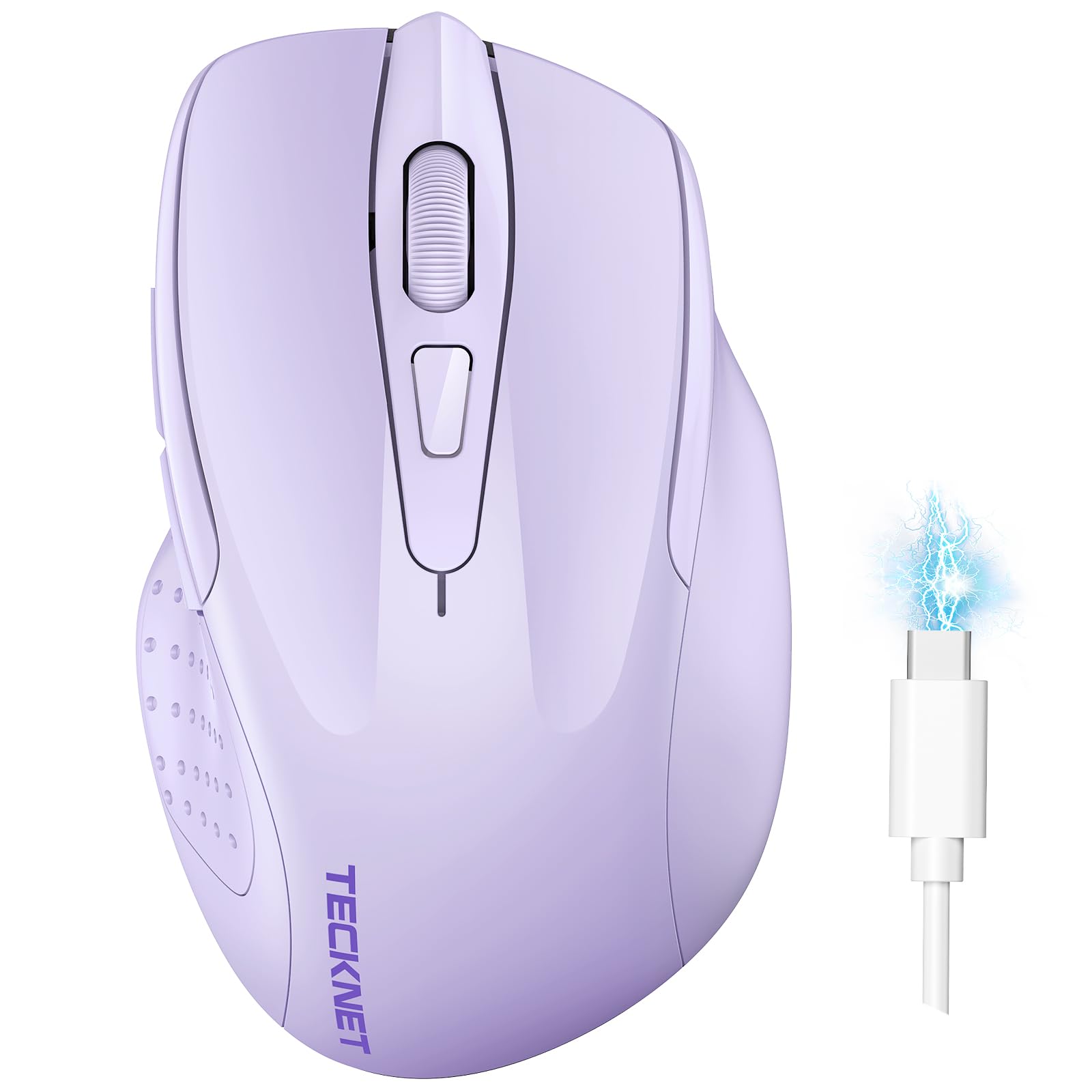
| TECKNET Wireless Mouse (BT5.0/3.0 & 2.4G)★ Best Overall | Multi-Device Users | 800 — 4800 | ~3 months (rechargeable) | Bluetooth + USB | Amazon |
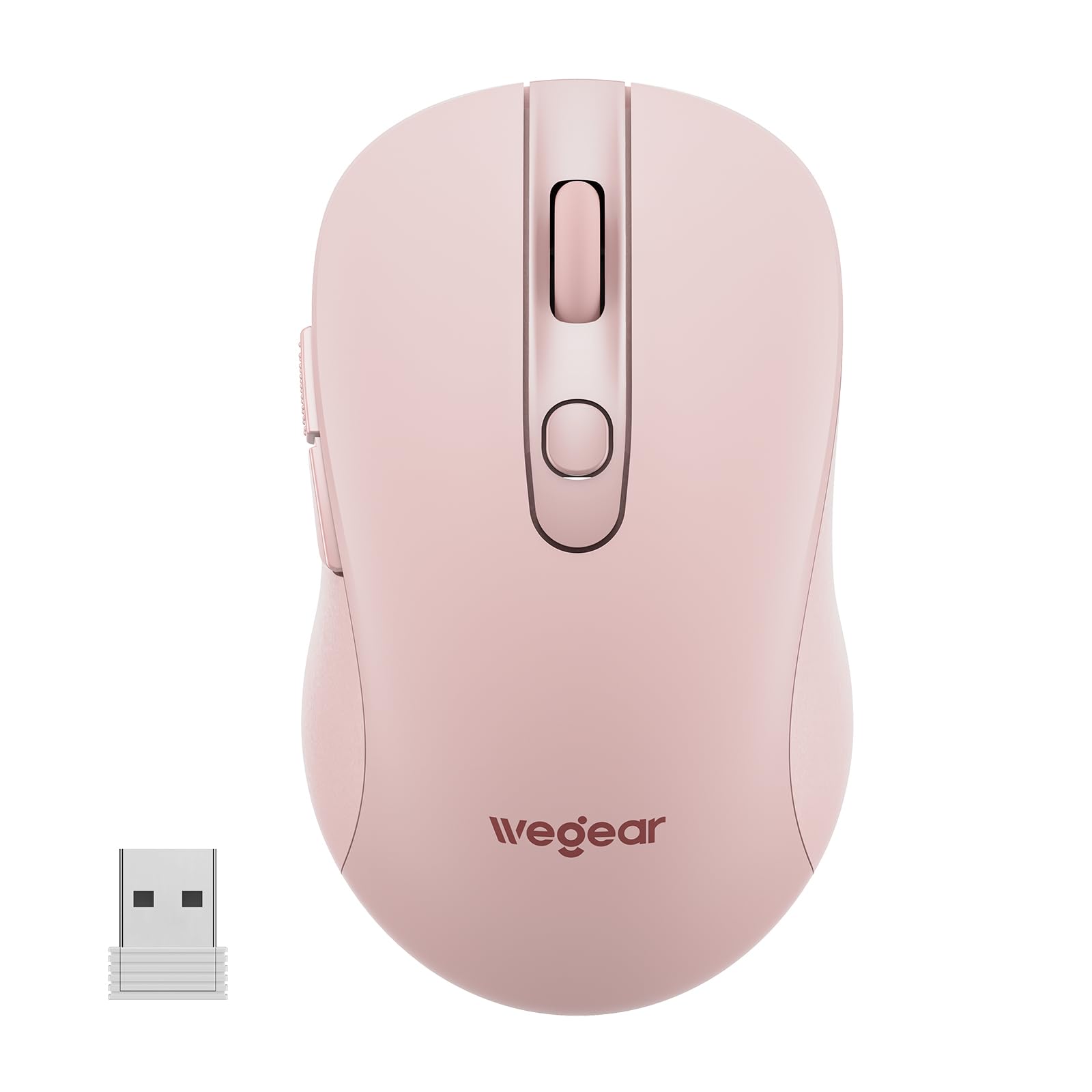
| wegear USB Wireless MouseBattery Life Champion | Battery Life Kings | 800 — 4000 | Up to 24 months (AA) | USB only | Amazon |
| Logitech M340 Wireless Mouse | Silent Clicks & Style | Fixed (1000) | Up to 18 months (AA) | USB only | Amazon |
| SABLUTE Wireless Mouse M21 | Travel & USB-C Compatibility | 800 — 1600 | Up to 18 months (AA) | USB + USB-C adapter | Amazon |
| TECKNET Ergonomic Vertical Mouse | Wrist Strain Relief | 800 — 4800 | Up to 24 months (2x AAA) | Bluetooth + USB | Amazon |
| Uineer Wireless Ergonomic Mouse | Compact Vertical with RGB | 800 — 2400 | Rechargeable (no specific estimate) | Bluetooth + USB | Amazon |
| XBG B15pro Wireless Bluetooth Mouse | On-Device Specs Display | 800 — 2400 | Rechargeable 500 mAh (no specific estimate) | Bluetooth + USB | Amazon |
In‑Depth Reviews
1. TECKNET Wireless Mouse (BT5.0/3.0 & 2.4G) Rechargeable 4800 DPI Silent
Our pick — over 4.5★ from 13,500+ verified ratings; the strongest balance of quality and price.
A rechargeable dual-mode mouse that juggles two devices without skipping a beat.
The TECKNET is built for the person who works across a laptop and a tablet — or a work PC and a personal one — without wanting to swap dongles. It pairs via Bluetooth 5.0/3.0 or a USB receiver, and you switch between the two connected devices with a slide of a button. That means you can jump from answering emails on your desktop to browsing on your tablet in one second. The mouse is rechargeable, taking about 1.5 to 2 hours to fill up, and buyers report using it as a primary mouse for three months without needing to plug it in.
The clicks are near-silent, so you will not annoy anyone in a shared office. But there is a size catch: the mouse is best for small to medium hands, and a few buyers with larger palms mentioned it feels a bit cheap. The side buttons also do not work on macOS, so Mac users lose some navigation shortcuts.
What Works Well
- Dual-device switching via Bluetooth or USB receiver is smooth.
- Rechargeable battery saves money on disposables; charges in under two hours.
- Six DPI levels up to 4800 give you speed or precision on demand.
- Silent clicks keep shared workspaces quiet.
What to Watch For
- Best suited for small to medium hands; larger hands may feel cramped.
- Side buttons are not recognized on macOS.
- Only right-handed orientation.
Your best all-rounder if: you need to switch between two devices regularly and want a rechargeable mouse with fast cursor speeds and silent clicks.
Look elsewhere if: you have large hands and want a full-palm grip, or you use a Mac and need those side buttons.
2. wegear USB Wireless Mouse for Laptop PC Mac, 2.4GHz Cordless Mouse with 6 Buttons
One AA battery runs this thing for two years — no charging cables required.
If your pet peeve is a mouse that dies mid-task, the wegear solves it with an absurdly long battery life: up to 24 months on a single AA battery. In real-world terms, that means you can shove a battery in and forget about it for the life of most laptops. The mouse drops into a sleep mode after 8 minutes of inactivity and wakes up with any button click, so it is not wasting power while you are away. A red LED blinks when the battery is low, giving you plenty of warning before it actually dies.
It packs six buttons including forward and back thumb controls, though those side buttons are not recognized on a Mac. The DPI maxes out at 4000 across five levels, which is plenty fast for large monitors. That is six buttons versus the Logitech M340’s three buttons, so you get more navigation shortcuts. One important note: the USB receiver sits in a compartment under the mouse and works within 33 feet (10 meters). Buyers consistently say it is plug-and-play with zero software headaches on Windows and Mac alike, though you will need a USB-C adapter for newer tablets or iPads.
Why You’d Pick It
- 24-month battery life on a single AA battery is top-tier for this list.
- Six buttons with forward/back navigation speed up web browsing.
- No software or drivers needed — works right from the start on Windows and Mac.
Things to Note
- Side buttons do not work on macOS.
- No Bluetooth — USB receiver only.
- AA battery is not included.
Reach for this if: you hate remembering to charge things and want a low-maintenance mouse that runs for years on a single battery.
Think twice if: you need Bluetooth to switch between devices or need those side buttons on a Mac.
3. Logitech M340 Wireless Mouse with Limited Edition Prints, USB Receiver and Silent Clicks

A library-quiet mouse that also looks like a design accessory.
The Logitech M340 is the mouse you pick when you want to make a statement without making a sound. Its Silent Touch technology removes 90% of click noise — so in a quiet office or a late-night room, your clicks stay private. The soundless clicks do not sacrifice feel, and owners mention the mouse is “responsive” with a satisfying tactile bump. It runs on a single pre-installed AA battery for up to 18 months, and an auto-sleep mode kicks in to save power when you step away.
This is an ultra-compact and lightweight wireless mouse that slips easily into a bag. It connects via a 2.4GHz USB receiver up to 10 meters away, with no Bluetooth option. The button count is limited to three — just left, right, and scroll wheel click — so you lose the forward and back shortcuts that the wegear or TECKNET offer. The shape is ambidextrous, and the plastic includes a minimum of 42% certified post-consumer recycled material, making it a slightly greener choice.
What Stands Out
- Silent clicks cut 90% of click noise; ideal for shared or quiet spaces.
- Up to 18 months of battery life with a pre-installed AA battery.
- Unique prints and colors let you express your style.
- Ambidextrous design works for left- and right-handed users.
Trade-offs
- No Bluetooth — USB receiver only, which requires a free USB-A port.
- Only three buttons; no forward/back navigation.
- Fixed DPI (1000ish), no adjustable levels for different tasks.
Best for you if: you work in a quiet environment like a library or open office and want a slim, stylish mouse with near-silent clicks.
Not for you if: you rely on Bluetooth or need adjustable DPI and extra buttons for fast navigation.
4. SABLUTE Wireless Mouse M21

Comes with both a USB-A dongle and a USB-C adapter so it works with modern laptops.
The SABLUTE M21 solves a common headache: your new laptop only has USB-C ports, but most wireless mice still ship with a USB-A receiver. This mouse includes both a USB-A nano receiver and a USB-C adapter, meaning you can plug it into a MacBook, a modern Windows ultrabook, or a tablet that supports OTG without a separate dock. The mouse measures 4.09 × 2.68 × 1.49 inches, making it genuinely compact enough to slide into a laptop bag pocket without a bulge.
The clicks are up to 90% quieter than a standard mouse, and the rubber scroll wheel feels tactile without being loose. The battery life is rated at up to 18 months on a single AA battery (not included), and it enters a light sleep after 10 seconds and deep sleep after 10 minutes to preserve power. One buyer specifically praised the USB-C adapter as “the best part” for switching between an older and newer Mac without extra dongles.
Why It Wins for Travel
- USB-A receiver and USB-C adapter included for broad device compatibility.
- Ultra-compact size fits easily in a laptop bag.
- Up to 18-month battery life with smart auto-sleep modes.
- 90% noise reduction for quiet office use.
What It Lacks
- No Bluetooth — relies solely on the USB receiver.
- Only three DPI levels, maxing at 1600 — less flexibility for high-res screens.
- AA battery not included.
Grab this if: you use a modern laptop with only USB-C ports and want a compact, no-fuss mouse that works without a dongle adapter.
skip it if: you need Bluetooth to connect to tablets or phones without a USB port.
5. TECKNET Ergonomic Mouse, Wireless Bluetooth Vertical Mouse

A vertical grip that puts your hand in a handshake position to reduce wrist strain.
If you feel a dull ache in your wrist or forearm after a long day at the computer, the TECKNET vertical mouse is worth a serious look. Its ergonomic design places your palm at a near-vertical angle against the desk instead of the flat pronated position of a standard mouse. That shift reduces pressure on the carpal tunnel area, and buyers consistently note it is comfortable for all-day use. It connects via Bluetooth 5.0/3.0 to two devices simultaneously, or you can use the USB receiver for a third — you short-press the pairing button to cycle between them.
The DPI range goes up to 4800 across six levels, matching the other TECKNET on this list. The left and right clicks are silent, though the other function buttons (like DPI switch) are not. It requires two AAA batteries (not included), and the maker claims up to 24 months of life depending on usage. A few buyers with smaller hands wished the grip was more compact, so it is best for medium or larger palms. The vertical shape takes a day or two to feel natural, but most users report they do not want to go back to a flat mouse afterwards.
Ergonomic Highlights
- Vertical handshake grip significantly reduces wrist and forearm strain during long workdays.
- Dual Bluetooth + 2.4GHz lets you connect up to three devices.
- 4800 max DPI with six adjustable levels for precision or speed.
- Silent left and right clicks for quiet environments.
Ergonomic Caveats
- Best for medium to large hands — smaller palms may find it bulky.
- Requires two AAA batteries (not included).
- Only right-handed design.
Ideal for: anyone who spends 6+ hours a day on a computer and wants to reduce wrist pain with a proven vertical grip.
Consider otherwise if: you have small hands or prefer a compact travel-friendly size.
6. Uineer Wireless Ergonomic Mouse, Wireless Bluetooth Rechargeable Vertical Mouse

A smaller vertical mouse with a colorful LED strip that adds some flair to your desk.
The Uineer takes the vertical ergonomic concept and shrinks it down for small to medium hands, making it a rare find if you have smaller palms but want wrist strain relief. It weighs just 71 grams, so it feels light in the hand. A 7-color ambient LED light runs along the thumb side — some buyers love the visual pop, though you cannot disable it. The mouse connects via dual Bluetooth 5.0/4.0 or a 2.4GHz USB receiver, and you can pair up to three devices and switch between them without re-pairing.
It is rechargeable via a built-in battery, though the maker does not give a specific month estimate — customers note a couple of weeks of moderate use before needing a charge. The clicks are described as crisp and precise rather than silent, so you will hear a faint click in a quiet room. Note that the side buttons do not work on macOS, and the LED light is always on while the mouse is active.
What We Like
- Vertical ergonomic design is scaled for small to medium hands.
- Very lightweight at 71 grams.
- Dual Bluetooth and USB connect up to three devices.
- Rechargeable — no batteries to replace.
Considerations
- LED lighting is always on and cannot be turned off.
- DPI maxes at 2400 — less range for high-resolution monitors.
- Side buttons not functional on macOS.
- Not ideal for large hands.
Best suited for: someone with small to medium hands who wants a lightweight vertical mouse and likes the ambient LED aesthetic.
Look elsewhere if: you need a silent click, a higher DPI, or a full-sized grip for larger palms.
7. XBG B15pro Wireless Bluetooth Mouse, Tri-Mode with LED Display

A built-in screen shows your battery percentage, DPI level, and connection mode in real time.
The XBG B15pro stands out with an LED status display right on the body — you can see your exact battery percentage, the current DPI level (800/1000/1200/1600/2400), and which wireless mode you are connected to without guessing. It connects via Bluetooth 5.0, Bluetooth 4.0, or a 2.4GHz USB receiver, and you can switch between paired devices in about 0.8 seconds. That makes it a strong option if you juggle a personal laptop, a work PC, and a tablet.
The built-in 500 mAh battery charges via a Type-C port, replacing the need for AA batteries entirely. The clicks are silent, preserving the feel without the noise. The shape includes a contoured thumb rest and arched palm support designed to prevent wrist strain during an 8-hour workday. One common complaint from users is that you cannot re-assign the side buttons or adjust the sleep timer — the sleep mode kicks in after 5 minutes of inactivity with no way to change it. The mouse is ambidextrous, which is rare among ergonomic-shaped mice.
Standout Features
- LED screen shows battery, DPI, and connection status at a glance.
- Tri-mode wireless (Bluetooth 5.0, 4.0, and 2.4GHz) for broad device support.
- Rechargeable 500 mAh battery with Type-C port.
- Silent clicks suitable for quiet offices.
Room for Improvement
- Cannot reprogram side buttons or adjust the 5-minute sleep timer.
- Max DPI of 2400 is lower than some premium alternatives.
- Ambidextrous shape may not feel as natural as a dedicated right-hand ergonomic design.
Perfect for: tech-savvy users who want real-time battery and DPI info on a screen and need to switch between three devices.
Not for you if: you need high DPI for a large 4K monitor, or you want to customize button assignments.
Understanding the Specs
DPI — Dots Per Inch
DPI controls how fast the cursor moves in relation to your physical hand movement. A higher DPI, like 4800, means the cursor zips across the screen with a tiny wrist flick — great for large or multi-monitor setups. A lower DPI, like 800, gives you fine control for tasks like photo editing or spreadsheet work. Most adjustable mice let you cycle through levels on the fly so you can slow down for precision and speed up for browsing.
Polling Rate (Hz)
The polling rate is how often the mouse reports its position to the computer, measured in hertz (Hz). A higher rate, like 500 Hz or 1000 Hz, means the cursor feels more responsive and the movements look smoother on screen. Most office mice run at around 125-250 Hz, which is perfectly fine for everyday work. Gamers or anyone doing precise design work will notice the difference with a higher polling rate.
Battery Life: Rechargeable vs Replaceable
A rechargeable mouse has a built-in battery that you charge via a cable — convenient but requires remembering to plug it in. A mouse that uses standard AA or AAA batteries can last 12 to 24 months, which is great for confidence but means you need to keep spare batteries on hand. Neither is better universally; your choice depends on whether you mind charging cables or battery waste more.
Connection: Bluetooth vs 2.4GHz USB Receiver
A 2.4GHz USB receiver gives you the most stable, low-latency connection with zero pairing — just plug in and go. Bluetooth frees up a USB port and lets you connect to devices that lack a USB-A port, like tablets or phones. Many premium mice now offer both modes, letting you use Bluetooth for your laptop and the receiver for your desktop, switching with a single button.
FAQ
How long does a wireless computer mouse battery last?
Is a Bluetooth mouse better than a 2.4GHz wireless mouse?
Does a vertical mouse actually help with wrist pain?
Can I use a wireless mouse on any surface?
What does DPI mean and how high should it be?
Do all wireless mice have the same latency or lag?
Can I use a wireless mouse while it is charging?
Will side buttons work on a Mac?
How do I clean a wireless mouse?
Does a wireless mouse work with a tablet or phone?
Final Thoughts: The Verdict
Across the board, the wireless computer mouse winner is the TECKNET Wireless Mouse (BT5.0/3.0 & 2.4G) Rechargeable because it balances dual-device switching, a rechargeable battery, six DPI levels including 4800, and silent clicks at a price that undercuts most competitors. If you want a battery that runs for nearly two years without a single charge, grab the wegear USB Wireless Mouse. And if wrist strain is your main concern, the standout is the comfort of the TECKNET Ergonomic Vertical Mouse with its proven handshake grip design.
How We Picked
We do not accept paid placement. Every pick is matched to a real buyer and a real use-case; we do not hands-on test units.
Sources & Methodology
Specifications: manufacturer listings and product documentation. Review insights: verified customer reviews, as of July 2026. Pricing: not shown on this page (it changes often); check the current price via the retailer link.
As an Amazon Associate, WellFizz earns from qualifying purchases. This does not affect which products we feature.
Related Guides

Mo Maruf
I created WellFizz to bridge the gap between vague wellness advice and actionable solutions. My mission is simple: to decode the research and give you practical tools you can actually use.
Beyond the data, I am a passionate traveler. I believe that stepping away from the screen to explore new environments is essential for mental clarity and physical vitality.