Our readers keep the lights on and my smoothie glass nicely filled. As an Amazon Associate, I earn from qualifying purchases.
A wired mouse eliminates the single most frustrating variable in pointer control: latency. When you click, the action registers immediately—no Bluetooth handshake, no dongle interference, no midnight scramble for a spare AA battery. The cable tethers your cursor to your command with absolute predictability.
I’m Mohammad Maruf — the founder and writer behind WellFizz. I’ve spent hundreds of hours breaking down sensor specifications, switch actuation forces, and cable flexibility data to separate genuinely capable wired mice from the noise.
Whether you need pixel-perfect tracking for competitive gaming or a reliable daily driver that never stalls mid-scroll, the best wired computer mouse delivers a consistent, zero-compromise connection that wireless simply cannot guarantee.
How To Choose The Best Wired Computer Mouse
A wired mouse is mechanically straightforward, but the differences in sensor accuracy, button feel, and cable stiffness directly affect how it performs under your hand. Focus on three key areas before buying.
Sensor Type and DPI Range
All modern wired mice use optical sensors, but not all sensors track equally. Entry-level sensors may introduce smoothing that adds latency at high DPI. Mid-range and premium optical sensors (such as Logitech’s HERO or PixArt variants) report movement without filtering. For standard 1080p screens, 8,000 DPI is more than sufficient. For ultra-wide or 4K displays, a sensor capable of 16,000 DPI or higher lets you move the cursor across the full width without lifting the mouse.
Switch Quality and Click Feel
Mechanical switches with metal spring tensioning provide a crisp, tactile click that wears evenly over millions of actuations. Budget mice often use standard membrane switches that develop a mushy feel or double-click issues sooner. For daily-heavy use or competitive gaming, look for mice that advertise mechanical primary buttons with rated lifespans above 20 million clicks.
Cable Construction and Weight
The cable is the defining constraint of a wired mouse. Standard rubber cables create drag and can catch on desk edges. Braided cables offer better durability but retain some stiffness. Paracord-style cables are the lightest, nearly eliminating cable drag to mimic a wireless feel. The mouse weight also affects glide—lightweight mice under 70 grams suit fast flick movements, while heavier mice (90 grams or more) provide stability for precise aiming.
Quick Comparison
On smaller screens, swipe sideways to see the full table.
| Model | Category | Best For | Key Spec | Amazon |
|---|---|---|---|---|
| Logitech G502 Hero | Premium | High-precision gaming and productivity | 25,600 DPI HERO Sensor | Amazon |
| Logitech G203 | Mid-Range | Budget gaming with reliable tracking | 8,000 DPI Optical Sensor | Amazon |
| Redragon M602 Griffin | Mid-Range | MMO gaming with programmable buttons | 7,200 DPI, 8 Buttons | Amazon |
| Redragon M617 Ultralight | Budget | Ultra-lightweight flick aiming | 41g Weight, Paracord Cable | Amazon |
| Hoteam 12-Pack | Budget | Bulk deployment for classrooms or labs | 3-Button Ambidextrous Design | Amazon |
In‑Depth Reviews
1. Logitech G502 Hero

The G502 Hero sits at the top of the wired mouse hierarchy for a reason. Its HERO 25K sensor tracks at sub-micron resolution, meaning every tiny adjustment of your wrist translates directly to cursor movement without acceleration or smoothing. For 4K displays or competitive shooters that demand one-to-one tracking, this sensor eliminates the guessing game.
The adjustable weight system sets it apart from static-shell mice. Five 3.6-gram cartridges let you dial in the balance—add all 18 grams for a planted, stable feel during precise aiming, or remove them entirely for a lighter flick. The dual-mode hyper-fast scroll wheel clicks conventionally or spins freely for rapid document navigation.
Build quality is exceptional. Metal spring tensioning on the left and right buttons delivers a crisp actuation that remains consistent after millions of clicks. The braided cable is durable and the weighted chassis reduces cable-induced wobble. Users note the G502 runs heavier than ultralight mice, so palm-grip users benefit most from its ergonomic contour.
Why it’s great
- Hero 25K sensor with zero smoothing offers flawless tracking
- Adjustable weight system for personalized balance
- Dual-mode scroll wheel for speed or precision
Good to know
- Heavier than typical ultralight gaming mice at over 120 grams
- Cable is braided and stiff, may benefit from a mouse bungee
2. Logitech G203

The G203 proves that a reliable gaming-grade sensor does not require a premium budget. Its 8,000 DPI optical sensor operates without filtering or smoothing, delivering clean tracking that rivals models twice its price. The default 1,000 Hz polling rate ensures the cursor updates every millisecond, keeping input lag to a minimum.
Logitech’s mechanical primary buttons use metal spring tensioning, giving each click a distinct, snappy rebound that resists fatigue during long sessions. The six-button layout keeps things simple—left, right, middle, two side buttons, and a DPI cycle button—without overwhelming beginners. LIGHTSYNC RGB offers full color customization through G Hub software, including screen-driven lighting that reacts to in-game action.
The symmetrical shape works well for claw and fingertip grips, though users with large palms may wish for a taller hump. The 2.1-meter USB Type-A cable is rubber rather than braided, so it is flexible but can attract desk dust. The G203 is also compatible with Piper software on Linux, widening its appeal beyond Windows and macOS.
Why it’s great
- Metal spring tensioned buttons for crisp, durable clicks
- 1,000 Hz polling rate with zero sensor smoothing
- Compatible with Logitech G Hub and Linux Piper
Good to know
- Rubber cable is flexible but not as durable as braided options
- Scroll wheel may develop wear after extended daily use
3. Redragon M602 Griffin

The M602 Griffin packs eight buttons and five memory profiles into an ergonomic shell designed for extended MMO sessions. Its 7,200 DPI optical sensor delivers five adjustable steps (800/1200/1600/2400/7200 DPI), letting you switch between broad camera movements and pixel-tight targeting on the fly. The 10G acceleration rating ensures fast flick responses without sensor dropout.
Button layout is where the Griffin shines for macro-heavy gamers. Seven programmable MMO buttons are placed for thumb access, reducing the need to stretch for keyboard hotkeys. The included Redragon software allows per-button macro recording and profile switching, with each profile assigned a distinct LED color for quick identification. The RGB backlight offers seven modes including a full-off option for dark-room gaming.
The ergonomic right-handed shape fits average-to-large palms with a palm grip, while the matte side grips reduce slip during intense play. The braided fiber cable is 1.8 meters long with a gold-plated USB connector. Some users note the middle button requires a harder press than ideal, and the sensor LED remains on even when the PC is powered down. Still, for the button count and customization, it outperforms many mice at a similar spend.
Why it’s great
- Eight programmable buttons with full macro support
- Five onboard memory profiles with color-coded LEDs
- Braided cable with gold-plated USB for reliable connection
Good to know
- Middle click requires a noticeably firmer press
- No lift-off calibration; cursor may shift when raised slightly
4. Redragon M617 Ultralight
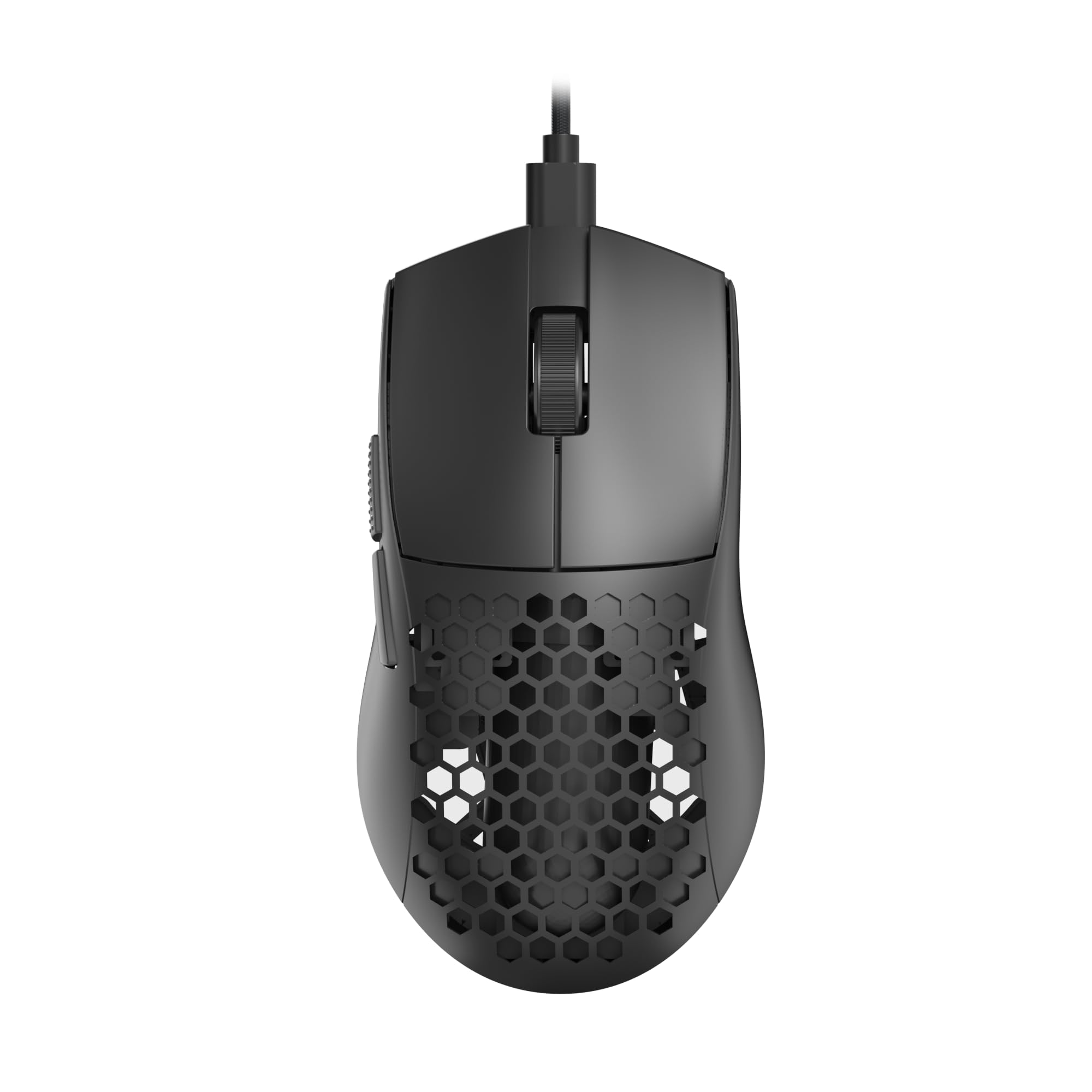
At 41 grams, the M617 Ultralight is barely perceptible in hand—a deliberate design choice for players who prioritize rapid flick movements and low wrist fatigue. The honeycomb shell cuts weight without compromising structural rigidity, and the paracord cable is so light and flexible that it feels nearly wireless in use. For competitive shooters where every millisecond of drag matters, this combination is hard to beat at an entry-level spend.
The 10,000 DPI sensor supports five adjustable steps (800/1200/1600/3200/10000 DPI) and can be fine-tuned via Redragon’s software. The symmetrical shape suits right-handed use with two side buttons on the left edge, and the medium size accommodates claw and fingertip grips. Six programmable buttons plus five configuration modes give enough flexibility for both gaming and office macros.
Because the shell is perforated, dust and debris can accumulate in the holes, and the mouse is not spill-resistant. The software is Windows-only, so Linux users cannot adjust DPI profiles. The honeycomb design also means the RGB lighting beams through the shell in a distinctive pattern that may be polarizing for users who prefer a solid enclosure. Still, for its weight class and price, the M617 delivers exceptional glide.
Why it’s great
- Ultra-light 41g design reduces wrist strain during long sessions
- Paracord cable creates nearly drag-free movement
- 5 programmable DPI steps up to 10,000
Good to know
- Honeycomb shell collects dust and is not water-resistant
- Software only available for Windows
5. Hoteam 12-Pack Wired Mice

The Hoteam 12-pack is not built for competitive gaming—it is a straightforward solution for schools, computer labs, or offices that need a consistent, replaceable input device. Each mouse uses a standard 3-button layout (left, right, scroll click) with a symmetrical ambidextrous shell that suits both left and right hands. The USB-A wired connection is plug-and-play with no drivers required across Windows, macOS, and Chrome OS.
Build quality reflects the bulk category: the plastic shell is lightweight and feels utilitarian rather than premium. The scroll wheel has defined steps without wobble, and the left/right clicks register with a moderate, audible snap. Users report that roughly 90% of units perform reliably out of the box, with occasional units exhibiting glitchy right-click response. At this quantity, individual cost is minimal, making them practical as loaner mice or replacements for high-traffic environments.
The mice are notably smaller than standard full-size models, closer to a portable or child-suitable form factor. Adults with large hands may find them cramped for extended use. Cables are rubber and standard length. For a single user, a 12-pack is overkill—but for anyone managing multiple workstations or a classroom, the Hoteam bulk set eliminates the hassle of sourcing individual units.
Why it’s great
- Bulk packaging lowers per-unit cost for institutional purchases
- Plug-and-play compatibility with all major operating systems
- Ambidextrous design works for left and right-handed users
Good to know
- Smaller size may not suit users with large hands
- Approximately 10% of units may show click inconsistency over time
FAQ
Does a wired mouse have less input lag than wireless?
What is the ideal DPI for a 1080p monitor?
Can I use a gaming mouse for office work?
Final Thoughts: The Verdict
For most users, the best wired computer mouse winner is the Logitech G502 Hero because its HERO 25K sensor, adjustable weight system, and dual-mode scroll wheel cover everything from competitive gaming to daily productivity with zero compromise. If you want a lightweight feel for fast flick movements at a lower climb, grab the Redragon M617 Ultralight. And for bulk deployment in classrooms, labs, or shared workspaces, nothing beats the sheer practicality of the Hoteam 12-Pack.

Mo Maruf
I created WellFizz to bridge the gap between vague wellness advice and actionable solutions. My mission is simple: to decode the research and give you practical tools you can actually use.
Beyond the data, I am a passionate traveler. I believe that stepping away from the screen to explore new environments is essential for mental clarity and physical vitality.