Our readers keep the lights on and my smoothie glass nicely filled. As an Amazon Associate, I earn from qualifying purchases.
Building a PC means balancing performance, thermals, and aesthetics, and the chassis you choose dictates every part of that equation. A mid tower offers the sweet spot of component support without dominating your desk, but the devil is in the details—fan configurations, radiator clearance, and cable routing depth separate a dream build from a frustrating one.
I’m Mohammad Maruf — the founder and writer behind WellFizz. I’ve spent hundreds of hours dissecting case specifications, analyzing thermal test results, and reading through thousands of real user experiences to understand exactly what makes a chassis perform under load.
This guide cuts through the marketing noise to help you find the right fit from the best mid tower computer cases currently available, focusing on the specs and real-world usability that actually matter during a build.
How To Choose The Best Mid Tower Computer Cases
Selecting a mid tower case is a decision between thermal performance, build convenience, and long-term expandability. Three factors define the experience: the path air takes through the chassis, the physical space available for components, and the design of the cable management system. Cases that excel in all three make assembly straightforward and keep temperatures under control for years.
Airflow Architecture and Fan Support
The front panel design is the single biggest variable in thermal performance. Full mesh fronts allow unrestricted intake, while solid panels or restrictive slits suffocate fans and force higher RPMs, producing more noise. Look for cases that support at least three 120mm front fans or two 140mm fans, and check whether the top panel can exhaust heat effectively, especially when using air coolers. Cases with dedicated bottom intake fans that blow directly onto the GPU provide measurable temperature improvements under load.
Clearance for GPU and CPU Cooler
Modern graphics cards are physically massive, and a case that claims GPU support must specify the maximum length in millimeters, accounting for front-mounted fans or radiators. CPU cooler height clearance matters equally—tower-style air coolers can exceed 160mm, and a case that pinches the side panel against the cooler creates noise or prevents closure. The motherboard tray layout also influences whether a thick radiator at the top interferes with tall RAM modules or VRM heatsinks.
Cable Management Depth and Routing
A case with 20mm or more of space behind the motherboard tray allows cables to sit flat, making side panel installation effortless. Look for wide rubber grommets, pre-installed Velcro straps, and multiple routing channels that separate thick power supply cables from thin fan headers. Tool-less panel removal and captive thumbscrews on expansion slots speed up the build process, while a PSU shroud hides the clutter of excess cables for a clean final look.
Quick Comparison
On smaller screens, swipe sideways to see the full table.
| Model | Category | Best For | Key Spec | Amazon |
|---|---|---|---|---|
| LIAN LI LANCOOL 216 | Premium Mid Tower | High airflow, large GPUs | 2x160mm + 1x140mm fans | Amazon |
| Geometric Future M5 | Premium Mid Tower | Enthusiast cooling, large builds | 5x140mm fans, 420mm rad support | Amazon |
| Corsair 4000D RS Frame | Premium Mid Tower | Modular customization | InfiniRail fan mounting system | Amazon |
| be quiet! Pure Base 501 | Mid-Range Mid Tower | Silent operation | 2x140mm Pure Wings 3 fans | Amazon |
| LIAN LI LANCOOL 207 | Mid-Range Mid Tower | Compact ATX, GPU cooling | 2x140mm + 2x120mm fans | Amazon |
| NZXT H7 Flow 2024 | Mid-Range Mid Tower | Stock airflow, easy builds | 3x120mm fans, 420mm rad front | Amazon |
| MONTECH XR-B | Budget Mid Tower | Value RGB build | 3x120mm ARGB fans, wood grain | Amazon |
In‑Depth Reviews
1. LIAN LI LANCOOL 216

The LANCOOL 216 sets the standard for thermal performance with two massive 160mm ARGB front fans and a dedicated 140mm rear exhaust, moving a high volume of air at very low noise levels. The chassis accommodates E-ATX motherboards up to 280mm wide and graphics cards up to 392mm, so even the largest RTX 4000 series cards fit without issue. Its rear PCIe fan bracket is an innovative touch that lets you mount an extra fan to exhaust hot air directly from the GPU backplate area, a feature most mid towers lack.
Cable management is among the best in this category, thanks to a dedicated cable grommet bar, pre-installed Velcro straps, and small clips that keep wires tidy behind the motherboard tray. The modular motherboard I/O panel can be repositioned higher for air-cooled builds or lower for water-cooled configurations, giving you flexibility depending on your cooler choice. Builders consistently report near-silent operation on high-end hardware, with CPU and GPU temperatures stabilizing quickly even during extended gaming sessions.
The side panel uses a single retained screw for easy tool-less access, and the PSU shroud includes a removable dust screen for easy maintenance. The front I/O can be relocated from the top to the side of the case, a useful option if you place the tower on a desk and prefer a cleaner front profile. For a premium mid tower that nails airflow, cable management, and build flexibility, the LANCOOL 216 is the benchmark.
Why it’s great
- Exceptional airflow from 160mm front fans runs cool and quiet
- Cable management with Velcro straps, clips, and grommet bar is best-in-class
- Innovative rear PCIe fan bracket targets GPU heat
- Modular I/O panel accommodates air or water cooling configurations
Good to know
- SSD access could be more convenient behind the motherboard tray
- Power button blends into the front panel design
- PSU shroud can feel tight with larger modular power supplies
2. Geometric Future M5
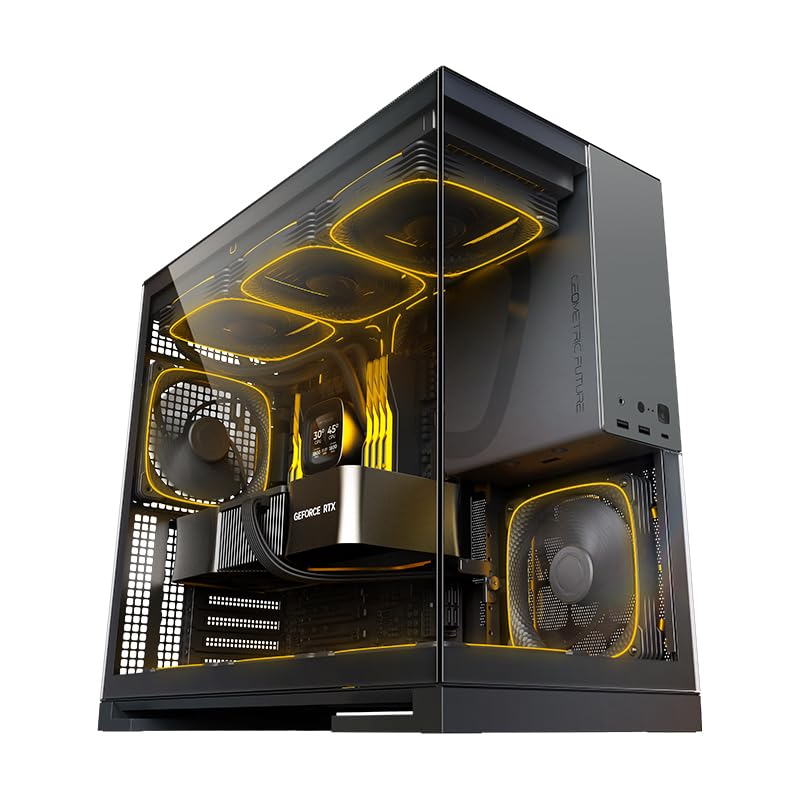
The Geometric Future M5 arrives with an aggressive specification sheet: five pre-installed 140mm ARGB PWM fans, support for radiators up to 420mm, and clearance for GPUs up to 460mm. That kind of capacity is rare in a mid tower, and it makes the M5 a genuine option for custom water loops without stepping up to a full tower. The steel frame uses panels ranging from 0.8mm to 1.2mm thick, giving the chassis a dense, premium feel that resists flex during transport.
Tool-less tempered glass panels on both sides grant quick access for upgrades, and the included cable management accessories—zip ties, Velcro straps, and routing channels—help keep the interior clean. The PSU shroud features a display window that lets you show off the power supply label or custom sleeved cables, a unique aesthetic touch. Builders report that 13600K CPUs idle around 32°C with air cooling, and the 140mm fans move substantial air while remaining quiet at normal operating speeds.
The screwless side panel design makes entering the case effortless, but the PSU area requires careful planning because larger power supplies can press against I/O cables if not routed early. The chassis supports E-ATX motherboards, though an ATX board provides more breathing room for cable routing near the top edge. For an enthusiast-grade build that prioritizes cooling capacity and comes nearly complete out of the box, the M5 delivers serious value.
Why it’s great
- Five 140mm fans and 420mm radiator support handle extreme cooling demands
- Thick steel frame with 1.2mm panels feels exceptionally sturdy
- Tool-less glass panels make upgrades quick and frustration-free
- PSU display window adds a unique visual element to the build
Good to know
- Larger PSUs can make cable routing in the shroud tight
- Pre-planning cable paths is essential due to minimal excess space
- price point is premium for a mid tower
3. Corsair 4000D RS Frame

The Corsair 4000D RS Frame redefines mid tower flexibility with its FRAME modular system, which lets you swap the motherboard tray and front I/O panel for custom upgrades over time. The InfiniRail mounting system uses steel rails that slide to any position in the front and roof, accommodating fans up to 200mm or multiple 360mm radiators without being locked into fixed screw holes. This is particularly useful for builders who want to fine-tune airflow direction or radiator placement.
Three pre-installed Corsair RS PWM fans support daisy-chainable connections and Zero RPM mode, keeping the system near-silent at low loads. The 3D Y-pattern front panel is perforated in three dimensions for low-restriction airflow, and the internal side panel near the motherboard tray can serve as a cable cover or be removed to mount side fans for additional cooling. The case fits ASUS BTF, Gigabyte Project Stealth, and MSI Project Zero reverse-connector motherboards, making cable management even cleaner.
The tempered glass panel is secure but can be difficult to remove without a guide, and some units have shipped with the front USB-C cable pinched during assembly, so checking that before building is wise. The motherboard tray lacks rubber grommets around routing holes, but the included Velcro straps and wide channels compensate. For builders who value long-term customization and the ability to reconfigure their case over multiple upgrades, the 4000D RS Frame is a forward-thinking choice.
Why it’s great
- FRAME modular system allows swapping motherboard tray and I/O
- InfiniRail slides for flexible fan and radiator positioning
- Supports reverse-connector motherboards for cleaner builds
- 3D Y-pattern front panel offers excellent airflow with dust filtration
Good to know
- Glass panel removal needs careful handling to avoid accidents
- No rubber grommets around cable routing holes
- Front USB-C cable may arrive pinched in some units
4. be quiet! Pure Base 501

The Pure Base 501 is engineered for silence, using two pre-installed Pure Wings 3 140mm PWM fans with airflow-optimized blades that reduce turbulence and noise. Sound-dampening material on the side panels further absorbs vibrations, and captive screws with rubber pads secure drives and components without rattling. Builders consistently report that this is one of the quietest mid towers they have ever used, with fans barely audible even under load.
The chassis supports a 360mm radiator in the front and a 240mm radiator in the top, which is sufficient for most mid-range builds, and the PCIe slots rotate 90 degrees to support vertical GPU mounting with an optional riser cable. Cable management is straightforward with wide routing channels, and the front I/O includes USB 3.2 Gen. 2 Type-C and dual Type-A ports. The mesh fan covers are easy to pop off for cleaning, and the all-rounded edges mean no sharp metal to cut fingers on during assembly.
The case ships with only two fans, so adding a third front intake or a top exhaust is recommended for high-TDP components. The compact footprint leaves less room behind the motherboard tray for very thick cable bundles, but for standard ATX builds with air coolers or modest AIOs, this case delivers a premium silent experience. The minimalistic design with no distracting LEDs appeals to users who want their hardware—not lighting—to be the center of attention.
Why it’s great
- Exceptional noise damping with Pure Wings 3 fans and side panel insulation
- Captive screws and foam pads eliminate vibration and rattling
- Vertical GPU mounting support with rotating PCIe bracket
- All-rounded edges make for a safe, blood-free build
Good to know
- Only two fans included; adding a third is recommended for high power draws
- Compact layout can feel tight with oversized PSU cables
- No RGB lighting for those who want a lit-up build
5. LIAN LI LANCOOL 207

The LANCOOL 207 reinvents the ATX layout by using an M-ATX motherboard footprint that still fits standard ATX boards, freeing up space for a recessed motherboard tray and dual 120mm fans directly under the GPU. Those bottom fans blow cool air straight into the graphics card, dropping temperatures noticeably compared to cases that rely solely on front intake. Two additional 140x30mm thick front ARGB fans with infinity mirror centers push massive airflow while looking striking through the mesh panel.
The power supply is relocated to the front of the case with an adapter cable, allowing connector ports to face outward for easier access and reducing the PSU length limitation to 160mm. A pre-installed GPU anti-sag bracket adjusts to fit any card size, preventing droop without requiring a separate support. The case supports a 360mm radiator at the top and graphics cards up to 410mm, which is exceptional for a chassis that measures just 17.9 inches deep.
Cable management requires some finesse because the PSU position and recessed tray limit space for bulky power cables, and the included front fans can produce a resonant hum that some builders fix with rubber gaskets. The side panels snap into place, which is convenient for frequent access but less secure for users who move their PC often. For performance-focused builders who want the thermal advantage of dedicated bottom GPU cooling in a compact package, the 207 delivers a unique layout.
Why it’s great
- Two bottom 120mm fans provide direct GPU cooling for lower temps
- Thick 140x30mm front fans move high airflow with ARGB infinity mirrors
- Built-in GPU anti-sag bracket fits all card sizes
- Compact dimensions still support 360mm radiator and long GPUs
Good to know
- Front fans may produce a resonant hum at certain speeds
- PSU relocation limits unit length to 160mm and needs an adapter
- Side cable management is tight; flat cables recommended
- No reset button and no bottom intake dust filter
6. NZXT H7 Flow 2024

The NZXT H7 Flow 2024 arrives with three pre-installed 120mm front fans and supports three more at the bottom for dedicated GPU cooling, offering strong out-of-the-box thermal performance without additional purchases. Its high-performance mesh front panel maximizes intake while filtering dust, and the case accommodates radiators up to 420mm in the front and 360mm in the top for future water-cooling upgrades. The interior is spacious enough for large air coolers and long graphics cards without feeling cramped.
Cable management is intuitive with wide channels, built-in hooks, and included straps that guide cables naturally behind the motherboard tray. The panels pull off without tools, making component access fast, and the sturdy metal construction with a tempered glass side panel gives the chassis a solid, premium feel. Builders consistently praise the purposeful design, noting that the case runs cool immediately and stays quiet with the included fans at default speeds.
The included front fans use 3-pin connectors rather than PWM headers, which means they run at a fixed speed unless controlled via voltage, limiting fan curve customization. The case is also quite large for a mid tower, with dimensions resembling some full towers, which may be a concern for desk space. The panels pull off without a latch, making initial removal straightforward but less secure during transport. For a clean, spacious build with excellent stock cooling, the H7 Flow is a reliable workhorse.
Why it’s great
- Three 120mm front fans included for effective stock cooling
- Supports bottom-mounted fans for dedicated GPU airflow
- 420mm front radiator support allows monster water-cooling setups
- Tool-less panel removal and wide cable channels simplify building
Good to know
- Front fans are 3-pin non-PWM, limiting speed control
- Very large footprint for a mid tower; measure your desk first
- Side panels pull off without a latch, less secure for moving
- Manual quality has been criticized for being unclear
7. MONTECH XR-B

The MONTECH XR-B offers remarkable value by including three pre-installed ARGB PWM fans—two reverse-blade units on the side and one standard fan at the rear—along with full-view dual tempered glass panels and a wood-grain I/O interface that adds a unique design element. Despite its compact dimensions, the XR supports 360mm radiators at the top and accommodates modern high-end GPUs like the RTX 40 series, making it viable for serious gaming builds. The chassis accepts up to nine fans total, giving you room to expand cooling later.
Cable management is surprisingly good for its price tier, with ample space behind the motherboard tray and pre-installed zip ties that keep the interior organized. The reverse-blade fans maintain the RGB lighting visible from the front while pulling air into the case, a design trick normally found on more expensive units. Builders consistently report that the XR feels solid for its price, with easy component installation and no sharp edges during assembly.
The dual tempered glass panels can arrive with scratches or smudges out of the box, so inspecting them on arrival is important. The side glass panel can be slightly tight to reattach after cable management, and the included fans, while capable, are not the quietest at full speed. For users building a high-performance PC on a tighter budget who want RGB lighting and good cooling support, the XR punches well above its weight class.
Why it’s great
- Three ARGB PWM fans included, two with reverse blades for visible lighting
- 360mm radiator support and room for 40-series GPUs in a compact mid tower
- Unique wood-grain I/O panel adds aesthetic distinctiveness
- Excellent cable management for a budget-oriented chassis
Good to know
- Glass panels may arrive with scratches or smudges
- Side glass panel can be tight to reattach after routing cables
- Included fans are not the quietest at full RPM
- Front I/O wood trim is cosmetic; durability over years is unproven
FAQ
What is the difference between a mid tower and a full tower case?
How many case fans do I need for a mid tower gaming PC?
Does a tempered glass side panel affect airflow or temperatures?
Final Thoughts: The Verdict
For most users, the best mid tower computer cases winner is the LIAN LI LANCOOL 216 because its combination of massive 160mm front fans, innovative rear fan bracket, and exceptional cable management creates an effortless high-performance build. If you want maximum cooling capacity with five pre-installed 140mm fans, grab the Geometric Future M5. And for silent operation that disappears into the background, nothing beats the be quiet! Pure Base 501.

Mo Maruf
I created WellFizz to bridge the gap between vague wellness advice and actionable solutions. My mission is simple: to decode the research and give you practical tools you can actually use.
Beyond the data, I am a passionate traveler. I believe that stepping away from the screen to explore new environments is essential for mental clarity and physical vitality.