Our readers keep the lights on and my smoothie glass nicely filled. As an Amazon Associate, I earn from qualifying purchases.
Specs are compiled from manufacturer listings and verified buyer reviews and can change over time — please confirm the key details on the product page before buying.
You have a laptop, a tablet, a phone, maybe a smartwatch and earbuds — and every one of them came with a different charger block that now lives in a tangled pile on your desk. A single fast charging station for multiple devices replaces that heap with one plugged-in hub that feeds power to everything at once, at speeds that actually rival your original wall bricks. The key is choosing a station that delivers the right wattage to each device without overheating or slowing down.
I’m Mohammad Maruf — the founder and writer behind WellFizz. This guide is built by comparing the manufacturers’ published specifications and the patterns across verified customer reviews, so you get each pick’s real strengths and trade-offs instead of marketing spin.
if you need to juice a MacBook while topping off an iPhone and an iPad simultaneously, these are the best fast charging station for multiple devices choices that actually deliver on their promises without overcrowding your outlet strip.
Our Picks at a Glance


How To Choose The Best Fast Charging Station For Multiple Devices
Not every charging station delivers on its fast-charging promise. Some split power so thinly that adding a third device drops everything to a crawl.
Total Wattage Is the Speed Limit
Total wattage—say, 67W or 200W—is the maximum power the station can distribute across all ports at once. A 67W station can fast-charge a laptop (which needs 45W–65W) but leaves little for a second phone. A 200W station keeps everything moving at full speed, even with four or five devices plugged in. For a family or heavy desk setup, aim for at least 100W total.
Port Types and Power Sharing
A station with four USB-C ports and two USB-A ports covers current and older devices. But the real question is how the station splits its wattage. Many stations will deliver 65W on one USB-C port, then drop that to 45W when you plug into a second port. Look for stations that clearly state per-port output, so your laptop does not end up charging at phone speeds.
GaN Technology Makes It Smaller and Cooler
Gallium Nitride (GaN) is a material that lets chargers run cooler and more efficiently than traditional silicon-based ones. A GaN station can pack high wattage into a compact, lightweight box that stays comfortable to the touch even under load. It also often means the charger is more energy-efficient.
Quick Comparison
| Model | Best For | Total Wattage | USB-C Ports | AC Outlets | Amazon |
|---|---|---|---|---|---|
| TenTrend 40W Tower★ Best Overall | Maximum device count | 40W | 4 | 12 | Amazon |
| Baseus 67W 10-in-1Best Value | Budget laptop charging | 67W | 3 | 6 | Amazon |
| Baseus 120W 6-in-1Top Performer | Ultra-fast laptop charging | 120W | 4 | 0 | Amazon |
| Lightning Ofertas 450W | High-power laptop hubs | 450W | 5 | 0 | Amazon |
| MDoureo 500W 12-Port | Power users and clusters | 500W | 8 | 0 | Amazon |
| Kioson 200W 12-in-1 | Combined USB + AC power | 200W | 4 | 4 | Amazon |
| Anker Nano 100W 7-in-1 | Clean desk cable management | 100W | 3 | 3 | Amazon |
| Anker Nano Clamp 70W | Standing desk setups | 70W | 2 | 6 | Amazon |
| UGREEN Nexode 200W | Premium all-round desktop power | 200W | 4 | 0 | Amazon |
In‑Depth Reviews
1. TenTrend 40W Flat Plug Power Strip Tower
Our pick — over 4.5★ from 900+ verified ratings; the strongest balance of quality and price.
A tower of pure outlet abundance that fits flush against the wall—and the crowd loves it.
This is the station that solves two problems at once: a serious shortage of AC outlets and a need for fast USB charging. With 12 AC outlets and 8 USB ports (4 of which are USB-C), it can handle 20 devices at the same time. The 40W total USB power is split across those ports, so it is best for phones, tablets, and smart home gadgets rather than high-wattage laptops. The real standout is the ultra-thin flat plug, which is only 0.27 inches thick. As buyers report, that “flat plug allows nightstand ~1 inch from wall, saving space and keeping neat.”
The 10-foot extension cord, made of pure copper with a 15A current rating, gives you huge reach across a room. The tower itself is compact at just 3.4 by 3.4 by 6.5 inches, with rubber feet to keep it planted. It is built from fire-resistant ABS+PC material rated to 1382°F, with overload protection and a master on/off switch. The thing that wins people over is the sheer port capacity and the fact that those 12 AC outlets are spaced far enough apart to fit bulky adapters without blocking each other.
The catch: at 40W total for USB, you cannot fast-charge a laptop through the USB ports—they are aimed at phones, watches, and earbuds. And the horizontal plug orientation means some extra-wide adapters may need a bit of wiggling. For a dorm room, a nightstand, or a desk where you have dozens of small devices to power, this tower is the undisputed crowd-pleaser.
Why It Dominates
- 20 devices at once (12 AC + 8 USB)
- Ultra-thin flat plug saves space behind furniture
- 10-foot pure copper extension cord
- Fire-resistant shell and overload protection
The Limits
- USB total is only 40W; no laptop fast-charging via USB
- Horizontal plug orientation can crowd some adapters
- No surge protection rating listed
Reach for this if: you need the absolute maximum number of outlets and USB ports in a single, space-saving tower for a dorm, desk, or family room.
Think twice if: you need to fast-charge a laptop through a USB-C cable—this station’s USB power is shared and capped at 40W.
2. Baseus Charging Station 67W, 10-in-1
A 67W hub that brings laptop-class USB-C charging to a budget-friendly desktop station.
Where the TenTrend tower focuses on device quantity, Baseus focuses on power quality. This 10-in-1 station packs 6 AC outlets, 3 USB-C ports, and 1 USB-A port into a compact vertical tower. The headline feature is the 67W USB-C output—enough to charge a laptop, tablet, or phone at full speed. That gives 67W versus the TenTrend’s 40W on the USB side alone, though the TenTrend has far more total ports. The Baseus also uses GaN6 technology, which keeps it smaller and cooler than older silicon chargers.
The station comes with a 5ft extension cord and a 1200-joule surge protection rating, so your expensive electronics stay safe from power spikes. The stand design keeps it upright on your desk, and the widely spaced AC outlets handle bulky plugs without blocking. Buyers consistently praise the functionality and quality—the most-discussed aspects by far are its reliable performance and solid build. However, a few owners note that the size is larger than expected, and the USB power redistribution can briefly cut power to connected devices when you plug in a new one. There is also a mention of occasional USB output failure after extended use, though Baseus customer service is noted as responsive with replacements.
This is the pick for anyone who wants one station to charge a laptop, phone, and tablet simultaneously without needing a separate laptop brick. It beats the TenTrend on raw USB charging speed but falls short on total port count (10 vs 20).
Why It Excels
- 67W USB-C PD fast-charges laptops and tablets
- 1200J surge protection for electronics safety
- GaN6 technology for cooler, more efficient operation
- 6 AC outlets with wide spacing for bulky adapters
The Trade-offs
- Only 4 USB ports total (3 USB-C + 1 USB-A)
- Power redistribution can briefly interrupt charging
- Some find it larger than expected for a desktop charger
Best for: the user who needs genuine laptop fast-charging from a USB-C port without spending for a premium-brand station.
Consider instead: the TenTrend tower if you need to power 20 smaller devices; the Baseus 120W if you need even faster laptop charging.
3. Baseus Charging Station 120W, 6-in-1
A 120W compact desktop charger that can push a MacBook Air M4 to 50% in 30 minutes.
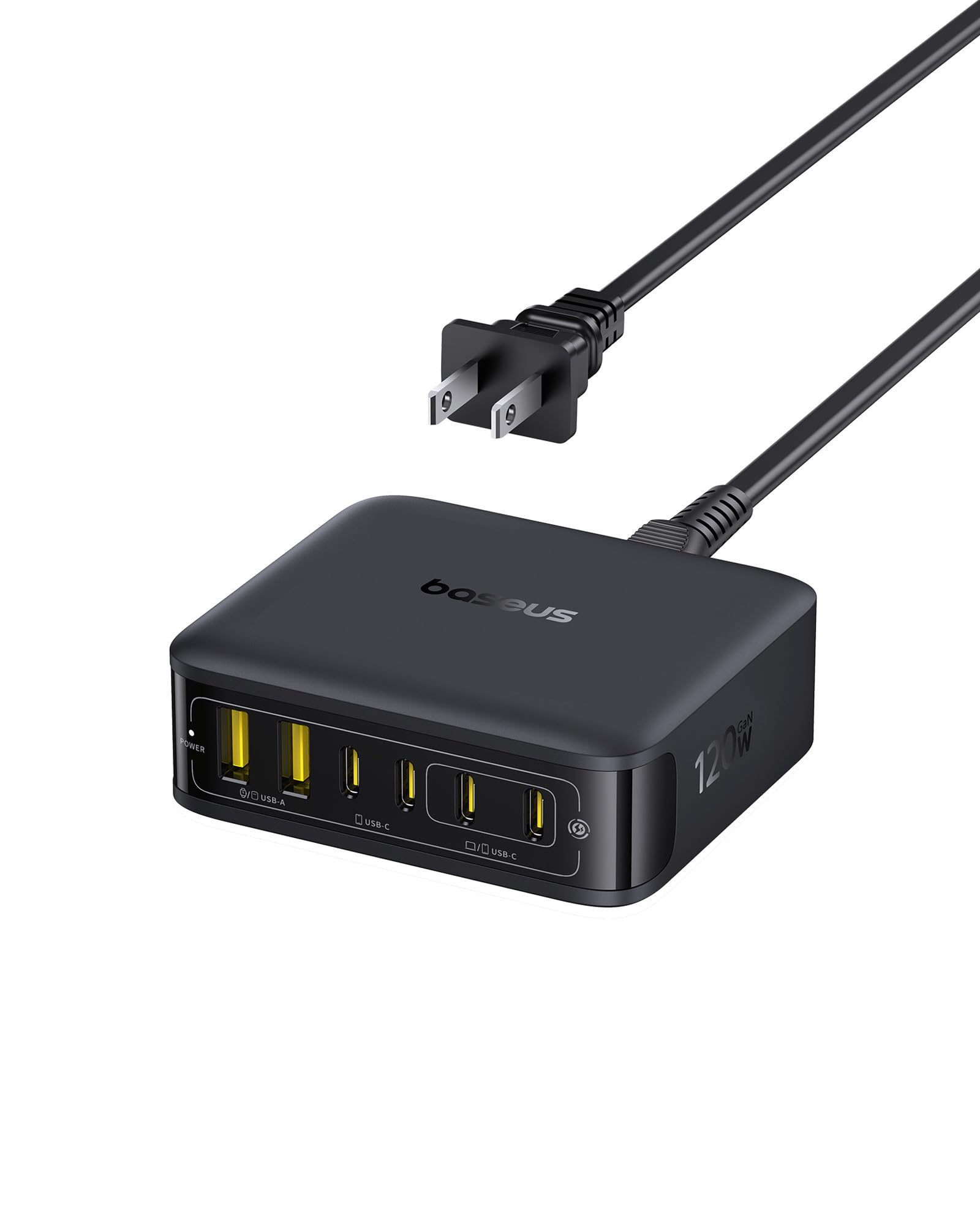
This station ditches AC outlets entirely and focuses purely on high-speed USB-C power. With 4 USB-C ports and 2 USB-A ports, it delivers a total of 120W—nearly double the Baseus 67W station (120W vs 67W). The single-port output reaches 65W, which is enough to charge a MacBook Air M4 to 50% in just 30 minutes, or fully in 110 minutes. That is a real-world speed boost that the 67W version cannot match when driving a laptop. As the manufacturer states, “Charge your MacBook Air M4 to 50% in just 30 minutes or fully in 110 minutes with up to 65W single-port output.”
It uses GaN technology paired with AI temperature monitoring that checks heat levels 45,000 times per hour, along with an 8800mm² heat dissipation area and 90% energy conversion. The device is compact—about half the size of an iPhone 17 Pro Max—and lightweight enough to carry between the office, coffee shop, and bedroom. The thing buyers praise most is its wide compatibility, working with PD3.0, QC3.0, PPS, and other protocols for everything from a MacBook to a Steam Deck to a GoPro. Build quality is the second most-discussed positive, noted for its sturdy feel and rubber grips that keep it planted on a desk.
The honest trade-off: it can run noticeably warm under heavy load (all four USB-C ports pushing power), which is expected for a 120W GaN charger this small. And it has no AC outlets, so if you need to plug in a lamp or monitor, you will need a separate strip. For a truly wireless desktop where every device charges via USB-C, this is the most powerful and portable option in the lineup.
Speed Demon: 120W total output with 65W single-port capability means a MacBook Air charges from dead to half in half an hour, beating every other non-premium station here on pure laptop speed.
The Catch: No AC outlets at all, and it gets toasty under full load—keep it in an open, ventilated spot on your desk.
4. Lightning Ofertas 450W 10-Port Charger

A 450W station with dedicated 140W USB-C ports for the most demanding laptops.
This station is built for the power user who needs to charge a MacBook Pro 16-inch, an iPad Pro, and multiple phones all at full speed. With a massive 450W total power budget and two USB-C ports that can each deliver 140W, it handles the highest-wattage laptops on the market. It has 5 USB-C and 5 USB-A ports, letting you charge 10 devices simultaneously from a single, slim block. The ultra-slim flat plug and 5ft cord make it unobtrusive behind a desk or nightstand.
Owners mention it handled three iPhones, an Apple Watch, and an iPad all at once during a cruise without any slowdown, and that all 6 simultaneously used ports maintained their charging rates without dropping to trickle speeds. The built-in Smart IC automatically distributes the optimal current to each connected device, while safeguards protect against overcharging, overheating, short circuits, overcurrent, and overvoltage. It uses updated GaN fast charging tech to stay compact despite the enormous power output.
One honest note: at 450W total, this station draws significant power and can run warm, though owners generally report it stays within acceptable temps. It also has no AC outlets, so you will still need a power strip for any wall-plug devices. For a content creator with a laptop, a tablet, a camera battery charger, and multiple phones, this is the one station that can power them all simultaneously without compromise.
Why It Powers Through
- 450W total output with dual 140W USB-C ports
- 10 total ports (5 USB-C + 5 USB-A) for maximum device count
- Ultra-slim flat plug for tight spaces
- Smart IC distributes optimal current automatically
Before You Buy
- No AC outlets for lamps or monitors
- Can run warm under sustained high-load charging
- Brand is less known than Anker or Baseus
Perfect for: the power user who needs to charge multiple high-wattage laptops and tablets simultaneously at full speed.
Consider instead: the Baseus 120W if you only need to charge one laptop and a few phones; the MDoureo 500W if you need even more USB-C ports.
5. MDoureo 500W 12-Port USB C Charger Block
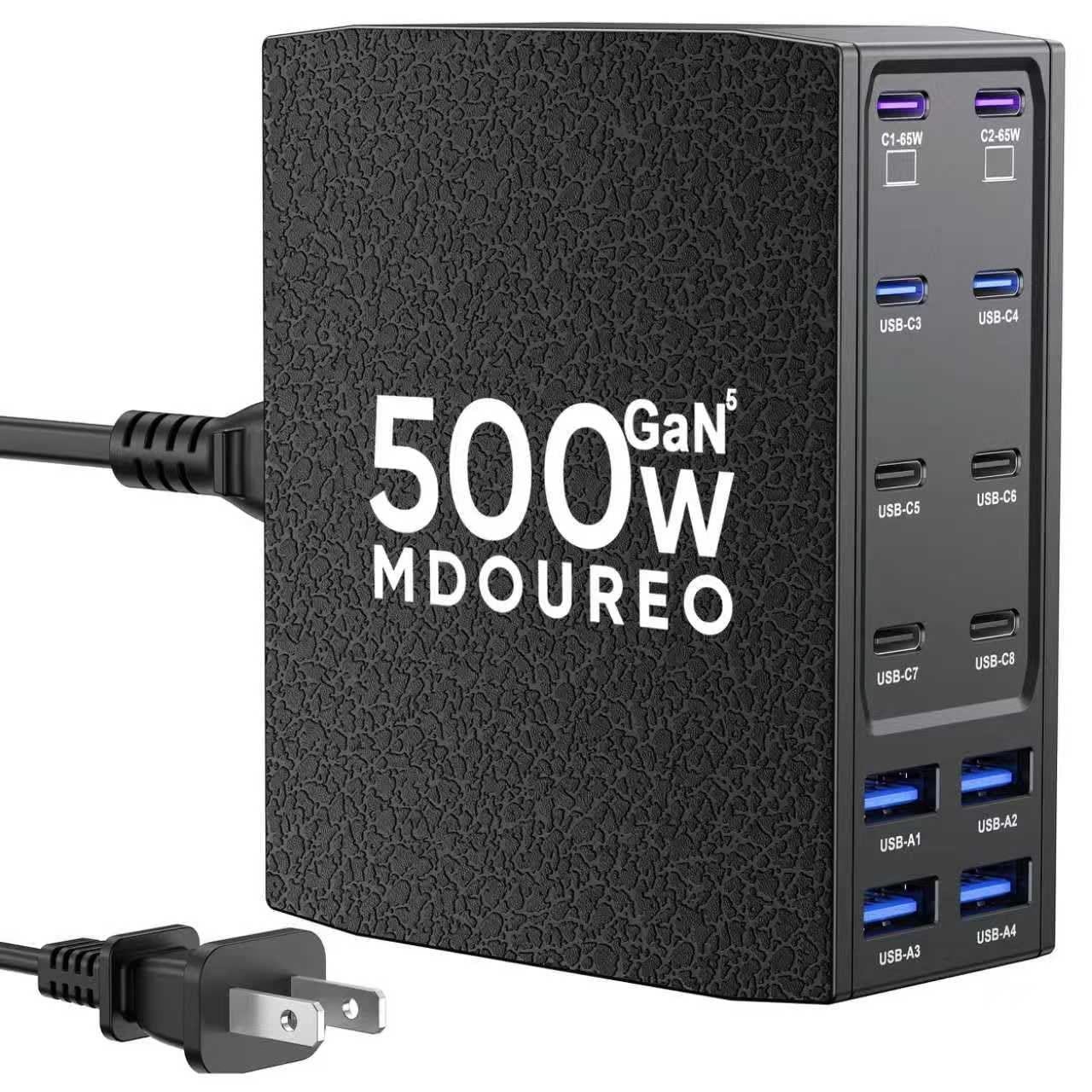
A 500W beast with 12 ports and a leather texture that stays cool under six Raspberry Pis.
This is the highest-wattage, highest-port-count station in the lineup. With 8 USB-C ports and 4 USB-A ports delivering a total of 500W, it can power an entire desk of laptops, tablets, and phones. The dual 65W USB-C ports handle laptops like the MacBook Pro and Dell XPS at full speed. It uses the latest GaN 5 technology with IceShield 5.0 for advanced protection against overcharging, overheating, and short circuits, while running cooler than previous-generation GaN chargers.
The design stands out with a black leather texture finish that adds durability and a premium feel. It is compact enough at roughly 4 by 4 by 1.5 inches to sit on a desk or nightstand, and it can be positioned upright or flat. Customers note that it handles 6 Raspberry Pis running at 6A continuous draw without breaking a sweat, and that it fast charges a Samsung Galaxy S25 without any issues. The charging speed is consistent across all ports, and there are no fans—it runs completely silent.
The trade-off is that at 500W, it is not travel-friendly for most people; it is a dedicated desktop hub. And it has no AC outlets, so it is purely a USB charging station. For a tech-heavy desk, a home lab, or a family with multiple laptops and tablets, this is the ultimate single-plug solution. It leads the Lightning Ofertas 450W on total port count (12 vs 10) and total wattage (500W vs 450W).
class-leading Capacity: 500W total output across 12 ports means you can charge a workstation of laptops and phones simultaneously—something no other station here can match.
The Catch: No AC outlets and it is a dedicated desktop unit, not something you toss in a bag; the leather texture is unique but may not suit every aesthetic.
6. Kioson 200W 12-in-1 GaN IV Charging Station

A 200W station that blends AC outlets with high-speed USB-C—the best of both worlds.
This is the station that solves the USB-only limitation of the higher-wattage picks. It gives you 4 AC outlets for lamps, monitors, or laptop bricks, plus 8 USB ports (4 USB-C and 4 USB-A) sharing 200W of total power. The USB-C1 port can deliver up to 65W, which means you can fast-charge a MacBook Pro to 50% in 30 minutes. It uses GaN IV technology, the latest generation, which keeps it cool and efficient even under load.
The design is ultra-slim at just 5.04 by 3.02 by 1.18 inches, with a 0.7-inch flat plug and a 5ft extension cord made of 14AWG pure copper for better current carrying capacity (15A). The shell is fire-resistant PC material rated to 1382°F. Owners consistently praise its reliability and build quality—those are the most-discussed positive aspects by far. Reviewers point out it works well with high-speed Apple chargers and keeps everything running cool, even with multiple devices plugged in.
The honest limitation: a few shoppers say issues with cords melting over long-term use, though this appears to be an occasional defect rather than a pattern. And at 200W total shared across 8 USB ports, if you plug in two high-wattage laptops, the power will split and slow them down. For most users who need AC outlets plus fast USB-C charging for a single laptop and several phones, this is the most versatile station in the lineup.
Why It Fits
- 4 AC outlets + 8 USB ports for true hybrid power
- 65W USB-C fast-charges laptops quickly
- GaN IV technology keeps it cool and efficient
- Ultra-thin flat plug and 5ft cord
Watch For
- 200W shared across 8 USB ports limits simultaneous laptop charging
- Occasional reports of cord issues over long-term use
- Larger than a pure USB charger
Ideal for: those who need AC outlets for desk accessories plus fast USB-C for one laptop and several phones—a true hybrid station.
Check out: the Anker Nano 100W if you want retractable cables and a more premium build; the Baseus 120W if you only need USB-C power.
7. Anker Nano Charging Station, 100W 7-in-1

A 100W station with two built-in retractable USB-C cables that banish desk clutter.
Anker brings its signature build quality to a station that solves the cable mess problem directly. This 7-in-1 unit has 3 USB-C ports (100W max), 1 USB-A port, and 3 AC outlets—but the standout feature is two built-in retractable USB-C cables that extend up to 2.3 feet each. You pull them out to charge, and they retract smoothly in one second when you are done. No more loose cables snaking across your desk. The port setup includes one retractable cable on each side, making it easy to reach devices on either side of the station.
Each USB-C port can deliver up to 100W when used alone, which charges a 16-inch MacBook Pro M3 Pro to 50% in 35 minutes. An LCD display on the front shows real-time charging wattage, so you can see exactly how fast your devices are charging. The station measures just 4.76 by 2.86 by 2.09 inches and weighs about as much as a 13-inch iPad Air. The 300-joule surge protection adds a layer of safety.
The thing everyone raves about is the retractable cables—it is the most-discussed feature by far. Buyers report it completely transforms desk cable management. The charging speed is also consistently praised, with owners noting the display helps troubleshoot slow charging issues. The trade-off is that at 100W total, power is shared when multiple devices are plugged in, so charging two laptops will slow both down. It is also slightly heavy for travel at 1.4 pounds. For a clean, organized desk where you charge one laptop and a few phones, this is the most thoughtfully designed station here.
Why It Shines
- Two built-in retractable USB-C cables eliminate cable clutter
- 100W USB-C fast-charges a 16-inch MacBook Pro quickly
- LCD display shows real-time charging wattage
- Premium Anker build quality with 18-month warranty
Limitations
- 100W total power means shared speeds with multiple high-demand devices
- Heavier than most compact chargers at 1.4 lbs
- Only 3 AC outlets
Reach for this if: desk cable mess drives you crazy—the retractable cables alone justify the premium over other stations.
Consider instead: the UGREEN 200W if you need to charge two laptops at full speed simultaneously.
8. Anker Nano Power Strip with Desk Clamp, 70W 10-in-1
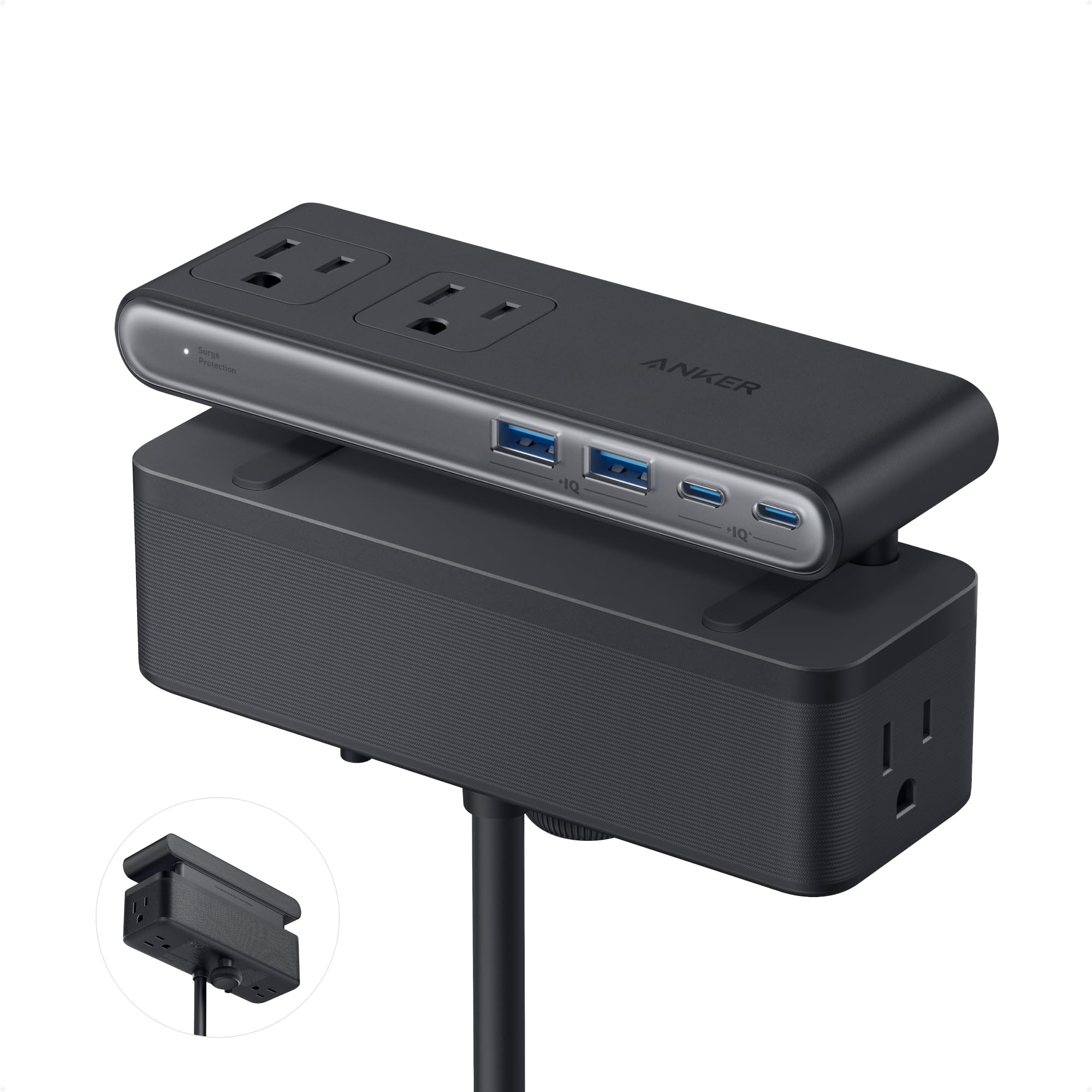
An elegant desk-clamp power strip that frees your desktop surface entirely.
This is the station for anyone who wants to reclaim their desk surface. Instead of sitting on the desk, it clamps to the edge of your tabletop (fitting edges from 0.6 to 1.8 inches thick) and sits underneath, completely out of the way. The top of the unit sits flush with the desk surface, with a pop-up outlet and USB ports accessible from above. It has 6 AC outlets, 2 USB-C ports, and 2 USB-A ports—a total of 10 ports split into top and bottom zones. The USB-C port delivers up to 70W using GaN technology, enough to charge a MacBook Pro 13 M3.
The 1500-joule surge protection rating is the highest in this lineup, giving you serious protection for expensive electronics. The 5-foot power cord is long enough to reach most under-desk outlets. The clamp is adjustable and holds securely, allowing you to plug and unplug devices with one hand without the unit shifting. Quality is the number-one thing owners praise, followed closely by the clever design and how it declutters a desk completely.
The catch: it is not compatible with curved desk edges, sloped edges over 45 degrees, or desks without a clampable edge. At 1.5 pounds, it is not travel-friendly. And at 70W total USB, it cannot fast-charge two laptops at once—it is best for one laptop and a few phones. For a standing desk or a workspace where every inch of surface counts, this is the most space-efficient solution money can buy.
Why It Excels
- Desk clamp mounts station under the desk, freeing surface space
- 1500J surge protection—highest in the lineup
- 70W USB-C fast-charges MacBook Pro 13 M3
- Flush top surface with pop-up outlets and USB ports
Before You Commit
- Only fits desk edges 0.6–1.8 in thick with straight edges
- 70W total USB limits simultaneous laptop charging
- Heavy and not designed for travel
Perfect for: anyone with a standing desk or a minimalist workspace who wants every cable and charger hidden under the desk surface.
Check out: the Anker Nano 100W if you want retractable cables on your desktop instead of an under-desk mount.
9. UGREEN Nexode 200W GaN USB C Charging Station, 8-Port

A 200W premium desktop station that keeps eight devices charging at full speed without overheating.
UGREEN’s Nexode is the polished, premium choice for the user who wants maximum USB-C power in a sleek desktop form. This 8-port station delivers 200W total with a single-port max of 100W, enough to fast-charge a MacBook Pro 16-inch at full speed. It has 4 USB-C and 4 USB-A ports, letting you charge eight devices simultaneously. The advanced GaN technology is touted as 65% more efficient than traditional chargers, meaning it runs cooler and wastes less energy.
The station comes with a 6ft extension cord, giving you flexibility in where you place it on your desk. Built-in protection and temperature control systems ensure safe charging for all connected devices. Owners consistently praise its fast charging speed, particularly noting that it maintains speed even with multiple devices connected—no drop to slow 5W or 12W charging when you plug in a third device. It handles everything from a drone hub and iPad to phones and a PS5 controller without issue. Many owners mention using it as the central power hub for their entire desk setup, replacing multiple individual chargers.
The only real downside is the premium price point, which is the highest in this lineup. And like the other high-wattage USB-only stations, it has no AC outlets—you will need a separate power strip for any wall-plug devices. For a clean, powerful, and reliable desktop charging hub that can handle a laptop, tablet, phone, and accessories all at full speed, the UGREEN Nexode is the top-tier pick.
Why It Leads
- 200W total with 100W single-port output for full-speed laptop charging
- 8 ports (4 USB-C + 4 USB-A) charge everything at once
- GaN technology runs cooler and more efficiently than traditional chargers
- 6ft extension cord for flexible desktop placement
Consider Carefully
- No AC outlets for lamps or monitors
- Premium price—most expensive in the lineup
- Designed for desktop use, not travel
Best for: the premium desktop user who wants the most powerful, cool-running, and reliable USB-only charging hub for a modern laptop-and-phone setup.
skip it if: you need AC outlets or are on a tight budget—the Baseus 120W or Kioson 200W offer similar power with different trade-offs.
Understanding the Specs
Total Wattage
This is the maximum power the station can deliver across all USB ports combined. A 67W station can fast-charge one laptop (needing 45–65W) and leave little for other devices. A 200W or higher station can charge a laptop, a tablet, and two phones all at full speed. If you regularly charge a laptop plus multiple devices, look for at least 100W total; for a family hub or heavy desk, 200W or more is ideal.
Power Sharing and Per-Port Output
When you plug multiple devices in, the station redistributes its total wattage among them. A station with a 65W USB-C port may drop that to 45W when a second device is plugged in. The key is checking how the station handles power sharing—some models clearly label per-port output (e.g., C1: 65W, C2: 45W), while others do not. If you need to fast-charge a laptop and a tablet at the same time, look for stations that maintain at least 45W on two ports simultaneously.
FAQ
Can a fast charging station fast-charge my laptop?
What does GaN mean in a charging station?
Will a 200W station charge my phone faster than a 67W station?
How many devices can I charge at the same time?
What is surge protection and do I need it?
Can I use a fast charging station while traveling?
What is the difference between USB-C PD and Quick Charge?
How do I know if a charging station is safe for my devices?
Final Thoughts: The Verdict
For most buyers, the best fast charging station for multiple devices winner is the TenTrend 40W Flat Plug Power Strip Tower because it offers the most total ports (20) at a budget-friendly price, with a space-saving flat plug and a long 10ft cord that the crowd loves. If you want genuine laptop fast-charging from a USB-C port while staying affordable, grab the Baseus 67W 10-in-1. And for a premium, ultra-organized desktop that charges a MacBook at 100W and hides its cables with retractable USB-C lines, the Anker Nano 100W 7-in-1 is the one to reach for.
How We Picked
We do not accept paid placement. Every pick is matched to a real buyer and a real use-case; we do not hands-on test units.
Sources & Methodology
Specifications: manufacturer listings and product documentation. Review insights: verified customer reviews, as of July 2026. Pricing: not shown on this page (it changes often); check the current price via the retailer link.
As an Amazon Associate, WellFizz earns from qualifying purchases. This does not affect which products we feature.
Related Guides

Mo Maruf
I created WellFizz to bridge the gap between vague wellness advice and actionable solutions. My mission is simple: to decode the research and give you practical tools you can actually use.
Beyond the data, I am a passionate traveler. I believe that stepping away from the screen to explore new environments is essential for mental clarity and physical vitality.