Our readers keep the lights on and my smoothie glass nicely filled. As an Amazon Associate, I earn from qualifying purchases.
Specs are compiled from manufacturer listings and verified buyer reviews and can change over time — please confirm the key details on the product page before buying.
Hot CPUs throttle. Throttling means stutters in your games, lag in your renders, and a PC that sounds like a hair dryer. The fix is simpler than most builders think: a great air cooler with serious fans moves heat away quietly and reliably, with no pump to fail and no liquid to leak. This guide lines up the fans for CPU cooling that actually earn their spot in your case.
I’m Mohammad Maruf — the founder and writer behind WellFizz. This guide is built by comparing the manufacturers’ published specifications and the patterns across verified customer reviews, so you get each pick’s real strengths and trade-offs instead of marketing spin.
Stop guessing between tower sizes and RPM ratings — here are the top fans for cpu ranked by real-world cooling, noise, and installation ease for every budget.
Our Picks at a Glance


How To Choose The Best Fans For CPU
Picking a CPU cooler is not about grabbing the biggest or the flashiest. It is about matching three things: your processor’s heat output, your case’s physical space, and your tolerance for noise. Get those three aligned and a mid-range air cooler will serve you for years.
Match the cooler to your CPU’s power draw
Every processor produces a certain amount of heat, measured in watts (TDP). A basic single-tower cooler handles everyday chips fine, while a hot flagship like an Intel Core i9 or AMD Ryzen 9 needs a beefy dual-tower design with more heat pipes and more surface area. Buying a cooler rated for more watts than you need is not wasteful — it just runs quieter because the fans spin slower.
Measure your case, not just your socket
CPU coolers are tall. A dual-tower model might be 154mm to 168mm high, and your case’s maximum cooler height is listed in its spec sheet. You also need to check RAM clearance: a cooler’s front fan can block tall memory sticks. If you have four RAM slots filled with high-profile heatsinks, look for a cooler with offset towers or adjustable fan positions.
Understand the noise and airflow balance
Two specs dominate the shopping decision: airflow in CFM (cubic feet per minute) and noise in dB(A). More airflow usually means more cooling, but it can also mean more noise. The trick is finding a fan that pushes enough air at low RPM. PWM (pulse-width modulation) fans are the standard — they automatically ramp speed based on CPU temperature, staying near-silent at idle and spinning up only when needed.
Quick Comparison
| Model | Best For | Max Fan Speed | Airflow | Noise Level | Amazon |
|---|---|---|---|---|---|
| Thermalright Phantom Spirit 120SE★ Best Overall | Best Overall value | 1500 rpm | 66.17 CFM | 25.6 dB | Amazon |
| Cooler Master Hyper 212 Spectrum V3Best RGB Value | Budget RGB classic | 1750 rpm | — | 27.2 dB | Amazon |
| KINGCOOL Iron Wind 120 ARGBBudget Champion | Entry dual-tower | 1800 rpm | 59.63 CFM | 29.8 dB | Amazon |
| Cooler Master Hyper 212 Black | Sleek budget pick | 2500 rpm | 70.3 CFM | 32.8 dB | Amazon |
| ID-COOLING FROZN A620 PRO SE | High-wattage budget | 2000 rpm | 58 CFM | 27.2 dB | Amazon |
| Thermalright Peerless Assassin 120 SE | Proven crowd favorite | 1550 rpm | 66.17 CFM | 25.6 dB | Amazon |
| Thermalright PS120SE ARGB | Best Overall with RGB | 1500 rpm | 66.17 CFM | 25.6 dB | Amazon |
| be quiet! Pure Rock Pro 3 | Whisper-quiet premium | 2000 rpm | — | 34.8 dB | Amazon |
| Noctua NH-D15 G2 chromax.black | Peak air performance | 1500 rpm | — | 24.8 dB | Amazon |
In-Depth Reviews
1. Thermalright Phantom Spirit 120SE
Our pick — over 4.5★ from 900+ verified ratings; the strongest balance of quality and price.
The dual-tower heavyweight that out-cools liquid coolers at a fraction of the cost.
The Phantom Spirit 120SE is the cooler everyone compares everything else to, and for good reason. It packs seven 6mm copper heat pipes and two 120mm TL-C12B V2 PWM fans that spin up to 1500 rpm, pushing 66.17 CFM of air while staying at or below 25.6 dB. That combination of raw airflow and quiet operation is why buyers report replacing their AIO liquid coolers with this and seeing nearly identical temperatures.
What wins people over is cooling performance — the most-cited reason buyers choose it. The numbers back that up: Owners mention temperature drops of over 25°C versus their previous coolers.. It keeps a Ryzen 7800X3D in the 50-60°C range during gaming and tames a 9950X3D under sustained loads.. The S-FDB bearings (a fluid-dynamic bearing design that reduces friction and wear) are rated for up to 20,000 hours of service life, and the whole unit stands 154mm tall, so it clears most tower cases.
The catch is physical size, which is the one negative aspect owners flag. At 4.92″L x 5.31″W x 6.06″H, this is a chunky dual-tower unit that can make motherboard access — like reaching your M.2 SSD — more awkward. Some owners also note the fans get noisy at absolute max RPM after months of use, though they’re easily swappable with standard 120mm replacements. The crowd favorite here is undeniable: it earns its reputation as the undisputed king of budget air cooling.
Why it dominates
- Seven heat pipes transfer heat faster than six-pipe rivals
- 66.17 CFM airflow at a quiet 25.6 dB noise level
- Customers note beating their old AIO liquid cooler’s temps
- Supports Intel LGA1851/1700 and AMD AM4/AM5 from the start
What to watch
- Tall 154mm design needs a case with good clearance
- Large footprint blocks easy access to M.2 slots
- Stock fans can get loud at max RPM after extended use
Reach for this if: you want flagship-level cooling without paying for a liquid cooler — it beats most AIOs on value.
Think twice if: your case is cramped or you hate working around a large heatsink to reach other components.
2. Cooler Master Hyper 212 Spectrum V3 ARGB
The legendary Hyper 212 gets a fresh ARGB makeover that still cools quietly.
You get the legendary Hyper 212 reliability with modern ARGB lighting, thanks to a 120mm PWM fan (a fan whose speed adjusts automatically to keep temperatures in check) that spins from 650 to 1750 rpm. The frosted blades spread the glow evenly, so your build looks sharp without extra lighting strips. Four heat pipes and a nickel-plated copper base handle AMD R7 and Intel i7 class CPUs with ease. It’s a touch louder than the top pick at 27.2 dB, but that’s still quiet enough for most gaming rigs.
What buyers rave about is cooling performance and how simple it is to install.
The one compatibility quirk: the RGB lighting defaults to a rainbow pattern, and while you can adjust or disable it through motherboard software like MSI’s, it can be annoying if your board lacks the right RGB header. At 152mm tall and just 4.88″L x 2.87″W x 5.98″H, it’s a slimmer, more compact option than the dual-tower giants — perfect if you want colorful lighting without the bulk.
Trusted classic: proves that a single-tower, four-pipe design is still plenty for mainstream builds when the fan and base are done right.
Budget balance: You get the Hyper 212 formula with modern ARGB and a 120mm PWM fan at a price that undercuts most rivals, so you don’t sacrifice looks or cooling to save money.
3. KINGCOOL Iron Wind 120 ARGB Dual Towers
An affordable dual-tower with 6 heat pipes that punches well above its price.
The Iron Wind 120 is the budget builder’s gateway to dual-tower cooling, letting you cool a hot CPU without spending big. It pairs six copper heat pipes with a nickel-plated copper base and two 120mm ARGB fans that spin up to 1800 rpm — 20% faster than the Phantom Spirit’s 1500 rpm top speed — pushing 59.63 CFM of air (cubic feet per minute, a measure of airflow). The fans are rated for a 30,000-hour lifespan, and the whole fin stack is fully painted to resist oxidation and keep cooling efficiency intact over time.
Buyers consistently highlight how easy it is to install — that’s the most-praised aspect — along with solid build quality. One owner’s Ryzen 5 5600X stays at or under 70°C under full load after replacing a dead AIO.. It’s also genuinely quiet. The 29.8 dB noise rating is slightly higher than premium rivals, but owners describe the fans as quiet and the RGB as clean and not distracting.
There are two honest caveats. First, it’s big — one owner with a full tower said it takes up most of the space between the motherboard and the case door, so measure your clearance carefully. Second, the fans sit 2mm short of clearing tall RAM heatsinks, so you may need to mount the front fan on the other side. The cooling performance is rated as mixed by owners though — fine for mainstream chips, not the last word for extreme overclocking.
Best for: first-time builders who want dual-tower cooling and ARGB looks without spending premium money.
Look elsewhere if: your case is tight or you have tall RAM that the front fan might hit — check your dimensions first.
4. Cooler Master Hyper 212 Black
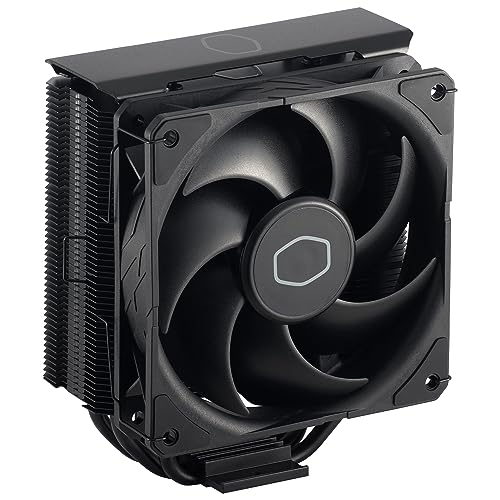
A brushed black classic whose SickleFlow fan pushes serious air for the price.
The Hyper 212 Black takes the timeless Hyper 212 formula and dresses it in a brushed black aluminium finish that hides its real trick: a SickleFlow 120 Edge fan that pushes 70.3 CFM of airflow at up to 2500 rpm. That’s the highest airflow in this lineup, so your CPU stays cooler under heavy loads, though it comes with a louder 32.8 dB noise rating (audible in a quiet room). Four embedded 6mm copper heat pipes in a grooved fin array move heat efficiently for mainstream CPUs.
Cooling performance is what owners praise most, and it delivers a noticeable temperature drop from stock coolers. It’s a reliable workhorse — one owner confirmed it works well with an Intel i9 for normal use, though it will throttle under heavy all-core loads. The all-in-one mounting brackets cover Intel LGA1700, LGA1200, LGA115x and AMD AM5/AM4, and it ships with thermal paste included.
The installation experience is mixed — some find it super easy, others moderately difficult, and it typically requires removing the motherboard. The nickel-plated black heatsink offers better heat radiation than plain aluminium fins, and the slightly offset fin array keeps it compatible with most RAM setups. Just remember the honest sizing: it’s a great budget and mid-range option, but not designed for high-end overclocking rigs.
What stands out
- 70.3 CFM airflow tops this whole list for raw movement
- Sleek all-black look fits stealth or RGB builds
- Proven reliability — owners trust it for years of service
Keep in mind
- 32.8 dB is louder than quieter dual-tower rivals
- Install usually means removing the motherboard first
- Struggles with high-end i7/i9 chips under heavy load
5. ID-COOLING FROZN A620 PRO SE

A 260W-rated dual-tower that swallows hot CPUs whole without breaking a sweat.
The FROZN A620 PRO SE is built for the wattage hogs, so if you run a high-power Intel Core Ultra or Ryzen 9, this cooler keeps it from throttling. With a 260W TDP rating (the maximum heat it can dissipate), six 6mm copper heat pipes, and two 120mm PWM fans spinning up to 2000 rpm, it’s designed to tame those hot chips. The noise rating stays controlled at 27.2 dB max, and the all-black design blends into dark cases smoothly.
Owners confirm the performance: An Intel Core Ultra 7 270K idles in the low 30s°C and peaks around 65°C under load.. Upgrading from a stock cooler dropped a Ryzen 5 5600X’s gaming temps from 90°C to 40-50°C.. The stand-out feature is RAM compatibility — it offers 40mm clearance for standard memory and up to 63mm with the cut-out fin design, so tall RAM sticks fit without fuss.
At 157mm tall, it fits most tower cases, and it’s honestly overkill for mainstream chips — one owner called it overkill for a Ryzen 7 9700X. But that headroom means it runs whisper-quiet because the fans rarely need to spin fast. Buyers call it a great value for high-TDP processors, delivering better results than a liquid AIO unless your CPU exceeds 200W under load.
Overkill is the point: rated for 260W, it runs cool and quiet even on the hottest mainstream chips.
RAM-friendly design: 63mm of clearance with the cut-out fin means no memory conflicts, unlike some bulkier towers.
6. Thermalright Peerless Assassin 120 SE

Thermalright’s other legend — a 6-pipe dual-tower that mid-range builders swear by.
The Peerless Assassin 120 SE is the slightly smaller sibling to the Phantom Spirit, and it’s earned its own following. Six 6mm copper heat pipes are soldered to a copper base and paired with two TL-C12C fans that spin to 1550 rpm, delivering the same 66.17 CFM airflow and 25.6 dB noise level as the top pick. The heatsink’s offset asymmetric layout improves graphics card and motherboard compatibility.
Cooling performance is the top reason buyers choose it. One owner’s Ryzen 5700X3D stays at 70°C under max load, while another saw temps drop nearly 15°C under heavy load.. It’s also genuinely easy to install, with the SS2 mounting system and a metal pressure plate for solid CPU contact. Third-party reviewers consistently rate it as one of the best value picks on the market.
The compatibility notes are worth reading. It supports Intel LGA1150/1151/1155/1156/1200/1700 and AMD AM4/AM5, but for AMD you need to use your motherboard’s built-in backplate — it’s not included. The cutout on the fin allows RAM modules to fit, and at 155mm tall with dimensions of 4.92″L x 5.31″W x 6.1″H, it fits most standard tower cases. This is the cooler to grab when you want proven Thermalright performance for a few dollars less.
Choose this if: you want the Thermalright dual-tower formula with 6 pipes at a slightly lighter price tag.
Note before buying: AMD installs rely on your motherboard’s stock backplate, which is not shipped in the box.
7. Thermalright PS120SE ARGB

The Phantom Spirit’s 7-pipe cooling, now wrapped in soft, synchronized ARGB light.
The PS120SE ARGB takes everything that makes the Phantom Spirit 120SE great — seven 6mm heat pipes, AGHP 4.0 technology, dual 120mm fans at 1500 rpm moving 66.17 CFM — and adds the visual drama of addressable RGB. The high-brightness LED atomizing fan blades reflect light softly off the fins for a diffused glow that owners say looks incredible inside a case. Up to 17 light effect modes sync through a 5V 3-pin ARGB header on your motherboard.
Cooling performance leads the praise by a wide margin, and the numbers deliver: it keeps a Ryzen 7800X3D cool easily, holds a Ryzen 9 5900XT steady during gaming and editing, and One owner’s Ryzen 9 9950X3D maxed at 78°C under sustained load with minimal throttling.. The S-FDB bearings (a fluid-dynamic bearing design) are rated for up to 20,000 hours, matching the non-RGB version’s longevity, so you won’t need to replace it for years.
The ARGB version stands 154mm tall with dimensions of 4.92″L x 5.31″W x 6.06″H, and buyers love that the clamp-on fans are adjustable for RAM clearance and repairable — compatible with most standard 120mm fans. The only quibble owners raise is size: it can interfere with non-low-profile RAM when all four slots are filled, though you can slide the front fan up slightly with minimal performance impact. The included thermal paste is very thick, so use a tool to spread it.
Why it glows
- Seven heat pipes with AGHP 4.0 for gravity-independent mounting
- 17 ARGB modes sync with your motherboard for a clean look
- Fans are adjustable and replaceable for RAM clearance
- Same 66.17 CFM and 25.6 dB as the non-RGB champion
Small trade-offs
- Tall memory with 4 filled slots may need the front fan raised
- Included paste is thick and benefits from tool spreading
8. be quiet! Pure Rock Pro 3 Black

The German-engineered dual-tower that delivers serious cooling at a near-silent whisper.
be quiet! built its name on silence, and the Pure Rock Pro 3 delivers exactly that. Six black high-performance copper heat pipes with a nickel-plated base feed a dual-tower design cooled by a Pure Wings 3 120mm PWM fan with tune blades for maximum air pressure. The funnel-shaped air outlet boost airflow over the fins, and the result is quiet, effective cooling for overclocked systems and demanding workstations.
Owners highlight the cooling performance and build quality in equal measure — it keeps a Ryzen 9 5900XT cool with no throttling, and one owner said it’s better than their water cooler. It operates at a whisper at idle, and under heavy loads the 2000 rpm fan stays remarkably controlled. The compact offset design significantly improves RAM and VRM cooler compatibility, and you can adjust the front fan’s height if needed.
Installation is the mixed note: the mounting kit is self-explanatory, but it requires changing the fan mount on your motherboard, and the brackets are orientation-specific. The heat pipes overhang the RAM, so check your memory clearance, and at 5.47″L x 4.88″W x 6.1″H it’s large enough that you must verify your case will handle it. The 34.8 dB noise rating is the loudest listed spec here, but owners universally describe it as very quiet in practice — that rating is under heavy load, not typical use.
Silence-first engineering: the funnel-shaped outlet and tune blade angles make the 2000 rpm fan sound far quieter than its spec suggests.
Premium but picky: outstanding for AM5 hot-spot cooling with the offset mount, but only if your case has the room.
9. Noctua NH-D15 G2 chromax.black

The icon reborn — 8 heat pipes and dual 140mm fans make this the peak of air cooling.
The Noctua NH-D15 G2 is the second generation of the most famous air cooler ever made, and it’s stronger than ever. Eight heat pipes, 20% more surface area than the original, and two novel NF-A14x25r G2 140mm fans with speed-offset acoustic tuning deliver ultimate low-noise cooling. The all-black chromax version fits high-end AMD Ryzen 9800X3D and 9950X3D chips, plus Intel Core Ultra 285K and 14900K — and it handles them all without breaking a sweat.
The performance is simply masterful. On a Ryzen 9 9950X3D in a tropical climate, reviewers point out idle temps around 50°C and 4K gaming temps of 65-69°C with zero throttling.. The 140mm fans are whisper-quiet at 1000-1200 rpm, and the offset design with recessed lower fins clears the top PCIe x16 slot on most motherboards while offering 59mm RAM clearance in single-fan mode (32mm with both fans).
This is the premium choice, and it asks for premium preparation. At 168mm tall and 5.98″L x 5.91″W x 6.61″H, it’s the largest cooler here — you must verify clearance with your case, motherboard, RAM, and fans. But it includes the superior NT-H2 thermal paste and a Torx-based SecuFirm2+ mounting system with an NM-SD1 screwdriver for easy installation on AMD AM5/AM4 and Intel LGA1851, LGA1700, LGA1200, and LGA115x. For a quiet server build or a maxed-out gaming rig, this is the ceiling of air cooling.
The pinnacle
- Eight heat pipes with 20% more surface area than the first D15
- 24.8 dB noise at 1500 rpm — the quietest spec in this lineup
- Gaming temps dropped from 80-85°C to 58-65°C for one owner
- Includes NT-H2 paste and Torx screwdriver for easy install
Premium demands
- 168mm height and huge footprint need careful case measuring
- Dual-fan mode cuts RAM clearance to 32mm
- Stands in the premium price tier — it’s an investment
The final word for enthusiasts: if you want the absolute best air cooling available and your case has the room, nothing else here tops it.
skip it if: your case or RAM clearance is tight, or you don’t need 8 heat pipes for a mid-range chip.
Understanding the Key Specs
Airflow (CFM) and Noise (dB)
CFM (cubic feet per minute) measures how much air a fan moves, and it’s the primary driver of cooling performance. More airflow generally means lower temperatures, but it often comes with more noise, measured in dB(A) (A-weighted decibels). the balance for most builders is a fan that pushes 60+ CFM at 25-28 dB — like the Thermalright coolers at 66.17 CFM and 25.6 dB. Fans above 30 dB start becoming audible in a quiet room, so consider your noise tolerance.
Fan Speed (RPM)
RPM (revolutions per minute) tells you how fast the fan blades spin. Higher RPM means more air moved, but also more noise and vibration. A 1500 RPM fan can be near-silent at idle, while a 2500 RPM fan like the Hyper 212 Black’s SickleFlow pushes serious air at the cost of 32.8 dB. PWM (pulse-width modulation) fans are the key technology here — they automatically adjust speed based on CPU temperature, so they stay quiet when idle and ramp up only under load.
Heat Pipes and Tower Design
Heat pipes are sealed copper tubes filled with a small amount of fluid that vaporizes at the CPU contact point and condenses in the fins, efficiently moving heat away. More pipes and more fins equal more surface area to dissipate heat. A dual-tower design — two separate fin stacks — offers significantly more surface area than a single tower, which is why coolers like the Phantom Spirit with seven pipes handle high-wattage CPUs so well.
Clearance: Height and RAM
Physical fit is the most overlooked spec. Cooler height (154mm to 168mm in this list) must be under your case’s max cooler height, which is listed in the case spec sheet. RAM clearance matters too: tall memory heatsinks can collide with the front fan on tower coolers. Look for offset tower designs or adjustable fans — the ID-COOLING offers 63mm of RAM clearance with its cut-out fin, while the be quiet! and Noctua require more careful checking.
FAQ
Will a dual-tower air cooler fit in my case?
Is a 4-heat-pipe cooler enough for an i5 or Ryzen 5?
How do I know if a cooler supports my motherboard socket?
What does PWM mean on a CPU fan?
Is 1800 RPM better than 1500 RPM for cooling?
Can a CPU air cooler beat a liquid AIO cooler?
What is the best budget CPU cooler for gaming?
Why does RAM clearance matter for a CPU cooler?
Do I need to buy thermal paste separately?
How long do CPU air coolers last?
Final Thoughts: The Verdict
For most builders, the fans for cpu winner is the Thermalright Phantom Spirit 120SE because seven heat pipes, 66.17 CFM airflow, and a 25.6 dB noise level deliver flagship cooling at a price that undercuts every liquid cooler. If you want that same performance with synchronized RGB, grab the Thermalright PS120SE ARGB instead. And for the enthusiast who wants the absolute ceiling of air cooling and has the case space, the Noctua NH-D15 G2 is the one to reach for — it’s the crowd favorite at the top of the air-cooling pyramid, and owners consistently call it the pinnacle of the category.
How We Picked
We do not accept paid placement. Every pick is matched to a real buyer and a real use-case; we do not hands-on test units.
Sources & Methodology
Specifications: manufacturer listings and product documentation. Review insights: verified customer reviews, as of August 2026. Pricing: not shown on this page (it changes often); check the current price via the retailer link.
As an Amazon Associate, WellFizz earns from qualifying purchases. This does not affect which products we feature.
Related Guides

Mo Maruf
I created WellFizz to bridge the gap between vague wellness advice and actionable solutions. My mission is simple: to decode the research and give you practical tools you can actually use.
Beyond the data, I am a passionate traveler. I believe that stepping away from the screen to explore new environments is essential for mental clarity and physical vitality.