Our readers keep the lights on and my smoothie glass nicely filled. As an Amazon Associate, I earn from qualifying purchases.
Specs are compiled from manufacturer listings and verified buyer reviews and can change over time — please confirm the key details on the product page before buying.
You want to cool your PC without it sounding like a jet engine. The key numbers are airflow in CFM (cubic feet per minute, or how much air moves), noise in decibels, and speed in RPM (revolutions per minute, or how fast the blades spin). This guide explains which of these matter for your build, whether you have a cramped mini-ITX case or a gaming tower packed with radiators.
I’m Mohammad Maruf — the founder and writer behind WellFizz. This guide is built by comparing the manufacturers’ published specifications and the patterns across verified customer reviews, so you get each pick’s real strengths and trade-offs instead of marketing spin.
From whisper-quiet premium models to budget triple-packs that punch above their tier, here is the practical rundown on the best fan cooler for pc setups you can mount today.
Our Picks at a Glance


How To Choose The Best Fan Cooler For PC
Forget the RGB hype for a second. A PC fan has one job: move hot air away from your components and pull cool air in. The trick is doing that without sounding like a hair dryer. You need to match the fan type to where it will live — case panels, CPU heatsinks, and radiators all demand different strengths.
Airflow vs. Static Pressure
Airflow, measured in CFM, is the raw volume of air a fan shoves per minute — the spec that matters most for open case panels. Static pressure, measured in mmH₂O, is the fan’s ability to push air through resistance, like the dense fins of a radiator or a fine mesh filter. A fan with high CFM but low pressure will struggle on a radiator; a high-pressure fan on an open mesh wastes its strength.
Size and Speed: 120mm vs 140mm, and RPM
Bigger fans move more air at slower, quieter speeds — a 140mm fan at modest RPM can out-cool a 120mm fan spinning faster. Your case’s mounting points dictate what fits, so check for 120mm or 140mm slots before buying. Then look at the maximum RPM: higher top speeds mean more headroom for heavy loads, but you rarely want to run a fan at 100% all day.
Bearing Type and Lifespan
The bearing is the rotating assembly that lets the blades spin, and its quality decides how long the fan stays quiet. Fluid-dynamic and rifle bearings are the gold standard for longevity, often rated at 80,000 hours or more (that’s over nine years of continuous use). Cheaper sleeve bearings wear out faster and start humming as they age.
Quick Comparison
| Model | Best For | Airflow | Max Speed | Noise Level | Amazon |
|---|---|---|---|---|---|
| Noctua NF-A12x25 PWM★ Best Overall | Ultra-quiet premium builds | 102.1 m³/h | 2000 rpm | 22.6 dB | Amazon |
| Thermalright TL-C12C-S X3Best Value | Budget ARGB value | 66.17 cfm | 1550 rpm | 25.6 dB | Amazon |
| ARCTIC P12 PWM PST A-RGBPressure Pick | Quiet performance on radiators | 48.8 cfm | 2000 rpm | 0.29 sones | Amazon |
| Thermalright TL-C12C X5 | No-frills budget cooling | 66.17 cfm | 1550 rpm | 25.6 dB | Amazon |
| ARCTIC P12 Pro A-RGB 3-Pack | High-pressure radiator duty | 77 cfm | 3000 rpm | — | Amazon |
| be quiet! Silent Wings 4 | Ultra-quiet 140mm case fans | 51.3 cfm | 1100 rpm | 13.6 dB | Amazon |
| be quiet! Pure Wings 3 Triple Pack | Quiet triple-pack for cases | 49.9 cfm | 1600 rpm | 25.5 dB | Amazon |
| CORSAIR RS120 ARGB Triple Pack | Bright RGB with high pressure | 72.8 cfm | 2100 rpm | 36 dB | Amazon |
| Noctua NF-A14x25 G2 PWM | Top-tier 140mm cooling | — | 1500 rpm | 24.8 dB | Amazon |
In‑Depth Reviews
1. Noctua NF-A12x25 PWM
Our pick — over 4.5★ from 7,500+ verified ratings; the strongest balance of quality and price.
The 120mm legend that cools like a monster while staying practically invisible to your ears.
This fan sets the standard everyone else chases. The Noctua NF-A12x25 spins up to 2000 rpm (revolutions per minute, or how fast the blades turn) yet stays at just 22.6 dB — roughly the sound of a quiet room, and a full 3 dB quieter than the budget Thermalright below. Buyers report CPU and GPU temps dropping by 10°C or more versus typical stock fans, boosting sustained gaming performance.
What makes it special is the engineering underneath. The frame uses Sterrox liquid-crystal polymer (a high-tech plastic that resists warping from heat), and the blade tips sit just 0.5mm from the frame to stop air from leaking back. That tight clearance is why it pushes 102.1 m³/h of air while staying hushed. The included accessory kit — anti-vibration mounts, radiator gasket, y-cable for running two fans off one motherboard header — means you won’t buy anything else to get it mounted.
The thing everyone raves about is the silence; owners call it inaudible under 1000 rpm, and it drops to even quieter operation when you attach the included Low-Noise Adaptor (which caps it at 1700 rpm). At each, it is a genuine premium investment. The honesty note: value-for-money opinions are split, with some buyers finding it pricey, though almost none regret the purchase after feeling the build quality.
What wins people over
- Near-silent at typical speeds; inaudible under 1000 rpm for many
- Excellent airflow and static pressure for both cases and radiators
- 150,000+ hour rated lifespan with a 6-year warranty
Who should think twice
- Premium price per fan adds up fast on multi-fan builds
- The signature brown color scheme isn’t for every aesthetic
Reach for this if: you want the quietest, most reliable 120mm fan money can buy and you’re cooling a radiator, a CPU heatsink, or a case that deserves the best.
Look elsewhere if: you’re outfitting five fan slots on a strict budget — the Thermalright triple-pack below delivers most of the cooling for a fraction of the cost.
2. Thermalright TL-C12C-S X3 Triple Pack
Three ARGB fans for less than the cost of one premium fan — and they genuinely deliver.
Here is the value king of the list. At for three fans, you’re paying roughly what a single premium fan costs, yet these push a hefty 66.17 cfm (cubic feet per minute — the measure of raw air volume) each. That’s 36% more airflow than the ARCTIC P12 A-RGB below, making this triple-pack the smart pick for anyone who wants to fill a case with cooling without emptying a wallet. Owners mention these are “WAY better than the stock fans that were in my case” — a recurring chorus in the reviews.
Each fan spins to a modest 1550 rpm with noise capped at 25.6 dB, and the S-FDB bearings (a fluid-dynamic design that self-lubricates) keep the blades steady and quiet over time. The ARGB lighting uses a 4-pin PWM connection, meaning your motherboard automatically adjusts speed based on temperature — you set it once and forget it. The 17 lighting modes sync through your board’s ARGB header, and owners note the colors look soft and bright, not harsh.
What wins people over is the noise — or rather, the lack of it. One buyer summed up the upgrade: “WAY better than the stock fans that were in my case. So quiet versus the noise the original case fans produced.” The honest trade-off is that the plastic build and ARGB color accuracy aren’t in Noctua territory, but at this price, the value-for-money praise is overwhelming.
Where it shines
- Unbeatable price for three quality rotating fans
- Higher airflow (66.17 cfm) than several pricier 120mm fans
- Quiet S-FDB bearings with long expected life
Reasonable cautions
- Plastic construction feels less premium than metal-reinforced rivals
- ARGB colors are good but not class-leading in accuracy
Best for: budget builders who need three decent fans right now and want ARGB flair without the premium tax.
Not ideal for: radiator duty — the static pressure is fine for cases but dedicated high-pressure fans push through dense fins better.
3. ARCTIC P12 PWM PST A-RGB
A 2000 rpm all-rounder that stays quiet off-radiator and pushes hard when you need it.
ARCTIC took the best trick from its praised P12 line and added addressable RGB. The P12 PWM PST A-RGB spins from a near-stop up to 2000 rpm — a full 29% higher top speed than the Thermalright triple-pack — yet its noise rating is just 0.29 sones (a unit that roughly means “very quiet in a normal room”). Owners say it is inaudible on the floor and nearly silent below 60% speed, which is where most fans run day to day.
The 48.8 cfm airflow figure looks modest next to the Thermalright’s 66.17 cfm, but this fan is tune for static pressure (measured at 1.85 mmH₂O). That means it’s built to push air through resistance — think radiator fins, tight mesh filters, and heatsink gaps — where a high-CFM fan would stall. The 12 A-RGB LEDs sit along the hub and shine through the transparent rotor for even, rich lighting that stays subtle rather than blinding.
The integrated Y-splitter on both the fan and RGB cables is a genuinely thoughtful touch: you daisy-chain multiple fans to one motherboard header without buying a hub. Owners praise the build quality and note it achieves all-time low temperatures in their cases. The one recurring gripe is the cable management — each fan has two cables (power plus RGB), so a full nine-fan setup means wrangling 18 cords.
What stands out
- High 2000 rpm top speed with very low noise
- Strong static pressure (1.85 mmH₂O) for radiators and mesh
- Integrated Y-splitters simplify multi-fan setups
Watch for
- Two separate cables per fan can get messy in big builds
- Airflow (48.8 cfm) trails high-CFM competitors
Pick this over the Thermalright if: you’re mounting fans on a radiator or behind a dust filter, where pressure beats raw volume.
skip it if: you only need open-case airflow and want the highest CFM per dollar.
4. Thermalright TL-C12C X5 (Unlit 5-Pack)

Five identical, zero-RGB fans that disappear into your case and just quietly work.
This is the unlit sibling of the triple-pack above, and it solves a different problem: what if you don’t want any lights, just five solid fans for one low price? At for five fans, you’re paying around per fan, which is extraordinary for what you get. Each one pushes the same 66.17 cfm as the ARGB version, with the same 1550 rpm top speed and the same 25.6 dB noise ceiling. Owners have bought 20-30 of these for multiple builds, and the word “value” appears in nearly every review.
The S-FDB bearings and 4-pin PWM control carry over, meaning the motherboard handles speed automatically based on temperature — set it in DC mode for a fixed speed if you prefer. One buyer mounted one to a 120mm radiator and keeps a 7800x3d below 75°C under gaming loads, proving these aren’t just idle-case fans. The clean black design and rubber mounting corners keep things tight and rattle-free.
Owners call this an “insane value” and appreciate that the fans don’t need a separate hub because the PWM and RGB (in the lit versions) daisy-chain directly. The trade-off: running any fan at full 100% PWM gets louder, so the smart move is letting the motherboard curve handle speeds. For a no-nonsense, lights-off build, this is the cheapest path to proper cooling you’ll find.
Why it sells
- Five fans for under is unbeatable per-fan value
- Quiet at sensible speeds with good airflow
- PWM control means automatic speed regulation
The minor notes
- No RGB at all — this is purely functional
- Gets audible if pushed to 100% PWM
Grab this if: you’re a function-over-form builder who wants maximum case airflow for the smallest possible spend.
Pass if: you want lighting effects to match a themed build — the ARGB triple-pack suits that better.
5. ARCTIC P12 Pro A-RGB (3-Pack)

A 3000 rpm pressure monster that turns dense radiators into iceboxes when you ask it to.
When a fan’s top speed is 3000 rpm (revolutions per minute), you’re in serious cooling territory. The P12 Pro A-RGB moves a huge 77 cfm of air — the highest airflow figure on this entire list — while generating strong static pressure that punches straight through dense radiator fins. Owners who replaced the stock fans on their AIO liquid coolers (like the DeepCool LT720) report better looks, vibrant RGB, and temps that stay cool under sustained loads.
The redesigned rotor blades balance high performance with low noise, and the fluid-dynamic bearing (a self-lubricating design) keeps things smooth and quiet for a long service life. Unlike the standard P12, this Pro model stops completely when the PWM signal drops below 5%, letting it idle fully silent in semi-passive fan curves. Owners note it’s quiet at normal speeds with an adjusted curve, with the honest caveat that it gets noticeable in the 70-100% range — that’s the price of 3000 rpm headroom.
What impresses veteran builders is the open software support — this fan works with FanControl and SignalRGB, no proprietary app required. The vibrant A-RGB lighting and durable construction make it a favorite for enthusiast builds. The recurring note about short cables needing extenders is minor; the performance per dollar here is what earns the praise.
The big strengths
- Highest airflow (77 cfm) with excellent static pressure
- Stops completely below 5% PWM for zero-noise idle
- Works with open-source fan control software
Fair warnings
- Audible at high speed — not a “silent at any cost” fan
- Short stock cables may need extensions
Choose this for: radiator-heavy builds where you need serious pressure and don’t mind a little noise at full tilt.
Choose the standard P12 instead if: your top priority is near-silence and you rarely push past 60% speed.
6. be quiet! Silent Wings 4 140mm PWM

The quietest fan on this list, rated at 13.6 dB — about the sound of a leaf falling.
If silence is the whole point of your build, center it around this fan. The be quiet! Silent Wings 4 runs at a maximum of just 1100 rpm and produces a claimed 13.6 dB of noise — the lowest figure in this entire roundup and roughly half the decibel level of the loudest picks here. Owners describe it as “the quietest case fan I have ever installed” and note that at idle you have to strain to hear it; even at full tilt it is quieter than an air conditioning vent.
The 140mm size is the secret to its serenity — a bigger blade moves a respectable 51.3 cfm without needing to spin fast. The 6-pole motor and fluid-dynamic bearing (a self-lubricating design that minimizes vibration) make operation glassy smooth. It ships with both anti-vibration push pins and standard screws, so you choose your mounting method, and the funnel-shaped frame outlets squeeze extra pressure out of the airflow.
Owners running multi-fan setups — like three 140mm intakes plus a rear 120mm — report excellent cooling with “high fan curves and minimal noise.” The build quality gets described as overbuilt for a case fan, which is high praise.
What makes it special
- Ultra-low 13.6 dB noise — the quietest here
- Premium 6-pole motor and smooth fluid-dynamic bearing
- Both anti-vibration pins and screw mounting included
Consider this
- Single fan for a premium price
- 1100 rpm cap means no high-RPM headroom for extreme loads
Reach for this if: you’re building a media center, office PC, or any rig where total silence trumps raw cooling.
It beats the CORSAIR RS120 on: noise by a wide margin — 13.6 dB versus 36 dB — at the cost of a much lower top speed.
7. be quiet! Pure Wings 3 120mm PWM (Triple Pack)
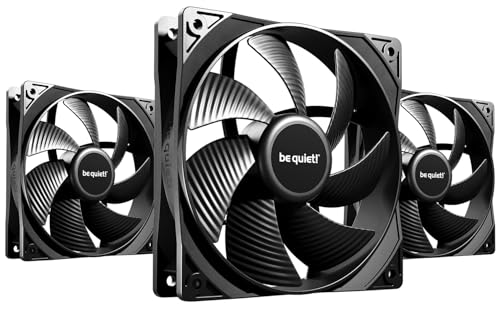
Three of be quiet!’s no-nonsense 120mm fans with a 80,000-hour rated lifespan.
This triple-pack is the smart middle ground if you trust the be quiet! brand but don’t want to pay the Silent Wings premium per fan. Each Pure Wings 3 spins to 1600 rpm, pushes 49.9 cfm, and holds noise to 25.5 dB. Owners say the fans are “impossible to hear unless concentrating” and that one buyer dropped CPU temperatures by around 5°C in a typical case. The 7 airflow-tune blades reduce turbulence, which keeps the sound profile smooth rather than whiny.
The headline durability spec is the rifle bearing — a proven design rated for 80,000 hours of operation on average, which is over nine years of continuous spinning. The redesigned frame minimizes air leaks around the blades, which especially benefits radiator performance. Owners running these in Plex servers report reliable operation for 6+ months with no issues, and the build quality gets described as solid throughout.
The practical value is the unit count: three fans for beats buying premium singles. One caveat the reviewers raise is the lack of vibration pads in the box — the Silent Wings line includes them, this one doesn’t. The trade-off is fair, though: one owner noted the design is good but a pricier brand pushes more air, yet at roughly less for three fans, the value math leans clearly this way.
Why it’s worth it
- 80,000-hour rifle bearing lifespan
- Very quiet operation with good airflow
- Solid build quality at a fair per-fan cost
Minor caveats
- No anti-vibration pads included
- Airflow trails high-CFM rivals like the Thermalright
Pick this triple-pack if: you want the reassurance of a long-life bearing and quiet operation without hunting for RGB.
It falls short of the Silent Wings 4 on: absolute silence (25.5 dB versus 13.6 dB) but costs far less per fan.
8. CORSAIR RS120 ARGB (Triple Pack)
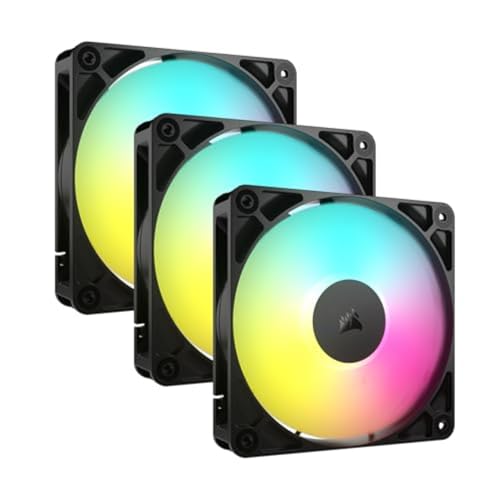
Bright eight-LED RGB with a 2100 rpm punch and magnetic dome bearings underneath.
CORSAIR brings its signature polish to the budget-mid tier with a fan that combines high airflow, high pressure, and seriously bright lighting. Each RS120 pushes 72.8 cfm (cubic feet per minute) — the second-highest figure on this list, trailing only the ARCTIC P12 Pro — with a static pressure of 2.8mm-H₂O (a measure of how hard it pushes air through tight spaces) that owners confirm works great on radiators, including a report of a 14900k kept cool under load. The max speed of 2100 rpm gives you real headroom for demanding scenarios.
The clever bit is the daisy-chain connection: you link multiple fans together and control them all through a single 4-pin PWM connector and one +5V ARGB connector. That means no hub and minimal cable mess. The 8 LEDs per fan shine bright and sync with your motherboard’s built-in ARGB control — owners note it works with OpenRGB for open-source control. The magnetic dome bearing (a design that uses magnets to reduce friction) keeps operation smooth and low-noise.
Owners describe the fans as “very quiet” under light loads with “plenty of airflow,” and the installation is straightforward even if the daisy-chain cables take a moment to figure out. The honest caveat is the 36 dB noise rating — the highest on this list — which shows up mostly if you push fans toward 100% speed. Keep them on a sensible motherboard curve and they stay whisper-quiet while moving serious air.
The strong points
- High 72.8 cfm airflow with strong static pressure
- Daisy-chain wiring keeps builds clean
- Bright, vibrant RGB with broad software support
Honest limits
- 36 dB noise rating is the loudest here at full speed
- Daisy-chain cables can be long and a bit confusing
Choose this for: a RGB-forward build where you want great cooling and don’t mind a touch more noise at the top end.
It beats the Thermalright triple-pack on: airflow (72.8 cfm versus 66.17 cfm) and radiator suitability, but costs notably more.
9. Noctua NF-A14x25 G2 PWM

Noctua’s next-gen 140mm flagship — near-silent at idle, powerful under load, built to last a decade.
This is the bigger brother of our Best Overall pick, and it takes the same engineering obsession up to 140mm. The Noctua NF-A14x25 G2 spins through a wide 300-1500 rpm range, hitting just 24.8 dB at max speed, and stops completely at 0% PWM (pulse-width modulation, a signal that controls fan speed) if you want a semi-passive setup. Owners running a 16-core AMD 5950x report keeping it at 65°C under load, with the fan moving “copious amounts of air at all speeds.” The Progressive-Bend impeller with winglets is the kind of blade design detail that explains why this fan cools so effectively at such low speeds.
It shares the 150,000-hour MTTF rating (mean time to failure — a reliability measure) with its smaller sibling, backed by the premium SSO2 bearing and safety certifications from UL and TÜV (independent testing organizations). The included kit is the most generous in the industry: anti-vibration mounts, a radiator gasket, fan screws, a Low-Noise Adaptor, an extension cable, and a splitter for running two fans off one motherboard header.
The review consensus is that this is class-leading — “the quietest fans out there” is a recurring line — with one buyer measured a CPU temp drop from 69.7°C to 68.7°C versus the previous generation. The honest downsides: it’s the most expensive fan on this list at, and the signature brown color is polarizing (some love it, some don’t). If 140mm fits your case and you want the absolute best, this is the ceiling.
Why it’s the top tier
- Near-silent operation across a wide speed range
- 150,000-hour rated lifespan with sturdy safety certifications
- Most complete accessory kit of any fan here
The real trade-offs
- Highest price per fan on this list
- Brown color scheme divides opinion
Worth the premium if: you’re building a high-end 140mm setup and want the quietest, most durable fans money can buy.
Step down to the Silent Wings 4 if: you prefer a black aesthetic and lighter weight — though the Noctua edges it on rated lifespan.
Understanding the Specs
CFM: The Airflow Number
CFM stands for cubic feet per minute, and it’s the fundamental measure of how much air a fan moves. Higher CFM means more cooling potential, but only if the air can flow freely — open case panels love high CFM, while dense radiator fins need pressure instead. As a rule of thumb, 50+ CFM is solid for case fans, and 60+ CFM is excellent.
Static Pressure: The Push Number
Static pressure, measured in mmH₂O (millimeters of water column), tells you how forcefully a fan pushes air against resistance. Radiators, thick dust filters, and tall heatsinks all create back-pressure that stalls weak fans. Look for 1.5 mmH₂O or higher for radiator duty, and note that dedicated high-pressure fans often sacrifice raw CFM to gain this push.
dB vs. Sones: Two Ways to Measure Noise
Decibels (dB) measure sound pressure, with each 10 dB increase sounding roughly twice as loud to your ears — so a 22.6 dB fan is notably quieter than a 36 dB fan. Sones measure perceived loudness on a linear scale, where 1 sone equals a quiet refrigerator hum. Both tell you the same story: lower numbers mean less noise.
PWM: Automatic Speed Control
PWM stands for pulse-width modulation, and it’s the 4-pin connector standard that lets your motherboard adjust fan speed in real time based on temperature. Your CPU gets hot, the fan speeds up; it cools down, the fan relaxes. This is the difference between a smart, adaptive cooling system and a fan that just runs at one fixed speed forever.
FAQ
What is a good noise level for a PC fan?
Is a 140mm fan always better than a 120mm fan?
Can I use a case fan on my CPU cooler or radiator?
How do I know which fan size fits my PC case?
What does the bearing type mean for how long my fan lasts?
Will my motherboard control these fans automatically?
Do I need to buy a fan hub for multiple fans?
How many case fans do I actually need?
Are expensive fans like Noctua worth the extra cost?
Final Thoughts: The Verdict
If you want one dependable pick, the best fan cooler for pc is the crowd-favorite Noctua NF-A12x25 PWM — a 4.9-star fan with 7,500+ owners behind it, prized for dropping CPU and GPU temps while staying nearly silent. If you’re outfitting a whole case on a budget and want ARGB, the Thermalright TL-C12C-S X3 is the value pick that keeps impressing. And for 140mm premium builds where silence is non-negotiable, the Noctua NF-A14x25 G2 is the one to reach for.
How We Picked
We do not accept paid placement. Every pick is matched to a real buyer and a real use-case; we do not hands-on test units.
Sources & Methodology
Specifications: manufacturer listings and product documentation. Review insights: verified customer reviews, as of August 2026. Pricing: not shown on this page (it changes often); check the current price via the retailer link.
As an Amazon Associate, WellFizz earns from qualifying purchases. This does not affect which products we feature.
Related Guides

Mo Maruf
I created WellFizz to bridge the gap between vague wellness advice and actionable solutions. My mission is simple: to decode the research and give you practical tools you can actually use.
Beyond the data, I am a passionate traveler. I believe that stepping away from the screen to explore new environments is essential for mental clarity and physical vitality.