Our readers keep the lights on and my smoothie glass nicely filled. As an Amazon Associate, I earn from qualifying purchases.
Specs are compiled from manufacturer listings and verified buyer reviews and can change over time — please confirm the key details on the product page before buying.
If your household is anything like most, the family computer is a shared command center — homework, video calls with grandparents, spreadsheets, and a little gaming all on one machine. The biggest mistake families make is picking a cheap tower that chokes the moment two people are logged in at once, or an all-in-one with so little memory that a dozen browser tabs freeze the screen. What you really need is a system that juggles multiple user accounts without slowing down, boots in seconds, and has enough storage for everyone’s files, photos, and projects.
I’m Mohammad Maruf — the founder and writer behind WellFizz. This guide is built by comparing the manufacturers’ published specifications and the patterns across verified customer reviews, so you get each pick’s real strengths and trade-offs instead of marketing spin.
From premium all-in-ones to value-packed towers, here’s how to find the right family computer for your household’s shared workflow.
Our Picks at a Glance


How To Choose The Best Family Computer
Choosing a shared family desktop is a balancing act between enough power for the heaviest user and enough simplicity for everyone else. A fast processor matters, but for a multi-person household, it’s your memory and storage that decide whether the machine feels new three years from now.
Memory and storage are the real workhorses
Every family member will have their own login, their own browser tabs, and their own folders of photos. That means your RAM (the short-term memory that keeps running programs open) does the heavy lifting during multitasking, and your SSD (the fast storage that holds files) decides how many projects you can keep before deleting things. A machine with 16GB of RAM and a 512GB SSD is a much safer bet for a family than one with 8GB and a 128GB drive, even if both have similar processors.
All-in-one vs. tower: a lifestyle choice
An all-in-one (where the computer is built into the monitor) saves your desk and your cable management sanity — perfect for a kitchen counter, a study nook, or a shared hallway desk. A tower desktop (a separate box that connects to a monitor) is usually easier to upgrade later and to repair, which appeals if you like keeping one machine for a long time. Neither is “better”; it depends on how much vertical space you have and whether you ever see yourself opening the case.
Refurbished and renewed: high value, different risk
A renewed or refurbished business desktop (often ex-office Dell or HP units) can deliver a serious processor and tons of memory for a fraction of a new machine’s cost. The trade-off is that condition varies machine by machine — most arrive spotless, but a small number arrive with cosmetic wear or issues that require seller support. If your family wants the smoothest experience with the least hassle, a brand-new machine carries fewer risks.
Quick Comparison
| Model | Best For | Memory | Storage | Form Factor | Amazon |
|---|---|---|---|---|---|
| Apple iMac M4★ Best Overall | smooth Apple ecosystem experience | 24GB | 512GB SSD | All-in-One | Amazon |
| Dell OptiPlex 7060 SFFBudget Power | Budget power with big memory | 32GB | 512GB SSD | Compact Tower | Amazon |
| 24″ All-in-One Windows 11Entry All-in-One | Simple, low-cost all-in-one | 4GB | 128GB | All-in-One | Amazon |
| HP ProDesk 600G4 Tower | Content creation on a budget | 32GB | 1TB SSD | Tower | Amazon |
| Prebuilt Gaming PC (abytespark) | Teen gamers on a budget | 16GB | 512GB SSD | Tower | Amazon |
| Lenovo IdeaCentre AIO | Reliable everyday all-in-one | 8GB | 512GB SSD | All-in-One | Amazon |
| HP 22″ FHD All-in-One | Quick setup, modern CPU | 8GB DDR5 | 128GB | All-in-One | Amazon |
| Lenovo 24″ FHD AIO | Business-grade build at home | 16GB | 128GB SSD | All-in-One | Amazon |
| HP ProDesk i5-10400F | Multi-monitor home office | 16GB | 1TB SSD | Microtower | Amazon |
| HP 24″ All-in-One Ryzen 7 | Speed for busy households | 16GB | 512GB SSD | All-in-One | Amazon |
| Dell Tower Core Ultra 7 | Future-proof family tower | 32GB | 1TB SSD | Tower | Amazon |
In-Depth Reviews
1. Apple 2024 iMac All-in-One
Our pick — over 4.5★ from 150+ verified ratings; the strongest balance of quality and price.
The all-in-one that turns a shared family desk into everyone’s favorite spot.
The iMac is the pick when your family values space and simplicity above all — the entire computer is built into a 24-inch Retina display, so there’s no tower, no tangle of cables, and no separate monitor to buy. It’s driven by Apple’s M4 chip, which owners say handles everything from photo editing to gaming with a speed that makes it feel brand new for years.
The screen is the real showpiece: a 4.5K Retina display with 500 nits of brightness and 1 billion colors, so homework documents and family photos both look stunning. For video calls with relatives, there’s a 12MP Center Stage camera, three studio-quality mics, and six speakers with Spatial Audio so everyone sounds clear on both ends.
You get 24GB of unified memory (the working memory that keeps many apps open at once) and 512GB of SSD storage (fast, silent storage for your files), so you can set up separate accounts for each family member and keep years of photos and documents without running out of space. Owners say it’s a “perfect size to have multiple tabs open without having more screens,” and reviews consistently praise how smoothly it handles a family room workload without the usual Windows headaches.
What wins families over
- One cable — the entire computer is inside the screen, so setup takes minutes
- 24GB of memory to handle several logged-in family accounts at once
- 512GB SSD storage for shared files, photos, and projects
- Zero maintenance — no tower internals to clean or upgrade
The honest trade-offs
- A premium price compared to Windows all-in-ones
- No internal expansion — you can’t add more RAM or storage later
- Runs macOS, so Windows-only school software needs a workaround
Ideal household: Apple-centric families who want a gorgeous, zero-fuss machine that looks great in a shared living space.
Think twice if: your family relies on Windows-only apps or you’d rather buy two budget machines for the same money.
2. DELL OptiPlex 7060 SFF Desktop
A compact tower that packs 32GB of memory at a price that protects your budget.
This renewed Dell delivers the kind of memory that usually costs three times as much: a full 32GB of DDR4 RAM paired with an Intel 8th Gen i7-8700 processor that reaches up to 4.60 GHz. For a family, that means one person can be in a video meeting while another edits photos and a third streams — all without the machine breaking a sweat.
The 512GB NVMe M.2 SSD offers far quicker boot times than older hard drives, so the machine is ready to go in moments rather than minutes. It comes with Windows 11 Pro pre-installed, a wireless keyboard and mouse are included, and the small form factor (SFF) case is easy to tuck beside a monitor or on a shelf.
Buyers report “this computer has worked great so far” — that’s the common sentiment for a machine that arrived in near-new condition and fired right up. The niggles worth knowing: it uses DisplayPort outputs rather than HDMI (so you may need a cheap adapter for older monitors), and the included keyboard and mouse are basic rather than premium.
Why it’s a family steal
- 32GB RAM — double what most new budget PCs offer
- 512GB NVMe SSD for fast boots and snappy app loading
- Wi-Fi and Bluetooth built in, with 5 USB 3.0 ports
- Windows 11 Pro with a wireless keyboard and mouse included
What to watch for
- Renewed condition varies — most arrive spotless, some need seller support
- No HDMI output; you’ll likely need an adapter for a standard monitor
- The bundled keyboard and mouse feel entry-level
Best for: budget-conscious families who want heavyweight memory without paying a premium — especially for homework and multitasking.
Reach elsewhere if: you want a single cable to a built-in screen, because this is a tower that needs a separate monitor.
3. 24″ All-in-One Desktop PC with Windows 11
The simplest all-in-one for a first family computer or a dedicated homework station.
If your family’s needs are truly modest — email, web browsing, video calls, and basic document work — this 24-inch all-in-one is about as simple as it gets. The screen, the computer, and even a microphone are all built into one clean white unit, so there’s no tower to hide and no complex setup. Owners consistently describe it as very easy to use and a great fit for the average user, especially with the built-in camera for voice chats.
The 1920×1080 Full HD IPS display is bright and sharp for the money, and the 2.9 GHz Intel Celeron N5095 processor handles single-task daily use without fuss. It runs Windows 11, which means the whole family gets a familiar, straightforward interface.
The honest catch is that this is a bare-bones config — just 4GB of RAM and 128GB of storage. That’s fine for light browsing, but it’s the lowest-memory machine on this list. Reliability has also drawn mixed owner reports, with some units stopping work within a year under heavier use. If you keep expectations realistic and stick to light tasks, it’s a functional budget all-in-one; if you want years of heavy multitasking, aim higher.
The simple appeal
- True all-in-one — it’s a monitor and computer in one clean unit
- Built-in microphone and camera for family video calls
- Full HD 1080p IPS screen that looks sharp for the price
- No-fuss setup that owners call genuinely easy
Know the limits
- 4GB RAM chokes with many browser tabs or apps open
- 128GB storage fills fast with family photos and projects
- Mixed reliability reports — treat it as a light-duty machine
Who it fits: a young student’s first computer or a simple kitchen-counter station for emails and web browsing.
Who should pass: households with heavy multitaskers or anyone planning to store years of photos on this drive.
4. HP ProDesk 600G4 Tower Desktop

A full-size tower with a full terabyte of storage for families who create, not just consume.
If someone in your house edits photos, cuts videos, or juggles many heavy programs, this tower is built for that. It pairs a 6-core i7-8700 processor (the chip that does the thinking) with 32GB of DDR4 RAM (memory for running many apps at once), which is genuinely strong for a mid-range price. The 1TB solid-state drive is the standout — four times the storage of the budget Dell on this list — so every family member can keep their files and a big media library without deleting anything.
The full-size tower design gives you room to grow, with 4 internal SATA bays for additional drives and an array of ports including 6 USB 3.0, a USB Type-C, and dual DisplayPorts for a dual-monitor homework station. It’s sold by the world’s largest Microsoft Authorized Refurbisher, with quality guarantee and free tech support — a genuine layer of reassurance for a renewed machine.
Owners call it “super fast” and an “outstanding refurb desktop,” noting how quick it feels even though it’s an older model. The catch: a few say the bundled keyboard and mouse feel cheap, and some report the advertised Wi-Fi and Bluetooth come as USB dongles (small plug-in adapters) rather than built-in components.
Why creators will love it
- 1TB SSD for huge storage and lightning-fast program loads
- 32GB RAM for video editing, streaming, and multitasking
- Dual DisplayPort outputs support a two-screen setup
- 6 USB 3.0 ports plus a USB Type-C for modern accessories
The refurb reality
- Cosmetic condition varies; a minority arrive with marks or tape residue
- No HDMI out — DisplayPort/VGA only, so check your monitor
- Wi-Fi and Bluetooth sometimes ship as USB adapters, not internal
Grab this if: you want cheap, capacious storage and heavy-duty memory for creative projects without a huge outlay.
Look elsewhere if: you hate fiddly adapters and want everything — Wi-Fi, Bluetooth, display connections — built cleanly into one box.
5. Prebuilt Gaming PC Desktop (abytespark)
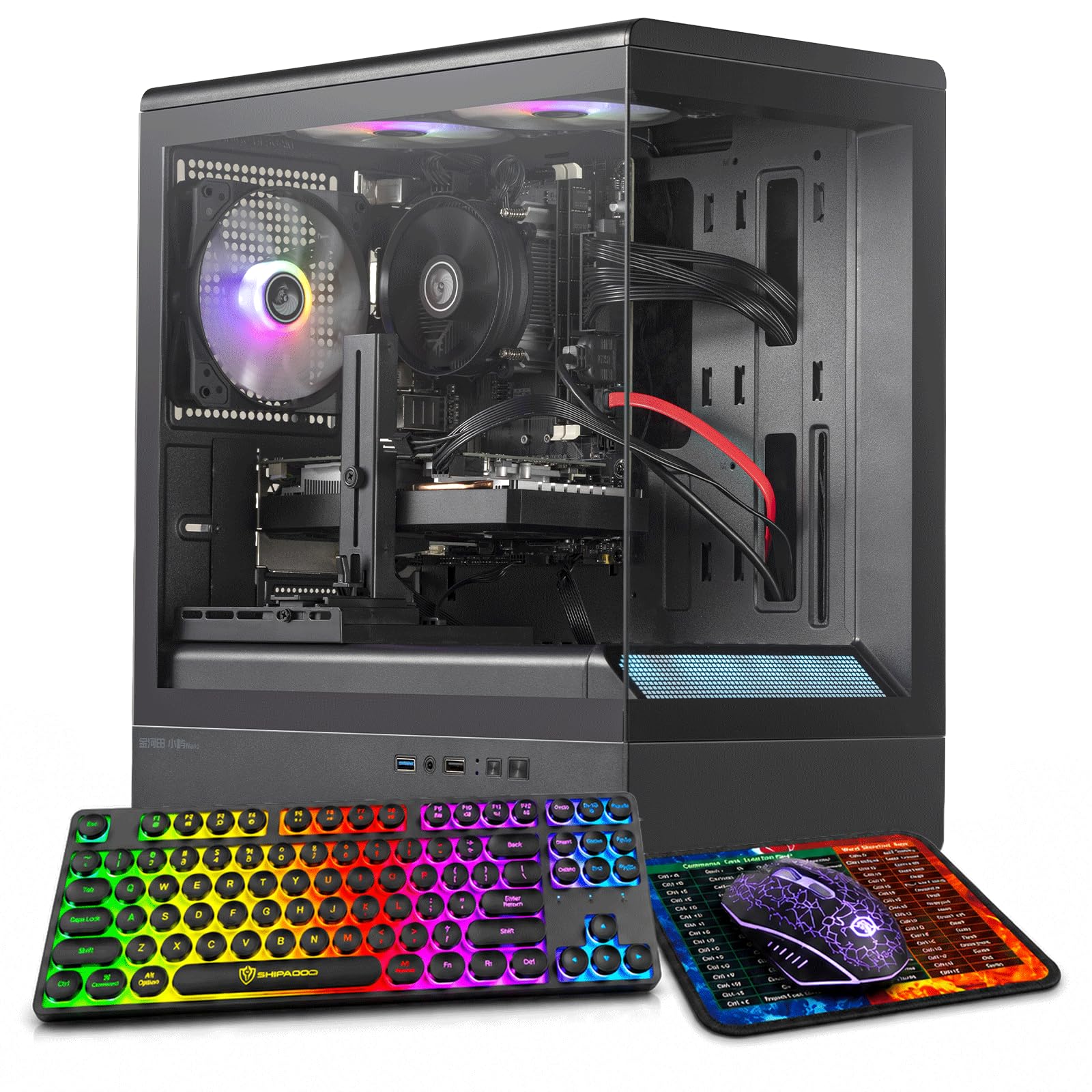
The budget tower that keeps a teenage gamer happy without emptying the college fund.
When your family’s biggest concern is a teen who wants to play Fortnite, Minecraft, and Apex Legends, this prebuilt tower is a strong candidate. It carries a dedicated GeForce GTX 1050 Ti graphics card with 4GB of VRAM (video memory for game graphics), plus 16GB of RAM and a 512GB SSD for fast loading. Owners mention smooth 1080p gaming on titles like Destiny 2 at medium settings.
The RGB case lighting and RGB fans (color-changing lights you can customize) make it look right at home on a teen’s desk, and reviewers consistently mention the cool night-time glow and how easy it was to set up. It runs Windows 11 and ships with a gaming keyboard, gaming mouse, and mouse pad, so it’s genuinely ready to play straight from the start.
The catch is honest and worth knowing: the processor is an older i7-4770 from 2013, and some customers note it isn’t fully Windows 11-compatible (lacking the TPM/Secure Boot requirement) and doesn’t support NVMe drives. That’s a real limitation if you plan to upgrade or if the Windows 11 update fails to install. But if your family’s sole demand is smooth gaming on a budget, the performance reviews speak for themselves.
What makes teens grin
- Dedicated GTX 1050 Ti graphics card with 4GB for real gaming
- 16GB RAM and 512GB SSD for smooth play and fast boots
- RGB fans and case lighting that look cool at night
- Comes with gaming keyboard, mouse, and a mouse pad
Before you click buy
- The i7-4770 CPU is a decade old and may not fully support Windows 11
- No NVMe support limits future storage upgrades
- Lacks Bluetooth connectivity
Choose this for: a budget gaming setup where smooth 1080p play matters more than future upgrade paths.
skip it if: you demand full Windows 11 compliance or plan serious hardware upgrades down the line.
6. Lenovo IdeaCentre All-in-One

A dependable all-in-one from a trusted brand that handles the daily home routine.
Lenovo’s reputation for reliability carries into this IdeaCentre all-in-one, powered by the modern Intel N100 processor (a low-power chip for everyday tasks) with 8GB of DDR4 RAM and a roomy 512GB PCIe SSD (a fast storage drive). For a family, the standout combo is a trusted brand, a crisp 23.8-inch Full HD anti-glare IPS display (a screen that reduces reflections and keeps colors accurate from wide angles), and modern Wi-Fi 6 and Bluetooth 5.2 — so video calls and streaming stay smooth even when many devices share your home network.
The 250-nit display covers 99% of the sRGB color gamut., which means homework and family photos look vivid and true-to-life. Owners consistently praise the easy setup, a great picture, and fast response, making it a genuinely low-stress machine for a study area or reception desk. It ships with a USB keyboard, an HD camera, dual 2W speakers, and a built-in microphone — everything a family needs for school calls and weekend video chats.
The main gripe among owners is practical, not mechanical: the USB ports are placed awkwardly, making them “very challenging to plug in stuff” for everyday access. It’s a small annoyance rather than a flaw, and the modern Wi-Fi 6 and solid 512GB storage make it a far safer long-term buy than the cheaper 128GB all-in-ones on this list.
Why it’s a safe family bet
- 512GB SSD — plenty of shared space for files and photos
- Wi-Fi 6 and Bluetooth 5.2 for fast, stable connections
- Trusted Lenovo brand with genuine Windows 11 Home
- Anti-glare FHD display that’s comfortable for homework
Small complaints
- USB port placement is awkward for frequent plugging
- 8GB RAM is adequate now but not roomy for heavy multitaskers
- No optical drive for discs
Reach for this if: you want a trusted-brand all-in-one with modern Wi-Fi 6 and real storage for a study or home office.
Pass it by if: you frequently plug in USB drives and peripherals and find awkward ports a genuine dealbreaker.
7. HP 22″ FHD All-in-One (2025)

A fresh, modern CPU at a budget price makes this HP a surprisingly current choice.
Most budget all-in-ones ship with aging processors, but this HP 22-inch model is “the new version for everyday use” and it shows: it runs the latest 13th Gen Intel N100 quad-core CPU with fast DDR5 memory. For a family that just wants today’s tech without today’s premium price, that’s a meaningful upgrade — you’re not paying for last decade’s internals.
The 21.5-inch Full HD anti-glare display is comfortable for daily work, and the built-in HD webcam with a privacy shutter is a thoughtful touch for families who care about security during school calls and meetings. It ships with Windows 11 Pro, dual stereo speakers, and comes in a sleek Jet Black finish. Owners consistently call it easy to set up — “the computer took 5 minutes to set up” — and a great value for home office use.
The trade-off is the classic budget all-in-one catch: 128GB of storage is genuinely tight for a shared family machine, and owners note “its memory is on the small size.” If your family relies on cloud storage (Google Drive, OneDrive) instead of local files, it works fine — but if you want to keep years of videos and projects on the machine itself, this drive fills up quickly.
What feels modern here
- Latest 13th Gen Intel N100 CPU with fast DDR5 RAM
- Windows 11 Pro with business-grade security features
- Wi-Fi 6 and Bluetooth 5.3 for smooth connectivity
- HD webcam with a privacy shutter for secure calls
The budget pinch
- 128GB storage is tight for a multi-user family
- 8GB RAM handles basics but not heavy multitasking
- 21.5-inch screen is smaller than most all-in-ones
Pick this for: a household that lives on cloud storage and wants the newest budget CPU with Windows 11 Pro.
Choose another if: you need to store big photo and video libraries locally — 128GB will run out.
8. Lenovo 24″ FHD All-in-One (16GB)

Business-grade Lenovo build with double the memory of most budget all-in-ones.
This Lenovo steps up from the brand’s budget AIO by doubling the memory to 16GB of DDR4 RAM, which makes it genuinely comfortable for a family where several people multitask. Combined with the 23.8-inch Full HD IPS anti-glare display with 250 nits and 99% sRGB coverage, it’s built for long homework sessions, school projects, and office work without eye strain.
The build quality carries a business pedigree — owners describe it as having a “strong build” that replaced an older unit and runs Windows 11 with ease, including handling laser and 3D printers without complaint. Connectivity is modern: Wi-Fi 6 AX203 and Bluetooth 5.2, plus HDMI-out and multiple USB-A ports for flexibility. It ships with a wireless keyboard and mouse in grey.
The honest snag is the recurring one with Lenovo’s bundled keyboard — a few owners received a keyboard that wouldn’t pair correctly with the machine, requiring a return or substitution with an old keyboard. It’s a minor logistics headache rather than a computer fault, and the machine itself earns high marks for functionality and reliability after a year of daily use.
Why it stands out
- 16GB DDR4 RAM for smoother family multitasking
- Wi-Fi 6 and Bluetooth 5.2 for fast, stable connections
- Business-grade build quality that owners rely on daily
- Non-touch FHD display with anti-glare coating
The small catches
- Bundled wireless keyboard has a spotty pairing record
- 128GB SSD is small for a family’s photo library
- Touchscreen sensitivity reported as overly reactive on some units
Best suited to: a home office or study where a sturdy, reliable all-in-one with true multitasking memory matters.
Look past it if: you’d rather avoid any chance of a keyboard hassle or need generous local storage — 128GB is lean.
9. HP ProDesk i5-10400F Desktop
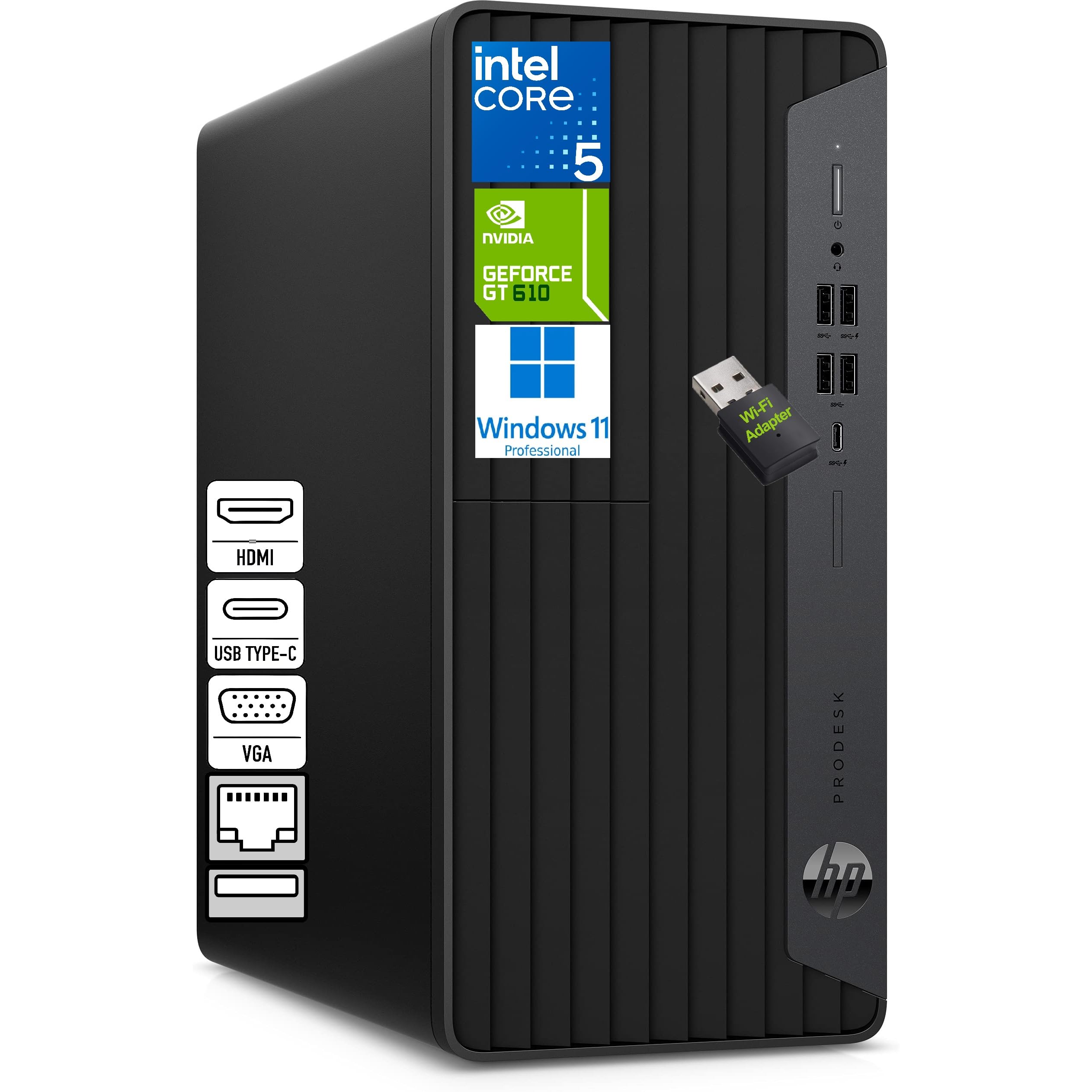
A compact, whisper-quiet tower built for the parent who runs a home office.
If your family computer also serves as a serious work-from-home station, this HP ProDesk is built for that. It runs the Intel Core i5-10400F (a solid mid-range processor) with 16GB of DDR4 memory and a full 1TB NVMe SSD (an ultra-fast storage drive) — the same generous storage as the pricier content-creation tower on this list, but in a quieter, more compact microtower that fits neatly into a home office.
The headline feature is triple-display support: with HDMI, VGA, and DVI-I outputs, a parent can run three monitors for spreadsheets, coding, or monitoring multiple apps at once. It comes with a wired HP keyboard and mouse, a Wi-Fi adapter, and USB-C for modern accessories — a complete setup from the start.
Owners are emphatic: “item was easy to set up, and appears to be noticeably faster,” and the machine “fired up right away” and arrived in like-new condition. One caution: some units ship with an Nvidia GeForce GT 610 dedicated graphics card (a separate chip for visuals) rather than newer hardware — fine for office work but not for gaming — and reliability feedback is mixed among a smaller group of owners.
The work-from-home edge
- Triple-display support via HDMI, VGA, and DVI-I
- 1TB NVMe SSD for fast boots and huge storage
- 16GB DDR4 memory handles heavy multitasking
- Compact, silent microtower that fits any desk
Honest limitations
- Entry-level dedicated graphics — not built for gaming
- No optical drive for CDs or DVDs
- Smaller owner base, so reliability data is thinner
Ideal for: the working parent who needs multiple monitors for productivity and wants a quiet, compact tower.
Not for: gaming households or anyone who still uses CDs — there’s no disc drive here.
10. HP 24″ All-in-One Ryzen 7 (2024)

A powerful AMD Ryzen 7 inside a sleek white all-in-one for busy, multi-user households.
This HP delivers real processor muscle — an AMD Ryzen 7 7730U — inside the cleanest all-in-one design on this list, so it’s a serious speed upgrade over the budget N100 machines. With 16GB of RAM and a 512GB SSD, it is ready for several family members to work at once without slowdowns, and The 512GB SSD boots the system in seconds, far quicker than any hard drive.
The design is where it wins hearts: an ultra-slim three-sided micro-edge display with an 89% screen-to-body ratio, so the screen dominates the desk. It also includes a tiltable pop-up privacy camera — a clever physical shutter — plus dual array microphones with noise reduction for crisp video calls. Owners love that it “works faster than their old computers” and halved their processing time.
The honest caveats are practical: owners note the built-in speakers are weak, and the bundled keyboard and mouse are mediocre rather than premium. A few also report machines freezing every 2-3 minutes, though these are outliers against a strong consensus on speed and value. For a family that wants a fast, attractive all-in-one without paying Apple prices, this is the balance.
Why it feels fast
- AMD Ryzen 7 7730U — a serious step up from budget processors
- 16GB RAM and 512GB SSD for smooth family multitasking
- Pop-up privacy camera plus noise-reducing mics
- Near-borderless display with an 89% screen-to-body ratio
What owners flag
- Built-in speakers are weak for music or movies
- Bundled keyboard and mouse feel budget-grade
- Stand is non-adjustable for height
Reach for this if: you want near-flagship speed and a gorgeous screen without paying Apple prices.
Think twice if: you do most of your listening through built-in speakers or want a fully adjustable stand.
11. Dell Tower Desktop Core Ultra 7

A future-proof tower with AI-ready power and a design made for easy upgrades.
This is the family computer built to last the longest: the latest Intel Core Ultra 7 processor with built-in AI acceleration, a full 32GB of RAM, and a 1TB PCIe NVMe SSD. That’s headline-level memory and storage in a brand-new Dell tower, and for a family it means years of smooth operation without ever feeling the need to upgrade. Owners call it “superfast” and praise its quiet operation and lightning speed for everyday tasks.
It’s also the most upgrade-friendly machine on this list — the tool-less entry and removable side panel let you open the case and swap components in seconds, so it can grow with your family’s needs. You can connect up to four FHD monitors via DisplayPort and Daisy Chaining, or two 4K displays through HDMI 2.1 and DisplayPort, making it a superb homework and work station. Dell even throws in 1 Year Onsite Service, meaning a technician comes to your home if a hardware issue can’t be fixed remotely.
The caveats are niche for a family buyer: the power supply is modest (180W), so serious gaming GPU upgrades are limited, and reviewers point out the keyboard and mouse are basic. Ports get mixed feedback — plenty of USB, but a single front audio jack that doesn’t record well. For a family that wants a brand-new, AI-ready tower with massive memory and easy expandability, this is the one to beat.
The long-term advantage
- Intel Core Ultra 7 with built-in AI for future-proof speed
- 32GB RAM and 1TB NVMe SSD — the biggest combo on this list
- Tool-less access makes upgrades genuinely easy
- 1 Year Onsite Service from Dell for real confidence
What to know
- 180W power supply limits big graphics card upgrades
- Bundled keyboard and mouse are basic
- Front audio jack doesn’t support recording without extra gear
Best for: a family that buys for the long haul and wants a brand-new, AI-ready tower with easy upgrade paths.
Choose another if: you’re building a serious gaming rig — the power supply needs to be swapped first.
Understanding the Specs
RAM (Memory) in GB
RAM is your computer’s short-term memory — it holds everything you have open so you can switch between apps instantly. For a shared family machine, more is better: 8GB handles basic browsing, but 16GB comfortably supports multiple logged-in accounts and heavy multitasking. Machines with 32GB, like the Dell OptiPlex and Dell Core Ultra tower, are future-proof.
SSD Storage in GB or TB
An SSD (solid-state drive) is your long-term storage for photos, videos, and programs, and it determines boot speed. A 128GB drive fills fast with family media; 512GB is comfortable; 1TB (which is 1000GB) is generous. NVMe SSDs are faster than older SATA SSDs and deliver near-instant startup.
FAQ
How much RAM does a family computer really need?
What is the difference between an all-in-one and a tower desktop?
Is a refurbished or renewed computer reliable for a family?
How much storage do I need for a family’s photos and files?For a typical family storing photos, videos, school projects, and documents locally, 512GB is a comfortable starting point. A 128GB drive will fill up quickly and force you to delete files. If you shoot lots of video or keep large media libraries, 1TB gives you the freedom to keep everything without worry.?
Can a family computer handle gaming?
What does Wi-Fi 6 mean for a family computer?
Which is better for a family: Windows or macOS?
How important is a solid-state drive (SSD) for a family computer?
Can I connect multiple monitors to a family computer?
What should I check before buying a renewed business desktop?
Final Thoughts: The Verdict
For most people, the family computer winner is the Apple iMac M4 because it combines a gorgeous 24-inch Retina display, easy setup, and enough memory (24GB) and storage (512GB) to serve a whole household with zero maintenance. If you want serious multitasking power on a budget, grab the Dell OptiPlex 7060. And for a brand-new, future-proof tower that will last your family the longest, the Dell Tower Core Ultra 7 is the one to reach for.
How We Picked
We do not accept paid placement. Every pick is matched to a real buyer and a real use-case; we do not hands-on test units.
Sources & Methodology
Specifications: manufacturer listings and product documentation. Review insights: verified customer reviews, as of August 2026. Pricing: not shown on this page (it changes often); check the current price via the retailer link.
As an Amazon Associate, WellFizz earns from qualifying purchases. This does not affect which products we feature.
Related Guides

Mo Maruf
I created WellFizz to bridge the gap between vague wellness advice and actionable solutions. My mission is simple: to decode the research and give you practical tools you can actually use.
Beyond the data, I am a passionate traveler. I believe that stepping away from the screen to explore new environments is essential for mental clarity and physical vitality.