Our readers keep the lights on and my smoothie glass nicely filled. As an Amazon Associate, I earn from qualifying purchases.
Specs are compiled from manufacturer listings and verified buyer reviews and can change over time — please confirm the key details on the product page before buying.
Buying your family’s first 3D printer should mean endless fun, not endless tinkering or a confusing setup that ends up in the closet. We focus on machines that print reliably from the start, run quietly, and offer enough build volume for toys and organizers—all while being simple enough for kids.
I’m Mohammad Maruf — the founder and writer behind WellFizz. This guide is built by comparing the manufacturers’ published specifications and the patterns across verified customer reviews, so you get each pick’s real strengths and trade-offs instead of marketing spin.
Our analysis highlights the best balance of speed, print quality, and beginner-friendly features. Use this research to confidently choose the right family 3d printer for your home, prioritizing reliability and ease of use.
Our Picks at a Glance


How To Choose The Best Family 3D Printer
The best family printer prioritizes reliability and ease of use over raw specs. Skip models that demand manual leveling or constant tweaking.
Prioritize Automated Setup and Leveling
The top cause of failed prints is a misaligned first layer, which auto-leveling prevents. Look for a printer with “auto-leveling” or “auto-calibration.” These features handle the fiddly alignment for you, so your first print has a much better chance of succeeding right from the start.
Match the Build Volume to Your Projects
Build volume determines the maximum size of a single object you can print. A smaller machine (around 220x220x220mm) is perfect for toys, miniatures, and phone stands. If you dream of printing helmets, large vases, or life-size models in one piece, look for a larger volume (300mm or more per side). Remember, a bigger printer takes up more physical space in your home too.
Consider Noise and Enclosure for Your Home
An open-frame printer is quieter and easier to access, but a fully enclosed printer does two jobs: it keeps curious little fingers away from hot moving parts, and it traps heat inside for printing advanced materials like ABS and ASA. If the printer will live in a common area or a child’s room, these factors can be just as important as print quality.
Think About the Ecosystem and Slicer Software
The software you use to turn a 3D model into a printable file (called a “slicer”) is your family’s daily interface. Beginner-friendly printers integrate with intuitive apps and have vast libraries of pre-made models you can download. A great ecosystem means your kids can find a dinosaur or a chess piece and print it within minutes, without ever touching complex design software.
Quick Comparison
| Model | Best For | Print Speed | Build Volume | Multi-Color Ready | Amazon |
|---|---|---|---|---|---|
| Bambu Lab A1★ Best Overall | Beginners and Families | 10,000 mm/s² acceleration | Standard (fits most toys) | Yes (with AMS lite) | Amazon |
| FLASHFORGE Adventurer 5MBest Value | Value and Print Quality | 600 mm/s | 220x220x220 mm | No | Amazon |
| FLASHFORGE AD5MEntry-Level Pro | Entry-level Value | 600 mm/s | 220x220x220 mm | No | Amazon |
| Anycubic Kobra X | Native Multi-Color | 600 mm/s | 260x260x260 mm | Yes (4 colors built-in) | Amazon |
| Creality Ender 3 V3 Plus | Large Budget Builds | 600 mm/s | 300x300x330 mm | No | Amazon |
| Bambu Lab P1S | Premium Performance | 500 mm/s | 260 mm³ | Yes (with AMS) | Amazon |
| QIDI Q2 | Advanced Materials & Safety | 600 mm/s | 270x270x256 mm | Yes (with QIDI BOX) | Amazon |
| Creality K2 Plus Combo | Large-Format Multi-Color | 600 mm/s | 350x350x350 mm | Yes (with CFS) | Amazon |
| Sovol SV08 Max | Huge Projects & Open Source | 700 mm/s | 500x500x500 mm | No | Amazon |
In‑Depth Reviews
1. Bambu Lab A1
Our pick — over 4.5★ from 550+ verified ratings; the strongest balance of quality and price.
A reliable workhorse that delivers pro-level results with minimal effort.
This is the printer that families rave about for its “user-friendly” design and flawless out-of-the-box performance. The secret is its “Full-Auto Calibration” — it handles precise Z-offset and bed-leveling automatically, so you skip the frustrating manual setup that turns many beginners off the hobby. It even uses “Active Flow Rate Compensation,” an algorithm that adjusts material flow in real time for consistently smooth surfaces, which means fewer failed prints and less wasted filament.
The A1 is a speed demon with an acceleration of 10,000 mm/s² (a measure of how quickly the print head can change speed and direction), delivering blazing-fast prints without sacrificing detail. It’s also remarkably quiet, rated at or below 48 dB — quieter than a normal conversation — thanks to active motor noise canceling, so it can run in a family room without drowning out the TV. While the reviews consistently praise its reliability, durability gets mixed feedback, so it’s best treated as a beloved gadget rather than an indestructible tank.
Multi-color printing is where this machine shines for families, open up vibrant toys and projects. It requires the separate “AMS lite” unit to swap filaments automatically, turning your A1 into a mini color factory. Buyers report that “daily use 4 months, highly reliable, user-friendly, low maintenance” is the real experience here, and many suggest getting the Combo version with the AMS lite, since it’s cheaper than buying the accessory separately later.
What Wins Families Over
- easy auto-calibration means less fiddling and more creating
- Impressive 10,000 mm/s² acceleration for fast turnaround on big projects
- Whisper-quiet operation at ≤48 dB, perfect for shared living spaces
What to Keep in Mind
- Lacks an enclosed body, so it’s not ideal for advanced materials like ABS
- Multi-color printing requires the separate, extra-cost AMS lite unit
Our favorite for: The family that wants a reliable, quiet, and fast printer that produces high-quality results without a steep learning curve.
Think twice if: You’re on a strict budget and don’t plan on exploring multi-color printing, or if you need an enclosed machine for advanced engineering materials.
2. FLASHFORGE Adventurer 5M
Premium print quality and speed at a budget-friendly price.
Owners regularly describe the Adventurer 5M as excellent value, with some saying its speed “nearly matches” more expensive models. The core of this machine is its “CoreXY All-Metal Motion Structure,” a design that keeps the moving parts light and stable, enabling a top speed of 600 mm/s and high-quality output even in high-speed mode. For a first-time buyer, “fully automatic one-click leveling” removes the biggest hurdle, measuring nozzle-to-plate distance for you.
One of the standout features is the patent “Quick-Detachable Nozzle.” You can swap between 0.25, 0.4, 0.6, and 0.8 mm diameters for different tasks without any tools — a job that takes as little as 3 seconds. This makes maintenance simple for novices but also gives experts the flexibility to print with high precision or high efficiency. It also includes power-loss recovery, so an outage won’t ruin a long print job.
Buyers with serious hours on the machine confirm its staying power. Report from real usage: “2 years/1000h: excellent value, best print quality-per-price; PLA/PETG/TPU fine”. Some warn that the stock nozzle assembly isn’t user-serviceable and requires whole-unit replacement, though an aftermarket “Durozzle” upgrade can fix that complaint. Newer users should treat the advice to print at “lower” speeds as a pro tip: it’s more reliable that way, and you won’t miss the extra speed on most family projects.
The Perks
- top-tier value for money with top-tier print quality
- Tool-free quick-swap nozzle makes maintenance a 3-second job
- Handles a wide range of materials including PLA, PETG, and TPU
The Trade-offs
- The stock nozzle assembly might need a full replacement if it clogs
- Wifi and touchscreen interface have been described as finicky
Best suited to: Budget-conscious beginners who refuse to compromise on print quality and want a fast, reliable workhorse.
A fair warning: A few owners have had reliability hiccups that required tinkering, so it’s best for the hobbyist who enjoys a bit of problem-solving.
3. FLASHFORGE AD5M
A simple to use entry-level machine with impressive quality and zero tinkering.
New owners are often shocked by how easy this printer is to get running, with one summing it up as a fantastic first experience. Setup takes about an hour with the included PLA filament, and then it just works — a fact made possible by the “fully automatic one-click leveling system.” Users praise the “Orcaslicer” software for making the whole process intuitive, from loading a model to sending it to the printer.
Its “All-Metal CoreXY Motion Structure” is the key to its speed and reliability. This design keeps the print head light and stable, supporting speeds up to 600 mm/s while maintaining low noise. It also features the same patent “Quick-Release Nozzle” as its sibling, the Adventurer 5M, allowing tool-free swaps in about 3 seconds — a great feature for troubleshooting clogs that can occur with young users.
The AD5M is praised for its “exceptional print quality” and is quiet enough to sit next to the TV, according to owners. While powerful, families should note that multi-color printing produces a lot of waste and takes a long time on this machine — as the review pages put it, “lots of waste on multi color prints, but does a nice job on them.” If you’re planning lots of single-color toys and practical prints, this is a brilliant choice; if multi-color is your dream, look elsewhere.
What impresses: Owners love how it “just works” from the start with zero calibration, making it one of the easiest entry points into the hobby.
The honest catch: A small number of units have arrived defective, so it’s smart to run a test print within your return window.
4. Anycubic Kobra X Multicolor

The machine that puts a rainbow in your kids’ hands, right from the start.
Unlike most printers where multi-color is a costly add-on, the Kobra X comes “born with 4 colors built-in,” making it the simplest way for a family to start printing in vibrant color immediately. It’s impressively expandable too; you can grow its palette up to 19 colors by adding four units of the ACE 2 Pro. This native multi-color support is a huge win for creating toys with eyes, game pieces with numbers, and models with intricate details.
Beyond color, this machine is engineered for speed and precision. It boasts a max speed of 600mm/s and completes a standard Benchy test boat in 14 minutes. The “LeviQ 3.0” auto bed leveling system uses a 49-point calibration (a process that checks the bed at 49 different points to ensure it’s perfectly flat) for a flawless first layer. It’s designed to be ready to print just 15 minutes after you unbox it.
It’s also a “smart” companion with an AI camera for remote monitoring and features like spaghetti detection (which spots when a print has failed and turned into a mess). The reviews show it’s a reliable and fun machine, with owners noting over 265 hours of printing in a month with “zero adhesion/clogging/spaghetti issues.” The main trade-offs to note: it’s app-only for control, and some owners have experienced occasional clogging or adhesion quirks — so there’s a small learning curve to mastering its settings.
Why It’s Fun
- Native 4-color printing works from the start — no extra hardware needed
- Can expand to an incredible 19-color palette for advanced projects
- Large 260x260x260 mm build volume for bigger family projects
What to Watch
- Control is app-only, which might occasionally feel limiting
- Mixed reports on long-term reliability and adhesion consistency
The perfect pick for: Families who want the wow-factor of multi-color prints without the complexity or cost of a separate add-on system.
A gentle caution: Some owners have faced quality-control issues, so be prepared to test it thoroughly when it arrives.
5. Creality Ender 3 V3 Plus

The big-format crowd-pleaser for printing life-size helmets and batch after batch of toys.
The Ender 3 V3 Plus’s a neat extra is its huge build volume of 300x300x330mm. This lets you print life-size items in one piece, like a full-sized helmet or a large dinosaur, without having to slice the model into parts. It also means you can print many smaller toys in a single batch, making it a production powerhouse for a creative family. It achieves this with a “CoreXZ” motion system, a sturdy design that keeps the print stable at high speeds.
This size doesn’t sacrifice speed, hitting a maximum 600 mm/s with 20,000 mm/s² acceleration — the maker says this is 12 times faster than a regular 3D printer, so you’re not waiting all day for those bigger projects. The direct-drive extruder is built to be clog-resistant, and the “Tri-metal” Unicorn nozzle uses hardened steel for smooth material flow and easy maintenance.
Owners say it’s easy to set up thanks to “auto calibration leveling” and that it produces “fantastic results” for beginners. However, it’s not without quirks. Owners mention that the auto-leveling can occasionally need patience, and some have had to manually adjust the power supply voltage from its default 230V setting to the 110V used in North America. It’s a printer that rewards a little community research — many suggest joining online forums for tips, and some have upgraded parts like the bed to perfect their setup.
The main draw: Its massive 300x300x330 mm build volume is the reason to buy it — there are few better ways to tackle large, ambitious projects on a budget.
The fair caveat: Mixed feedback on reliability and adhesion suggests it’s a better fit for tinkerers than for families wanting a completely hands-off experience.
6. Bambu Lab P1S

A sealed, speedy powerhouse that turns an 11-year-old into an instant maker.
The P1S is the upgrade pick for families who want a printer that can do it all — including printing stronger, more technical materials. Its “Enclosed Design” is the defining feature: it’s a fully enclosed body that gives you two big advantages. It protects curious hands from hot moving parts, and it traps heat to print advanced filaments like ABS and ASA reliably, which open-frame printers often struggle with.
Despite its enclosed size, it’s a speed demon. It prints at 500 mm/s with a 20,000 mm/s² acceleration, and auto bed leveling ensures those fast prints stick perfectly. The setup is famously quick, with owners reporting a 30-minute journey from box to first print. It’s even fast enough in real-world terms that one owner reported their “11-year-old printed in 5 min” after setup.
The P1S truly shines with the optional Bambu Lab AMS system, open up “up to 16 colors” for stunning multi-color prints. While the machine itself is very reliable, some owners note that adhesion can be tricky and that the build quality feels solid but not indestructible. It’s a mini-fridge-sized unit that’s “fast, quiet, and easy,” and it’ll handle anything from a quick PLA toy to a precision ABS engineering part — a true family workhorse for years to come.
The Upgrades
- Fully enclosed design for safety and advanced-material printing
- Fast 500 mm/s speed with a huge 260 mm³ build volume
- Connects to the AMS system for up to 16-color printing
The Downside
- The enclosed design is larger and needs more desk space
- Some owners find adhesion finicky, and build quality gets mixed reviews
Reach for this if: You want a premium, enclosed machine that can grow with your kids from basic toys to advanced engineering projects.
Look elsewhere if: You’re tight on space or want the simplest possible open-frame design.
7. QIDI Q2

A safe, enclosed, and astonishingly capable machine that even handles carbon-fiber materials.
The QIDI Q2 is a professional-grade machine that takes safety and material flexibility very seriously. It’s enclosed and features a “triple filtration system” with a G3 pre-filter, H12 HEPA filter, and activated carbon to reduce odors and harmful particles — a huge plus for families printing indoors. It’s also built with flame-retardant materials in the chamber, adding another layer of confidence.
For ambitious families, the Q2 is an absolute beast. The 370℃ high-temp nozzle open up advanced materials like PPS-CF (a super-strong carbon-fiber reinforced plastic), while its 65℃ heated chamber minimizes warping and ensures strong layer adhesion. This means you can print everything from flexible TPU phone cases to durable, functional parts that stand up to real use — a capability that will grow with your kids’ skills.
Setup is genuinely simple, taking about 10 minutes to go from unboxing to printing. Buyers are quick to praise its “exceptional print quality” and beautiful aluminum/glass design, with one noting that “setup <20 min” is the real deal. The built-in AI camera handles remote monitoring. The main trade-offs are the price and the fact that a few owners have reported minor sensor hiccups, though the responsive customer service quickly resolves them. It also prints multi-color with the optional QIDI BOX.
Why it’s worth it: The combination of a 370℃ nozzle, 65℃ heated chamber, and triple filtration makes it the safest and most versatile choice for serious family makers.
The honest trade-off: It’s a big investment, and the advanced features will be wasted if you only ever plan to print simple PLA toys.
8. Creality K2 Plus Combo

The large-format multi-color master that’s become the beating heart of many a home workshop.
The K2 Plus Combo is the machine to beat if you want both incredible size and incredible color. The “Combo” includes the K2 Plus printer and one CFS (Creality Filament System) unit, and it supports a massive 350x350x350mm build volume — large enough to print big props, furniture parts, and oversized models in one go. It’s an absolute unit that customers note “needs 2 people” to set up due to its heavy, sturdy build.
On the color front, the “Automatic Material System” (the CFS) brings intelligent multi-filament management. You can hook up to four CFS units together to print in up to 16 colors, which opens up incredible possibilities for detailed, vibrant family projects. It supports a wide range of materials, including PLA, ABS, PETG, PA-CF, and PPA-CF, so it’s ready for everything from kids’ toys to durable functional parts.
It’s also a speed monster, with a top speed of 600mm/s and a staggering 30,000 mm/s² acceleration thanks to its step-servo motor system. Dual AI cameras monitor the chamber to catch failures like spaghetti and foreign objects, alerting you via the app. Buyers find it produces “perfect prints every time” with “zero failures,” though the 3.9-star average hints at the occasional bad unit and the need for troubleshooting. It’s a premium, heavy investment, but for families who want the best of everything, it’s hard to look past.
Big Advantages
- Huge 350x350x350 mm build volume for oversized, ambitious prints
- Multi-color with up to 16 colors via multiple CFS units
- Dual AI cameras provide top-tier failure detection and monitoring
Big Considerations
- Very heavy and large — you’ll need dedicated space and a second person to lift it
- Loud at times, and a few owners have reported quality-control issues or a steep setup
Who should buy it: Ambitious families or hobbyists who want a premium, large-format, multi-color workhorse that can handle serious projects.
Who should skip it: Beginners on a budget, or families who don’t have the physical space or patience for a large, complex machine.
9. Sovol SV08 Max
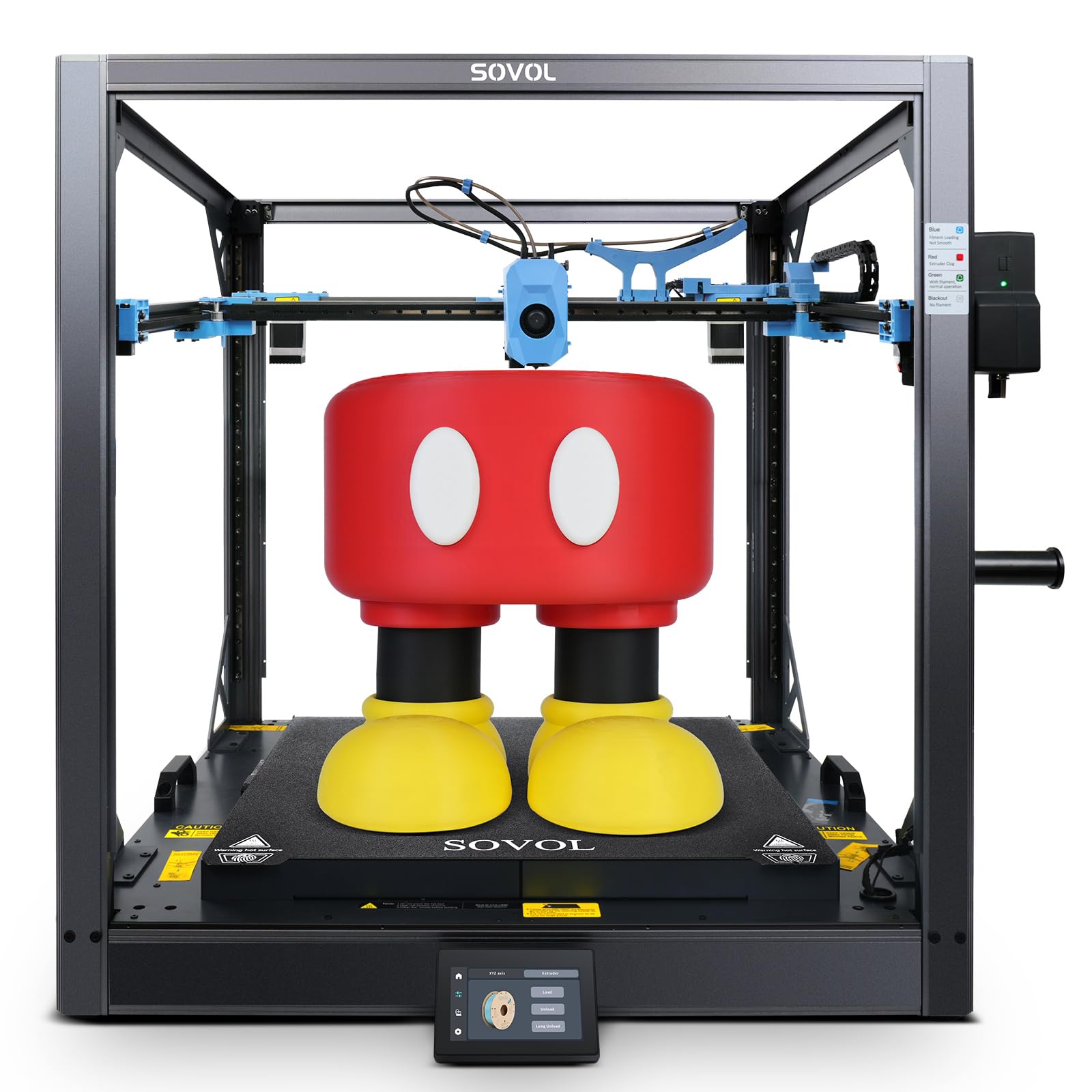
The ultimate giant for printing full-scale, life-size projects without breaking a sweat.
The Sovol SV08 Max is all about one thing: sheer size. With a print volume of 500x500x500mm, it “redefines true large-format printing,” letting you tackle industrial parts, full-scale prototypes, and oversized props in a single go. This is the printer you’d buy if you and your kids dream of printing a full-size stormtrooper helmet, a functional gear, or a large piece of furniture — projects that simply won’t fit on any other machine in this list.
Despite its size, it’s built for speed, hitting the highest top speed in this guide at 700mm/s with a blistering 40,000 mm/s² acceleration. It’s powered by an “Eddy Current Sensor” for contactless, high-speed bed leveling, which detects even the smallest surface deviations to ensure perfect first layers — a real necessity for a bed this large. It also runs on the open-source Klipper firmware, meaning tinkerers have full control and it can integrate with advanced tools like Obico for AI failure detection.
Owners confirm it “prints great out of box” and represent fantastic value for the size. However, it is extremely loud and heavy (86.8 pounds), and its 1300W heated bed can spike power on startup. Bed adhesion can be tricky with some materials, though a simple hairspray fix solves it for many. It’s less of a “family appliance” and more of a “serious fabrication tool” — perfect for a dedicated workshop rather than a shared living room.
The biggest selling point: Its gigantic 500mm³ build volume is simply class-leading here — no other pick lets you print on this scale.
The blunt trade-off: It’s loud, huge, and demands a dedicated workshop space, so it’s a poor fit for small apartments or quiet family rooms.
Understanding the Specs
Auto-Leveling: The Anti-Frustration Feature
This system measures the distance between the nozzle and the build plate at multiple points to automatically calibrate a perfect “first layer.” Without it, you’d have to manually adjust knobs and slide paper under the nozzle — a fiddly process that’s the #1 cause of failed prints. Every printer on this list includes some form of auto-leveling, which is the single biggest reason modern 3D printing is finally family-friendly.
Print Speed (mm/s) & Acceleration
Print speed, measured in millimeters per second (mm/s), is how fast the print head moves. Acceleration (mm/s²) is how quickly it can speed up and slow down. A high speed like 600 mm/s is impressive, but a high acceleration is just as important for actually finishing prints quickly on complex models — the head spends most of its time accelerating and decelerating, not at top speed.
Build Volume: How Big Can You Go?
This is the maximum size of a single object you can print, usually given as X, Y, and Z dimensions in millimeters. A 220x220x220mm volume is great for toys and practical items. A 300mm+ volume open up helmets, large vases, and batch printing. A 500mm volume, like the Sovol SV08 Max, is for true large-format projects that demand a dedicated workshop.
Enclosed vs. Open-Frame
An enclosed printer has a sealed chamber that traps heat and protects against curious fingers. It’s necessary for printing advanced materials like ABS and ASA, which warp without a warm environment. An open printer is easier to access and more affordable, and it’s perfectly fine for most family-friendly materials like PLA — but it offers less physical protection and safety for younger children.
FAQ
Is a 3D printer safe for a child to use?
Do I need to buy anything else to get started?
How long does a typical print take?
Is multi-color printing worth the extra cost?
What is the best material for printing toys?
What does “open source” mean for a 3D printer?
What is a slicer and do I need to be good at computers to use it?
How much maintenance does a family 3D printer need?
What is a “heated chamber” and why would I want one?
Final Thoughts: The Verdict
For most families, the family 3d printer winner is the Bambu Lab A1 because it combines reliability, speed, quiet operation, and a beautiful ecosystem into one of the easiest machines to love. If you want to dive into vibrant multi-color printing right away, grab the Anycubic Kobra X — it’s a budget-friendly way to get stunning results. And for the family that dreams of huge, professional-grade projects, the Bambu Lab P1S is the one to reach for, offering an enclosed, premium experience that will still be impressive years from now.
How We Picked
We do not accept paid placement. Every pick is matched to a real buyer and a real use-case; we do not hands-on test units.
Sources & Methodology
Specifications: manufacturer listings and product documentation. Review insights: verified customer reviews, as of August 2026. Pricing: not shown on this page (it changes often); check the current price via the retailer link.
As an Amazon Associate, WellFizz earns from qualifying purchases. This does not affect which products we feature.
Related Guides

Mo Maruf
I created WellFizz to bridge the gap between vague wellness advice and actionable solutions. My mission is simple: to decode the research and give you practical tools you can actually use.
Beyond the data, I am a passionate traveler. I believe that stepping away from the screen to explore new environments is essential for mental clarity and physical vitality.