Our readers keep the lights on and my smoothie glass nicely filled. As an Amazon Associate, I earn from qualifying purchases.
Specs are compiled from manufacturer listings and verified buyer reviews and can change over time — please confirm the key details on the product page before buying.
You are flying a DCS mission, and you glance at your left gauge. The camera pans instantly with your eyes, not with a stiff head turn. That smooth motion comes from an eye tracker, a small device that watches where you look. Picking the right one means choosing between a desktop bar you barely notice and a full VR headset with eye sensors built right in. This guide breaks down the three approaches so you know exactly where your money goes.
I’m Mohammad Maruf — the founder and writer behind WellFizz. This guide is built by comparing the manufacturers’ published specifications and the patterns across verified customer reviews, so you get each pick’s real strengths and trade-offs instead of marketing spin.
Whether you fly DCS in a sim pit or run VRChat avatars, these are the standouts in the best eye tracker space right now — a peripheral, a standalone VR rig, and a pro-grade headset built for foveated rendering.
Our Picks at a Glance
How To Choose The Best Eye Tracker
Eye trackers break into two camps: desktop peripherals that sit below your monitor and track both your head movement and your gaze direction, and VR headsets with embedded eye sensors that let you interact with virtual worlds. Which camp you fall into depends almost entirely on what you are trying to play or build.
Desktop vs VR-Built-In
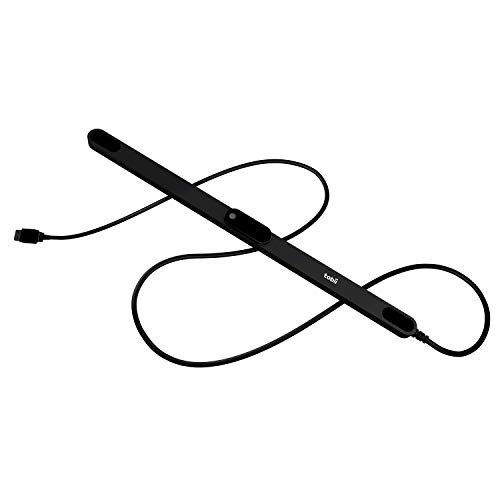
A desktop tracker like the Tobii Eye Tracker 5 is a small bar that connects via USB. It works with flight simulators, truck sims, and a handful of shooters — and it plays nicely with Windows Hello for password-free login. It adds no weight to your head and costs a fraction of a VR headset. The trade-off is that it only works with games that support its API, and the eye-tracking side can be hit-or-miss depending on your monitor and room lighting.
Foveated Rendering and Why It Matters
In a VR headset, eye tracking enables foveated rendering: the headset renders the exact spot you are looking at in full detail while dialing down graphics everywhere else. That saves your GPU serious workload. It is the main reason to pay for a pro-tier VR headset with eye tracking built in, and it works best when the software actually supports the feature — something to verify before you buy.
Software Support Is the Real Gatekeeper
The Tobii ecosystem claims support for 170+ games, while VR titles that use eye tracking are far fewer. Before purchasing, check your primary software — your flight sim, your social VR app, your data-analysis tool — and confirm it has a driver or plugin for the specific tracker you are considering.
Quick Comparison
| Model | Best For | Tracking Type | Key Spec | Platform | Amazon |
|---|---|---|---|---|---|
| Tobii Eye Tracker 5★ Best Overall | Simulation PC Gaming | Head & Eye | 170+ Supported Games | Windows 10 / 11 | Amazon |
| HTC Vive Focus Vision | All-in-One VR + PC VR | Eye & Hand (Built-In) | 2448×2448 per Eye | Standalone / PC | Amazon |
| HTC Vive Pro Eye | Pro Foveated Rendering | Precision Eye (Built-In) | OLED Display / 110° FOV | PC VR | Amazon |
In‑Depth Reviews
1. Tobii Eye Tracker 5
You get head and eye tracking from a single small bar below your monitor. No headset, no clip, no fuss.
This is the classic “no headgear needed” route. The Tobii Eye Tracker 5 sits below your screen using a magnetic mount and connects via USB. It works in a pitch-black room or bright daylight — a bigger deal than it sounds, since some cameras struggle in dim sim-pit setups. Tracking combines head movement and gaze, making gauge glances in DCS or Prepar3D feel natural. The crowd favorite here is support for 170+ games, covering everything from Star Citizen and Microsoft Flight Simulator to War Thunder and Euro Truck Simulator. It also doubles as a Windows Hello biometric sensor (a camera that recognizes your face), so you can log in just by looking at your PC.
Eye tracking accuracy varies with monitor size and distance. Head tracking is rock-solid — the thing owners rave about — but the finer gaze-point accuracy can be inconsistent. A few buyers report the adhesive on the mount failed early, though two replacement strips are included in the packaging. Setup itself is quick and the calibration takes seconds. If you race or fly on a flat screen and want immersion without wearing anything, this is the obvious starting point. skip it if you need high-precision gaze data for analytics work or foveated rendering — this is a consumer gaming peripheral, not a lab tool.
Why Simmers Love It
- Tracks head and eye movement in one USB device — no hat or clip needed
- Works in full darkness, something many IR-based systems do not
- Magnetic mount makes installation a 10-second job
The Nuance
- Eye tracking accuracy can be inconsistent depending on your setup distance
- Mounting adhesive failed on a small number of units early on
Reach for this if: you play flight sims, truck sims, or shooters on a flat monitor and want rich head-and-gaze tracking without putting a tracker on your head.
Think twice if: you need high-precision gaze data for analytics work or foveated rendering — this is a consumer gaming peripheral, not a lab tool.
2. HTC Vive Pro Eye

This is the VR headset that puts eye tracking front and center, with an OLED display at 110 degrees field of view per eye.
This is the headset that says “eye tracking” on the box — and it means business. The Vive Pro Eye uses an OLED display per eye with a 110-degree field of view. Eye tracking is the core feature, built for consistent, accurate gaze detection. What that open up is foveated rendering — the headset renders only what you are looking at in full detail, reducing GPU load dramatically. The complete system comes with base stations and controllers, and it supports VIVEPORT Infinity for unlimited access to 700+ games and apps.
Here is the honest truth: the eye tracking and foveated rendering features are “mixed” by buyer consensus. Several owners mention the foveated rendering is not currently usable in most titles despite the advertising, and the lens balance is narrow with noticeable blurriness in the periphery. On the flip side, a pro user with a team running this in a professional environment calls the eye tracking a standout and says calibration takes under 30 seconds. One owner notes the build outlasted a Quest and a Valve Index after repeated accidental drops. Think of this as a specialty tool for teams or individuals who need eye-tracking data in VR — not as a mass-market consumer headset.
The Data-Driven Verdict: This is the most-discussed topic among buyers, and it is a mixed bag — eye tracking works reliably for some, but the peripheral blurriness and limited foveated-rendering support keep it from being a slam-dunk for most. It is a niche pro tool, not a universal recommendation.
Strongest fit: teams doing VR-based eye-tracking research or studios that need foveated rendering in a controlled, compatible software environment.
Harder sell: anyone hoping to plug in and get flawless foveated rendering across SteamVR — verify your apps support it first, or expect to wait.
3. HTC Vive Focus Vision

A standalone VR headset with built-in eye and hand tracking that also connects to a PC for high-fidelity gaming.
This standalone VR headset also connects to a PC for high-fidelity gaming. The Vive Focus Vision works on its own for casual use — no PC, no cables — and switches to DisplayPort mode for lossless PC VR through SteamVR. Eye tracking is embedded alongside low-light hand tracking, face tracking, and body tracker support. The display runs at 2448 x 2448 pixels per eye with a 120-degree field of view and a 90 Hz refresh rate. A hot-swappable battery means a reserve front battery keeps the headset alive while you swap the main pack, so you never fully shut down mid-session.
The biggest drawback is the unreliable PC connectivity. Customers note the DisplayPort cable is flaky — one owner says it only detects the PC about 30% of the time. The headset also ships without a charger, and the Fresnel lenses produce noticeable blurriness for some. Setup is complex for new VR users, and the eye tracking can be unreliable. If you run strictly as a standalone device, the experience is smoother. The moment you expect a plug-and-play PC VR connection, the Focus Vision requires patience and a reliable cable setup.
The Standalone Advantage
- No PC required for basic use — it boots and runs on its own
- Automatic IPD adjustment aligns lenses to your pupils instantly
- Hot-swappable battery keeps sessions going without a full shutdown
PC VR Catch
- DisplayPort connection is unreliable — some owners get detection only 30% of the time
- Fresnel lenses create blurriness in peripheral vision for some users
- No charging block included in the box
Best for: someone who wants a standalone VR headset for everyday use and can tolerate a fiddly PC connection when they want higher-fidelity games.
Not for: anyone who expects a smooth, console-like PC VR experience right from the start.
Understanding the Specs
Head Tracking vs Eye Tracking
Head tracking moves your view as you turn your head — it tells the game you are looking left or right. Eye tracking detects exactly where your pupil is pointed, so you can glance at a gauge or a dashboard without moving your head at all. A device like the Tobii Eye Tracker 5 does both. A VR headset like the HTC Vive Pro Eye adds eye tracking to enable foveated rendering, which is a GPU-saving trick that only renders full detail exactly where you are looking.
Foveated Rendering
This is the killer app for eye tracking in VR. The headset renders the spot your eye is focused on at full resolution and drops the detail everywhere else in your periphery. That frees up graphics power, letting you run more complex scenes on the same hardware. It only works if the game or application actually supports it — not every VR title does, so check compatibility before you buy an eye-tracking headset for that reason alone.
FAQ
Do I need a VR headset to use eye tracking?
Will the Tobii Eye Tracker 5 work with every game?
Can I use an eye tracker in a dark room?
What is foveated rendering and why do I need it?
Does the HTC Vive Pro Eye support foveated rendering right now?
Can I use the HTC Vive Focus Vision without a PC?
Will eye tracking work with my glasses?
How long does calibration take on a typical eye tracker?
Final Thoughts: The Verdict
For most people, the best eye tracker is the Tobii Eye Tracker 5 because it gives you head and eye tracking in a single small device for a fraction of the cost of a VR headset, with support across 170+ games and Windows Hello built in. If you need a VR headset with embedded eye tracking for foveated rendering and can work around limited software support, the HTC Vive Pro Eye is the pro-grade pick. And for a standalone mixed-reality rig that also does PC VR when it works, the HTC Vive Focus Vision offers the most flexible hardware — as long as you do not need a perfect DisplayPort connection every time.
How We Picked
We do not accept paid placement. Every pick is matched to a real buyer and a real use-case; we do not hands-on test units.
Sources & Methodology
Specifications: manufacturer listings and product documentation. Review insights: verified customer reviews, as of July 2026. Pricing: not shown on this page (it changes often); check the current price via the retailer link.
As an Amazon Associate, WellFizz earns from qualifying purchases. This does not affect which products we feature.
Related Guides

Mo Maruf
I created WellFizz to bridge the gap between vague wellness advice and actionable solutions. My mission is simple: to decode the research and give you practical tools you can actually use.
Beyond the data, I am a passionate traveler. I believe that stepping away from the screen to explore new environments is essential for mental clarity and physical vitality.