Active Daily Care Eat Smart Health Hacks Recommended
About Contact The Library

6 Best Eye Contact Webcam | 4K That Actually Looks at You

Our readers keep the lights on and my smoothie glass nicely filled. As an Amazon Associate, I earn from qualifying purchases.

Specs are compiled from manufacturer listings and verified buyer reviews and can change over time — please confirm the key details on the product page before buying.

You know that awkward video-call moment: you look at your screen, but the other person sees you looking down or off to the side. An eye contact webcam ends that. It either places the lens in the center of your screen or uses software to correct your gaze, so you appear to look directly at the person on the other end. A far more natural, engaged, and professional presence in every meeting is the result.

I’m Mohammad Maruf — the founder and writer behind WellFizz. This guide is built by comparing the manufacturers’ published specifications and the patterns across verified customer reviews, so you get each pick’s real strengths and trade-offs instead of marketing spin.

If you lead daily sales calls, coach clients, or simply want to stop looking shifty on Zoom, the right eye contact webcam can transform how you are perceived in every virtual room.

Our Picks at a Glance

OBSBOT Tiny 3
Best OverallOBSBOT Tiny 34.5★191 ratingsThe gimbal-driven AI tracker that follows you around the room while delivering studio-grade 4K.Check Price on Amazon
JOYUSING FlexCam10
Most VersatileJOYUSING FlexCam104.3★55 ratingsFour physical modes in one body — eye contact, desk view, privacy, and a 4K webcam. The FlexCam10 takes a clever approach: instead of just offering an eye contact mode, it gives you four distinct physical setups.Check Price on Amazon

How To Choose The Best Eye Contact Webcam

Not all eye contact webcams achieve the same result. Some rely on a physical design that puts the lens right in front of your face, while others use software to digitally adjust your gaze. Understanding the core differences will help you pick the one that actually works for your setup.

Physical eye contact: center-mount vs. drop-down vs. AI correction

A center-mount webcam sits directly in the middle of your screen, often on a flexible arm or a dedicated stand, so you naturally look straight ahead at the lens. A drop-down design hides the camera at the top of the monitor and pulls it down to eye level when needed. AI-based correction, found in many premium webcams, uses software (like NVIDIA Maxine Eye Contact) to digitally shift your gaze so it appears you are looking at the lens even when you are not. Physical solutions generally look more natural and avoid the slight “uncanny valley” effect of AI correction.

Resolution and autofocus for a sharp, natural look

You want a camera that keeps your face sharp and correctly exposed, especially when you move around. A 4K sensor gives you more detail for cropping and digital zoom, but a fast phase-detection autofocus (PDAF) matters more for keeping focus as you lean in or gesture. Low-light correction is equally important; a camera that pumps up the grain in dim lighting makes you look unprofessional regardless of eye contact. Look for a wide ISO domain or a large sensor if you work in spaces with mixed lighting.

Compatibility with your operating system and meeting apps

Most eye contact webcams are plug-and-play with Windows, macOS, and Linux, but advanced features like gaze correction or gesture control often require proprietary software. If you rely on Zoom, Teams, or Google Meet, check for explicit “Zoom Certified” or “Works with Teams” claims in the specs. Some special features — like Windows Hello facial recognition — require specific hardware and are only available on certain models, such as the ProHello.

Microphone quality for clear audio

Eye contact is visual, but the full professional impression depends on clear audio too. Many of these webcams include dual or triple microphone arrays with noise cancellation. If you are in a busy home office, a model with omnidirectional and directional mics will capture your voice while filtering out the neighbor’s dog or the kitchen blender. For the absolute best audio, some owners recommend a dedicated external mic, but a well-designed built-in array is enough for most daily calls.

Quick Comparison

Model Best For Resolution Eye Contact Method Autofocus Amazon
OBSBOT Tiny 3★ Best Overall AI tracking & premium video 4K@30 / 1080p@120 AI Tracking + Gimbal Dual All-Pixel PDAF Amazon
JOYUSING FlexCam10Most Versatile Flexible arm & document capture 4K UHD 4 Modes (Eye Contact Mode) PDAF Amazon
Center Cam V2 Center-mount on ultrawide monitors 1080p HD@30 Center-mount (physical) Fixed Focus Amazon
CA Essential Webcam Flex Multi-scenario (center/table/traditional) 1080p HD Center View Mode (physical) Auto/Fixed Amazon
ProMini iContact Laptops and small screens 4K UHD Drop-down arm Auto Focus Amazon
ProHello iContact Windows Hello + eye contact 4K UHD Drop-down arm Manual Focus Amazon

In‑Depth Reviews

★ Best Overall

1. OBSBOT Tiny 3

Our pick — 4.5★ from 150+ verified ratings; the strongest balance of quality and price.

AI Tracking4K@120FPS

The gimbal-driven AI tracker that follows you around the room while delivering studio-grade 4K.

This is the most technically advanced eye contact webcam on the list, and it earns the top spot because it combines a full AI-powered gimbal with a large 1/1.28-inch CMOS sensor. The result is that you can pace, gesture, or even walk across the room, and the camera smoothly pans and tilts to keep you perfectly centered — so you are always looking at the lens. It delivers 4K at 30 frames per second or a silky 1080p at 120FPS, and the Dual All-Pixel PDAF (phase-detection autofocus) keeps you sharp even as you move.

What wins people over is the image quality — owners consistently praise the crisp 4K and excellent low-light performance, thanks to a wide ISO domain of 0-12800 and DCG HDR. The triple-mic array captures spatial audio, with two directional MEMS mics pinpointing your voice while an omnidirectional mic picks up the room. You can also control the camera with voice commands or gestures, which adds a layer of convenience for solo presenters. The only real caveats are that mounting on very wide monitors can be tricky (some owners use Velcro), and the camera does get noticeably warm during extended use.

Considering all its features — AI tracking, gesture control, and a built-in gimbal — this is a premium investment that solves eye contact in a way no fixed-position camera can match. It is also extremely portable at just 63g, as buyers report, making it easy to toss in a bag.

What makes it the best

  • AI tracking gimbal keeps you centered automatically, solving eye contact naturally
  • Excellent 4K image quality with a large sensor for low-light scenes
  • Triple-mic array delivers professional spatial audio
  • Gesture and voice control for hands-free operation

What to consider

  • Gets warm during extended use
  • Mounting on wide monitors can be problematic, sometimes requires Velcro
  • Premium price, overkill for basic video calls

Reach for this if: you move around during calls, present frequently, or want the absolute best AI tracking and image quality in one package.

Think twice if: your budget is tighter or you only need a simple eye contact solution for a fixed desk position.

Most Versatile

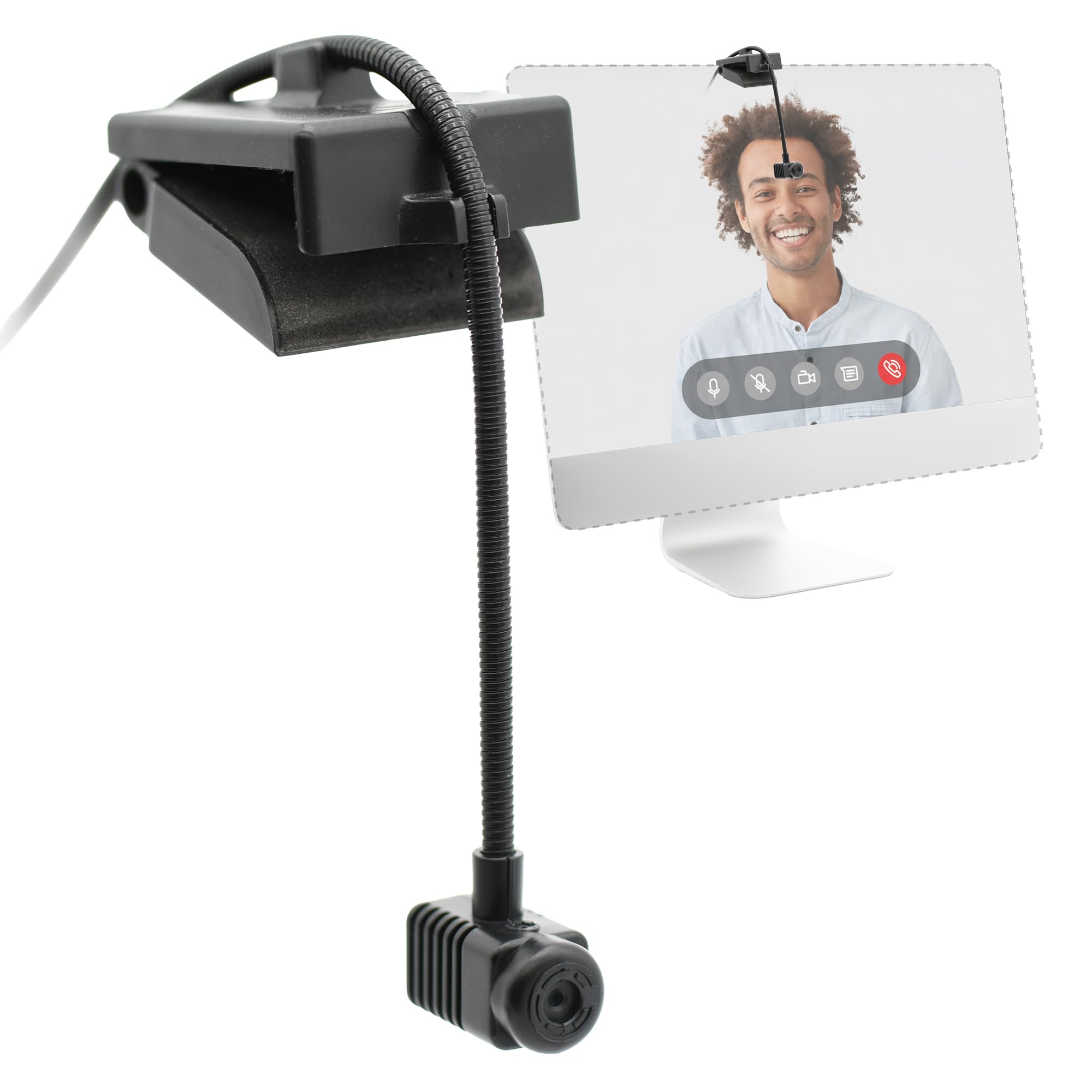
2. JOYUSING FlexCam10

4 ModesTelescopic Arm

Four physical modes in one body — eye contact, desk view, privacy, and a 4K webcam.

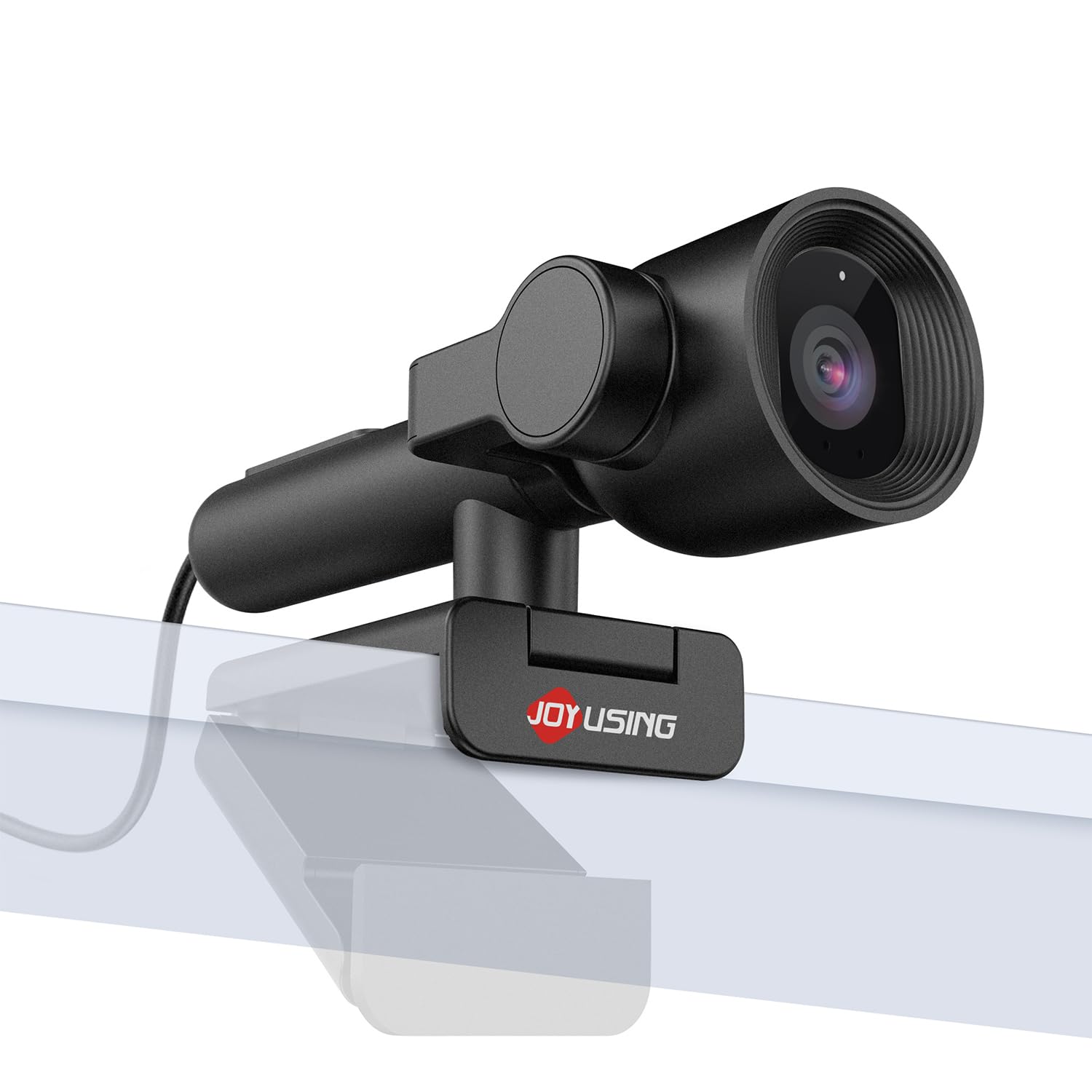
The FlexCam10 takes a clever approach: instead of just offering an eye contact mode, it gives you four distinct physical setups. You can use it as a standard 4K webcam, rotate it to the center for eye contact, point it downward 90 degrees for a desk view (perfect for document sharing), or flip it 180 degrees inward toward the screen for privacy. This flexibility makes it a smart choice for anyone who needs more than just a talking-head camera.

At the heart of the eye contact mode is a telescopic arm that extends the camera down to screen center, with a fixed 79-degree field of view. The PDAF autofocus locks quickly within a range of 0.65 to 10 feet, so you stay sharp as you lean in. The image quality is solid 4K, though owners note it is not extraordinary compared to more expensive options. The dual noise-cancelling mics are adequate for most calls, but some recommend an external mic for truly professional audio.

The trade-off is that a few owners found the eye contact positioning does not suit every face angle, and the camera can struggle with noise in low light. However, for a mid-range price, you get a remarkably versatile tool that replaces a webcam, a document camera, and a privacy shutter in one unit.

Why it stands out: The telescopic arm and 90-degree downward tilt are rare features that make this webcam useful for more than just video calls — it doubles as a document camera for sharing notes or objects without losing quality.

Best for: users who want a single camera for meetings, document sharing, and screen presentations, and value physical flexibility over software-driven eye contact.

skip it if: you need top-tier low-light performance or you have a very specific eye-contact angle that the fixed arm cannot accommodate.

The versatile arm of the FlexCam10 gives you a freedom that the OBSBOT Tiny 3’s top-mount gimbal cannot match — you can point it at your desk for a document camera in seconds.

Slim Center-Mount

3. Center Cam V2

Ultrawide Friendly1080p HD

The original center-mount design, purpose-built to sit right in front of your face on any monitor.

A therapist who wanted real-feel eye contact on video calls created Center Cam, and that core mission still drives the V2. Its 16-inch flexible metal arm is only 4mm thick, so it slips between stacked ultrawide monitors without covering much screen real estate. The camera sits at eye level in the middle of the display, so you naturally look straight ahead at the lens — no software magic required.

The trade-off is that the video quality is only 1080p at 30fps with a fixed focus lens, and some owners mention a yellowish hue or grainy image in less-than-ideal lighting. The fixed 70-degree horizontal field of view frames you a bit tighter than most webcams, which can help keep the focus on your face but leaves less room for background. The built-in mono microphone is fine for quick calls, but for professional audio you will want an external mic.

This is a specialist tool for people with super ultrawide monitors or those who simply cannot tolerate the off-angle look of a traditional top-mounted webcam. As owners put it: “the placement is the killer feature.” Just know that the image quality will not match a premium 4K sensor.

What it does best

  • Only 4mm thick flexible arm fits between ultrawide monitors
  • Physical center placement for natural, direct eye contact
  • 6-foot total USB length for flexible routing
  • Simple plug-and-play, no software required

What to watch for

  • 1080p fixed-focus lens is noticeably softer than a 4K webcam
  • Some customers note a yellowish tint in video
  • Fixed focus means you cannot adjust sharpness for changing distances

Reach for this if: you have a super ultrawide or multi-monitor setup and natural eye contact is your top priority over resolution.

Think twice if: you need sharp 4K video or work in challenging lighting that demands a wide ISO range.

If you have a dual-ultrawide setup, this 4mm arm is your only option for true centered eye contact — the JOYUSING FlexCam10’s thicker arm will not slide between stacked displays.

Multi-View Flex

4. CA Essential Webcam Flex

Center + Table View5x Digital Zoom

A three-position arm that switches from center-screen eye contact to a desktop document camera in seconds.

The Cyber Acoustics Webcam Flex is built for professionals who need both eye contact and a document camera in one device. Its 7.48-inch rotatable arm allows three distinct mounting positions: Center View (eye level, centered on screen), Table View (pointed down at your desk for sharing documents), and Traditional View (on top of the monitor). The 5MP sensor delivers 1080p HD video, and the camera offers up to 5x digital zoom for honing in on details during a presentation.

Image quality gets mixed reactions from owners — some say the sharpness rivals webcams, while others report focusing issues that make the camera unusable. The adjustability is also a point of contention; the arm can be stiff to move and requires two hands to adjust, and on higher monitors the shaft may be too short for a perfect centered eye level. The dual omnidirectional microphones are fine for calls, and the plug-and-play USB-A connection works with PC, Mac, and Chromebook without any software.

For the price, this is a solid choice if you frequently switch between giving presentations and sharing your screen’s content. The honest trade-off is that the build quality feels less refined than the Center Cam V2, and the mixed reviews on image quality mean it may not suit perfectionists.

Good to know: The three physical buttons on the base let you toggle zoom up to 5x, switch auto or fixed focus, and adjust image orientation without needing any software — a rare convenience for presenters who want to stay in flow.

Best for: educators, trainers, or presenters who need to alternate between face-to-face eye contact and showing a notebook or object on their desk.

pass on it if: you need consistent, top-shelf image quality or have a very tall monitor where the arm may not reach eye level.

The CA Webcam Flex’s 7.48-inch reach is shorter than the Center Cam V2’s 16-inch arm, so on tall monitors it may leave you looking slightly upward instead of straight ahead.

Laptop-Friendly

5. ProMini iContact

Drop-Down Arm4K UHD

A drop-down arm brings 4K eye contact to laptops and small screens without a center-mounted gadget.

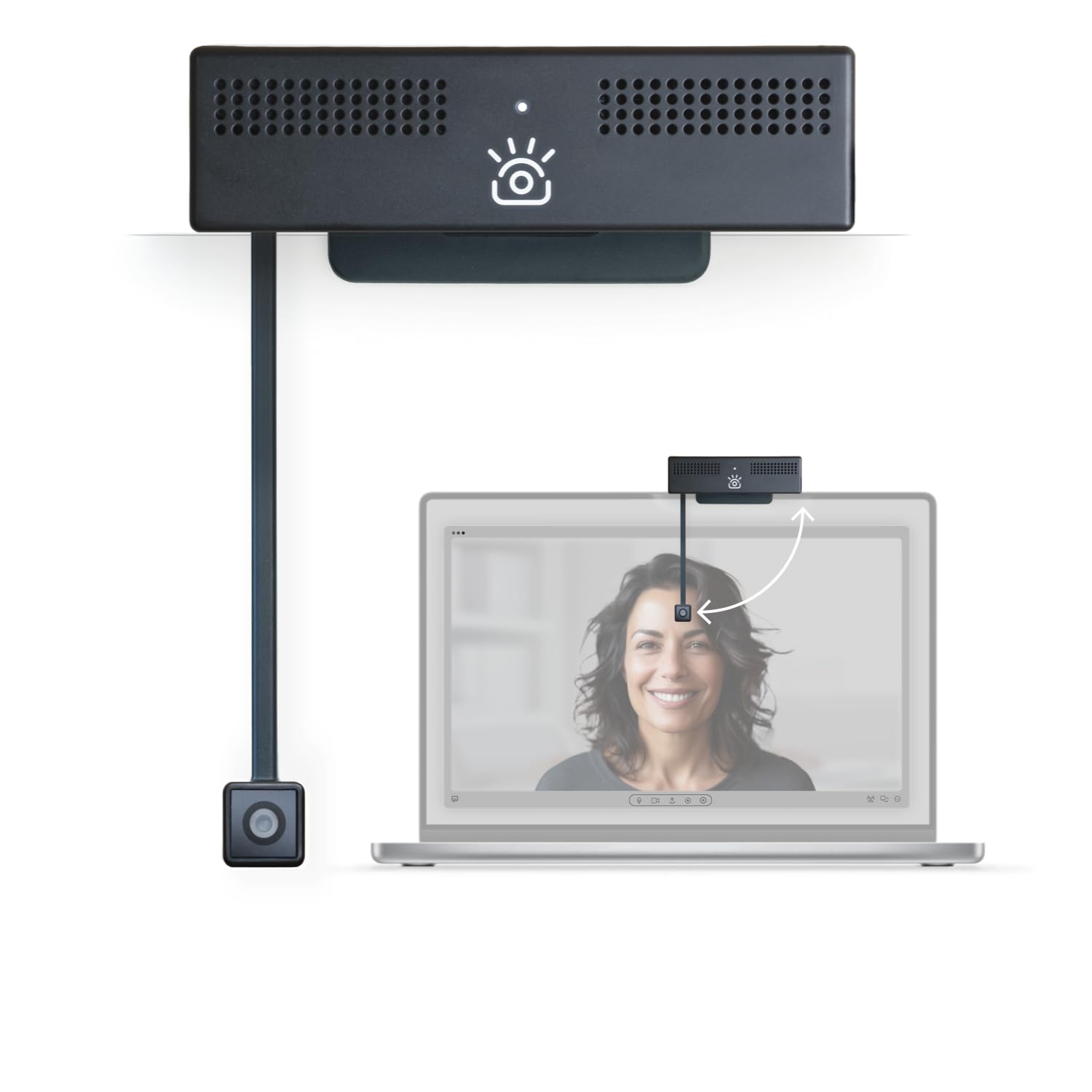
The ProMini is designed for people who work primarily on laptops or smaller external monitors. Instead of a flexible arm that sits in the middle of the screen, this webcam mounts at the top of your display and then drops down to eye level when you are ready to talk. This approach keeps your screen clear when the camera is not in use and gives you a clean 4K signal with a 12MP sensor when you are on a call.

The eye contact technology is built-in and works reliably — owners call it “impressive” and note it makes a real difference on Zoom and Teams calls. The free iContact app gives you some fine control over zoom and image adjustments, but the interface is a bit clunky.

The biggest caveat from owners is durability: a few units stopped working after a week or two, though customer service was quick to exchange them. The arm also feels fragile to some, and the light indicator is unreliable. If you get a good unit, it is a excellent solution for laptop users who want 4K eye contact without a bulky external stand.

What shines

  • Drop-down arm provides centered eye contact on laptops and small monitors
  • 4K UHD with 12MP sensor for sharp, detailed video
  • Zoom Certified, works smoothly with Teams and Google Meet
  • Noise-cancelling microphone for clearer audio

What to keep in mind

  • Some reviewers point out the arm and build feel fragile
  • A few units had early failures, though customer service replaced them
  • Sound quality at distance is poor; mic works best when you are close

Reach for this if: you use a laptop as your primary machine and want 4K eye contact without a flexible arm occupying your screen center.

Think twice if: you need a rock-solid build for frequent travel or you prefer a traditional center-mount webcam for a clean setup.

The drop-down arm of the ProMini is a smarter choice for laptop users than the OBSBOT Tiny 3’s top-mount gimbal, because it folds away completely when not in use, leaving your screen unobstructed.

Windows Hello

6. ProHello iContact

Windows HelloSecure Switch

The same drop-down eye contact camera with the added convenience of Windows Hello facial sign-in.

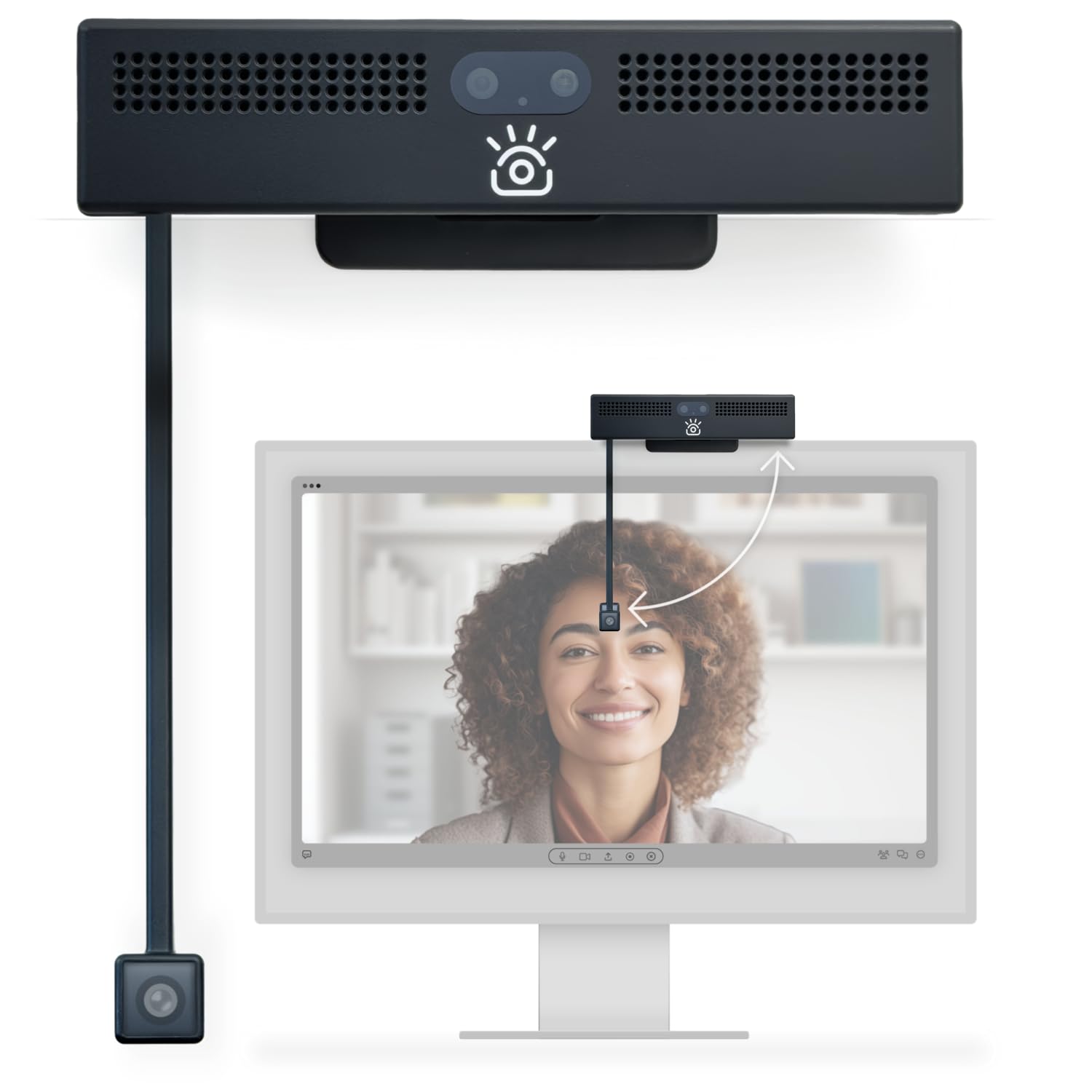
The ProHello is essentially the ProMini’s sibling with one major addition: Windows Hello facial recognition. The drop-down camera sits at eye level in the center of your screen for natural eye contact, and it doubles as a biometric sign-in tool that logs you into Windows without a password. It fits desktop monitors between 20 and 30 inches, and the secure switch disconnects power to both the camera and microphones when you fold the arm up.

The 4K video uses a 12MP sensor at 30fps with a 78-degree field of view. Owners say the eye-level angle is flattering and the camera is a “standout” for Teams calls once you get it set up. However, some note that the drop-down camera sensor does not match the quality of the top-facing camera on this same unit — it is not true 4K on the eye-contact lens, which can be disappointing. The dual noise-cancelling mics are adequate for most calls.

Where the ProHello falls short for some is image quality consistency. Without its companion software, the camera looks noticeably worse than a competing Logitech Brio. The app can also introduce lag and blur. The manual focus means you cannot rely on autofocus to clean up changes in distance. For Windows Hello users who prioritize convenience and security, the utility may outweigh the visual imperfections.

The honest read: Windows Hello works well and the eye contact positioning is solid, but the drop-down lens quality is a step below the main camera sensor, so buyers with a critical eye for image quality may be unsatisfied.

Best for: Windows Hello users who want a single webcam that handles secure login and eye contact meetings without extra hardware.

it’s not for you if: image quality is your top priority — the drop-down lens does not deliver the same 4K fidelity as the top camera, and the manual focus limits flexibility.

If Windows Hello sign-in is a must-have, this is the only option on the list — the ProMini lacks the IR sensor, and the OBSBOT Tiny 3 cannot log you in with your face at all.

Understanding the Specs

Eye contact method: physical vs. software

The most important decision you will make is how the webcam achieves eye contact. Physical solutions (center-mount arms like the Center Cam V2 or drop-down arms like the ProMini) put the lens directly in front of your face, so you naturally look at it. Software-based solutions (like the AI gaze correction in the OBSBOT Tiny 3) digitally adjust your eyes in the video feed. Physical methods tend to look more natural and reliable, while software can sometimes introduce a slight uncanny-valley effect if the correction is imperfect. Some webcams also use a combination, offering both a physical angled mount and optional software fine-tuning.

Autofocus type and why it matters

Phase-detection autofocus (PDAF) is the gold standard for eye contact webcams because it locks focus quickly and holds it as you move. The JOYUSING FlexCam10 uses PDAF to stay sharp within 0.65 to 10 feet, making it ideal for someone who leans back or gestures during a call. Fixed-focus lenses (like the Center Cam V2) are simpler and cheaper, but they are designed for a single, consistent distance — if you move closer or farther, you go soft. The OBSBOT Tiny 3 uses Dual All-Pixel PDAF, which intelligently switches focus modes to match the lighting and subject movement. If you move around during calls, PDAF is effectively a requirement.

Microphone array and noise cancellation

Your video may look great, but if your audio is distant or full of background noise, the professional impression falls apart. Most eye contact webcams include at least dual microphones. The OBSBOT Tiny 3 uses a triple-mic array with two directional MEMS mics and one omnidirectional mic, which captures your voice while filtering out the room. The JOYUSING and ProHello models use dual noise-cancelling mics that are fine for quiet offices but may pick up more ambient sound in busy spaces. Some owners of the FlexCam10 recommend an external mic for the best audio, a common theme across all webcams with built-in mics.

Resolution and frame rate for a natural look

4K resolution gives you more detail and headroom for cropping or digital zoom, but 1080p at 30fps is perfectly adequate for the vast majority of video calls. The OBSBOT Tiny 3 offers 4K at 30fps and a high-frame-rate 1080p at 120fps, which is useful for content creators who want smooth slow-motion. The Center Cam V2 and CA Webcam Flex are limited to 1080p, which looks fine in good light but may show more grain in dim conditions. A larger sensor (like the 1/1.28-inch CMOS in the OBSBOT) handles low light far better than a tiny smartphone-style sensor, so if you work in a room with mixed lighting, prioritize sensor size over raw resolution.

FAQ

What exactly does an eye contact webcam do differently?
A standard webcam sits at the top edge of your screen, so you naturally look down or to the side of the lens to see your video feed. An eye contact webcam places the camera in the center of your screen (via a flexible arm, a drop-down mechanism, or software that digitally corrects your gaze), so you appear to be looking directly at the person you are talking to. This creates a more natural, engaged, and professional impression.
Will a center-mount webcam block my screen?
Yes, but minimally. The Center Cam V2 is only 4mm thick and sits at the bottom center of your monitor, so it covers a very small portion of the screen. Most users adapt quickly and find the trade-off worth it for natural eye contact. The ProMini and ProHello use a drop-down arm that only appears when you need it, so your screen stays completely clear when the camera is not in use.
Can I use an eye contact webcam with an ultrawide or multi-monitor setup?
Yes, but it depends on the model. The Center Cam V2 is specifically designed for this: its 16-inch flexible arm is thin enough to slide between stacked ultrawide monitors. The JOYUSING FlexCam10 and CA Webcam Flex have adjustable arms that can be positioned in the center of any monitor. The OBSBOT Tiny 3 and the ProHello models sit on top of a single monitor, so they work best with a standard or single-display setup.
Do I need special software for the eye contact feature to work?
It depends on the webcam. Physical center-mount or drop-down designs (Center Cam V2, ProMini, ProHello) do not require any software — the eye contact is a natural result of the lens position. The OBSBOT Tiny 3 uses its OBSBOT Center software for AI tracking, gaze correction, and gesture controls, but the camera works without it in basic USB video mode. Software-based eye correction features (like NVIDIA Maxine Eye Contact) need the app running to function.
How does the drop-down arm on the ProMini and ProHello work?
The camera mounts at the top of your monitor like a traditional webcam. When you want to use it, you pull the lens downward on a thin arm so it sits at eye level in the center of the screen. When you are done, you push it back up, and the arm folds flush against the monitor. On the ProHello, folding the arm also triggers a secure switch that disconnects power to both the camera and microphones for privacy.
Is 4K necessary for eye contact webcams?
No, 4K is not necessary for eye contact itself — the lens position or software correction is what creates the effect. However, 4K gives you a sharper, more detailed image that crops well if you want to zoom in digitally without looking pixelated. The 1080p Center Cam V2 and CA Webcam Flex produce perfectly fine video for standard meetings, but the 4K models (OBSBOT, JOYUSING, ProMini, ProHello) offer more flexibility for framing and look better on large monitors.
What is the difference between AI tracking and eye contact?
AI tracking (like the OBSBOT Tiny 3’s gimbal) physically moves the camera to keep you centered as you move around the room, so you always appear to be looking at the lens. Eye contact (like the Center Cam V2’s fixed center placement) relies on the camera being directly in front of your face when you are seated still. Some webcams combine both: the OBSBOT Tiny 3 uses its gimbal for tracking and also offers NVIDIA Maxine Eye Contact software for additional gaze correction.
Can I use an eye contact webcam as a document camera?
Only if the webcam has a flexible arm that can point downward. The JOYUSING FlexCam10 and the CA Essential Webcam Flex both offer a dedicated Table View mode that rotates the camera 90 degrees toward your desk, turning it into a document camera for sharing notes, objects, or demonstrations. Standard center-mount or drop-down webcams do not have this capability, so if document sharing is important, choose one of those two models.
Does Windows Hello work with all these webcams?
No, Windows Hello requires a specific infrared (IR) sensor for facial recognition, which only the ProHello iContact has among the webcams on this list. The other models (OBSBOT, JOYUSING, Center Cam, CA Webcam Flex, ProMini) are standard RGB webcams and cannot be used for Windows Hello sign-in. If biometric login is a requirement, the ProHello is your pick.
How durable are the flexible arms on these webcams?
Durability varies by model. The Center Cam V2’s 4mm metal arm is designed to hold its position indefinitely and is praised for its adjustability. The CA Webcam Flex’s arm gets mixed feedback — some owners find it stiff and requiring two hands to adjust, while others note it feels flimsy. The ProMini and ProHello’s drop-down arms are the most delicate; a few owners reported breakage, though the manufacturer’s customer service replaced affected units. The JOYUSING FlexCam10’s telescopic arm is generally considered sturdy.

Final Thoughts: The Verdict

If you want one dependable pick, the eye contact webcam winner is the OBSBOT Tiny 3 because its AI gimbal tracking and 4K sensor solve eye contact naturally even when you move around. If you want physical versatility that includes document camera mode, grab the JOYUSING FlexCam10. And for laptop users who need Windows Hello and a clean drop-down design, the ProHello iContact is the one to reach for.

How We Picked

We do not accept paid placement. Every pick is matched to a real buyer and a real use-case; we do not hands-on test units.

Sources & Methodology

Specifications: manufacturer listings and product documentation. Review insights: verified customer reviews, as of July 2026. Pricing: not shown on this page (it changes often); check the current price via the retailer link.

As an Amazon Associate, WellFizz earns from qualifying purchases. This does not affect which products we feature.

Related Guides

Mo Maruf
Founder & Lead Editor

Mo Maruf

I created WellFizz to bridge the gap between vague wellness advice and actionable solutions. My mission is simple: to decode the research and give you practical tools you can actually use.

Beyond the data, I am a passionate traveler. I believe that stepping away from the screen to explore new environments is essential for mental clarity and physical vitality.

Please use a real email you check. If it's fake or mistyped, your message won't reach us and we can't reply — wrong addresses are rejected automatically.