Our readers keep the lights on and my smoothie glass nicely filled. As an Amazon Associate, I earn from qualifying purchases.
Specs are compiled from manufacturer listings and verified buyer reviews and can change over time — please confirm the key details on the product page before buying.
Your memory cards fill up fast, and your editing timeline stalls when the drive can’t keep up. The right external drive gives you a safe place to dump a full card and a fast workspace for raw files straight from the camera. This guide breaks down the best options for photographers, from rugged field drives to high-speed SSDs.
I’m Mohammad Maruf — the founder and writer behind WellFizz. This guide is built by comparing the manufacturers’ published specifications and the patterns across verified customer reviews, so you get each pick’s real strengths and trade-offs instead of marketing spin.
Whether you edit in the field or archive at home, picking the right external hard drive for photographers means balancing speed, capacity, and durability against your actual workflow.
Our Picks at a Glance


How To Choose The Best External Hard Drive For Photographers
Photographers have a unique problem: files are huge, and a shoot can produce tens of gigabytes in a single afternoon. Your drive must hold all of that safely, transfer it quickly, and survive being thrown into a camera bag. A few key specs—transfer speed, ruggedness, and capacity—make the choice much easier.
Understanding Transfer Speed Standards
USB 3.0 and USB 3.2 Gen 1 both offer 5 gigabits per second, which is plenty for traditional spinning hard drives. If you edit raw files directly from the drive, you want a solid-state drive (SSD) with USB 3.2 Gen 2 — that doubles the speed ceiling to 10 Gbps and makes scrubbing through timelines much smoother.
Rugged Protection for Field Work
IP ratings tell you how well a drive resists the elements. An IP65 rating means it is fully protected against dust and can handle low-pressure water jets, so a sudden rain shower won’t ruin your footage. Drop resistance is measured in feet or meters, and a drive rated for falls from 9.8 feet will survive most fumbles on location.
Matching Capacity to Your Workflow
A 1TB SSD holds roughly 30,000 raw files from a 24-megapixel camera, but that fills up fast when you shoot video. If you keep your entire archive with you, a 5TB or 6TB portable hard drive is the way to go. Spinning drives are slower but offer far more space per dollar.
Quick Comparison
| Model | Best For | Capacity | Max Speed | Ruggedness | Amazon |
|---|---|---|---|---|---|
| Samsung T7 Shield★ Best Overall | Editing raw files on the go | 1 TB | 1,050 MB/s | IP65 + 9.8 ft drops | Amazon |
| SanDisk Creator ProTop Performer | High-speed creative workflow | 1 TB | 2,000 MB/s | IP65 + 3m drops | Amazon |
| Seagate Backup PlusEditor’s Pick | Photographers on Mac & PC | 4 TB | USB 3.0 | — | Amazon |
| WD My Passport 6TB | Massive portable archives | 6 TB | 5 Gbps | — | Amazon |
| Seagate Portable 5TB | Budget-friendly bulk storage | 5 TB | 5120 Mbps | — | Amazon |
| WD My Passport 5TB | Ransomware-aware backups | 5 TB | 5 Gbps | — | Amazon |
| WD Elements 5TB | Simple plug-and-play storage | 5 TB | 5 Gbps | — | Amazon |
| ADATA HD710 Pro | Tough outdoor shooting | 2 TB | 625 Mbps | IP68, MIL-STD-810G | Amazon |
| Toshiba Canvio Basics | Budget travel companion | 2 TB | 5 Gbps | — | Amazon |
In-Depth Reviews
1. Samsung T7 Shield Portable SSD
Our pick — over 4.5★ from 16,000+ verified ratings; the strongest balance of quality and price.
The rugged field SSD that edits raw files with zero lag and shrugs off drops.
Editing a 6K Blackmagic clip straight off a portable drive used to mean watching the timeline stutter. Buyers report this one handles raw photo and video editing with no lag at all, which is exactly what you want when the deadline is tight. The secret is the USB 3.2 Gen 2 interface and PCIe NVMe technology inside, delivering read speeds up to 1,050 MB/s — nearly twice as fast as Samsung’s own T5.
You get fast transfers first, with hundreds of buyers praising the speed. It also shrugs off dust and water jets thanks to its IP65 rating (a standard for dust-tight and water-resistant protection), and it survives a fall from up to 9.8 feet, so a fumbled card dump on a rocky trail is not a disaster. The palm-sized body is about the size of a credit card, and owners mention excellent heat management even when copying large volumes of data on a MacBook Pro.
It also records iPhone 15 Pro 4K video at 60fps (frames per second, meaning smooth motion), so you can back up phone footage alongside your camera files. For a photographer whose livelihood depends on files surviving, that premium buys real confidence.
Why it wins for shooters
- 1,050 MB/s read speed edits raw files directly with no lag
- IP65 water and dust resistance plus 9.8-foot drop protection
- Credit-card footprint that disappears into a camera bag
Fair trade-offs
- 1TB fills up fast if you shoot heavy video
- Customers note the price has crept up over time
Perfect for: working photographers who edit in the field and need durability with speed.
Think twice if: you need to carry your entire archive — 1TB means the T7 Shield is a working drive, not a library.
2. SanDisk Creator Pro Portable SSD
Double the speed of most SSDs, built for creators who need a bootable workspace on the move.
Most portable SSDs top out around 1,050 MB/s, but the Creator Pro nearly doubles that with read speeds up to 2,000 MB/s over USB 3.2 Gen 2×2. For a photographer with a small internal drive, this is a lifesaver — one owner uses it as a boot device for a 256GB iMac, running bigger apps like the Adobe Suite directly off the SSD. That speed turns an external drive into a true working drive, not just storage.
Buyers rave about the storage capacity and how fast it moves data, with several calling it a great replacement for an internal drive. The rugged build matches the creative focus too: IP65 water and dust resistance plus drop protection up to three meters means it stays safe when your gear bag takes a knock. SanDisk sweetens the deal with one month of Adobe Creative Cloud included, which is a nice way to test photo editing apps without committing.
The honest caveat here is that reliability gets mixed feedback across the review pool. Most owners have zero issues, but a handful report failures within six months, so it pays to keep a backup of your backups. Still, for sheer transfer speed in a weather-resistant package, this is the most powerful 1TB drive on this list.
Speed king: the 2,000 MB/s read rate is the fastest here, making it ideal for editing and even booting an entire system.
Watch out for: the mixed reliability reports mean this deserves a solid backup routine.
Reach for it if: you edit heavy files or run apps directly from an external drive on a laptop with small storage.
Look elsewhere if: you want a long-term archive — the speed is wasted on cold storage.
3. Seagate Backup Plus Portable 4TB
A minimalist metal 4TB drive that doubles as a scheduled backup hub for laptop shooters.
Photographers who shoot on laptops need a drive that can handle both single-click backups and scheduled protection. The Backup Plus does both, letting you back up with one click or set automatic daily, weekly, or monthly schedules. The minimalist metal enclosure looks sharp on a desk and keeps the drive feeling premium while staying compact enough to toss in a bag.
The longevity here is remarkable — one owner has had theirs running since 2018 with zero file corruption, and another reports over ten years of solid service. That kind of track record makes it a dependable home for your photo library. Seagate also includes a complimentary 2-month Adobe Creative Cloud Photography Plan membership, so you can keep editing while your files sit safe.
The recurring gripe is the USB cord, which several find too short, and the drive can be noisier than expected in a quiet room. Reformatting may also be required to use it with Time Machine on a Mac. For a photographer who wants a reliable, good-looking archive drive with real longevity, these are minor trade-offs.
Built to last
- Proven longevity with owners reporting 10+ years of use
- Metallic enclosure and 4TB of space for a large library
- 2 months of Adobe Photography Plan included
Small quibbles
- Short USB 3.0 cable limits placement
- Audible noise in very quiet rooms
Best suited to: photographers who want a stylish, dependable archive drive with built-in backup scheduling.
Not ideal for: users who need a silent drive in a recording studio or a super-fast SSD for editing.
4. WD 6TB My Passport

The world’s first 6TB drive in a slim 2.5-inch case, and it fits in your pocket.
If your entire photography business travels with you, 6TB in a portable 2.5-inch drive is a standout. WD calls it the world’s first 6TB 2.5-inch portable hard drive, and buyers confirm it lives up to the claim — several describe it as compact as a deck of playing cards. That is a massive archive in a package that slips into a camera bag without complaint.
The included software adds real value for working photographers: device management with defense against ransomware, plus password protection and hardware encryption to keep client work secure. Reviewers point out it mounts almost immediately and the connectivity is fast, with one noting a system check confirmed the advertised capacity. The drive is also a speed upgrade over older models, with faster sequential writes in real-world testing.
The main hiccup reported by a few buyers is the included USB cable, which can be loose or defective and may need replacing. There is also the usual format consideration — Mac users need NTFS software or a reformat. For sheer portable capacity with security features, nothing else on this list comes close to 6TB.
Capacity champion: 6TB of portable storage is class-leading here, ideal for a full image library.
Cable caveat: a few units ship with a finicky USB-C cable — have a spare handy, or order a replacement.
Choose this if: you carry your entire archive with you and want built-in password protection.
skip it if: you work mainly in the field and need rugged drop protection — this is not armored.
5. Seagate Portable 5TB External Hard Drive

A massive 5TB of plug-and-play space that even works with your gaming consoles.
Sometimes you just need a huge amount of space that works instantly, and this Seagate delivers exactly that. The 5TB capacity is a favorite for offloading photos and videos from phones — one owner transfers large iPhone dumps in 30 to 45 minutes with no fuss. It works with PC, Mac, PS4, and Xbox, making it a versatile hub for both work and play.
Owners highlight how easy it is to set up: connect it and it is automatically recognized, no software required. The included 18-inch USB 3.0 cable handles the connection, and the drive is compact despite its capacity. A camera owner notes it replaced a failed drive and handled three full backups flawlessly with no heat issues, even on a MacBook Air after a one-click reformat.
Music producers also praise it for storing plugins and samples with no delay on a beefy laptop. The trade-off is that it is a spinning drive, so it is slower than an SSD for editing. It is also worth reformatting a resale unit before first use, as a few buyers found them blank.
Space and simplicity
- 5TB capacity at a budget-friendly price per gigabyte
- True plug-and-play with automatic recognition on PC and Mac
- Also works with PS4 and Xbox for media storage
HDD limits
- Spinning drive is slower than an SSD for active editing
- Resale units may arrive blank and require formatting
Grab this for: a budget-friendly, massive archive that works across computers and consoles.
Pass if: you edit 4K video directly from the drive — you will want flash storage.
6. WD 5TB My Passport

A 5TB drive that guards your photos with ransomware defense and hardware encryption.
For a photographer, client work is irreplaceable, and this My Passport adds a layer of protection beyond just storing files. The included software defends against ransomware and lets you lock the drive with password protection plus hardware encryption. That makes it a strong choice for wedding photographers or anyone handling sensitive sessions where a data breach would be a professional disaster.
The slim, durable design makes it easy to carry, and buyers love the 5TB capacity for storing photos, videos, and music. One owner with decades of WD loyalty reports the hardware is excellent, and another finds it a reliable plug-and-play companion across multiple devices. The 3-year limited warranty adds a nice safety net for a working drive.
The software itself gets mixed reviews though — some report the install hanging or updates failing, so the hardware shines while the software can frustrate. One buyer notes it feels a little slower than expected, though perfectly fine for backup needs. If you care more about a secure, spacious drive than about flawless software, this delivers.
Security first: ransomware defense and hardware encryption make this the most protective pick here.
Software snag: the included management tool can be finicky on some Windows setups.
Best for: photographers who need to secure client work with encryption and password protection.
Avoid if: you want a fuss-free drive with polished software — the hardware is great, the app is not.
7. WD Elements 5TB Portable External Hard Drive

No software, no fuss — just 5TB of reliable plug-and-play storage for backup.
Some photographers want a drive that simply works with zero setup, and the WD Elements is the purest expression of that. It is plug-and-play expandability at its simplest: connect the included SuperSpeed USB-A cable and your computer recognizes it immediately. No software to install, no accounts to create, just storage that appears when you need it.
Owners consistently praise the 5TB capacity and compact size, making it a favorite for backing up photos, videos, and documents when your computer runs out of space. Long-term reliability is a recurring theme, with one owner using WD Elements drives for 15 years without a single failure. The 5 Gbps USB 3.2 Gen 1 interface is plenty fast for a spinning drive holding large photo libraries.
The main limitation is that it is not cross-platform friendly from the start — NTFS format means Mac users get read-only access unless they reformat to ExFAT. It also has no encryption or backup software, so you manage security yourself. For a no-nonsense, dependable archive drive, it is hard to fault.
What makes it simple
- Real plug-and-play with no software required
- Proven reliability over many years of use
- 5TB capacity in a compact, lightweight frame
What is missing
- NTFS format limits Macs to read-only until reformatted
- No encryption or backup software included
Pick this if: you want a dependable, basic backup drive with no bells and whistles.
pass on it if: you work across Mac and Windows daily and do not want to deal with reformatting.
8. ADATA HD710 Pro 2TB
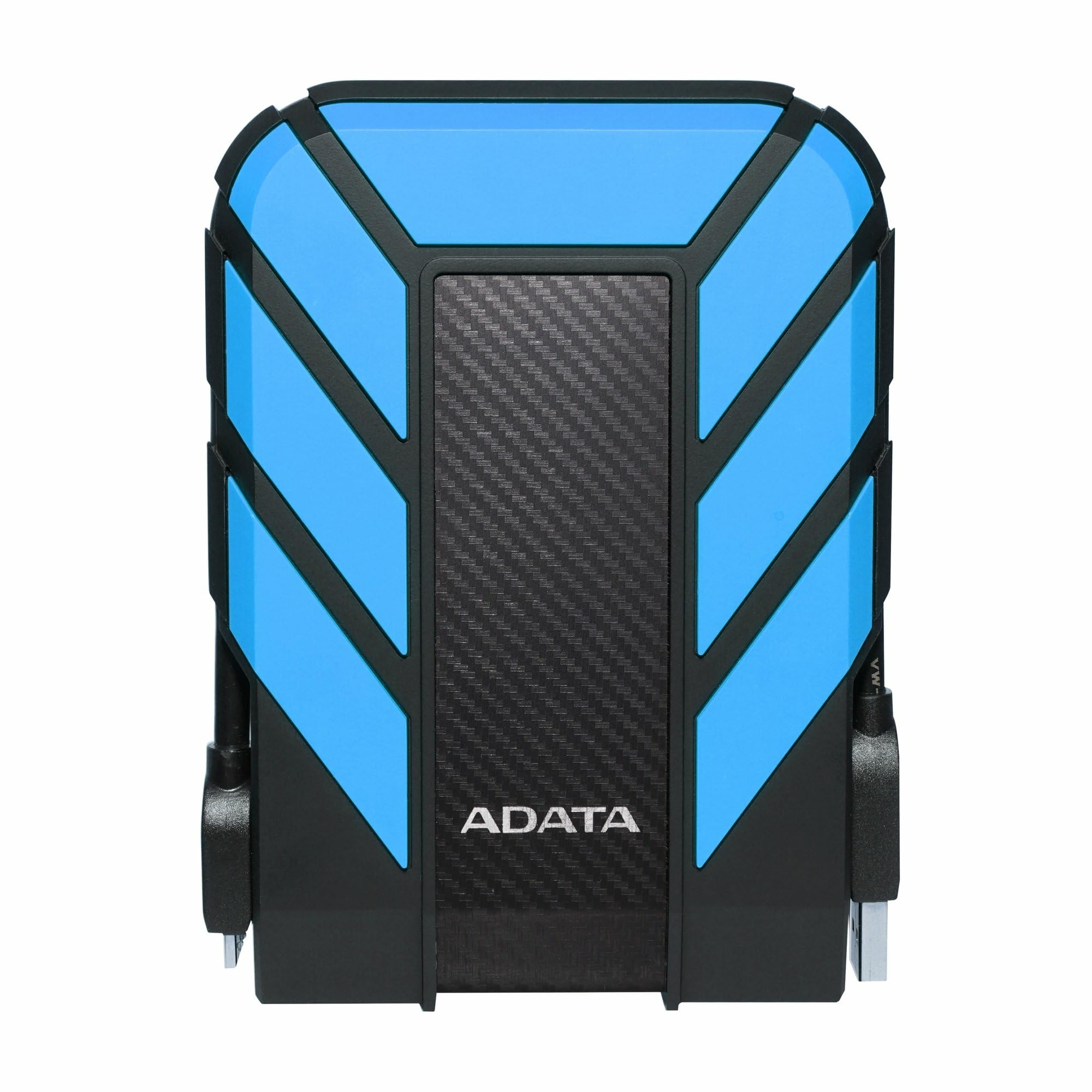
The armored tank of portable storage, rated to survive dust, water, and a serious drop.
If your shoots take you somewhere rugged — a dusty desert, a rainy forest, a rocky shoreline — the HD710 Pro is built for exactly that. Its triple-layered construction carries an IP68 waterproof and IP6X dustproof rating, plus military-grade shock resistance (MIL-STD-810G 516.6). That is the toughest protection on this list, beating the IP65 ratings on the SSDs above.
Buyers praise the quality and durability above all else, calling it reliable for everyday use and noting it handles the rough stuff as advertised. The firm metal USB connector and rubber cover keep the cable secure, and the 2TB capacity is ample for a working photographer’s card dumps. It is compatible with Mac, PC, and Linux, so it fits into almost any workflow.
The honest trade-off is speed — at 625 megabits per second, it is noticeably slower than the SSDs above, and one owner found fragmented folders transfer much slower until recopied. It is best for static backups and off-site redundancy rather than frequent large-file editing. If your priority is a drive that survives the elements, this is the one.
Toughness wins: IP68 and MIL-STD-810G ratings make this the most drop-and-water-proof pick here.
Speed trade-off: a spinning drive with slower transfer — treat it as a safe vault, not an editing workspace.
Made for: outdoor and adventure photographers who need a drive that survives rough conditions.
Not for: editors who need fast access to raw files during a session.
9. Toshiba Canvio Basics 2TB

A simple 2TB travel drive that fits in your pocket without emptying your wallet.
For a photographer on a budget who just needs a reliable place to dump photos after a shoot, the Canvio Basics is a solid, affordable answer. One owner sums it up simply: used it for photos, had no issues, small and great for travel. The sleek matte finish resists smudges, keeping it looking clean even after bouncing around a bag.
It is genuinely plug-and-play with no software to install, and shoppers say it connects easily to HP computers and backs up files well. The USB 3.0 interface is compatible with USB 2.0 ports too, and there is no external AC power cord needed — it runs straight from your laptop. Its sturdy material does not get hot, making it comfortable for long backup sessions.
The major caveat is reliability feedback is mixed. While many drives work flawlessly, some buyers report failures within a year of purchase, so this is best treated as a budget backup rather than your only copy of irreplaceable work. It is also pre-formatted NTFS for Windows, meaning Macs need a reformat before use.
Budget appeal
- Affordable 2TB capacity for entry-level storage
- Smudge-resistant matte finish and pocketable size
- No software needed, works with USB 3.0 and 2.0
Know the risk
- Mixed reliability reports, so keep a second copy of your files
- NTFS format requires reformatting for Mac use
Great entry point: an inexpensive travel drive for photographers building their first backup setup.
Be careful if: this is your only copy of client work — the mixed reliability reports argue for a dual-backup strategy.
Understanding the Specs
Transfer Speed and the USB Standard
The USB generation on a drive sets the speed ceiling for moving your files. USB 3.0 and USB 3.2 Gen 1 both deliver 5 gigabits per second, which is plenty for spinning hard drives. SSDs using USB 3.2 Gen 2 double that to 10 Gbps, and the fastest drives use USB 3.2 Gen 2×2 for up to 2,000 MB/s. In practice, this is the difference between waiting a few minutes versus a few seconds to offload a full memory card.
IP Ratings and Drop Protection
IP (Ingress Protection) ratings describe how well a drive resists particles and water. The first digit covers solids — IP6X means fully dust-tight — while the second covers liquids, with IP65 handling low-pressure water jets and IP68 surviving continuous immersion. Drop resistance is measured in meters or feet, and a higher number means the drive survives tougher falls from a table or while hiking.
FAQ
Should I buy an SSD or a traditional hard drive for my photos?
Is the Samsung T7 Shield fast enough for editing 4K video?
What does the IP65 and IP68 rating actually mean for my drive?
Can I use these drives with both my Mac and Windows PC?
How much storage do I actually need as a photographer?
Is a drop-resistant drive worth the extra cost?
What does hardware encryption do for my photos?
Can I connect these drives to my phone or tablet for backups?
Final Thoughts: The Verdict
For most photographers, the external hard drive for photographers winner is the Samsung T7 Shield because it pairs genuine editing speed with rugged durability that survives field work. If you want the fastest transfers possible on a creative budget, the SanDisk Creator Pro delivers double the read speed. And for massive portable archives with built-in security, the WD My Passport 6TB is the one to reach for — its review count among the highest here shows how much trust it earns.
How We Picked
We do not accept paid placement. Every pick is matched to a real buyer and a real use-case; we do not hands-on test units.
Sources & Methodology
Specifications: manufacturer listings and product documentation. Review insights: verified customer reviews, as of July 2026. Pricing: not shown on this page (it changes often); check the current price via the retailer link.
As an Amazon Associate, WellFizz earns from qualifying purchases. This does not affect which products we feature.
Related Guides

Mo Maruf
I created WellFizz to bridge the gap between vague wellness advice and actionable solutions. My mission is simple: to decode the research and give you practical tools you can actually use.
Beyond the data, I am a passionate traveler. I believe that stepping away from the screen to explore new environments is essential for mental clarity and physical vitality.