Our readers keep the lights on and my smoothie glass nicely filled. As an Amazon Associate, I earn from qualifying purchases.
Specs are compiled from manufacturer listings and verified buyer reviews and can change over time — please confirm the key details on the product page before buying.
Your new laptop dropped the disc drive, and now that stack of old DVDs or the one software disc you need feels useless. An external DVD writer fixes that right away — but the trick is picking one that reads and burns without errors every single time. The BPAKDU External Drive is the one to start with because it combines a reliable reader and burner with a 4-port USB hub in a slim 9-ounce body; you get one device that does both jobs without sacrificing ports.
I’m Mohammad Maruf — the founder and writer behind WellFizz. This guide is built by comparing the manufacturers’ published specifications and the patterns across verified customer reviews, so you get each pick’s real strengths and trade-offs instead of marketing spin.
After looking through thousands of owner experiences across these six options, the picks below stand out for anyone searching for the best external dvd writer — from a plug-and-play value champ to a premium brand built for long-term reliability.
Our Picks at a Glance


How To Choose The Best External DVD Writer
Picking the right external DVD writer depends on a few key specs that determine whether it reads your discs instantly or gives you headaches. Here is what matters most when comparing these drives.
Read and Write Speeds
The most important numbers are the maximum DVD and CD read/write speeds. Most drives offer an 8x max DVD read speed and a 24x max CD read/write speed. In plain terms, that means burning a full 4.7GB DVD takes around 8 to 10 minutes. If you plan to burn stacks of discs, look for these exact figures — slower drives can take twice as long.
USB Interface and Power
Almost all modern drives use USB 3.0, which pushes data at up to 5 Gbps (gigabits per second). That is roughly 10 times faster than USB 2.0, so disc reading and burning feel snappy. But here is the catch: some laptops cannot supply enough power through a single USB port to spin the disc. Many drives now include an extra power cable that plugs into a 5V charger or power bank as a workaround.
Compatibility with Your Operating System
Not every drive works with every computer. Windows 10 and 11 are nearly universal, but Mac users need a drive that explicitly lists macOS support (including Apple Silicon M1/M2 chips). Linux users have fewer options, and Chromebooks, TVs, tablets, and game consoles are almost always ruled out. Always check the supported OS list before buying.
Extra Ports vs. Pure Function
Several drives double as a USB hub, adding extra USB-A and USB-C ports plus SD and TF card slots. This is convenient if your laptop is short on ports, but it also adds complexity. Some owners find that running a hub function can pull power away from the disc drive, causing read errors — a dedicated drive is often more reliable for pure disc work.
Quick Comparison
| Model | Best For | Read Speed | Interface | Extra Ports | Amazon |
|---|---|---|---|---|---|
| BPAKDU External Drive★ Best Overall | Best Overall / Hub | 8x DVD / 24x CD | USB 3.0 + Type-C | 4 USB + 2 Card Slots | Amazon |
| Wbacon 7 in 1Best Value Hub | Budget Hub | 8x DVD / 24x CD | USB 3.0 Type-C | 3 USB + 2 Card Slots | Amazon |
| Rioddas External Drive | Crowd Favorite | 5 Gbps USB 3.0 | USB 3.0 | None | Amazon |
| ASHDOL 8 in 1 | Compact Versatility | 8x DVD / 24x CD | USB 3.0 + Type-C | 4 USB + 2 Card Slots | Amazon |
| ORIGBELIE External Drive | RGB Style | 8x DVD / 24x CD | USB 3.0 + Type-C | 4 USB + 2 Card Slots | Amazon |
| LG GP65NB78 | Premium Brand | 8x DVD / 24x CD | USB 2.0 | None | Amazon |
In‑Depth Reviews
1. BPAKDU External CD/DVD Drive for Laptop with Carrying Case
Our pick — over 4★ from 750+ verified ratings; the strongest balance of quality and price.
The do-everything drive that doubles as a 4-port USB hub, all wrapped in a slim 9-ounce body.
You get to read or burn discs and expand your laptop’s ports at the same time — the BPAKDU packs a 4-port USB hub and two memory card slots (TF and SD) into a 9-ounce, 0.63-inch-thick body. The USB 3.0 interface delivers data at up to 5 Gbps (gigabits per second), so disc reading and burning feel instant, and you can plug in a flash drive, mouse, or keyboard through the same device. The included carrying case keeps everything tidy on the go.
Buyers report that it is fully plug-and-play on Windows 11 with no drivers needed. The thing everyone raves about is its solid functionality — it reads and burns CDs and DVDs reliably, and the bundled ports mean you are not sacrificing connectivity. A recurring practical note: if your computer’s USB port does not supply enough juice, you need to plug the extra power cable into a 5V charger or power bank. A few owners also mention that the SD and TF card slots cannot be used simultaneously, so plan your transfers accordingly.
What Owners Love
- True plug-and-play on Windows 11, no driver setup
- 4 USB ports and 2 card slots act as a full hub
- Lightweight at 9 ounces with a slim profile and carrying case
One Honest Trade-Off
- Some computers require the extra power cable for stable reading
- SD and TF slots cannot be used at the same time
Reach for this if: You want one device that reads and burns discs while also expanding your laptop’s ports — the 4 USB-A, 1 Type-C, and dual card slots make it a mini docking station.
Think twice if: Your computer’s USB ports are weak and you would rather not fuss with an extra power cable; a simpler single-function drive like the Rioddas may be less hassle.
2. Wbacon 7 in 1 External CD/DVD Drive for Laptop
The no-frills performer that adds a USB 3.0 hub and card slots without the premium price.
Buyers sum it up cleanly: “No frills it works as expected.” The 7-in-1 Wbacon drive gives you a USB 3.0 and Type-C interface, plus one USB 3.0 port, one USB 2.0 port, two Type-C ports, and one TF and SD slot each. The data transfer rate reaches 5 Gbps, and it supports a maximum 8x DVDR read speed and 24x CD write/read speed. The ABS plastic enclosure keeps it sturdy without adding weight.
What wins owners over is the reliability — it does exactly what it should without glitches. A DVD player for laptop that also serves as a multi-port hub is exactly what modern thin laptops need. The mixed feedback is on connectivity: most find it instantly plug-and-play, but a minority hit setup hiccups. The drive is also notably incompatible with Surface Pro, Chromebook, tablets, and TV sets, so keep that in mind if you plan to use it beyond a standard PC or Mac. Its budget price makes it the cheapest entry point for a hub-style drive compared to the pricier ASHDOL.
Smart Buy For: Anyone needing a cheap, no-fuss external DVD burner that doubles as a hub — the 7-in-1 setup covers basic disc work and adds ports while staying affordable.
Grab it if: You need a spare drive for occasional disc reading and burning plus extra USB ports, and you value simplicity over bells and whistles.
skip it if: You plan to use it with a Chromebook, tablet, TV, or game console — those are not supported.
3. Rioddas External CD/DVD Drive for Laptop

Over 40,000 owners have made this the most-reviewed external DVD drive for its cheap, reliable performance.
Unlike the hub-packed BPAKDU, the Rioddas drive is a pure, no-frills optical drive — no hub, no card slots, just a CD/DVD burner and reader with a brushed texture shell and a physical eject button. That button is a clever safety net: if your computer fails to recognize the drive, you can still safely eject a disc. The drive uses USB 3.0 with data transfer speeds up to 5 Gbps and features copper mesh technology for stable data transmission.
What wins people over is how easily it works. One owner backed up multiple CDs “within two minutes.” The drive supports Windows 11/10/8.1/7/Vista/XP, Linux, and macOS 10.16+ — including Apple Silicon Macs — but it is not compatible with ChromeOS, TVs, or game consoles. The main downside is that it lacks any extra ports, so it will not help with a port-starved laptop. A handful of owners note that compatibility with new MacBook Pros can be spotty, so Mac-focused buyers should check that specifically.
The Core Strengths
- True plug-and-play — powered by USB, no drivers needed
- Physical eject button for safe disc removal
- Lightweight, compact, and easy to store
The Clear Limitations
- No extra USB ports or card slots
- MacBook Pro compatibility is not guaranteed
Best for: The person who wants the cheapest reliable DVD burner — no extras, no complexity, just disc reading and writing that works every time.
Not for: MacBook Pro owners who need a guaranteed connection; test it soon after purchase.
4. ASHDOL 8 in 1 External CD DVD Drive USB 3.0 and Type-C
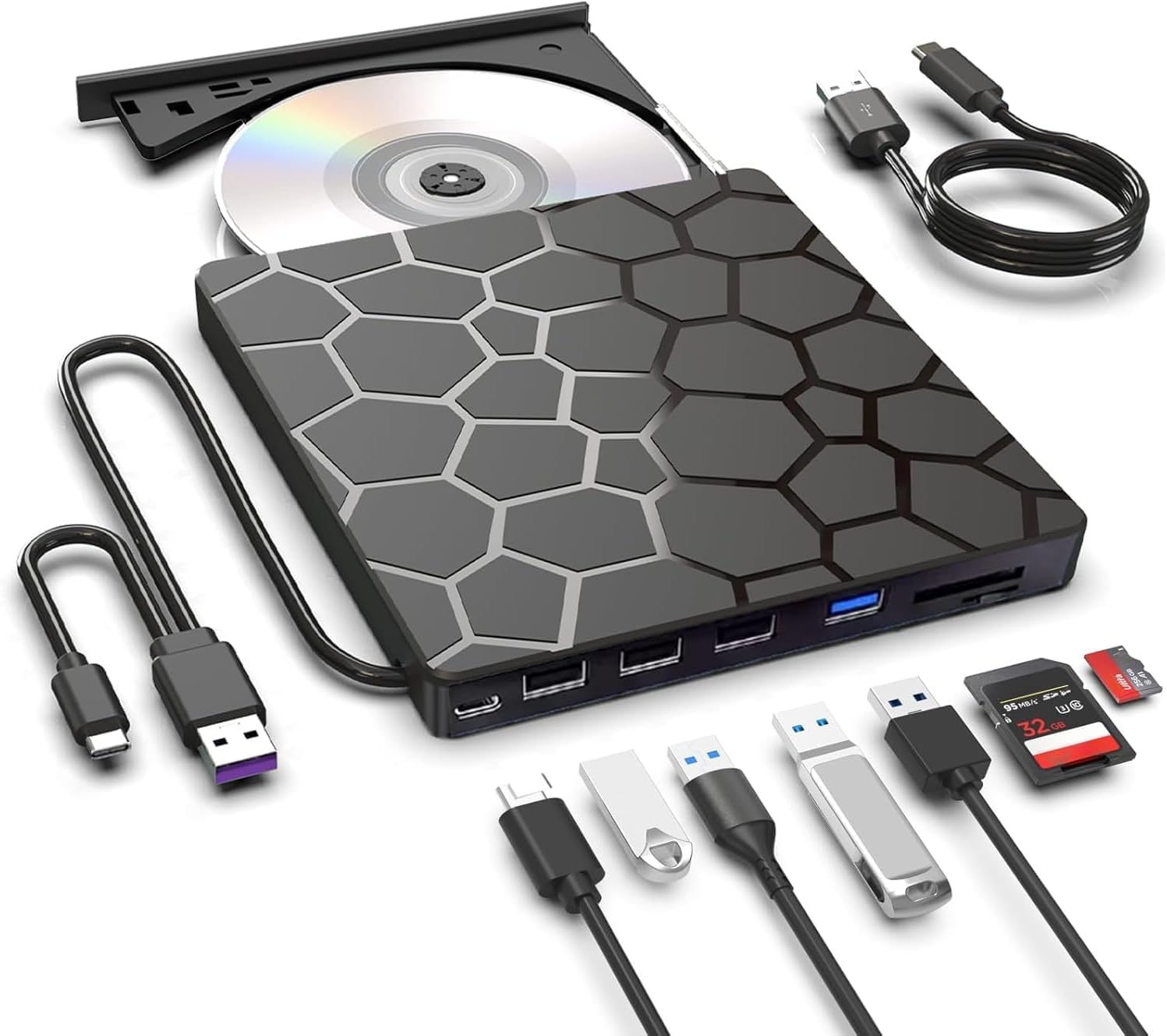
A featherlight 11.2-ounce drive that packs four USB ports and anti-shock protection for stable burns on the move.
The ASHDOL drive earns its “8 in 1” label with four USB ports, dual TF/SD card slots, and a hidden built-in cable design. It is slim at 0.63 inches thick and weighs just 11.2 ounces, making it among the most portable multi-function drives available. The USB 3.0 and Type-C interfaces deliver 5 Gbps data transfer, and the drive supports a max 8x DVD read speed and 24x CD read/write speed.
What impresses owners is the anti-shock technology and intelligent error correction, which reduce reading errors and keep disc playback smooth even on less-than-stable surfaces. The drive is praised for its broad compatibility across Windows XP through Windows 11, Linux, and all macOS versions. The recurring advice from owners: plug it directly into your computer’s own USB port (not a hub or extension cable) for the most stable power. The 2-year manufacturer warranty is also a confidence booster that most budget drives do not offer. This makes it a better pick for travelers than the simpler Rioddas, which lacks anti-shock protection.
Standout Spec: Anti-shock protection plus 2-year warranty make this the hub-style drive for mobile users who want extra confidence their data burns cleanly.
Reach for it if: You travel with your laptop and need a drive that burns reliably on a moving train or plane seat — the anti-shock tech is genuinely useful here.
Look elsewhere if: You need the absolute lowest price; simpler drives like the Wbacon cost less for just disc work.
5. ORIGBELIE External CD/DVD Drive for Laptop, 4 USB Ports & 2 SD/TF Slots

The only external DVD writer with an RGB LED that cycles through colors — plus a full 6-in-1 hub and carrying case.
The ORIGBELIE drive stands out visually with an RGB LED indicator that gradually changes color, but the specs are equally competitive. It delivers USB 3.0 speeds up to 5 Gbps with a max 8x DVD read/write speed and max 24x CD read/write speed. The 6-in-1 hub includes one USB-A 3.0, one USB-A 2.0, two USB-C ports, plus TF and SD card slots. The built-in 2-in-1 USB 3.0 Type-A/C data cable means no dongle needed for modern laptops, and the included storage bag keeps everything organized.
Owners consistently call it a reliable plug-and-play device. One noted it was recognized immediately by their PC and used for burning CDs and watching movies “right away.” The drive supports Windows 11/10/8/7/XP, Vista, Linux, and Mac OS 10.6 or above — but Windows 11 requires a media player like VLC plus an internet connection. The extra power cable is a smart inclusion, as some computers cannot supply enough power through a single USB port. A few owners mention the slim ABS plastic shell needs careful handling during transport, but the included bag solves that.
The Highlights
- RGB LED cycles through color changes for a cool look
- Comes with both a storage bag and an extra power cable
- Built-in USB 3.0 Type-A/C data cable for adapter-free connection
The Trade-Offs
- Windows 11 needs VLC or another media player
- Slim ABS shell is not as rugged as a metal chassis
Pick this if: You want a visually distinct drive that brings RGB lighting to your desk and still delivers a full hub and carrying case.
pass on it if: You prefer a minimalist, all-black device that disappears on your desk and does not need the extra flair.
6. LG GP65NB78 8X USB 2.0 Super Multi Ultra Slim Portable DVD Writer
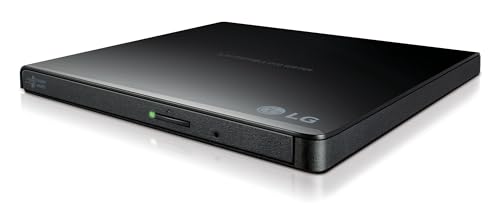
The ultra-slim 14mm LG drive that writes to M-Discs — the most durable archival media you can burn.
The LG GP65NB78 is the only drive here from a name-brand electronics manufacturer, and it brings one unique spec: M-Disc support. M-Discs are a special type of recordable disc that stores data on a stone-like layer, designed to last hundreds of years. If you are archiving important family photos or business records, this is the drive to own. It is also the slimmest pick at just 14mm (0.55 inches) tall, and it includes Cyberlink software for disc burning from the start.
Owners mention it burns CDs stably with “no error messages so far,” and one used it on a Mac with Handbrake to upload videos from a Sony mini disc to YouTube. The drive is USB 2.0, which maxes out at 480 Mbps — noticeably slower than the USB 3.0 drives above. That matters little for occasional disc use but becomes a bottleneck if you frequently rip or burn large batches. A long-term owner notes the previous generation lasted about two years before quitting, so longevity may be comparable to budget drives despite the brand premium. Unlike the Rioddas, which offers USB 3.0 for faster bulk burning, the LG is the only M-Disc option here.
Why It Wins: The LG brand carries weight for reliability, and M-Disc support is genuinely unique — no other drive in this roundup offers archival-grade disc burning. If you need to write data for the long haul, this is your only choice.
Best for: Archiving important files on M-Discs where longevity matters more than transfer speed — plus you get a name you trust and bundled software.
Not for: Frequent bulk burning; the USB 2.0 interface is a real bottleneck compared to the USB 3.0 drives at half the price.
Understanding the Specs
Read and Write Speeds
The numbers like 8x and 24x refer to how fast the drive can read or write a disc compared to the original standard speed (1x). An 8x DVD read speed means the drive reads data at roughly 10.8 MB/s, so a full 4.7GB DVD takes about 7 to 8 minutes. A 24x CD speed is much faster relative to the smaller capacity of CDs (700MB). If you frequently burn discs, the read/write speed determines how long you wait — 8x DVD is standard, while anything slower will feel noticeably sluggish.
USB Interface Generations
USB 3.0 drives hit 5 Gbps (gigabits per second), which is more than enough for disc reading and burning. Most budget drives use USB 3.0. The LG GP65NB78 uses USB 2.0, which tops out at 480 Mbps — over 10 times slower. For occasional disc use, you may not notice the difference, but bulk ripping or burning dozens of discs will take longer on USB 2.0. A USB 3.0 drive also gives you faster transfers when using the built-in hub functions to move files from a flash drive.
FAQ
Will an external DVD writer work with my MacBook Air or MacBook Pro?
Can I watch movies from a different region with these drives?
What is the difference between DVD-R and DVD+R?
Do I need special software to burn CDs or DVDs?
How long do external DVD drives last with regular use?
Can I use these drives with a Chromebook, tablet, or smartphone?
What does M-Disc support mean and do I need it?
Why does my computer sometimes not recognize the drive?
Can I use the SD and TF card slots on these multi-function drives at the same time?
Which drive is best for burning large batches of discs?
Final Thoughts: The Verdict
Across the board, the best external DVD writer winner is the BPAKDU External CD/DVD Drive because it combines reliable disc reading and burning with a 4-port USB hub, a carrying case, and an ultra-slim 9-ounce design. If you want the crowd-favorite pure disc drive with over tens of thousands of happy owners, grab the Rioddas External CD/DVD Drive. And for archival burning with M-Disc support from a trusted brand, the LG GP65NB78 is the one to reach for.
How We Picked
We do not accept paid placement. Every pick is matched to a real buyer and a real use-case; we do not hands-on test units.
Sources & Methodology
Specifications: manufacturer listings and product documentation. Review insights: verified customer reviews, as of July 2026. Pricing: not shown on this page (it changes often); check the current price via the retailer link.
As an Amazon Associate, WellFizz earns from qualifying purchases. This does not affect which products we feature.
Related Guides

Mo Maruf
I created WellFizz to bridge the gap between vague wellness advice and actionable solutions. My mission is simple: to decode the research and give you practical tools you can actually use.
Beyond the data, I am a passionate traveler. I believe that stepping away from the screen to explore new environments is essential for mental clarity and physical vitality.