Our readers keep the lights on and my smoothie glass nicely filled. As an Amazon Associate, I earn from qualifying purchases.
Specs are compiled from manufacturer listings and verified buyer reviews and can change over time — please confirm the key details on the product page before buying.
Your new laptop dropped the disc drive, and now that box of family photos on CD or the install disk for older software is just gathering dust. The right external burner changes that — it reads your old discs, writes new backups, and often adds card readers and USB ports your slim laptop is missing. This guide breaks down the real-world differences between eight models, so you can pick the one that actually fits how you use discs.
I’m Mohammad Maruf — the founder and writer behind WellFizz. This guide is built by comparing the manufacturers’ published specifications and the patterns across verified customer reviews, so you get each pick’s real strengths and trade-offs instead of marketing spin.
You want a burner that works the moment you plug it in, without hunting for drivers. For most people, a simple plug-and-play drive from a trusted brand beats a feature-packed one that needs fixes — and this breakdown of the Best External CD/DVD Burner options shows you exactly which models deliver that reliability.
Our Picks at a Glance

How To Choose The Best External CD/DVD Burner
Before you buy, you need to match the drive to your computer’s ports and your burning habits. A drive that needs extra power or a specific driver can turn a five-minute job into an hour of frustration, so the checklist below covers the points that matter most.
Check your laptop’s port type first
Modern ultrabooks only have USB-C, while older machines use the rectangular USB-A connector. Most drives here include both cables or a combo cable, but a few are older designs that need an adapter. If your laptop is a MacBook Air or a slim Windows ultrabook, make sure the drive you choose has a USB-C option built in.
Speed decides how long you wait
Burn speed is measured in “X” — 1x is the original CD speed. A drive rated for 8x DVD writing and 24x CD writing will finish a full disc in a few minutes, while slower models make you wait longer. If you burn discs often, speed is worth paying attention to; if you only read an occasional disk, nearly any drive will do.
Extra ports are a bonus, not a requirement
Many drives double as USB hubs or SD card readers, which is handy if your laptop is short on ports. But these extras add cost and sometimes complexity. Decide if you need them before you pay for them — a pure burner is often the most reliable choice.
Quick Comparison
| Model | Best For | Interface | Max DVD Speed | Extra Ports | Amazon |
|---|---|---|---|---|---|
| Dell DW316★ Best Overall | Plug-and-play reliability | USB 2.0 | 8x Write | None | Amazon |
| BUNUD LightScribeLightScribe Pick | Disc label etching | USB 3.0 & USB-C | 8x Read | SD/TF, 2x USB | Amazon |
| BUNUD Mac DriveMac Friendly | Apple computer owners | USB 3.0 & USB-C | 8x Read | SD/TF, 2x USB | Amazon |
| ORIGBELIE 6-in-1 | Hub + burner combo | USB 3.0 & USB-C | 8x Read/Write | 4 USB, 2 SD/TF | Amazon |
| ASUS LITE | Mac & Windows dual use | USB 2.0 | 8x Write | None | Amazon |
| Alxum 8-in-1 | Multi-port versatility | USB 3.0 & USB-C | 8x Read/Write | 4 USB, SD/TF | Amazon |
| ORIGBELIE Ethernet | Network + disc combo | USB 3.0 & USB-C | 8x Read/Write | 3 USB, 2 SD/TF, LAN | Amazon |
| SAMSUNG SE-218GN | M-DISC long-term archiving | USB 2.0 | 8x Write | None | Amazon |
In-Depth Reviews
1. Dell DW316 USB Low Profile DVD Super Multi Drive
Our pick — over 4.5★ from 150+ verified ratings; the strongest balance of quality and price.
The no-drama burner that just works the moment you plug it in.
If your priority is a burner that behaves exactly like the internal drive your old computer had, this Dell is the one. Buyers report it performs as well as an internal drive, with the most common praise centered on how it simply works — the functionality is what wins people over here, and at 7.1 oz (200 g) it is light enough to toss in a bag without thinking about it.
The speed profile is solid for everyday use: it writes DVD±R at 8x/8x and CD at 24x/24x, so a standard disc burn finishes in a few minutes. It pulls just 8 W of power, which means a single USB 2.0 port on most laptops can drive it without a secondary power cable. The tray-loading design feels familiar, and the 14.4 cm width fits neatly next to a laptop.
There is no software wizardry here — you get the CyberLink Media Suite CD and a USB cable, and the drive supports Windows 7 through 10. The one honest caveat is the complete lack of instructions in the box, which tripped up a less tech-savvy user who needed help getting started. If you are comfortable plugging in a USB cable, that is a non-issue, but it is worth knowing.
What owners love
- Genuinely plug-and-play — recognized instantly on Windows
- Fast 8x DVD write speed for quick backups
- Light 200 g build that travels well
The honest gaps
- No printed manual — less savvy users may need help
- USB 2.0 only, slower than newer USB 3.0 models
- No extra card reader or USB hub ports
Reach for it if: you want a trusted brand burner with zero setup fuss for a Windows laptop or desktop.
Look elsewhere if: you need USB-C connectivity or SD card slots built into the same device.
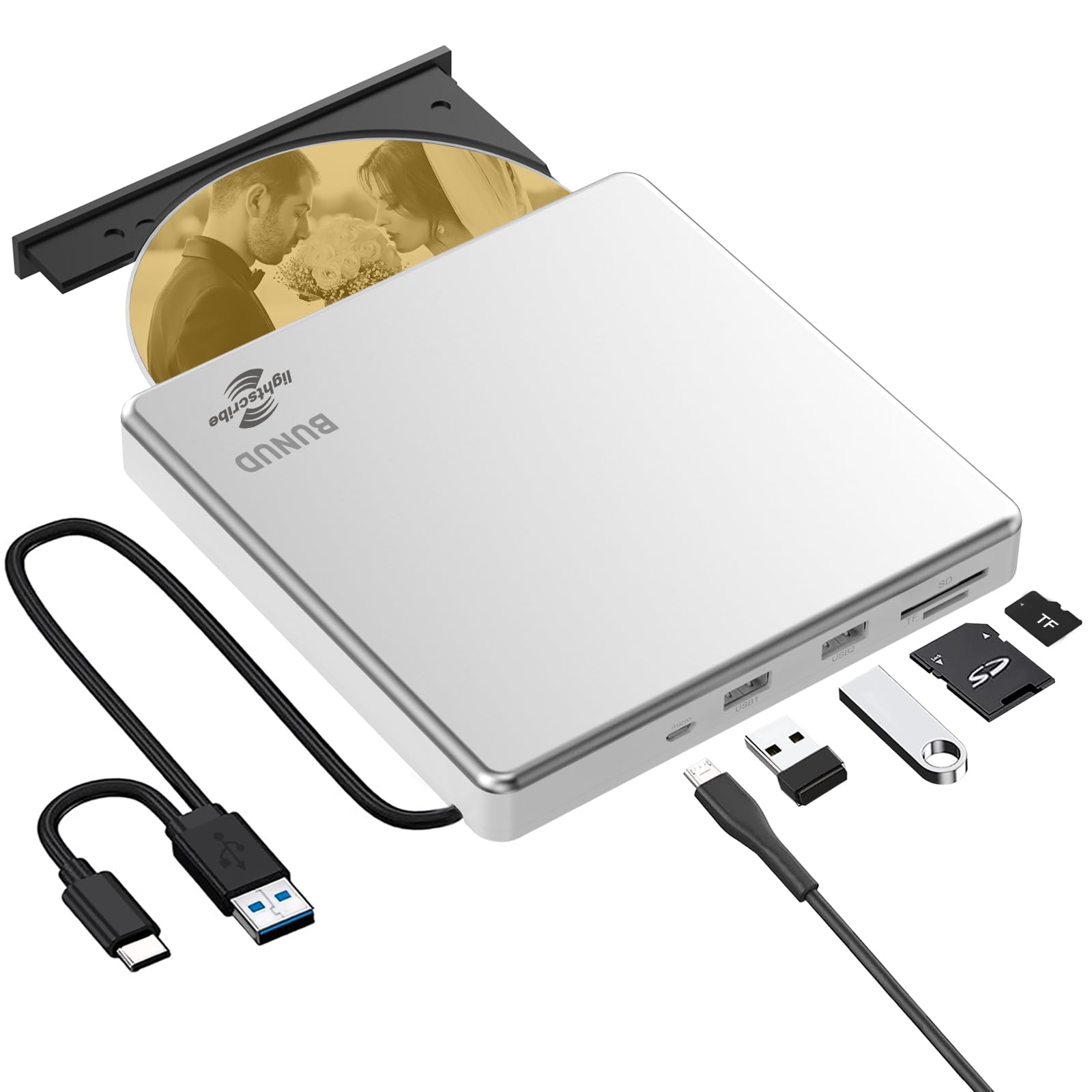
2. BUNUD External CD DVD Drive with LightScribe
Etches your own label art straight onto the disc surface.
LightScribe is the standout trick here — the laser etches a design you create directly onto the top of a compatible disc, so you get a professional-looking label without printing stickers. That feature draws a specific crowd: people who burn mixes or archive collections and want each disc to look intentional. The catch is that LightScribe requires special LightScribe discs, not your standard blanks, and the software is not included.
Beyond that a neat extra, this is a practical 5-in-1 hub. It pairs the DVD burner with an SD/TF card slot and two USB ports, so you can move photos off a camera card or charge a phone while the drive handles discs. The aluminum alloy top cover gives it a more premium feel on a desk, and the embedded cable design means you will not lose the cord in transit. It connects via USB 3.0 or USB-C at up to 5 Gbps, and reads DVD at 8x while burning CD at 24x.
The honest caveat is the LightScribe software situation on newer systems. Owners mention the LightScribe function fails on Windows 11 without third-party drivers, and it works more smoothly on older systems like Windows 8.1. The drive itself burns fine across platforms, but if your whole reason for buying is LightScribe on a brand-new PC, be prepared to hunt down drivers.
The draw: LightScribe label etching is rare to find, and the bundled USB hub makes this a versatile desk companion.
The friction: LightScribe needs special discs plus software you must source yourself, and Windows 11 users may hit driver hiccups.
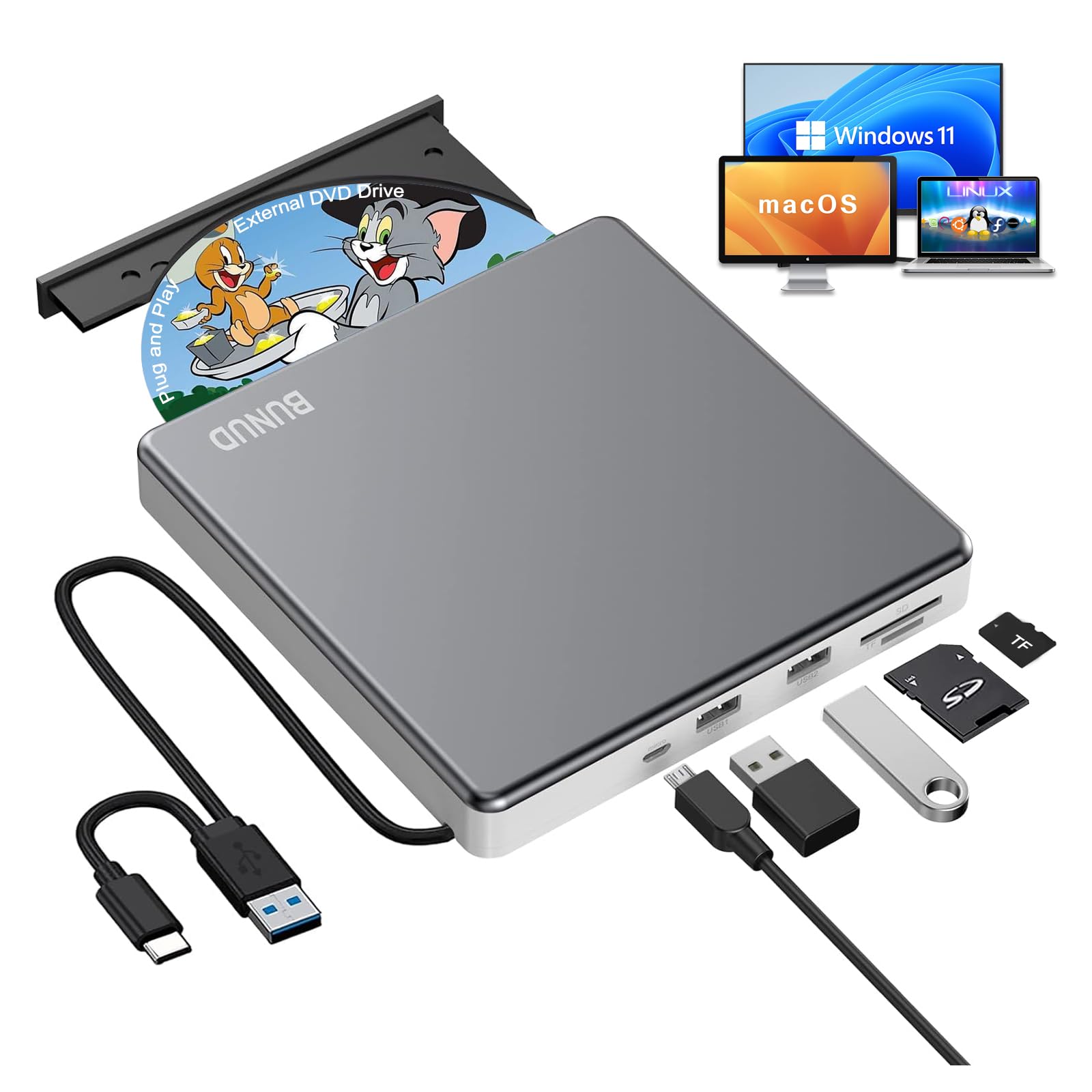
3. BUNUD External DVD Drive for Mac
The slim grey drive that finally gives your Mac a disc slot again.
Most external drives are built with Windows in mind, but this BUNUD is the rare one that Mac owners specifically single out — the compatibility with Apple computers is the first thing buyers mention when it works with both a MacBook Pro and Windows PCs. It pairs a USB 3.0 Type-A connector with a USB-C connector, so you can plug into either port on a modern MacBook without hunting for an adapter.
There is a small Mac quirk to know: when you connect it to a Mac, nothing appears on the desktop until you insert a disc. Once a disc is in, an icon shows up and playback starts with your normal software. The drive reads and burns CD±R/RW and DVD±R/RW at up to 8x for DVD and 24x for CD, and the 5-in-1 hub adds an SD/TF slot plus two USB ports for moving files around.
The grey aluminum alloy body keeps it light at 0.63 kg, and the pop-up button makes swapping discs easy. The honest limitation is the same as any slim drive — it will not touch iPad, Tablet, Projector, TV, Chrome OS, Car, Smart Phone, Blu-ray, or 4K discs. That is a standard list for this category, so it only matters if you expected those.
Mac owners’ favorite bits
- Works with MacBook Pro, iMac, and Mac Mini without drivers
- USB-C and USB-A connectors both included in the cable
- Two USB passthrough ports add value beyond burning
What to know first
- Mac shows no icon until a disc is inserted — a normal quirk
- Not for Blu-ray, 4K, or tablet/phone connections
- Rubber pad design is good, but the tray needs gentle handling
Best for: MacBook or iMac owners who want a single drive that also serves a Windows PC.
skip it if: you need to play Blu-ray discs or connect to a tablet — this drive will not do either.
4. ORIGBELIE External CD/DVD Drive 6-in-1 Hub

A burner that quietly doubles as a four-port USB hub.
If your laptop has one lonely USB-C port and you need to burn a disc, plug in a mouse, and read a camera card all at once, this ORIGBELIE is built for that exact moment. It is a 6-in-1 hub with 1 USB-A 3.0, 1 USB-A 2.0, 2 USB-C ports, plus TF and SD card slots — so it replaces a separate hub and card reader in one slim 0.7-inch-tall package. Customers note it works flawlessly with Windows laptops and connects instantly.
Speed is a genuine strong point: USB 3.0 pushes data transfer up to 5 Gbps (625 MB/s). It reads and writes DVD at max 8x and CD at max 24x. The included USB A to DC power supply cable is a smart backup — some laptops do not feed enough power through a single port, and that extra cable lets you plug into a 5V charger or power bank to keep the drive running.
The clear-headed trade-off is the build material. The ABS plastic shell is slim and portable, but a few owners describe it as fragile-feeling, so it is not the drive to toss roughly into a backpack. It also comes with a storage bag and a 90-day warranty. If you want the hub functionality in a sturdier metal shell, that means paying more elsewhere.
Why it wins on value: you get a burner, a 4-port USB hub, and an SD/TF reader for less than buying those separately.
The trade-off: the slim plastic body demands care, and low-power USB ports may need the included power cable.
5. ASUS LITE Portable USB 2.0 8X DVD Burner
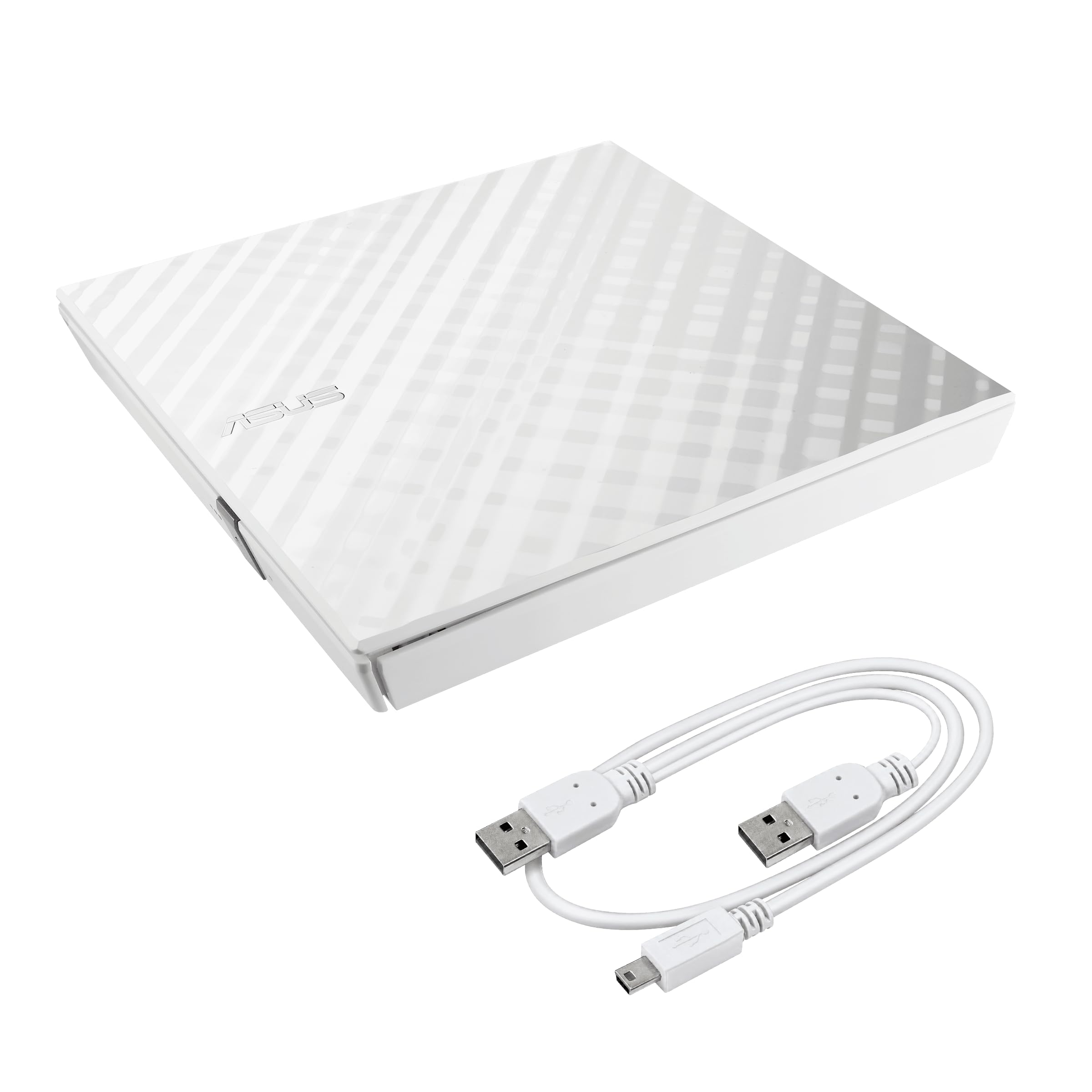
The white diamond-cut shell that does not look like a tech box.
ASUS gives this one a genuinely different look — the diamond-cut design on the white body makes it the rare external drive you might actually leave out on a desk. It is an 8x DVD writer with USB 2.0 connectivity, and it works with both Windows and Mac. The 200 g weight keeps it easy to carry, and owners consistently call it easy to set up and use.
The bundled software is where ASUS adds real value. Disc Encryption gives you password-controlled and hidden-file functionality, so you can lock a backup disc so others cannot open it. Drag and Burn cuts the burning process to three simple steps, which is friendlier than most drive software. This is the drive to pick if you want a bit of security for sensitive backups without learning complicated tools.
The honest reality is split on durability — some reviewers point out it held up well over time, while others experienced failures, and the noise level gets the same mixed reaction with some constant clicking during use. The plastic build is light but not armor-plated, and the tray needs a manual pull to fully open. For occasional burning on a desk, this is a solid choice; for heavy daily use, a sturdier metal drive may last longer.
What stands out
- Disc Encryption adds password protection to your burns
- Drag and Burn makes the process a simple three steps
- White diamond-cut look is unique in this category
Fair warnings
- Durability gets mixed owner feedback over time
- Operation can be clicky and a bit noisy
- USB 2.0 only — slower transfer than USB 3.0 rivals
Choose it for: a style-forward drive with built-in encryption for sensitive disc backups.
Think twice if: you burn discs daily and need the fastest USB 3.0 transfer speeds.
6. Alxum External CD DVD Drive 8-in-1

A quiet multi-tool that adds four USB ports and card slots to any laptop.
Quiet is the word that keeps coming back with this Alxum — owners describe it as very quiet in operation, which matters if you are burning a disc in a shared space or while watching a movie. Beyond the burner itself, it is an 8-in-1 hub with a separate SD and TF card slot, one USB 3.0 Type-A port, and three USB 2.0 Type-A ports, so you can plug in a flash drive, a mouse, and a keyboard while the drive runs.
The speed story is solid for the price: USB 3.0 gives you transfer up to 5 Gbps, backward compatible with USB 2.0 and 1.1, while DVD reads and burns at max 8x and CD at max 24x. It connects over both Type-C and Type-A, works with Windows, MacOS, and Linux, and the slim form factor slips into a backpack easily. The package includes an SD to Micro SD card holder and a USB A to Micro B power cable.
The honest note is that functionality gets mixed owner feedback overall — many find it works great, but the occasional unit does not work at all, and the slim tray needs careful handling. One owner needed seller support to get it loading on Windows 11. If you buy it, test it soon after arrival so any issue surfaces inside the support window.
The high point: owners praise the versatility and the extra USB ports — it replaces a separate hub at a budget-friendly price.
The fit note: quality control is inconsistent, so test your unit early; the slim tray also needs gentle use.
7. ORIGBELIE External DVD Drive with Ethernet Adapter
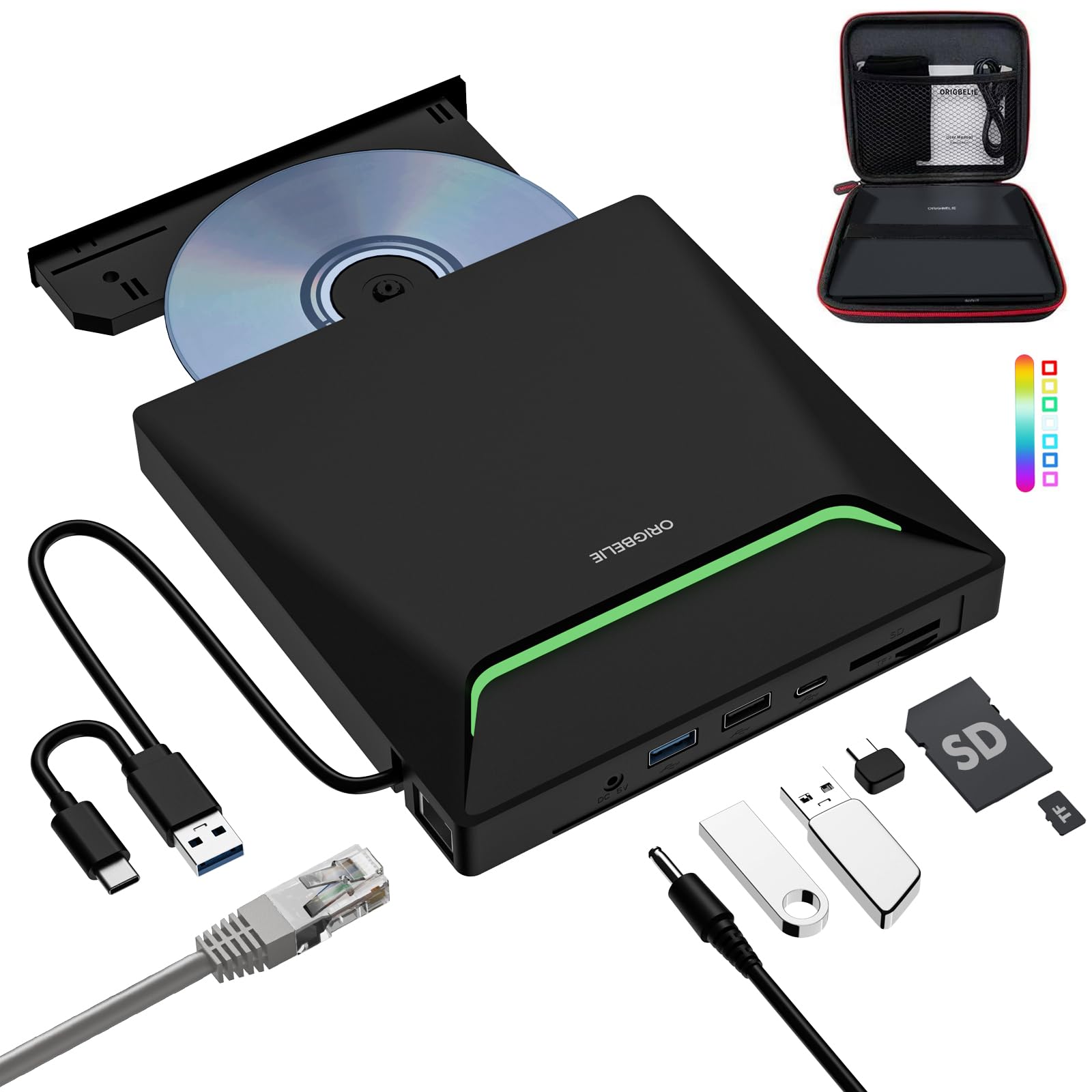
The one gadget that adds a disc slot, Ethernet, and USB ports in a single plug.
This is the most feature-dense drive on the list, and the reason it earns a premium spot is the RJ45 network interface — a port most ultrabooks lost years ago. You get a 9-in-1 hub combining the DVD burner with a USB 3.0 network adapter (up to 100 Mbps Ethernet), a USB-A 3.0 port, a USB-A 2.0 port, a USB-C port, plus TF and SD card slots. For a MacBook or thin Windows laptop, this one device replaces a burner, a dongle, and a card reader.
The drive itself is a capable burner supporting CD±R/RW, DVD±R/RW, DVD-ROM, DVD-RAM, VCD, and SVCD, reading and writing DVD at max 8x and CD at max 24x. USB 3.0 delivers up to 5 Gbps (625 MB/s). The RGB LED gradient lights give it a playful, techy look, and it ships with both a storage bag and a carrying case. The included USB A to DC power supply cable covers low-power USB ports.
The honest trade-offs are speed and cable length — owners note it is slower than expected and the built-in cable is short, so on a desktop you may want the included power cable or an extension. The Ethernet tops out at 100 Mbps, which is fine for most work but not full gigabit. With 18,000+ owners behind it and strong plug-and-play feedback across Mac Mini and Windows 11, this is a crowd favorite for a reason.
The big wins
- RJ45 Ethernet port adds wired networking to portless laptops
- 9-in-1 hub replaces several separate accessories
- Strong plug-and-play reliability across Mac and Windows
Know before you buy
- Ethernet is capped at 100 Mbps, not gigabit
- Built-in cable is short — plan for the power cable on desktops
- RGB lighting is a matter of taste on a desk
Reach for it if: your laptop lacks both a disc drive and an Ethernet port and you want one device to fix both.
Pass if: you need gigabit networking or you want a plain, no-frills burner at the lowest cost.
8. SAMSUNG TSST Ultra-Slim 8X DVD Rewriter

The archivist’s choice — M-DISC support for backups meant to outlast you.
M-DISC support is the headline feature here, and it is a specific one: M-DISC is a special recordable disc engineered for long-term archival storage, and this Samsung is built to write that format. For someone digitizing VHS tapes or preserving family photos for the long haul, that is the difference between a backup that might last a decade and one designed to last generations. Owners confirm the drive handled VHS-to-DVD transfers of roughly 30 tapes without wasting a single disc.
The drive is genuinely slim at 14 mm and runs off USB 2.0 (3.0 compatible) with a top-mounted LED and eject button. Samsung includes Buffer Under Run Free Technology, which helps prevent the buffer from emptying mid-burn and ruining a disc — exactly the kind of quiet reliability you want for archive jobs. It works from the start with Windows XP through 8.1 and Mac OS X 10.8 through 10.10.
The honest warning is twofold. First, the drive is power-hungry — owners found that even the included cable can struggle with sustained high-speed copying, so a powered USB hub is recommended. Second, the build is on the fragile side, with the port area and scratch-prone plastic needing a protective case. There are also reports of units failing within a year, so it is not the drive to roughhouse.
The strongest case: M-DISC archival support plus Buffer Under Run protection make it a dependable pick for long-term backups.
The caveat: it wants a powered hub for heavy burns, and the plastic shell needs careful handling to last.
Understanding the Specs
Burn Speed (8x DVD / 24x CD)
“X” is the speed multiplier based on the original CD standard. A drive writing DVD at 8x finishes a standard 4.7 GB disc in roughly 6-7 minutes, while 24x CD writing polishes off a 700 MB disc in about 3-4 minutes. Faster is better if you burn regularly; for occasional reads, any speed works.
USB-C vs USB-A Connectivity
USB-C is the oval connector on modern ultrabooks and MacBooks, while USB-A is the rectangular port on older laptops. A drive with both connectors or a combo cable works with any machine you own. If a drive is USB 2.0 only, you lose the faster 5 Gbps transfer speeds of USB 3.0 but keep full compatibility.
FAQ
Will an external DVD burner work with my MacBook?
What is the difference between 8x and 24x burn speed?
Why does my drive need extra power from a second cable?
What is LightScribe and do I need special discs for it?
Can I play Blu-ray discs on an external DVD burner?
What is M-DISC and why would I want it?
How do I eject a disc from a Mac?
Will these drives work with a Chromebook or a tablet?
Final Thoughts: The Verdict
For most buyers, the external cd/dvd burner winner is the Dell DW316 because it delivers dependable plug-and-play burning without software headaches or driver fixes, which is exactly what the crowd values most. If you own a Mac and want a drive that also adds USB ports, grab the BUNUD Mac Drive. And for the buyer who needs a disc slot, Ethernet, and extra ports in one device, the ORIGBELIE Ethernet Hub is the one to reach for.
How We Picked
We do not accept paid placement. Every pick is matched to a real buyer and a real use-case; we do not hands-on test units.
Sources & Methodology
Specifications: manufacturer listings and product documentation. Review insights: verified customer reviews, as of August 2026. Pricing: not shown on this page (it changes often); check the current price via the retailer link.
As an Amazon Associate, WellFizz earns from qualifying purchases. This does not affect which products we feature.
Related Guides

Mo Maruf
I created WellFizz to bridge the gap between vague wellness advice and actionable solutions. My mission is simple: to decode the research and give you practical tools you can actually use.
Beyond the data, I am a passionate traveler. I believe that stepping away from the screen to explore new environments is essential for mental clarity and physical vitality.