Our readers keep the lights on and my smoothie glass nicely filled. As an Amazon Associate, I earn from qualifying purchases.
Specs are compiled from manufacturer listings and verified buyer reviews and can change over time — please confirm the key details on the product page before buying.
The biggest trap when shopping for an external Blu-ray drive isn’t the hardware itself — it’s the software and compatibility maze that comes after you plug it in. Most modern laptops dropped the disc drive entirely, so you need a reliable external unit to watch movies, rip your old collection, or burn backups. This guide cuts through the spec-sheet noise to find drives that play your discs without endless troubleshooting, and it flags the ones that demand third-party software right up front.
I’m Mohammad Maruf — the founder and writer behind WellFizz. This guide is built by comparing the manufacturers’ published specifications and the patterns across verified customer reviews, so you get each pick’s real strengths and trade-offs instead of marketing spin.
The right external blu-ray drive balances read speed, port design, and true plug-and-play support across Windows and Mac for your daily disc needs.
Our Picks at a Glance



How To Choose The Best External Blu-Ray Drive
Before you buy an external Blu-ray drive, check three things: read-only vs. burner, connection type, and bundled software. Every drive here reads Blu-ray, DVD, and CD, but that is where the similarities end.
Read Speed vs. Burn Speed
Speeds are measured in multiples of the original disc speed — a “1X” Blu-ray drive transfers data at 4.5 MB/s, so a 6X drive is six times faster. A 6X read speed is plenty for smooth movie playback and reasonable ripping, while 8X and 16X drives finish large backups noticeably faster. If you plan to burn discs, check the write speed, because many portable drives can burn DVDs but read Blu-ray discs only.
Power and Connectivity
Most slim portable drives draw all their power from a single USB port, which is convenient for travel but can struggle on older or underpowered laptops. Drives that come with both USB-A and USB-C cables, or a Y-cable that draws power from two ports, are more forgiving. Desktop-style drives with their own AC adapter deliver stable speed for heavy burning sessions.
Quick Comparison
| Model | Best For | Read Speed | Connectivity | Unique Feature | Amazon |
|---|---|---|---|---|---|
| ASUS SBW-06D5H-U★ Best Overall | Reliable all-round burner | 6X BD | USB 3.1 Type-A/C | BDXL & M-Disc support | Amazon |
| LLMHHKYK 2-in-1Budget Value | Budget DVD/CD burning | 6X BD | USB 3.0 Type-A/C | Embedded data cable | Amazon |
| GODBPNYMU 8-in-1Most Versatile | Travel & multi-device hubs | 6X BD | USB 3.0 Type-A/C | 8-in-1 USB hub & card reader | Amazon |
| BUNUD 5-in-1 | LightScribe disc labeling | 8X DVD | USB 3.0 Type-C | 5-in-1 with SD/TF slot | Amazon |
| Wbacon 7-in-1 | Multi-port connectivity | 6X BD | USB 3.0 Type-A/C | 7-in-1 with USB hub | Amazon |
| ASUS SBW-06D2X-U | BDXL archival burning | 6X BD | USB 2.0 | BDXL & Disc Encryption II | Amazon |
| mthstec 4-in-1 | Desktop media servers | 16X BD | USB 3.0 & Type-C | Built-in HDD enclosure | Amazon |
| Intenso EOD 500BD | Ultra-portable aluminum build | 6X BD | USB 3.2 Gen 1 | Free Ashampoo software | Amazon |
| BUFFALO 6X | Reliable plug-and-play backup | 6X BD | USB 3.2 Type-A/C | M-DISC support | Amazon |
In-Depth Reviews
1. ASUS SBW-06D5H-U BDXL External Ultra Slim Blu-ray Burner
Our pick — over 4★ from 600+ verified ratings; the strongest balance of quality and price.
The ultra-slim burner that reads even scratched discs without breaking a sweat.
The ASUS SBW-06D5H-U is the drive buyers trust when they “just HAVE to pay more” for reliability — and the crowd favorite sits at 4.4 stars from over 600 owners. It reads, writes, and rewrites CDs, DVDs, and Blu-rays, and it comes with both USB 3.1 Type-A and Type-C cables in the box so you can connect to nearly any modern laptop. The detachable cable design means you can replace a damaged cord without replacing the whole drive.
What wins people over is how it handles the worst of your old disc collection. Buyers report it reads “even scratched up discs with no problems,” and one owner summed up their experience watching five seasons of a show with “no skips or bumps.” It is also one of the few portable drives with BDXL support, meaning it can write to 100GB triple-layer Blu-ray discs for big archival projects, and it supports M-Disc for long-term data storage.
The catch is the high-gloss finish — it shows fingerprints and the topside scratches up easily, so treat it gently. Linux users also note it works perfectly with Ubuntu 24.04, but the device uses a USB micro-B Superspeed port, so the included USB-C cable converts rather than being natively USB-C. It’s slightly larger than the LLMHHKYK 2-in-1 at 6.1″L x 5.87″W x 0.59″H, but that extra footprint buys you a more sturdy mechanism.
What wins owners over
- Reads scratched and damaged discs that other drives reject
- True plug-and-play with no driver installation needed
- BDXL support writes to huge 100GB triple-layer discs
Fair warnings
- Glossy top surface shows fingerprints and scratches easily
- Region code must be set manually — defaults to Region B
Reach for this if: you want a dependable burner for both everyday playback and archiving onto large BDXL discs.
Think twice if: you’re on a tight budget or want a native USB-C connection rather than a micro-B port with a converter cable.
2. LLMHHKYK 2-in-1 External Blu-ray Drive
A travel-friendly reader with a built-in cable that won’t get lost in your bag.
This is the budget entry point, and it reads Blu-ray at 6X, DVDs at 8X, and CDs at 24X — but here’s the crucial detail: it can read but cannot burn Blu-ray discs, only CDs and DVDs. If your primary goal is watching movies or ripping your collection rather than creating Blu-ray backups, that’s a perfectly reasonable trade for the savings.
Buyers praise the speed and quiet operation, and the embedded data cable is a genuinely thoughtful design for travel — you never have to remember a separate cord. One owner ripped a 1.5-hour Blu-ray in about 25 minutes at 18.2 MB/s via USB-C, which shows the USB 3.0 connection delivers real-world speed. The brushed texture shell keeps fingerprints at bay.
The honest caveat is reliability — this is the one drive on the list with a mixed track record. Some owners had units fail within a month or arrive dead on arrival, and a few report it doesn’t work with macOS, so Windows users will have the smoothest experience. It’s also a recycled HP CT30K mechanism inside, which explains the value price. At 5.68″L x 5.6″W x 0.75″H, it’s smaller than the ASUS SBW-06D5H-U above, making it the more compact travel companion.
Solid for its price: fast ripping speeds and a self-contained cable design make it a great first Blu-ray drive for Windows laptops, as long as you stick to reading discs rather than burning Blu-rays.
Who it’s not for: Mac owners and anyone needing a burner for Blu-ray discs should look at the pricier options with better compatibility records.
3. GODBPNYMU 8-in-1 External Blu-ray Drive & USB-C Hub
The all-in-one that doubles as a USB hub and memory card reader for road warriors.
If you travel with a thin laptop, this drive replaces three separate gadgets at once. Beyond reading and burning BD, DVD, and CD discs, it adds 2 USB-C ports, 1 USB 3.0 port, 1 USB 2.0 port, and a TF/SD card slot so you can pull photos off your camera and connect peripherals without hunting for a hub. Compatibility wins people over most — over 90 owners call it out as the standout feature, and it works across Windows 11/10/8.1/7 and macOS 10.6 and later.
The drive reads at 6X for BD, 8X for DVD, and 24X for CD, and it can burn dual-layer Blu-rays up to 50GB — the maximum this unit supports. It even plays 3D Blu-ray discs, though you’ll need third-party software like PowerDVD or Leawo for any Blu-ray playback. It’s also genuinely portable: buyers describe it as “ideal for travel,” with one owner playing DVDs on a 6-hour-plus flight with two kids watching movies uninterrupted.
Reliability is the recurring gripe in the review pages — a small number of units broke after about two weeks of use, so treat the one-year warranty as your safety net. The permanently attached USB cable stows neatly but is on the short side, and you may find it awkward plugging into the right side of a laptop without an extension. It’s the slimmest drive here at 6.1″L x 5.87″W x 0.59″H, thinner than the ASUS SBW-06D5H-U’s 0.59-inch profile.
Why it’s a favorite
- 8-in-1 design replaces a hub, card reader, and disc drive
- Burns dual-layer Blu-rays up to 50GB
- Truly plug-and-play across Windows and Mac
What to watch
- Some units reported breaking after two weeks
- Attached cable is short and can be awkward
Pick it if: you want one travel device that reads discs, expands your ports, and imports SD cards.
Look elsewhere if: you need maximum reliability for daily heavy burning — consider the ASUS SBW-06D5H-U instead.
4. BUNUD 5-in-1 External Blu-ray Drive

The 5-in-1 drive that labels your discs with LightScribe etching as it burns.
This grey drive is a rare find because it supports LightScribe — the technology that laser-etches labels directly onto special discs, so you never need a marker or printed sticker. That makes it the pick for archivists who want professional-looking discs. It reads and burns CDs and DVDs at respectable speeds (DVD-R at 8X, CD-R at 24X) and reads Blu-ray discs, though it doesn’t burn them.
The design adds 2 USB ports and an SD/TF card slot for file transfers, and the embedded cable means you won’t lose the connection cord. Buyers describe it as easy to set up with solid build quality, quiet operation, and a smooth tray function, especially on iMacs and MacBooks. The USB 3.0 and Type-C interfaces transfer data at up to 5 Gbps with strong error correction.
The honest catch is the LightScribe software: it works on older systems like Windows 8.1, but owners mention driver issues on Windows 11, and the driver isn’t included in the box. LightScribe media is also scarce and pricier than standard discs. If you skip LightScribe, this is still a capable everyday drive, but Windows 11 owners may need to hunt for drivers.
Specialist tool: the only drive here that etches LightScribe labels, plus a 5-in-1 layout with USB ports and an SD slot for an all-in-one workflow.
Not for: Windows 11 users who want zero setup hassle — this drive shines brightest on older systems or Macs.
5. Wbacon 7-in-1 External Blu-ray Drive

A 7-in-1 desktop companion that reads, burns, and expands your ports in one box.
This 7-in-1 drive reads CDs at up to 24X, DVDs at up to 8X, and Blu-rays at up to 6X, and it can burn standard CDs and DVDs in 8.5GB, 4.7GB, and 700MB sizes. Beyond the disc functions, it’s a full hub with 1 SD card slot, 1 TF card slot, 2 Type-C ports, 1 USB 2.0 port, and 1 USB 3.0 port — so you can transfer files from memory cards while charging a phone through the same device.
The clever design detail is the two concealed wire grooves that store both the USB 3.0 and Type-C cables right in the drive body, so you can’t lose either connector and it packs flat for travel. It transfers data at up to 5 Gbps over USB 3.0, and buyers describe it as excellent quality for the money. If you want to watch movies, plan on PowerDVD or similar software — the drive itself doesn’t include a player.
The biggest confusion here is the “4K” branding. The product title says 4K Blu-ray, but the drive does not play 4K UHD discs — review pages call this out directly, and one owner was genuinely upset about the misleading description. Also, operation gets loud, and recording slows down if you connect other devices at the same time without a powered hub. It works well for standard Blu-ray and DVD, just not 4K.
Strong points
- 7 ports in one travel-friendly device with stowed cables
- Reads and burns all standard disc formats
- Fast 5 Gbps USB 3.0 data transfers
Fair warnings
- Does NOT play 4K UHD discs despite the title
- Loud operation and slowing when other devices are connected
Choose it for: a multi-port hub plus disc drive that keeps its cables stored inside, ideal for a desk that’s short on USB ports.
skip it if: you specifically want 4K UHD playback — this drive cannot do it, and the misleading title is a known frustration.
6. ASUS SBW-06D2X-U External Blu-ray Writer
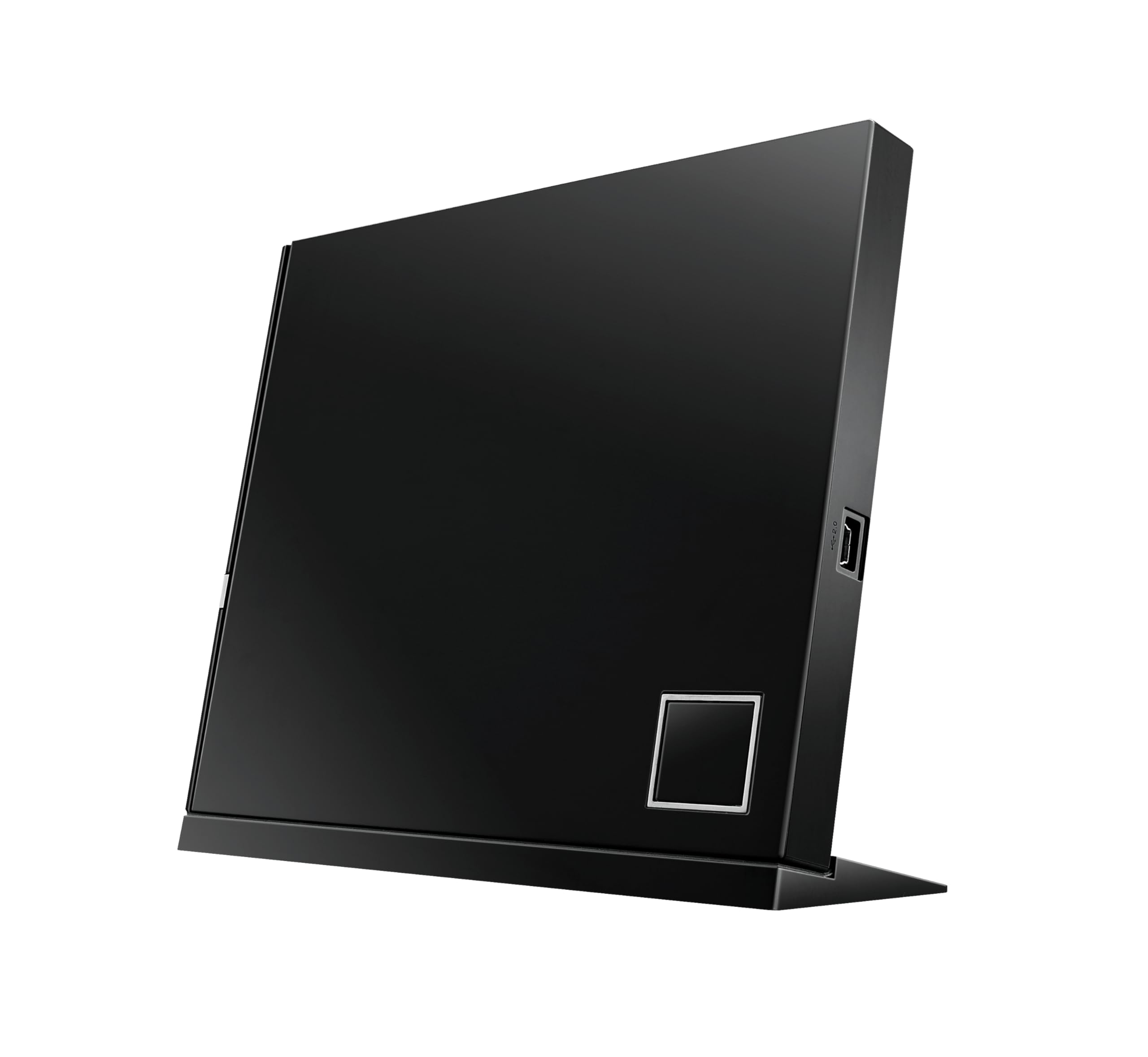
An ASUS archival workhorse with BDXL and disc encryption for serious backups.
This is the older sibling to our top pick, and it’s built for one specific job: reliable burning with extra security. It writes BD-R at 6X, BD-R dual-layer at 4X, and BD-R TL/QL at 4X for the massive triple- and quad-layer discs that hold 100GB or more. The ASUS ATP Technology is designed to assure the best burning quality, and Disc Encryption II adds a second layer of password protection to your data.
Customers note never burning a coaster — a strong endorsement for archival use — and it works with both desktop PCs and Macs, including plug-and-play on an old 2007 iMac. It can sit vertically or horizontally, so you can tuck it into a tight desk space. The free Leawo software handles multi-region Blu-ray and DVD playback on Windows 10.
The trade-offs are real. It connects via USB 2.0, not USB 3.0, which limits transfer speed, and the dual-USB cable is only 18 inches long. Setup can be intensive — the driver and patch must be copied off the included CD onto a USB stick, which trips up non-technical users, and the driver isn’t posted on the ASUS site. A few buyers hit Windows 8.1 compatibility quirks where burn options were greyed out, though it worked fine on Windows 7.
Built for archivists: BDXL support, disc encryption, and a track record of clean burns make this a trusted backup tool, not just a movie player.
Only for patient users: the USB 2.0 interface and CD-based driver setup demand more technical comfort than our top pick.
7. mthstec Multifunction Desktop Blu-ray Drive with HDD Enclosure

A heavy-duty desktop drive that rips at 16X and docks a second hard drive on top.
This is the speed king of the list. It reads Blu-rays at up to 16X, DVDs at up to 16X, and CDs at up to 40X — which the manufacturer says is 2-3 times faster than most normal Blu-ray drives. That speed makes it the right pick for building a media server or ripping a large disc collection, and owners describe it as feeling heavy-duty and tank-like, working hard without blinking.
The defining feature is the external hard drive enclosure built into the top of the device, which accepts both 3.5″ and 2.5″ SATA I/II/III hard drives. You can dock a bare SATA drive and access it directly from your laptop or desktop without buying a separate enclosure — a genuinely useful tool for media management. It also adds a 2-port USB 3.0 hub with data transfer speeds up to 5 Gbps, plus a USB-A fast-charging port for phones.
This is not a travel drive — owners note it’s bigger than expected and heavy, so plan for it to live on a desk. Blu-ray playback requires third-party software, and one buyer hit AACS decryption errors that needed paid players and codecs; DVDs worked fine, but Blu-ray wasn’t truly plug-and-play. A couple of units arrived dead on arrival with auto-ejecting trays, though the 2-year warranty covers that risk.
What it delivers
- 16X Blu-ray read speed for fast ripping
- Built-in SATA dock for 3.5″ and 2.5″ hard drives
- 2-port USB 3.0 hub with fast-charging
Know before you buy
- Bigger and heavier than expected — not for travel
- Blu-ray playback needs third-party software and codecs
Reach for it if: you’re ripping hundreds of discs for a media server and want the speed plus a built-in hard drive dock.
Pass on it if: you want a slim travel drive or expect true plug-and-play Blu-ray movie playback.
8. Intenso EOD 500BD Slim USB 3.2 External Blu-ray Drive
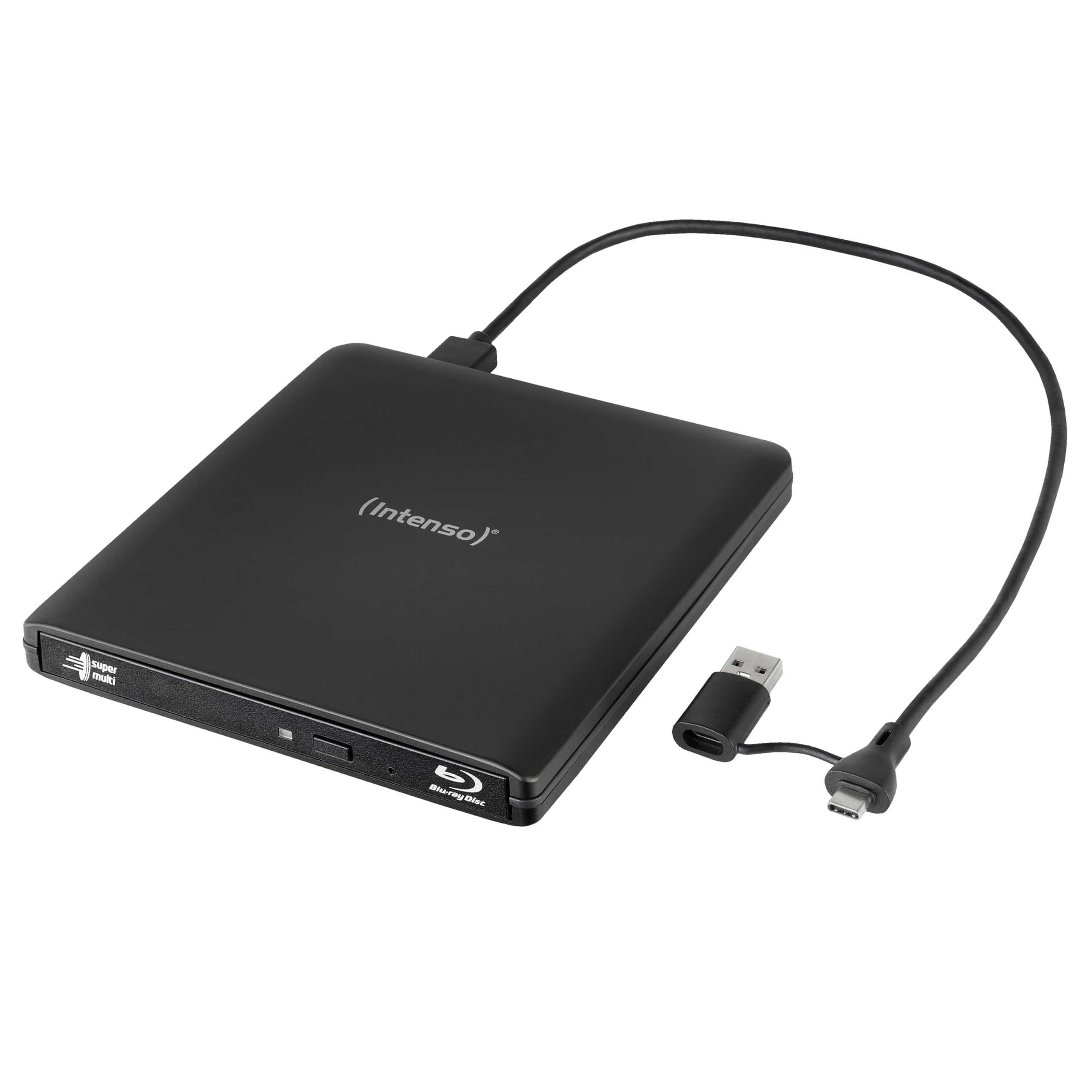
An aluminum-sheathed drive that’s light enough to slip into a pocket or backpack.
This is the drive that disappears into your bag. The aluminum housing weighs just 250 g and measures 142 x 148 x 16 mm — compact enough to fit easily in a pocket or backpack, yet it still handles the full range of Blu-ray, DVD, and CD formats including dual-layer, DVD-RAM, and M-Disc. The USB 3.2 Gen 1 connection transfers data at up to 5 Gbps for stable ripping and burning.
The standout bonus is the included Ashampoo Burning Studio software — a free full version for Windows 10 or later that handles playback and burning from the start, so you don’t have to hunt for third-party tools. Buyers praise the easy USB plug-and-play install, fast disc recognition, and error-free reading of old Blu-ray and DVD backups. It writes BD-R up to 6X, DVDs up to 8X, and CDs up to 24X.
The only meaningful caveat is that the bundled software is Windows-only, so Mac users get the hardware but not the free software. The included Y-cable connects via micro-B to USB-C and USB-A, giving you flexibility with different laptops. This is a smaller drive than the mthstec desktop unit above, but it’s also less powerful — no hard drive dock and lower read speeds, so it’s a trade of muscle for portability.
Grab it for: a premium-feeling aluminum build with free burning software included, perfect for MacBook or ultrabook owners who want a compact drive.
Not for: Mac users who want the bundled software (Windows-only) or anyone needing high-speed 16X ripping.
9. BUFFALO 6X Portable Blu-ray Drive

A made-in-Japan drive with M-DISC support for archiving data across generations.
This is the highest-rated drive on the list and the most trustworthy for archival work. It reads and writes Blu-ray at 6X, DVDs at 8X, and CDs, but its defining feature is M-DISC support — M-DISC media is rated to preserve data for up to 1000 years against heat, light, and moisture., making this the pick for anyone preserving family photos or critical documents. The BUFFALO is also TAA-compliant and made in Japan.
It connects via USB 3.2 (Gen 1) Type-A with a Type-C adapter included, and it measures just 6 x 5 x 0.5 inches at 0.5 lbs, so it rides easily alongside a laptop. The CyberLink Media Suite software handles playback and burning on Windows.
Be realistic about disc compatibility: one buyer found it couldn’t read a specific disc that another PC drive handled fine, and the reverse was true for a different DVD — so no drive reads every disc perfectly. The bundled CyberLink software is Windows-only, which means Mac users will need their own player. This drive is pricier than the Intenso above, but you’re paying for the Japanese build quality and the reputation that comes with it, plus US-based support and a 2-year warranty.
Why buyers love it
- True plug-and-play with zero configuration on Windows
- M-DISC support for 1000-year archival data preservation.
- Ultra-slim 6 x 5 x 0.5 in design at 0.5 lbs
Honest limitations
- Software is Windows-only; Mac users source their own player
- No drive reads every disc perfectly — occasional incompatibility happens
Pick this if: archival reliability and low-maintenance setup matter more than raw speed — the made-in-Japan build earns trust.
Think twice if: you need faster than 6X ripping or you’re a Mac user who doesn’t want to buy separate playback software.
Understanding the Specs
Read Speed (X Rating)
Disc drive speeds are measured in multiples of the original playback speed — “1X” for Blu-ray equals 4.5 MB/s of data transfer. A 6X drive moves data at about 27 MB/s, which is plenty smooth for watching movies and reasonable for ripping a film in 25 minutes or so. If you’re archiving large collections, step up to 8X or 16X drives like the mthstec, which reads Blu-rays at up to 16X — noticeably faster for batch jobs.
BDXL vs. Standard Blu-ray
A standard Blu-ray disc holds 25GB, and a dual-layer holds 50GB. BDXL support extends that to 100GB and even 128GB on triple- and quad-layer discs, which matters if you’re backing up large video projects. The ASUS SBW-06D5H-U and SBW-06D2X-U both support BDXL, while many budget drives cap out at 50GB. Check BDXL support before buying if you plan to archive big files.
Burn Capability
Not every “Blu-ray drive” can write Blu-ray discs — some read Blu-ray but only burn CDs and DVDs. Read the fine print carefully. The LLMHHKYK 2-in-1 and the BUNUD 5-in-1 fall into this category. If you want to create Blu-ray backups, look for drives that explicitly list BD-R write speeds, like the ASUS models or the BUFFALO. If you only watch and rip, a reader-only drive saves you money.
M-DISC Support
M-DISC is a special recordable disc designed for long-term data storage — The manufacturer rates M-DISC media to preserve data for up to 1000 years against heat, light, and moisture. damage. It’s the archival gold standard for preserving family photos, videos, and documents. The BUFFALO and ASUS SBW-06D5H-U support M-DISC, making them the top choices if you’re building a permanent backup library rather than just watching movies.
FAQ
Do external Blu-ray drives play 4K UHD discs?
Why won’t my Blu-ray drive play movies without extra software?
Can I burn a Blu-ray disc with any external Blu-ray drive?
Will an external Blu-ray drive work with my MacBook?
What does BDXL mean and do I need it?
Can I watch Blu-ray movies from different regions on one drive?
Do these drives need a power adapter or do they run off USB?
How long does it take to rip a Blu-ray movie?
What is M-DISC and should I use it for backups?
My drive isn’t detecting discs — what should I check first?
Final Thoughts: The Verdict
For the majority of shoppers, the external blu-ray drive winner is the ASUS SBW-06D5H-U because it balances reliable playback of scratched discs, BDXL burning, and true plug-and-play across Windows, Mac, and Linux. If you want a travel-ready hub that also reads memory cards and expands your ports, grab the GODBPNYMU 8-in-1. And for the heaviest archival work with 1000-year M-DISC storage, the BUFFALO 6X is the one to reach for.
How We Picked
We do not accept paid placement. Every pick is matched to a real buyer and a real use-case; we do not hands-on test units.
Sources & Methodology
Specifications: manufacturer listings and product documentation. Review insights: verified customer reviews, as of August 2026. Pricing: not shown on this page (it changes often); check the current price via the retailer link.
As an Amazon Associate, WellFizz earns from qualifying purchases. This does not affect which products we feature.
Related Guides

Mo Maruf
I created WellFizz to bridge the gap between vague wellness advice and actionable solutions. My mission is simple: to decode the research and give you practical tools you can actually use.
Beyond the data, I am a passionate traveler. I believe that stepping away from the screen to explore new environments is essential for mental clarity and physical vitality.