Our readers keep the lights on and my smoothie glass nicely filled. As an Amazon Associate, I earn from qualifying purchases.
Specs are compiled from manufacturer listings and verified buyer reviews and can change over time — please confirm the key details on the product page before buying.
An ergonomic keyboard and mouse combo can transform a desk job from a source of daily ache into a barely noticeable part of your day. The problem is that most sets promise wrist relief but only one or two actually deliver on it, leaving the rest to feel awkward or just sit in a drawer. This guide breaks down the real differences in wave designs, vertical mice (a mouse that tilts your hand into a handshake position), and switchable connectivity — all in plain language — so you can pick the pair that genuinely fits your hands and your workflow.
I’m Mohammad Maruf — the founder and writer behind WellFizz. This guide is built by comparing the manufacturers’ published specifications and the patterns across verified customer reviews, so you get each pick’s real strengths and trade-offs instead of marketing spin.
Whether you type reports or jump between spreadsheets, the right gear changes how your body feels at 5 p.m. Keep reading to discover which ergonomic wireless keyboard and mouse combo earns a permanent spot on your desk.
Our Picks at a Glance

How To Choose The Best Ergonomic Wireless Keyboard And Mouse Combo
Focus on three things: keyboard shape, mouse angle, and connectivity. A wavy or split keyboard lets your hands rest in a natural, straight line rather than bending outward. A vertical mouse tilts your hand like a handshake, taking pressure off the tunnel of bones and ligaments in your wrist. A solid wireless connection — via USB receiver or Bluetooth — keeps your desk cable-free without lag.
Keyboard Shape: Wave vs. Split
A wave keyboard has one continuous curved surface that slopes down in the middle, gently cupping your hands. A split keyboard physically divides the key layout into two halves so each arm can sit at its own comfortable angle. Buyers with wrist pain often prefer split designs for an independent shoulder-width stance, while wave boards are easier to transition to from a standard layout.
Mouse Angle: Vertical and DPI
A vertical mouse holds your hand in a neutral handshake position, keeping forearm muscles relaxed. Most offer adjustable DPI (dots per inch — a measure of how fast the cursor moves across the screen); a lower DPI gives you precise control for detailed work, while a higher DPI lets you zip across large monitors with a small flick of the wrist.
Wireless Connection and Battery Life
Two popular wireless technologies dominate this category. A 2.4GHz connection uses a small USB receiver and gives you a stable, low-latency link up to about 33 feet. Bluetooth connects without needing a USB port and works with tablets and laptops, but can sometimes introduce a tiny delay. Some combos offer both, ideal for switching between a desktop and a tablet. Battery life varies: some sets run for weeks on AAA batteries, while others use a rechargeable lithium-ion cell lasting days per charge.
Quick Comparison
| Model | Best For | Keyboard Shape | Mouse Type | Connectivity | Amazon |
|---|---|---|---|---|---|
| Logitech Wave Keys & Lift Mouse★ Best Overall | Proven ergonomics | Wave | Vertical (57°) | Bluetooth + Logi Bolt | Amazon |
| ProtoArc EKM01 PlusBest Value | Full-size split with rechargeable battery | Split | Contoured | Bluetooth + USB | Amazon |
| ProtoArc EKM02 Wave KeysCompact Premium | Compact wave with vertical mouse | Wave | Vertical | Bluetooth + 2.4G | Amazon |
| MEETION Split Wireless | Full split design with vertical mouse | Split | Vertical (4-level DPI) | 2.4G | Amazon |
| EDJO Dual-Mode | Budget dual-mode with soft wrist rest | Wave | Standard (3-level DPI) | Bluetooth + 2.4G | Amazon |
| Lomiluskr Split Ergo | Colorful split design with PU wrist rest | Split | Standard (3-level DPI) | 2.4G | Amazon |
| Amazon Basics Ergonomic Combo | low-maintenance budget pick | Wave | Contoured | 2.4G | Amazon |
| Kensington Pro Fit Ergonomic | Dual wireless with AES encryption | Split | Standard (5-button) | Bluetooth + 2.4G | Amazon |
In‑Depth Reviews
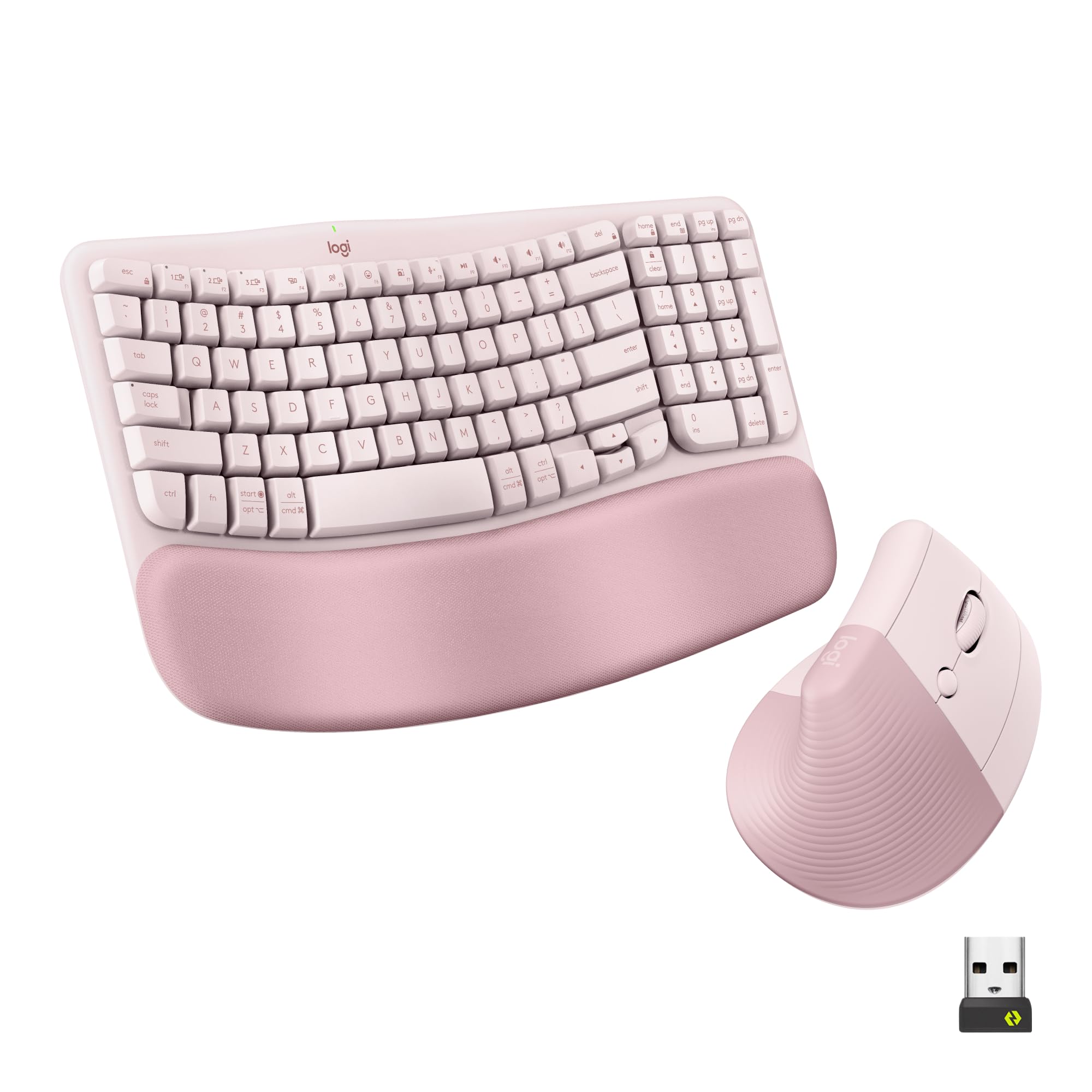
1. Logitech Wave Keys Keyboard & Lift Mouse Ergonomic Combo – Rose
Our pick — 4.5★ from 300+ verified ratings; the strongest balance of quality and price.
Your wrists get a 57° vertical mouse and a wave keyboard in one certified pair — zero guesswork.
The Logitech Wave Keys keyboard uses a continuous wave shape that guides your hands, wrists, and forearms into a natural, straight alignment. The plunger key switches offer a tactile bump without being loud, so you get satisfying feedback that does not echo through a quiet room. At 1.7 pounds, the kit is light enough to shift around your desk but feels solid under your palms. The matching Lift vertical mouse tilts your hand to a 57° angle — the balance between flat and fully vertical — which buyers consistently say helps with hand fatigue during long shifts.
The cushioned memory foam palm rest is built into the keyboard and provides all-day support without sliding away. You can pair the set over Bluetooth Low Energy (a power-saving version of Bluetooth) or the included Logi Bolt USB receiver, and the Easy-Switch feature lets you bounce between three connected devices with a single button press. The pinkish-rose color adds a subtle personality that stands out from the sea of black peripherals. Owners praise the quality above all else, and the ergonomics and comfort are the next most-discussed strengths. Some with larger hands find the keyboard slightly compact, and a few note the mouse lacks grip ridges on the side, so lifting it can feel a little slippery.
What wins people over
- Ergo-certified wave keyboard with memory foam palm rest supports natural hand alignment
- 57° vertical mouse reduces forearm strain and helps with hand fatigue
- Quiet tactile keystrokes that feel satisfying without being disruptive
Reach for this if
- Keyboard is on the smaller side — best for small to medium hands
- Non-removable wrist pad means you cannot swap it out for a different height
Your best bet if: you want a professionally validated ergonomic set that buyers call “great for WFH” and that single-dongle connectivity makes switching between devices easy. The crowd favorite — 4.5 stars from hundreds of owners — backs it up.
Think twice if: you have very large hands or prefer a split keyboard design; some find the wave layout a touch narrow, and the mouse lacks side grip ridges for secure lifting.
2. ProtoArc EKM01 Plus Wireless Ergonomic Keyboard Mouse Combo
A full-size split keyboard and contoured mouse that finally make a cramped desk feel roomy.
The EKM01 Plus takes the split concept and runs with it — the keyframe is divided into two curved halves that let each arm rest at its natural angle, reducing the outward bend that strains your wrists. Unlike the Logitech wave set, this one includes a separate curved wrist rest padded with soft memory foam that you can position independently. The set ships with a dust cover, a thoughtful touch that keeps the keyboard clean when you are not typing. The quality of the build is what owners praise most, with 94 positive mentions, followed closely by the ergonomics and comfort.
The 500mAh rechargeable lithium battery inside both the keyboard and mouse delivers up to 250 hours of standby time after a full 2-hour charge via USB-C. That means you can go weeks without plugging in, even with daily use. You can connect to up to three devices at once through Bluetooth or the USB receiver and switch between them with a single button. The mouse uses an optical sensor with a 2000 DPI resolution and includes forward and backward buttons for quick web navigation. Buyers with wrist pain report real relief, noting the keys are responsive with a short reset, though the keyboard is not backlit and measures 20.75 inches wide — make sure your desk has room.
Split comfort with a rechargeable twist: the full-size layout and separate wrist rest give you a lot of adjustability, and the USB-C charging means you can say goodbye to stocking AA batteries. A few owners experienced connectivity issues or complete failure after a few months, which tempers the otherwise glowing consensus.
Ideal for: anyone who wants a generously sized split keyboard with a rechargeable battery and the ability to switch between a PC, a Mac, and a tablet without unplugging anything.
Check your desk space first: at nearly 21 inches wide, this is a large setup; measure your workspace before buying.
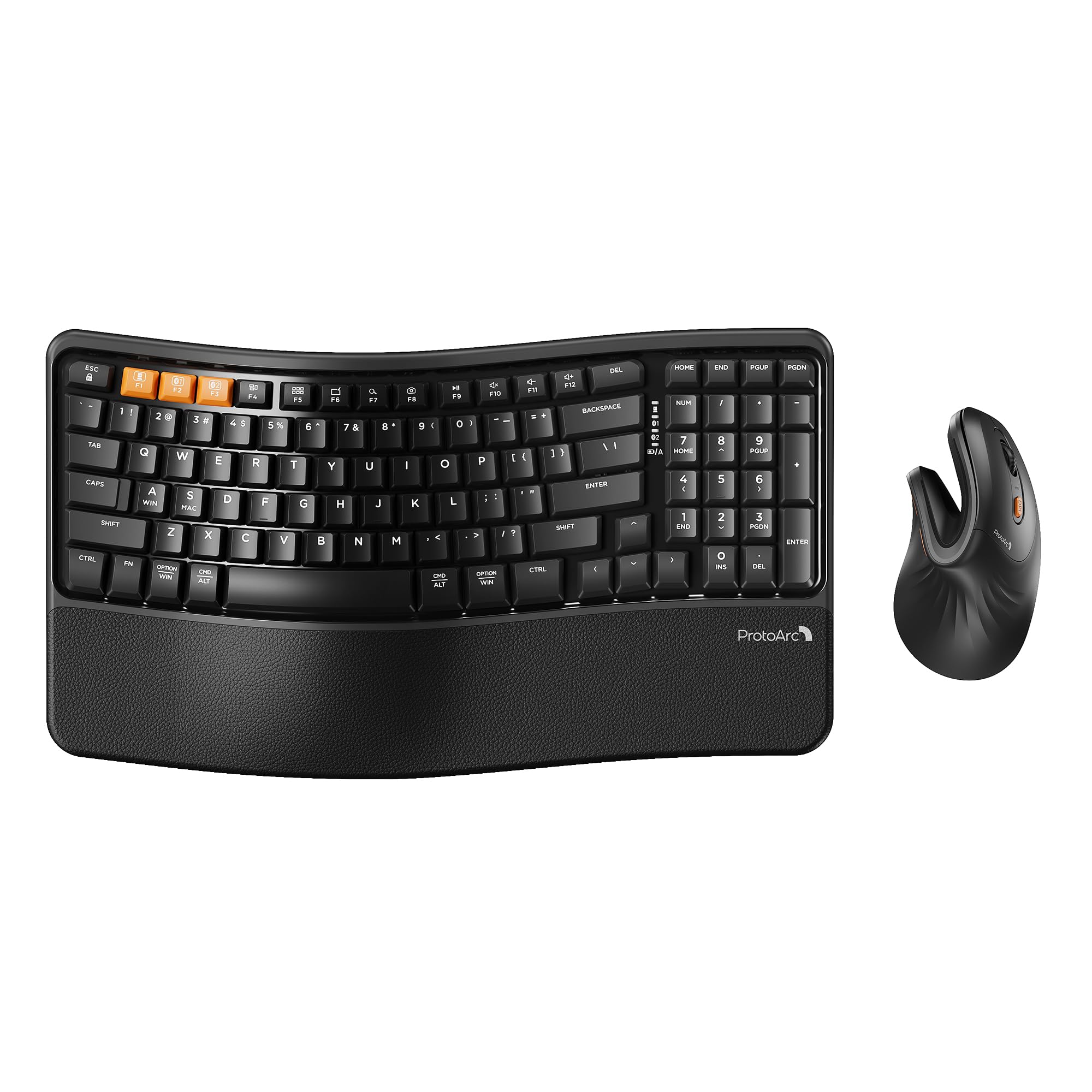
3. ProtoArc EKM02 Wave Keys Ergonomic Wireless Keyboard and Mouse
A wave keyboard with a vertical mouse that fits small hands like a custom glove.
The EKM02 is designed explicitly for hand lengths under 7.5 inches, making it a rare find for people who feel lost on oversized peripherals. The keyboard uses a continuous wave shape with a built-in cushioned memory foam palm rest, and four adjustable tilt legs let you find the perfect angle whether you sit or stand. The compact layout — 15.6 inches long — keeps the mouse close, promoting better shoulder alignment. What makes this pair special is the EM11 NL vertical mouse, which buyers describe as “well built” and “comfortable upon first touch.” The 500mAh rechargeable battery in each device gives you up to 100 hours of working time after just 2 to 3 hours of USB-C charging.
The set connects via Bluetooth or USB and can switch between three devices at the press of a button — perfect for moving between a work laptop and a personal computer. It is compatible with Windows 8 to 11, macOS, and Android 5 or higher. Owners rave about the quality and the relief they feel in their wrists; one buyer who had the set for three weeks reported their “wrist feel so much relief.” The honest trade-off is the learning curve with the vertical mouse — it takes 1 to 2 weeks to get used to the new grip. Some with larger hands also find the mouse a bit too big for a comfortable full-hand grip.
What you get
- Compact wave design that is a perfect fit for small to medium hands
- Built-in rechargeable battery with 100 hours of use per charge
- smooth 3-device switching via Bluetooth or USB
Keep in mind
- Vertical mouse requires a 1-2 week adjustment period
- No wired USB connection option
Grab this if: your hands measure under 7.5 inches and you want a compact, rechargeable wave set with a vertical mouse that owners unanimously call “outstanding” in quality.
Pass if: you have larger hands or cannot tolerate an adjustment period — the mouse encourages a full-hand grip that may feel restrictive at first.
4. MEETION Ergonomic Keyboard and Mouse Combo, Split Wireless Design

A true split keyboard that lets each hand type at its own natural distance.
The MEETION combo takes the split approach to its logical end: the keyboard is physically divided into two halves, so your arms never have to reach inward or twist outward. The built-in pillow-shaped wrist rest is made of a non-slip material that stays put even during fast typing sessions, providing targeted support that keeps your hands from hovering. The vertical mouse offers four adjustable DPI levels (dots per inch, or cursor speed): 800, 1200, 1600, and 2400, which you can toggle to match your task — lower for precise document editing, higher for zipping across big spreadsheets. The mouse also includes a side-scrolling wheel for easy horizontal navigation, which Excel users will appreciate.
The set connects via a single 2.4G USB receiver at distances up to 10 meters. Owners with wrist pain report real improvements, with one noting that the “pain in my hand has gone away” and another calling the keys “buttery smooth.” The split layout does take some learning — the halves place the ASDF and JKL rows in separate positions, so your muscle memory needs a few days to adapt. A few buyers experienced key failures, but the company replaced the defective unit quickly with good customer service.
Genuine split ergonomics for under: the independent halves and 4-level DPI vertical mouse give you a lot of adjustability. The main barrier is the learning curve for the split layout, and the occasional quality issue — mitigated by responsive customer support — means you should buy with confidence that any problems will be handled.
Choose this for: true split-keyboard typing that significantly reduces wrist and hand pain, paired with a versatile vertical mouse that adapts to different tasks.
Be ready for: a few days of retraining your typing habits, and keep an eye on the keyboard’s consistency — a rare unit may hiccup, but support typically resolves it fast.
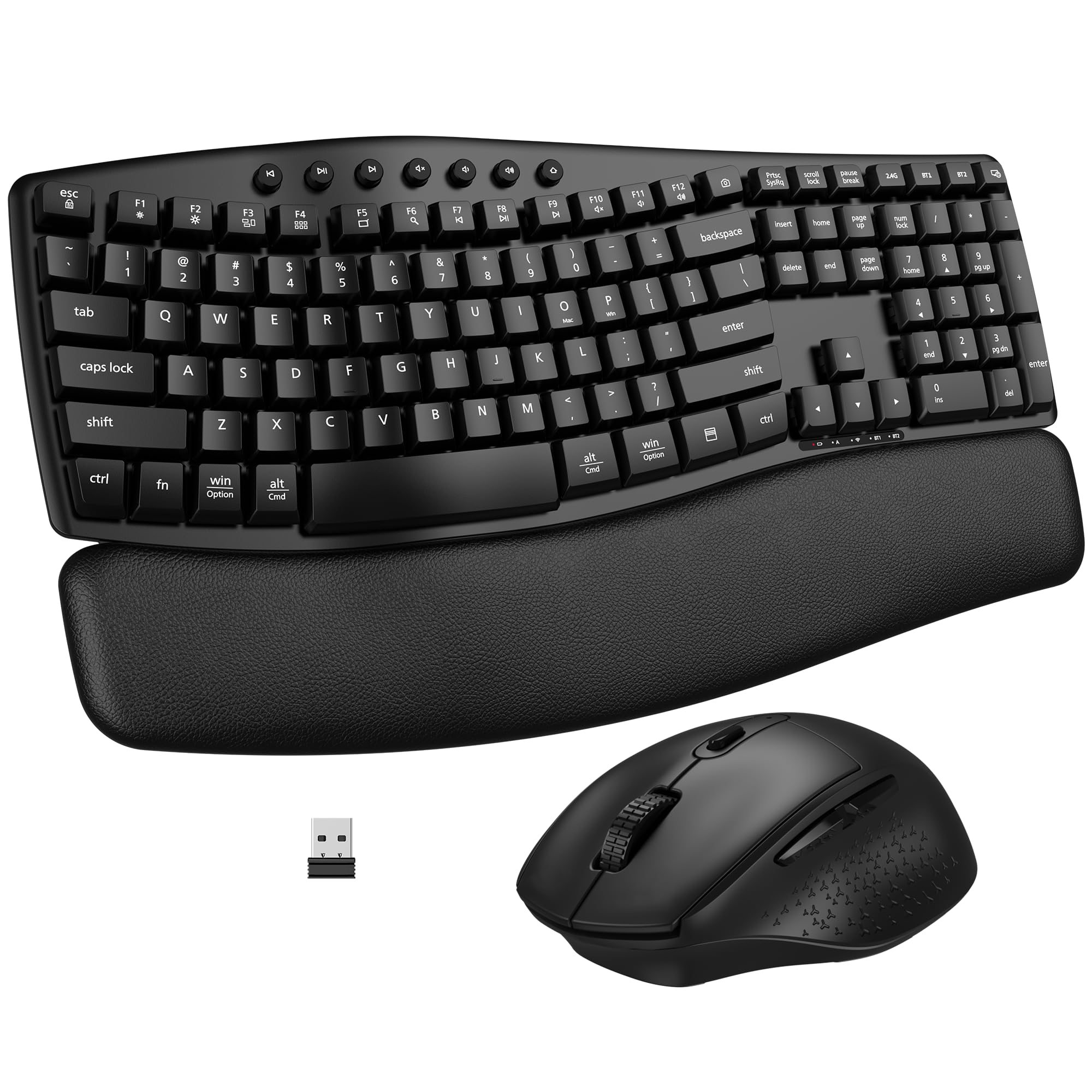
5. EDJO Ergonomic Wireless Keyboard Mouse Combo, Bluetooth/2.4G Dual-Mode
Wave comfort and dual-mode connectivity at a price that does not make you wince.
The EDJO combo brings a wave-shaped keyboard with a soft foam palm rest, plus both Bluetooth and 2.4G wireless connections, for a very accessible price point. The wave surface and adjustable keyboard stand help guide your hands into a comfortable typing position, and the keys are quiet enough for a library-like office. The mouse has three adjustable DPI levels — 1000, 1600, and 2400 — plus forward and backward buttons that make web browsing feel snappier. You also get 19 shortcut key combinations on the keyboard for one-touch volume control and web navigation.
Both devices use replaceable batteries: the keyboard takes 2 AAA batteries and the mouse takes 1 AA battery (none included). An intelligent power-saving chip kicks in after 30 minutes of inactivity to extend battery life. The ergonomics and keyboard quality are the most-praised features, but the reliability of the connection is the most-discussed topic overall, and it is marked as mixed — meaning most owners find it stable, but a few report occasional hiccups. One owner noted the keyboard needs fresh AAA batteries every two weeks with heavy use (12+ hours a day), which is faster than some competitors. A flashing white light under the down arrow is a minor annoyance that some find irritating.
What stands out
- Genuine dual-mode connectivity (Bluetooth and 2.4G) for flexible device pairing
- Soft foam wrist rest and wave key design improve typing comfort
- Affordable price point with a 12-month warranty for confidence
What to watch for
- Battery life is short for heavy typists — the keyboard may need fresh AAA batteries every two weeks
- A persistent flashing white light under the down arrow bothers some users
Best for: budget-conscious buyers who want the flexibility of both Bluetooth and 2.4G connections plus a soft wrist rest, all from a brand that backs its product with a full year of warranty.
skip it if: you type for 12+ hours daily and do not want to replace AAA batteries every two weeks, or if a small flashing light would drive you crazy.
6. Lomiluskr Wireless Ergonomic Keyboard and Mouse Combo with PU Wrist Rest

A purple split keyboard that looks as good as it feels on your wrists.
The Lomiluskr combo features a split, sloping keyboard that angles your arms inward, plus an integrated wrist rest covered in PU leather for a soft, non-slip surface. The low-profile membrane keys require a light press, reducing the force your fingers need with each stroke. The mouse includes a PU leather palm grip and offers three DPI settings — 1200, 1600, and 2400 — so you can dial in your preferred cursor speed. The whole setup connects over a 2.4G wireless link up to 10 meters away, using a single USB receiver for both devices.
People are drawn to the ergonomics — that is the top positive aspect with 106 mentions — and they love the appearance, which is the second most-praised feature. The purple color and soft feel genuinely make the desk look more inviting. However, the reliability concerns are hard to ignore: 101 owners flag it as a negative, with the most common complaint being that the keyboard stops working randomly or that keys get stuck internally. An occasional unit fails after a few months, and the auto-sleep feature (which kicks in after 3-5 minutes) can be annoying because you have to click a button to wake it up. This is a decent entry-level split keyboard for someone on a tight budget who loves the color, but it is hard to recommend for daily heavy use over the long haul.
Pretty and comfortable, but reliability is a gamble: the split design and PU leather wrist rest genuinely reduce typing strain, and the purple finish is unique. The trade-off is a notable drop-off in long-term reliability — some buyers report key sticking or connectivity failure after a few months, making this better suited as a secondary or light-use keyboard.
Try this if: you want an affordable split keyboard with a comfortable PU wrist rest and a fun color that nobody else at the office has.
Look elsewhere if: you expect your keyboard to last through years of daily 8-hour typing sessions — the reliability data here is a red flag for heavy users.
7. Amazon Basics Ergonomic Wireless Keyboard and Mouse Combo with Wrist Rest

Wave-shaped relief without a wave-shaped price tag.
The Amazon Basics combo uses an ergonomic wave keyboard with a full number pad and a contoured mouse with soft rubber grips. Setup is truly plug-and-play — you take the single 2.4G USB receiver from the mouse battery compartment, plug it into your computer, and both devices work instantly without any driver installation. The wireless connection is reliable up to 33 feet, so you can step away from the desk without losing the link. The mouse has an advanced scroll wheel and an adjustable DPI button for controlling cursor speed. It weighs 1.6 pounds (the Logitech Wave Keys set weighs 1.7 pounds); the difference is barely noticeable on a desk.
Buyers consistently praise the comfort and easy setup. One described it as “excellent ergonomic design for extended comfort” with “well-spaced keys” and “smooth lag-free wireless.” However, there is a notable durability concern: some owners mention that after a few months of daily use, the keyboard starts to miss keystrokes and the mouse becomes unresponsive. A few also experienced issues with Mac compatibility — Command+C and Command+V shortcuts failing to register — though this could be specific to certain macOS versions or a defective unit. For light to moderate use, this is a fantastic value; for heavy, all-day typing, the longevity is a real question mark.
Great for casual use, risky for the power typist: the instant setup and comfortable wave design are tough to top at this price. The caveat is that owners who use it for 8-hour workdays sometimes find it starts skipping keystrokes after 3-4 months, so treat this as a reliable secondary or light-use keyboard rather than a daily workhorse.
Reach for this if: you need an affordable ergonomic wave keyboard for occasional typing, home use, or as a backup, and you want it working in under 10 seconds from the start.
pass on it if: you are a heavy daily typist who needs a set to last through years of full-time work — the durability track record suggests it may not hold up.
8. Kensington Pro Fit Ergonomic Wireless Keyboard and Mouse

A split keyboard with government-grade wireless encryption for the security-conscious desk.
The Kensington Pro Fit features a split, sloped keyboard with adjustable reverse tilt positions — meaning you can angle the keyboard away from you, which some users find reduces wrist strain even further than the standard forward tilt. It offers dual wireless connectivity via both 2.4GHz and Bluetooth 4.0 LE, with 128-bit AES encryption (a strong encryption standard that scramble your keystrokes so they cannot be intercepted) to keep your keystrokes secure from wireless eavesdropping. The five-button mouse includes forward and back navigation buttons, and a three-mode power-saving switch lets you toggle between 2.4GHz, Bluetooth, and off to conserve battery life. The set works with Windows, macOS, and ChromeOS.
Comfort is the standout positive trait, with 28 owners praising the ergonomic feel. The keyboard is quiet and comfortable, and the split design genuinely helps reduce wrist strain. However, the reliability and connectivity scores are the lowest in this guide — by a wide margin. The most common complaints include the keyboard and mouse stopping working after about two months, frequent disconnections, and keys that stick constantly. One owner described it as “low quality, high price,” noting a backspace key that needed physical sanding to stop sticking and a mouse scroll wheel that caused unintended middle clicks. The comfort is real, but the product feels like it was designed a generation ago and has not been updated.
The good
- Dual wireless with 128-bit AES encryption for secure connections
- Adjustable reverse tilt lets you fine-tune wrist angle
- Comfortable split design that reduces strain for some users
The bad
- Reliability is a significant concern — many units fail or develop sticky keys after a few months
- Mouse is very slow with the same sensitivity settings as other mice, and some find it nearly unusable
Consider it for: a secure office environment where 128-bit AES encryption is a requirement and you primarily need a comfortable split keyboard for light typing.
Avoid it if: you need a set that works reliably every day for more than a few months — the failure rate reported by owners is the highest in this guide, and the mouse performance is a common frustration.
Understanding the Specs
Wave vs. Split Keyboard
A wave keyboard curves gently in a single piece so your hands rest at a natural inward angle, which is easier to adapt to if you have only used standard keyboards. A split keyboard is physically divided down the middle, allowing each hand and arm to sit at its own entirely independent angle — this provides the most natural alignment but takes a few days of practice because your muscle memory has to adjust to the two separate halves.
Vertical Mouse Angle and DPI
A vertical mouse turns your hand into a handshake position (typically around a 57° tilt), which keeps the bones and tendons in your wrist in a neutral line rather than twisted flat. DPI, or dots per inch, controls how fast the cursor moves: a lower number like 800 DPI gives you precise, slow movements for detailed editing, while a higher number like 2400 DPI lets you sweep across multiple monitors with a tiny flick. Most ergonomic mice let you toggle between 3 or 4 levels on the fly.
FAQ
Will an ergonomic keyboard and mouse combo fit on my small desk?
How long does it take to get used to a vertical mouse?
Can I use these combos with a Mac?
What is the difference between Bluetooth and 2.4G wireless?
How often do I need to change or charge the batteries?
Is a split keyboard better than a wave keyboard for wrist pain?
Do these combos work with tablets and smartphones?
Are the keys on these keyboards backlit?
Can I use the mouse and keyboard with two different computers at the same time?
Final Thoughts: The Verdict
For the majority of shoppers, the ergonomic wireless keyboard and mouse combo winner is the Logitech Wave Keys & Lift Mouse because it combines ergo-certified wave design, a 57° vertical mouse, and easy multi-device switching in one refined package. If you want a full-size split keyboard with USB-C rechargeable batteries, grab the ProtoArc EKM01 Plus. And for a compact wave set tailored to smaller hands, the ProtoArc EKM02 Wave Keys is the one to reach for — though with a 44-review sample, its acclaim still trails the Logitech’s established track record with hundreds of buyers.
How We Picked
We do not accept paid placement. Every pick is matched to a real buyer and a real use-case; we do not hands-on test units.
Sources & Methodology
Specifications: manufacturer listings and product documentation. Review insights: verified customer reviews, as of July 2026. Pricing: not shown on this page (it changes often); check the current price via the retailer link.
As an Amazon Associate, WellFizz earns from qualifying purchases. This does not affect which products we feature.
Related Guides

Mo Maruf
I created WellFizz to bridge the gap between vague wellness advice and actionable solutions. My mission is simple: to decode the research and give you practical tools you can actually use.
Beyond the data, I am a passionate traveler. I believe that stepping away from the screen to explore new environments is essential for mental clarity and physical vitality.