Our readers keep the lights on and my smoothie glass nicely filled. As an Amazon Associate, I earn from qualifying purchases.
Specs are compiled from manufacturer listings and verified buyer reviews and can change over time — please confirm the key details on the product page before buying.
Your wrists are telling you something. The ache that creeps up your forearms after a long day of typing is a direct result of a flat, straight keyboard forcing your hands into unnatural angles. Switching to an ergonomic split keyboard is the fix that lets your hands rest at shoulder-width, keeping your wrists straight instead of bent.
I’m Mohammad Maruf — the founder and writer behind WellFizz. This guide is built by comparing the manufacturers’ published specifications and the patterns across verified customer reviews, so you get each pick’s real strengths and trade-offs instead of marketing spin.
You want an ergonomic split keyboard that fits your desk and your hands, whether you crunch spreadsheets on a full-size layout or code for hours on a premium mechanical. Here is how to pick the right one without getting lost in specs.
Our Picks at a Glance


How To Choose The Best Ergonomic Split Keyboard
An ergonomic split keyboard is a serious investment in your daily comfort, so picking the right one is about matching the design to your specific typing habits, desk space, and the amount of customization you want.
One-Piece Split vs. Fully Separable Halves
Your first big choice is between a single curved frame with keys split down the middle or two fully independent halves. A one-piece split, like the Logitech Ergo K860, is simpler, needs no setup, and is often more portable. Fully separable halves, like the Kinesis Freestyle2 or EPOMAKER Split65, let you place each side at your exact shoulder width — even on opposite sides of a laptop or lap desk — for the most natural posture, but they take more desk space and a longer adjustment period.
Tenting and Tilt: The Angle That Saves Your Forearms
Flat keyboards force your palms down, which twists your forearms. Tenting is the feature that lifts the inner edge of each half so your hand sits in a more neutral “handshake” position. Some models offer fixed tenting built into the frame, while others let you choose between several degrees of tilt. The more adjustable the tenting, the easier it is to find the exact angle that relieves your specific strain.
Switches: Membrane, Low-Profile Tactile, or Full Mechanical
How the keys feel under your fingers is personal. Many ergonomic boards use quiet membrane keys that need only a light touch. Low-profile tactile mechanical switches give you a noticeable bump on each press without the loud click of a gaming keyboard. Full-size mechanical switches offer crisp feedback and fast reset, making them a favorite for heavy typists and programmers who want precision and durability — often with hot-swappable sockets, so you can change the switch feel later without soldering.
Quick Comparison
| Model | Best For | Layout Type | Key Count | Connection | Amazon |
|---|---|---|---|---|---|
| Logitech Ergo K860★ Best Overall | All-day office comfort | One-piece Split | 78 | Bluetooth / USB | Amazon |
| Nulea RT05Best Value | Budget with backlight | One-piece Split | 104 | Bluetooth / 2.4G | Amazon |
| ProtoArc EKM01 PlusFull Kit Pick | Full kit with mouse | One-piece Split | — | Bluetooth / USB | Amazon |
| Perixx PERIBOARD-624B | True wireless halves | Fully Separable | 86 | RF Wireless | Amazon |
| Perixx PERIBOARD-535BR | Wired mechanical value | One-piece Split | — | USB-A | Amazon |
| MechLands Feker Alice98 | Mechanical + numpad | Alice Layout | 98 | USB-C Wired | Amazon |
| EPOMAKER Split65 | Compact tri-mode gaming | Fully Separable | 81 | BT / 2.4G / USB-C | Amazon |
| Kinesis Freestyle2 | Adjustable tenting for pain relief | Fully Separable | 94 | USB-A | Amazon |
| Kinesis Advantage360 | Serious ergonomic investment | Contoured Keywells | 87 | Bluetooth | Amazon |
In-Depth Reviews
1. Logitech Ergo K860
Our pick — 4.5★ from 7,500+ verified ratings; the strongest balance of quality and price.
The office favorite that makes the jump to ergonomic typing feel easy, not like a compromise.
The K860’s curved, split keyframe is certified by United States Ergonomics to improve posture and lower muscle strain. The scooped keys match the curve of your fingertips, so you type with a natural, fluid motion instead of hunting for flat keys.
Comfort here is a layered system. Its memory foam wrist rest delivers 54 per cent more wrist support and 25 per cent less wrist bending than a keyboard without a palm rest. You also get adjustable tilt legs at 0, -4, and -7 degrees, so whether you’re seated or standing, your wrists stay neutral. Owners call it the quietest keyboard they’ve used, with battery life measured in years on 2 AAA batteries.
Connectivity is flexible — pair it with 3 devices via Bluetooth or the included USB receiver. The trade-off is that it’s not rechargeable, and some users need the Logitech Options software to open up full key customization, which has had glitches on newer macOS versions. If you want a reliable, comfortable, no-fuss transition, this is the one.
Why it wins at the office
- Ergonomist-certified curved split design reduces muscle strain
- Memory foam wrist rest with 54% more support
- Connects to 3 devices at once
- Exceptionally quiet keys
The compromises to know
- Uses 2 AAA batteries, not rechargeable
- Software needed for full customization
Reach for this if: you want the safest, most proven ergonomic upgrade with near-universal owner satisfaction.
Look elsewhere if: you need a rechargeable battery or fully separable halves for extreme desk setups.
2. Nulea RT05
A feature-packed budget contender that brings backlighting and rechargeability to the ergonomic world.
The RT05 packs more functionality into a budget frame than most competitors double its price. It pairs a full 104-key layout with a 7-color backlight across 3 brightness levels, letting you pick from blue, green, red, cyan, purple, yellow, or white to match your setup. The split, splayed, and curved design keeps shoulders relaxed and reduces fatigue.
Power comes from a 2000mAh internal battery charged via USB-C, so you skip the disposable battery shuffle entirely. It connects to up to three devices via Bluetooth and 2.4G USB with one-tap switching. Owners who made the switch from Microsoft models praised the tactile, bouncy keys and the comfortable leather wrist pad, noting the battery lasts weeks even with 8+ hours of daily use.
The honest catch is durability: some buyers report the battery failing to charge after roughly four months of use. The layout also draws mixed feedback — the half-size up/down arrow keys and quirky numpad placement are a real hurdle if you live in Excel and rely on hotkeys. It’s a great value entry point, but treat it as a lighter-duty daily driver, not a decade-long workhorse.
What the extra features buy you
- USB-C rechargeable 2000mAh battery
- 7-color backlight with 3 brightness levels
- 3-device connection with one-tap switch
- Tactile, bouncy keys with leather wrist pad
Where it cuts corners
- Reported battery charging failures after a few months
- Compact arrow keys and numpad layout annoy hotkey users
Grab it for: a colorful, rechargeable first ergonomic keyboard without a big budget outlay.
Think twice if: you depend on the 10-key for daily numeric entry and can’t tolerate a quirky layout.
3. ProtoArc EKM01 Plus
An all-in-one ergonomic setup that pairs a cushioned split keyboard with a contoured mouse for total wrist relief.
The EKM01 Plus solves the problem most ergonomic buyers forget: your mouse hand needs help too. This combo pairs a full-size split keyboard with a contoured mouse that has a palm and thumb rest, so both hands stay in a natural position. The keyboard’s curved, split keyframe and cushioned memory foam palm rest handle the typing side, while the mouse’s 2000 DPI sensor delivers precise control for browsing.
Owners consistently praise the build quality — it’s the most-discussed aspect by far — along with the ergonomic relief it provides. The responsive keys have a short reset and stay quiet, and the included dust cover protects it when not in use. Both devices connect to up to 3 devices via USB receiver or Bluetooth with a single button press, and auto-sleep kicks in after 30 minutes of no operation.
The mouse is the weak link for some: a few owners found it unresponsive and less reliable than the keyboard. At 20.75″ L x 11″ W, the full-size layout needs real desk space, so measure your setup first. If you want one purchase to fix your whole posture, this combo delivers exceptional value.
The complete package
- Ergonomic mouse with palm and thumb rest
- Durable build praised by the majority of owners
- 3-device switching for keyboard and mouse
- Auto-sleep after 30 minutes saves power
Honest limitations
- Mouse responsiveness drew some criticism
- Large footprint needs a spacious desk
Best for: anyone wanting a single, coordinated keyboard-and-mouse upgrade for all-day comfort.
Not ideal if: you already own a quality ergonomic mouse and only need to replace the keyboard.
4. Perixx PERIBOARD-624B

The rare split keyboard with zero cables between the halves, freeing you to place each side anywhere.
The PERIBOARD-624B is one of the few true wireless split keyboards on the market — there’s no cable connecting the two halves at all. Each half runs on its own batteries and communicates wirelessly, giving you up to 2 feet of separation without a connection cable or charging cord. The curved, split-key sloped design promotes a natural arm and hand position, and the adjustable tilt angle on the bottom offers many customized positions.
This is the keyboard post-carpal-tunnel-surgery patients and tenting enthusiasts rave about. Owners using it after surgery found the split design helps maintain a natural hand position, and the built-in palm rests are excellent for tented use. The low-profile keys have a quick throw that takes some getting used to, but the solid build quality and independent half operation make it a flexible tool — you can even use one half alone.
The ergonomics feedback is genuinely mixed, so it’s not a universal fit. Some owners find the keys require heavy pressure and struggle with typing, and there are reports of magnetic feet falling off and keys becoming unresponsive after a couple of months. The battery drain also means you’ll want to switch it off when idle. It’s a specialized tool for those who absolutely need cable-free halves — just know the build is not built for heavy daily punishment.
What freedom buys you
- No cable between halves for up to 2 ft separation
- Built-in palm rests ideal for tented use
- Adjustable tilt with many positions
- Each half can be used independently
Where it struggles
- Ergonomic comfort is a matter of taste, not a given
- Reports of key failures after months of use
- Magnetic feet can detach and halves stick together
Choose this for: a unique cable-free design if you need extreme flexibility in half placement.
skip it if: you want a durable daily driver you can hammer on for years.
5. Perixx PERIBOARD-535BR
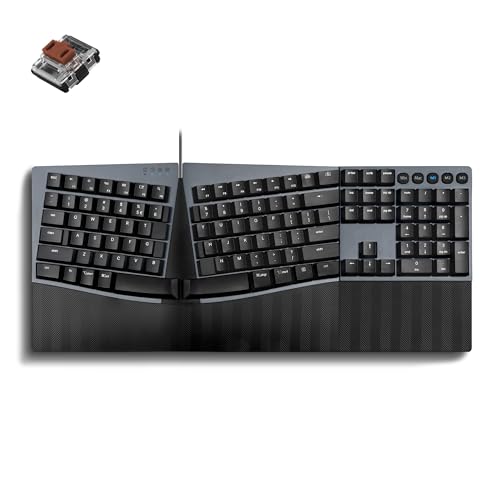
A no-frills wired mechanical that gives programmers the tactile feedback they crave without the gaming RGB circus.
The PERIBOARD-535BR is the anti-fluff pick. It skips backlighting, wireless, and software bloat to deliver a focused full-size split-layout mechanical keyboard. The low-profile brown tactile switches give you a noticeable bump on each press with a fast key reset and reduced noise — a feel owners describe as “just the right amount of click.” The stepped, curved key rows and ergonomic keycaps with flatter tops enhance fingertip comfort.
It’s built as a direct successor to the beloved Microsoft Natural 4000, and owners who made that switch found the key feel perfect and the standard layout with a numpad reliable. Full NKRO anti-ghosting ensures every keystroke registers accurately even during fast typing, and the keys are programmable via the Perixx website with no software installation required. It works from the start with Windows, macOS, and Linux.
The 1.92 lb frame is a straightforward tool, not a showpiece. Some Mac users found the layout slightly off, and there’s a learning curve of 1-2 weeks as your hands adapt to the split. If you want a reliable, quiet mechanical that just works for long coding sessions, this is an excellent wired choice at a reasonable price.
The focused build
- Quiet low-profile brown tactile switches
- Full NKRO anti-ghosting for accurate fast typing
- Programmable keys without software install
- Works with Windows, macOS, and Linux
What you give up
- No wireless or backlighting options
- Mac layout needs some adjustment
Pick this if: you’re a programmer or writer who wants dependable mechanical feedback without extra frills.
Pass on it if: you need wireless freedom or RGB lighting in your setup.
6. MechLands Feker Alice98
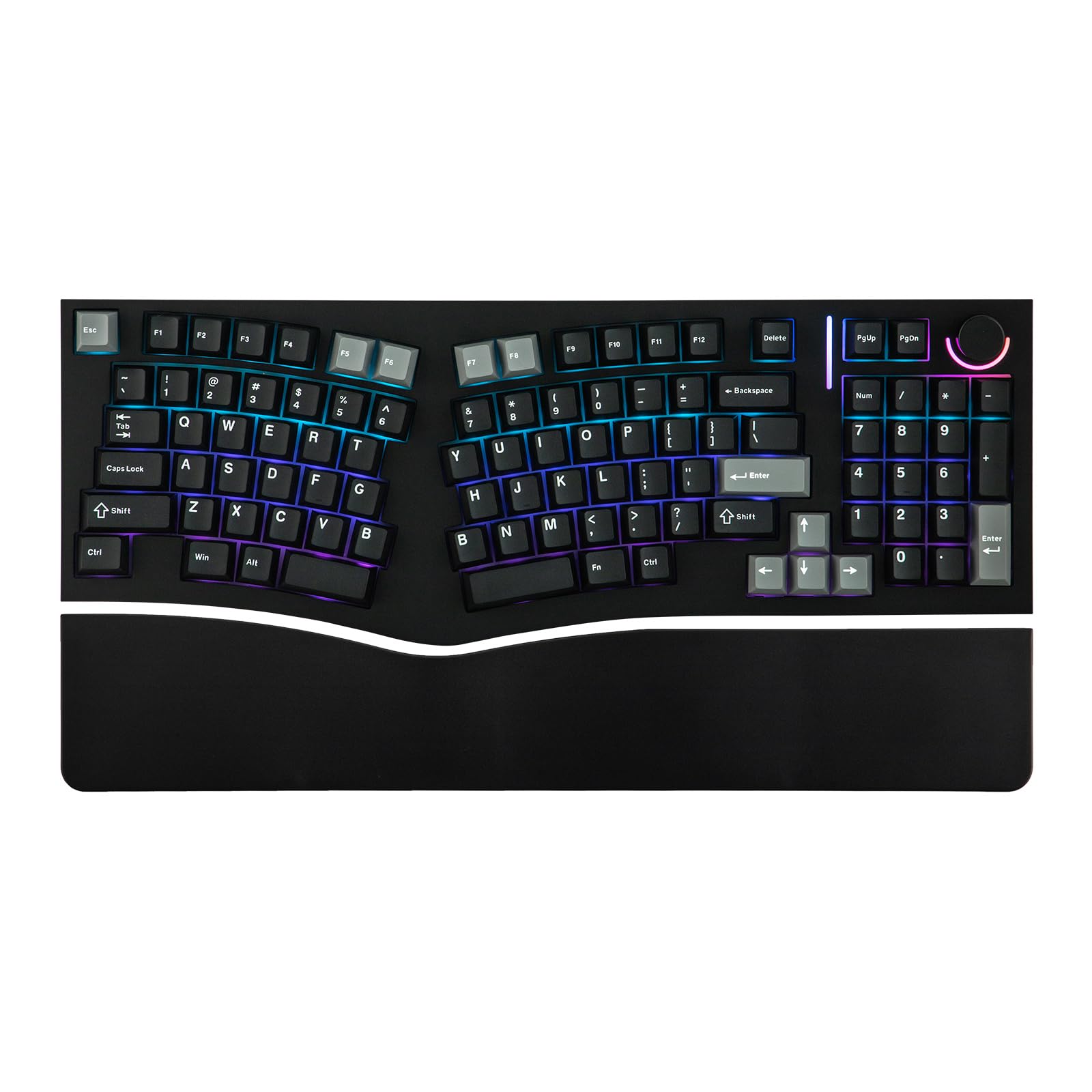
The Alice layout finally gets a numpad, merging ergonomic key angles with spreadsheet-ready functionality.
The Alice layout angles the keys to align with your hands’ natural resting position, but until now it usually meant giving up your 10-key. The Feker Alice98 fixes that with a 98-key layout that keeps the numpad intact. The angled keys and split spacebar let your hands rest naturally, and owners mention it genuinely eases wrist pain during extended typing sessions.
What wins people over here is the build and sound. The gasket mount structure with a PC plate delivers a soft, consistent typing feel, layered with Poron sandwich foam, an IXPE switch pad, PET film, and more to produce a rich, satisfying “clacky” sound — the second most-praised aspect. You get 21 south-facing RGB lighting effects, a hot-swappable PCB for changing switches without soldering, and Cherry profile dye sublimation PBT keycaps that resist becoming oily.
VIA programmability gives you complete control to remap keys and set macros. There’s a real quality-control caveat though: an occasional unit arrives with faulty or chattering keys, and the knob light has flickered for some. The quality is genuinely praised by most, but it’s not a guaranteed-perfect board from the start. For ergonomic comfort plus a numpad, it’s a standout.
The comfort-and-function combo
- Ergonomic Alice layout with a full numpad
- Rich, satisfying typing sound praised by owners
- VIA programmable with hot-swappable PCB
- Durable PBT keycaps resist oil buildup
The reliability question
- Some units arrive with faulty or chattering keys
- Knob LED flickering reported occasionally
Best for: mechanical enthusiasts who need a numpad and want deep programmability in an ergonomic layout.
Be cautious if: you can’t tolerate the possibility of fixing a faulty key or two on arrival.
7. EPOMAKER Split65

A sleek, fully separable 65% board that proves ergonomic splits can look and feel like a premium gaming rig.
The Split65 is the keyboard that converts traditionalists. It’s a fully separable split layout in a compact 65% form that saves serious desk space, and owners who switched say they’ll never buy a traditional keyboard again. The split design lets you adjust each half’s angle and distance independently, reducing strain on wrists and forearms by letting you type in a natural posture.
Sound and feel are the headline. The top-mounted structure with 4 layers of cushioning material — Poron sandwich foam, IXPE switch pad, PET pad, and Poron socket pad — eliminates hollow noise for a pure, creamy acoustic profile. The Wisteria linear switches feel smooth, and the south-facing RGB backlight delivers 16.8 million colors with dozens of pre-set effects. The hot-swappable PCB is compatible with mainstream 3/5-pin switches, so you can experiment with feels later.
Connectivity is where it shines: Bluetooth 5.0, 2.4GHz wireless, and USB-C cable mode connect to up to 5 paired devices at once, with a rotary knob for volume and brightness. The QMK/VIA support gives maximum programming freedom. The Linux AppImage tool is admittedly outdated, but the core keyboard is rock solid. For a compact, flexible split that doubles as a gaming board, this is a superb mid-premium pick.
The premium feel
- Fully separable halves with adjustable positioning
- 4-layer sound dampening for a creamy acoustic profile
- Connects to 5 devices across 3 modes
- Hot-swappable PCB for switch customization
The small print
- Compact layout means no numpad
- Linux support tool is outdated
Reach for this if: you want a wireless, deep-customizable compact split that feels at home in both work and gaming.
Look elsewhere if: your workflow absolutely requires a dedicated number pad.
8. Kinesis Freestyle2

The adjustable-tenting specialist that delivers measurable relief for wrists and shoulders — straight from the start.
The Freestyle2 is built for people who have actual pain, not just discomfort. The award-winning split design lets you rotate and separate the key modules up to 9 inches to achieve natural hand, wrist, and forearm positions for your specific body type. This version comes with the VIP3 tenting accessory pre-installed, enabling 5, 10, or 15 degrees of tenting with integrated cushioned palm supports to keep forearms neutral.
The relief is the story here. Owners using it 8+ hours daily for two years report eliminated wrist and finger pain, and those recovering from limited wrist mobility call it outstanding. Its low-force membrane switches reduce finger fatigue, and dedicated Cut, Copy, Paste, and Undo hotkeys boost productivity without software.
The trade-offs are real for some: the Delete key is the same size as Backspace, causing occasional errors, and the Fn key placement on the left instead of Ctrl takes adjustment. There’s also no number pad. But for its core mission — keeping your wrists straight and your posture neutral — it’s a proven, award-winning tool that helped a huge number of owners find real relief.
The ergonomic core
- Rotate and separate halves up to 9 inches
- VIP3 tenting at 5, 10, or 15 degrees
- Low-force keys reduce finger fatigue
- Dedicated Cut, Copy, Paste hotkeys
Adjustment needed
- Delete and Backspace are the same size
- No number pad
- Steep learning curve initially
Choose this for: proven, doctor-friendly relief if wrist and shoulder strain is already affecting your work.
Not for you if: you need a numpad or want a modern mechanical typing feel.
9. Kinesis Advantage360

The gold standard of ergonomic engineering, with concave keywells that completely reshape how your hands move.
The Advantage360 is the serious investment for people who’ve tried everything else. Its concave keywells are scooped into a bowl shape to reduce hand and finger extension, and the keys are arranged in vertical columns rather than staggered rows to match your fingers’ natural motion. The two keywells are tented to a moderate “handshake” posture, reducing forearm pronation stress with three height options.
This is a total redesign of typing. The thumb clusters redistribute frequently-used keys like Enter, Space, Backspace, and Delete from your weaker little fingers to your stronger thumbs. It even eliminates the numeric 10-key so you can place your mouse closer, reducing painful over-reach. Owners who committed to the 1-2 week learning curve reached 90 words per minute in three weeks and saw wrist and shoulder pain dramatically reduced.
It’s fully programmable with open-source ZMK firmware and connects via Bluetooth, with battery life stretching 2-3 months between charges. The honest caveats: Bluetooth connectivity drew negative feedback, with some owners reporting the left half disconnecting from the right. The ZMK remapping software is not beginner-friendly — it requires GitHub and USB flashing. And the ABS keycaps can get oily, with PBT upgrades available separately. For the ultimate in ergonomic engineering, this is the pinnacle.
The ultimate design
- Concave keywells reduce hand and finger extension
- Vertical column layout matches natural finger motion
- Thumb clusters offload work from little fingers
- Fully programmable with open-source ZMK firmware
The steep climb
- Bluetooth connectivity drew notable negative feedback
- ZMK remapping requires technical expertise
- ABS keycaps can become oily over time
Invest here if: you have chronic hand or wrist issues and are willing to commit weeks to learning a truly different way to type.
Skip this if: you want a plug-and-play keyboard or aren’t ready to troubleshoot Bluetooth or firmware.
Understanding the Specs
Tenting Angle
Tenting is the angle that lifts the inner edge of the keyboard halves, tipping your hands into a more neutral “handshake” position. A flat keyboard forces your palms down, which twists your forearms and contributes to strain. Adjustable tenting — like the 5, 10, and 15 degrees on the Kinesis Freestyle2 — lets you find the exact angle that keeps your forearms neutral and relaxed. This single feature does more for long-term comfort than almost anything else on a split keyboard.
QWERTY vs. Alternative Layouts
Most ergonomic split keyboards stick with the QWERTY layout you already know, which keeps the learning curve short. Advanced designs like the Kinesis Advantage360 go further by arranging keys in vertical columns instead of staggered rows, matching your fingers’ natural motion more closely. Alice-style layouts angle the keys to align with your hands’ resting position. Unless you’re ready to retrain your muscle memory, a familiar QWERTY split is the safer first step.
Switch Types and Feel
Membrane keys are the quietest and lightest, using a rubber dome that requires minimal force — ideal for reducing finger fatigue. Low-profile tactile mechanical switches, like the brown switches on the Perixx 535BR, give a noticeable bump with each press and a faster reset without the loud click. Full mechanical switches offer the crispest feedback and are hot-swappable on many boards, so you can swap between linear, tactile, or clicky switches to find your perfect feel.
Connectivity and Battery Life
Wireless split keyboards connect via Bluetooth, a 2.4G USB receiver, or both. Some support multiple paired devices with one-tap switching. Battery life varies hugely: the Logitech Ergo K860 runs on 2 AAA batteries for years, while rechargeable models with internal batteries, like the Nulea RT05’s 2000mAh, need more frequent charging but skip disposable batteries entirely. If you type all day, look for models with auto-sleep modes to stretch battery life.
FAQ
How long does it take to get used to an ergonomic split keyboard?
Does a split keyboard actually reduce wrist pain?
What is the difference between a one-piece split and fully separable halves?
Will an ergonomic split keyboard work with a Mac?
Which split keyboard is best for someone who needs a number pad?
What is tenting and why does it matter?
Are mechanical or membrane switches better for ergonomics?
Can I use an ergonomic split keyboard for gaming?
How do I clean and maintain an ergonomic split keyboard?
Is it worth paying more for a premium ergonomic keyboard?
Final Thoughts: The Verdict
For the majority of shoppers, the ergonomic split keyboard winner is the Logitech Ergo K860 because it delivers certified ergonomic design, a supremely comfortable memory foam wrist rest, and near-universal owner satisfaction in a familiar layout. If you want a mechanical feel with a numpad for spreadsheet work, grab the MechLands Feker Alice98. And for chronic wrist or shoulder pain that demands proven relief, the Kinesis Freestyle2 with its adjustable tenting is the one to reach for.
How We Picked
We do not accept paid placement. Every pick is matched to a real buyer and a real use-case; we do not hands-on test units.
Sources & Methodology
Specifications: manufacturer listings and product documentation. Review insights: verified customer reviews, as of August 2026. Pricing: not shown on this page (it changes often); check the current price via the retailer link.
As an Amazon Associate, WellFizz earns from qualifying purchases. This does not affect which products we feature.
Related Guides

Mo Maruf
I created WellFizz to bridge the gap between vague wellness advice and actionable solutions. My mission is simple: to decode the research and give you practical tools you can actually use.
Beyond the data, I am a passionate traveler. I believe that stepping away from the screen to explore new environments is essential for mental clarity and physical vitality.