Our readers keep the lights on and my smoothie glass nicely filled. As an Amazon Associate, I earn from qualifying purchases.
Specs are compiled from manufacturer listings and verified buyer reviews and can change over time — please confirm the key details on the product page before buying.
If you code for a living, your keyboard is where the pain starts — hunched shoulders, aching wrists, and tired forearms after a long session. A split or tented layout keeps your wrists straight and shoulders relaxed, cutting the strain that builds during long coding sessions. This guide breaks down the best ergonomic split, tented, and curved layouts so you can pick the one that fits your typing style and desk setup.
I’m Mohammad Maruf — the founder and writer behind WellFizz. This guide is built by comparing the manufacturers’ published specifications and the patterns across verified customer reviews, so you get each pick’s real strengths and trade-offs instead of marketing spin.
Find the ideal ergonomic keyboard for programmers that eases wrist strain, supports natural posture, and fits your daily coding workflow.
Our Picks at a Glance


How To Choose The Best Ergonomic Keyboard For Programmers
Picking an ergonomic keyboard is about matching the design to the specific strain you feel. A split layout lets each hand sit at shoulder width, a tented angle raises your thumbs to a handshake position, and a curved or scooped keywell reduces how far your fingers have to reach.
Split vs. Curved vs. Alice Layouts
A split keyframe separates the keys into two halves so your arms don’t have to angle inward. A curved keyframe, like the Logitech Ergo K860, slopes the keys into a wave that follows your fingertips. An Alice layout angles the keys to mirror the natural resting position of each hand, and some versions keep the numpad for data-heavy work.
The Role of Switches and Key Feel
Mechanical switches give you tactile feedback and a longer lifespan, but they are louder. Membrane or scissor keys are quieter and softer, which suits shared offices or open-plan spaces. For fast typists, the ‘reset’ — how quickly a key springs back — is what keeps you from feeling like you are dragging.
Quick Comparison
| Model | Best For | Layout | Connection | Key Type | Amazon |
|---|---|---|---|---|---|
| Logitech Ergo K860★ Best Overall | Quiet comfort and multi-device | Split & Curved | Bluetooth + USB | Membrane (Scooped) | Amazon |
| ProtoArc EKM01 PlusBest Value Combo | Full-size combo with mouse | Split | Bluetooth + USB | Scissor | Amazon |
| X9 Performance TrackballAll-in-One Pick | All-in-one with built-in trackball | Split | RF 2.4G | Membrane | Amazon |
| MechLands Feker Alice98 | Custom mechanical with numpad | Alice (Angled) | USB-C (Wired) | Mechanical (Hot-swap) | Amazon |
| Logitech Wave Keys + Lift | Compact combo for small hands | Curved (Wavy) | Bluetooth + Logi Bolt | Membrane (Plunger) | Amazon |
| Cloud Nine C989M | Adjustable split with macros | Split (Adjustable) | USB (Wired) | Mechanical (Kailh Brown) | Amazon |
| Keychron Q13 Max | Premium metal Alice wireless | Alice (96%) | BT 5.2 + 2.4G + USB-C | Mechanical (Hot-swap) | Amazon |
| Kinesis Advantage2 | Contoured keywells for pro ergonomics | Contoured Split | USB (Wired) | Mechanical (Cherry MX Brown) | Amazon |
| Kinesis Advantage360 Pro | Split tented design for shoulder-width arms | Split (Tented) | Bluetooth | Mechanical (Gateron Brown) | Amazon |
In-Depth Reviews
1. Logitech Ergo K860
Our pick — 4.5★ from 7,500+ verified ratings; the strongest balance of quality and price.
The crowd favorite that pairs a curved split frame with a pillowed wrist rest for all-day comfort.
The K860 is certified by United States Ergonomics to improve posture and lower muscle strain. The curved, split keyframe slopes your hands into a natural typing line, and the scooped keys are shaped to match your fingertips, so your fingers don’t have to flatten out with every press.
Owners call it the quietest keyboard they’ve used, with battery life measured in years on two AAA cells. Its memory foam wrist rest delivers 54% more support and 25% less wrist bending than a keyboard without a palm rest. It connects to three devices via Bluetooth or the included USB receiver, which is a boon for programmers toggling between a desktop and a laptop.
The trade-off is the configuration software: the Logitech Options app can crash or go unrecognized on newer macOS versions, blocking Fn-key customization for some users. The keys run on 2 AAA batteries rather than a rechargeable cell, and large-handed typists note the frame can feel a bit narrow.
What wins people over
- Quietest keyboard many owners have used, with soft, responsive keys
- Memory foam wrist rest gives real support and less wrist bending
- Connects to 3 devices via Bluetooth or USB receiver
The honest trade-offs
- Config software can be unreliable on macOS Catalina and newer
- Runs on 2 AAA batteries, not rechargeable
- Some larger-handed typists find the frame a bit short
Reach for it if: you want a proven, quiet, multi-device ergonomic keyboard that most owners swear by.
Look elsewhere if: you need deep key remapping on a Mac without wrestling with Logitech’s software.
2. ProtoArc EKM01 Plus
A full-size split keyboard and ergonomic mouse in one rechargeable, desk-ready bundle.
The standout here is value with a capital V: you get both a curved split keyboard and a contoured ergonomic mouse with a 2000 DPI sensor for precise control. The keyboard’s cushioned palm rest uses a memory foam layer for wrist support, and 4 adjustable tilt legs let you find the right angle whether you sit or stand.
As buyers put it, “a great keyboard and mouse” with a really good feel when typing — keys that are responsive with a short reset. The set connects to 3 devices simultaneously through the USB receiver or Bluetooth, and both are powered by built-in 500mAh rechargeable lithium batteries offering 250 hours of standby after a 2-hour full charge. It even ships with a dust cover to protect the keyboard when not in use.
Quality is the thing everyone raves about, and ergonomics is the second most-discussed strength. The catch is that the mouse has drawn mixed feedback on responsiveness — some find it less responsive than expected — and the keyboard lacks dedicated copy/paste/cut keys, so you may want a separate macro pad.
Why it’s a winner
- Keyboard and mouse combo covers your whole setup
- Type-C charging with 250 hours of standby time
- Responsive keys with a short reset for fast typing
What to know
- Mouse responsiveness gets mixed reviews
- No dedicated copy/paste buttons near the fingers
Grab this if: you want one rechargeable set that covers both keyboard and mouse for a shared or home desk.
Think twice if: you are picky about mouse precision — that part has been the weaker link.
3. X9 Performance Ergonomic Wireless Keyboard
A split keyboard with a central trackball and mouse buttons so your hand never leaves the keys.
The reason programmers look twice at this one is the integrated trackball — you can navigate, scroll, and click without reaching for a separate mouse. The centralized trackball is designed for easy thumb navigation, and 19 dedicated shortcut keys cover volume, media, and app management.
A 2000mAh rechargeable cell delivers up to 12 months per charge, so you skip cables and battery swaps. It connects via RF 2.4G, and the split ergonomic design includes a built-in wrist rest for extended sessions.
The thing everyone raves about is the functionality packed into one board, and owners note it relieves shoulder tension by cutting out mouse reaching. However, reliability gets mixed feedback — one unit reportedly stopped working after about 20 days — and the trackball responsiveness takes practice to master. The power switch sits on the bottom, which is inconvenient if you power it off nightly.
The big strengths
- Built-in trackball means no separate mouse needed
- 12 months of battery life from a 2000mAh cell
- 3 levels of white backlighting for low-light work
The caveats
- Trackball responsiveness has a learning curve
- Reliability is mixed — occasional units fail early
- Power switch on the bottom is awkward to reach
Pick this for: a compact all-in-one setup where desk space is tight and you want to ditch the mouse entirely.
skip it if: you need dependable day-one reliability and don’t want to gamble on a trackball that takes getting used to.
4. MechLands Feker Alice98
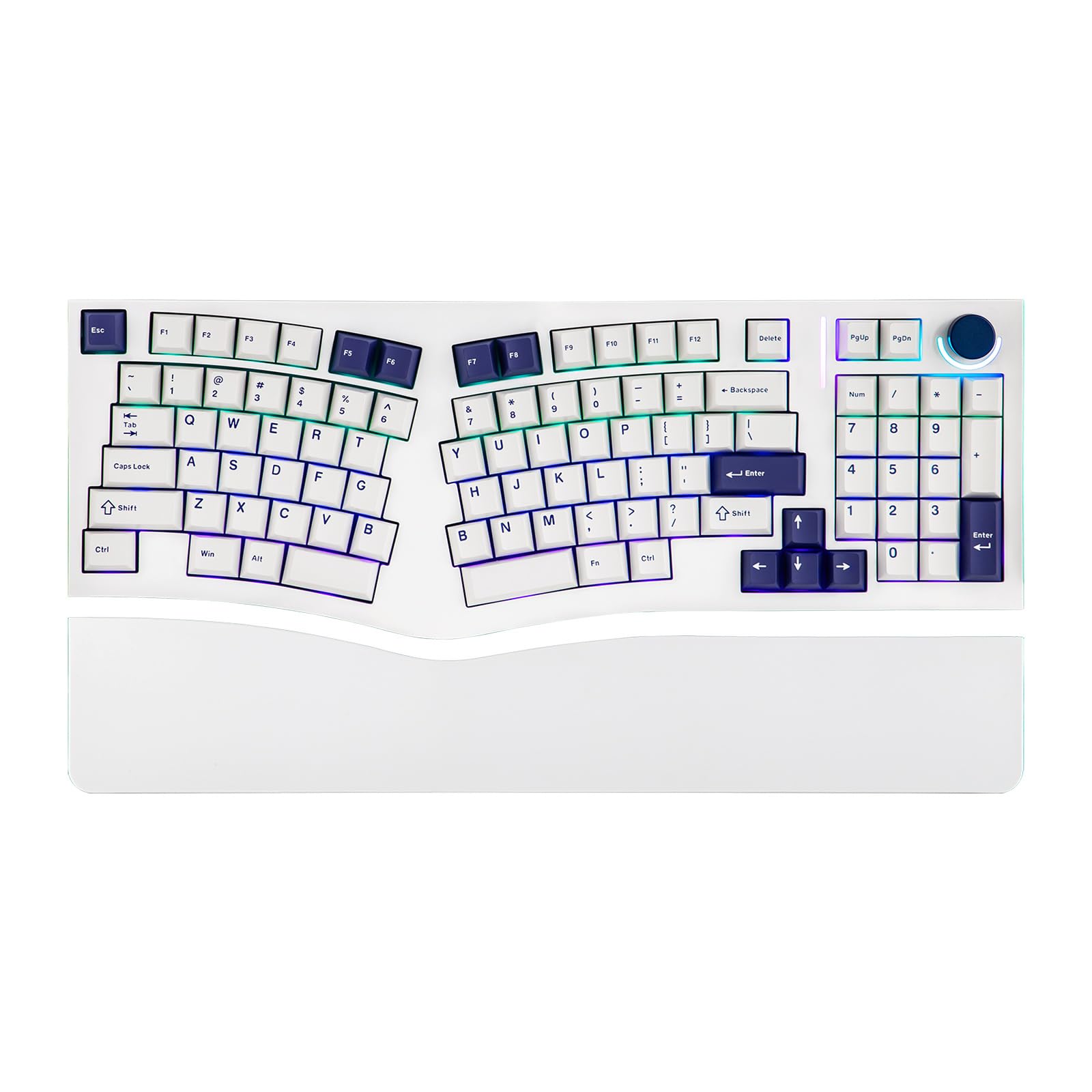
The Alice layout with a numpad, fully programmable and hot-swappable for keyboard tinkerers.
This one wins over programmers who want the ergonomic Alice layout without giving up the numpad. The angled keys align with the natural position of your hands, and the split spacebar accommodates the design while a media control knob adds convenience. It is compatible with VIA, so you can remap keys, create custom macros, and set up complex key combos tailored to your workflow.
The typing feel is the headline: a gasket mount structure with a PC plate delivers a soft, consistent feel, and five layers of sound-dampening materials — Poron sandwich foam, IXPE switch pad, PET film, EPDM socket foam, and case foam — minimize noise for a rich, satisfying sound. The south-facing RGB offers 21 customizable lighting effects, and the hot-swappable PCB lets you change switches without soldering.
Quality is what owners praise most, and the sound is the second most-mentioned strength — one owner describes it as a satisfying “clicky” type. The caveat is reliability: some units arrive with dead keys or switch chatter, though the seller has sent replacements. The white finish can discolor from skin oils over time.
Where it shines
- VIA support for full key remapping and macros
- Hot-swappable switches with 5-layer sound dampening
- Keeps the numpad in an ergonomic layout
Worth knowing
- Occasional dead keys or switch chatter from the start
- White finish can discolor from skin oils
- Wired only — no Bluetooth or wireless option
Choose this for: deep customization and a satisfying mechanical sound, especially if you need a numpad for data entry.
Pass if: you want wireless freedom or you are not willing to troubleshoot a possible faulty switch.
5. Logitech Wave Keys + Lift Mouse

A compact wavy keyboard paired with a 57-degree vertical mouse for smaller hands.
The defining detail here is the Lift mouse’s 57-degree vertical angle, which positions your forearm in a more natural posture and takes pressure off the wrist. The companion Wave Keys keyboard uses a wavy design to support natural hand, wrist, and forearm alignment, with plunger key switches that give a tactile but discreet feel.
The cushioned memory foam palm rest provides all-day comfort, and buyers report the combo genuinely helps with hand fatigue, especially during work-from-home marathons. Both devices share a single Logi Bolt USB receiver, cutting down on dongle clutter. The SmartWheel adjusts scrolling speed to match the pace of your flicks, and the Logi Options+ app lets you customize your workflow.
Quality is the top praise, and ergonomics is a close second — owners love how the curved keyboard keeps hands still and the mouse eases fatigue. The size is the mixed note: some find it compact and delightful, while larger-handed users say it feels too small. The mouse’s slanted pyramid sides can make a firm grip tricky when lifting it.
What stands out
- 57-degree vertical mouse promotes natural forearm posture
- Compact wavy keyboard keeps hands in place
- Single Logi Bolt receiver for both devices
Keep in mind
- Compact size feels small for large hands
- Mouse sides lack grip ridges for firm lifting
- Wrist pad is non-removable
Best suited for: coders with small to medium hands who want a tidy, wrist-friendly keyboard and mouse pair.
Not ideal if: you have large hands or prefer a wider, full-size typing frame.
6. Cloud Nine C989M

A full mechanical split that separates up to 8 inches to match your exact shoulder width.
The headline spec is the adjustable split — the two halves can be separated up to 8 inches, letting you position each hand at true shoulder width for proper arm and wrist alignment. The built-in tenting adds 7 degrees of angle into the wrist rests, so your hands sit in a natural “handshake” position while you type.
It uses Kailh Brown mechanical switches for tactile feedback, and the full-size frame keeps the number keypad plus 10x programmable macro keys for workflow automation. A USB pass-through adds convenience for a mouse or headset dongle. This doubles as a business and gaming board, so your 8-plus-hour coding days and FPS sessions are both covered.
Quality is the thing everyone raves about, and ergonomics is the second-most praised aspect — owners mention no wrist or hand pain during extended use. The recurring gripe is size: at 28.6 inches long, it is large and the macro keys add bulk. The software/firmware download has been flagged by some as malware, and the connecting cable is short, so budget for an extension.
The strong points
- Halves separate up to 8 inches for perfect shoulder alignment
- 7 degrees of built-in tenting angle
- Kailh Brown switches with 10x programmable macros
The downsides
- Large footprint — needs a big desk
- Short connecting cable between halves
- Software download has raised malware flags
Go for it if: you want a truly adjustable split with mechanical switches and a numpad for heavy data work.
Reconsider if: desk space is tight or you are wary of third-party driver software.
7. Keychron Q13 Max
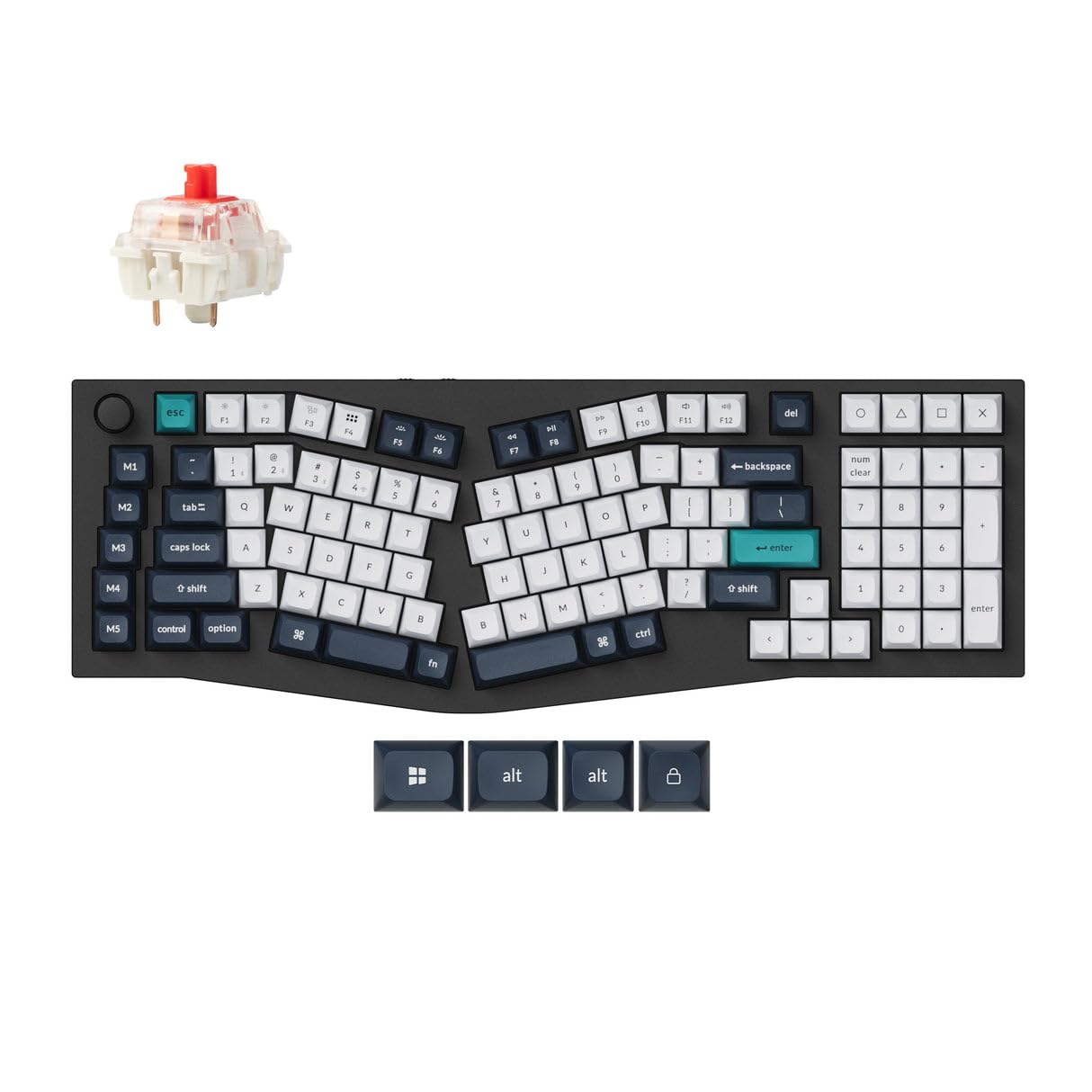
A full-metal Alice keyboard with a 1000 Hz polling rate for near-zero wireless latency.
For programmers who game on the side, the Q13 Max is the premium pick. The full metal body is CNC-machined from 6063 aluminum, and the unique 96% Alice layout keeps the ergonomic angled keys while packing in nearly everything from a full-size board. The 2.4 GHz wireless connection delivers a rapid 1000 Hz polling rate (90 Hz on Bluetooth), so latency is hardly noticeable even in competitive games.
The typing experience is the other headline: a Double Gasket Design adds silicone pads between the top and bottom cases to reduce acoustic resonance, and multiple layers of acoustic foam deliver premium sound with every keystroke. The hot-swappable PCB runs Gateron Red switches, and the sculpted KSA keycaps are sized generously for larger fingers. It is QMK compatible, so you can fully customize the layout.
Owners praise the build quality and ease of switch swapping above all, and one sums it up as a keyboard that will “likely outlive me.” The trade-offs are real: at about 5 lbs it is heavy, and it only ships with one USB receiver. The red switches are smooth but not tactile, and the price places it firmly in premium territory.
Why it earns the premium
- Full CNC-machined 6063 aluminum body
- 1000 Hz polling rate on 2.4 GHz for low latency
- Hot-swappable Gateron Reds with QMK support
What to weigh
- Weighs about 5 lbs — not portable
- Only one USB receiver included
- Smooth red switches lack tactile bump
Choose this if: you want a premium metal Alice board that works flawlessly for both typing and gaming.
Pass if: you prefer a tactile switch feel or want to keep your desk setup lightweight.
8. Kinesis Advantage2

The concave keywell design that redistributes the workload from your little fingers to your thumbs.
This is the keyboard that career programmers with chronic wrist pain eventually land on. The patented design splits the keys into concave keywells with an orthogonal (vertical-column) layout, and adds 20 degrees of tenting plus integrated cushioned palm supports. The thumb clusters put frequently-used keys like Enter, Space, Backspace, and Delete under your stronger thumbs, reducing strain on overused little fingers.
Genuine Cherry MX Brown switches offer tactile feedback, low activation force, and a 50-million-press rating. Onboard programmability via the Driverless Smart Set engine means you can remap keys, record macros on the fly, and store custom layouts in QWERTY or Dvorak on the keyboard’s 4MB flash memory — no software needed after setup. It is plug-and-play with Windows 7-10, Mac OS X, Linux, and Chrome.
Owners, including software engineers, report chronic wrist and hand pain gone within about 2 months. The learning curve is steep, roughly a month to retrain muscle memory, and the tall profile plus loud switches take getting used to. It is not compatible with KVM switches, so plan for a direct connection.
What makes it legendary
- Concave keywells and thumb clusters reduce finger reach
- Cherry MX Brown switches rated for 50 million presses
- Full onboard programmability with no drivers needed
What holds it back
- Steep learning curve — about a month to adapt
- Tall profile and loud switches
- No LED backlighting and glued-on legends can fade
Invest in this if: you already touch-type and want the gold standard for eliminating wrist and hand pain.
Think twice if: you are not a strict home-row typist or you need a quiet, low-profile board.
9. Kinesis Advantage360 Professional

A fully split, tented keywell design that keeps your arms at shoulder-width and wrists straight.
This is the modern evolution of the Advantage2, and the key difference is the physical split: separating the keywells positions your arms at shoulder-width, keeping wrists straight and perpendicular to the home row. The two keywells are tented to raise the thumb side of the hand into a neutral “handshake” posture, and you can choose from three tenting heights. The concave keywells are scooped into a bowl shape to reduce hand and finger extension.
Bluetooth connection with owners reporting 2-3 months of battery life per charge. The thumb clusters redistribute the workload from weaker little fingers to stronger thumbs, and the footprint is smaller than most keyboards because the numeric 10-key was eliminated — letting you place the mouse closer to your body to reduce painful over-reach. It runs Gateron Brown mechanical switches and is fully programmable with open-source ZMK firmware.
Ergonomics is the top praise and comfort is the second — customers note reduced wrist and shoulder pain, with one calling it the best keyboard they have owned. The big caveat is Bluetooth connectivity, which gets notably negative feedback: some report the left half frequently disconnects from the right half. The ZMK remapping software is unfriendly for beginners, requiring GitHub knowledge, and the default ABS keycaps are lower quality — a PBT upgrade helps.
The key strengths
- Fully split design with 3 adjustable tenting heights
- Bluetooth with 2-3 month battery life
- Smaller footprint — no 10-key, mouse sits closer
The real trade-offs
- Bluetooth can drop between halves for some users
- ZMK firmware requires GitHub knowledge to remap
- Default ABS keycaps can get oily
Choose this for: the ultimate split ergonomics with adjustable tenting, if you are willing to troubleshoot connectivity.
Look elsewhere if: you want a rock-solid wireless connection from the start or you dislike fiddling with firmware.
Understanding the Specs
Split, Tented, and Curved Layouts
A split layout separates the keys into two halves so each hand sits at shoulder width. Tenting raises the thumb side of the hand into a neutral “handshake” posture, and a curved or scooped keywell reduces how far your fingers need to reach. Each addresses a different source of strain, and some keyboards combine all three.
Mechanical vs. Membrane Switches
Mechanical switches use a spring and metal contact for tactile feedback and durability, often rated for tens of millions of presses. Membrane and scissor switches are quieter and softer, which suits shared spaces but offers less feedback. Hot-swappable boards let you change switches without soldering, which is a big plus for tinkerers.
FAQ
Will an ergonomic keyboard actually reduce my wrist pain?
How long does it take to get used to a split keyboard?
Is a mechanical or membrane keyboard better for programming?
Can I use a 2.4 GHz or Bluetooth keyboard for gaming?
What is the difference between an Alice layout and a split layout?
Do ergonomic keyboards work with Mac and Linux?
Why do some ergonomic keyboards not have a numpad?
How long does the battery last on a wireless ergonomic keyboard?
Is a vertical mouse worth pairing with an ergonomic keyboard?
Final Thoughts: The Verdict
For the majority of shoppers, the ergonomic keyboard for programmers winner is the Logitech Ergo K860 because it pairs a proven, ergonomist-certified design with quiet keys and reliable multi-device connectivity. If you want a full mechanical split with true adjustability, the Cloud Nine C989M separates up to 8 inches and adds programmable macros. And for the ultimate in pain relief, the Kinesis Advantage2 is the board that career programmers with chronic wrist issues swear by.
How We Picked
We do not accept paid placement. Every pick is matched to a real buyer and a real use-case; we do not hands-on test units.
Sources & Methodology
Specifications: manufacturer listings and product documentation. Review insights: verified customer reviews, as of August 2026. Pricing: not shown on this page (it changes often); check the current price via the retailer link.
As an Amazon Associate, WellFizz earns from qualifying purchases. This does not affect which products we feature.
Related Guides

Mo Maruf
I created WellFizz to bridge the gap between vague wellness advice and actionable solutions. My mission is simple: to decode the research and give you practical tools you can actually use.
Beyond the data, I am a passionate traveler. I believe that stepping away from the screen to explore new environments is essential for mental clarity and physical vitality.