Our readers keep the lights on and my smoothie glass nicely filled. As an Amazon Associate, I earn from qualifying purchases.
Specs are compiled from manufacturer listings and verified buyer reviews and can change over time — please confirm the key details on the product page before buying.
If you are here, you likely know the feeling: the tingling, the dull ache, the numbing that creeps in after a long day of typing. An ergonomic keyboard won’t cure carpal tunnel syndrome, but the right split or contoured design can ease wrist strain by keeping your hands in a neutral position. This guide breaks down the split, tented, and curved designs that actually help, and highlights the real-world trade-offs of each so you can pick the one that fits your body and your budget.
I’m Mohammad Maruf — the founder and writer behind WellFizz. This guide is built by comparing the manufacturers’ published specifications and the patterns across verified customer reviews, so you get each pick’s real strengths and trade-offs instead of marketing spin.
From a fully adjustable split design to a contoured keywell, find the ergonomic keyboard for carpal tunnel that matches your typing style and your desk setup.
Our Picks at a Glance


How To Choose The Best Ergonomic Keyboard For Carpal Tunnel
Choosing the right keyboard starts with understanding your own pain and your typing habits. The goal is to keep your wrists straight, not bent up, down, or sideways. Here are the three most important decisions you’ll make.
Split vs. Curved vs. Contoured: Which Shape?
A split keyboard divides the keys into two halves, letting you position each hand at shoulder width. A curved (or wave) design angles the keys in a gentle arc but keeps the halves connected. A contoured design, like the Kinesis Advantage2, sinks your fingers into sculpted wells. All three reduce wrist bending, but a split design gives you the most freedom to match your exact body frame.
Tenting and Tilt: Angles That Matter
Tenting lifts the center of the keyboard so your hands rest in a more handshake-like position, which can take pressure off the forearm. Tilt, on the other hand, adjusts the front-to-back angle of the board. Look for keyboards that let you adjust these angles—fixed designs are fine, but adjustable ones let you dial in what feels right for you.
Key Switches That Are Easy on Your Fingers
Your fingers will thank you for choosing the right switch type. Membrane keys are soft and quiet, needing only a gentle press, while mechanical switches like Cherry MX Brown (a type that gives a small bump when you press) offer crisp feedback and are rated for millions of presses. If your fingers tire easily, a low-force switch cuts the effort for every keystroke, so you can type longer without strain. Decide if you prefer the quiet softness of a membrane or the tactile response of a mechanical.
Quick Comparison
| Model | Best For | Layout Type | Connectivity | Key Count | Amazon |
|---|---|---|---|---|---|
| Logitech Ergo K860★ Best Overall | Overall comfort & posture | Split KeyFrame | Bluetooth / USB | 78 | Amazon |
| Kinesis Advantage2Serious Relief | Serious wrist relief & programming | Contoured Keywell | Wired USB | 87 | Amazon |
| Cloud Nine C989MMechanical Marvel | Mechanical feel with a numpad | Split Mechanical | Wired USB | 104 | Amazon |
| KINESIS Freestyle2 | Maximum adjustability | Split (up to 9″) | Wired USB | 94 | Amazon |
| Microsoft LXM-00004 | Familiar ergonomic design | Split Sculpted | Wired USB | 104 | Amazon |
| ProtoArc EKM01 Plus | Full setup with mouse | Split Full-Size | Bluetooth / 2.4G | — | Amazon |
| X9 Wireless Ergonomic | Budget-friendly wireless | Split 2-Zone | 2.4G RF | 110 | Amazon |
| Perixx PERIDUO-512B | Value combo with mouse | Split & 3D Curve | Wired USB | — | Amazon |
| Logitech Wave Keys | Compact comfort & versatility | Wave Curve | Bluetooth / Logi Bolt | 19 (keyboard group) | Amazon |
In-Depth Reviews
1. Logitech Ergo K860 Wireless Ergonomic Keyboard
Our pick — over 4★ from 850+ verified ratings; the strongest balance of quality and price.
A cushioned split design that reduces wrist bending by 25% for home and office pros.
This Logitech doesn’t just look ergonomic—it is engineered to reduce strain in measurable ways. Its pillowed wrist rest offers 54% more support and reduces wrist bending by 25% compared to standard keyboards, which is a concrete win if you feel the ache after a few hours. The split KeyFrame design promotes a more natural typing position, and you can fine-tune the tilt with legs set at 0°, -4°, or -7°.
Battery life is a standout. Buyers report still using the original battery after 7 months and still showing maximum battery life. The keys are shaped to match your fingertips, and the typing sound is notably quiet—sound quality is actually the thing owners praise most, with 67 customers singling it out. It connects via Bluetooth or USB, works with both Windows and macOS, and weighs 3.7 pounds, so it feels solid without being a desk anchor.
The honest trade-off here is durability. A few owners mention the keyboard breaking within three months of use, and there are mentions of random key failures. Compared to the wave-shaped Logitech Wave Keys, this one has a more pronounced split and a softer, pillowed rest, but it also carries a higher price tag. It is a renewed model, which means you are getting a refurbished unit—often in flawless condition, as customers note, but it is still not brand new.
What wins people over
- 54% more wrist support and 25% less wrist bending than a standard keyboard
- Adjustable tilt legs at 0°, -4°, or -7° for personalized posture
- Long battery life—reviewers point out months of use on one charge
What to watch out for
- Durability is mixed; some units fail within months
- Occasional connectivity and random key failures reported
- As a renewed model, you get a refurbished unit, not brand new
Reach for this if: you want a proven, comfortable split design with excellent battery life and don’t mind a refurbished unit.
Keep looking if: durability under heavy daily use is your top concern—some owners hit issues within months.
2. Kinesis Advantage2 Ergonomic Keyboard
A contoured keywell with 20 degrees of tenting that software engineers rely on for chronic wrist pain.
If your pain is serious, this is the serious answer. The Advantage2’s patented design sinks your fingers into concave keywells with thumb keys and an orthogonal (straight-column) layout, and it offers 20 degrees of tenting built right in. The integrated palm supports with cushioned pads keep your forearms neutral. For people who type for a living, the relief is often dramatic—buyers describe chronic wrist pain eliminated within roughly two months.
The typing feel comes from genuine Cherry MX Brown mechanical switches, rated for 50 million key presses. That is a lot of keystrokes. It is also fully programmable with a Driverless Smart Set engine, letting you remap keys on the fly, record macros, and save settings to the keyboard’s 4MB flash memory. It works plug-and-play with Windows, Mac OS, Linux, and Chrome, so you can move it between machines without installing a thing.
The catch is the learning curve and the cost. Expect about a month of adjustment before you’re typing at your old speed. The thumb-clustered backspace, delete, and enter keys are excellent once you’re used to them, but they take practice. The plastic case feels less premium than the price suggests, and there is no LED backlighting. If you switch back to a normal keyboard, the pain can return immediately, so some owners end up buying a second unit for the office.
Why it’s worth the money
- Cherry MX Brown switches rated for 50 million key presses
- 20 degrees of tenting and contoured keywells for a neutral wrist position
- Onboard programmability with settings saved to 4MB flash memory
What to know before you buy
- Learning curve of about one month before you regain typing speed
- Premium price that some buyers feel is hard to justify
- Plastic build feels a bit hollow; letters on keys can fade
Choose this if: you type all day and want the most effective, programmable relief for chronic wrist pain.
Pass if you: are not ready for a steep learning curve or a top-tier price tag.
3. Cloud Nine C989M Ergonomic Mechanical Keyboard
A split mechanical board with Kailh Brown switches that separates up to 8 inches to ease wrist and shoulder strain.
This is the rare ergonomic keyboard that doubles as a gaming peripheral. It uses Kailh Tactile Brown switches for a satisfying bump with every press, and the split design separates the halves up to 8 inches to keep your arms and wrists aligned. The built-in tenting and palm support include 7 degrees of angle right into the wrist rests, so your hands stay in a natural position without extra setup.
It is a full-sized board with a complete number keypad, 10x programmable macro keys, and a USB pass-through—features that make it a solid choice if you crunch numbers or play FPS games. The RGB backlighting offers 20+ patterns, and the keys are hot-swappable, so you can customize the switches later if you want a different feel. Shoppers say comfortable long typing sessions with no wrist pain.
Size is the biggest hurdle. At 28.6 inches long, this keyboard demands a large desk. The connecting cable is short (a 15 accessory fixes that), and some owners note the keys are hard to read when the backlight is off. Reliability is mixed—most works well, but some report keys not working properly. Still, it is one of the only split ergonomic keyboards with a dedicated numpad, which is a big deal for number-heavy work.
What stands out
- Full number keypad—rare among split ergonomic keyboards
- Kailh Brown switches with tactile feedback and RGB backlighting
- Separates up to 8 inches for natural arm alignment
What to measure first
- Large footprint at 28.6 inches long
- Short connecting cable included
- Keys can be hard to read without backlight
Pick this if: you want a mechanical split keyboard with a numpad and don’t mind a large desk footprint.
Think twice if: your desk is cramped—this one needs room to breathe.
4. KINESIS Freestyle2 USB-A Ergonomic Keyboard

Rotate and separate the halves up to 9 inches to match your shoulder width.
Unlike fixed ergonomic keyboards, this one is genuinely adjustable. You can rotate and separate the two key modules up to 9 inches to find the perfect position for your body type. It comes pre-assembled with the popular VIP3 tenting accessory, which lets you choose 5, 10, or 15 degrees of tenting, and it includes cushioned palm supports. If you have shoulder pain from typing with your arms squeezed together, this is the fix.
The keys use a custom membrane switch with low activation force and tactile feedback, meaning you don’t have to press hard—a detail that reduces finger fatigue over an 8-hour day. It uses a standard Windows layout with hotkeys for Cut, Copy, Paste, and multimedia, plus an embedded numeric 10-key. No software or special drivers are needed, so it works right from the start on Windows and Linux.
The main complaints are minor but real. The Delete key is the same size as Backspace, causing mis-hits, and the Fn key sits on the left where you might expect Control. There’s no dedicated keypad—the embedded one is less intuitive. Still, buyers report using it 8+ hours a day for two years with wrist and finger pain gone. It’s lighter than the Cloud Nine at 2 pounds, but the adjustability is what makes it special.
What makes it unique
- Halves separate up to 9 inches for shoulder-width typing
- VIP3 tenting with 5, 10, or 15-degree angles
- Low-force keys reduce finger fatigue
Small quirks to note
- Delete and Backspace are the same size—expect mis-hits
- No dedicated keypad; embedded one takes getting used to
- Fn key placement on the left irks some users
Best for: anyone who wants to dial in the exact split and tent angle that feels right for their frame.
Not for those who: need a dedicated number pad or can’t handle a short adjustment period.
5. Microsoft LXM-00004 Wired Ergonomic Keyboard

A refined split sculpted design that one owner says eased carpal tunnel pain within a week.
This is the keyboard people recommend when they mean business. It features an ergonomist-approved design with a split, sculpted layout that keeps your wrists in a neutral posture. The palm rest is covered in premium fabric and has improved cushioning, which makes a real difference during long days. One buyer with carpal tunnel reported their pain went away within a week of switching to this design.
The keys are responsive without being overly sensitive, which means fewer accidental presses. It has a dedicated integrated number pad for fast data entry and built-in smart shortcuts, including function keys for emojis and Cortana. It’s wired, which guarantees reliable speed and accuracy—no batteries, no connection drops, just consistent performance. The long USB cable is a plus for flexible desk setups.
The main drawback is the price—this is a premium wired keyboard, so you pay more upfront. Some users report the key travel feels heavy, and the white lettering on black keys is tough to see in dim light. It’s also a large board at 20 inches wide, so it needs desk space. But if you’ve trusted this design for years, the reliability stands out—several owners have bought it for both work and home because they love it that much.
Why it’s beloved
- Ergonomist-approved split design with premium fabric palm rest
- Responsive keys that avoid accidental presses
- Dedicated number pad and emoji/Cortana shortcut keys
What to consider
- Premium price for a wired keyboard
- Heavier key touch than some prefer
- White lettering on keys is small and can be hard to read
Go for it if: you want a proven, dependable ergonomic design and don’t mind paying for a wired connection.
skip it if: you prefer a lighter key touch or need wireless connectivity.
6. ProtoArc EKM01 Plus Wireless Ergonomic Keyboard Mouse Combo

A full-size split keyboard and ergonomic mouse combo that relieves wrist tension in both hands.
This combo tackles the whole problem: not just your typing hand, but your mouse hand too. The full-size keyboard features a curved and split keyframe that positions your wrist and forearm in a relaxed posture, and the curved wrist rest has a soft memory foam layer. The included ergonomic mouse has a palm and thumb rest for better support and a 2000 DPI sensor for precise control. Owners with carpal tunnel report the setup works well for them.
The keyboard and mouse can connect to up to 3 devices simultaneously via USB receiver or Bluetooth, and you switch between them with a single button. That’s handy if you work across a laptop, desktop, and tablet. Both are powered by a built-in 500mAh rechargeable lithium battery, giving you 250 hours of standby after a 2-hour full charge, and they auto-sleep after 30 minutes of no operation. The keys are quiet with a short reset, and a dust cover is even included.
Two things to know before you buy. First, the right space bar squeaks noticeably for some owners—a minor but annoying flaw. Second, this is a large setup; the keyboard measures 20.75 inches long by 11 inches wide, so measure your desk. The lack of dedicated copy/paste/cut keys near your fingers is a small gripe for some, but overall, the build quality and responsiveness earn high marks from buyers.
What makes it a great value
- Combo set covers both keyboard and mouse ergonomics
- 500mAh battery with 250 hours standby after 2-hour charge
- Switch between 3 devices with one button
What to watch for
- Right space bar can squeak on some units
- Large footprint at 20.75 inches long by 11 inches wide
- No dedicated copy/cut/paste keys
Best for: anyone who wants a complete ergonomic setup—keyboard plus mouse—without buying pieces separately.
Look elsewhere if: your desk is tight or you can’t tolerate a squeaky space bar.
7. X9 Wireless Ergonomic Keyboard with Cushioned Wrist Support

A wireless split board with a soft wrist cushion and 30-foot range at a budget price.
If you want to try an ergonomic keyboard without a big commitment, this is the entry point. It has a split 2-zone design with 110 keys and a soft wrist cushion, promoting a relaxed typing posture. It connects via a 2.4G wireless receiver with a 30-foot range, so you can clear the cable clutter from your desk. The built-in 600mAh battery lasts months between charges, and the charging cable is included.
Owners who switched from an older Belkin ergonomic keyboard found the key spacing nearly identical, making the transition smooth. The wave design helps separate your hands, which eliminates crossover errors and relieves wrist and arm aches. One owner’s unit lasted four years of daily use before dying—and they promptly ordered a new one. The rechargeable battery is a big plus over models that need AAAs.
Expect a few annoyances. There’s no low-battery warning, so the keyboard can die mid-typing without notice, and you can’t use it while charging—the red light stays on for about an hour. Battery life varies widely, with owners reporting anywhere from 3-4 days to months between charges, depending on how you use it. Connectivity is also inconsistent, as some owners mention frequent disconnections. Still, for the price, the comfort and wireless freedom are tough to match.
What you get for the price
- 110 ergo keys with a soft, cushioned wrist rest
- 600mAh rechargeable battery—no AAAs needed
- 30-foot wireless range via 2.4G receiver
Where it falls short
- No low-battery warning; can die without notice
- Can’t be used while charging
- Some report frequent wireless disconnections
Choose this if: you’re new to ergonomic keyboards and want an affordable wireless option with a soft wrist rest.
Move on if: you rely on a steady wireless connection and can’t risk sudden disconnects.
8. Perixx PERIDUO-512B Wired Ergonomic Keyboard and Vertical Mouse Combo
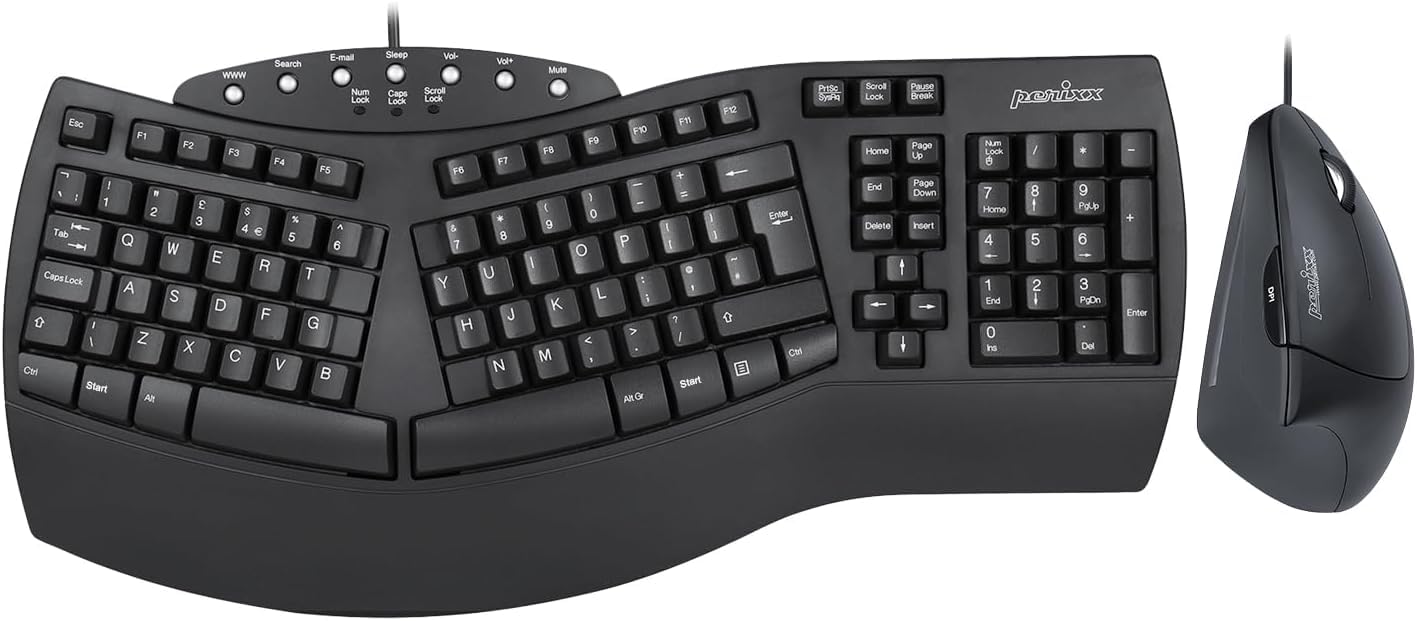
A dependable wired duo with a vertical mouse—a budget-friendly step toward better hand posture.
This combo pairs a split-key keyboard with a 3D curved design and a vertical mouse built for right-handed users. The keyboard has an integrated palm rest to support your wrist, and the vertical mouse promotes a natural handshake posture, which can ease strain from the forearm down to the thumb. It’s recommended for people with repetitive strain injuries and anyone who works long stretches at the computer.
The membrane keys have long travel distances, which minimizes pressure with each keystroke. The vertical mouse has a DPI button that switches between 1000 and 1600 DPI levels, and the whole setup connects via a simple wired USB 2.0 connection—no drivers to install. It works with Windows 7, 8, 10, and 11. The build quality gets consistently praised, with one owner noting it still works perfectly almost three years later.
Not everyone loves the mouse. It’s a handshake-style vertical design, and some buyers find it uncomfortable and swap it out for a different one. The ergonomics of the keyboard also get mixed feedback—some find it comfortable, others don’t feel much difference. It’s also not a quiet keyboard; the mechanical-style sound and feel is part of its charm for some, but it could bother you in a shared office. If you want a complete budget setup, this delivers.
What makes it a solid pick
- Complete keyboard and vertical mouse combo
- DPI switch between 1000 and 1600 on the mouse
- Long-lasting build—one owner reports 3 years with no issues
What to expect
- Vertical mouse isn’t for everyone—some swap it out
- Keys are not quiet; mechanical-style sound and feel
- Ergonomics get mixed reviews from different users
Best for: budget-conscious buyers who want a wired keyboard and vertical mouse combo without overthinking it.
Not ideal if: you need a silent keyboard or prefer a traditional mouse shape.
9. Logitech Wave Keys Wireless Ergonomic Keyboard

The wavy, compact keyboard that slipped onto narrow desks and won over a crowd of nearly 3,000 buyers.
This is the ergonomic keyboard for people who don’t have room for a giant split board. Its wavy design places your hands, wrists, and forearms in a natural typing position, and it’s compact enough to fit on narrow desks—a huge plus for cramped home offices. The cushioned palm rest is filled with memory foam, offering more wrist support with less pressure. It’s been approved by United States Ergonomics, an independent body that certifies ergonomic products.
You can connect via Bluetooth or the Logi Bolt receiver, and use Easy-Switch to toggle between your laptop, tablet, and phone—up to 3 devices. It’s compatible with Windows, macOS, iPadOS, and ChromeOS. The battery is rated for up to 3 years of use, which is exceptional for a wireless keyboard. Owners love the quiet, soft-touch keys and report it helps with conditions like tendinitis. One owner noted the battery lasts about a year with regular use.
The pink colorway stains easily, according to owners, and requires regular cleaning with a microfiber cloth—lotion or sanitizer can mark it. It’s also more compact than the older Logitech K350 Wave, so the arrow keys and numpad feel a bit cramped initially. The wrist pad lacks heavy support, which might matter if you need firm cushioning. But for a compact, versatile, and quiet keyboard, this is a top choice.
What makes it a crowd favorite
- Compact wave design fits narrow desks easily
- Battery rated for up to 3 years of use
- Ergo-certified by United States Ergonomics
Small things to know
- Pink colorway stains easily—needs regular cleaning
- More compact than older Logitech Wave models
- Wrist pad offers lighter support than some prefer
Pick this if: you need a compact, wireless, quiet keyboard that pairs with multiple devices and fits a small desk.
Look elsewhere if: you want a pronounced split layout or very firm wrist support.
Understanding the Specs
Split vs. Wave vs. Contoured Layout
The layout is the single biggest factor in how much relief you get. A split keyboard lets you position each half at shoulder width, which is ideal for a broad frame. A wave (curved) design angles the keys in an arc but keeps the halves connected—good for a gentler adjustment. A contoured design sinks your fingers into sculpted wells, which forces a very specific, neutral hand position but can be hard to get used to.
Tenting and Vertical Angle
Tenting raises the center of the keyboard, tilting your hands into a more natural handshake position. This can reduce pressure on the forearm and shoulder. Look for a keyboard that lets you adjust the tenting angle (commonly 5, 10, or 15 degrees) rather than a fixed one. The more you can customize, the better you can match your body’s natural resting position.
Key Switch Type and Your Fingers
There are two main types: membrane and mechanical. Membrane keys are soft, quiet, and inexpensive, requiring a light touch. Mechanical switches like Cherry MX Brown or Kailh Brown provide a tactile bump and are rated for tens of millions of presses—great for heavy typists. Consider what feels best for your fingers; less force required means less fatigue over time.
Wireless vs. Wired Reliability
Wireless keyboards (Bluetooth or 2.4G) keep your desk tidy and let you switch between devices, but they depend on battery life and connection stability. Wired keyboards guarantee zero lag and no charging, but they add a cable to your workspace. If you switch between a laptop and desktop, a wireless board with multi-device pairing is a real convenience; if you just want reliability, wired is the safest bet.
FAQ
Will an ergonomic keyboard cure my carpal tunnel?
What is the difference between a split keyboard and a wave keyboard?
How long does it take to get used to an ergonomic keyboard?
Is a wireless ergonomic keyboard reliable for daily work?
Do I need a separate vertical mouse to go with my ergonomic keyboard?
What does tenting do for my wrists?
Mechanical or membrane switches: which is better for carpal tunnel?
Will an ergonomic keyboard fit on my existing desk?
Can I use an ergonomic keyboard with both Windows and Mac?
Final Thoughts: The Verdict
For the majority of shoppers, the ergonomic keyboard for carpal tunnel winner is the Logitech Ergo K860 because it combines a proven split design with long battery life and a comfortably cushioned wrist rest. If you want a serious, programmable solution for chronic pain, grab the Kinesis Advantage2. And for a compact, versatile option that pairs with multiple devices, the Logitech Wave Keys is the one to reach for. Whichever you choose, the right keyboard can genuinely change how your hands feel at the end of the day.
How We Picked
We do not accept paid placement. Every pick is matched to a real buyer and a real use-case; we do not hands-on test units.
Sources & Methodology
Specifications: manufacturer listings and product documentation. Review insights: verified customer reviews, as of August 2026. Pricing: not shown on this page (it changes often); check the current price via the retailer link.
As an Amazon Associate, WellFizz earns from qualifying purchases. This does not affect which products we feature.
Related Guides

Mo Maruf
I created WellFizz to bridge the gap between vague wellness advice and actionable solutions. My mission is simple: to decode the research and give you practical tools you can actually use.
Beyond the data, I am a passionate traveler. I believe that stepping away from the screen to explore new environments is essential for mental clarity and physical vitality.