Our readers keep the lights on and my smoothie glass nicely filled. As an Amazon Associate, I earn from qualifying purchases.
Specs are compiled from manufacturer listings and verified buyer reviews and can change over time — please confirm the key details on the product page before buying.
The right ereader disappears in your hands and leaves you alone with the story. A bad screen makes you squint, a short battery dies mid-chapter, and a locked store blocks your library. You need a device you forget about, not one that gets in the way. This guide finds the nine best ereaders for reading by focusing on the specs that matter for long, comfortable sessions — battery life measured in weeks, displays that read like paper, and libraries that travel without the weight.
I’m Mohammad Maruf — the founder and writer behind WellFizz. This guide is built by comparing the manufacturers’ published specifications and the patterns across verified customer reviews, so you get each pick’s real strengths and trade-offs instead of marketing spin.
Below you will find the best ereader for reading across every price tier, from a premium color Kindle to budget-friendly models that still deliver weeks of battery life and a distraction-free experience.
Our Picks at a Glance


How To Choose The Best Ereader For Reading
The right ereader is the one you forget about while reading. To get there, focus on three things: screen quality that mimics paper, a battery that lasts your whole trip, and a library system that fits the way you buy or borrow books. Here is what matters most.
Screen Technology and Front Lighting
E Ink screens (a type of display that uses tiny microcapsules of pigment to form text) do not have a backlight — they reflect ambient light like paper, so there is no glare in sunlight and less eye strain. The key specs are resolution (most modern ereaders hit 300 PPI, or pixels per inch, for sharp text) and the front light system. A front light uses edge-mounted LEDs to brighten the screen from above, not behind, keeping it natural-looking. Look for adjustable brightness and a warm-tone setting that shifts from cool blue to amber, reducing eye strain at night. A 6-inch screen is the classic portable size, while a 7-inch model like the Kindle Paperwhite gives you more text per page without added bulk.
Battery Life: Weeks, Not Hours
Because E Ink only draws power when the page changes — not to keep the image lit — an ereader battery lasts weeks on a single charge. A model with “up to 6 weeks” of battery life, like the entry-level Kindle, will get a daily reader through a month of light use. The 12-week Paperwhite Signature Edition means you can charge it once before a long trip and never think about it again. Factors that drain the battery faster: leaving Wi-Fi and Bluetooth on, using a bright front light, and flipping pages rapidly. For most buyers, anything above 4 weeks is a non-issue.
Ecosystem and File Compatibility
This is the biggest hidden choice. Amazon’s Kindle line ties you to the Kindle Store and uses a proprietary format (AZW/KFX), though you can side-load compatible files like MOBI and PDF via USB. Kobo and PocketBook use open formats like EPUB, meaning you can download books from any store, borrow from your local library via OverDrive or Libby, and transfer files via USB or cloud without conversion. If you already own a large library of EPUBs or use library apps, an open ecosystem device will save you a headache. Kindle Unlimited subscribers, on the other hand, get the most value inside Amazon’s walled garden.
Quick Comparison
| Model | Best For | Screen Size | Storage | Battery Life | Amazon |
|---|---|---|---|---|---|
| Like-New Amazon Kindle Paperwhite Signature Edition 32GB★ Best Overall | Best Overall | 7″ | 32 GB | Up to 12 weeks | Amazon |
| Amazon Kindle 16 GB (newest model)Ultra Portable | Most Portable | 6″ | 16 GB | Up to 6 weeks | Amazon |
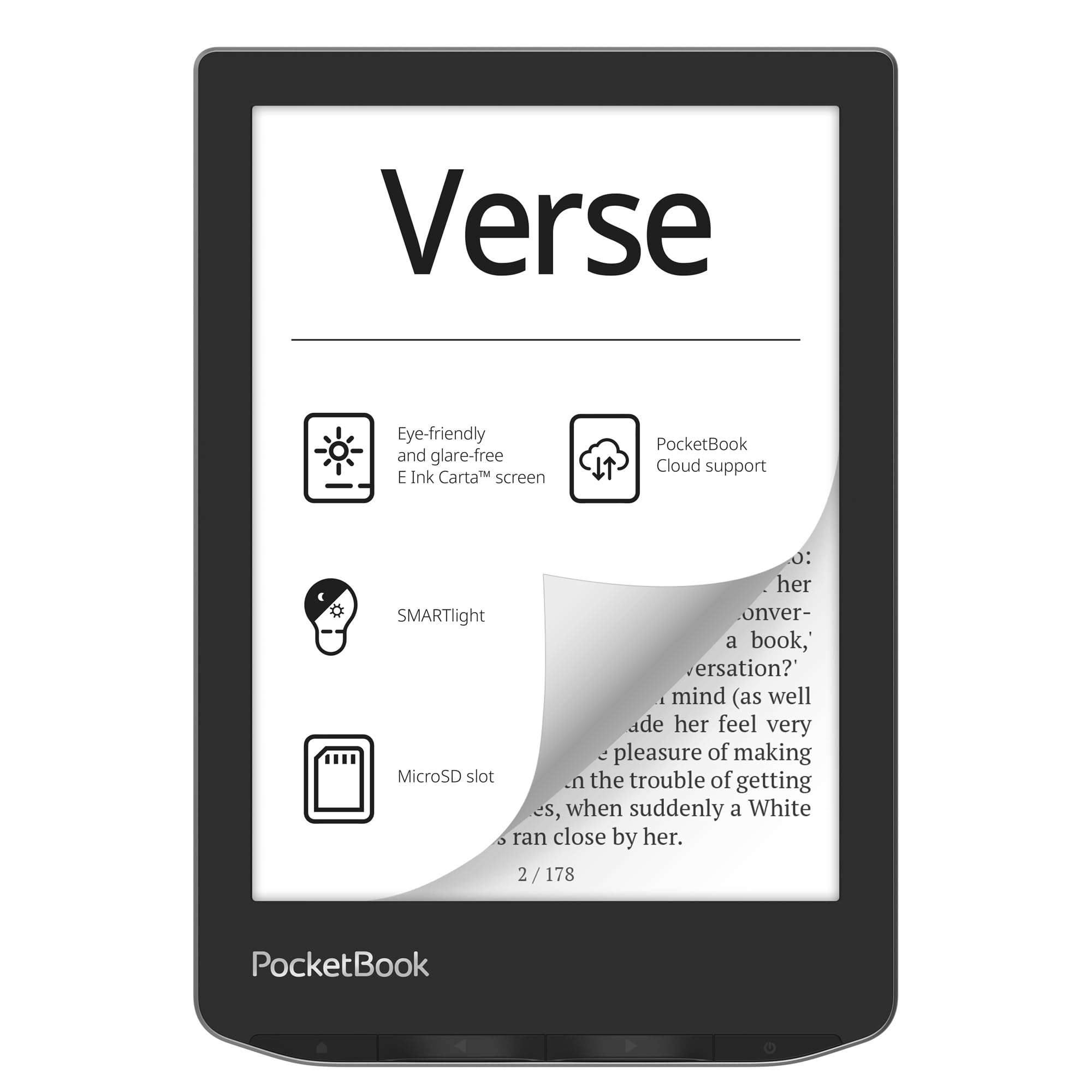
| PocketBook VerseOpen Format King | Open Format Support | 6″ | 8 GB + microSD | Up to 1 month | Amazon |
| Amazon Kindle Paperwhite 16GB (newest model) | Premium Reading | 7″ | 16 GB | Up to 12 weeks | Amazon |
| Kobo Clara BW | Library Borrowing | 6″ | 16 GB | Weeks | Amazon |
| PocketBook Verse Pro Color | Color E Ink | 6″ | 16 GB | — | Amazon |
| Kobo Libra Colour | Color & Buttons | 7″ Color | 32 GB | Up to 4 weeks | Amazon |
| Like-New Amazon Kindle Scribe 64GB | Note-Taking & Reading | 10.2″ | 64 GB | Read for months, write for weeks | Amazon |
| Amazon Kindle Colorsoft Signature Edition Bundle | Color Highlights | 7″ Color | 32 GB | Up to 10 weeks | Amazon |
In‑Depth Reviews
1. Like-New Amazon Kindle Paperwhite Signature Edition 32GB
Our pick — over 4.5★ from 700+ verified ratings; the strongest balance of quality and price.
This Signature Edition is the reading machine that keeps up with your habits — 12 weeks of battery, a larger screen, and no distractions.
No other ereader here matches the battery of 12 weeks — the standard Kindle’s 6 weeks is a 2x gap that matters on long trips. The 7-inch display is 17% larger than the 6-inch screen on the entry-level Kindle, so you see more words per page without a bulkier device. The adjustable front light shifts from cool to warm automatically, which owners say eliminates blue light at night. With 32 GB of storage, you get a 4x jump over the 8 GB PocketBook Verse, enough for manga, audiobooks, and a massive library. Over 700 ratings average a near-perfect score, and owners consistently call the reading experience the standout feature. The only recurring complaint is the power button’s bottom placement — some owners trigger it accidentally when holding the device one-handed. But for most, the auto-adjusting light, wireless charging, and waterproof build make this the clearest choice for serious readers.
Why It Leads
- Longest battery life in the list — 12 weeks per charge, beats the standard Kindle by a 2x margin
- 32 GB storage leaves the 8 GB PocketBook Verse far behind — a 4x capacity gap
- Auto-adjusting front light and wireless charging add convenience without extra cost
The Trade-Off
- Refurbished unit — may come in generic packaging, though owners say it looks brand new
- Power button on the bottom edge can be bumped accidentally
Pick this if: you want the best battery and largest screen in a portable package, and you are fine with a certified refurbished unit that looks and works like new.
Think twice if: you need a physical page-turn button or want to borrow library books on an open ecosystem — Amazon’s Kindle store is excellent but not universal.
2. Amazon Kindle 16 GB (newest model)
The lightest Kindle ever made — owners say it is lighter than a phone in a case and fits in a pocket.
This is the lightest Kindle, and buyers report it is easier to hold one-handed than the Paperwhite. The trade-off for that portability is a 6-inch display (1 inch smaller than the Paperwhite’s 7-inch panel) and a front light that is now 25% brighter at its max setting — a real improvement over the previous generation for dim rooms. Battery life sits at 6 weeks, half the Paperwhite Signature Edition’s 12-week span, but still enough for most trips. The 16 GB storage holds thousands of books. The catch? No warm light mode, which the Paperwhite line offers, and no waterproofing. Owners who upgraded from an older Kindle Fire call it perfect for its size; Paperwhite veterans miss the warmer screen tones.
Why It Stands Out
- Lightest Kindle — owners say it is lighter than a phone in a case and easy to hold one-handed
- 16 GB storage holds thousands of books, and the 6″ glare-free display works in direct sunlight
- 25% brighter front light at max improves reading in dim rooms without a warm-tone option
The Shortfall
- Battery at 6 weeks is behind the Paperwhite’s 12 weeks — a 2x gap for heavy readers
- No warm light, no waterproofing — two features the Paperwhite line includes
Grab this if: pocketability is your priority — this is the smallest and lightest ereader, perfect for travel and one-handed reading anywhere.
Look elsewhere if: you read by the pool or need a warm screen tone at night — the Paperwhite or Kobo models handle those jobs better.
3. PocketBook Verse E-Reader
This is the reader for people who already own a thousand EPUBs and refuse to convert them.
Most ereaders lock you into their store. The PocketBook Verse flips that by supporting 25 formats from the start — EPUB, PDF, MOBI, DJVU, CBR, CBZ, and more — without conversion. The 6-inch E Ink Carta HD touchscreen has an adjustable SMARTlight that shifts both brightness and color temperature. Owners who manage large Calibre libraries (one reported over 5,000 EPUBs) say the Verse handles them without a hiccup. The battery surprises owners — official spec says up to 1 month, but they consistently report 4 to 7 months of real-world use with Wi-Fi off. The 8 GB internal storage expands via microSD up to 128 GB, surpassing even the 32 GB Kindle models. The downside: reliability gets mixed feedback. Some owners say the device feels glitchy — light use sometimes resets the page position, and settings changes may not stick without manual file editing.
Best for library hoarders: the 25-format support and microSD expansion mean you never have to convert or delete a book again — just drag and drop.
Reach for this if: you already have a large EPUB library or borrow from non-Amazon sources, and you value the freedom to sideload without tools.
skip it if: you want a perfectly polished, bug-free experience. The software has occasional glitches that require manual fixes.
4. Amazon Kindle Paperwhite 16GB (newest model)

The Paperwhite takes the standard Kindle formula and makes it faster, sharper, and waterproof — without going full Signature.
It is essentially the Signature Edition without the auto-adjusting light and wireless charging, which keeps the price lower while keeping the core reading experience nearly identical. The 7-inch screen has a higher contrast ratio and 25% faster page turns than the previous generation — noticeably snappier than both the standard Kindle and the PocketBook Verse. The battery matches the Signature Edition at 12 weeks (double the 6-week standard Kindle), and the display shifts from white to amber for comfortable night reading without eye strain. Owners consistently rank quality as the top aspect, followed by battery life. The 16 GB storage holds about 8,000 books, and the IPX8 waterproof rating means you can drop it in the bath without panic. Some find the metallic finish a fingerprint magnet, but that is a minor cosmetic complaint.
Why It Shines
- 12 weeks of battery matches the Signature Edition — double the standard Kindle’s 6-week life
- 25% faster page turns and adjustable warm light improve comfort over the base Kindle
- Waterproof IPX8 build lets you read by the pool or in the bath low-maintenance
What You Give Up
- No auto-brightness or wireless charging — features reserved for the more expensive Signature Edition
- 16 GB is half the storage of the 32 GB Signature model, though still enough for thousands of books
Choose this if: you want the refined Paperwhite experience — fast, warm-lit, waterproof, and long-lasting — without paying for wireless charging you may not need.
Consider the Signature Edition if: you are a heavy note-taker or want the maximum storage (32 GB) for manga and audiobooks.
5. Kobo Clara BW

If you borrow from the library, this is the only ereader that makes it simple — built-in OverDrive with no extra steps.
The Kobo Clara BW natively supports EPUB and library borrowing via OverDrive — you can browse and borrow from your local library directly on the device, without needing a computer or Adobe Digital Editions. The 6-inch E Ink Carta 1300 HD touchscreen (one of the sharpest in this size class) has ComfortLight PRO for both brightness and color temperature adjustment to cut blue light at night. Owners praise its 6.14-ounce weight, calling it comfortable even for arthritic hands. The IPX8 waterproof rating (good for 60 minutes in up to 2 meters of water) matches the Kindle Paperwhite. Battery life is listed at weeks, though owners need to charge it about twice during heavy use. For library borrowers, this is the most friction-free option available.
Best for OverDrive users: borrow and return library books directly from the device — no computer, no conversions, no hassle.
Reach for this if: your reading comes mostly from library apps like Libby or OverDrive, or you prefer EPUB over Amazon’s format.
Look elsewhere if: you are deep in the Kindle ecosystem with a Kindle Unlimited subscription — the Kobo store is different and smaller.
6. PocketBook Verse Pro Color

The Verse Pro Color gives you a color E Ink screen without tying you to any store or ecosystem.
This is one of the few color ereaders that does not force you into a single store. The 6-inch E Ink Kaleido 3 display (a color E Ink layer that brings covers and comics to life) has SMARTlight for adjustable color temperature at night. You can sideload EPUB, MOBI, PDF, and CBZ files via USB drag-and-drop, FTP, or the PocketBook app — no accounts required, which privacy-focused owners appreciate. The build quality earns top marks from reviewers, but the performance gets mixed feedback — some call it fast, while others report 5–10 second delays between actions and an unreliable cloud sync. The color layer dims the screen slightly compared to a monochrome model, though the front light helps. The IPX8 waterproof rating matches the Kobo Libra Colour.
A privacy-first color reader: no account required, easy sideloading of DRM-free files, and a 16 GB capacity with an open operating system.
Pick this if: you want a color screen for comics or illustrated books without joining a proprietary ecosystem, and you are comfortable with occasional software lag.
Think twice if: you need a snappy, bug-free experience — the performance reports are mixed, and some find the device too slow for daily use.
7. Kobo Libra Colour

Physical buttons, a 7-inch color screen, and a storage capacity of 32 GB make this the most versatile Kobo in the lineup.
The Libra Colour is the first Kobo to combine color E Ink with ergonomic page-turn buttons — a huge draw for owners who dislike touch-only navigation. The buttons are clicky and allow one-handed page turns without shifting your grip, reducing hand fatigue during long sessions. 63 owners single out the color as the standout feature, calling it great for comics, covers, and highlighting in multiple colors. The 32 GB storage holds up to 24,000 eBooks or 150 audiobooks, and the IPX8 waterproof rating keeps it safe by the pool. Battery life at 4 weeks is less than Kindle’s 12-week models but typical for a color E Ink device. The screen quality is a mixed bag — some find the color reproduction washed out, especially at low brightness, and there is no SD card slot or headphone jack, so you are stuck with the 32 GB.
Strengths
- Physical page-turn buttons reduce hand fatigue during long reading sessions
- 32 GB storage is generous — holds up to 24,000 eBooks or 150 audiobooks
- Color E Ink with stylus support and OverDrive library integration built in
Weaknesses
- Color is slightly washed out compared to a tablet, especially at low brightness
- No SD card slot or headphone jack — you cannot expand storage or connect wired headphones
Choose this if: physical buttons and a color screen are non-negotiable for your reading, and you want the best stylus-compatible color Kobo.
pass on it if: you need the sharpest possible color and have a large local collection — the 32 GB is non-expandable, and the color layer does dim the screen slightly.
8. Like-New Amazon Kindle Scribe 64GB
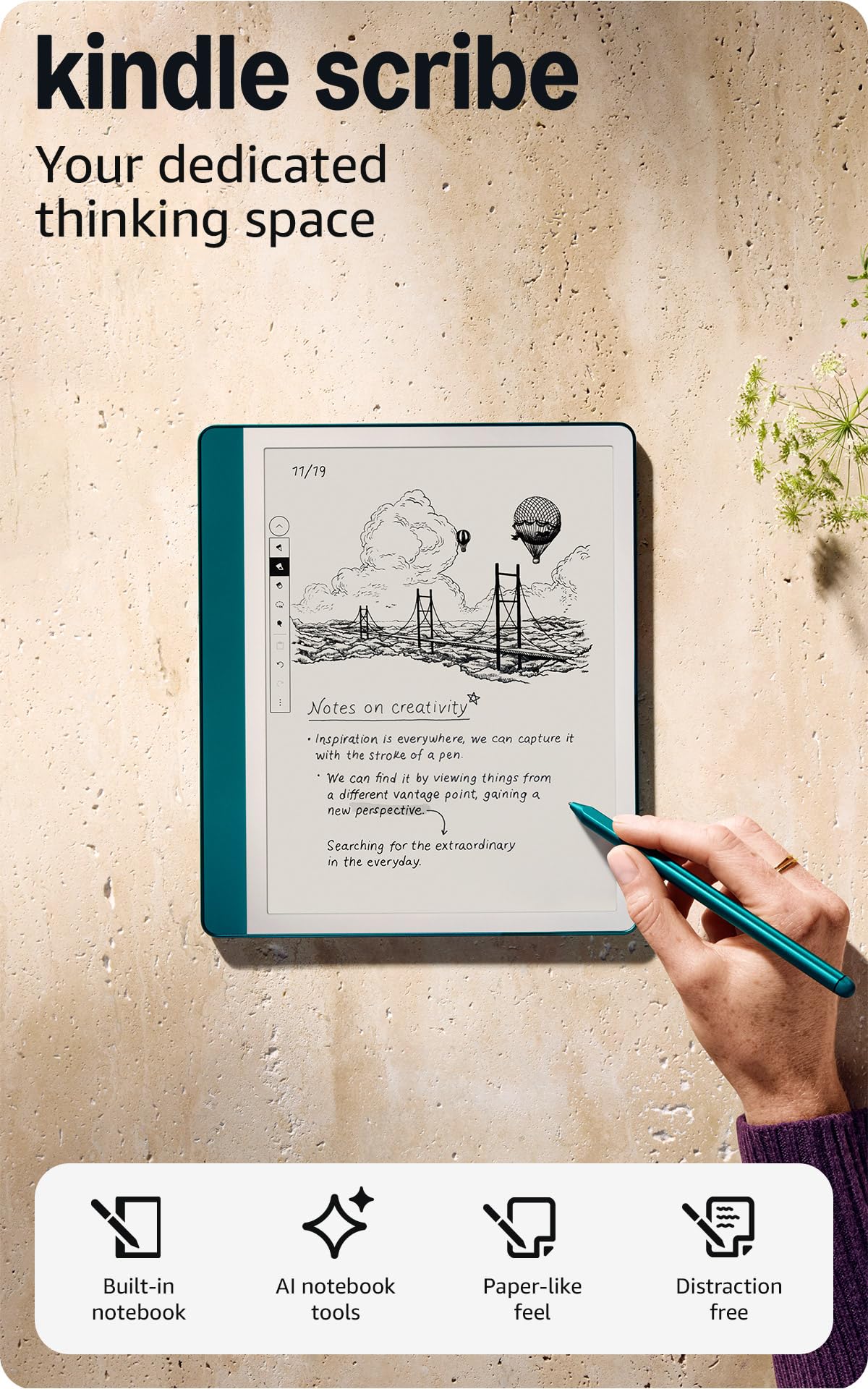
It is an ereader with a 10.2-inch screen that doubles as a digital notebook — no charging required for the pen.
The Kindle Scribe is not just for reading. The 10.2-inch, 300 PPI front-lit display is designed for two things: rich reading and handwritten note-taking. The included Premium Pen (which works without charging or pairing) feels like pen on paper, according to owners who use it for journaling, daily planning, and margin notes. The 64 GB of storage dwarfs every other device on this list, and the battery lasts “months for reading, weeks for writing” per the manufacturer. Reading on a 10.2-inch screen is a luxury — text is larger, page turns feel less frequent, and the screen fits a full PDF page without zooming. The catch: the user interface feels clumsy for non-linear reference books like cookbooks, and the web browser is very slow. For pure reading, the Scribe is overkill compared to the 6-inch Kindle; for readers who also want a sturdy notebook, it is class-leading.
A reader’s notebook: write directly on pages without charging the pen, organize notes into folders, and use the AI tools to clean up your handwriting.
Pick this if: you want a single device for reading and note-taking, and the 10.2-inch screen appeals for PDFs, textbooks, and journaling.
Think twice if: you only read novels — the size and weight make it less portable than a 6-inch or 7-inch model, and the UI is not tune for quick browsing.
9. Amazon Kindle Colorsoft Signature Edition Bundle

Amazon’s first color Kindle brings highlights to life — read, annotate, and see your covers in full color.
The Colorsoft is Amazon’s answer to color E Ink. The 7-inch Colorsoft display is high-contrast and paper-like, with color that brings book covers, comics, and illustrations to life. You can highlight passages in yellow, orange, blue, or pink — owners say this makes annotating far more useful than the single-color highlights on black-and-white Kindles. The auto-adjusting front light works in any environment, like the Paperwhite Signature Edition. Battery life at 10 weeks trails the 12-week Paperwhite but easily beats the 6-week standard Kindle. The 32 GB storage holds a large library, and the included plant-based leather cover and wireless charging dock make this a complete package. Owners rave about the color — one noted it made reading graphic novels possible on a Kindle. The only caveat: the wireless charging dock does not work when the included cover is on, so you must remove it to charge.
What It Does Best
- Color E Ink brings covers, comics, and highlights to life — highlight in four distinct colors
- Bundle includes leather cover and wireless charging dock, saving you the hassle of separate purchases
- 10-week battery is long enough for almost any trip, and the auto-adjusting light adapts to any environment
The Catch
- Wireless charging is inconsistent with the included cover on — you must remove it to dock the device
- Color screen is slightly dimmer than a black-and-white Paperwhite, though the front light compensates
Reach for this if: you want color highlights and the ability to read graphic novels or illustrated books on a Kindle, all in a complete bundle.
it’s not for you if: you are purely a novel reader — the black-and-white Paperwhite gives you a slightly brighter screen and longer battery for less money.
Understanding the Specs
E Ink Screen Technology
E Ink (sometimes written as “E-Ink” or “electronic ink”) is a display type that uses tiny black-and-white pigment capsules to form text and images. Unlike a phone or tablet screen, which uses a backlight that shines directly into your eyes, an E Ink screen reflects ambient light the same way paper does. That is why there is no glare in sunlight and why your eyes feel less strained after a three-hour reading session. The two specs to watch are resolution (measured in PPI, or pixels per inch — 300 PPI is the gold standard for sharp text) and the front light system. A front light uses edge-mounted LEDs to illuminate the screen from above, not behind, so it still looks natural. Adjustable warmth (shifting from cool blue to warm amber) is a feature on most mid-range and premium models and makes a real difference for bedtime reading.
Battery Life and Charging
E Ink displays only draw power when the page changes — not to keep an image visible — so a single charge lasts weeks, not hours. The “up to 6 weeks” or “up to 12 weeks” figures assume you read for about 30 minutes a day with Wi-Fi and Bluetooth off and the front light at a moderate setting. Real-world battery life will be less if you use the front light at max brightness, leave wireless radios on, or flip pages rapidly. Devices with USB-C charging are now standard, and some premium models (like the Paperwhite Signature Edition and Colorsoft) support wireless charging as well, though it is usually slower than a wired connection. For most buyers, anything above 6 weeks means you charge it once a month or less — a real convenience for travelers.
FAQ
Are color E Ink screens as sharp as black-and-white screens?
Can I borrow library books on a Kindle?
Which format is better for an ereader: EPUB or Kindle (AZW/KFX)?
How much storage do I need on an ereader?
Is a waterproof ereader worth it?
Do I need a front light on my ereader?
What is the difference between sideloading and buying from the store?
How long does a typical ereader last before it needs replacing?
Can I listen to audiobooks on any ereader?
Are refurbished Kindles worth buying?
Final Thoughts: The Verdict
For most readers, the best ereader for reading is the Like-New Amazon Kindle Paperwhite Signature Edition 32GB because it combines the largest battery (12 weeks), the fastest screen, and the most storage at a price that undercuts the color models. If you want the lightest device that slips into
Related Guides

Mo Maruf
I created WellFizz to bridge the gap between vague wellness advice and actionable solutions. My mission is simple: to decode the research and give you practical tools you can actually use.
Beyond the data, I am a passionate traveler. I believe that stepping away from the screen to explore new environments is essential for mental clarity and physical vitality.