Our readers keep the lights on and my smoothie glass nicely filled. As an Amazon Associate, I earn from qualifying purchases.
Specs are compiled from manufacturer listings and verified buyer reviews and can change over time — please confirm the key details on the product page before buying.
The quietest drain on your power bill isn’t the fridge or the AC — it’s the glowing LEDs and hidden adapters of electronics that sit in standby mode all day. An energy-saving power strip attacks that waste at the source, either by cutting power on a schedule, responding to your voice, or turning off slave devices when the main one sleeps. The right one pays for itself in convenience alone, and The smartest picks below handle the “phantom power” problem automatically while protecting your gear from surges.., and the smartest picks below handle the “phantom power” problem automatically while protecting your gear from surges.
I’m Mohammad Maruf — the founder and writer behind WellFizz. This guide is built by comparing the manufacturers’ published specifications and the patterns across verified customer reviews, so you get each pick’s real strengths and trade-offs instead of marketing spin.
If you want to stop paying for electricity you’re not using, these are the energy saving power strips worth your money, ranked by real-world reliability and smart features that actually work..
Our Picks at a Glance


How To Choose The Best Energy Saving Power Strips
You can stop wasting electricity on gadgets that sit in standby mode. Energy-saving power strips do this in one of two ways: they cut power on a schedule you set, or they detect when a “master” device (like your TV) is off and kill power to the “slave” outlets (like your soundbar and game console). Before you buy, you need to know which type fits how you actually use your electronics.
Master-Slave vs Smart Scheduling
A master-slave strip needs no app and no WiFi — you plug your TV into the control outlet, and it decides when to power the rest. A smart strip connects to your home network so you can schedule, group, and voice-control each outlet individually, which gives you far more flexibility but requires setup and a reliable 2.4GHz connection.
Check Outlet Spacing and USB Power
The physical layout matters more than you’d think.. Tightly spaced outlets can block bulky chargers, so look for spacing that fits your adapters. If you charge phones and tablets, check the USB ports’ total output — some strips offer fast USB-C charging while others just trickle power.
Quick Comparison
| Model | Best For | Outlets | Max Current | Smart Control | Amazon |
|---|---|---|---|---|---|
| Kasa KP303★ Best Overall | Voice-controlled standby cutting | 3 + 2 USB | 10.5 A | Alexa, Google Home | Amazon |
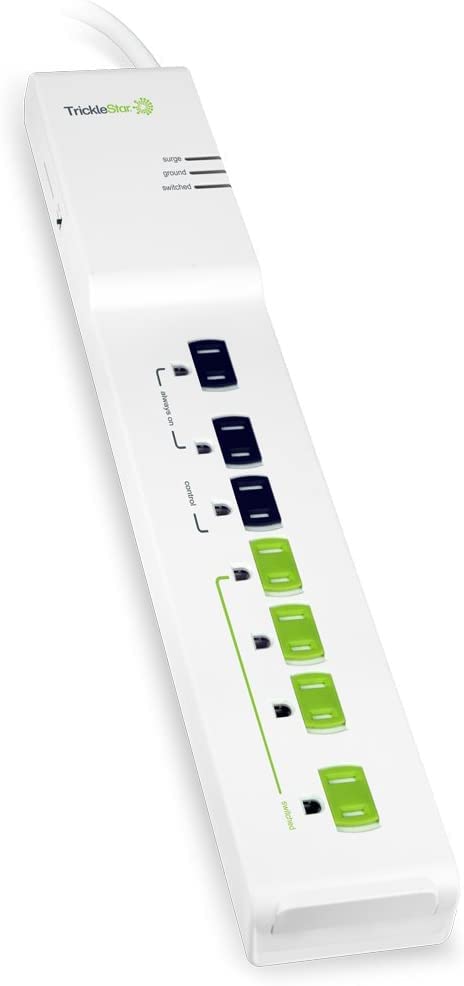
| TrickleStar TS1104Auto Cutoff | Automatic TV peripheral shutdown | 7 | 15 A | Master-Slave (none) | Amazon |
| meross MSS425FHomeKit Pick | HomeKit users who want USB-C | 4 + 4 USB | 15 A | HomeKit, Alexa, Google | Amazon |
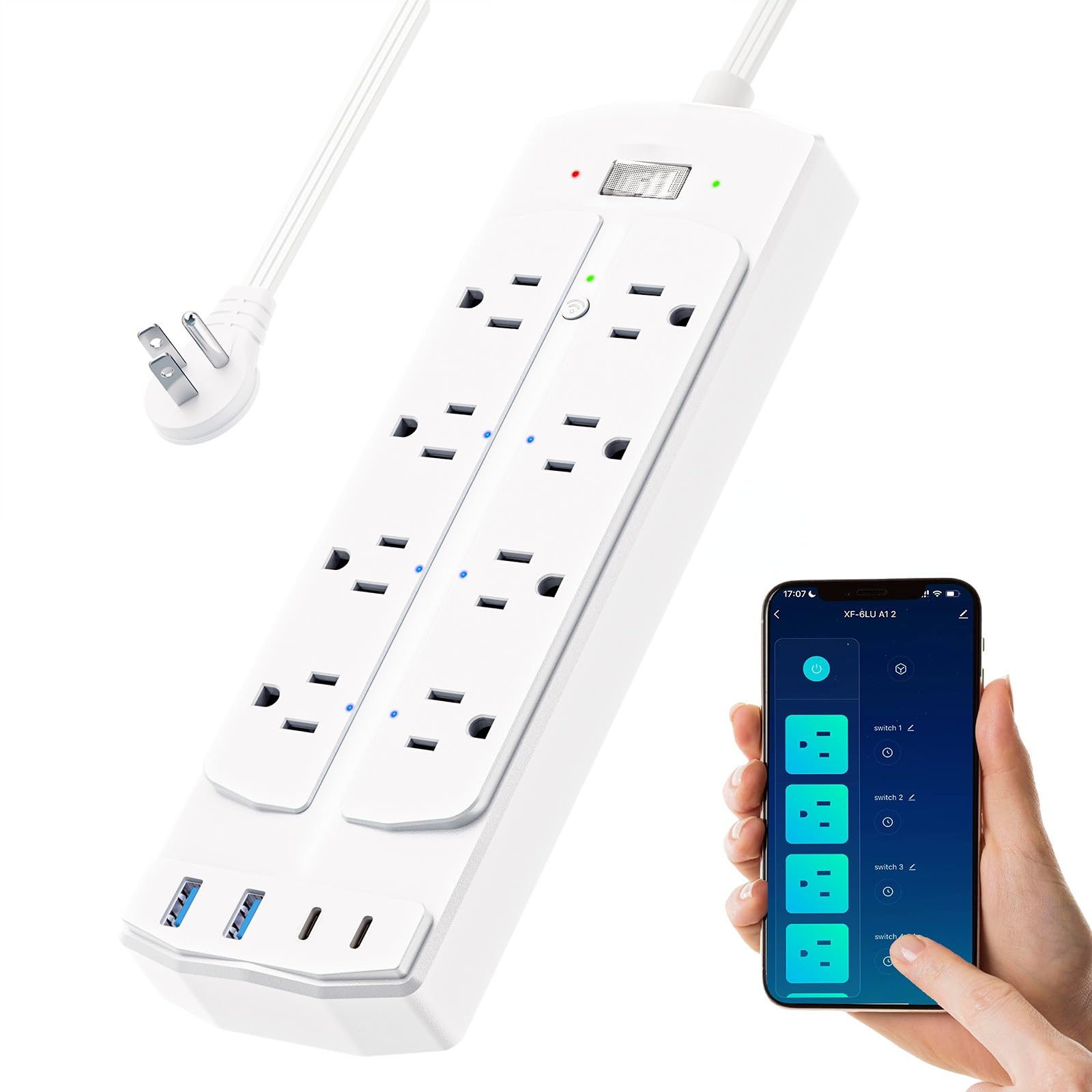
| Yozisital ZB1 | Aquarium and pet setups | 8 + 4 USB | 15 A | Alexa, Google Home | Amazon |
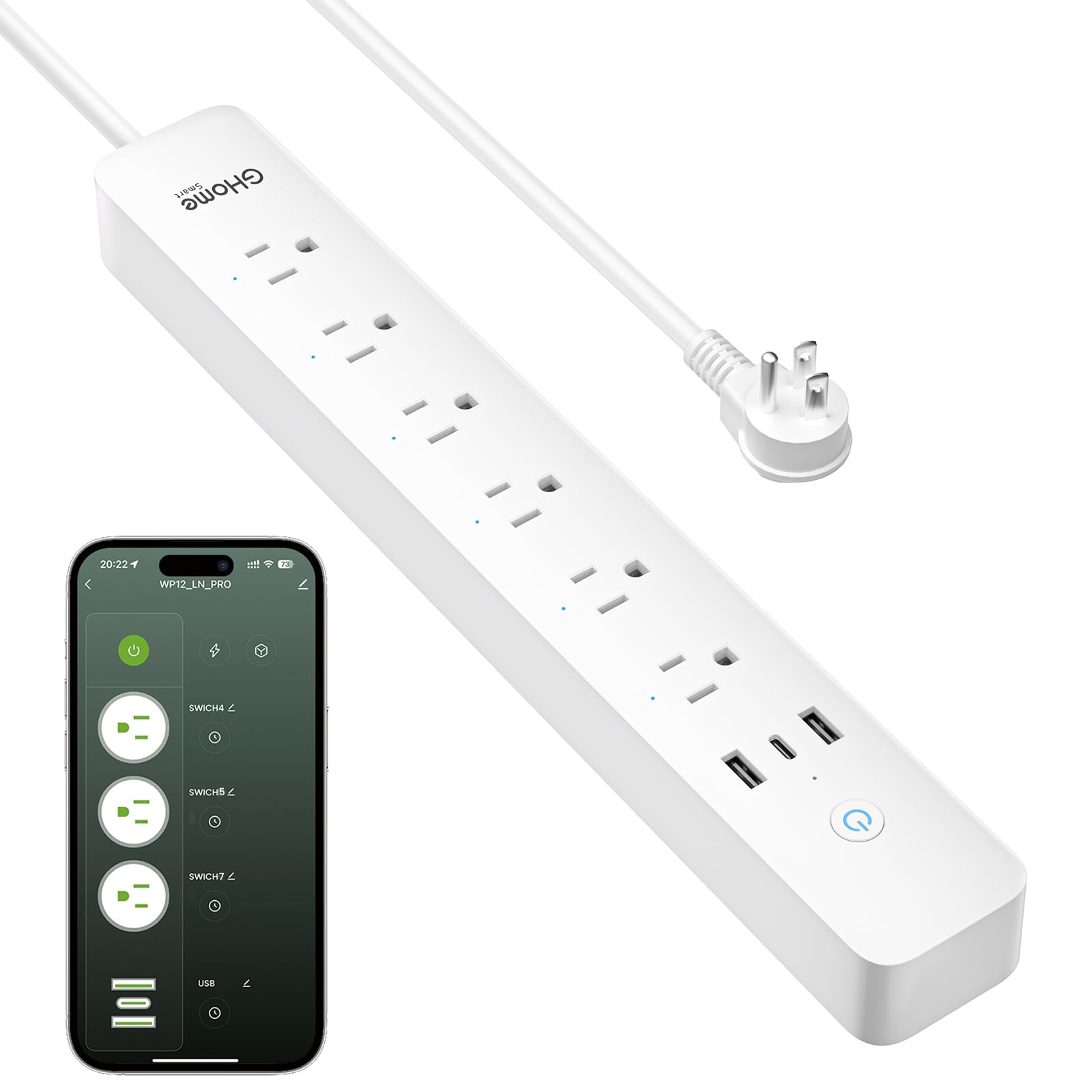
| GHome WP12 | Tracking per-device power use | 6 + 3 USB | 15 A | Alexa, Google Assistant | Amazon |
| Amazon Basics WP26 | Alexa-only households | 6 + 3 USB | 15 A | Alexa only | Amazon |
| Geeni Surge Ultra | High surge protection needs | 8 | 15 A | Alexa, Google Assistant | Amazon |
| Tapo P316M | Per-outlet energy monitoring | 6 + 3 USB | 15 A | Matter, Alexa, Siri, Google | Amazon |
In-Depth Reviews
1. Kasa Smart Plug Power Strip KP303
Our pick — over 4.5★ from 16,000+ verified ratings; the strongest balance of quality and price.
The crowd favorite that slays phantom power with three individually controllable outlets and rock-solid reliability.
Reliability is the thing owners rave about most here — it’s the most-praised trait by a wide margin, backed by thousands of owners who report the strip simply works. The three smart outlets let you kill standby power on your TV, soundbar, or reptile lights independently, while the two always-on USB ports keep charging your phone no matter what. You can control each outlet from the Kasa app on your phone, or just talk to Alexa or Google Assistant to switch things off hands-free.
Setup takes minutes: download the app, plug in the strip, connect to WiFi. Buyers report the whole process took 5-10 minutes total, and the schedule and timer functions let you automate everything from bedroom TVs to reptile heat lamps. Owners specifically love using it for devices that shouldn’t run all day, with one noting it eliminated a safety routine that auto-shuts off a mattress pad.
It’s a smaller footprint than many rivals — 10.24″L x 2.5″W and just 1.1 pounds — so it tucks neatly behind a desk or entertainment center. The trade-off is amperage: at 10.5 A it’s rated lower than the 15 A strips on this list, so it’s best for electronics and lighting rather than space heaters or high-draw appliances. The connectivity is occasionally finicky — some owners hit a rare silent disconnect that needs an unplug-reset — but the overwhelming majority find it dependable.
What wins people over
- Three independently smart outlets kill standby waste device-by-device
- Alexa and Google Assistant voice control, no hub needed
- App-based schedules and timers cut your power bill automatically
- ETL-certified surge protection shields your gear
Where it’s limited
- 10.5 A max current limits it to electronics, not heaters
- Occasional silent WiFi disconnect needs a manual reset
Grab it if: you want dependable app and voice control over your entertainment setup’s standby power.
Think twice if: you need to power high-current appliances — this one tops out at 10.5 A.
2. TrickleStar TS1104 7 Outlet APS
The no-app genius that watches your TV and switches off the whole entertainment stack by itself.
This is the rare energy-saving strip that needs no WiFi, no app, and no phone — it works on pure logic. Plug your TV into the master outlet, and the TS1104 detects when it powers down and cuts electricity to the slave outlets feeding your soundbar, game console, and streaming box. The result is automatic standby elimination, exactly the “phantom power” drain most people never notice. Owners mention it solved the hot-standby LED problem in their entertainment setup and stayed reliable after a full year of daily use.
The clever part is the selectable switching threshold — 10W, 22W, or 42W — so you can tune exactly how sensitive the master detection is. One owner found the perfect setting for a Yamaha R-N602 receiver, letting it power a phono turntable and tape deck off whenever the receiver went silent. With 7 outlets and a 15 A maximum current, this strip drives more gear than most smart rivals, and the 1080-joule surge protection plus 40dB noise filtering keep your audio-video gear clean.
It’s a different philosophy from the smart strips on this list. — no per-outlet app control, no voice commands. You trade flexibility for pure automation. The adjustable sensitivity takes a little tuning to get right, and a couple of owners found the threshold switch ineffective for their specific gear, though responsive support tried to help. Bulkier chargers can crowd the outlets, so check your plug sizes before committing.
Why it stands out
- Master-slave logic cuts standby power with zero setup or apps
- 7 outlets at 15 A handles far more gear than typical smart strips
- Selectable 10W/22W/42W trigger thresholds fine-tune detection
- 1080-joule surge protection with 40dB noise filtering for AV gear
Keep in mind
- Adjustable sensitivity needs time to tune for your devices
- No app, voice control, or per-outlet remote management
Perfect for: stereo and home-theater owners who want standby power gone without touching a phone.
Not for: smart-home fans who want to control each outlet remotely.
3. meross Smart Plug Power Strip MSS425F
The Apple HomeKit sweetheart with a 20W USB-C port that charges your phone while it schedules everything else.
If you live in the Apple ecosystem, this is the strip that speaks your language. It’s natively compatible with Apple HomeKit (iOS 13 or above) and Siri, plus Alexa, Google Assistant, and SmartThings — so you can say “turn off the living room” and watch the standby drain disappear. The four individually controlled AC outlets pair with four USB ports that deliver up to 4.0A total, including a PD 20W USB-C fast-charging port for phones and tablets. Owners praise the long 6-foot cord and the flat design that slides neatly under a desk.
For a smart-strip, it runs higher current than the Kasa — a full 15 A — so it can comfortably handle more demanding gear. The flame-retardant PC shell is ETL and FCC approved, and it supports sunrise and sunset scheduling, meaning your lights can follow the actual daylight without you lifting a finger. One owner summed it up as “convenient and easy to use, long cable, no noise, clean setup.”
Connectivity is the asterisk here. While many owners connect without issue, a recurring group reports trouble pairing it to HomeKit specifically and occasional disconnects. It also needs an Apple TV 4K or iPad as a HomeKit bridge for remote control away from home, which is an extra requirement some buyers don’t expect. At 12.2″L x 2.4″W and 1.3 pounds, it’s slightly longer and heavier than the Kasa KP303, yet it gives you that extra USB-C punch and a higher current ceiling.
The big win: native HomeKit and Siri control plus a genuine 20W USB-C fast-charge port — a combo almost nothing else here matches.
Watch out for: HomeKit pairing hiccups reported by some owners, and the need for an Apple TV or iPad as a remote-control bridge.
4. Yozisital Smart Power Strip ZB1
The 12-in-1 powerhouse that runs an entire aquarium or home office from one wall socket.
This is the most outlet-dense pick in the lineup — 8 AC outlets total, with 6 of them individually smart-controllable, plus 2 regular always-on outlets and 4 USB ports (2 USB-A and 2 USB-C). The two always-on outlets are perfect for routers and modems that must never lose power, while the 6 smart outlets handle your schedule-driven gear. Reef-tank owners are the surprise superfans here, using timers to run skimmers, UV lights, wave makers, and return pumps on precise feeding schedules.
Setup runs through the Smart Life app, and the strip only supports 2.4GHz WiFi — no 5G networks, no encrypted networks, no passwordless public WiFi. That’s a clear limitation to know before you buy. The flat plug and 5-foot cord make it easy to mount on a wall with either 2 or 4 screws, and the physical master switch with LEDs gives you a quick manual cut-off. Functionality is the most-praised trait, with owners noting the plugs hold firmly and the app is easy to use.
There’s a real trade-off on outlet spacing: at roughly 0.75 inches apart, chunky wall-wart chargers will block neighbors. One owner flagged a high-pitched whine from the plugs, which is worth knowing if you’re sensitive to electronic noise. And while the 15 A rating is solid, opinions split on long-term durability and value, so this is a pick to research against your specific devices.
What you get
- 6 smart outlets plus 2 always-on outlets — the most flexible layout here
- 4 USB ports with 2 USB-C for modern device charging
- 15 A max current handles serious appliances
- Wall-mountable with a truly flat plug and 5-foot cord
What to check
- 2.4GHz-only WiFi is a hard requirement — no 5G or encrypted networks
- ~0.75-inch outlet spacing blocks bulky adapters
- Some customers note an audible high-pitched whine
Reach for it if: you run an aquarium, reptile setup, or multiple appliances that all need their own timers.
Look elsewhere if: your home runs on 5GHz WiFi or you rely on big, bulky chargers.
5. GHome Smart Power Strip WP12
The budget brain that tracks your total power draw and fast-charges a 30W USB-C device at the same time.
What sets the GHome apart is its built-in energy monitor — you can check and track the total power consumption of everything plugged into it straight from the app. That turns “I think I’m wasting power” into hard numbers you can act on. It pairs that with 6 WiFi-controlled outlets and 3 smart USB ports, including a 30W USB-C fast-charging port, which is the strongest USB-C output on this list by a clear margin. Owners call it great value, with one noting it compares well to commercial PDUs costing far more.
Individual outlet control and grouping work reliably, and the app pairs flawlessly according to most buyers. The audible click on each activation gives you satisfying feedback, and the blue outlet lights make it easy to see what’s live at a glance. It’s a long strip — 14.17″L x 2.04″W — which gives outlets breathing room for bulkier adapters. The 7.2-foot cord is the longest here, a real bonus for hard-to-reach sockets.
Two honest caveats: the energy monitor tracks the whole strip’s draw, not per-outlet usage, so you won’t know which device is the culprit. And the USB ports are grouped together in the app rather than independently controlled, which some owners wanted. A minority report the schedule can drift — losing time or flipping AM/PM — which matters if you depend on precise timing for plants or reptiles. At 15 A and 2.4GHz-only WiFi, it fits most homes but double-check your network band.
Standout feature: whole-strip energy monitoring plus 30W USB-C charging — a one-two punch for cutting waste and charging fast.
Fair warning: no per-outlet power readings, and USB ports control as a group, not individually.
6. Amazon Basics Smart Plug Power Strip WP26

The no-configuration charmer that syncs with Alexa the second it’s plugged in.
If you’re all-in on Alexa, this is the frictionless option: reviewers point out it “works great right from the start” and immediately syncs with Alexa with no configuration required. The 6 independently controlled outlets let you schedule holiday lights, lamps, and humidifiers on their own timers, while the 3 USB ports (2 USB-A and 1 USB-C) keep devices charged. Since it’s hub-free and works through the Alexa app, you can build routines and schedules without any extra gear.
Whole families have adopted these — some owners have several in the house and buy more as gifts, which says a lot about daily reliability. The independent socket settings eliminate the need for multiple timer plugs, a convenience buyers specifically call out. At 15 A max current and 1.2 pounds, it handles standard household loads with room to spare, and the polycarbonate shell keeps things cool and safe.
The catch is in the name.: this strip works with Alexa only. No Google Assistant, no Siri, no HomeKit — so it’s a non-starter for other ecosystems. Some owners found setup trickier when running multiple strips at once, since device numbering shifts and you may need separate routines for on and off timing. If you’re a committed Alexa household, none of that will bother you.
Why it’s easy to love
- Instant Alexa sync with zero configuration hassle
- 6 individually controlled outlets erase the need for timer plugs
- 3 USB ports include a USB-C option
- 15 A rating handles standard home loads
Before you buy
- Alexa-only — no Google Assistant, Siri, or HomeKit support
- Multiple strips can complicate device numbering and routines
Best for: households already living in Alexa that want plug-and-play smart scheduling.
Skip if: you use Google Home, Siri, or any voice assistant other than Alexa.
7. Geeni Surge Ultra Smart 8-Outlet Surge Protector

The easiest smart device owners say they’ve ever set up, with 1200 joules of surge armor on top.
The Geeni Surge Ultra earns its name with a 1200-joule surge protection rating — the highest protection level on this list, giving your valuable electronics real shielding from power spikes. It packs 8 outlets total: 6 smart outlets for individual control and 2 always-on outlets that keep security cameras and other essential gear powered no matter what. Owners consistently call it one of the easiest smart devices they’ve ever configured, with an intuitive app and flawless Alexa commands.
The 6-foot cord gives you generous reach, and since it needs no hub, you just connect it to your home WiFi and start managing devices right away. Aquarium keepers use it to automate pump shutdowns with one-tap scenes, while reptile owners program day-night cycles for their enclosures. One owner bought 2 more after the first, driven by reliable schedule-based control of multiple lava lamps.
The recurring wish-list item is USB ports — owners like the 110V outlets but note there are no USB-A or USB-C ports at all, so you’ll still need chargers. The app’s timer is a countdown rather than a true schedule, so you’ll want to use the Schedule function for daily on/off automation. At 15 A with an 8-outlet layout, this is a strong value if surge protection is your priority and you don’t need USB charging built in.
The headline: 1200 joules of surge protection plus easy setup — the safest smart-strip choice for expensive gear.
The gap: no USB ports at all, and the app timer is countdown-only, not a true schedule.
8. Tapo Smart Wi-Fi Power Strip P316M

The future-proof strip with Matter certification and per-outlet energy tracking that even works offline.
The Tapo P316M is the most technically advanced pick here, led by Matter certification — the universal smart-home standard that lets it work with Alexa, Google Home, Apple HomeKit, Samsung SmartThings, and even Bixby, regardless of your ecosystem. The standout feature is per-outlet energy monitoring: it tracks the power consumption of each AC outlet individually, showing you the current draw of every single device. That’s a level of insight no other strip on this list offers, making it the definitive tool for hunting down energy waste.
It powers up to 9 devices at once — 6 individually controlled smart AC outlets plus 3 always-on USB ports (5V 2.4A). The overcharge prevention automatically shuts off an outlet when your device is fully charged, protecting battery life and cutting standby drain. Local control means you can still manage outlets through the Tapo app over your home network even during an internet outage, a reliability feature owners specifically praise.
The slim design with a flush-fitting plug tucks behind couches and furniture, though the 3-foot cord is on the shorter side. The USB ports are always-on rather than smart, and they lack fast charging — recurring notes from owners who wanted more from those three ports. At 1.4 pounds, it’s the heaviest strip here, reflecting the extra monitoring hardware inside. This is the pick for smart-home enthusiasts who want maximum insight and ecosystem flexibility.
Why it leads on tech
- Per-outlet energy monitoring reveals exactly what’s wasting power
- Matter-certified for universal compatibility with every major assistant
- Local network control keeps working during internet outages
- Overcharge prevention shuts off outlets when devices are full
Know the limits
- USB ports are always-on and lack fast charging
- 3-foot cord is short for hard-to-reach outlets
Choose this for: deep energy insight and a strip that speaks every smart-home language.
Pass if: you need long-reach cords or fast-charging USB ports built in.
Understanding the Specs
Master-Slave vs Individual Control
Master-slave strips (like the TrickleStar) use a main outlet to detect when your primary device is off, then cut power to everything downstream. Smart strips instead let you control each outlet individually through an app, so you decide what powers down and when. Master-slave is set-and-forget; individual control is more flexible but needs setup and a network connection.
Amperage and Surge Protection
Amperage (measured in A) tells you how much current the strip can safely carry — 10.5 A suits electronics, while 15 A handles heavier loads like space heaters. Surge protection, measured in joules, shows how much energy the strip can absorb before it fails; higher is better for expensive gear, and 1200 joules offers serious shielding.
FAQ
Do energy saving power strips actually reduce my electricity bill?
What is the difference between a master-slave strip and a smart strip?
Will an energy saving power strip work with my 5GHz WiFi router?
Can I use a smart power strip to control my aquarium or reptile lights?
Why do some power strips have always-on outlets?
What is energy monitoring and why does it matter?
Will these strips protect my devices from power surges?
How many devices can I plug into a smart power strip?
Final Thoughts: The Verdict
For most buyers, the energy saving power strips winner is the Kasa KP303 because it pairs rock-solid reliability with per-outlet app control and Alexa/Google voice commands — the complete package for cutting standby waste. If you want automatic shutdown with zero setup, grab the TrickleStar TS1104 and let it watch your TV. And for deep energy insight across every device, the Tapo P316M is the one to reach for, with per-outlet monitoring that shows exactly where your power goes.
How We Picked
We do not accept paid placement. Every pick is matched to a real buyer and a real use-case; we do not hands-on test units.
Sources & Methodology
Specifications: manufacturer listings and product documentation. Review insights: verified customer reviews, as of July 2026. Pricing: not shown on this page (it changes often); check the current price via the retailer link.
As an Amazon Associate, WellFizz earns from qualifying purchases. This does not affect which products we feature.
Related Guides

Mo Maruf
I created WellFizz to bridge the gap between vague wellness advice and actionable solutions. My mission is simple: to decode the research and give you practical tools you can actually use.
Beyond the data, I am a passionate traveler. I believe that stepping away from the screen to explore new environments is essential for mental clarity and physical vitality.