Our readers keep the lights on and my smoothie glass nicely filled. As an Amazon Associate, I earn from qualifying purchases.
Specs are compiled from manufacturer listings and verified buyer reviews and can change over time — please confirm the key details on the product page before buying.
You want your first embroidery project to feel like a win, not a frustration session. The right machine balances built-in designs, hoop size, and ease of use so your first project feels smooth, not frustrating. Here are nine beginner-friendly contenders, each chosen for a specific reason, so you can match one to your project goals and skill level.
I’m Mohammad Maruf — the founder and writer behind WellFizz. This guide is built by comparing the manufacturers’ published specifications and the patterns across verified customer reviews, so you get each pick’s real strengths and trade-offs instead of marketing spin.
From the crowd-pleasing Brother SE600 to large-hoop options from PooLin and Janome, this breakdown of the embroidery sewing machine for beginners gives you a solid starting point for any budget or experience level.
Our Picks at a Glance


How To Choose The Best Embroidery Sewing Machine For Beginners
Before you chase design counts, check the hoop size first. The hoop size dictates the maximum dimensions of a single design, and for most beginners, a 4″ x 4″ field is more than enough to start making patches, monograms, and small shirt details.
Combo Machine vs. Embroidery-Only
Decide first whether you also need to sew. A combo machine like the Brother SE600 or SE700 lets you switch from mending a hem to embroidering a pocket on the same unit, which saves desk space. If you already own a reliable sewing machine, an embroidery-only model like the Brother PE545 or PooLin EOC05 is usually simpler to learn because there is no mode switching.
Built-in Designs and Connectivity
Built-in design counts range from 80 up to 200 on these picks, which gives you instant variety without a computer. Yet the real flexibility comes from connectivity — a USB port or WiFi transfer lets you load custom files, and that is where a free companion app or transfer software becomes essential.
Quick Comparison
| Model | Best For | Hoop Area | Built-In Designs | Machine Weight | Amazon |
|---|---|---|---|---|---|
| Brother SE600★ Best Overall | Best All-Rounder Combo | 4″ x 4″ | 80 | 26.2 lbs | Amazon |
| EverSewn Sparrow X2Smart Control | Smart-Device Control | 4″ x 4″ (two hoops) | 100+ | 20 lbs | Amazon |
| Brother SE700Wireless Pick | Wireless Combo Upgrade | 4″ x 4″ | 135 | 15.6 lbs | Amazon |
| PooLin EOC05 | Large-Hoop Home DIY | 4″ x 9.25″ | Stock designs | 22 lbs | Amazon |
| SINGER Legacy SE300 | Stitch Variety Combo | 4″ x 4″ & 10.25″ x 6″ | 200 | 20.5 lbs | Amazon |
| PooLin EOC06 | Large Projects & Gifts | Up to 11″ x 7.9″ | 200 | 35 lbs | Amazon |
| Janome MC 500E LE | High-Speed Precision | 7.9″ x 11″ | 160 | 18.7 lbs | Amazon |
In‑Depth Reviews
1. Brother SE600 Sewing and Embroidery Machine
Our pick — over 4.5★ from 4,500+ verified ratings; the strongest balance of quality and price.
The do-everything starter that sews, embroiders, and grows with you.
The Brother SE600 earns its benchmark spot because it does two jobs in one: it sews and embroiders. You get a 4″ x 4″ embroidery field (the standard size for most beginner projects), 103 built-in sewing stitches, 80 embroidery designs, and 6 lettering fonts — so you can stitch a straight seam and then embroider a name on the same machine. The 3.2″ LCD color touchscreen lets you preview your design before stitching, which spares beginners from wasted fabric.
Quality is what wins people over — owners mention it more than any other trait — and the automatic needle threader plus jam-resistant drop-in top bobbin remove the two most frustrating setup steps for new users. Sewing speed tops out at 710 stitches per minute, while embroidery runs at 400 spm, giving you room to grow.
The honest trade-off is weight and reliability. At 26.2 pounds — about 31% heavier than the EverSewn Sparrow X2 — it is a permanent desk fixture, not a carry-around. Reliability draws mixed feedback, so treat it gently with weekly cleaning.
Why Owners Stick With It
- 80 built-in designs plus 103 sewing stitches means two machines in one footprint
- Automatic needle threader and drop-in top bobbin keep setup frustration low
- Bright LED work area and tidy stitches on denim, cotton, and polyester
The Fine Print
- At 26.2 pounds, you will not be moving it around much
- Long-term reliability earns mixed reviews — buy quality thread, not cheap spools
Your best match: the beginner who wants one machine that sews and embroiders without learning two separate systems.
Think twice if: you need a large hoop for big designs — 4″ x 4″ is a true starting point, not a finish line.
2. EverSewn Sparrow X2 Sewing & Embroidery Machine
A bold app-driven idea that rewards patience and punishes shortcuts.
The Sparrow X2 stands out by putting design control on your phone or tablet — the app works with Apple or Android, and no WiFi is required to connect. It packs over 120 stitch patterns and over 100 embroidery designs, reads common file formats like exp, pes, and dst, and ships with two hoops for flexibility.
The learning curve is the story here. Owners who upgraded from older machines found the app-based workflow genuinely new, and some report the design app works smoothly within about 15 feet of the machine on a 64-bit device. Quality thread and EverSewn bobbins make a real difference in stitch alignment, so don’t skimp on supplies.
The catch is consistency. Buyers report “more issues in one month than any machine” is a rare but real experience with misaligned projects and broken needles, while other owners say their replacement unit “works beautifully” after a rocky first machine.
Balance of risks: the smart-device workflow is genuinely fresh, but this pick suits a tinkerer who enjoys troubleshooting, not someone who wants a simple to use first run. If you prefer a machine that just works from the start, consider the PE545 below instead.
Bottom line: brilliant concept, finicky execution — proceed with realistic expectations.
3. Brother PE545 Wireless Embroidery Machine
The SE600’s smarter sibling with double the designs and wireless freedom.
The 3.7″ touchscreen — 16% larger than the SE600’s 3.2″ — gives you on-screen editing before you stitch.
Wireless LAN and the Artspira app let you draw or download designs and send them straight to the machine, and owners say Etsy designs transfer cleanly. The auto needle threader and jam-resistant drop-in top bobbin keep the beginner-friendly DNA intact, and it handles thick quilt sandwiches without complaint.
Durability gets the most negative feedback here, with reports of needle breakage on projects. The recurring advice is to switch to proper embroidery needles and adjust tension — a normal tune-up as you learn.
The Standout Features
- 135 designs and 103 stitches make this a true two-in-one for the price of one
- Wireless file transfer plus the Artspira app beats USB-only rivals
- At 15.6 pounds, it is over 10 pounds lighter than the SE600
Who Should Look Elsewhere
- Skip if you quilt king-size tops — the throat space is small
- Needle breakage shows up until you match needle type to fabric
4. PooLin EOC05 Embroidery Machine

A smarter screen and a roomier hoop for bigger home projects.
The EOC05 is an embroidery-only machine built around a 4″ x 9.25″ field — roomy enough for shirt fronts and hoodies without the intimidation of a commercial unit. Its defining feature is the 7″ color touchscreen, which is the largest display on this list and makes navigation feel like using a phone.
Ease of use is what owners praise most — 70 buyers single it out — and the machine comes with everything you need to start instantly: two hoops, 6 rolls of thread, 30 stabilizer pieces, 25 bobbins, and a USB drive. The Institch OS2 system keeps controls intuitive, and owners happily replaced a problematic Brother PE900 with this unit. If you want a machine that’s ready to go the moment you open the box, this is it.
Thread management draws negative feedback when jams occur, but the support network catches it — one owner reached a rep on Facebook who walked them through a bobbin case fix and got the machine running again. It is not built for commercial mass production, so keep expectations at the home-DIY level.
The crowd favorite part: the big touchscreen and included starter kit make it one of the lowest-friction ways to start embroidering larger pieces.
One honest limit: stock designs are limited and thread jams can happen — support is responsive, but you may wait for a fix.
5. SINGER Legacy SE300 Computerized Sewing & Embroidery Machine

The design library king with two hoops and a massive stitch menu.
The SE300 leads this list in raw variety with 250 built-in sewing stitches and 200 embroidery designs, including 6 font options, all on a machine that sews and embroiders. The included second hoop is a big deal — a 10¼” x 6″ frame alongside the standard 4″ x 4″, which lets you tackle larger patterns than most beginner combo machines allow.
The self-adjusting tension system automatically sets stitch length, width, and pressure, which removes a whole category of beginner guesswork. The setup includes 10 presser feet, a USB stick, and complimentary digitizing software, so the box alone gets you through your first projects.
Reliability is the asterisk. Some owners mention motor overload errors and thread bunching, and one honest owner who returned theirs now uses the machine “only for embroidery” after the reverse function gave them trouble. Sewing performance gets the most positive feedback, so this is a sewing-first machine that embroiders well.
Why The Variety Wins
- 200 designs and 250 stitches crush the field for instant project ideas
- The extra 10¼” x 6″ hoop handles designs the 4″ x 4″ machines cannot
- Self-adjusting tension means fewer beginner setup errors
Who Should Be Cautious
- Reliability complaints around motor errors and thread jams are real
- Skip if you want on-machine design editing — the display lacks step preview
6. PooLin EOC06 Embroidery Machine
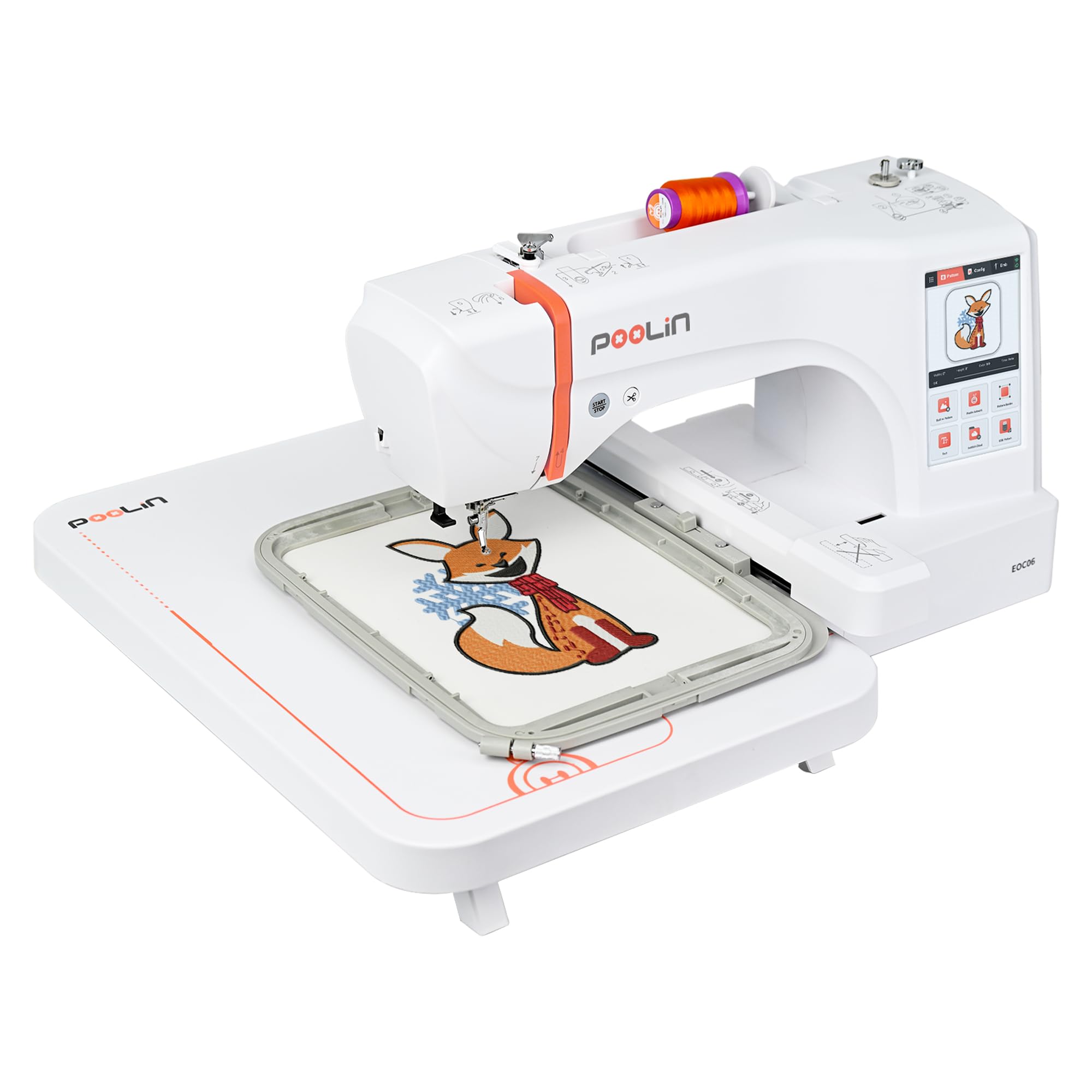
The serious home studio machine with four hoops and a giant 7-inch screen.
The EOC06 is the biggest PooLin on this list, with a max embroidery area of 11″ x 7.9″ thanks to four included hoops: two 5.5″ x 5.5″, one 7.9″ x 7.9″, and one 7.9″ x 11″. The 7″ color touchscreen — the same size as the EOC05 — handles drag-and-drop editing like a smartphone, and the InStitch i3 system keeps the learning curve gentle.
Owners call it the best they have used, and packages are complete: 200 built-in designs, 8 fonts, 10 languages, 6 rolls of polyester thread, 24 bobbins, and 100 stabilizer pieces. The automatic thread trimmer cuts jump stitches between colors, and bobbin-out plus color-change warnings prevent beginner mistakes before they happen.
The trade-off is bulk — at 35 pounds and 23″D x 27″W x 12.5″H, this is a dedicated station, not a kitchen-table-to-closet machine. Threading takes practice, and the included bobbin thread is sewing thread, so owners recommend swapping to embroidery bobbin thread for best results.
What makes it worth it: the 11″ x 7.9″ max area and four hoops let you embroider hoodies, sleeves, and pant legs that smaller machines simply cannot fit.
Heads up: its 35-pound frame means you will dedicate permanent space to it.
7. Janome Memory Craft 500e LE Embroidery Machine

The speed king that skips the sewing and goes straight to pro-level stitching.
The Memory Craft 500e LE is an embroidery-only powerhouse, and its standout spec is the maximum embroidery size of 7.9″ x 11″ — the largest single field on this list — so you can tackle big projects like jacket backs or quilt blocks in one pass. It also offers 160 built-in designs plus 6 monogramming fonts with 2- and 3-letter capability. Its embroidery speed of 400-860 SPM (stitches per minute) is class-leading here, making it the fastest way to move from idea to finished design.
Janome owners coming from Brother machines notice the difference immediately, calling it “better faster on doing my work” and praising a beautiful stitch right from the start. The full-color LCD touchscreen and on-screen editing options — enlarge, rotate, flip, arc, combine, copy and paste — put serious control at your fingertips, and the USB drive comes loaded with 30 exclusive large designs.
The entry point is premium, and the learning curve is real: the needle threader takes getting used to, and the instruction manual is light on detail. Yet for a beginner who plans to grow into serious embroidery, this machine removes the upgrade ceiling completely.
The Speed Advantage
- 7.9″ x 11″ max area is the largest embroidery field on this list
- 400-860 SPM means faster project completion than any rival here
- 160 designs plus 30 exclusive large designs on the included USB drive
Who Should Wait
- Skip if you want a combo machine — this one embroiders only
- The premium price and manual detail make it better for committed learners
Understanding the Specs
Hoop Size
The hoop size sets the maximum physical dimensions of a single embroidery design. A 4″ x 4″ field is the beginner standard — perfect for pockets, patches, and small monograms. Larger fields like 7.9″ x 11″ allow bigger designs but add bulk and cost, so match the hoop to the projects you actually plan to make.
Built-in Designs and Connectivity
Built-in design counts (80 to 200 on this list) give you instant variety without a computer, but connectivity matters more long-term. A USB port or WiFi transfer lets you load custom files from your own designs or purchased patterns, which is where the real creative freedom lives.
FAQ
Is a 4×4 hoop big enough for a beginner?
Should I buy a combo sewing and embroidery machine?
What does the included starter kit give me?
How do I transfer custom designs to the machine?
Is an embroidery machine worth it for a complete beginner?
Can I use these machines for a small business?
Why do my needles keep breaking?
How heavy are these machines for moving around?
What is the difference between the Brother SE600 and SE700?
Final Thoughts: The Verdict
For most people, the embroidery sewing machine for beginners winner is the Brother SE600 because it pairs true combo versatility with a beginner-friendly design and quality that owners praise more than any other feature. If you want wireless design transfer and a larger touchscreen, grab the Brother SE700. And for those planning larger projects, the PooLin EOC05 delivers a roomy hoop and a 7-inch screen that feels easy to learn.
How We Picked
We do not accept paid placement. Every pick is matched to a real buyer and a real use-case; we do not hands-on test units.
Sources & Methodology
Specifications: manufacturer listings and product documentation. Review insights: verified customer reviews, as of August 2026. Pricing: not shown on this page (it changes often); check the current price via the retailer link.
As an Amazon Associate, WellFizz earns from qualifying purchases. This does not affect which products we feature.
Related Guides

Mo Maruf
I created WellFizz to bridge the gap between vague wellness advice and actionable solutions. My mission is simple: to decode the research and give you practical tools you can actually use.
Beyond the data, I am a passionate traveler. I believe that stepping away from the screen to explore new environments is essential for mental clarity and physical vitality.