Our readers keep the lights on and my smoothie glass nicely filled. As an Amazon Associate, I earn from qualifying purchases.
Specs are compiled from manufacturer listings and verified buyer reviews and can change over time — please confirm the key details on the product page before buying.
You want to look up a word fast, but grabbing your phone means getting pulled into notifications, social feeds, and a dozen open tabs. If you are a student wrestling with academic texts, an ESOL learner building everyday vocabulary, a crossword fanatic chasing the perfect seven-letter word, or a professional preparing for the TOEFL, you need a tool that does exactly one thing well: define, translate, and teach — without once offering you a distraction. An electronic dictionary (a handheld device with a built-in word library) is the quiet specialist that sits on your desk or slides into a bag and does its job, no app store attached.
I’m Mohammad Maruf — the founder and writer behind WellFizz. This guide is built by comparing the manufacturers’ published specifications and the patterns across verified customer reviews, so you get each pick’s real strengths and trade-offs instead of marketing spin.
A good device handles the words you actually meet — obscure headwords, everyday jargon, and proper phonetic spelling. This guide walks you through the best options so you can find the right electronic dictionary for your exact reading or learning goal.
Our Picks at a Glance

How To Choose The Best Electronic Dictionary
The first thing to decide is if you need a traditional keypad unit (like the classic Franklin or Lexibook models) or a modern scan-and-translate pen. Keypad devices are excellent for deep study, defined word lists, and building vocabulary through built-in quizzes and games. Scan pens shine when you are reading a physical book or handout and need instant help without interrupting your flow. Pick your primary use-case first — that choice narrows the field immediately.
Word count and source material
An electronic dictionary is only as good as the library it carries. The Lexibook D650EN carries 380,000 words and 78,000 synonyms, while the Collins-licensed D850EN goes further with 725,000 words, meanings, and phrases from the official 13th edition. The Franklin MDE-1200 contains 80,000 headwords and 250,000 definitions. If you regularly encounter academic or technical vocabulary, the higher count prevents frustrating “word not found” moments.
Quick Comparison
| Model | Best For | Word Count | Device Weight | Screen Type | Amazon |
|---|---|---|---|---|---|
| Scan Translator Pen★ Best Overall | Scan-and-learn readers | 142 online / 10 offline lang | 2.47 oz | Inline OLED | Amazon |
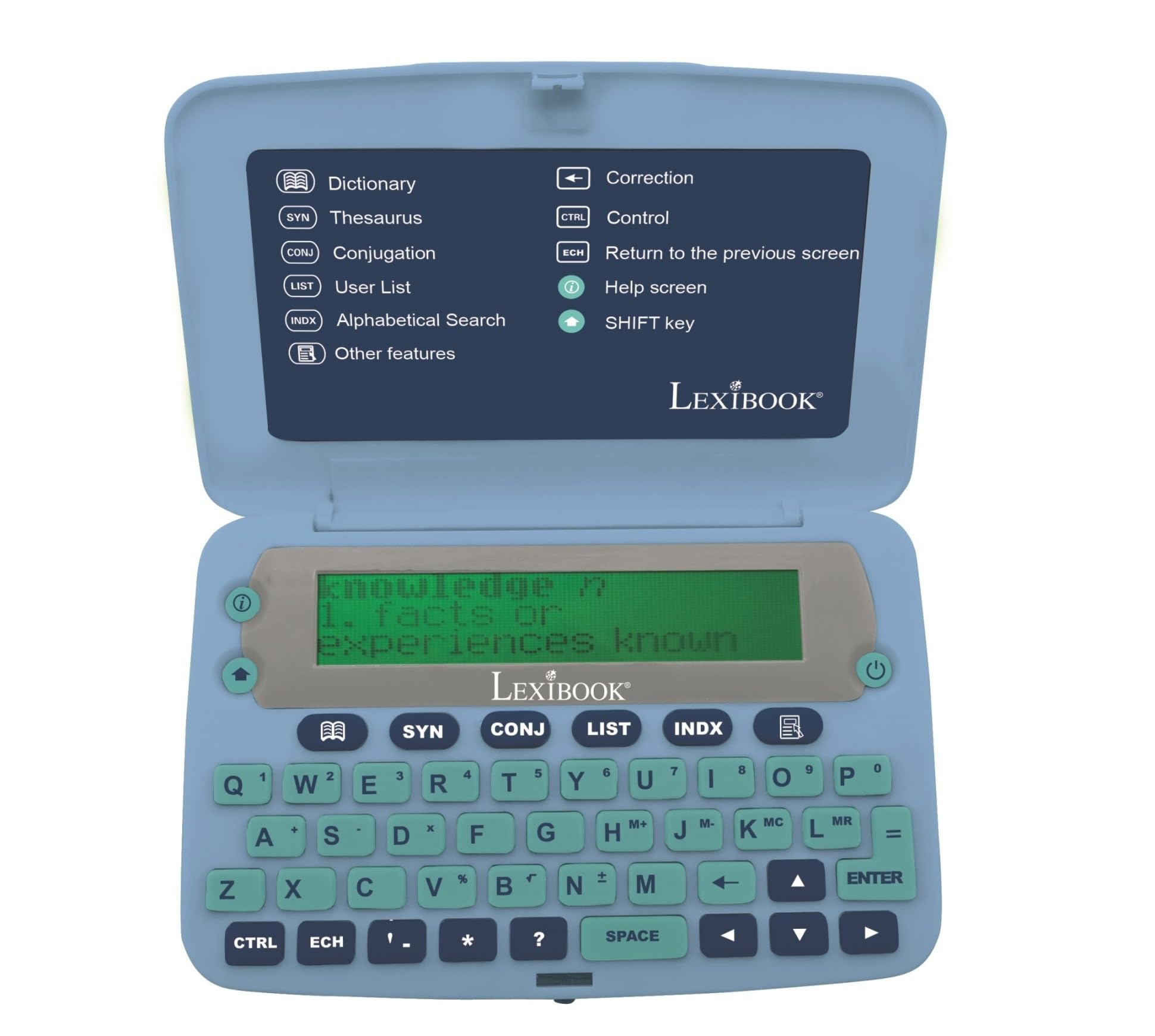
| LEXiBOOK D650ENBest Value | Simple, focused definitions | 380,000 | 3.9 oz | 3-line mono LCD | Amazon |
| Franklin MDE-1200 | Test prep & word games | 80,000 | 5 oz | 3-inch zoomable | Amazon |
| LEXiBOOK D850EN | Deep English library | 725,000 | 3.84 oz | 4-line mono LCD | Amazon |
| Franklin BES-2150 | Spanish-English learners | 5 million translations | 6 oz | 3-line with 3x zoom | Amazon |
| Sharp PW-NA1-B | Japanese-English study | Multiple built-in dicts | 6.6 oz | Monochrome LCD | Amazon |
| iFLYTEK AIT2221T | Global business travel | 60 languages | 14 oz | 5.05″ HD touch | Amazon |
In‑Depth Reviews
1. Scan Translator Pen S65pro
The lightweight pen that scans any printed line and reads it back aloud.
This pen lets you get the meaning of a word without ever pulling out your phone — you drag its tip over a printed word and it reads it aloud. It supports online voice and scanning translation in 142 languages, plus offline translation (no internet needed) for 10 major languages including Chinese, Spanish, French, and German. So you can scan a menu in Tokyo or a textbook in Barcelona without needing a data connection. At just 2.47 ounces it is the lightest device here, impossible to notice in a pencil case.
The read-aloud function highlights each word on screen as it pronounces it, reinforcing both hearing and sight. Students and ESOL learners find this auditory support faster than flipping through a printed dictionary. The built-in camera handles photo translation for menus, signs, and documents in 142 languages online and 10 offline. At 2.47 oz, compared to the Franklin MDE-1200 at 5 oz, it is much lighter and disappears into a pocket.
The honest trade-off: scan accuracy depends heavily on printing quality. Some buyers report the pen jumbles lines when scanning dense book columns, and during one user’s test, the device misspelled and mispronounced the word “déjà vu.” For single words or clear book fonts it excels, but a thick academic volume might frustrate you.
What owners love
- Fast, accurate scanning saves time compared to manual lookups
- Read-aloud feature builds pronunciation and comprehension simultaneously
- Extremely portable at 2.47 ounces — fits in a shirt pocket
- Photo translation works for signs, menus, and documents
Where it stumbles
- Struggles with long sentences and dense book columns
- Occasional mispronunciation on uncommon or accented words
- Best suited for single words or short phrases, not continuous reading
Your best bet if: you read printed books or handouts and want instant word help without breaking focus.
Think twice if: you need a deep, searchable English dictionary with thousands of synonyms and word games — get a keypad unit instead.
2. LEXiBOOK D650EN English Dictionary
No distractions, no apps — just a family-friendly word reference.
This is the simplest, most direct English dictionary on the list. The D650EN carries 380,000 words, 78,000 synonyms, and conjugations for over 8,000 verbs across four tenses (simple present, simple past, present participle, past participle). What makes it stand out is the large 3-line screen with a magnifying function, making it easier to read than most keypad units. The button layout is spacious and the device is ergonomically designed for hands that are not used to tiny smartphone keyboards.
The built-in word games — Hangman, Jumble, and Anagram solver — make this a genuinely engaging tool for younger learners. However, the phonetic spell-check (which lets you type a word the way it sounds) is a real limitation. As owners mention, typing “tho” does not suggest “though,” and “cood” does not find “could.” A 5th grader struggling with phonetic spelling will not get the correction they need, which is a significant drawback for a device marketed as educational.
An occasional unit arrives damaged or fails to power on — something to be aware of if you need a reliable study tool immediately. But for a parent, a spouse, or an older reader who just wants to look up a word quickly without a phone in hand, this device delivers exactly that.
Who it works for: parents buying for younger children, older users who prefer large buttons and a magnified screen, anyone who wants a pure dictionary without scan technology.
Where it falls short: the phonetic spell-check stumbles on common misspellings, so a struggling reader may not get the help they need.
3. Franklin MDE-1200 Electronic Dictionary
Grammar lessons and test-prep tools packed into a portable frame.
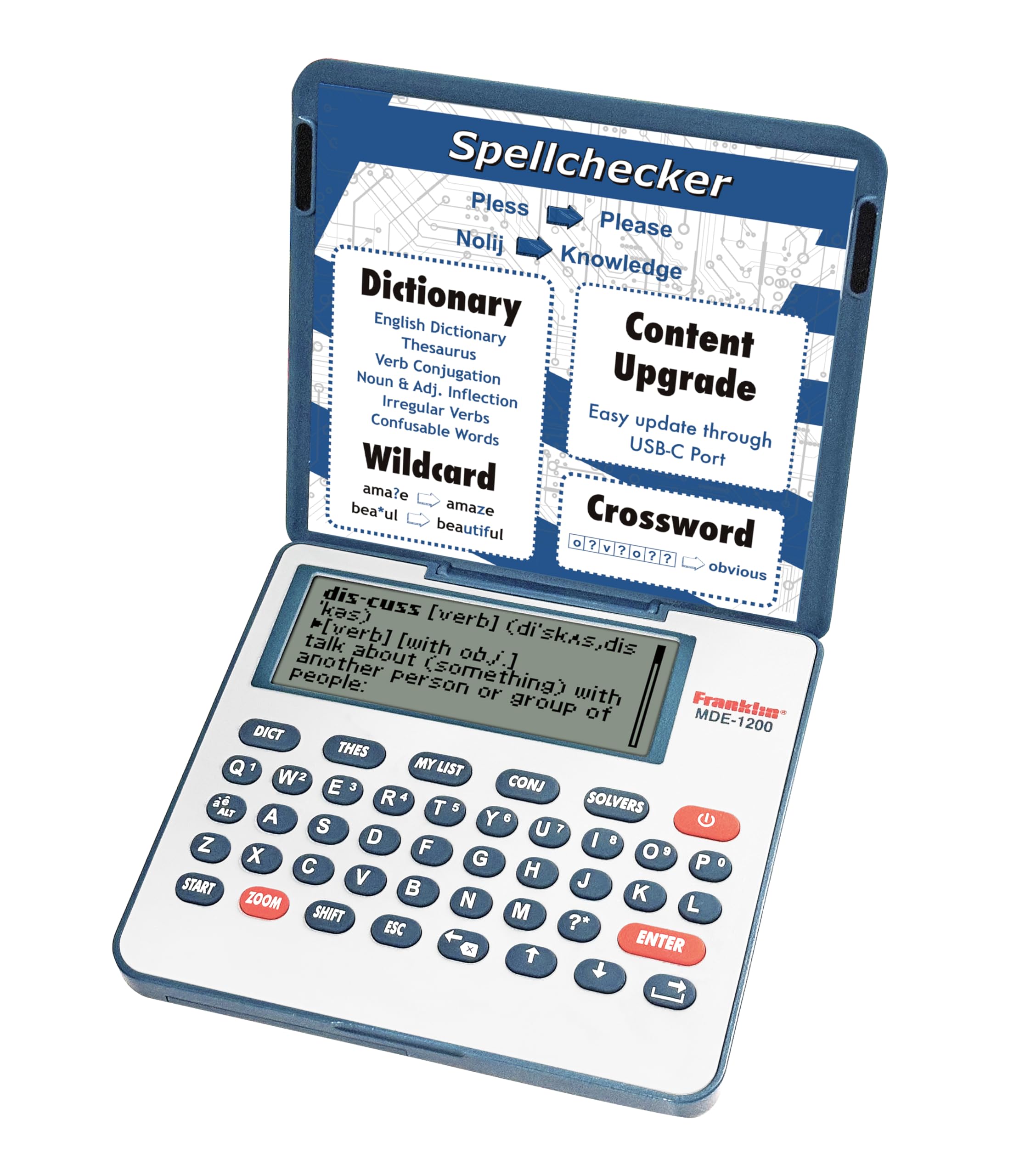
Franklin’s MDE-1200 is built specifically for structured learning. Its library includes 80,000 headwords and 250,000 definitions, plus 15,000 synonyms and 12,000 antonyms. But the real draw is the built-in English lessons covering irregular verbs, verb conjugation, noun and adjective inflection, confusables (words often mixed up, like “affect” vs. “effect”), and vocabulary banks for TOEFL, GRE, SAT, GMAT, and TOEIC prep. If you are actively studying for one of those exams, having targeted word lists in your pocket is genuinely useful.
The 3-inch zoomable screen is adjustable for contrast and the keyboard has sound control, so you can quiet the clicks in a library. It runs on 2 AA batteries, which is convenient for travel. At 5 ounces it is noticeably heavier than the Lexibook D850EN (3.84 oz) and especially heavier than the scan pen (2.47 oz), but still pocketable.
The missing backlight is the recurring trade-off. As one buyer put it directly: “no back light… old fashioned dictionary.. not good for us older folks!” The screen is readable in good light but unusable in a dim classroom or on an evening commute. Some units have also been reported faulty on arrival, immediately showing a phantom “NO SD CARD” error and powering off. For crossword fans it works well for fast spelling and definition lookup, but the slow initial boot and occasional word gaps frustrate deeper study.
Strongest when: you are preparing for a standardized test and want portable vocabulary drills without a phone.
Weakest when: you need to study in low light or rely on a backlit screen — this device has none.
4. LEXiBOOK D850EN Collins English Dictionary

The biggest word count on the list, licensed from a trusted authority.
This is the Lexibook sibling with one major upgrade: it carries the Collins English Dictionary, 13th edition, with 725,000 words, meanings, and phrases. That is nearly double the word count of the D650EN (380,000 words). The 4-line screen offers better reading real estate than the 3-line display on most competitors, and the magnifying function helps when your eyes are tired.
The device is compact at 3.84 ounces and 4.72 x 2.99 x 0.59 inches, slipping easily into a bag or large pocket. Buyers who use it for meetings or daily reading appreciate how unobtrusive it is. However, the screen is genuinely hard to read in some lighting conditions — you need a specific angle and decent light to see the text clearly. Several owners note the build feels flimsy and the device must be held in your hand; it will not stand up on a desk.
The biggest risk here is reliability. A handful of reports describe devices that stop working after a short period. And if the battery runs out, the device forgets your saved word list entirely — a frustration for anyone building a custom vocabulary bank. The D850EN offers the deepest library at this tier, but the physical build and reliability leave room for caution.
Best for: someone who prioritizes dictionary depth above all else and is willing to handle a finicky screen.
Not for: daily heavy use in varied lighting or anyone who needs a desk-sturdy unit.
5. Franklin BES-2150 Spanish-English Dictionary

Merriam-Webster and Franklin team up for a serious bilingual reference.
This device stands apart because it speaks. The BES-2150 includes a Merriam-Webster Advanced Learner’s English Dictionary that reads words and 4,800 phrases aloud, plus a full Spanish-English dictionary with 5 million translations from Franklin’s own thesaurus. It also includes verb conjugation, interactive quizzes, a crossword solver, and a confusables feature. At 6 ounces it is the heaviest traditional keypad unit here, but the trade-off is a sturdy reference library in a package that is still smaller than a printed textbook.
The voice function at maximum volume is clear enough for classroom use. The 3-line screen offers a zoom feature with three adjustable font sizes, which helps if you find the default text too small. The device runs on 2 AAA batteries and includes a backlight accessible by pressing FN+Enter — a detail many owners miss at first.
The clear limitation: this device is heavily biased toward English learners, not Spanish learners. If you are trying to learn Spanish, the lack of cross-reference from English to Spanish, the absence of mode memory, and the inability to switch languages with one button make it frustrating. Owners who have owned multiple Franklin devices call this the worst model for Spanish acquisition. As buyers sum it up, it works best for single-word Spanish-English translation — do not expect phrase-level help or a Spanish-learning tool. For English speakers learning Spanish, look elsewhere.
Who it serves: Spanish speakers learning English who need spoken pronunciation and a deep bilingual dictionary.
Who should skip it: anyone hoping to learn Spanish from English — the navigation is too one-sided.
6. Sharp PW-NA1-B Brain Dictionary

Sharp’s compact powerhouse for Japanese and English learners.
This Sharp Brain dictionary is a specific tool for a specific audience: anyone studying Japanese and English together. It integrates multiple built-in dictionaries covering Japanese language, kanji (Chinese characters used in Japanese), English-Japanese, Japanese-English, and even includes a travel phrase collection with audio pronunciation. The device runs on 2 AAA batteries and measures 3.54 x 5.22 x 0.6 inches — larger than the Lexibook units but still compact enough for a daily carry bag.
At 6.6 ounces, it is the heaviest traditional model here, but the build quality is what you expect from Sharp: solid and durable. The keyboard uses a typewriter layout, which some users find more comfortable than the cramped keys on smaller devices. The voice playback is decent but does not match the clarity of a dedicated app like Weblio — a common benchmark among Japanese learners. The screen is where owners hesitate: it is dark and the font is hard to read in anything less than bright light, and dust easily collects around the buttons.
The trade-off is that the Japanese-to-English navigation is occasionally clunky — the English-Japanese and Japanese-English buttons are toggle-style, leading to accidental mode switches. However, for someone who uses Japanese daily at work or in study and wants a single, offline device that does not rely on a phone, this remains a beloved tool. One owner’s wife uses hers every single day and calls it completely worth the money.
Perfect for: Japanese-language students and professionals who need a reliable offline Japanese-English dictionary.
Skip if: you only need English definitions — this device is heavily oriented toward bilingual Japanese study, not general English reference.
7. iFLYTEK AIT2221T AI Translator
Real-time conversation translation with two years of free global data.
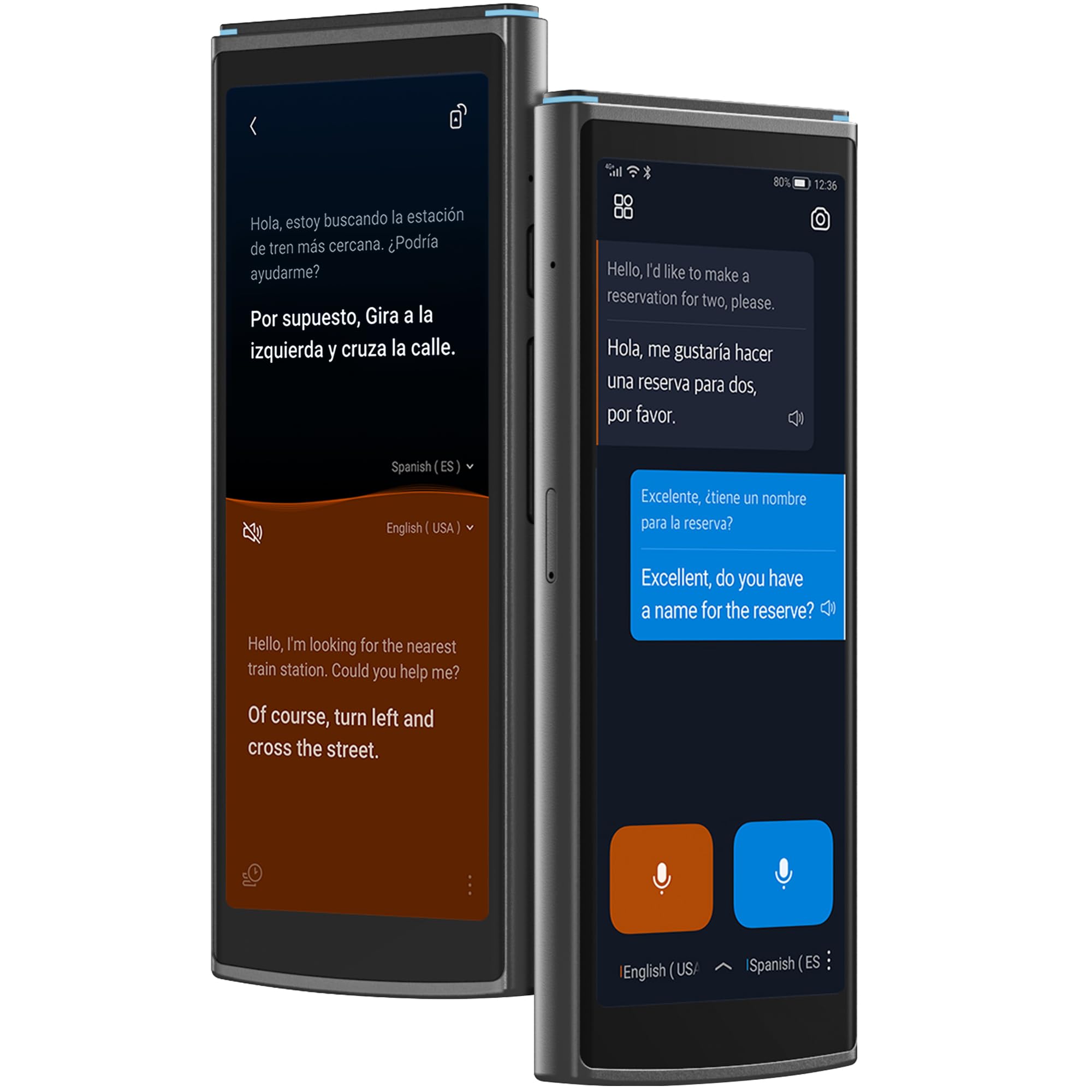
The iFLYTEK AIT2221T is a different beast entirely — it is a full conversation translator, not a traditional dictionary. Its split-screen mode shows both sides of a dialogue simultaneously, so you never need to pass the device back and forth. It supports 60 online languages worldwide and includes 18 offline language packs you can pre-load before a trip. The 5.05-inch HD touchscreen is larger than any other device in this roundup, making text easy to read for both parties in a conversation.
The real story here is the 2-year free global data that covers 200 countries — no SIM fees, no roaming charges. The built-in 16GB storage saves over 1,000 translation records for later export, and photo translation works in 50 languages for menus, signs, and documents. HIPAA compliance (a US standard for protecting private health information) means it is designed for confidential conversations in medical and legal settings. Owners find the UI as intuitive as a smartphone and report strong performance with languages like Dutch, Flemish, and Vietnamese, including slang.
The honest caveat: 14 ounces makes this the heaviest device here, and the 6-hour battery is enough for a full workday but not for multi-day trips without a charger. A very small number of units have arrived unresponsive from the start. For casual conversation it works well, but if you need deep word-by-word study with definitions and synonyms, the Franklin or Lexibook keypad units offer far richer English reference material. This is a conversation bridge, not a learning dictionary.
Made for: business travelers, medical professionals, and anyone who needs real-time spoken translation across many languages.
Not meant for: serious English vocabulary study or academic word-building — get a Franklin or Lexibook for that.
Understanding the Specs
Word Count
This is the single most important spec for a traditional keypad dictionary. Higher counts reduce the chance of seeing “word not found” when you enter an uncommon or technical term. The Lexibook D850EN tops out at 725,000 words from the Collins 13th edition, while the Franklin MDE-1200 carries 80,000 headwords. A higher count also generally means more synonyms, antonyms, and usage examples, which helps build vocabulary over time rather than just defining a single word.
Screen Readability
Screen size and backlight mean the difference between a dictionary you use every day and one that collects dust. A 4-line display (like the Lexibook D850EN) shows more context than a 3-line one (like the Franklin BES-2150). Backlight matters if you study in dim light or on a bus. The Franklin MDE-1200 has no backlight at all, while the iFLYTEK translator uses a large 5.05-inch HD touchscreen. For older eyes or low-light use, backlight is a must-check feature.
Phonetic Spell-Check
Phonetic spell-check lets you type a word the way it sounds (“fizzicks” for “physics”) and still find the correct spelling. This is critical for children, ESOL learners, and dyslexic readers. The Lexibook D650EN is weak here — typing “tho” does not suggest “though.” The Franklin BES-2150 handles this better with its built-in confusables feature. If the reader you are buying for is a poor speller, this spec alone can make or break the device’s usefulness.
Offline vs Online Function
Traditional keypad dictionaries (Franklin, Lexibook, Sharp) work entirely offline — the dictionary is stored in the device’s memory. Scan pens and translator devices (the Scan Translator Pen, iFLYTEK) may require a data connection for full language support. The Scan Translator Pen supports offline translation for 10 major languages but needs an internet connection for its full 142-language library. The iFLYTEK has 18 offline packs. If you travel to remote areas or study without Wi-Fi, offline support is essential.
FAQ
Which electronic dictionary has the most words?
Can I use an electronic dictionary without an internet connection?
What is phonetic spell-check and why does it matter?
Is a scan pen better than a keypad electronic dictionary?
Will an electronic dictionary help me prepare for the TOEFL or GRE?
Do electronic dictionaries have backlit screens?
How durable are Franklin electronic dictionaries?
Can I use a translator pen for learning Spanish?
How long do the batteries last in an electronic dictionary?
Is an electronic dictionary better than a smartphone app?
Final Thoughts: The Verdict
For most buyers, the absolute best electronic dictionary is the Scan Translator Pen S65pro because it combines instant scan-and-hear functionality with a featherlight 2.47-ounce body and 142-language support — it is the fastest way to look up a word while reading. If you prefer a traditional keypad device with the deepest word library, grab the Lexibook D850EN with its 725,000-word Collins dictionary. And for serious test preparation targeting the TOEFL, GRE, SAT, GMAT, or TOEIC, the Franklin MDE-1200 offers targeted vocabulary banks and grammar tools you will not find on any other device.
How We Picked
We do not accept paid placement. Every pick is matched to a real buyer and a real use-case; we do not hands-on test units.
Sources & Methodology
Specifications: manufacturer listings and product documentation. Review insights: verified customer reviews, as of July 2026. Pricing: not shown on this page (it changes often); check the current price via the retailer link.
As an Amazon Associate, WellFizz earns from qualifying purchases. This does not affect which products we feature.
Related Guides

Mo Maruf
I created WellFizz to bridge the gap between vague wellness advice and actionable solutions. My mission is simple: to decode the research and give you practical tools you can actually use.
Beyond the data, I am a passionate traveler. I believe that stepping away from the screen to explore new environments is essential for mental clarity and physical vitality.