Our readers keep the lights on and my smoothie glass nicely filled. As an Amazon Associate, I earn from qualifying purchases.
Specs are compiled from manufacturer listings and verified buyer reviews and can change over time — please confirm the key details on the product page before buying.
The biggest trap parents hit buying educational robots is confusing a remote-controlled toy with a real learning tool. A robot that just drives around and plays music is fun for an afternoon, but it won’t teach your child to think logically, solve problems, or understand cause and effect. This guide cuts through the marketing to show which robots deliver real STEM learning — building, coding, or both — for the price.
I’m Mohammad Maruf — the founder and writer behind WellFizz. This guide is built by comparing the manufacturers’ published specifications and the patterns across verified customer reviews, so you get each pick’s real strengths and trade-offs instead of marketing spin.
Whether your child is 5 or 14, the right robot turns screen time into hands-on logic. Here is the no-fluff breakdown of the best educational robots that actually teach coding, engineering, and creative thinking.
Our Picks at a Glance

How To Choose The Best Educational Robots
Not every robot labeled “STEM” actually teaches anything. Your real decision depends on three things: does your child build it, code it, or just drive it? A construction kit forces them to follow plans and understand structure. A coding robot teaches sequencing and logic. A remote-control toy teaches neither. Pick the category that matches your goal, then check the age range and battery life — a robot that dies in 40 minutes is frustrating, and one meant for a 3-year-old won’t challenge a 10-year-old.
Buildable vs. Ready-to-Play
A buildable robot (like the Sillbird or IQKidz) delivers hours of focused assembly that builds patience and spatial reasoning — the learning happens during the build, not just the play. A ready-to-play robot (like the Ruko or Sphero Mini) gets straight to coding or interactive games. Neither is better; it depends whether your child loves the process or wants instant results. Some kids want both, which is where hybrid kits — build it, then code it — earn their premium price.
Control Method: Remote, App, or Screen-Free
Younger kids (ages 3-6) do best with gesture sensing and simple remotes — they can make the robot move without reading. Kids 8+ can handle app programming with drag-and-drop blocks. If you want to limit screen time, look for a robot that uses a physical programmer remote (Botley 2.0 is the best example). Screen-free coding forces the child to plan a sequence before pressing buttons, which is exactly how real programming logic works.
Quick Comparison
| Model | Best For | Piece Count | Battery Life | Control Method | Amazon |
|---|---|---|---|---|---|
| Sillbird STEM Robot★ Best Overall | STEM building + coding hybrid | 596 | 40 min | Remote & App | Amazon |
| Ruko 6088 RobotBest Battery Life | Young kids (ages 3-6) | — | 120 min | Gesture & App | Amazon |
| STEMTRON RobotTop Value | Ready-to-play with voice control | — | 60 min | Gesture & Voice | Amazon |
| IQKidz Building Kit | Compact buildable RC robot | 440 | — | Remote & App | Amazon |
| Kyanio Robotics Kit | Advanced builders (3-in-1 models) | 560 | — | Remote & App | Amazon |
| Opmind 5-in-1 Kit | Variety with app programming | 419 | — | Remote & App | Amazon |
| VATOS Large RC Robot | Big interactive playmate | — | 60 min | Voice & Gesture | Amazon |
| Learning Resources Botley 2.0 | Screen-free coding for ages 5+ | — | — | Remote Programmer (no screen) | Amazon |
| Sphero Mini Activity Kit | App-based coding + games | 28-piece set | — | App (Bluetooth) | Amazon |
In‑Depth Reviews
1. Sillbird STEM Robot Building Kit
Our pick — over 4.5★ from 850+ verified ratings; the strongest balance of quality and price.
The build-it-yourself robot that keeps kids engaged for hours and teaches real engineering logic.
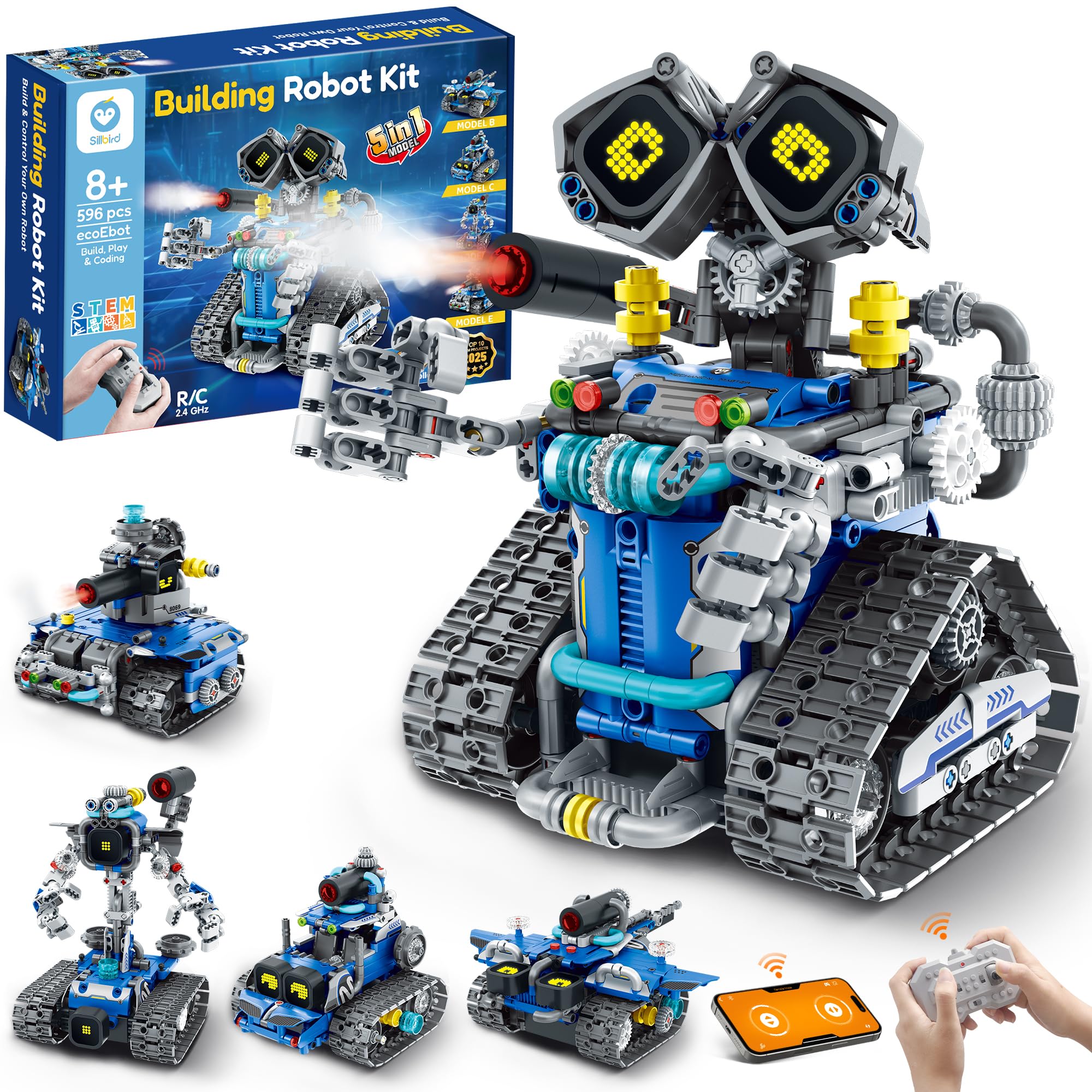
This is the rare kit where the learning value matches the fun. With 596 pieces and five different models to build — robot, tank, car, and more — your child starts simple and works up to harder builds, each one teaching spatial reasoning and step-following discipline. The instructions are clear and colorful, and as buyers report, “my son built it by himself in a few hours.” That independence is the whole point.
The finished robot isn’t just a static display. It has digital LED eyes that change expressions, sound effects, and even a mist-spray feature you activate with a little water. You control it via remote or the Bluetooth app, which introduces basic coding logic through drag-and-drop commands. The rechargeable battery runs for 40 minutes per charge — enough for a solid play session after the build is complete. The crowd gives this one 4.7 stars across nearly 900 ratings, and the most-discussed aspects are fun (38 mentions) and quality (24 mentions), which tells you it delivers on both promises.
The honest trade-off is assembly. While many kids breeze through it, some find certain steps challenging — the small tube connectors can be tough for little fingers to push in. This is an age-appropriate challenge for 8-14 year olds, but a younger 8-year-old may need adult help on a few steps. Consider it part of the learning.
What Builders Love
- 596 pieces mean a long, satisfying build that takes hours, not minutes
- Five model options in one box — replay value is excellent
- Clear, high-quality instruction booklet that kids can follow alone
- App and remote control introduce real coding logic after the build
What to Watch For
- Some connectors are tight for small hands — a parent’s help may be needed
- 40-minute battery life is fine for play but shorter than some competitors
Best for: Kids 8-14 who love Legos and are ready for a more complex building challenge that leads to actual programmable play.
Think twice if: Your child wants instant play — this is a build-first toy, and the assembly time is part of the experience, not a hurdle.
2. Ruko 6088 Robot Toys for Kids
The toddler-friendly robot with gesture control and triple the playtime of most competitors.
Where the Sillbird requires hours of building, the Ruko 6088 is ready from the start — and it keeps going. The standout spec here is the 120-minute battery life on a 2-hour charge, longer than many robots in this list (most offer 40 to 60 minutes). For a preschooler (ages 3-6), that means real staying power across multiple play sessions without constant recharging. The Ruko also has 120 minutes of battery life, compared to the STEMTRON’s 60 minutes.
Control is the other big draw. The robot responds to four methods: remote, app, gravity-sensitive control (tilt your device), and infrared gesture sensing — wave your hand to make it move forward or turn. For a 5-year-old who can’t read yet, gesture control is magic. The robot also sings, dances, and has 9 dynamic LED face expressions that help kids understand emotions and non-verbal cues. The app includes 10-question interactive quizzes about Earth and space, adding a light educational layer underneath the fun.
The honest reality is that engagement can be shallow for some kids. As one owner put it bluntly: “Grandson’s played with it a few hours, and there it sets, months later, untouched.” This is a robot that entertains, but it doesn’t teach building or coding — it’s a responsive toy, not a project. For a 3-6 year old who wants a playful companion, it’s great. For a child who needs a deeper challenge, look at the buildable kits instead.
The real-world trade-off: The huge 120-minute battery is fantastic, but the novelty wears off faster than a building kit because there’s no assembly or coding depth to revisit.
Reach for this if: You have a preschooler (3-6) and want a robot they can control with simple hand waves — no reading, no assembly, just instant interactive fun.
Pass on it if: Your goal is STEM learning or coding skills — this robot entertains but doesn’t build or program.
3. STEMTRON Robot Toys for Kids
A mid-range robot with voice commands and a cool design that’s bigger than most at this price.
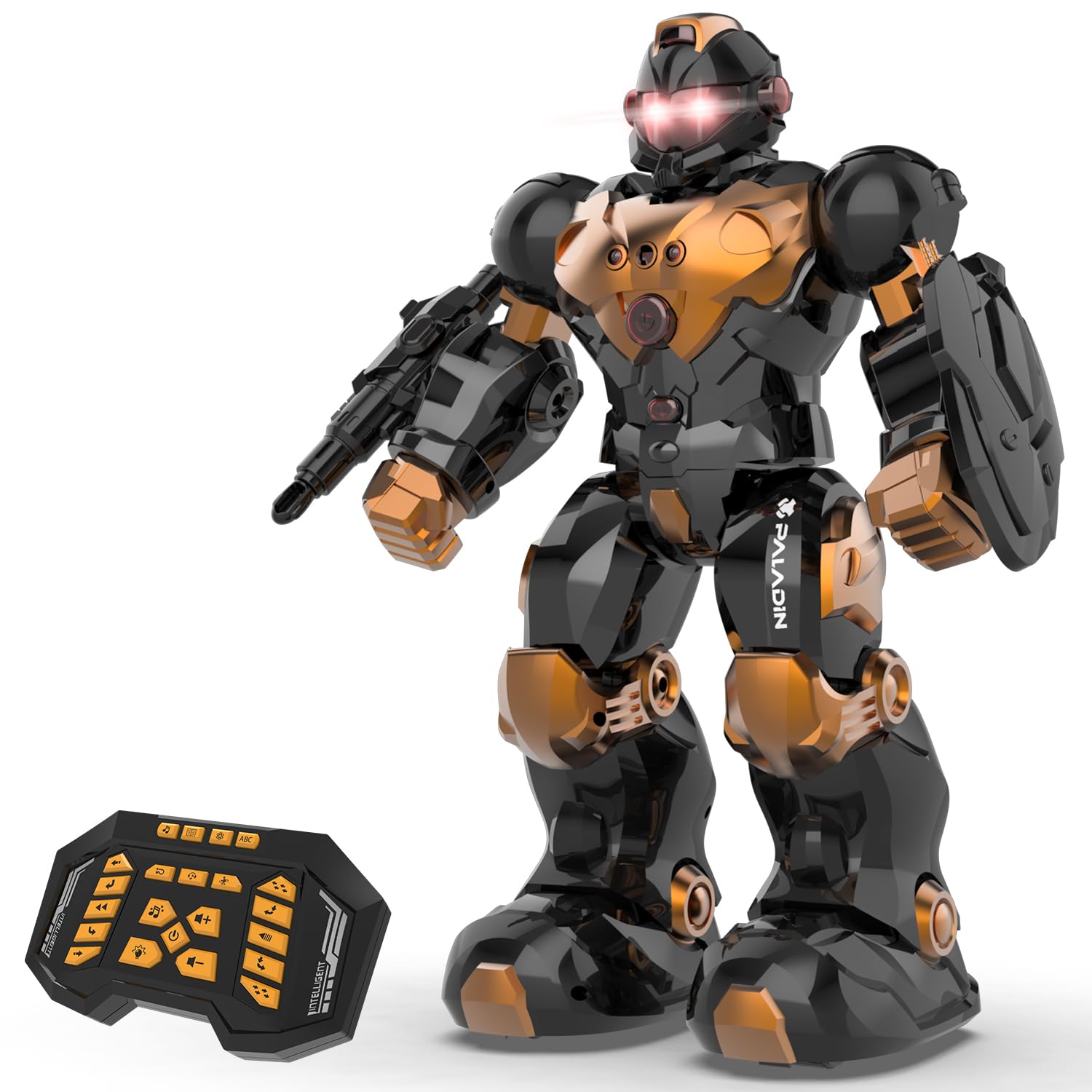
The STEMTRON is bigger than many robots at this level — 13 inches tall, with color-changing LED eyes, a launcher, and a protective shield that gives it an adventurous feel. what separates it for the price is the dual voice and gesture control. Kids can simply speak commands or wave their hands to make it walk, slide, or turn, which builds confidence in communication and cause-effect logic without needing an app or remote.
On the educational side, it comes programmed with 5 songs, 2 jokes, 8 light music tracks, 4 science stories, and 5 machine languages — enough variety to keep a child exploring. You can also program a custom sequence of actions, which is basic coding logic in physical form. The rechargeable battery gives 60 minutes of play after a 1-hour charge, compared to the Sillbird’s 40 minutes. The crowd consensus is that quality and durability are strong — owners note it took a few hard falls and didn’t break.
The catch is that some units have QC issues. A few owners mention that the left leg stopped working after a day of use. For a robot in this price tier, occasional defects happen, and the warranty support is a factor to consider. The majority of owners (4.6 stars across 300+ ratings) have no issues, but it’s worth buying from a seller with easy returns just in case.
One-sentence verdict: If you want a ready-to-play robot with voice control and mechanical accessories for under the premium-tier price, this is the one to grab — just check it quickly on arrival.
Best for: Kids ages 6+ who want a big, interactive robot that responds to their voice and gestures without needing a phone or tablet.
Consider skipping if: You need guaranteed reliability — a small number of units have motor defects, so buy from a low-maintenance return seller.
4. IQKidz APP/Remote Control STEM Building Kits
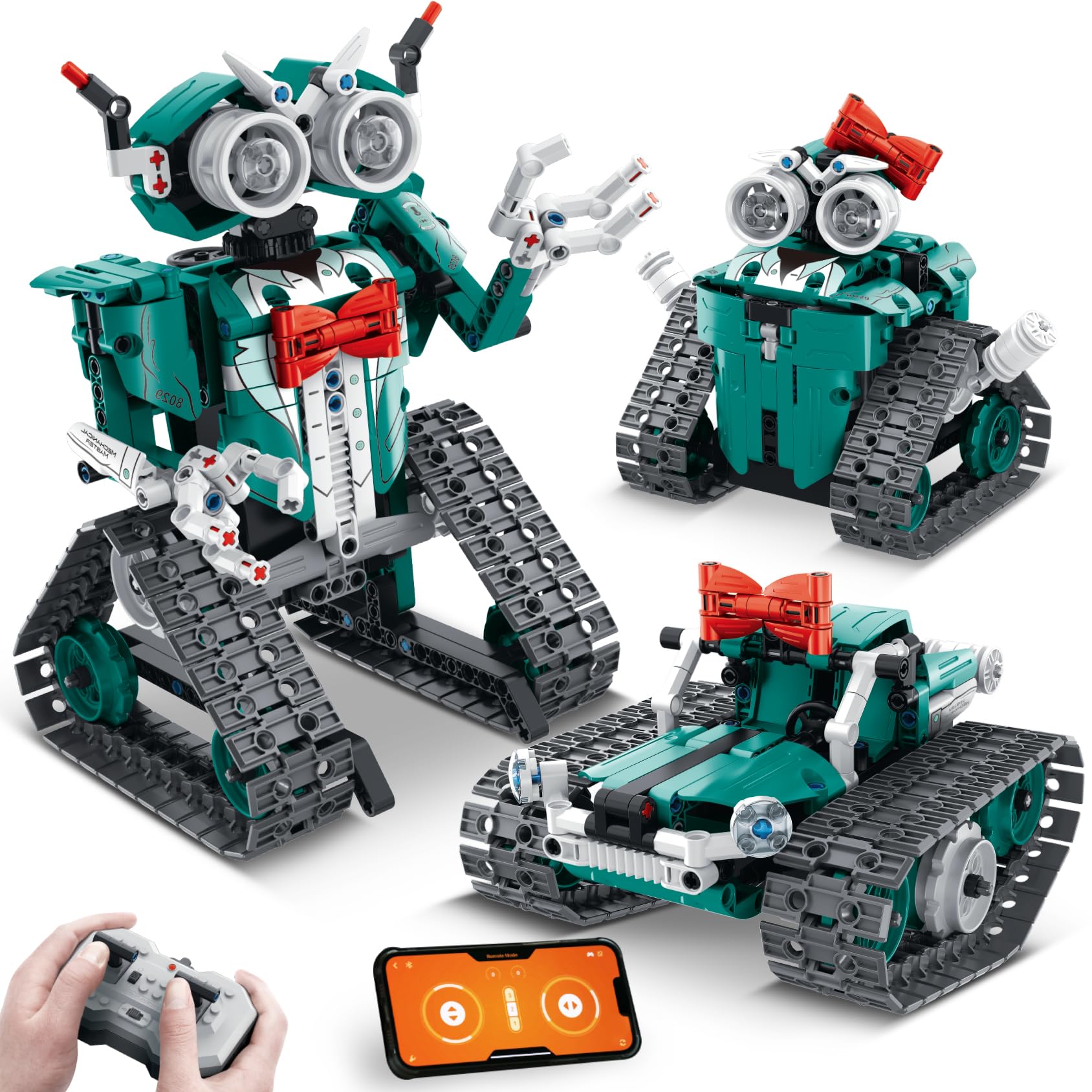
A compact buildable robot with a distinctive red-bowtie design that kids find irresistible.
Most educational robots look like generic metal boxes. The IQKidz stands out with personality — a sleek robot with movable fingers, a red bowtie, and alternate builds including a stunt tank and a robot girl with a red bowknot hair clip. With 440 pieces, it’s a moderate build that a 10-year-old can finish in one evening, as many customers note. The quality of the plastic is sturdy, and the set includes extra pieces in case some go missing, which is a thoughtful touch.
The learning angle comes from the remote and app control. Kids can make the robot move forward, backward, turn, spin, and follow a programmed path. This introduces basic sequencing and coding logic in a visual, satisfying way — see your code make the robot move across the floor. It’s also a good size at 1.9 pounds, not too heavy to carry around but substantial enough to feel real. The age range is 8-14, and owners consistently call it age-appropriate and high-quality.
The main downside is assembly friction. Unlike the Sillbird, which has numbered bags, the IQKidz pieces come mixed together, so sorting takes extra time. Some owners found the instructions less clear than the leading brand. If your child is patient and enjoys a puzzle, this won’t bother them. If they get frustrated easily, the Sillbird’s better-organized build process is a smoother experience.
What Owners Praise Most
- Unique, charming design that stands out from generic robot kits
- Three build options in one box — robot, tank, or robot girl
- Extra pieces included for lost-part insurance
- App provides basic coding path-following commands
The Assembly Caveat
- Pieces are not bag-numbered — sorting takes patience and time
- Only moves forward and backward with no turning, per some owners
Grab this for: A Lego-loving 8-12 year old who wants a robot with personality and a satisfying single-evening build project.
Look elsewhere if: Your child needs numbered step bags to stay organized — the mixed-piece system adds friction.
5. Kyanio STEM Robotics Kits for Kids

A 560-piece building kit that turns into three different motorized models with app programming.
The Kyanio kit hits a balance for advanced builders aged 8-14. With 560 pieces, you can build a machine gun robot, an armored tracked vehicle, or a mechanical cannon tank. The robot’s hand-mounted machine guns sync and rotate with the mechanical gears, which is the sort of moving-part detail that fascinates kids who love mechanics. The build uses color-coded blocks with clear step-by-step instructions — reviewers point out a child assembled it in about half an hour, though that likely means the simpler model.
After the build, the learning continues with 2.4GHz remote control for stable, interference-free operation (multiple kids can play simultaneously) and an app that introduces programming logic. Upgraded Type-C charging is a convenient modern touch. The kit is made from premium ABS plastic, and the manufacturer offers a 1-year warranty against defects, which is better coverage than most competitors in this range. The build quality earns frequent praise, with owners noting parts are “as good as Lego.”
The issue that comes up most is missing pieces — a few shoppers say their kit arrived short a part, which prevented completion. For a 560-piece set, this happens occasionally with any brand, and the 1-year warranty should cover it. But if your child has a tight timeline (birthday gift, etc.), build in a buffer to request replacements. The assembly experience itself is also mixed — some kids fly through it, others find it tough, which is normal for this piece count.
The real story: At 4.7 stars with nearly 300 ratings, this kit satisfies most buyers. The missing-piece risk is real but manageable — buy early enough to handle any exchange.
Best for: Kids 8-14 who love mechanical engineering — the gear-synced rotating weapons are a huge draw for that mindset.
Think twice if: Your child gets devastated by an incomplete set — have a plan for getting missing parts quickly.
6. Opmind 5 in 1 STEM RC Robot Building Kit
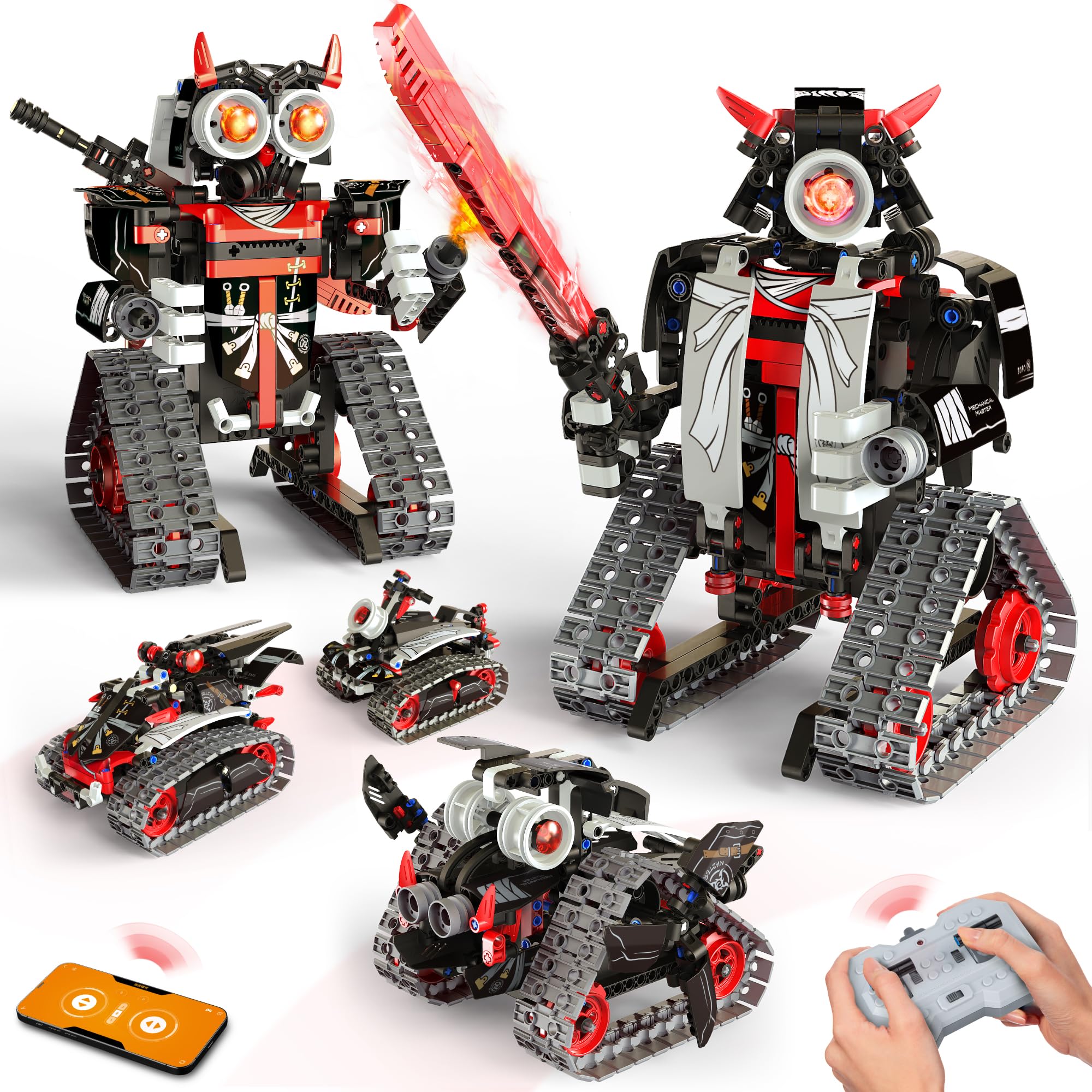
Five buildable models from one box — warrior, ninja, boar, chariot, and buggy — with full app control.
Most kits offer two or three builds. The Opmind gives you five — a warrior robot, a ninja, a boar, a chariot, and a buggy — from 419 pieces. Your child can build all five over weeks, taking apart and rebuilding different designs, which is exceptional value for the price. The instructions are detailed enough that most kids ages 6-12 can follow them independently, and the high-quality ABS material is ASTM and CPSIA-certified for safety — non-toxic and odorless.
The app control is genuinely useful here. Beyond the standard remote, the app offers drive simulation, a gravity gyroscope mode, navigation path planning, and AI programming. The 360° rotation is smooth, and the app interface is intuitive enough that a 10-year-old can figure out path programming within minutes. The high-quality motor system is also compatible with major building block brands, so your child can mix and match with existing collections to create original designs. Fun is the most-discussed aspect (17 mentions), and assembly is the second (10 mentions), both positive.
The limitation is the piece count relative to the model variety. With 419 pieces split across five models, each individual build isn’t as complex as the 596-piece Sillbird single robot. If your child wants one intricate, detailed robot, the Sillbird delivers more depth. If they want variety and replayability, the Opmind wins by a wide margin.
The Variety Advantage
- Five distinct models from a single box — the best replay value in this list
- App offers path planning, gyroscope, and AI programming modes
- Certified non-toxic and safe for ages 6+
- Compatible with major building block brands for creative mixing
The Complexity Trade-Off
- Each individual build is less detailed than dedicated single-model kits
- 419 pieces across 5 models means some builds feel smaller
Ideal for: A creative child who loves variety and will enjoy rebuilding different models over weeks rather than one fixed robot.
Not the pick if: You want a single, dense, complex build — the piece count per model is lower here than dedicated kits.
7. VATOS Remote Control Robot for Kids

The giant of the list at 15.4 inches — a full-size interactive companion with voice control and 30-program memory.
If your child wants a robot that feels like a real presence in the room, the VATOS delivers. At 15.4 inches tall, it’s substantially bigger than the STEMTRON (13 inches) and the Ruko (10.8 inches). Its size makes it feel more like a friend than a toy. The upgraded voice control lets kids talk directly to the robot — it responds to voice commands, tells stories, tells jokes, recites poetry, and can even carry a basic conversation. The 22 functional remote commands include sliding, walking, singing, and dancing.
The programmable element is real: the robot can record up to 30 commands in sequence, and it will repeat your programmed routine. This is physical coding — your child plans a sequence of actions, inputs them, and watches the robot execute them exactly. It’s a tangible way to understand programming logic without a screen. The rechargeable battery runs 60 minutes on a 2-hour charge, which is standard for this size and feature set. Build quality is solid, with high-gloss ABS plastic and metal components that feel premium.
One practical note from owners: the robot works best on hard floors. On carpet, movement is much less reliable — the wheels struggle with thicker pile. Also, the controller buttons are not numbered to match the manual’s command list, which makes it harder to reference specific functions without flipping pages. These are minor friction points in an otherwise well-reviewed robot (4.6 stars across 475 ratings). For a child who wants a big, talkative, programmable buddy, this is the one.
What owners are saying: “Great for ages 8+” and “well-made, fun” are the consistent chorus. The size and voice features are the biggest draws, while the carpet issue is the most common practical complaint.
Best for: Kids ages 3-8 who want a large, interactive robot they can talk to and program with simple voice and button commands.
skip it if: Your home has mostly carpeted flooring — this robot needs a hard surface to move well.
8. Learning Resources Botley 2.0 The Coding Robot

The robot that teaches real coding without a single screen — just a remote programmer and your child’s logic.
Most coding robots require a phone or tablet. Botley 2.0 is different: it uses a physical remote programmer that sends commands wirelessly. Your child presses buttons to program a sequence — forward, turn, loop, object detection — then Botley executes it. No apps, no WiFi, no screen time. For parents who are strict about limiting device use, this is a standout. It’s also ready to go right from the start — just install 5 AAA batteries (3 for Botley, 2 for the remote) and start coding.
Botley teaches early STEM skills including critical thinking, problem-solving, and logic. The activity set includes obstacle-building pieces, so kids can set up a course and code Botley to navigate around it. It can also transform into different characters with included accessories — a frog, a train, a ghost — which adds imaginative play to coding. One 5-year-old “loves that she is able to program different codes to turn Botley into a frog.” The age range is 5+, and it’s designed for elementary-level children.
The trade-off is that Botley won’t hold every child’s attention. Some 6-year-olds lose interest after the initial novelty because the screen-free programming, while purer, lacks the flashy animations and sounds of app-based robots. It also requires more adult guidance upfront to explain the concept of sequencing — you can’t just hand it to a 5-year-old and expect them to figure it out. But for the child who clicks with it, it’s the most genuine coding education you can get at this price. The 4.4-star rating across 400+ reviews reflects this: strong for the right kid, not universal.
The honest take: This is the best coding teacher in the list — but it needs a child who is curious enough to engage with the logic rather than just waiting for flashy reactions.
Ideal for: Screen-conscious families with kids ages 5-8 who want a real coding introduction without a tablet in their hands.
May not fit if: Your child needs instant visual rewards — Botley’s feedback is more subtle than app-based robots.
9. Sphero Mini Activity Kit

A ping-pong-ball-sized robot ball that teaches real JavaScript coding through play.
The Sphero Mini is fundamentally different from every other robot in this list. It’s not a walking humanoid or a building block set — it’s a clear-shelled robotic ball packed with a gyroscope, accelerometer, and customizable LED light. You control it through the Sphero Play app using Joystick, Slingshot, or Tilt modes. It’s fast, responsive, and genuinely fun to drive. The Activity Kit adds a 28-piece construction set, 6 bowling pins, 3 cones, and 15 STEM-inspired activity cards that turn the ball into a bowling game, a maze challenge, or a croquet set.
The coding depth here is class-leading in this price range. Using the Sphero Edu app, kids can program the ball with drag-and-drop blocks, then progress to JavaScript and Swift. This is the same platform used in classrooms and after-school STEM programs — it’s not a toy coding language, it’s real code. The ball responds to your program by rolling, changing colors, and navigating courses you build with the included accessories. The activity cards provide guided challenges that grow with the child’s skill level, from basic drives to complex conditional logic.
At 4.7 stars across 750+ ratings, the Sphero Mini has the strongest consensus in the list. The most-praised aspects are playability (30 mentions) and learning value (11 mentions). The caveat is that the compact size (about the size of a ping-pong ball) means it’s easy to lose under furniture, and the app dependency means it requires a compatible tablet or phone. Some children also find the novelty wears off if they don’t engage with the coding challenges — as a game controller, it’s fun for a while, but the real depth is in the programming.
The Coding Advantage
- Teaches real JavaScript and Swift programming, not just block-based logic
- 28-piece activity set (pins, cones, construction pieces) adds physical play to coding
- Durable, responsive, and fast — genuinely fun to drive
- Industry-standard platform used in schools
The Practical Limits
- Small size means it’s easy to lose under furniture or outdoors
- Requires a phone or tablet for all functionality
- Some children need structure to engage — the open-ended play can be overwhelming
Best for: A tech-savvy child aged 5+ who is ready to move beyond toy coding into real programming languages — and loves fast, responsive tech toys.
Not for: Families who want to limit all screen time — the Sphero Mini needs an app to function. Also not for easily-frustrated kids who need step-by-step instructions for everything.
Understanding the Specs
Piece Count and Build Depth
The number of pieces in a building kit directly tells you how long the assembly will take and how complex the final model will be. A 400-piece kit like the Opmind offers moderate builds that take an evening. A 596-piece kit like the Sillbird is a multi-day project that demands real persistence. For a child who gets frustrated easily, start lower; for a child who loves deep focus, go higher. The buildable robots teach patience, spatial reasoning, and following instructions — the piece count measures the learning time.
Battery Life and Play Time
Battery life is measured in minutes of continuous play per full charge. The range here is wide: the Ruko 6088 delivers 120 minutes, while the Sillbird offers 40 minutes. A 40-minute battery is fine for one play session after a build, but a robot with 120 minutes of run time can power through multiple kids or an entire afternoon. If the robot is a primary toy rather than a weekend project, prioritize longer battery life. Also check charge time — the STEMTRON charges in 1 hour for 60 minutes of play, which means play time equals charge time.
Control Method: Remote, App, Gesture, or Voice
Each control method teaches a different skill. A standard remote control teaches hand-eye coordination. A gesture-sensing robot (like the Ruko) teaches cause and effect without needing to read. Voice control (like the STEMTRON and VATOS) builds communication confidence. App control introduces block-based programming logic, which is the gateway to real coding. The most educational robots offer multiple methods so the child can progress from simple remote driving to app-based path programming as their skills grow.
Screen-Free vs. App-Based Coding
This is the biggest philosophical split in educational robots. Screen-free coding (Botley 2.0) uses a physical remote programmer — your child plans a sequence by pressing buttons, then watches the robot execute it. No tablet needed. This forces true planning and sequencing skills. App-based coding (Sphero Mini, Kyanio) uses a phone or tablet for drag-and-drop or text-based programming. This allows more complex programs and instant visual feedback, but it adds screen time. Neither is better — match to your parenting style and your child’s age.
FAQ
What age is an educational robot actually right for?
Which is more educational: building a robot or coding a robot?
Will a buildable robot fall apart after assembly?
How long does a typical robot battery last?
Can my child use multiple robots at the same time without interference?
Is the Sphero Mini worth the premium price?
What if my child loses interest after the initial excitement?
Do these robots require WiFi or a tablet to work?
Final Thoughts: The Verdict
For most people, the best educational robots winner is the Sillbird STEM Robot Building Kit because it combines a long, satisfying 596-piece build with app-based programming that teaches coding logic — it’s the only robot here that truly does both. If you want a robot that starts playing immediately and runs for 120 minutes, grab the Ruko 6088. And for the purest coding education with zero screen time, the Learning Resources Botley 2.0 is the one to reach for. Each pick serves a different age and goal — match the robot to your child’s personality, not just the box label.
How We Picked
We do not accept paid placement. Every pick is matched to a real buyer and a real use-case; we do not hands-on test units.
Sources & Methodology
Specifications: manufacturer listings and product documentation. Review insights: verified customer reviews, as of July 2026. Pricing: not shown on this page (it changes often); check the current price via the retailer link.
As an Amazon Associate, WellFizz earns from qualifying purchases. This does not affect which products we feature.
Related Guides

Mo Maruf
I created WellFizz to bridge the gap between vague wellness advice and actionable solutions. My mission is simple: to decode the research and give you practical tools you can actually use.
Beyond the data, I am a passionate traveler. I believe that stepping away from the screen to explore new environments is essential for mental clarity and physical vitality.