Our readers keep the lights on and my smoothie glass nicely filled. As an Amazon Associate, I earn from qualifying purchases.
Specs are compiled from manufacturer listings and verified buyer reviews and can change over time — please confirm the key details on the product page before buying.
Late-night TV watching often depends on a volume tug-of-war. You want to hear every whispered line, but your partner wants silence, and the remote becomes a tug-of-war. Dedicated TV headphones or earbuds connect directly to your TV for private, room-filling sound. This guide focuses on wireless range, battery life, and audio sync to find the best models.
I’m Mohammad Maruf — the founder and writer behind WellFizz. This guide is built by comparing the manufacturers’ published specifications and the patterns across verified customer reviews, so you get each pick’s real strengths and trade-offs instead of marketing spin.
The right pair of TV earbuds works with both smart and older sets. Here’s how to find the best earbuds for tv that keep dialogue clear and your household peaceful.
Our Picks at a Glance
How To Choose The Best Earbuds For TV
Not every wireless earbud works well with a television. Most are built for phones and pair via standard Bluetooth, which can feel laggy or fail to connect to an older TV at all. You need a system designed for the living room — usually a small transmitter that plugs into your TV and sends audio directly to the earbuds.
Check Your TV’s Audio Output First
Before anything else, look at the back of your television. You need an Optical (TOSLINK) port, a 3.5mm AUX jack, or RCA jacks. Most dedicated TV earbud kits rely on at least one of these three connections, and the cables usually arrive in the box. If your TV only has HDMI ports, your options shrink dramatically, so confirm this before you commit.
Latency Is The Make-Or-Break Spec
Latency is the delay between the sound being made and when you hear it. If it’s too high, lips move before the words arrive, which ruins movies and sports. Look for a low millisecond figure — under 50ms is the balance for keeping everything in sync, and a few models here hit under 40ms.
Battery Life And Charging Matter More Than You Think
TV sessions often run two to three hours at a stretch. A pair that dies mid-film is useless. Check battery life per charge and whether a charging dock or case tops them up between uses.
Quick Comparison
| Model | Best For | Battery Life | Latency | Connection | Amazon |
|---|---|---|---|---|---|
| SKYCOMET Wireless Headphones★ Best Overall | Overall TV use, long sessions | 65 hours | Under 40ms | Bluetooth 5.2 | Amazon |
| Earbay Wireless HeadphonesSenior-Friendly Pick | Seniors, easy setup | 40 hours | Under 40ms | Bluetooth 5.4 | Amazon |
| DCOLOR Open-Ear Earbuds | All-day comfort, zero pairing | 12 hours | 0.3ms | 2.4GHz (no Bluetooth) | Amazon |
| HomeSpot ANC Earbuds | Noise cancelling, private listening | 7 hours (30+ with case) | Low latency | Pre-paired Transmitter | Amazon |
| Avantree HT4186-Q | Boosting low optical volume | 20 hours | Under 50ms | Bluetooth 5.3 / aptX | Amazon |
| Avantree Medley Air | Shared TV, open-ear comfort | 8 hours | Minimal delay | Bluetooth 5 | Amazon |
| Sony INZONE Buds | Gaming on PS5 and PC | 12 hours (48 with case) | 30ms | 2.4GHz USB-C Dongle | Amazon |
In‑Depth Reviews
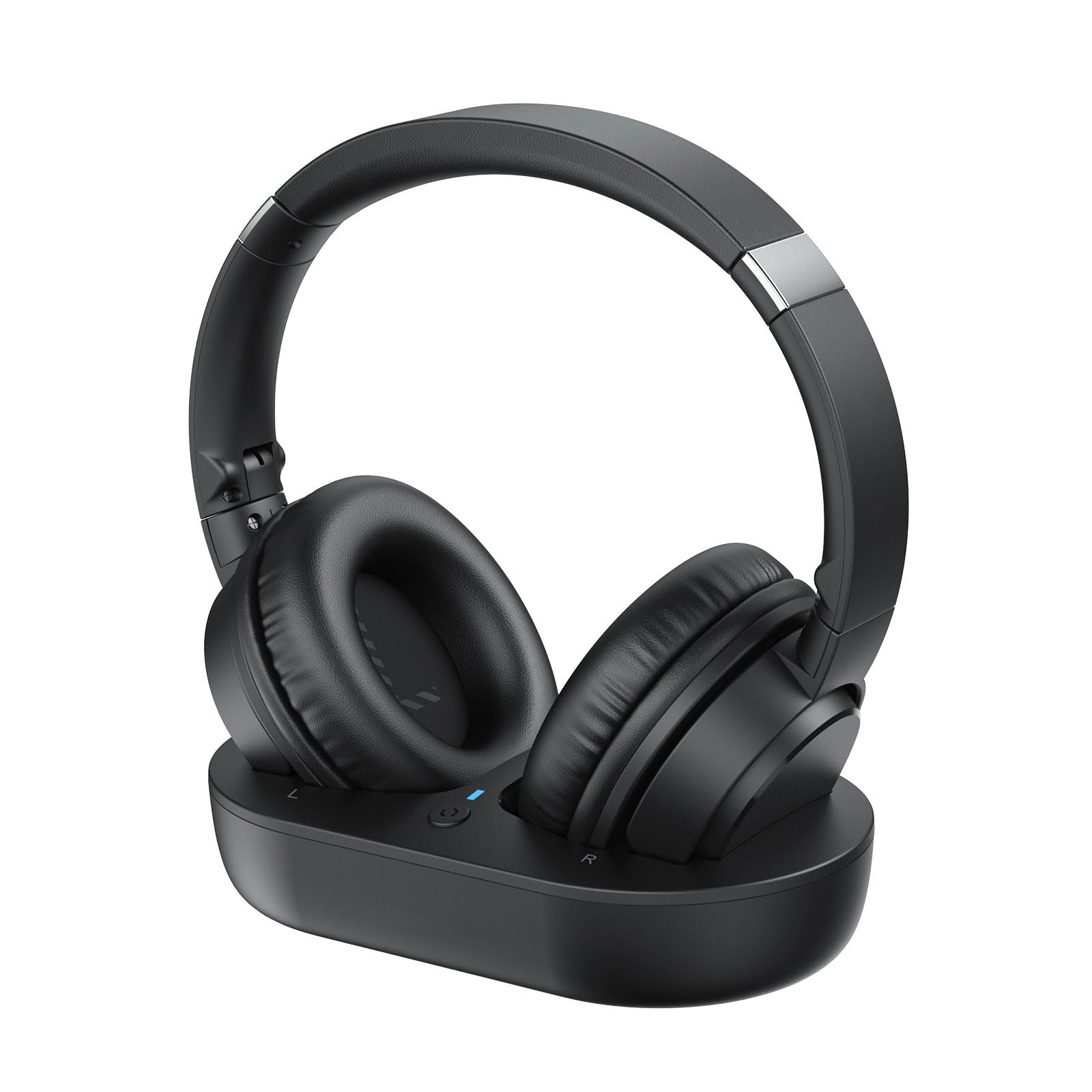
1. SKYCOMET Wireless Headphones for TV
Our pick — over 4★ from 750+ verified ratings; the strongest balance of quality and price.
The 65-hour workhorse that lets your spouse sleep while you binge.
This is the pick when battery anxiety doesn’t exist. You get up to 65 hours of playtime on a single charge — that’s well over two weeks of nightly episodes before you even think about the dock. When you do need power, you just drop the headphones onto the charging base, and the 2-hour charge tops them back up with no cables to fumble.
Dialogue stays locked to the picture thanks to Bluetooth 5.2 and an ultra-low latency of under 40ms, so you won’t see mouths move out of sync. The wireless range stretches to 30 meters (about 100 feet), which means you can walk to the kitchen for a drink without the audio cutting out. You won’t find a longer-lasting option in this lineup — the Earbay model trails at 40 hours, a 62% shorter runtime.
Setup is genuinely plug-and-play. The box includes Optical, 3.5mm AUX, and RCA cables, so it connects to most TVs on the market, and the 40mm dynamic drivers deliver sound that owners describe as clear, lag-free, and comfortable for hours. The soft protein leather ear cushions and lightweight adjustable headband make long movie nights easy on the ears.
What wins people over
- Huge 65-hour battery means charging is a rare event
- Dock doubles as storage and keeps everything tidy
- Works with Optical, AUX, and RCA connections
- Comfortable protein leather cushions for long wear
Know before you buy
- One owner found the included optical cable useless and needed their own
- It’s a full headphone, not a compact earbud, so it takes up more space
Reach for this if: you want maximum runtime and a simple dock that keeps everything charged and organized.
Look elsewhere if: you specifically want tiny earbuds that vanish into your ears rather than a full over-ear headset.
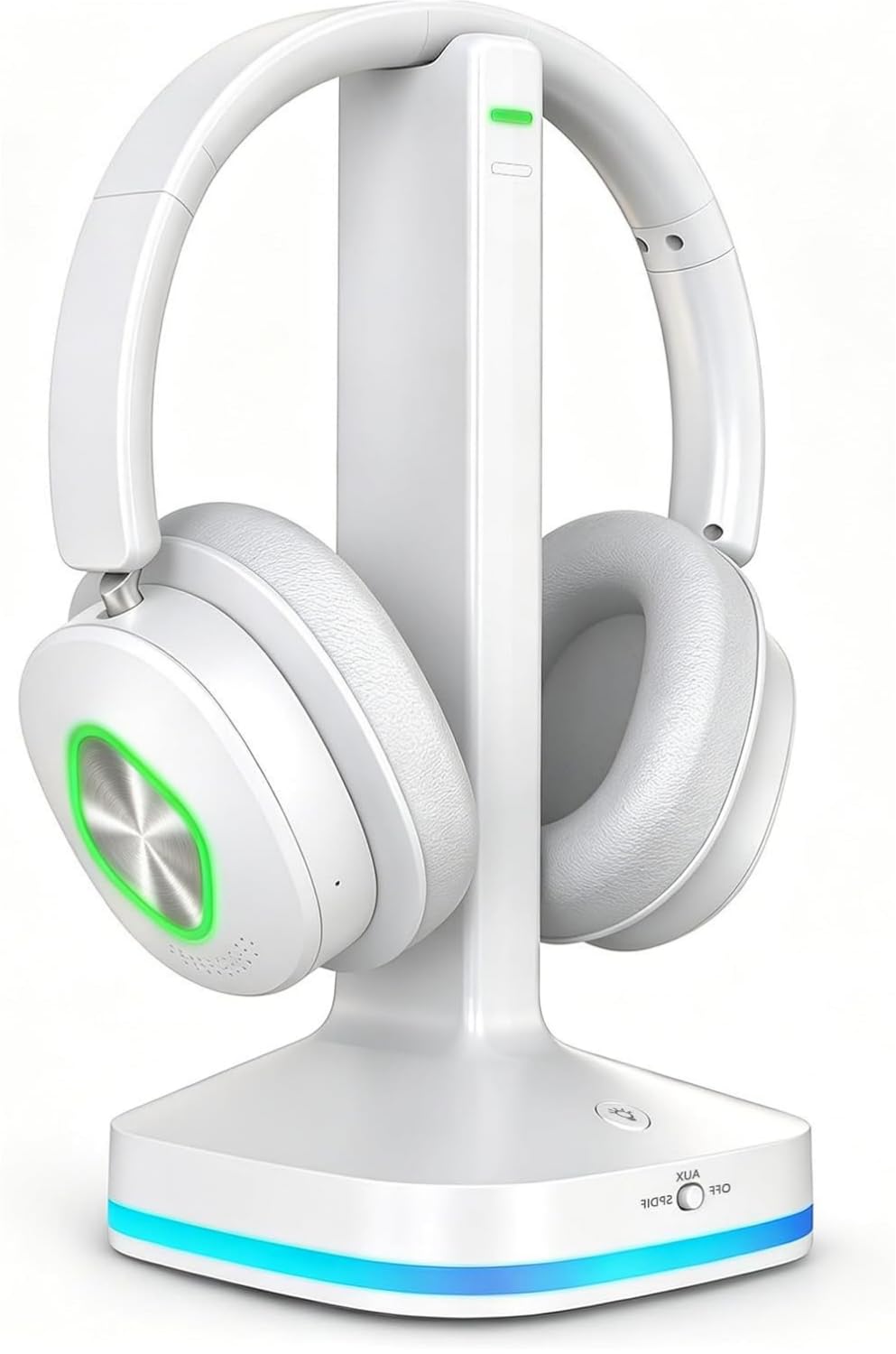
2. Earbay Wireless Headphones for TV
The easiest pairing you’ll find, built for non-technical viewers.
This set makes the whole TV-audio process nearly invisible. You connect the transmitter base to your TV via the included optical, RCA, or 3.5mm AUX cables, power it on, and the headphones pair automatically — no menus, no repeated Bluetooth setup. That’s a huge win for seniors or anyone who just wants to press play and watch.
Under the hood, it runs Bluetooth 5.4, the newest version in this roundup — a step up from the 5.2 in the SKYCOMET model above. It delivers under 40ms latency for perfect lip-sync during movies and sports, and the 100-foot range keeps audio with you from the living room to the kitchen. A quick 2-hour charge buys you up to 40 hours of playback, which comfortably covers a full week of daily viewing.
Owners consistently rave about the sound, with one noting they can finally understand every word while background music sits lower in the mix. The premium protein leather cushions with memory foam keep pressure off your ears, and a 3-star review offers an honest counterpoint: some found the fit a little loose and hoped for more noise isolation, so this is best if you prioritize easy setup over tight isolation.
Why it stands out: the 2-in-1 dock charges and pairs in one step, so there’s almost nothing to learn.
The honest trade-off: a few owners note the fit isn’t snug for everyone, and it doesn’t seal out background noise as much as the name suggests.
Who it suits: older viewers or anyone who wants a zero-frustration setup and doesn’t mind an over-ear style.
Who should pass: anyone who needs rock-solid noise blocking, since the fit leaves some ambient sound audible.
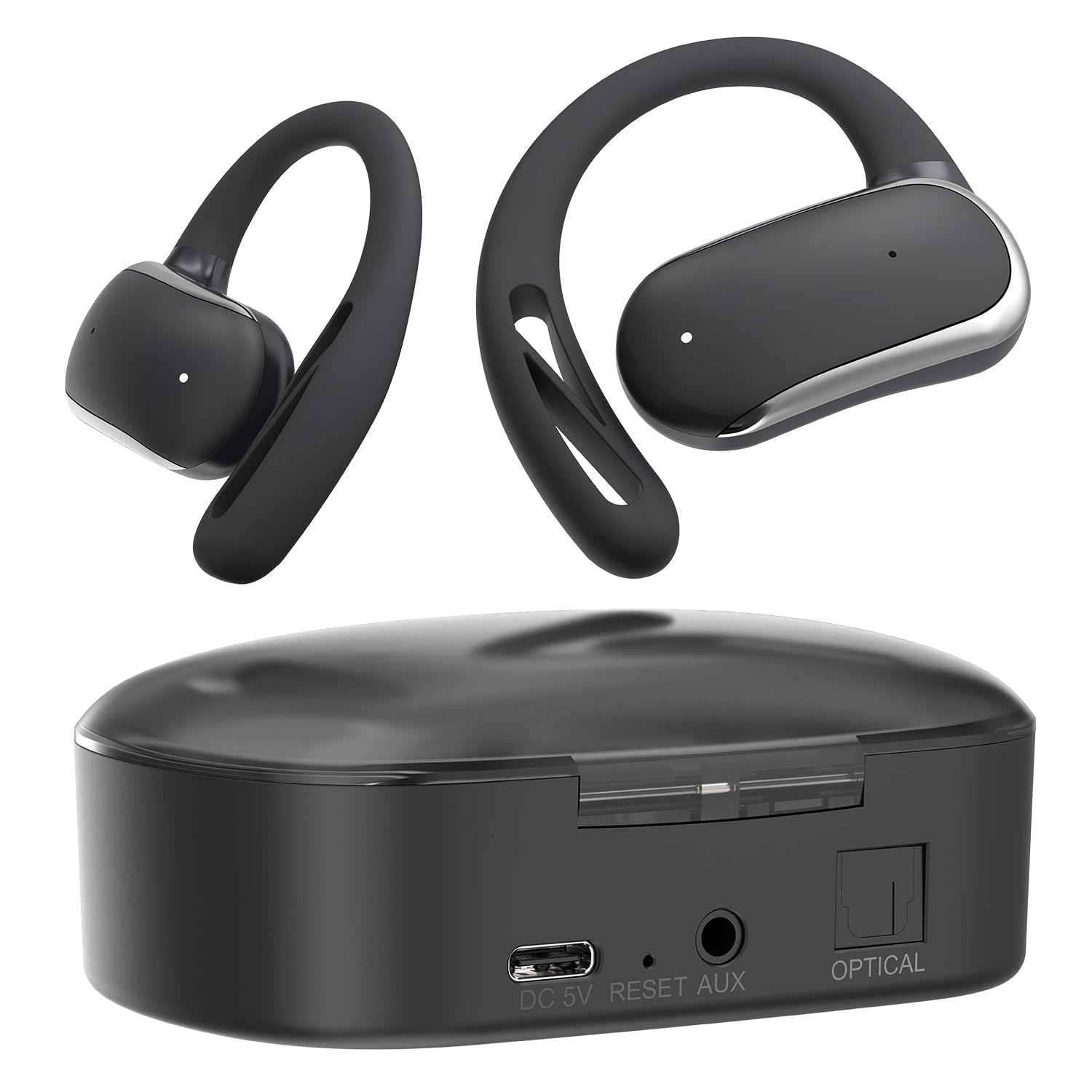
3. DCOLOR Open-Ear Wireless TV Earbuds
Zero pairing menus and earbuds that let you hear the room.
This one takes a completely different path: no Bluetooth at all. It’s a dedicated 2.4GHz system where the charging dock doubles as the transmitter. You connect the dock to your TV, pick up the earbuds, and they auto-connect instantly. For anyone who finds Bluetooth menus frustrating, this is the closest thing to a zero-setup experience in the list.
The open-ear hook design keeps the drivers resting just outside your ear canals, so you can watch TV while still hearing a family member call your name or a pot boiling over. The 13mm dynamic drivers and a latency of just 0.3ms mean audio stays perfectly locked to the picture — there’s essentially zero perceptible lag. You get a 50-foot range, and a 1-hour quick charge delivers 4 hours of playtime.
Honest truth: reliability is this model’s weak spot, and it’s the reason the rating sits lower than the rest. Several buyers report units that worked great for a day, then stopped charging or cut out after 20 minutes, which points to quality-control issues. If the open-ear concept appeals to you, this is the form factor to try — just know the longevity track record isn’t reassuring, and a few also found the fit finicky and the volume control marginal.
The appeal: true plug-and-play behavior and earbuds light enough to forget you’re wearing them.
The catch: durability concerns from multiple owners make this a gamble rather than a sure thing.
Best for: someone who hates pairing menus and wants earbuds that don’t block out the household around them.
Think twice if: you need something dependable for daily use, given the reports of failures within the first two days.
4. HomeSpot ANC True Wireless Earbuds

Active noise cancelling in a true-wireless TV bundle that pre-pairs itself.
If you want to shut out the world — or just the neighbor’s TV — this is the only pick in the roundup with active noise cancelling. The advanced ANC tech filters out external distractions, and the earbuds are pre-paired at the factory to the included Bluetooth transmitter. Take them out of the case and the audio starts; there’s no pairing dance to learn.
You get over 7 hours of playback per charge, extendable past 30 hours with the charging case that shows battery percentage on an LCD. The balanced armature drivers deliver clear sound, which is the one thing owners consistently praise. The touch controls are mapped for TV use: one tap on the right earbud raises volume, one tap on the left lowers it, and a double tap on the left cycles through ANC on, off, and ambient mode.
There’s a setup quirk to know about: when using the digital TOSLINK connection, your TV must output PCM audio format or you’ll get no sound at all. Reliability also draws mixed feedback — while some owners say these earbuds worked after other pairs failed, others report units that stop working or refuse to pair, and one buyer described theirs as extremely fragile after two drops on tile.
What stands out
- Real ANC blocks out household noise
- Factory pre-pairing means true pick-up-and-go
- LCD battery display on the case
- Works for an 87-year-old with hearing issues at near-mute TV volume
Fair warnings
- Some units arrive with connectivity problems
- Drop them on tile and they may not survive
- Requires PCM audio output on your TV’s optical connection
Grab it if: noise cancelling is non-negotiable and you want true-wireless earbuds, not a headband.
skip it if: you can’t tolerate the risk of a defective unit or fragile build.
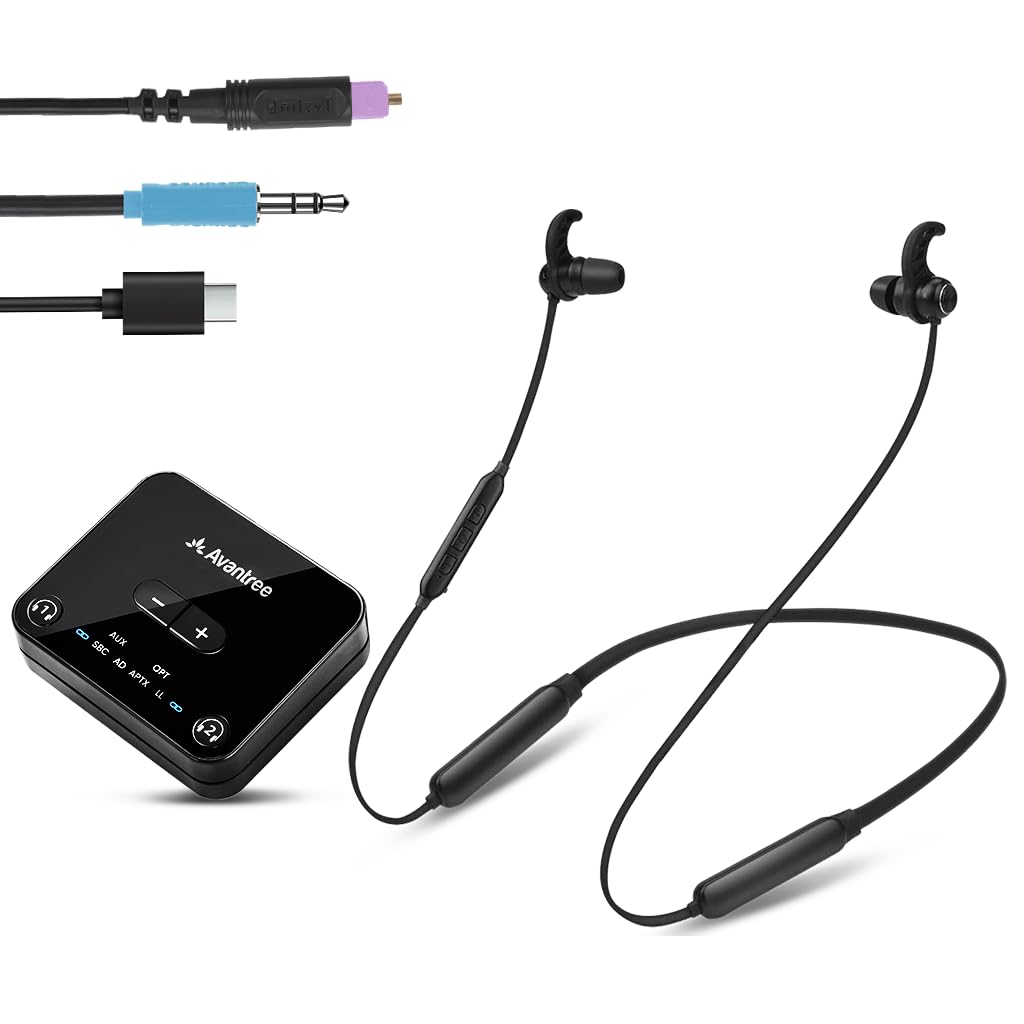
5. Avantree HT4186-Q Wireless Earbuds
Solves the one TV audio problem nobody mentions: optical volume that’s too quiet.
This neckband-style set from Avantree fixes a genuinely annoying issue. TVs with optical connections often output audio at low, unadjustable volumes, which makes dialogue hard to hear even with headphones on. The HT4186-Q has a built-in 6dB optical volume boost that pumps the signal up, so you’re not straining to catch quiet lines.
Latency stays under 50ms thanks to aptX Adaptive and a Qualcomm chipset, which Avantree backs with two decades of Bluetooth expertise. That keeps speech synced to the picture, a point owners confirm — one noted a slight echo but good sync overall, and another mentioned they mute the TV entirely and still hear everything through the earbuds. You get 20 hours of battery life from a 2-hour charge, and the Bluetooth 5.3 connection reaches 10 meters.
Before you buy, check your TV’s outputs: this works with Optical (TOSLINK), AUX (3.5mm), or RCA using the included transmitter, and it’s not compatible with HDMI-only TVs. There’s also a real-world flaw to weigh: one owner had their first shipment arrive with the transmitter and earbuds missing, though the replacement was sent quickly after an online form. A separate review flagged a loud connect/disconnect tone with no warning in the docs.
The defining feature: the 6dB optical boost that rescues weak TV audio without touching your volume settings.
What to watch: confirm your TV has the right ports, and be ready for a loud chime when the earbuds connect.
Choose this if: your TV’s optical output is too quiet and you want a neckband with long battery life.
Pass if: your TV is HDMI-only — this just won’t work without the right audio ports.
6. Avantree Medley Air Open-Ear Earbuds

The rare pair that lets you hear the TV privately while others keep the soundbar.
Here’s the scenario this solves: you want to watch at midnight during the World Cup while your family is asleep upstairs. The Medley Air uses an optical passthrough so you can wear the earbuds while the soundbar continues playing for everyone else in the room — or you can just mute the TV and listen alone. It’s the most flexible setup for a shared living space.
The open-ear design sits just outside your ears, so you stay aware of your surroundings and can even wear them comfortably with glasses. Audio is tuned to enhance speech clarity, making dialogue in news and dramas easier to follow without raising the TV volume. It connects via a Bluetooth 5 transmitter and runs 8 hours per charge, with a 1.5-hour recharge time.
The crowd is largely happy here — the sound quality gets more praise than anything else, and owners highlight easy setup, long battery, and a design that doesn’t smash hair or cover ears tightly in summer. The recurring trade-off is comfort and fit: some find the ear loops slightly small, and a few report soreness or awkwardness when leaning back, especially if you like to recline while watching.
Why it’s loved
- Optical passthrough lets others share the TV audio
- Speech enhancement makes dialogue clearer
- Open-ear style works with glasses
- Auto on/off with the charging base
Where it falls short
- Ear loops aren’t adjustable and run small
- Uncomfortable for some when leaning back in a recliner
- Only 8 hours per charge, on the lower end here
Ideal for: households where one person wants private audio without silencing everyone else’s soundbar.
Not for: glasses-wearers who need a totally customized fit and long recliner sessions.
7. Sony INZONE Buds Wireless Gaming Earbuds

The premium gaming option that brings PS5-quality sound to your TV setup.
If your TV time is mostly PlayStation, this is the earbud you’ve been looking for. The INZONE Buds connect through a 2.4GHz USB-C dongle for a high-speed, low-latency link at just 30ms — tighter than any Bluetooth option here. They’re designed with esports organization FNATIC, and Sony’s 360 spatial sound customizes itself to your ear shape to help you hear enemies before you see them.
The specs are impressive: 12 hours of continuous gaming on a single charge, stretching to 48 hours with the charging case through LE Audio. The 8.4mm dynamic drivers handle both in-game explosions and dialogue clearly, and active noise cancelling plus a transparency mode let you switch between isolation and awareness. On a PS5, you get on-screen status for volume, battery, and microphone mute.
The catch is real, though. Connectivity draws the most complaints — owners mention left earbuds that stop working entirely, sometimes after months of use, and the Bluetooth LE Audio isn’t compatible with iPhones. One buyer called their unit’s microphone quality terrible, and customization requires the PC-only INZONE Hub app. For pure TV-and-gaming use on a PS5, it’s unbeatable; for everyday phone calls and mixed use, it falls short.
The standout spec: 30ms latency via the USB-C dongle — the lowest in this lineup and perfect for competitive play.
The honest caution: left-eardrop failures and iPhone incompatibility make this a specialized purchase, not a universal one.
Buy it for: PS5 and PC gaming where low latency and spatial audio give you an edge.
Don’t buy it for: general TV watching on a non-Sony smart TV, where a dedicated TV transmitter is simpler.
Understanding the Specs
Latency (ms)
Latency measures the delay between what happens on screen and when you hear it. High latency makes actors’ lips move before their words arrive, which ruins dialogue-heavy shows. Look for a number under 50ms for a smooth experience. The lower the number, the tighter the sync — the DCOLOR model claims just 0.3ms, while the Sony and SKYCOMET options sit under 40ms.
Bluetooth Range
This tells you how far you can wander before the audio drops. A range of 30 meters (about 100 feet) means you can leave the room and still hear the TV. If you only ever sit on the couch, a shorter range is fine, but if you like to grab snacks during commercial breaks, longer is better.
Battery Life
TV sessions are long, so battery life per charge matters more than with standard earbuds. A 65-hour headphone like the SKYCOMET lasts weeks between charges. True-wireless earbuds like the HomeSpot check in around 7 hours per charge, so they rely on a charging case to get through a binge session.
Audio Output Connection
Your TV needs a way to send audio to the transmitter. The three common options are Optical (TOSLINK), a 3.5mm AUX jack, or RCA jacks. Most dedicated TV earbud kits include cables for all three. If your TV only has HDMI, you’ll need a model with its own Bluetooth connection or a separate adapter.
FAQ
Will any Bluetooth earbuds work with my TV?
What does low latency mean for watching TV?
What is an optical TOSLINK connection and do I need it?
Can I use TV earbuds with my soundbar?
How long do TV earbuds last on a single charge?
What is the difference between over-ear headphones and open-ear earbuds for TV?
Do these earbuds work with hearing aids?
Is a charging dock worth it for TV headphones?
Can I connect these to my phone or tablet too?
Why does my TV’s optical audio sound too quiet?
Final Thoughts: The Verdict
For most people, the earbuds for tv winner is the SKYCOMET Wireless Headphones because the 65-hour battery and simple charging dock eliminate the two biggest frustrations with TV audio: frequent charging and complicated setup. If you want a truly easy setup for a senior family member, grab the Earbay with its automatic pairing. And for gaming on a PS5, the Sony INZONE Buds are the clear pick with 30ms latency. Buyers consistently praise the SKYCOMET’s clear, lag-free dialogue and comfort — it’s the crowd favorite for a reason.
How We Picked
We do not accept paid placement. Every pick is matched to a real buyer and a real use-case; we do not hands-on test units.
Sources & Methodology
Specifications: manufacturer listings and product documentation. Review insights: verified customer reviews, as of August 2026. Pricing: not shown on this page (it changes often); check the current price via the retailer link.
As an Amazon Associate, WellFizz earns from qualifying purchases. This does not affect which products we feature.
Related Guides

Mo Maruf
I created WellFizz to bridge the gap between vague wellness advice and actionable solutions. My mission is simple: to decode the research and give you practical tools you can actually use.
Beyond the data, I am a passionate traveler. I believe that stepping away from the screen to explore new environments is essential for mental clarity and physical vitality.