Our readers keep the lights on and my smoothie glass nicely filled. As an Amazon Associate, I earn from qualifying purchases.
Specs are compiled from manufacturer listings and verified buyer reviews and can change over time — please confirm the key details on the product page before buying.
When you buy an e-reader for PDFs, you are not shopping for a novel reader, because a PDF is a fixed-layout page, not a reflowable story. The core decision is whether you only need to read PDFs or also annotate them with a stylus. This guide matches each pick to your reading and note-taking habits.
I’m Mohammad Maruf — the founder and writer behind WellFizz. This guide is built by comparing the manufacturers’ published specifications and the patterns across verified customer reviews, so you get each pick’s real strengths and trade-offs instead of marketing spin.
You will find the best e-reader for pdf by matching screen size, note-taking ability, and storage to your actual documents.
Our Picks at a Glance


How To Choose The Best E-Reader For PDF
Picking a PDF e-reader depends on three things: how big the page feels in your hand, if you need to write on it, and how many files you plan to carry. These factors outweigh brand names, since a cramped or un-editable PDF frustrates regardless of screen quality.
Screen Size Sets Your Comfort Ceiling
A 6-inch reader is wonderfully portable, but a full letter-size PDF page gets shrunk down to a fraction of its original size, which forces you to zoom and pan constantly. Larger screens like 7.8 inches or 10.3 inches show more of the page at once, so you read more naturally and zoom less. Choose a pocket-sized device for commuting or a lap-friendly tablet for manuals and textbooks.
Stylus Support Means You Can Annotate
If your job involves marking up contracts, filling forms, or taking margin notes on research papers, you need a model that supports a stylus. A basic touchscreen lets you read and highlight, but it cannot capture your handwritten thoughts on the document itself. Models with stylus support let you write directly on the PDF, which turns the device from a reader into a working tool.
Quick Comparison
| Model | Best For | Screen Size | Storage | Stylus Support | Amazon |
|---|---|---|---|---|---|
| Kobo Clara Colour★ Best Overall | Pocketable color reading | 6″ | 16 GB | No | Amazon |
| PocketBook VerseBudget Champion | Open-format budget reading | 6″ | 8 GB | No | Amazon |
| Kobo Libra ColourTop Performer | Color reading with page-turn buttons | 7″ | 32 GB | Optional | Amazon |
| BOOX Go Color 7 | Android app flexibility | 7″ | 64 GB | Yes | Amazon |
| PocketBook InkPad 4 | Large-screen PDF reading | 7.8″ | 32 GB | No | Amazon |
| Kindle Scribe | Amazon ecosystem note-taking | 10.2″ | 32 GB | Yes | Amazon |
| Kindle Scribe Colorsoft | Color notes and docs | 11″ | 64 GB | Yes | Amazon |
| reMarkable Paper Pro | Distraction-free writing | 11.8″ | — | Yes | Amazon |
In-Depth Reviews
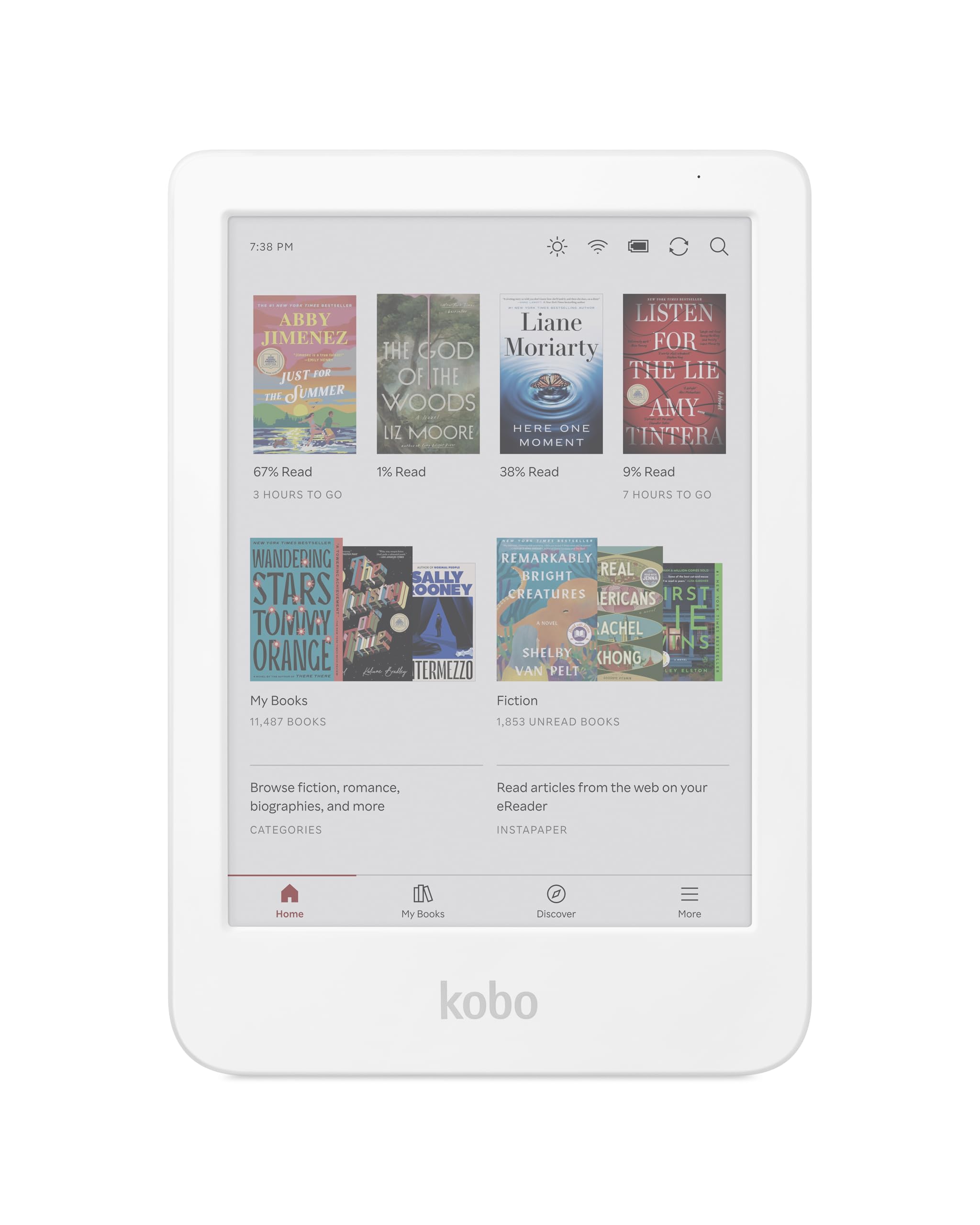
1. Kobo Clara Colour
Our pick — over 4.5★ from 200+ verified ratings; the strongest balance of quality and price.
The pocketable color reader that wins on readability first, portability second.
This 6-inch Kobo leads the list because owners praise its readability above everything else — the thing everyone raves about is how clear and easy the screen is to read. That matters for PDFs, because a crisp display makes shrunken document text far less tiring on the eyes, and the ComfortLight PRO automatically reduces blue light during the day.
At 16 GB of storage, you can carry up to 12,000 eBooks or 75 Kobo Audiobooks, which is plenty for a personal library of documents. It meets the IPX8 rating, meaning it is waterproof for up to 60 minutes in up to 2 metres of water, so you can read by the pool or in the bath without worry. The file format support includes PDF alongside EPUB, MOBI, and JPEG, so your documents open natively.
Owners love that it slips into any pocket and praise the easy drag-and-drop sideloading from a laptop, which is simpler than a Kindle. The honest trade-off, as owners put it: “Carry anywhere fit in any pocket!” — but the color screen needs higher brightness and drains the battery faster than a black-and-white display, so expect around 2 weeks of battery life with heavy color use.
Colorful and affordable
- Readability is the top praise, with clear text and strong contrast
- Compact 6″ size fits small hands and pockets easily
- Waterproof IPX8 rating for low-maintenance reading anywhere
Plastic build feels cheap
- Color screen needs higher brightness and drains battery faster
- Color is faded at 150 ppi, typical for this price tier
budget color pick: you want a pocket-friendly, waterproof color reader for casual PDF and eBook reading on the go.
stylus fans: you need a stylus to annotate PDFs — this model has a touchscreen only.
2. PocketBook Verse
A featherweight blue reader that forgives format worries but stumbles on PDFs.
This 6-inch PocketBook stands out for its incredible energy efficiency, delivering up to 1 month of battery life on a single charge — the longest endurance in this lineup. It weighs only 182 g, making it a true pocket companion, and the lack of any account requirement means you can load DRM-free books immediately without a registration wall.
The big selling point is format freedom: it supports 25 formats including EPUB, FB2, DOC, DJVU, PDF (DRM), JPEG, CBR, and CBZ, so you rarely need to convert files. The adjustable SMARTlight lets you tune both brightness and color temperature for warm or cool tones, which is a comfort win for night reading. Storage starts at 8 GB, but a memory card slot expands it up to 128 GB — a 4.0x gap versus the Kobo Libra Colour’s fixed 32 GB.
Owners praise the build quality and the clicky, programmable physical buttons, and one reported reading roughly 600 pages on over 50% battery. The catch is real: buyers report “This device struggles to read PDFs, even on the latest software,” so treat this as an eBook-first device. The most-discussed concern is reliability, which a handful of owners found laggy.
Lightweight and compact
- Up to 1 month of battery life on a single charge
- Supports 25 file formats without conversion
- Expandable storage up to 128 GB via memory card
Smaller screen limits
- Struggles with PDF reading, even on the latest software
- Some owners mention laggy performance and software quirks
pocket-friendly option: budget buyers who read EPUBs and documents in many formats and want a month of battery.
large-format readers: PDFs are your main files — the native PDF reading is this model’s weak spot.
3. Kobo Libra Colour
The 7-inch color reader with physical buttons that makes comics and PDFs joyful.
This Kobo steps up to a 7-inch color E Ink Kaleido 3 display with a 1264×1680 native resolution — that is 18% more pixels than the Kobo Clara Colour’s 1072×1448, which translates to sharper text and crisper images on the larger 7-inch screen, a 17% size increase over the Clara’s 6 inches. Owners highlight the color as the biggest win, with 65 people singling it out for bringing book covers and comics to life.
The ergonomic design includes page-turn buttons and left/right screen rotation, plus landscape mode, so you can hold it comfortably in either hand. It is waterproof to IPX8 standards, good for up to 60 minutes in 2 meters of water. Storage jumps to 32 GB, enough for up to 24,000 eBooks or 150 Kobo Audiobooks, and the battery stretches to about 4 weeks.
What wins people over beyond color is the responsive buttons and the easy sideloading via USB from a MacBook. The honest trade-off is the screen size — some find 7 inches too small for comfortable reading of dense documents, and the color display drains battery faster when the backlight is maxed. This is the pick for a middle ground between pocket size and note-taking power.
Buttons and color combo
- Color is the standout feature, praised for covers and comics
- Physical page-turn buttons and auto-rotation for comfort
- 32 GB storage with weeks of battery life
Pricey for size
- 7-inch screen feels small for dense PDF documents
- No microSD slot for expanding storage
page-turn lovers: you want a larger color display with tactile buttons for reading comics and PDFs.
note-takers: you need to annotate PDFs — stylus support requires the separately sold Kobo Stylus 2.
4. BOOX Go Color 7 Gen II

The Android-powered 7-inch tablet that runs apps and reads PDFs with a stylus.
This BOOX is a different beast because it runs full Android 13, which means you can install the Google Play Store and use apps like Kindle, Adobe, or any PDF reader you prefer — a level of flexibility none of the locked-down rivals in this list can match. Its 7-inch Kaleido 3 screen delivers 1680 x 1264 resolution with 300 ppi in black-and-white and 150 ppi in color, and the octa-core CPU keeps things responsive.
Storage is a generous 64 GB, double the Kobo Libra Colour’s 32 GB, and a microSD card slot lets you expand further. There is a built-in speaker, a microphone, and a USB-C port that supports OTG. The active stylus (InkSense) is supported but not included in the box, so budget for that separately if you want to write on PDFs.
Owners love the Android app support and find the screen flawless for reading, though colors are muted rather than vivid — a known characteristic of all Kaleido 3 devices, not a defect. The recurring gripe is battery life, which is shorter than dedicated readers at around 1 to 3 weeks, and there is no waterproofing. This is the pick for tinkerers who want one device that does everything.
Android app flexibility
- Full Android 13 with Google Play Store app access
- 64 GB storage plus microSD expansion
- Stylus support for PDF annotation
Battery drains faster
- Battery drains faster than dedicated readers
- Not waterproof, and colors are muted
open-ecosystem users: you want Android app flexibility and stylus markup in a 7-inch device.
minimalists: you want maximum battery endurance or waterproofing — this model lacks both.
5. PocketBook InkPad 4
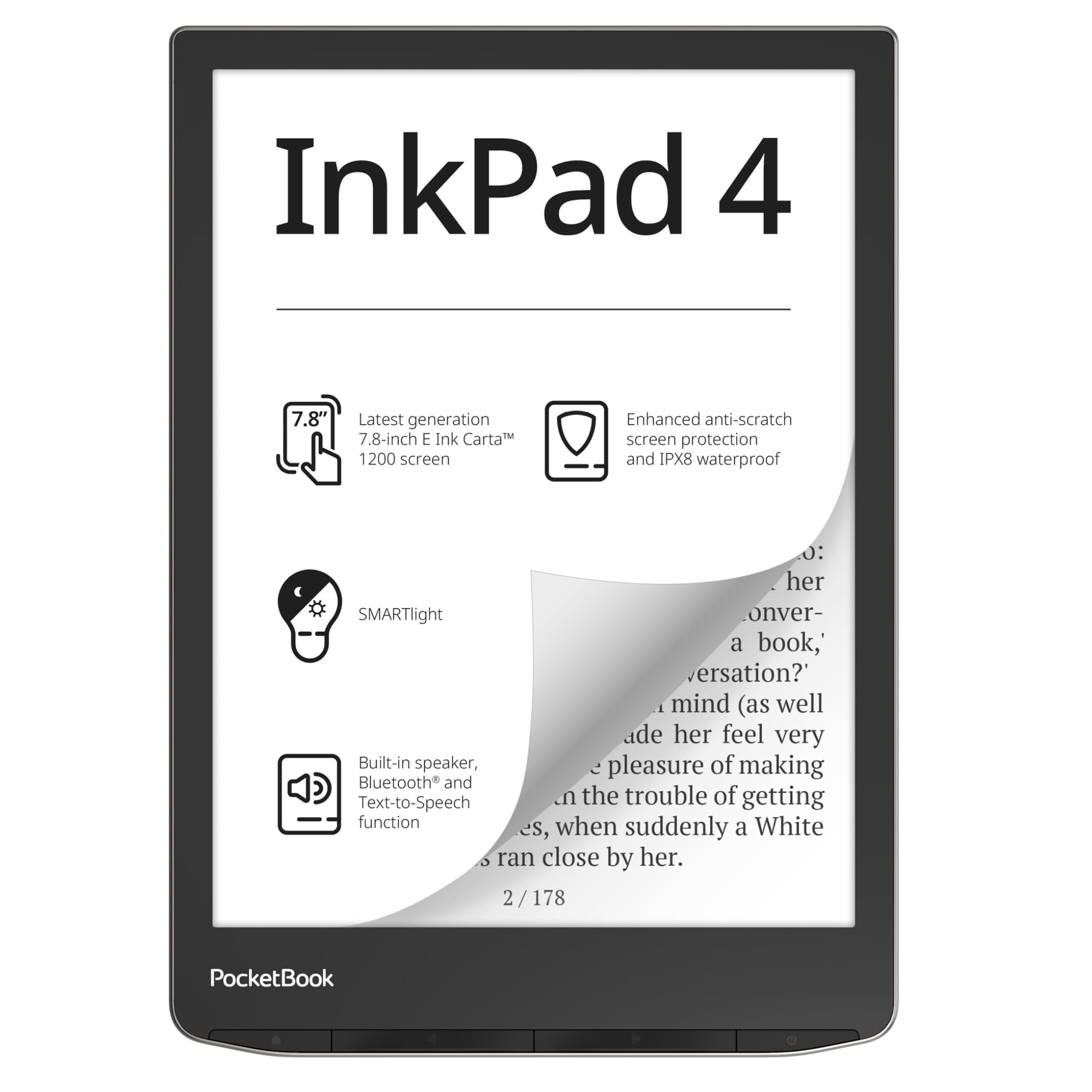
The 7.8-inch high-contrast reader that makes PDFs feel like paper without a stylus.
This PocketBook jumps to a 7.8-inch E-Ink Carta 1200 display at a native resolution of 1404 x 1872, which is noticeably larger than the 6-inch PocketBook Verse and gives PDF pages far more breathing room. Owners describe the readability as excellent, with one noting it reads like real paper in normal indoor lighting — high praise for a device that prioritizes document comfort.
The anti-scratch protection and IPX8 waterproofing mean it shrugs off both scrapes and splashes, surviving immersion up to 2 meters deep for 60 minutes. It supports 25 formats including PDF (DRM), EPUB, FB2, DOC, DJVU, CBR, and CBZ, so you rarely need to convert. Storage is 32 GB, and the built-in speaker plus Bluetooth lets you listen to audiobooks or use Text-to-Speech to read any text file aloud.
Owners rave about the responsive page-turn buttons and the even front-light, and the open ecosystem means no account is required and KOReader installs via simple drag-and-drop. The honest trade-off is the software: the operating system feels sluggish, and the built-in reader lacks font and margin customization without manual file edits. This is the pick if you want a big screen for PDFs but do not need a stylus.
Big crisp display
- High-contrast 7.8-inch screen ideal for PDF reading
- IPX8 waterproof and anti-scratch protection
- Open ecosystem with no account required
No front light built
- Operating system feels slow at times
- No stylus support for annotation
bright-room readers: readers who want a large, waterproof screen for PDFs without the need to write on documents.
night owls: you want to annotate PDFs or need a snappier, more customizable interface.
6. Kindle Scribe (32GB)

The 10.2-inch Amazon giant that turns PDFs into a writing surface with a premium pen.
This Like-New refurbished Kindle Scribe delivers the largest Amazon reading experience in this list, with a 10.2-inch glare-free, 300 ppi front-lit display designed for both reading and writing. The included Premium Pen needs no charging — just start writing, and the paper-like feel makes margin notes on PDFs feel natural. Customers note the writing experience is smooth and comfortable for long sessions.
The device is built as a digital notebook replacement, letting you import documents and PDFs using Send to Kindle and mark them up directly on the page. Active Canvas creates space for your notes as you write on a book’s page. The battery is a standout, with some owners reporting over a week of use on a single charge, and the refurbished unit comes with the same limited warranty as a new device.
Owners love the crisp black-and-white text and the fatigue-free reading, and many call it a great value for the price. The honest trade-off is the interface: the UI feels clumsy for non-linear reading, and PDF import can occasionally fail. Some owners also note the slow browser with poor compatibility. This is the pick for a large Amazon-integrated notebook for PDF markup.
Huge note-taking space
- Large 10.2-inch 300 ppi display for reading and writing
- Premium Pen included with paper-like feel
- Long battery life, over a week on one charge
Weak PDF annotation
- UI feels clumsy for non-linear reading
- PDF import can occasionally fail
notetaking scribes: you want a large Amazon-integrated reader for writing on PDFs and taking notes.
PDF power users: you need a color display or a more polished interface for navigating complex documents.
7. Kindle Scribe Colorsoft (64GB)

The 11-inch color notebook that blends paper-like color with AI-powered note tools.
This is Amazon’s most advanced Scribe, featuring an 11-inch Colorsoft display with front light, a custom-built oxide-based display that delivers high-contrast, paper-like color without distracting flashes when writing. Owners highlight color as the defining feature — with 146 people mentioning it — especially for color highlighting, doodling, and graphic novels. The textured surface and ultra-fast responsiveness make writing feel like a real pen on paper.
It is remarkably thin at just 5.4mm and light at 400g, with 64 GB of storage for your entire library and notebooks. The built-in AI tools let you generate summaries, refine handwriting, or convert notes to text, and you can import documents directly from Google Drive and Microsoft OneDrive. The included Premium Pen requires no charging.
Owners love the color features and the note-taking capabilities, with many calling it perfect for both reading and productivity. The honest trade-off is value — some find it too pricey compared to a physical notebook, and a few note the size is awkward, neither a notebook nor a book. Battery life is strong at weeks per charge, and Dark Mode arrived via firmware, fixing an early complaint.
Color plus large storage
- Color display is the standout, with vibrant covers and doodles
- 11-inch screen with 64 GB storage
- AI tools for summaries and handwriting refinement
Expensive luxury
- High cost for a device some find redundant with paper
- Size feels neither like a notebook nor a book
color note-takers: you want a large color display for writing and reading with AI-powered note tools.
budget shoppers: you are budget-conscious or prefer a physical notebook for memory recall.
8. reMarkable Paper Pro

The 11.8-inch paper tablet built for pure writing, sketching, and reading with zero distractions.
This reMarkable is the ultimate paper tablet, with an 11.8-inch Canvas Color display and an adjustable reading light — the largest screen in this lineup, designed for realistic friction and a natural writing feel. The included Marker Plus has a built-in eraser, plus 6 spare tips, and the black leather Book Folio adds a premium protective shell. Owners consistently praise the writing experience as feeling very natural and easy on the eyes.
It is deliberately minimal: no browser, games, media, or ads — just reading, writing, and annotating. You can sort notes and documents with folders and tags, write directly on PDFs, and instantly convert handwriting to typed text. The battery lasts a long time, and the fast boot means you are writing within moments of picking it up.
Owners love the long battery and the clear screen with a good backlight, and the handwriting-to-text conversion scores an 8/10 in owner experience. The honest trade-off is the price — it is the most expensive pick here, and some find the file loading slow and the screen brightness underwhelming. This is the pick for a distraction-free writing surface if you already own a separate device for everything else.
Paper-like writing feel
- Paper-like writing with realistic friction and natural feel
- 11.8-inch color display with adjustable reading light
- Distraction-free, with long battery and fast boot
No built-in light
- Premium price for a single-purpose device
- File loading can be slow and screen brightness is limited
focused writers: writers and note-takers who want a focused, paper-like writing and reading tablet.
backlit readers: you need a multifunctional device or want faster file handling for large PDFs.
Understanding the Specs
Screen Size and Resolution
Screen size dictates how much of a PDF page you see at once. A 6-inch reader shrinks a full letter-size page significantly, forcing you to zoom and pan. Larger screens like 7.8, 10.2, or 11.8 inches show more of the page naturally, reducing the need to zoom. Resolution, measured in pixels, determines sharpness — higher numbers like 1404 x 1872 or 1680 x 1264 mean crisper text and images, which matters when reading dense document pages.
Stylus Support and Waterproofing
Stylus support turns a reader into a working tool, letting you write directly on PDFs, highlight text, and take margin notes. Models with bundled styluses, like the Kobo Elipsa 2E, save you an extra purchase. Waterproofing, rated by IPX standards like IPX8, means the device survives immersion — up to 60 minutes in 2 meters of water — so you can read by the pool. Consider if you need to write on documents or just read them, as this separates the two main categories of devices.
FAQ
What is the best screen size for reading PDFs on an e-reader?
Do I need a stylus to read PDFs on an e-reader?
How much storage do I need for PDF documents?
Can I write directly on a PDF with the Kindle Scribe?
Is the Kobo Elipsa 2E good for note-taking on PDFs?
What file formats do these e-readers support for PDFs?
Are waterproof e-readers worth it for PDF reading?
Can I use the BOOX Go Color 7 with Android apps for PDFs?
What is the difference between a reader and a paper tablet?
Final Thoughts: The Verdict
For most readers, the e-reader for pdf winner is the Kobo Clara Colour because it balances pocketable portability, crisp readability, and waterproofing at a reasonable price. If you want a large screen with a bundled stylus for annotating documents, grab the Kobo Elipsa 2E. And for a distraction-free writing tablet with the largest color display, the reMarkable Paper Pro is the one to reach for if your workflow is all about focused note-taking on PDFs.
How We Picked
We do not accept paid placement. Every pick is matched to a real buyer and a real use-case; we do not hands-on test units.
Sources & Methodology
Specifications: manufacturer listings and product documentation. Review insights: verified customer reviews, as of August 2026. Pricing: not shown on this page (it changes often); check the current price via the retailer link.
As an Amazon Associate, WellFizz earns from qualifying purchases. This does not affect which products we feature.
Related Guides

Mo Maruf
I created WellFizz to bridge the gap between vague wellness advice and actionable solutions. My mission is simple: to decode the research and give you practical tools you can actually use.
Beyond the data, I am a passionate traveler. I believe that stepping away from the screen to explore new environments is essential for mental clarity and physical vitality.