Our readers keep the lights on and my smoothie glass nicely filled. As an Amazon Associate, I earn from qualifying purchases.
Specs are compiled from manufacturer listings and verified buyer reviews and can change over time — please confirm the key details on the product page before buying.
Color e-ink tablets have quietly solved the two biggest complaints about reading on a glowing screen: the eye strain and the glare. The panels now show book covers and comics in color, yet still read like a printed page in direct sunlight, with a battery that lasts for weeks instead of hours. This guide breaks down the 8 models worth your money, separating the ones that nail the writing feel from those that just check a spec sheet.
I’m Mohammad Maruf — the founder and writer behind WellFizz. This guide is built by comparing the manufacturers’ published specifications and the patterns across verified customer reviews, so you get each pick’s real strengths and trade-offs instead of marketing spin.
From the waterproof 7-inch Kobo to the 11.8-inch reMarkable, here is how to choose the best e-ink tablet for reading and note-taking that actually fits your daily routine.
Our Picks at a Glance


How To Choose The Best E-Ink Tablet
You are choosing between a device that replaces your paper notebook and one that replaces your physical bookshelf. Getting that clear first saves you from spending a premium on features you will never use.
Reading vs. Writing: The Core Divide
For reading novels, a 6- or 7-inch reader with physical page-turn buttons gives you the longest battery and a comfortable grip. If you need to annotate PDFs, sketch, or keep meeting notes, choose a larger 10-inch-plus screen with a high-pressure-sensitivity stylus (a pen that responds to how hard you press). A 10.3-inch screen shows a full page of text without zooming, so your eyes do less work during long study sessions.
Open Android vs. Closed Ecosystem
Some tablets run Android, letting you install the Kindle app, Libby, or even Spotify directly. Others use a locked operating system that only reads specific file formats and connects to their own store. Open systems give you flexibility, but they often come with a shorter battery life and a more complex interface. Closed systems are simpler, ad-free, and can last up to 4 weeks on a charge, but you are tied to one store ecosystem.
Waterproofing and Stylus Support
A waterproof rating (often IPX8) means the device survives poolside reading or a sudden rain shower, though you should always check the exact depth and time limits. For note-takers, the stylus is the real test. Some pens require charging, while battery-free options like the Huion and reMarkable rely on electromagnetic resonance, so they never run out of power and deliver that paper-like friction.
Quick Comparison
| Model | Best For | Screen Size | Storage | Weight | Amazon |
|---|---|---|---|---|---|
| Kobo Libra Colour★ Best Overall | Waterproof reading & notes | 7″ | 32 GB | 7.05 oz | Amazon |
| Kobo Clara ColourBest Value | Pocket-friendly reading | 6″ | 16 GB | 6.14 oz | Amazon |
| BOOX Go Color 7Most Versatile | Android apps in your pocket | 7″ | 64 GB | 6.9 oz | Amazon |
| Huion Ink EB1011 | Digital note-taking | 10.3″ | 64 GB | 0.99 lb | Amazon |
| reMarkable Paper Pro Move | Distraction-free writing | 7.3″ | — | 248.4 g | Amazon |
| BOOX Note Air 5 C | Large-screen Android work | 10.3″ | 64 GB | 15.2 oz | Amazon |
| Kindle Scribe Colorsoft | Book readers who write | 11″ | 32 GB | 400 g | Amazon |
| reMarkable Paper Pro | Full-size paper tablet | 11.8″ | — | 1.2 lb | Amazon |
In-Depth Reviews
1. Kobo Libra Colour
Our pick — 4.5★ from 550+ verified ratings; the strongest balance of quality and price.
The color e-reader that finally makes the jump from Kindle feel worth it.
You get a 7-inch Kaleido 3 color screen that brings book covers and comics to life, wrapped in a body that is 7.05 ounces and shaped for one hand. The physical page-turn buttons are the first thing readers rave about, especially when you flip the device to use them with either hand. It carries up to 24,000 eBooks in 32GB of storage, so your entire library fits with room to spare.
Buyers report “Battery fantastic vs Kindle Colorsoft,” and they back it up with a 4-week average battery life. The IPX8 rating means you can read for up to 60 minutes in up to 2 meters of water, which covers poolside lounging without the stress. Color is the feature that wins people over, hands down, and they also praise the build quality and the responsive buttons that make page-flipping satisfying.
What wins people over is the color handling — owners note it is superior to the Colorsoft for sketching and mind maps. The trade-off is the closed system: no Kindle books, no SD card slot, and fixed 32GB storage. The screen is also smaller than a full notebook, which some find tight for long-form PDF reading at 7 inches.
What Owners Love
- Color quality and covers that pop
- Waterproof IPX8 for low-maintenance reading
- Page-turn buttons and auto-rotation
What to Know
- No Kindle book compatibility
- Fixed storage with no SD expansion
Reach for it if: you want a waterproof, button-driven color reader that lasts a month on a charge.
Look elsewhere if: you live inside the Kindle ecosystem and cannot move your library.
2. Kobo Clara Colour
The pocket-sized color reader that undercuts the big-name rivals.
Owners mention this is “better value than Kindle Colorsoft ( cheaper),” and the math holds up: you get a 6-inch E Ink Kaleido 3 display, 16GB of storage, and a 2-week battery in a 6.14-ounce shell. It is lighter than the 7-inch Libra above by a noticeable margin, which makes it the one that disappears into a bag or jacket pocket. The pocket-friendly size is exactly what owners call out as the top reason to buy it.
Readability is what owners praise most — the matte, glare-free screen stays comfortable for long textbook sessions, and the adjustable warm light protects your eyes at night. On a single charge the 2-week battery life holds up well, especially with Wi-Fi switched off, which many owners discover extends it further. It also gives you multi-color highlighting and Dark Mode, so your notes stand out without a backlight blasting your face.
At 6 inches, the screen is genuinely small for comics with dense panels or for PDFs that require constant zooming. The color rendering is also a step more muted than the 7-inch Libra, so serious comic readers should size up. If you mostly read novels and want color covers without the bulk, this is the pick that makes sense.
Owner consensus: The clarity and size win it, but the speed and color screen draw mixed reviews.
Perfect for: Students and commuters who read for hours and want something light enough to forget they are carrying.
3. BOOX Go Color 7 Gen II
An Android tablet that reads as well as your Kindle, but plays nicer with everything else.
This 7-inch BOOX runs full Android 13, which means you can install the Kindle app, Libby, Spotify, or any reading app you already use, all on a 1680 x 1264 screen that hits 300 ppi for crisp text. The 64GB storage is a 4.0x gap over the 16GB Kobo Clara, giving you serious room for PDFs, audiobooks, and apps. It is just 6.9 oz and 0.25 inches thin, so it slips into a bag without adding bulk.
Owners love the page-turn buttons and the configurable front light, which lets you dial in warm or cold tones for any lighting. The dual speakers and built-in microphone turn it into a basic audiobook and voice-note device, expanding what a reader can do. The microSD card slot means you can keep adding storage, so your library is never truly full.
The color screen here is muted compared to a phone or tablet, and the battery life of 1-3 weeks is shorter than the Kobo, so heavier users will charge weekly. One owner found the Kindle app glitchy and went back to an old Oasis, which is the reality check: this is a versatile tool, not a polished single-purpose reader. The stylus is sold separately, so factor that into the budget if you plan to write.
It runs Android, so it is easy to use and compatible with other reading apps.
Why It Wins Fans
- Full Android with Google Play Store access
- Expandable storage via microSD
- Page-turn buttons and dual speakers
Honest Trade-offs
- Shorter battery life than dedicated readers
- Muted colors and occasional app glitches
Pick this if: you want one device that reads Kindle, Kobo, and PDFs without switching hardware.
Think twice if: you want a no-fuss reader that lasts a full month — the Kobo Libra is the stronger choice.
4. Huion Ink EB1011

The digital notebook that turns your handwriting into editable text with a battery-free pen.
The 10.3-inch screen hits 227 PPI with a 1404×1872 resolution, so full pages of PDFs and textbooks render clearly without constant zooming. It weighs just 0.99 pounds and is 0.25 inches thin, making it lighter than most paper planners you would carry. The battery-free stylus delivers 8192 levels of pressure, giving you the precise control of a premium drawing pad without ever needing a charge.
Owners love how the anti-glare, fully laminated glass kills reflections, which makes outdoor reading and note-taking genuinely comfortable. The 12-day battery life and 64GB storage (expandable up to 2TB) mean you can leave the charger at home during a long trip. Smart features like handwritten-to-text conversion and split-screen reading let you take notes while studying a document side by side.
The recurring gripe is the proprietary pen: it is the only stylus that works, and the tips wear down, though replaceable nibs and refills are included. Owners also note the native backup format only opens in Huion’s own app, so you need to export to PDF for important notes. It excels at digitizing notes, but it is not a full tablet replacement—some apps like NFC tools simply fail.
As owners put it: “It’s not an iPad, but it does what it designed for well.”
Standout feature: The battery-free pen with 8192 pressure levels and a tail eraser makes writing feel easy.
The catch: You are locked into Huion’s pen and app ecosystem for full functionality.
5. reMarkable Paper Pro Move

The ultraportable color notebook that fits in a jacket pocket, dedicated to distraction-free thought.
The 7.3-inch Canvas Color display in a 248.4-gram frame is smaller than a paperback, which is exactly what makes it the one you actually take everywhere. reMarkable is famous for the writing feel, and the Marker Plus here maintains that paper-like friction that owners describe as genuinely satisfying. It comes with 6 spare Marker tips, so the pen stays sharp for a long time.
Owners praise the portability — it fits easily in backpacks and purses, and the writing experience feels natural and responsive. The handwritten-to-text conversion lets you search through your notes and share them with a tap. The 9 different pen styles and colors give you room to sketch and diagram, not just write lines of text.
The limitation is reMarkable’s philosophy: no apps, no email, no web browsing — just writing and reading. One owner found this too restrictive, missing a live calendar and note-editing tools. A subscription is also required for the full cloud search features, which some see as an added cost on top of an already premium device.
The High Points
- Ultraportable at 248.4 g
- Natural paper-like writing feel
- Distraction-free by design
What Limits It
- No third-party app support
- Subscription needed for full cloud features
Ideal for: focused writers and sketchers who want a digital notebook that protects their concentration.
Not for: anyone who needs email, calendars, or web access on the same device.
6. BOOX Note Air 5 C

A serious 10.3-inch workhorse that runs Android apps and weighs barely more than a paperback.
The 10.3-inch Kaleido 3 panel delivers 2480 x 1860 resolution in black-and-white at 300 ppi, which is sharp enough for dense PDFs and textbooks. It is 5.8 mm thin and 430 g, so it feels like a slim clipboard rather than a tablet. With 6GB of RAM and 64GB of storage, it handles multiple open documents and Android apps without the stutter you get on basic readers.
Functionality is what owners praise most — the Android app support means you can run the Kindle app, reading apps, and even note-taking tools side by side. The BOOX stylus offers 4096 levels of pressure sensitivity, and any Wacom-compatible pen works, so you are not locked into one accessory. The built-in dual speakers and microphone turn it into a multimedia device for audiobooks and voice memos.
The display is noticeably darker than a standard LCD, and customers note it needs the front light on to look its best, which cuts into battery life. Owners also flag the writing feel as scratchier than the reMarkable, with a pen that can feel cheap in comparison. Owner consensus is that the color is impressive and the functionality strong, but the brightness and writing experience are mixed.
One owner summed it up: “Excellent execution — hard to choose between this and the Supernote.”
Why it stands out: A rare combination of large screen, Android freedom, and a fingerprint-recognition power button for security.
The downside: The dim display and average battery require the front light and a charger nearby.
7. Kindle Scribe Colorsoft

Amazon’s largest color screen yet, built for readers who also want a serious notebook.
The 11-inch Colorsoft display is the defining feature here — it delivers paper-like color that owners say suits comic pages perfectly, with crisp text for programming and technical books. At just 5.4 mm thin and 400 g, it is remarkably light for an 11-inch device, so long reading sessions do not tire your arms. The included Premium Pen needs no charging, with a textured surface that mimics pencil on paper.
Color is the standout feature, with 148 owners praising it for highlighting and doodling in different colors while taking notes. Owners also love the reading experience, noting the large format suits picture books and technical documents that need space. Google Drive and Microsoft OneDrive integration works smoothly, so you can import documents directly for markup.
The built-in AI tools generate summaries, refine handwriting, and convert notes to text, which saves real time on long projects. Owners note the occasional palm rejection issue while writing, and the pen itself is wider than the device body, so it can knock off easily in a bag. The value is a common point of debate, but for an avid reader, the writing feel and screen size justify the price.
Reviewers point out the battery lasts about a week with regular use, which is solid for an 11-inch color device.
What Impresses
- Large 11″ color display, thin at 5.4 mm
- AI note tools: summaries and text conversion
- Google Drive and OneDrive integration
What to Watch
- Occasional palm rejection while writing
- Pen can knock off the side in a bag
Choose this if: you want Amazon’s ecosystem with a large color screen for reading and writing.
skip it if: you need an open Android system — BOOX offers more app flexibility.
8. reMarkable Paper Pro
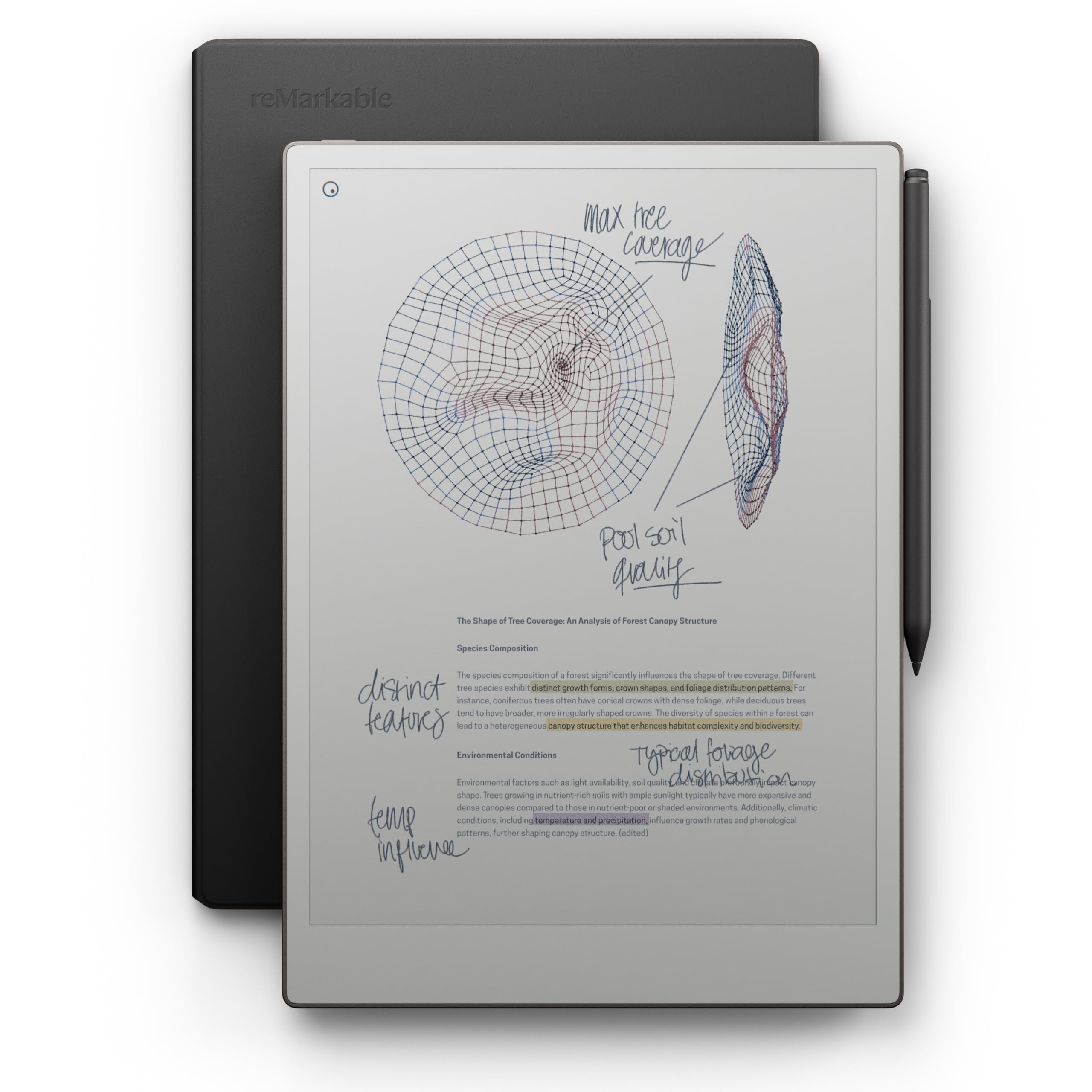
The full-size 11.8-inch paper tablet that finally brings color to the reMarkable line.
With an 11.8-inch Canvas Color display, this is a true full-size paper tablet that replaces a physical notebook for meetings, study sessions, and daily journaling. It weighs 1.2 pounds and comes with the Marker Plus, 6 spare tips, and a premium black leather Book Folio, so you have everything you need from the start. The low-glare display reflects natural light, so you can read and write outdoors without eye strain.
Owners praise the build quality — the leather case feels premium, and the writing experience stands out for a digital notebook. The long battery life and fast boot time keep it ready when you are, and the distraction-free design means no notifications interrupt your flow. Handwriting-to-text conversion scores around 8 out of 10 for accuracy, according to owners.
The biggest complaint is the price: several owners feel the color version costs too much for what it adds, especially when a monochrome model would do the job. There are also reports of an occasional unit with color fading or screen lines, so it is worth checking the return policy. If you want color highlighting and sketching, it is a joy, but if you only need monochrome notes, the premium is hard to justify.
One owner called it “excellent digital notebook!” with natural writing and a battery that lasts a long time, on a screen that is easy on the eyes.
Why It Shines
- Full-size 11.8″ color display
- Premium leather folio included
- Distraction-free with excellent writing feel
Reality Check
- High price for color you may not need
- No apps, email, or web access
Invest here if: you want the largest, most paper-like writing surface and the premium leather build.
Consider cheaper if: color is a nice-to-have rather than a need — the monochrome reMarkable 2 covers writing at a lower cost.
Understanding the Specs
Kaleido 3 Panel & PPI
Kaleido 3 is the color e-ink technology used by Kobo, BOOX, and reMarkable. It layers color filters over the standard black-and-white e-ink panel. This is why most color e-ink screens show 300 ppi for black text but drop to 150 ppi for color — a real trade-off that affects how sharp photos and comics look. The screen can also look grayer than a tablet, which is normal for the technology, not a defect.
Front Light vs Backlight
E-ink tablets do not glare like a phone because they use a front light, which shines light onto the screen rather than through it. This keeps text readable in bright sunlight, which a backlit LCD cannot do. Warm and cold light modes let you shift color temperature, reducing blue light for nighttime reading.
Storage and Expandability
Storage determines how many books and files you can carry. 16GB holds roughly 6,000-8,000 ebooks, while 64GB quadruples that. Some devices like the BOOX Go Color 7 include a microSD slot, letting you expand storage indefinitely. Others like the Kobo use fixed storage, so choose your capacity carefully from the start.
Battery Life Reality
E-ink is famous for weeks-long battery life, but color screens and Android apps drain it faster. A dedicated reader like the Kobo Libra hits 4 weeks, while an Android slate like BOOX may last 1-3 weeks depending on usage. If you leave Wi-Fi off and stick to static pages, expect the longer end of the range.
FAQ
Is a color E-Ink screen as sharp as a regular tablet?
Can I install the Kindle app on a Kobo tablet?
Do all E-Ink tablets come with a stylus?
How long does the battery last on a color E-Ink tablet?
What does the IPX8 waterproof rating actually mean?
Is an Android E-Ink tablet better than a closed e-reader?
Can I convert my handwritten notes to text on these tablets?
How much storage do I need?
Which E-Ink tablet is best for reading comics?
Do these tablets get dark mode for night reading?
Final Thoughts: The Verdict
For most buyers, the e-ink tablet winner is the Kobo Libra Colour because it balances waterproof durability, a 4-week battery, and a 7-inch color screen that owners adore for under the premium tier. If you want maximum Android app flexibility and a larger screen for work, grab the BOOX Note Air 5 C. And for the purest, most paper-like writing experience with the biggest display, the reMarkable Paper Pro is the one to reach for.
How We Picked
We do not accept paid placement. Every pick is matched to a real buyer and a real use-case; we do not hands-on test units.
Sources & Methodology
Specifications: manufacturer listings and product documentation. Review insights: verified customer reviews, as of August 2026. Pricing: not shown on this page (it changes often); check the current price via the retailer link.
As an Amazon Associate, WellFizz earns from qualifying purchases. This does not affect which products we feature.
Related Guides

Mo Maruf
I created WellFizz to bridge the gap between vague wellness advice and actionable solutions. My mission is simple: to decode the research and give you practical tools you can actually use.
Beyond the data, I am a passionate traveler. I believe that stepping away from the screen to explore new environments is essential for mental clarity and physical vitality.