Our readers keep the lights on and my smoothie glass nicely filled. As an Amazon Associate, I earn from qualifying purchases.
Specs are compiled from manufacturer listings and verified buyer reviews and can change over time — please confirm the key details on the product page before buying.
If your recordings pick up every keyboard clack, AC hum, and room echo, the problem is usually your microphone type, not your voice. A dynamic USB microphone uses a moving-coil capsule that naturally ignores off-axis sound, so it focuses on your voice and rejects the desk noise a condenser mic would amplify. This guide sorts through the best dynamic USB mics for podcasting, streaming, and gaming, and it breaks down which one fits your setup, your room, and your budget.
I’m Mohammad Maruf — the founder and writer behind WellFizz. This guide is built by comparing the manufacturers’ published specifications and the patterns across verified customer reviews, so you get each pick’s real strengths and trade-offs instead of marketing spin.
Whether you are a podcaster, a Twitch streamer, or a remote worker, the best dynamic usb microphone will capture clean vocals without the background noise that plagues standard condenser mics.
Our Picks at a Glance


How To Choose The Best Dynamic USB Microphone
Dynamic USB mics are the go-to for creators who record in normal, untreated rooms. Unlike condenser mics, which pick up everything, a dynamic capsule is less sensitive, so it naturally keeps your voice centered and pushes background noise to the side. The choices come down to connectivity, controls, and software — and knowing which of those you actually need.
USB Only or USB Plus XLR?
A pure USB mic is plug-and-play — no interface, no mixer, just a cable to your computer. A USB/XLR hybrid gives you both: plug it into your PC today, and later connect it to a professional mixer or audio interface for a studio-grade signal path. If you are just starting out, USB is enough. If you want a mic that can grow with your rig, the hybrid is the safer long-term buy.
What Does the Cardioid Pattern Really Do?
A cardioid polar pattern captures sound mainly from the front and rejects it from the sides and rear. For a dynamic mic, this is the key to clean audio in a noisy room — your voice is in front, and the fan noise or keyboard clicks are off to the side, so they get ignored. Some mics use a tighter supercardioid pattern for even more side rejection, which helps if you game in a loud environment.
Why Monitoring and Mute Controls Matter
Live streamers need to hear themselves without delay, so a headphone jack with zero-latency monitoring is a real feature, not a luxury. A physical mute button, ideally a tap-to-mute design, saves you from fumbling with software when you need to cough or take a call mid-stream. On-board gain knobs and headphone volume controls let you adjust levels without opening a settings menu.
Quick Comparison
| Model | Best For | Connectivity | Audible Noise | On-Board Controls | Amazon |
|---|---|---|---|---|---|
| Shure MV7+★ Best Overall | Premium podcast & stream quality | USB-C & XLR | 20 dB | LED Touch Panel, Auto Level | Amazon |
| FDUCE SL40+Budget Champion | Budget-friendly dual connectivity | USB-C & XLR | 95 dB | Mute, Gain, Monitoring Volume | Amazon |
| TONOR TD520SStyle Pick | RGB aesthetics & value | USB & XLR | — | Quick Mute, Gain, Volume | Amazon |
| FIFINE K688T | Complete kit with boom arm | USB & XLR | 130 dB | Tap Mute, Gain, Monitor Volume | Amazon |
| Samson Q9U | Broadcast-style hybrid | XLR & USB-C | 78 dB | Mute, Mid Boost, Low Cut | Amazon |
| Logitech G Yeti GX | Gamers wanting RGB & software | USB | 78 dB | Smart Audio Lock, Mute | Amazon |
| MAONO PD400X | Software EQ on a budget | USB & XLR | 78 dB | 3-in-1 Knob, Tap Mute | Amazon |
| RØDE PodMic USB | Broadcast build & DSP effects | USB-C & XLR | 25 dB | Headphone Volume, Mute | Amazon |
| BEACN Dark | Advanced software routing | USB-C | 78 dB | DSP Effects, RGB | Amazon |
In‑Depth Reviews
1. Shure MV7+
Our pick — over 4.5★ from 550+ verified ratings; the strongest balance of quality and price.
The broadcast standard that makes your voice sound like it is already mastered.
The MV7+ is the mic that ends the search for most creators. The MV7+ puts out a remarkably low self-noise of 20 dB, which is a fraction of the 95 dB you get from the FDUCE SL40+ — practically a 4.8x gap — so your recordings stay clean and hiss-free even at higher gain. It pairs that with Voice Isolation Technology and built-in DSP (a digital signal processor that shapes your sound in real time) to filter out fan noise and room echo, which is why owners say it captures every nuance of their voice.
Setup is genuinely plug-and-play. Buyers report it “just works” — one switched from a Yeti Nano because of background noise and had no issues connecting to a MacBook Pro M4, with the software working right away. The LED touch panel gives you a 16.8 million-color light show and tap-anywhere mute, which sounds flashy but is genuinely handy mid-stream. You also get Auto Level Mode, which automatically adjusts your gain based on how far you are from the mic and how loud you speak.
The dual USB-C and XLR connectivity means you can run it straight into your PC today, or wire it to a mixer when you build out a pro studio. MOTIV Mix app access adds reverb and fine-tuning. The trade-off is that it weighs 3.6 pounds and is bulky on a desk, and it is the priciest of the USB-first options here — but owners consistently call it worth it for podcast, voice-over, and streaming work.
What wins people over
- Studio-grade voice capture with real-time noise reduction
- Zero-latency headphone monitoring for live streaming
- OBS-certified, with USB-C and XLR to fit any rig
What to weigh
- Heavy 3.6 lb build with a bulky footprint
- Premium price that not every beginner needs
Who it’s for: Serious podcasters and streamers who want a proven broadcast mic with room to grow.
Who should look elsewhere: Casual chat users who only need basic clarity and want to spend far less.
2. FDUCE SL40+
A dual-connection workhorse that costs less than most mics’ shock mounts.
The SL40+ is the entry-level pick that refuses to sound entry-level. The SL40+ supports up to 96KHz/24bit audio resolution (a high-fidelity digital format that captures more detail than standard CD-quality), and its cardioid pickup focuses on your voice while reducing environmental noise. Owners describe it as a “solid, entry level” mic that is easy to set up and sounds great for online chatting and gaming, with one calling it perfect for podcasting.
You get both USB-C and XLR connections, plus a one-key mute function and the ability to switch the volume control between mic and headset in USB mode. Real-time monitoring with a headphone jack lets you hear yourself without lag. The all-metal construction and included boom stand give it a professional look that drew compliments right from the start.
The honest catch is audible. It has a self-noise spec of 95 dB, which is the loudest of our comparison set — 4.8x noisier than the Shure MV7+ at 20 dB — so it is not in the same league as premium mics. And as owners mention, there is a “POP sound if I say a word with P in it,” so plosive filtering is the weak point here. But on pure value, it is hard to argue with the price for a USB/XLR mic with a boom arm.
The strengths
- Dual USB-C and XLR connectivity on a budget
- 96KHz/24bit high-resolution audio capture
- Boom stand and all-metal body included
The trade-offs
- Noticeable self-noise at 95 dB compared to premium mics
- Popping on P sounds without stronger filtering
Best for: New podcasters and gamers who want dual connectivity without spending big.
skip it if: You need broadcast-grade silence and are ready to pay for it.
3. TONOR TD520S
A dynamic RGB glow that matches its surprisingly pro audio chops.
This mic wins on personality first. The TD520S packs a Dynamic RGB Light system with 4 modes and over 11 color combinations, plus 4 brightness levels from 0% to 100%, all controlled by a rear button. Owners love that it “matches with my desk” and takes up little space, with one calling the clamp “much more sturdy than my previous mic.”
Audio-wise, it delivers a 60Hz-17KHz frequency response and 120dB max SPL (sound pressure level — how loud a sound it can handle before distorting). The cardioid pattern and built-in noise reduction work to eliminate background noise, with a recommended recording distance of 2-4 inches. It runs both USB and XLR connections, and the included metal stand extends from 10cm to 20cm tall, with 3/8″ and 5/8″ threads for standard boom arms.
There is a caveat that shows up in owner experience: the sound can come across a bit “tinny” on its own, but it tunes up nicely with a compressor and EQ in software like OBS. Notably, the noise canceling only works in USB mode, not XLR mode. Reviewers also note it is a better fit for friends and game chat than for professional-level streaming — treat it as the fun, capable mid-tier choice, not a studio replacement.
What stands out
- Customizable RGB with 4 modes and 11+ color combos
- 60Hz-17KHz response with 120dB max SPL
- Expanding metal stand included, no extra purchase
What to know
- Noise canceling is USB-only, not active over XLR
- Sound leans tinny until you EQ it in software
Reach for it if: You want a good-looking desk mic with RGB that handles game chat and casual streaming.
Look elsewhere if: You need pro-grade streaming audio straight from the start.
4. FIFINE AmpliTank K688T

One box that gives you a studio boom arm, shock mount, and solid dynamic sound.
The K688T is the all-in-one starter kit that removes the guesswork. The FIFINE K688T comes with a sturdy metal suspension boom arm that handles up to 2 kilograms — enough to hold the mic securely and cut collisions and vibrations during streams. It stretches 180° vertically and 135° horizontally, so you can position it exactly where you need it. Owners call the arm “very durable and versatile,” noting the shock mount keeps light desk vibrations from affecting the sound.
Sound-wise, it offers a 130dB SPL handling and a frequency range of 50Hz-16KHz. The dynamic capsule with a cardioid pattern knocks down noise from hard drives and computer fans, and the included windscreen and shock mount further suppress plosives and low-frequency rumble. You get both USB and XLR connections, a tap-to-mute button, a gain knob, and a headphone monitoring jack with its own volume knob.
Cloud-voice clarity is a common theme in owner feedback — it sounds “like a professional set up from the start.” The main limitation is the arm itself: it lacks a stem bend, so it takes effort to adjust, which one owner flagged as a flexibility issue. But for a complete kit at this price, it is a remarkably easy recommendation for new creators.
The package
- 2 kg-rated metal boom arm with 180° vertical reach
- 130dB SPL handling for loud, distortion-free peaks
- Shock mount and windscreen for clean, natural sound
The limits
- Arm has no stem bend, making fine adjustments fiddly
- Budget-tier positioning may not satisfy pro users
Ideal for: First-time podcasters who want everything — mic, arm, mount, cables — in one kit.
Not for: Those who need precise, flexible boom arm articulation.
5. Samson Q9U
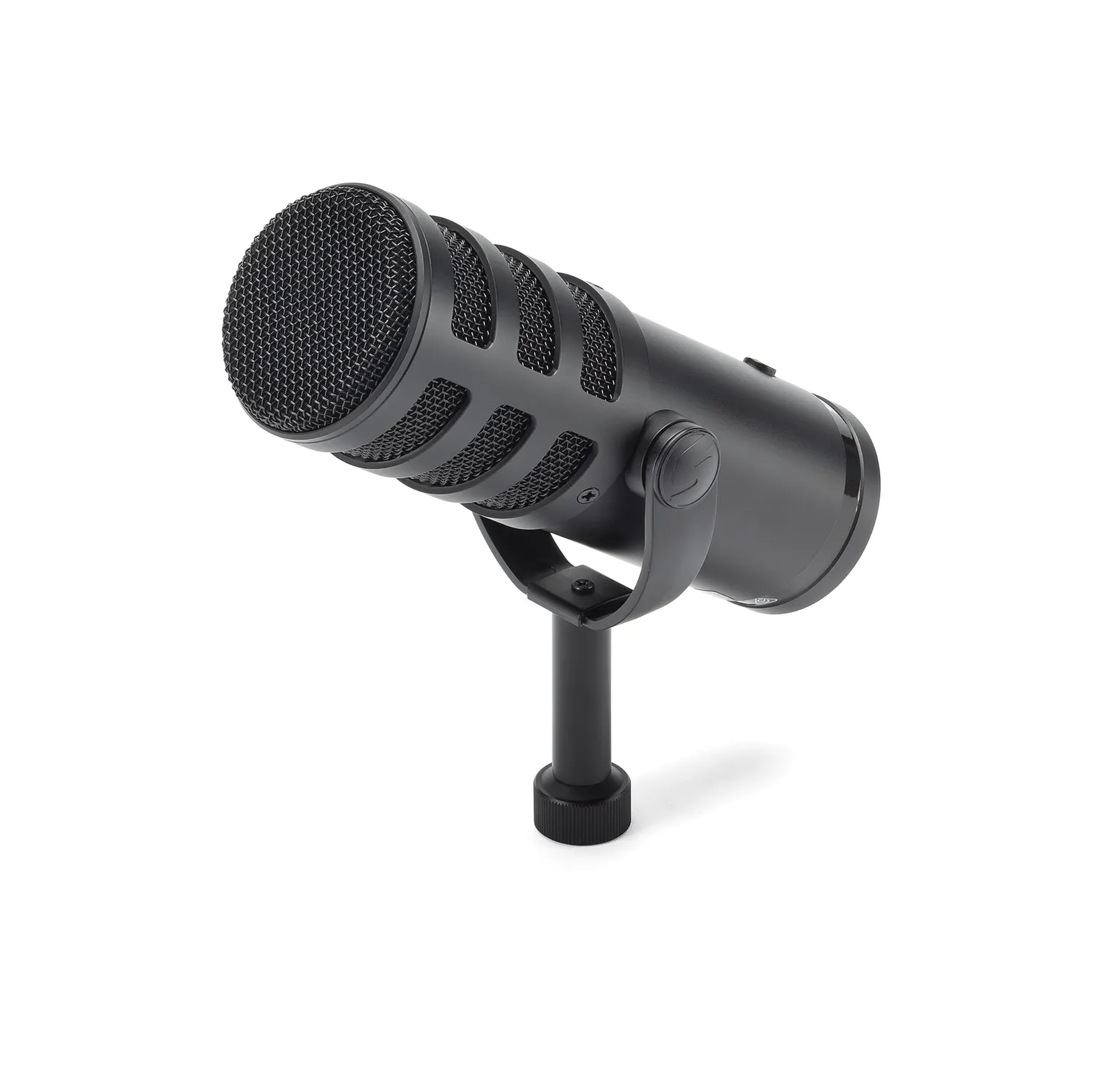
A tank of a broadcast mic that punches well above its price class.
The Q9U is the hybrid that serious creators grow into. The Q9U delivers a 24-bit/96kHz analog-to-digital converter (a high-resolution digital capture with no driver downloads on Mac or Windows), so your recordings are vibrant and detailed. Its modern dynamic capsule with a neodymium magnet provides plenty of output, meaning you do not need external gain devices to drive it through a mixer. Owners describe it as “heavy, sturdy, and easily transportable.”
You get both XLR analog and USB-C outputs, a cardioid polar pattern for excellent off-axis rejection, and an internal pneumatic shock mount that isolates the capsule from mechanical noise. A dual-layer windscreen minimizes popping for a crisp broadcast sound. On-board, there is a mute switch that silences both outputs, a mid-boost and a low-cut filter, and zero-latency headphone monitoring.
A few owners have hit a real durability issue — some units saw volume drop after months of use, and one had a replacement fail the same way. Note that the Q9U does not come with a stand, mount adapters, or an XLR cable, so factor those into your setup. When it works, customers note it rivals mics costing twice as much.
The highlights
- 24-bit/96kHz hi-def conversion over USB-C
- Neodymium dynamic capsule with strong output
- Internal shock mount and dual-layer windscreen
The risks
- Occasional volume-drop failures reported after months
- No stand, adapters, or XLR cable in the box
Choose it for: Broadcast-style recording where you need pro output without extra gain gear.
Think twice if: You want a ready-out-of-box kit with a stand included, or maximum long-term reliability assurance.
6. Logitech G Yeti GX

The gaming-first dynamic mic that treats keyboard clicks like they do not exist.
The Yeti GX is built with gamers in mind, and it shows in the supercardioid pattern. The Yeti GX uses a supercardioid dynamic capsule — a tighter pickup pattern than standard cardioid — that specifically ignores key clicks and focuses on your voice. It pairs with LIGHTSYNC RGB across two separate light zones that you can sync with other Logitech G gear in the G HUB software. Owners are blunt about the effect: “insanely crisp and clear,” and it does “a really good job of blocking out” the white noise from an AC unit.
The custom software is the real star here. Blue VO!CE filters and effects let you add studio tools like Smart Audio Lock, which uses an analog limiter to prevent clipping (distortion when you get loud) and a downward expander to reduce ambient noise. That is directly useful for streamers who get excited and yell. One owner notes you have to fine-tune it through the software to get it “to sound right,” but once you do, the quality is strong.
Connectivity is USB only — this is not a hybrid — so if you plan to move to a mixer later, this is not your mic. Build quality gets consistent praise, and the supercardioid pattern is the defining feature for loud, clicky environments. Just know that some buyers find the price steep for a USB-only dynamic, and it requires the software to open up its best sound.
Why gamers love it
- Supercardioid pattern ignores keyboard clicks
- Smart Audio Lock prevents clipping on loud moments
- Dual-zone LIGHTSYNC RGB syncs with Logitech gear
The catches
- USB-only, so no XLR upgrade path
- Needs G HUB tuning to sound its best
Best for: Streamers and gamers in the Logitech ecosystem who want clean voice over clacking keys.
Not for: Creators planning a professional XLR setup down the line.
7. MAONO PD400X

A metal-bodied hybrid that brings studio EQ software to a mid-range price.
The PD400X delivers pro sound-shaping without the pro price tag. The PD400X combines a dynamic capsule with a cardioid polar pattern, so it rejects unwanted background noise even in imperfect rooms. Its metal chassis and professional appearance earn consistent praise, and it is “loved and trusted” by users worldwide, according to the brand. Run it on USB for plug-and-play, or switch to XLR for connecting to interfaces, mixers, or a portable PA system.
The defining feature is the unique 3-in-1 digital knob. One dial controls mic gain, headphone volume, and monitor mix, with a tap-to-mute key and an LED indicator. In USB mode, the MAONO Link app open up an Advanced Mode where you can adjust EQ, limiter, compressor, and more — the kind of control usually reserved for much pricier gear. Owners describe the sound as “clear, rich” with minimal background noise.
At 40-16kHz frequency response, it tracks your voice well across the range. The catch: functionality gets mixed feedback, with some owners reporting minor issues, and the sound can pick up background noise depending on positioning — a good shock mount or boom arm helps. For the money, though, owners say it outperforms dynamic mics that cost significantly more.
The standouts
- EQ, limiter, and compressor via MAONO Link software
- 3-in-1 knob for gain, volume, and monitor mix
- All-metal build with 40-16kHz response
The caveats
- Mixed functionality feedback on some units
- May still pick up room noise depending on setup
Reach for it if: You want deep software EQ control without paying premium money.
Look elsewhere if: You want zero software dependency and a fully physical-control experience.
8. RØDE PodMic USB

The broadcast legend goes USB, bringing studio DSP with a sleek white finish.
RØDE built its name on broadcast mics, and the PodMic USB brings that pedigree to the USB era with a low self-noise of 25 dB — dramatically cleaner than the 95 dB FDUCE SL40+, keeping your recordings hiss-free. It offers both XLR and USB-C connectivity, so it works with traditional audio interfaces and mixers as well as your computer. Owners call its construction “truly premium” and note it is suitable for daily professional use.
The special sauce is the RØDE Central companion app, which open up internal DSP and effects including the legendary APHEX Aural Exciter and Big Bottom processors — tools that add broadcast polish to your voice. As a USB mic, the integrated headphone port delivers zero-latency monitoring with a dedicated volume control. An internal shock mount reduces knocks and vibration, while a built-in pop filter plus an external pop filter tame plosives for natural voice reproduction.
Owners note the sound is “crisp, warm” and near Shure SM7B quality with EQ applied, at roughly half the cost. The honest caveats: it is heavy at 896 g and needs a sturdy boom arm, and the software is weak — one owner called it “poor” and Discord-incompatible, though the mic retains its settings after you uninstall it. Sound quality itself is rated mixed by some, with a few finding the output too low, so plan to boost gain in software.
The strengths
- 25 dB self-noise for clean, quiet recordings
- APHEX Aural Exciter and Big Bottom DSP effects
- Internal shock mount plus dual pop filtering
The drawbacks
- Heavy 896 g build demands a sturdy boom arm
- App software is clunky and Discord-incompatible
Ideal for: Streamers and podcasters who want broadcast DSP and a premium metal build.
Not for: Anyone who wants a single-cable setup without software fiddling, or a light-weight desk mic.
9. BEACN Dark Dynamic USB Microphone

A zinc-built creator hub with software that routes your whole audio life.
The BEACN Dark is for creators who want total control, not just a decent mic. The BEACN Dark captures full-bodied vocals while rejecting keyboard clicks, fan noise, and room echo, all over a direct USB-C connection — no audio interface, no mixer, no extra gear. Its broadcast dynamic capsule focuses purely on your voice, and the zinc enclosure feels genuinely premium. Owners say it is “true to your original voice with ample room for adjustments.”
The BEACN app is the biggest differentiator. It offers full multi-band EQ, compression, bass enhance, and patent-pending adaptive noise suppression, plus the ability to route audio directly inside the app — ideal for streamers who want a clean setup without extra hardware. Settings save directly on the device for instant recall, and onboard DSP effects are built in. Real-time headphone monitoring with zero delay keeps you in control mid-stream, and the RGB lighting syncs with your gaming accessories.
The trade-offs are real and worth knowing. Some owners find the EQ tuning has a steep learning curve — one called it “overwhelming for beginners” — and the software can crash occasionally. It is also tune for single-PC streaming; one owner returned it because it only “seems to work well with 1 PC stream setup.” The premium price reflects the software depth, and there is no XLR option here, so this stays a USB-only ecosystem play.
Why power users choose it
- Full multi-band EQ plus adaptive noise suppression
- Settings stored on-device for instant recall
- Solid zinc build with 55 owners praising construction
The honest limits
- Software can crash and has a steep EQ learning curve
- USB-only connectivity with no XLR path
Best for: Single-PC streamers and audio tinkerers who want deep software routing without a mixer.
pass on it if: You want plug-and-play simplicity, an XLR upgrade path, or a dual-PC stream setup.
Understanding the Specs
Self-Noise (Audible Noise)
This is the microphone’s own background hiss, measured in decibels (dB). A lower number means a quieter, cleaner signal — the Shure MV7+ at 20 dB is dramatically cleaner than the FDUCE SL40+ at 95 dB. If you plan to record in a quiet room and want broadcast-level silence, prioritize a low dB figure like 20-25 dB over something in the 78-95 dB range.
Frequency Response
This is the range of pitches the mic can capture, from the lowest bass to the highest treble, measured in hertz (Hz) and kilohertz (kHz). Human speech sits roughly between 80Hz and 14kHz, so a mic spanning 50Hz-16kHz or 60Hz-17kHz covers your voice comfortably. Wider is not always better — a focused response often makes speech sound warmer and more natural.
Cardioid vs. Supercardioid Pattern
A cardioid polar pattern captures sound from the front and rejects it from the sides and rear, which is why dynamic mics are great for noisy rooms. A supercardioid pattern is even tighter, rejecting more from the sides — the Logitech G Yeti GX uses it specifically to ignore keyboard clicks. For gaming in a loud environment, supercardioid gives you extra isolation.
Zero-Latency Monitoring
When you speak into a mic and hear yourself through headphones, any delay feels disorienting. Zero-latency monitoring pipes your voice straight back to your headphones with no delay, so you hear yourself in real time. A dedicated headphone jack on the mic — not your computer — is what enables this, and it matters for live streaming and podcasting.
FAQ
Is a dynamic USB microphone better than a condenser for podcasting?
How does a dynamic mic reject background noise without software?
What is the difference between USB-only and USB with XLR?
Will a dynamic USB mic pick up keyboard clicks and mouse sounds?
Why does my dynamic mic sound quiet without a preamp?
What does tap-to-mute actually do during a live stream?
Why does my mic have popping sounds when I say words with P or B?
Can I use a dynamic USB mic with my gaming console or phone?
Do I need a shock mount or boom arm for a dynamic USB mic?
What does 24-bit/96kHz audio resolution mean for my recordings?
Final Thoughts: The Verdict
For the majority of shoppers, the dynamic usb microphone winner is the Shure MV7+ because it pairs the quietest self-noise in this lineup with auto leveling, real-time denoising, and dual USB-C/XLR connectivity, all wrapped in a brand with a proven studio pedigree. If you want MAONO PD400X levels of software EQ control on a budget, that is your value play. And for RØDE PodMic USB broadcast-grade DSP effects with a premium metal build, that is the one to reach for. A dynamic USB mic is the single smartest upgrade for cutting background noise and letting your voice cut through.
How We Picked
We do not accept paid placement. Every pick is matched to a real buyer and a real use-case; we do not hands-on test units.
Sources & Methodology
Specifications: manufacturer listings and product documentation. Review insights: verified customer reviews, as of August 2026. Pricing: not shown on this page (it changes often); check the current price via the retailer link.
As an Amazon Associate, WellFizz earns from qualifying purchases. This does not affect which products we feature.
Related Guides

Mo Maruf
I created WellFizz to bridge the gap between vague wellness advice and actionable solutions. My mission is simple: to decode the research and give you practical tools you can actually use.
Beyond the data, I am a passionate traveler. I believe that stepping away from the screen to explore new environments is essential for mental clarity and physical vitality.