Our readers keep the lights on and my smoothie glass nicely filled. As an Amazon Associate, I earn from qualifying purchases.
Specs are compiled from manufacturer listings and verified buyer reviews and can change over time — please confirm the key details on the product page before buying.
Dye sublimation sound like a complex chemical process, but in practice it is the simplest way to turn a digital photo into a permanent, full-color print on a mug, T-shirt, or phone case. The trick is that these printers use special heat-activated inks and paper — the image comes out looking dull and muted, then a heat press turns it into a vibrant, stain-proof transfer that will not peel or crack. The problem is picking the right machine from models that can cost anywhere from a few hundred dollars well into four figures, and the wrong choice can mean clogs, wasted blanks, and frustrating software.
I’m Mohammad Maruf — the founder and writer behind WellFizz. This guide is built by comparing the manufacturers’ published specifications and the patterns across verified customer reviews, so you get each pick’s real strengths and trade-offs instead of marketing spin.
Whether you are starting a side hustle or equipping a busy photo booth, the right dye sublimation photo printer determines how sharp your transfers look and how fast you can work — here is how to find the perfect match.
Our Picks at a Glance


How To Choose The Best Dye Sublimation Photo Printer
Sublimation printing relies on heat to turn solid dye ink into gas that bonds permanently with polyester-coated materials. That means the printer itself is just one part of the equation — you also need sublimation paper, a heat press, and the right blank items. But the printer determines your color accuracy, maximum project size, and how many items you can produce per hour. Here are the things to nail down before you click buy.
Print Size and Media Handling
The most common max paper size for hobbyist dye-sub printers is 8.5 by 11 inches — fine for 10-ounce mugs, coaster sets, and small T-shirt graphics. If you need to print larger, you will need a machine with a bypass tray that can handle longer sheets, or step up to a professional roll-fed model. Also check whether the printer is print-only or an all-in-one with a scanner and copier; a scanner can help you digitize hand-drawn designs instantly.
Print Speed and Volume
If you plan to run a small shop selling a dozen custom tumblers a week, a consumer printer rated at roughly one page per minute for color will keep you busy. But for event photography or a real production line, you want speeds measured in seconds per print — the DNP DS620A, for example, cranks out a 4-by-6 print in 8.3 seconds. High-volume models also use large paper rolls that hold hundreds of prints so you are not reloading every 15 minutes.
Ink System and Clog Prevention
Dye sublimation ink is water-based and can dry out and clog print heads if you let the printer sit idle for weeks. Some brands build in automatic head-cleaning cycles that run even when the printer is off — Brother calls theirs a self-cleaning feature, and Sawgrass has auto-maintenance. If you print only once a month, look for a printer with a strong anti-clog reputation or a cartridge-based system that keeps the ink sealed until use.
Software, Profiles, and App Ecosystem
Getting accurate color from sublimation requires ICC color profiles (a file that tells the printer how to map the colors you see on screen to the ink). Many printers come with a proprietary print utility or app that handles this for you — Sawgrass has the MySawgrass platform and Brother uses the Artspira app. If you prefer working from a desktop PC with full color management, check that the printer includes a driver for your operating system.
Quick Comparison
| Model | Best For | Max Print Size | Print Speed | Key Feature | Amazon |
|---|---|---|---|---|---|
| Epson SureColor F170★ Best Overall | Small business, crafters | 8.5″ x 11″ | 1 ppm color | PrecisionCore printhead | Amazon |
| Brother Sublimation PrinterTop Performer | Versatile home pro | 8.5″ x 14″ | 10 ppm B&W | Self-cleaning, Artspira app | Amazon |
| Brother SP-1 Deluxe BundleBest Value Bundle | Newbies who need everything | 8.5″ x 11″ | 10 ppm | 310 paper sheets + 50 blanks | Amazon |
| Pinckney Super-Tank Bundle | Budget all-in-one | 8.5″ x 14″ | 5 ppm color | Scanner & copier built in | Amazon |
| DNP QW410 | Event photo printers | 4.5″ x 8″ | 19 sec per 4×6 | 190 prints per hour | Amazon |
| Sawgrass SG500 | Dedicated dye-sub starters | 8.5″ x 51″ (bypass) | 10 ppm color | MySawgrass platform | Amazon |
| HiTi P525L | Photo booth on the go | 6″ x 8″ | 12.8 sec per 4×6 | Glossy or matte finish | Amazon |
| DNP RX1 | Mid-volume photo booth | 6″ x 8″ | 12.4 sec per 4×6 | 700 prints per roll | Amazon |
| DNP DS620A | High-volume pro | 6″ x 8″ | 8.3 sec per 4×6 | 400 prints per roll 4×6 | Amazon |
In‑Depth Reviews
1. Epson SureColor F170 Dye-Sublimation Printer
Our pick — 4.5★ from 450+ verified ratings; the strongest balance of quality and price.
The quiet workhorse that fits a corner desk and prints pro-grade transfers right out the box.
The F170 gives you Epson’s PrecisionCore printhead (a printhead that uses microscopic piezoelectric nozzles to control droplet placement with extreme accuracy) so you get sharp details and smooth gradients on everything from mugs to mousepads. A dust-resistant closed paper tray holds 150 sheets, which means less dust on the paper and fewer white spots on your transfers. The setup is genuinely easy — people report that it is ready to go in minutes, and the auto-stop ink bottles refill without glug or mess. Print quality is the standout praise by a wide margin.
The catch is that you need to learn color management and ICC profiles (specific color calibration files that tell the printer how to match screen colors to ink output) to open up the full vibrancy; from the start, some find colors a touch muted until they dial in the settings. Also, the Wi-Fi can be fussy — a common workaround is a simple Ethernet cable. At 16 pounds and a compact footprint (13.7 by 14.8 inches), it is light enough to move between rooms. This crowd favorite carries thousands of happy owners and the strongest print-quality reputation in its price class.
Real‑world downshot: The connectivity is the one weak link — you may need Ethernet instead of Wi-Fi, but once it is on your network the prints are fantastic.
Who grabs this: Hobbyists and small-shop owners who want the most reliable desktop dye-sub transfer printer they can buy without going pro-priced.
Think twice if: You rely on wireless-only placement far from a router — plan for a cable.
2. Brother Sublimation Printer for Custom Heat Transfer Printing
A self-cleaning sublimation beast that prints bold, wash-fast designs without the maintenance headache.
This Brother model is taller and deeper than the Epson (20.1 inches wide by 19.1 inches deep) which means it is less of a desktop fit, but it gives you a lot of versatility: it can scan documents too, and the Artspira app (Brother’s free design and print mobile app) gives you instant access to over 100 made-for-sublimation designs. The Brother Genuine Sublimation Ink prints in muted tones on paper and only pops into brilliant color after heat is applied. The self-cleaning feature is the thing people love most — the printer runs automated maintenance cycles so you do not return to a clogged head after a week of idle time. Print quality is praised by the highest number of owners.
On the speed side, it manages 10 black-and-white pages per minute. The biggest trade-off is color quality — some see the final shades as not vivid enough for their taste, which often depends on using the right paper and time on a heat press. At 34 pounds this is not something you move daily. The crowd (500+ owners) gives it a strong overall rating and many call it the best balance of quality and price after weeks of research.
The trade-off echoed most: Expect to dial in your ICC profile and press settings; the kit is capable of brilliant colors, but it is not plug-and-play perfection from the start.
Who it serves: Anyone who wants a reliable, low-fuss sublimation setup for shirts, bags, and signs and prefers an app-based workflow over complex desktop software.
Who should pass: People with very limited desk space — this one demands a dedicated table.
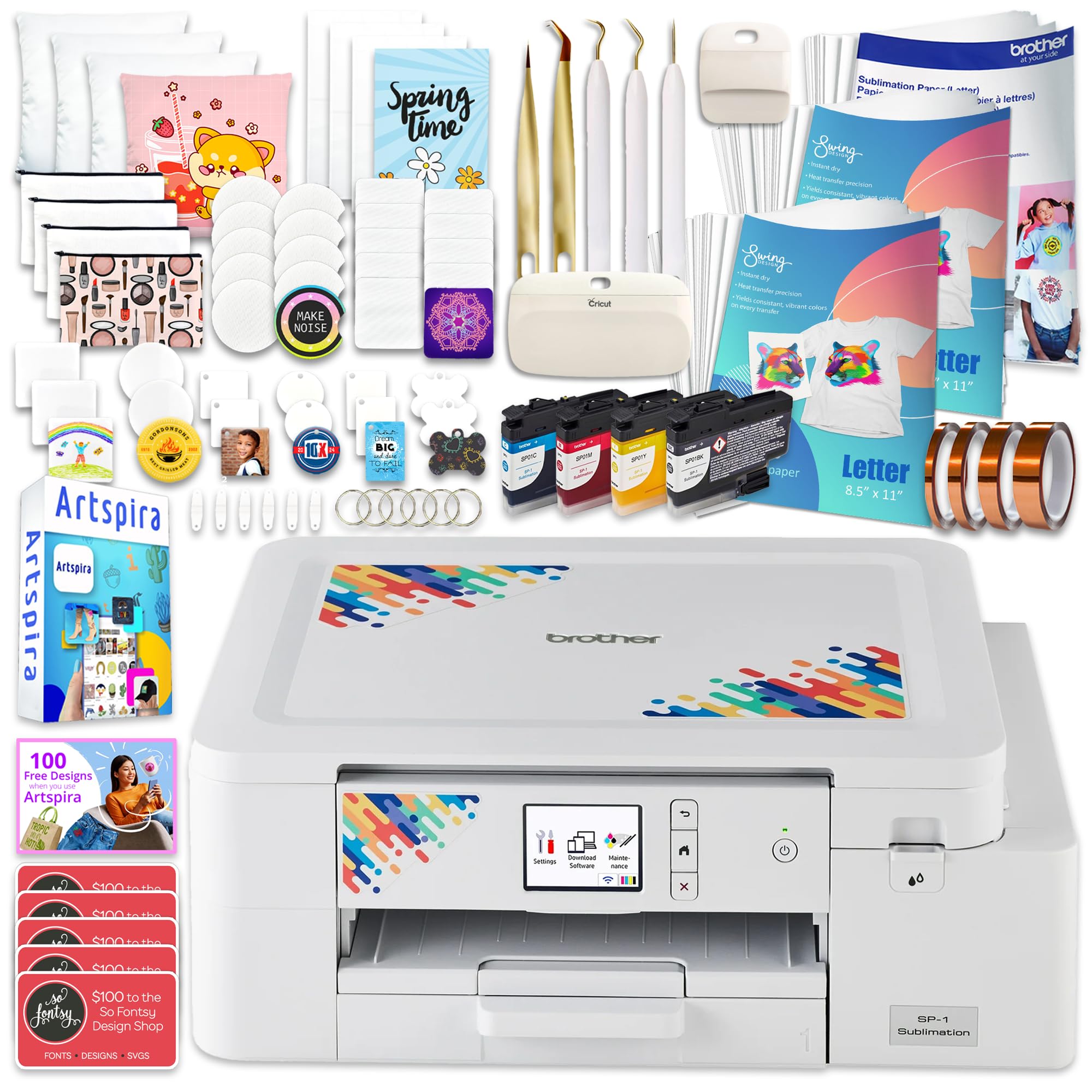
3. Brother SP-1 Sublimation Printer Deluxe Bundle
Everything but the heat press in one box — paper, blanks, inks, and tape for a true first-day start.
The Brother SP-1 itself is a compact print-only machine (13.5 inches wide, 6.3 inches tall) that sits nicely on a small desk. But the real story here is the bundle: you get a full set of CMYK inks (cyan, magenta, yellow, black — the four standard ink colors used in full-color sublimation), 300 ProSub sublimation sheets plus 10 Brother sheets of 8.5-by-11 sublimation paper, 50 sublimation blanks including items like key fobs and coasters, and four rolls of heat-resistant tape in different widths. For someone new to sublimation, this bundle removes the paralysis of figuring out which accessories actually work. The printer itself self-cleans to keep the heads from clogging and auto-mirrors your images so they transfer right-reading. Print quality is the top praise, and most say it is very bright right after setup.
The biggest practical drawback is that the Artspira app is designed for phones and tablets — there is no desktop app, which can be limiting if you prefer editing on a big monitor before sending to print. Also, the SP-1 is print-only (no scanner), so you need another way to digitize artwork. Owners who do mug and coaster production say it uses ink sparingly compared to other printers.
Why this bundle wins
- Comes with 310 sublimation transfer sheets and 50 quality blanks — you start printing immediately
- Auto print head cleaning and auto mirror imaging remove beginner mistakes
The limit to know
- Only works with the Artspira phone/tablet app — no desktop driver for PC or Mac
- Lacks a built-in scanner for digitizing hand-drawn designs
Perfect starter setup: Anyone completely new to sublimation who wants to avoid a dozen separate orders — just add a heat press and you are in business.
Who may outgrow it fast: Heavy producers who need desktop color management workflow and a scanner.
4. Pinckney Cartridge-Free Super-Tank Printer with Sublimation Ink Bundle

A complete all-in-one with scanner and copier that gets you into sublimation for less than any other kit here.
This is a converted Epson ET-2800 or ET2803 chassis (the base printer is a popular cartridge-free ink tank model) bundled with Pinckney’s own sublimation ink bottles: one each of 127 milliliters of black and 85 milliliters of cyan, magenta, and yellow. The ink fills via an auto-nozzle — no syringe, no spills, no squeezing. You also get the ability to print up to 5760 by 1440 dpi resolution (dots per inch, a measure of detailed clarity — higher numbers mean finer detail), which is a step above many dedicated sublimation machines. The all-in-one functionality means you can scan and copy, which is handy for small workspace users. Setup is easy and the color output is vivid on the right blanks.
The reliability picture is split. A number of buyers report fantastic results — clear prints, easy phone connectivity, great for the price — while a small but vocal group had the printer stop working after about a week or suffered from jams. The 1-year limited warranty covers you, and the company offers customer support. This is a budget entry point, and the lows come from unit-to-unit variability rather than a design flaw. For the price, it is the most affordable way to get a scanner, copier, and sublimation capability in one box.
The big plus
- High-res printing at 5760 x 1440 dpi for fine detail on small items like keychains
- Cartridge-free super-tank with generous ink bottles — 127ml black, 85ml per color
The known gamble
- Some units arrive with defects or stop printing within the first week — QC is inconsistent
- The ink is bundled separately, so be ready for a possible extra shipping box
Best for: Shoppers on a strict budget who need scanning, copying, and sublimation in one machine and are comfortable with a 1-year warranty safety net.
Pass if: You need rock-solid, low-maintenance reliability for a business — the higher-rated Epson or Brother is worth the extra spend.
5. DNP QW410 4.5″ Dye Sublimation Printer

Small enough to bag for an event, fast enough to keep a wedding line moving.
The DNP QW410 is built for one job: printing durable, 4-by-6 photos at event speed. It outputs a 4-by-6 print in 19 seconds, which works out to roughly 190 prints per hour. At 13 pounds and in a compact 9.5-by-7.75-inch footprint, it genuinely fits in a large camera bag or event kit alongside your laptop. The resolution is 300 by 300 dpi — this is a true dye-sub (dye sublimation) rather than inkjet, so prints come out dry immediately and are resistant to fingerprints and water. Owners who run photo booths and on-site printing for clients praise the speed and the easy-to-use software. The media tray holds 150 sheets of 4-by-6 paper, so you do not reload constantly during an event.
The trade-offs are straightforward: it only prints small formats (4 by 6 inches and 4.5 by 8 inches), so you cannot do mugs or shirts with it. The included paper and film are part of a media pack that some buyers found missing from their delivery — confirm your kit arrived complete before the event date. Changing the media roll takes a little practice, but once it is loaded, the printer is a tank.
Straight talk: This is a dedicated photo printer, not a transfer printer — buy it for instant photo booth keepsakes, not for T-shirt sublimation.
Perfect for: Photographers and event planners who need a portable, fast dye-sub photo printer for instant 4×6 prints.
Not for: Anyone planning to sublimate onto apparel, mugs, or anything larger than 4.5 by 8 inches.
6. Sawgrass SG500 Sublimation Printer Starter Bundle

A purpose-built sublimation machine with an online design platform and auto-maintenance for business-grade reliability.
Unlike printers that are converted from standard inkjets, the Sawgrass SG500 is designed from the ground up for sublimation. It comes with a full set of 20-milliliter SubliJet UHD ink cartridges (specially formulated small-batch ink for consistent, vivid CMYK color), and it works exclusively with Sawgrass’s MySawgrass online design platform, which includes templates and a print utility that smart-presets your ICC profiles for accurate color. It can handle media up to 8.5 by 14 inches, and the rear bypass tray accepts sheets as long as 51 inches — great for long banners. Wi-Fi connectivity is built in, and the auto-maintenance feature cycles the print heads to prevent clogs even during idle stretches. The starter bundle also includes TruePix paper, so you can make your first print without extra purchases.
The elephant in the room is that the starter ink cartridges are only 20 milliliters each, and many owners found that after priming the ink lines the cartridges show as nearly empty — a replacement set costs a significant amount. Sawgrass ink price is a recurring point of frustration; some owners describe it as a monopoly that locks out third-party options entirely. The printer also requires that you use only Sawgrass authorized ink, and the software stack adds extra steps to your workflow. Print quality is genuinely good when it is working, but the high cost of consumables makes this a calculated choice.
The cost reality: Buyers love the prints but hate the ink pricing — factor in a full set of replacement cartridges from day one or you may run dry mid-project.
Who it fits: Small business owners who want a dedicated, ecosystem-backed sublimation system with Wi-Fi and are comfortable with the ongoing ink investment.
Who should reconsider: Budget-conscious crafters or anyone who hates consumables that cost as much as the machine over time.
7. HiTi P525L Compact Dye Sub Photo Printer

A fast roll-fed photo printer that lets you choose glossy or matte finishes for every event.
HiTi uses D2T2 (Dye Diffusion Thermal Transfer) technology, which is a thermal process that diffuses dye from a ribbon directly onto the media for rich, continuous-tone prints — no dots or dithering patterns. The P525L pushes out a 4-by-6 print in 12.8 seconds, or about 280 sheets per hour, and uses roll media for continuous unattended feeding. You can switch between glossy (the default) and matte finish, which is rare at this price and gives you stylistic flexibility for different clients. It prints up to 6 by 8 inches, so you can do standard photo sizes plus larger prints. The USB 2.0 interface is reliable, and with a 3-year limited warranty from HiTi, there is decent coverage. It weighs 39 pounds, so it is not truly portable but stays put in a booth setup.
The biggest issues are software-related. The mobile app has not been updated in over a year, and on Mac the printer can stop after one photo, forcing a USB unplug and re-plug for every print. Windows users report a better experience, especially with Windows 7 and 10. The print bin can also have trouble keeping prints in order if you batch many at once. For small event jobs — a hundred photos or so — it is a great little machine. For high-volume fulfillment, the warping and ordering issues become a frustration.
Strengths to love
- True 300 dpi dye-sub with D2T2 technology for continuous-tone, dot-free prints
- Choose between glossy or matte finish — a rare feature for a sub- photo printer
Weaknesses to note
- Mobile software is buggy and has not been updated in over a year
- Mac users may need to unplug and re-plug USB after each single print
Reach for this if: You run a Windows-based event photo booth and want fast, glossy or matte prints with a 3-year warranty.
skip it if: You use a Mac or need to batch-print more than a few hundred photos in one session.
8. DNP RX1 DS-RX1HS 6″ Dye Sublimation Printer

The booth runner’s best friend — fast, high-capacity, and built to survive a wedding season without a break.
The DNP RX1 is designed for serious volume. It prints a 4-by-6 in 12.4 seconds or a 6-by-8 in 22 seconds, and the paper roll holds up to 700 4-by-6 prints per roll — meaning you can shoot a whole event without a single media swap. It offers two resolution modes: 300 by 300 dpi for high speed and 300 by 600 dpi for even finer detail. The weight is about 31 pounds, so it is solid but not wholly portable without a cart. USB 2.0 Type B connectivity is straightforward for any Windows or Mac setup. What owners love most is the print quality — consistent, instant-dry, and vibrant — followed closely by the reliability and speed. It integrates well with photo booth software like Darkroom and DSLRBooth. One owner called it a “true workhorse.”
The downsides are the weight and the noise — it is loud when printing and loud when moving. It is also a print-only device; there is no scanner or copier. Value perceptions are mixed because media is proprietary and not cheap, but for mid-volume event pros, the cost per print works out fine when you factor in the reliability. The DNP RX1 earned high marks from 184 owners and is a proven tool in the photo booth industry.
Real talk: This printer is heavy and loud, but that is the trade-off for a machine that will go all day without a hiccup.
Best for: Established photo booth operators who need high-speed, high-volume output with minimal downtime and can handle a heavy unit on a rolling cart.
Not ideal for: Light users or crafter — this is pro gear for events, not occasional hobby prints.
9. DNP DS620A Dye Sub Professional Photo Printer

A floodgate for prints: 8.3 seconds per 4×6 and dual-finish options for any pro job.
The DS620A is the fastest consumer-accessible dye-sub photo printer in this lineup, pushing out a 4-by-6 in 8.3 seconds — that is roughly 433 prints per hour. It runs on rolls: 400 prints per roll on 4-by-6, 230 per roll on 5-by-7, and 200 per roll on 6-by-8, so you can go all day without reloading. The print method is true dye sublimation with the option to finish in glossy or matte, selectable per print job. Resolution sits at 300 by 300 dpi, and it offers 30-bit color depth (30 bits per pixel means over a billion possible colors — richer gradations than standard 24-bit). The printer is large at 15.7 inches square and 13.5 inches tall, weighing nearly 31 pounds, but it is a low-maintenance production tool. Setup has a learning curve, but owners who work in photo booth businesses call it a beast — it keeps running with minimal issues beyond full cut bins and user paper-sizing errors.
At this price, the printer is a serious investment. The per-print cost is higher than a wet-lab system like a Noritsu, but you trade the chemical hassles and temperature control for pure simplicity. It is also noticeably noisy when running. Owners who have printed over 1,600 images on a single unit report flawless operation. The DS620A holds an elite rating from 41 owners, many of whom say it pays itself off after a few events. Compatible with Windows 7/8 and Mac OS-X via included driver CD.
What you are paying for
- Blazing 8.3-second 4×6 prints — the fastest here
- Dual finish (glossy or matte) plus high speed or high quality modes
- Massive roll capacities — 400 prints per 4×6 roll
What to be ready for
- High upfront cost and proprietary DNP media — per-print cost is real
- Noisy operation and heavy physical footprint — not for a cramped desk
Who this is for: High-volume photo booth operators and professional print labs that need the fastest possible output with reliable, beautiful prints — and have the budget.
Who it is overkill for: Small crafters or occasional users who cannot justify the investment or the desk space.
Understanding the Specs
Print Speed and What It Means
A printer’s speed is often listed in pages per minute (ppm) or seconds per print. For sublimation, the difference between 8 seconds and 19 seconds per 4-by-6 print does not sound huge — until you are printing 200 photos at an event. The faster models (like the DNP DS620A at 8.3 seconds) can churn out over 400 prints per hour, while a standard 10 ppm all-in-one might take 30 seconds per page of transfer paper. If you plan to sell items or print for clients, speed directly limits your revenue per hour.
Resolution and Color Depth
Dots per inch (dpi) tells you how much fine detail the printer can resolve — 300 by 300 dpi is the standard for most event photo dye-subs, while consumer printers often go to 5760 by 1440 dpi for smoother gradients. Color depth, measured in bits per pixel (bpp), describes how many color variations each pixel can display; 24-bit gives about 16.7 million colors, which is very good, while 30-bit (used in the DNP DS620A) pushes past a billion shades. That extra depth matters for skin tones and complex gradients in photo booth portraits.
FAQ
Can any inkjet printer be used for sublimation?
Do I need a heat press or can I use an iron?
Why does my sublimation print look dull on the paper?
What materials work with dye sublimation?
How long do dye sublimation prints last after transfer?
Can I use third-party ink in my sublimation printer?
Which printer is best for a beginner sublimation small business?
How fast do these printers actually print for events?
Is a larger printer always better for sublimation?
Final Thoughts: The Verdict
If you want one dependable pick, the dye sublimation photo printer winner is the Epson SureColor F170 because it delivers the best combination of print quality, compact footprint, and user-friendly EcoTank ink system without the premium price tag of pro photo printers. If you want a complete starter kit with blanks and paper included so you can start creating from day one, grab the Brother SP-1 Deluxe Bundle. And for high-volume event printing where speed is everything, the DNP DS620A is the pro workhorse that will never keep a guest waiting.
How We Picked
We do not accept paid placement. Every pick is matched to a real buyer and a real use-case; we do not hands-on test units.
Sources & Methodology
Specifications: manufacturer listings and product documentation. Review insights: verified customer reviews, as of July 2026. Pricing: not shown on this page (it changes often); check the current price via the retailer link.
As an Amazon Associate, WellFizz earns from qualifying purchases. This does not affect which products we feature.
Related Guides

Mo Maruf
I created WellFizz to bridge the gap between vague wellness advice and actionable solutions. My mission is simple: to decode the research and give you practical tools you can actually use.
Beyond the data, I am a passionate traveler. I believe that stepping away from the screen to explore new environments is essential for mental clarity and physical vitality.