Our readers keep the lights on and my smoothie glass nicely filled. As an Amazon Associate, I earn from qualifying purchases.
Specs are compiled from manufacturer listings and verified buyer reviews and can change over time — please confirm the key details on the product page before buying.
Cutting the cord on cable means you face one immediate problem: how do you record, pause, and rewind live antenna TV the same way you used to with a cable box? The answer is a dedicated DVR that connects your over-the-air antenna to your whole home network — and the trade-off between tuner count, guide subscriptions, and storage flexibility is the real decision you need to make.
I’m Mohammad Maruf — the founder and writer behind WellFizz. This guide is built by comparing the manufacturers’ published specifications and the patterns across verified customer reviews, so you get each pick’s real strengths and trade-offs instead of marketing spin.
if you want to record your local news, pause live sports, or stream antenna channels to every room without a monthly fee, the right dvr for antenna tv depends on how many tuners you need, if you want a guide subscription, and how you want to store your recordings.
Our Picks at a Glance


How To Choose The Best DVR For Antenna TV
Picking the right DVR means matching the device to your TV habits and your home network. You do not need a degree in broadcast engineering — just a clear handle on three things: tuner count, storage, and compatibility with your streaming devices.
Tuner Count — The Core of Multi-Room Viewing
The tuner count is the single most important spec. A 2-tuner DVR lets you watch one live channel while recording another — or record two shows at once. A 4-tuner unit gives you far more breathing room: someone can watch live TV in the living room while the DVR records two different shows, and a third person watches a recorded program in the bedroom. More tuners mean fewer household conflicts.
Storage — Built-In vs. External Drives
Some DVRs come with built-in storage (typically 64GB to 128GB), which gets you 50-plus hours of recording right from the start. Others require you to plug in a USB hard drive — an external drive you buy separately — which lets you decide exactly how much space you want, from a small 500GB drive up to 8TB or more. There is no right answer here; it is about if you want ready-to-go recording or maximum flexibility.
Guide Subscriptions — The Hidden Cost You Need to Know
Many DVRs work without any subscription: you can manually schedule recordings using the on-screen grid. But a paid TV guide subscription (often to per year) open up automatic series recording, so the DVR grabs every episode of a show without you telling it each week. Some devices include the guide for free, others require a subscription for advanced features. Read the fine print before you buy.
ATSC 3.0 — Future-Proofing vs. Practical Today
ATSC 3.0 (also called NextGen TV) is the newest broadcast standard, capable of 4K HDR picture quality. In most cities today, ATSC 3.0 broadcasts are still limited, and some channels use encryption (DRM) that not every device can handle. A DVR that supports ATSC 3.0 costs more, but it prepares you for the future. If you just want reliable recording of today’s HD channels, a standard ATSC 1.0 DVR is all you need — and it costs less.
Quick Comparison
| Model | Best For | Tuners | Storage | Device Compatibility | Amazon |
|---|---|---|---|---|---|
| HDHomeRun Flex Quatro HDFX-4US★ Best Overall | Whole-home flexibility | 4 (ATSC 1.0) | External USB drive (up to 8TB) | Android, FireTV, AppleTV, Roku, Xbox, PC, Mac | Amazon |
| HDHomeRun Flex 4K HDFX-4KPremium Pick | ATSC 3.0 readiness | 4 (2 ATSC 3.0, 4 ATSC 1.0) | External USB drive | Android, FireTV, AppleTV, Roku, Xbox, PC, Mac | Amazon |
| Sling AirTV 2Best for Sling Users | Mobile viewing + Sling guide | 2 (ATSC 1.0) | External hard drive (sold separately) | Roku, Fire TV, Android TV, iOS, Android | Amazon |
| ZapperBox M1 | Advanced DVR with 4K guide | 2 (ATSC 3.0 / ATSC 1.0) | USB 3.0 / microSD (min 128GB) | HDMI TV, Bluetooth, Wi-Fi | Amazon |
| ADTH NextGen TV Box Gen 2 | All-in-one converter + DVR | 2 (ATSC 3.0 / ATSC 1.0) | 64GB built-in + USB/microSD expansion | HDMI TV | Amazon |
| AirTV Anywhere | Sling TV integration | 2 (ATSC 1.0) | Built-in DVR (expandable) | Sling app on Roku, Fire TV, Android TV, iOS, Android | Amazon |
| Tablo 4th Gen 2-Tuner (Renewed) | Low-cost entry with free guide | 2 (ATSC 1.0) | 128GB built-in + external USB up to 8TB | Roku, Fire TV, Android TV, Apple TV, Samsung, LG | Amazon |
In‑Depth Reviews
1. HDHomeRun Flex Quatro 4 x ATSC Tuners – HDFX-4US
Our pick — over 4★ from 350+ verified ratings; the strongest balance of quality and price.
The four-tuner powerhouse that streams live TV to every device in your house without a monthly fee.
This is the balance for anyone who wants to watch and record antenna TV on multiple devices at the same time. With four ATSC 1.0 tuners built in, you can record two shows while two people watch different live channels — no household gridlock. The whole-home DVR works by connecting your own USB hard drive, and there is no subscription required for basic recording. A paid TV guide ( per year) open up automatic series recording, but you can schedule manually for free. The unit connects to your network via Ethernet, so a stable wired connection is key — and as buyers report, “very easy setup with 8TB USB drive and annual guide subscription.” It works with nearly every platform: Android, FireTV, AppleTV, Roku, Xbox, iPhone, iPad, and PC/Mac. The catch is that this is not a standalone box you plug into a TV — it streams over your network, so every TV needs a streaming device (like a Fire Stick or Roku) to access the channels.
The thing owners love most is the pure reliability of the tuners once the network connection is solid. Fast channel changes, stable app performance, and smooth integration with Plex are common refrains. With 4 tuners versus the HDHomeRun Flex Duo’s 2, this unit adds two more simultaneous streams before anyone hits a conflict. The only hardware limitation: as an ATSC 1.0 device, it does not handle the newer 4K broadcasts, but for today’s HD channels it is rock solid. For a family home where three or four people might want TV at once, this is the most practical pick on the list.
The Multi-Screen Advantage
- Four tuners let four people watch or record simultaneously
- No monthly subscription required for basic DVR functionality
- Works with nearly every streaming platform and Plex
- 2-year warranty included for confidence
The Network Requirement
- Requires a streaming device (Fire Stick, Roku, etc.) on each TV — not a standalone box
- Ethernet connection recommended for best performance; Wi-Fi can cause buffering
- No built-in storage — you must supply your own USB hard drive
Your best bet if: you have multiple TVs and want to watch antenna TV in every room, at the same time, with no per-room fees.
Think twice if: you prefer a simple box that plugs directly into a single TV — this works over your home network, not as a direct TV connection.
2. HDHomeRun Flex 4K ATSC 3.0 NextGen TV: 2/4 Tuners HDFX-4K
The future-proof choice that brings 4K broadcasts into your home network while staying backward-compatible with every HD channel.
This is the most talked-about HDHomeRun in the lineup — nearly two thousand owners have weighed in — and the overwhelming verdict is that reliability and picture quality are exceptional. The Flex 4K packs four tuners total, with two dedicated to ATSC 3.0 (NextGen TV) and all four capable of tuning ATSC 1.0. That means it can pull in today’s HD channels with room to spare, and when your local stations start broadcasting in 4K HDR, this device is ready. You do need a USB hard drive for DVR, and a paid TV guide subscription open up advanced auto-record features, but basic recording is free. The unit connects via Ethernet (wired is strongly recommended), and it streams to Android, FireTV, AppleTV, Roku, Xbox, iPhone, iPad, and PC/Mac.
The thing owners praise most is reliability — over 300 people single it out. The second most-discussed aspect is quality, with 200 mentions. The consensus: this unit pulls in clear channels from impressive distances (one owner reports 78 channels from 37 miles away) and integrates beautifully with Plex for DVR and remote access. However, compatibility is a mixed bag — specifically, the Roku app has known issues with crashing and broken fast-forward/rewind, though a workaround using a low-cost Android TV box solves it. Also, ATSC 3.0 DRM-protected channels are not compatible, so not every NextGen broadcast will work. If you can live with those caveats, the sheer tuner count and future-ready hardware make this the premium hedge for the next several years of broadcast TV.
Reliability that speaks: 324 owners highlight how dependable this tuner is once wired to the network — it simply works, day after day, without freezing or dropped signals.
The Roku gotcha: the Roku app is the weakest link here, with crashing and broken trick-play; a cheap Android TV box sidesteps the problem entirely.
Reach for this if: you want to be ready for 4K over-the-air broadcasts and you already rely on Plex or third-party apps for your DVR.
Look elsewhere if: you are a dedicated Roku user who wants one remote to rule them all — the app friction here is real.
3. Sling AirTV 2 Dual-Tuner Local Channel Streamer w/DVR
The Sling subscriber’s secret weapon — local channels tucked right inside your Sling TV guide.
If you already pay for Sling TV, the AirTV 2 is the natural extension that puts your antenna channels into the same interface. It connects a single HD antenna to your home Wi-Fi network and streams local channels like ABC, CBS, Fox, and NBC to Roku, Fire TV, Android TV, or the AirTV player. The Sling app becomes your one-stop guide for both streaming and antenna content. You can record up to two shows at once, with pause, rewind, and fast-forward — but you need to supply your own external hard drive, sold separately. The two-tuner setup means you can watch one channel while recording another, or record two shows simultaneously. A big plus: you can watch live and recorded content outside your home through the Sling mobile app on iOS or Android, so you never miss your local news while traveling.
Setup is the weakest part of this experience. Multiple owners describe it as a “pain to set up” and note that the Wi-Fi connection can be finicky. Once it is working, however, the picture quality is good and reliability is strong — one owner reports it has “worked flawlessly…unlike the Tablo TV device.” The catch: AirTV 2 was built for the Sling ecosystem, and it shows. If you do not use Sling, the guide and remote features lose their main advantage. It also requires broadband internet (25Mbps recommended) and a media streaming player on each TV. For Sling subscribers who want OTA channels merged into one guide, this is the cleanest path, even if the initial setup demands patience.
Integrated simplicity: local channels appear right next to your Sling lineup in one guide — no switching between apps, no separate remote.
The setup hurdle: Wi-Fi pairing can be frustrating; hardwiring via Ethernet is the more reliable route during initial configuration.
Grab it if: you are a Sling subscriber who wants all your TV — streaming and antenna — in one app, including remote viewing away from home.
skip it if: you don’t use Sling TV — the magic is in the integration, and standalone it loses its edge to simpler alternatives.
4. NextGen TV Box Gen 2 ATSC 3.0 & ATSC 1.0 Digital Converter Box – 64GB Storage
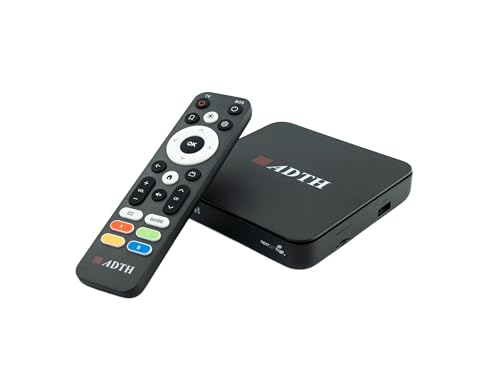
The standalone box that converts any old TV into a 4K-ready, DVR-equipped antenna powerhouse — no extra devices needed.
Unlike the network-centric HDHomeRun units, the ADTH NextGen TV Box Gen 2 plugs directly into a single TV via HDMI, making it the simplest solution for upgrading an older set or adding a DVR to a secondary TV like one in a bedroom or RV. It handles both ATSC 3.0 (NextGen TV) and legacy ATSC 1.0 broadcasts, outputs up to 4K HDR, and comes with 64GB of internal storage ready for recording right from the start — no external drive required. You can also expand via USB flash drive or microSD card. It supports Dolby Digital Plus and AC-4 audio for clearer dialogue, and dual-band Wi-Fi plus Bluetooth keep it connected for firmware updates. The box is compact enough to tuck into an entertainment center out of sight.
Signal reception is the most-discussed aspect, with mixed results. Some owners mention excellent results with both ATSC 3.0 and 1.0 signals, while others experience occasional freezing or “no signal” drops. The most positive aspect — signal quality — gets only 6 mentions, telling you that performance varies heavily by location and antenna setup. A few customers note that the DVR function crashes during playback, a frustrating issue if recording is your main goal. The Gen 2 remote also draws complaints for unresponsive keys. This is a capable device for someone who wants a simple, single-TV DVR with 4K potential, but it is not the most polished experience on this list.
Ready from the start: 64GB of built-in storage means you can start recording immediately — no hunting for a USB drive during setup.
Signal sensitivity varies: the same strong signal location works brilliantly, while marginal locations see freezes; antenna placement is critical here.
Who it fits: someone with an older non-smart TV who wants a single-box upgrade to 4K OTA TV with DVR — especially in an RV or guest room.
Who should pass: anyone expecting a flawless streaming-like experience; this is a converter box at heart, with some rough edges in the DVR software.
5. AirTV Anywhere Whole-Home OTA DVR

The integrated DVR that streams free local channels to four TVs and follows you on your phone when you leave the house.
If you live inside the Sling TV app, the AirTV Anywhere takes the concept of the AirTV 2 further by packing a built-in DVR — no external hard drive needed. It streams free HD local channels to up to four TVs simultaneously when paired with an antenna, and you control everything through the Sling app on Roku, Fire TV, Android TV, or mobile devices. The mobile streaming feature is a standout: you can watch live or recorded local channels from anywhere outside your home, so missing the evening news while on a trip is a thing of the past. It records content while you watch, and with the Sling DVR app, you can skip commercials on recorded shows — a feature cord-cutters particularly appreciate.
Owner feedback is split: some call it a powerful cost-saver, others report loud hardware and glitchy software. A recurring complaint is that recording becomes inconsistent after a day or two, and the app can feel laggy. A few owners compare it unfavorably to the now-discontinued Fire TV Recast. That said, satisfied reviewers point out easy installation and reliable whole-house access, with one describing it as “a great product, allows free on air TV channels on every TV on my home network.” This is a niche pick best suited for dedicated Sling users who want the deepest integration available — not a first recommendation for a cord-cutting newcomer.
Travel-friendly: stream your local channels to your phone anywhere with an internet connection — no extra fees, no VPN needed.
Software reliability gap: several shoppers say the DVR stops recording after a couple of days, requiring a reboot — a frustration for low-maintenance users.
Best for: the Sling TV subscriber who wants to broadcast local channels to every room and on the go, with commercial skipping built right in.
Not for: anyone who wants a rock-solid DVR experience without occasional app glitches or hardware noise.
6. Tablo 4th Gen 2-Tuner Over-The-Air (OTA) DVR – 128GB (Renewed)

The lowest-cost DVR with built-in storage and no subscription, though reliability is inconsistent.
The Tablo 4th Gen comes with 128GB of internal storage, enough for 50-plus hours of recording, and it does not require any subscription or hidden fees to use as a DVR. You plug in your antenna, connect via Wi-Fi or Ethernet, install the free Tablo app on Roku, Fire TV, Apple TV, or compatible smart TVs, and you are recording. The two-tuner setup lets you watch one channel while recording another, or record two shows simultaneously. You can also add up to 8TB of external USB storage if you outgrow the built-in space. The device also offers over 100 free streaming channels you cannot get with an antenna alone, though recording some of those may be restricted by licensing.
Owners say it works as intended, but few call it flawless. A significant number of owners note that the device requires an occasional reboot (every couple of weeks) to stay connected, and the Wi-Fi stream can drop unpredictably. Several reviews in early 2025 flagged that the Roku app was not working at all, and the Fire Stick app was crashing after 5-10 minutes — a serious compatibility concern that may or may not be resolved by the time you read this. The channel scanning is sensitive, reportedly pulling in 63 stations with a basic rabbit ears antenna. For the low upfront cost, this is a compelling experiment for a first-time cord-cutter, but it lacks the reliability polish of the HDHomeRun family.
Zero-fee DVR: truly no hidden costs — the guide, recording, and pausing work without a credit card, which is rare in this category.
Wi-Fi fragility: streaming over Wi-Fi is convenient but prone to drops; Ethernet provides a noticeably more stable experience.
Fine for: someone dipping a toe into cord-cutting who wants the lowest possible upfront cost and does not mind a few reboots.
Avoid if: you need rock-solid reliability and zero hassle — Tablo’s app compatibility glitches and intermittent disconnects will test your patience.
7. ZapperBox M1 ATSC 3.0 OTA Dual Tuner + DVR + Gateway

The dedicated box for NextGen TV enthusiasts who want the best possible 4K picture from an antenna, complete with a polished guide.
The ZapperBox M1 is a different kind of DVR — it connects directly to a single TV via HDMI 2.1, making it a standalone receiver rather than a network streamer. It supports both ATSC 3.0 and ATSC 1.0, outputting up to 4K with HDR10 and HLG high dynamic range, plus Dolby Atmos and Dolby AC-4 audio. The two tuners let you watch live while recording another, or record two shows at once. For storage, you supply your own microSD card or USB drive (minimum 128GB recommended, no maximum). A subscription costing per year open up advanced DVR features like a proper TV guide. The box includes Bluetooth 4.0, dual-band Wi-Fi, gigabit Ethernet, and even a YouTube app pre-installed.
Fans call the M1 the best ATSC 3.0 OTA DVR, praising its HDMI 2.1 picture quality and detailed signal readings. The additive channel scan — which adds new channels without wiping your existing lineup — is a nice touch. But the detractors point to a genuine deal: some units fail to tune any ATSC 3.0 channels, even with strong signals, and one owner found the ZapperBox missed 10 channels compared to a competing HDHomeRun. The interface can feel laggy, and the price is the highest on this list. This is a specialist tool for someone who absolutely wants the best possible 4K OTA experience and is willing to troubleshoot for it — not a casual recommendation for a first-time buyer.
Picture quality that wows: HDMI 2.1 output with 4K HDR makes the most of any NextGen TV broadcast in your area — sharper and more vivid than any other box here.
The ATSC 3.0 gamble: a non-trivial number of buyers report the box simply cannot lock onto 3.0 channels, making the premium price hard to justify if your local stations are not fully supported.
Choose this if: you already know your local stations broadcast ATSC 3.0 in 4K, and you want to watch them on a single TV with the best possible picture and sound.
Pick something else if: you want whole-home streaming to multiple TVs or you need guaranteed ATSC 3.0 compatibility without the risk of a dud unit.
Understanding the Specs
Tuner Count
The number of tuners tells you how many live channels you can watch or record at the exact same moment. A 2-tuner DVR lets you record one show while watching another live channel, or record two shows while watching a pre-recorded one. A 4-tuner DVR adds breathing room for larger households — a third person can watch a completely different channel without anyone hitting a conflict. If you live alone or as a couple, 2 tuners are almost always enough. For a family of three or more, 4 tuners prevent the “stop that recording, I want to watch the game” argument.
ATSC 3.0 (NextGen TV)
ATSC 3.0 is the newest broadcast TV standard, capable of delivering 4K resolution with HDR color and better reception in difficult signal areas. It is an upgrade from ATSC 1.0, which is the standard used by every broadcast station today. The catch: many ATSC 3.0 channels are encrypted with DRM (digital rights management), meaning not every DVR can record or display them. If you buy an ATSC 3.0 DVR, check that it works with the DRM schemes used by your local stations. For most people, an ATSC 1.0 DVR is perfectly fine for years to come — 4K OTA broadcasts are still rare in most markets.
Storage Type
Some DVRs come with built-in flash storage (64GB or 128GB) so you can start recording immediately. Others require you to connect an external USB hard drive, which you buy separately. Built-in storage is convenient and simple — open the box, plug it in, and you are recording. External drives give you total control: you can choose a 500GB drive for light use or a massive 8TB drive for recording everything. A USB flash drive is not always compatible; many DVRs require a traditional spinning hard drive or a solid-state drive (SSD) for reliable recording. Check the manufacturer’s minimum storage size before buying a drive.
Streaming Device Compatibility
Most network-based DVRs do not connect directly to your TV. Instead, they connect to your home network, and you need a streaming device (like a Roku, Fire TV Stick, Apple TV, or Android TV) on each television to access the channels. Some DVRs have apps for specific platforms but not others — for example, a Roku app may be buggy or missing features while the Fire TV version works perfectly. If you use a particular streaming platform, confirm that the DVR’s app is available and well-reviewed for that platform before purchasing. A direct-HDMI box like the ZapperBox M1 bypasses this issue entirely by connecting straight to one TV.
FAQ
Do I need a subscription to use an OTA DVR?
Can I watch recorded shows on my phone away from home?
How many hours of recording does 128GB hold?
Will a DVR work with any TV antenna?
What is the difference between ATSC 1.0 and ATSC 3.0?
Can I use a DVR with a non-smart TV?
How does Plex work with an OTA DVR?
What happens if I lose internet while using a network DVR?
Is a 2-tuner DVR enough for a family of four?
Can I use a DVR with multiple antennas?
Final Thoughts: The Verdict
For the majority of shoppers, the dvr for antenna tv winner is the HDHomeRun Flex Quatro HDFX-4US because four tuners at this price point with no required subscription and broad platform support is the best combination of flexibility and value on the market. If you want ATSC 3.0 readiness for future 4K broadcasts, the HDHomeRun Flex 4K HDFX-4K is the one to reach for, with four tuners and well over 1,000 owners backing its reliability. And for a single-TV setup where you want the best possible 4K picture from a dedicated box, the ZapperBox M1 delivers an HDMI 2.1 experience that nothing else here matches.
How We Picked
We do not accept paid placement. Every pick is matched to a real buyer and a real use-case; we do not hands-on test units.
Sources & Methodology
Specifications: manufacturer listings and product documentation. Review insights: verified customer reviews, as of July 2026. Pricing: not shown on this page (it changes often); check the current price via the retailer link.
As an Amazon Associate, WellFizz earns from qualifying purchases. This does not affect which products we feature.
Related Guides

Mo Maruf
I created WellFizz to bridge the gap between vague wellness advice and actionable solutions. My mission is simple: to decode the research and give you practical tools you can actually use.
Beyond the data, I am a passionate traveler. I believe that stepping away from the screen to explore new environments is essential for mental clarity and physical vitality.