Our readers keep the lights on and my smoothie glass nicely filled. As an Amazon Associate, I earn from qualifying purchases.
Specs are compiled from manufacturer listings and verified buyer reviews and can change over time — please confirm the key details on the product page before buying.
Cutting the cord means keeping your local news, sports, and network shows without handing over a monthly check to a cable company. The piece that makes that work is a DVR that records over-the-air TV onto its own storage, with zero subscription fees for the core recording feature. The challenge is picking one that actually delivers a smooth, reliable experience instead of constant glitches.
I’m Mohammad Maruf — the founder and writer behind WellFizz. This guide is built by comparing the manufacturers’ published specifications and the patterns across verified customer reviews, so you get each pick’s real strengths and trade-offs instead of marketing spin.
To pause live football or record a week of prime time without paying a cent, you need the right dvr for antenna tv with no subscription. It anchors your entire cord-cutting setup and makes free TV far more watchable.
Our Picks at a Glance


How To Choose The Best DVR For Antenna TV With No Subscription
A no-subscription OTA DVR (over-the-air digital video recorder) connects your TV antenna to your home network so you can record, pause, and replay live broadcast TV without any monthly fees. Since every model here records for free, the real differences come down to a few key specs that dictate how well the device works for your household.
Tuner Count: How many shows at once
A tuner grabs one broadcast signal from your antenna. If a DVR has two tuners, you can record one channel while watching another live, or record two different shows at the same time. Four tuners let you juggle three recordings while watching a fourth channel live. More tuners mean less conflict when the family wants different things on a Sunday night. For a single-person household, two tuners often suffice; for families, four is a safer bet.
Storage: Onboard vs. external
Some DVRs come with built-in storage (measured in gigabytes) that is ready to record from the start. Others rely on you plugging in your own USB hard drive. The trade-off is convenience versus flexibility — onboard storage means no extra purchase, while external storage lets you expand capacity to whatever size drive you choose. Pay attention to the specific storage number when comparing models, as it directly limits how many hours of shows you can keep before the device overwrites old recordings.
ATSC Version: 1.0 vs. 3.0
ATSC (Advanced Television Systems Committee) is the technical standard for over-the-air broadcasting in the US. ATSC 1.0 is the current standard used by nearly every station; it delivers 1080i or 720p HD (high-definition) picture quality. ATSC 3.0 (also called NextGen TV) is a newer standard that can deliver 4K HDR (ultra-high-definition with high dynamic range — richer colors and contrast) picture quality, though the rollout is still in progress in many cities. If you buy an ATSC 1.0-only DVR today, it will work perfectly for years. Buying an ATSC 3.0 model future-proofs your setup for when more stations broadcast in 4K, though many 3.0 channels currently use DRM (digital rights management — encryption that some devices cannot record) which some devices cannot record.
Quick Comparison
| Model | Best For | Tuners | Storage | ATSC Version | Amazon |
|---|---|---|---|---|---|
| HDHomeRun Flex Quatro★ Best Overall | High-volume multi-device homes | 4 (ATSC 1.0) | External USB (via your own drive) | ATSC 1.0 | Amazon |
| Tablo 4th Gen (Renewed)Best Value | Wireless simplicity with built-in storage | 2 (ATSC 1.0) | 128GB onboard | ATSC 1.0 | Amazon |
| NextGen TV Box Gen 2 | 4K ATSC 3.0 from a single TV | 1 (ATSC 1.0 & 3.0) | 64GB onboard | ATSC 1.0 & 3.0 | Amazon |
| HDHomeRun Flex 4K | Future-proof whole-home with 4K | 4 total (2 ATSC 3.0, all 4 ATSC 1.0) | External USB (via your own drive) | ATSC 1.0 & 3.0 | Amazon |
In‑Depth Reviews
1. HDHomeRun Flex Quatro 4 x ATSC Tuners – HDFX-4US
Our pick — over 4★ from 350+ verified ratings; the strongest balance of quality and price.
Four tuners let you record three shows while someone else watches a fourth — a feature that the 2-tuner Tablo and Flex Duo cannot match.
The standout feature here is the four tuners and it fundamentally changes how your household experiences live TV. With four ATSC 1.0 tuners, you can record three shows while watching a fourth live, or let multiple family members stream different channels to their own devices simultaneously. The crowd favorite setup connects a USB hard drive for full whole-home DVR recording, and as buyers report, it is a “very easy setup with 8TB USB drive and annual guide subscription” if you want the advanced guide features. The best part: the basic DVR functionality (the ability to record, pause, and rewind live TV) requires no subscription at all.
This is a network tuner, meaning it connects to your router via Ethernet (an RJ45 connector — the standard cable plug for wired networks) and streams live and recorded TV to any device on your home network — Android, FireTV, AppleTV, Roku, Sony, Xbox, iPhone, iPad, Windows, and Mac. The picture quality wins consistent praise, and owners note the app is stable with fast channel changes. The hardware carries a 2-year warranty. The main trade-off is that you need to supply your own USB hard drive for recording, so factor that into your initial setup cost. It is also ATSC 1.0 only, so it does not handle the newer 4K broadcasts.
What wins people over
- Four tuners give you recording flexibility no other model at this level can match
- Works with virtually every streaming device and smart platform
- Stable performance and fast channel changes reported consistently
The honest trade-offs
- Requires your own external USB drive — no storage included in the box
- ATSC 1.0 only, so no 4K ATSC 3.0 broadcast support
Reach for this if: you have a busy household with multiple people watching live TV at the same time, or you want to record several shows without missing anything.
Think twice if: you want a device with built-in storage ready to go from the start, or absolutely need future 4K broadcast support today.
2. Tablo 4th Gen 2-Tuner Over-The-Air (OTA) DVR – Renewed
Built-in 128GB storage lets you start recording right away — no extra drive needed, unlike the HDHomeRun Flex Quatro.
The Tablo 4th Gen stands out because it comes with 128GB of onboard recording storage — enough for 50+ hours of shows — right in the box, with no external drive required. The two tuners let you record one channel while watching another. What really separates it is Wi-Fi connectivity, which means you can place your antenna wherever it gets the best signal and stream live and recorded TV wirelessly to devices throughout your home. As buyers sum it up, this is a “great value DVR for wireless multi-device antenna TV with 128GB storage and no subscriptions.”
Setup goes through the Tablo app on your phone, tablet, or smart TV. It works with Roku, Amazon Fire TV, Android TV, Google TV, Apple TV, Samsung and LG smart TVs, plus iPhones and iPads. You also get access to over 100 free streaming channels built in, adding content beyond what your antenna picks up. The honest caveat here is that some owners mention occasional bugs — the device sometimes needs a reboot every couple of weeks, and current compatibility issues with certain Roku models have been noted by recent buyers. The 2-tuner limit also means a family of heavy TV watchers might wish for more flexibility.
Hands-down advantage: the 128GB onboard storage means you can start recording immediately without spending extra on a USB drive. At 5 inches wide and 1.38 inches tall, it is also the most compact unit here, sliding easily into any entertainment center.
Fair warning: the wireless stream can occasionally drop, and the favorites feature for channels requires the phone app rather than working natively on your TV.
Grab it for: a simple, all-in-one DVR that records from the start with no extra accessories, especially if you prefer Wi-Fi placement flexibility over a wired Ethernet connection.
Consider another pick if: you need more than two tuners for simultaneous recordings, or if Roku is your primary streaming platform and you want guaranteed compatibility.
3. NextGen TV Box Gen 2 ATSC 3.0 & ATSC 1.0 Digital Converter Box
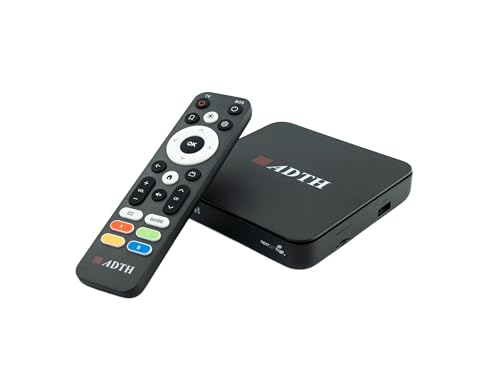
The only model here that combines ATSC 3.0 (NextGen TV) and ATSC 1.0 reception in one compact HDMI-connected box, with 64GB of onboard storage for DVR use.
This unit lets you watch and record both standard HD broadcasts and newer 4K HDR (high dynamic range — for brighter whites and darker blacks) broadcasts from stations that have upgraded to NextGen TV. It supports Dolby Digital Plus and AC-4 audio for clearer dialogue and more rich sound when your TV system supports it. The signal reception is the aspect owners mention most often, with multiple owners noting the Gen 2 model is more sensitive to ATSC 3.0 signals than the previous generation, resulting in fewer signal drops.
Setup is straightforward — connect via HDMI to your TV and coaxial input to your antenna, then run the guided channel scan. Wi-Fi and Bluetooth are built in for firmware updates and future enhancements. The honest picture here is mixed: while some reviewers point out impressive 4K HDR picture quality on NBC broadcasts, others note occasional picture freezes and a DVR playback system that can feel buggy, with reports of the unit crashing and rebooting during playback. The remote control has also drawn criticism for unresponsive keys. This is a newer product with a smaller owner base, so long-term reliability data is more limited compared to the HDHomeRun line.
The standout spec: 64GB of onboard storage plus ATSC 3.0 support in a single HDMI-connected box that costs less than many standalone 3.0 tuners. You can expand storage further with a USB drive or microSD card.
Be realistic about: the DVR stability — some owners hit crashes during playback, and the remote quality is a recurring complaint. This is best for early adopters who want 4K OTA now and are comfortable with some quirks.
Perfect for: a secondary TV in a bedroom, RV, or office where you want 4K broadcast capability without a full network setup.
Not the pick if: you need a rock-solid DVR for daily prime-time recording, or you want to stream to multiple TVs throughout the house — this unit connects to one TV at a time.
4. HDHomeRun Flex 4K ATSC 3.0 NextGen TV: 2/4 Tuners HDFX-4K

Four tuners with two dedicated to ATSC 3.0 — it delivers the four-tuner flexibility of the Quatro plus 4K future-proofing, all in the same compact chassis.
The Flex 4K is the most capable unit in the HDHomeRun family, combining four total tuners — two dedicated to ATSC 3.0 (NextGen TV) and all four capable of ATSC 1.0 — in the same compact 7-by-5-by-2.2-inch chassis. This means you get the same multi-room, multi-user streaming capability as the Quatro, but with the added ability to receive and record 4K HDR broadcasts where available. Reliability is the single most-praised aspect by a wide margin, with hundreds of owners calling out stable, consistent performance. The picture quality follows closely as the second most-discussed positive, with multiple reports of crisp video delivered to every device in the home.
Like the other HDHomeRun models, DVR recording requires your own USB hard drive, and at least the basic recording works without any subscription. It integrates deeply with Plex for DVR and remote access, which owners call a perfect pairing. The honest catch is ATSC 3.0 compatibility has nuance — DRM-protected ATSC 3.0 channels are not supported, so some encrypted broadcasts may not be viewable on this device. Roku users should note that the Flex 4K has known app instability issues, with reports of freezing and fast-forward problems. The workaround most owners use is a cheap Android streaming box, which reportedly handles the Flex 4K without issues.
What makes it the premium choice
- Two ATSC 3.0 tuners ready for future 4K HDR broadcasts alongside full ATSC 1.0 support
- Four total tuners give you maximum household flexibility for simultaneous viewing
- Reliability is the number-one praised aspect among thousands of owners
The honest trade-offs
- DRM-protected ATSC 3.0 channels are not supported — not all 4K broadcasts will work
- Roku app has known stability issues, requiring a workaround streaming box
Choose this if: you are building a long-term cord-cutting setup and want the flexibility of 4K OTA broadcasts as they roll out in your area, combined with the proven reliability of the HDHomeRun platform.
Instead save with: the Flex Quatro if you are satisfied with HD broadcasts and do not need the 4K future-proofing — you get the same four-tuner flexibility for less.
Understanding the Specs
Tuner Count and Simultaneous Viewing
Each tuner in a DVR can grab exactly one broadcast channel at a time. If your device has two tuners, you can record one show while watching another live, or record two different shows at the exact same hour. A four-tuner device lets you record three shows while watching a fourth. This spec directly determines how much flexibility your household has on a busy TV night. For a single person or a couple, two tuners are usually enough. For families, four tuners prevent scheduling conflicts.
Onboard vs. External Storage
Onboard storage means the DVR has built-in memory measured in gigabytes — 64GB or 128GB are typical — and is ready to record immediately after setup. External storage requires you to connect your own USB hard drive to the DVR. The trade-off is simplicity versus expandability. Onboard storage is convenient and requires no extra purchase, but you cannot easily upgrade it. External storage lets you choose any capacity you want, from small drives to very large ones, and swap them out as needed. Both approaches let you record for free with no subscription.
ATSC 1.0 vs. ATSC 3.0
ATSC 1.0 is the current broadcast standard used by virtually every over-the-air TV station in the US. It delivers HD picture quality at up to 1080i resolution. ATSC 3.0, also called NextGen TV, is a newer standard that can carry 4K HDR video, better audio, and more data. The rollout of ATSC 3.0 is ongoing — some major cities have multiple 3.0 stations while others have none. A DVR that supports only ATSC 1.0 will work perfectly today and for years to come. A DVR that also supports ATSC 3.0 is ready for future 4K broadcasts, though some 3.0 channels use DRM (digital rights management — encryption) that certain devices cannot record.
Network Tuner vs. Converter Box
A network tuner connects to your home router (usually via Ethernet) and streams TV to any device on your network — smart TVs, phones, tablets, computers, streaming boxes. Multiple people can watch different channels on different devices simultaneously. A converter box connects directly to one TV via HDMI, functioning like a standalone receiver for that single display. Network tuners are better for whole-home setups. Converter boxes work well for a single TV in a bedroom, RV, or secondary room where you do not need multi-device streaming.
FAQ
Do I need an internet connection for an OTA DVR to record?
Can I watch live TV on my phone or tablet with these DVRs?
How many hours of recording can 128GB hold?
Will an ATSC 1.0 DVR become obsolete when stations switch to ATSC 3.0?
Can I use any USB hard drive for recording?
What happens to my recordings if the DVR loses power?
Is the paid TV guide subscription necessary for basic recording?
Can I watch recorded shows from outside my home?
Final Thoughts: The Verdict
Across the board, the dvr for antenna tv with no subscription winner is the HDHomeRun Flex Quatro because its four tuners give a busy household recording flexibility that nothing else at this level matches, with proven stability across thousands of owners. If you want a simpler setup with built-in storage and Wi-Fi, grab the Tablo 4th Gen. And for future-proof 4K whole-home capability, the HDHomeRun Flex 4K is the one to reach for, pairing ATSC 3.0 support with the platform reliability that has made HDHomeRun the crowd favorite among serious cord cutters.
How We Picked
We do not accept paid placement. Every pick is matched to a real buyer and a real use-case; we do not hands-on test units.
Sources & Methodology
Specifications: manufacturer listings and product documentation. Review insights: verified customer reviews, as of July 2026. Pricing: not shown on this page (it changes often); check the current price via the retailer link.
As an Amazon Associate, WellFizz earns from qualifying purchases. This does not affect which products we feature.
Related Guides

Mo Maruf
I created WellFizz to bridge the gap between vague wellness advice and actionable solutions. My mission is simple: to decode the research and give you practical tools you can actually use.
Beyond the data, I am a passionate traveler. I believe that stepping away from the screen to explore new environments is essential for mental clarity and physical vitality.