Our readers keep the lights on and my smoothie glass nicely filled. As an Amazon Associate, I earn from qualifying purchases.
Specs are compiled from manufacturer listings and verified buyer reviews and can change over time — please confirm the key details on the product page before buying.
You bought a modern laptop and discovered the hard way it has no disc slot. Or your desktop DVD drive finally gave up after a decade of spinning discs. Either way, you need a reliable drive that actually reads your old discs, burns new ones, and does it without freezing halfway through. The trick is picking between an internal SATA (Serial ATA, a direct connection inside a desktop) workhorse for a desktop tower and a portable USB drive you can carry in a bag — and knowing which specs separate a smooth burn from a coaster.
I’m Mohammad Maruf — the founder and writer behind WellFizz. This guide is built by comparing the manufacturers’ published specifications and the patterns across verified customer reviews, so you get each pick’s real strengths and trade-offs instead of marketing spin.
Choosing the right dvd drive depends on matching the interface (SATA or USB) to your computer and knowing the real-world speeds and reliability each model delivers.
Our Picks at a Glance

How To Choose The Best DVD Drive
The single biggest fork in the road is if you need an internal or an external drive. An internal SATA drive (like the Lite-On 24X) slides into a desktop tower, draws power from the motherboard (the main circuit board inside your computer), and delivers the fastest, most stable burns because it connects directly to the SATA bus (a data highway inside your PC). An external USB drive (like the Rioddas or the 5-in-1) works with any laptop or desktop that has a USB port — no case-opening required, no cables to buy separately, but it relies on USB power and bandwidth. For most people today, a portable USB drive is the practical answer because modern laptops lack optical bays, but if you are building or upgrading a desktop and need repeat high-volume ripping, the internal route is the pro choice.
Speed: What 24x and 8x Actually Mean
Drive speed is measured in multiples of the original CD audio spin rate (150 KB/s). A 24x DVD drive writes at 24 times that base speed. In real terms, a 24x drive can burn a full 4.7GB DVD in about four to five minutes, while an 8x drive takes roughly eight to ten minutes. The data transfer rate is the more technical number — internal SATA drives use a direct motherboard connection, while USB 3.0 external drives hit up to 5 gigabits per second. That sounds contradictory, but USB 3.0’s faster interface reduces transfer bottlenecks between the computer and the drive, so a USB 3.0 external drive can feel snappier in everyday use than its raw DVD burn speed suggests.
Compatibility: The Trap Most Buyers Miss
Not every DVD drive works with every computer from the start. Internal SATA drives need a free SATA port on the motherboard and a 5.25-inch drive bay (a standard-sized slot for disc drives) in the case. External drives are more universal, but USB-C and USB-A are different connectors (USB-C is the smaller, oval port; USB-A is the rectangular one), and some drives ship with only one cable type. Mac compatibility is a separate hurdle — some drives require third-party software to play commercial DVDs because macOS dropped native DVD player support. And none of these drives play Blu-ray discs; that is a different optical standard entirely. Always check whether your operating system, your computer’s port type, and the disc format you need (DVD-R, DVD+R, dual-layer) line up with what the drive supports.
Quick Comparison
| Model | Best For | Interface | Speed | Form Factor | Amazon |
|---|---|---|---|---|---|
| Lite-On 24X SATA★ Best Overall | High-volume archiving & ripping | SATA | 24x DVD write | Internal 5.25″ | Amazon |
| 5-in-1 External DriveBudget Champion | Budget USB-C convenience | USB 3.0 + Type-C | 5 Gbps | Compact external | Amazon |
| Rioddas External | Mass-appeal plug-and-play | USB 3.0 | 5 Gbps | Portable external | Amazon |
| ORIGBELIE 6-in-1 | Multi-device hub + DVD | USB 3.0 + Type-C | 5 Gbps, 8x DVD | External portable | Amazon |
| BPAKDU External | Travel-friendly with case | USB 3.0 + Type-C | 5 Gbps, 24x CD | Ultra-slim external | Amazon |
| ROOFULL 8-in-1 | Premium hub & reliability | USB 3.0 + Type-C | 5 Gbps, 8x DVD | Slim external w/ case | Amazon |
| BestDuplicator Lite-On Dual-Layer | Desktop & server builds | SATA | 24x DVD write | Internal 5.25″ | Amazon |
In‑Depth Reviews
1. Lite-On 24X SATA DVD/CD Writer Drive
Our pick — over 4.5★ from 500+ verified ratings; the strongest balance of quality and price.
The internal workhorse that ripped over 800 CDs without a single error.
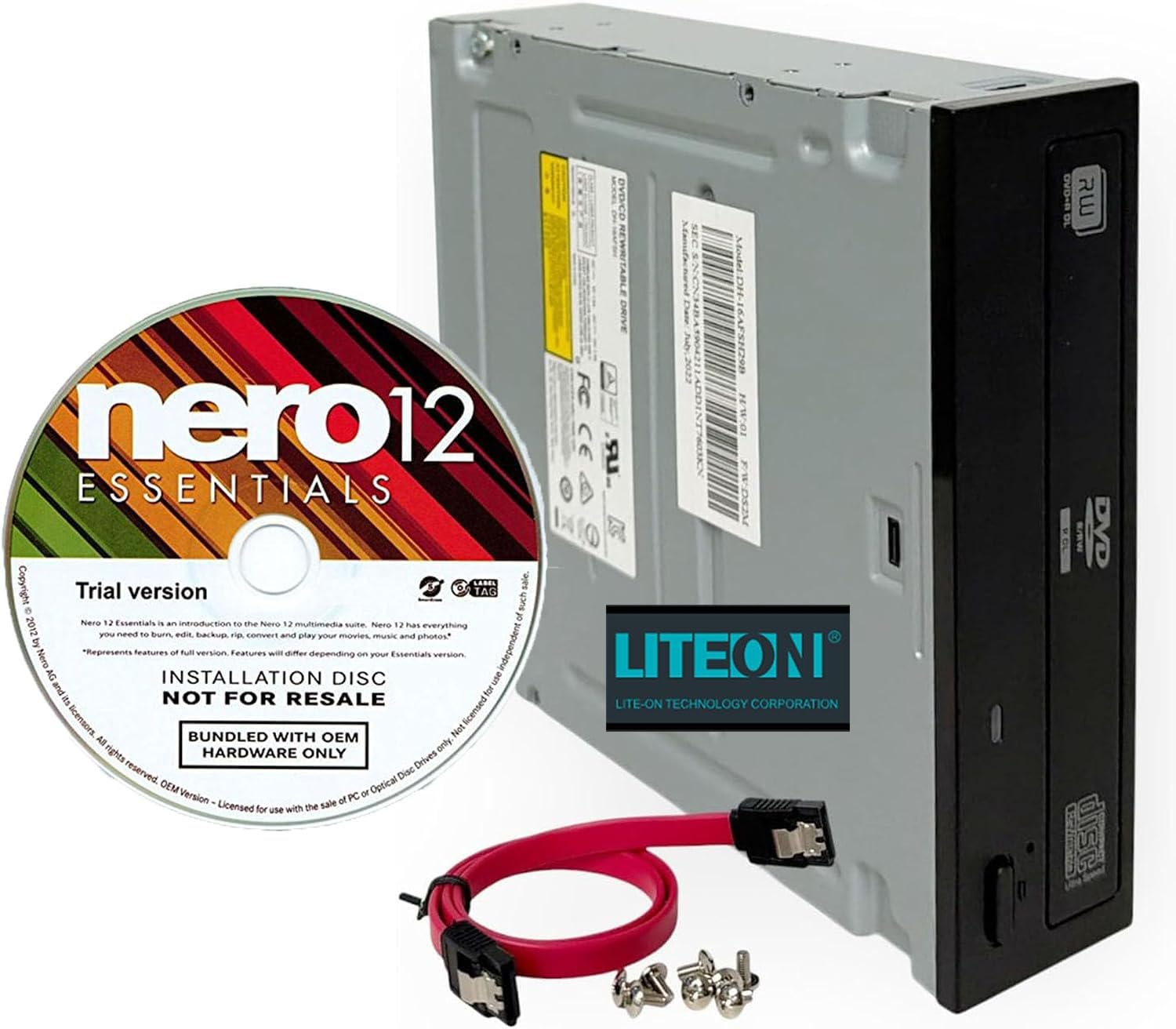
If raw burning reliability matters more than portability, this SATA drive from Lite-On is the one to beat. Its 24x write speed runs circles around the external USB drives in this list — the SATA bus provides a direct connection to the motherboard rather than a bottleneck-prone USB cable. Buyers report it “ripped 809 CDs accurately with Exact Audio Copy,” a feat that demands consistent read performance that cheaper drives cannot maintain. The included Nero 12 Essentials trial gives you burning and media management software right from the start, though it is a trial version rather than a full license.
Installation is straightforward: the drive ships with a SATA cable and mounting screws, so you slot it into a standard 5.25-inch bay, connect power and data, and you are running. The 2 MB cache (a small amount of memory that holds data before writing it to the disc) helps buffer data during burns, reducing buffer underrun errors that ruin discs. Reviewers see it the same way — functionality is the most-praised aspect by a wide margin, followed closely by value for money and ease of installation. A small number of owners note the drive can be noisy during reads, but the overwhelming consensus is that it is “accurate and extremely durable” — one unit even survived a CD exploding inside and kept working after a cleaning.
Ripping royalty: The fastest burner here at 24x DVD write, with a proven track record of error-free ripping over long sessions. If you plan to digitize hundreds of discs, this is the one that will get the job done without frustrating failures.
Desktop-only shape: This is an internal SATA drive that needs a 5.25-inch bay — no USB, no carrying it between computers. Also, the door mechanism can be finicky if the drive is not perfectly aligned in the case.
Reach for this if: you are building or upgrading a desktop and need the fastest, most consistent optical drive for ripping, burning, or software installation. The SATA interface delivers rock-solid stability that USB drives cannot match.
Look elsewhere if: you need a drive for a laptop, a Mac, or you want something you can plug in and unplug as needed. An external USB model will serve you better.
2. 5-in-1 External CD/DVD Drive for Laptop
The multi-port USB drive that turns your laptop into a disc-reading hub.
This external drive packs the most versatility per dollar in the lineup. Beyond reading and burning CDs and DVDs, it adds 2 USB 2.0 ports, an SD card slot (for full-size memory cards from cameras), and a TF (microSD, the tiny card for phones) card slot — so you can plug in a mouse, a flash drive, and transfer photos from a camera card all at once. The data transfer rate over USB 3.0 hits up to 5 gigabits per second. That speed makes disc reading feel snappy, and the plug-and-play nature (the drive works right away without installing drivers) means you do not hunt for software. Buyers confirm it “works with Windows 11, plays audio CDs” right after plugging it in.
Compatibility is the headline here — owners mention it more than any other aspect, and overwhelmingly positively. The drive works with everything from Windows 7 through 11, Linux, and all versions of macOS. Two USB cables are included: one USB-A and one USB-C, plus a separate power cable for computers whose USB ports cannot supply enough juice. The permanently attached main cable stows underneath, which keeps your desk tidy but one reviewer noted the placement is “inconvenient” when trying to position the drive. At 6.1 by 5.87 by 0.59 inches, it slides into a laptop bag easily, and the 24-month warranty is longer than most budget drives offer.
Why it wins for budget buyers
- Includes USB-A and USB-C cables so it works with new MacBooks and older PCs without an adapter
- Built-in SD and TF card slots save buying a separate card reader
- 24-month warranty is reassurance for a low-cost device
The trade-offs to know
- Permanently attached USB cable can get in the way on a cramped desk
- External power cable needed for some computers — another wire to carry
- Not compatible with TVs, tablets, or car entertainment systems
Best for: someone on a tight budget who needs one device that reads discs, transfers camera photos, and expands USB ports on a laptop. The 5-in-1 design pulls triple duty.
skip it if: you need a heavy-duty daily burner for hundreds of discs — this is built for occasional home and office use, not industrial-volume ripping.
3. Rioddas External CD/DVD Drive for Laptop

The crowd favorite that sold tens of thousands for a reason — it just works.
This is the drive most people will buy, and the volume speaks for itself. With over 40,000 ratings, the Rioddas is the best-selling external DVD drive on the market, and the reason is straightforward: it is genuinely plug-and-play (no driver installation needed). Powered entirely by the USB port, it requires no external power adapter or driver installation. You plug it in, insert a disc, and your computer sees it immediately. The USB 3.0 interface supports data transfer rates up to 5 gigabits per second, which means less waiting when reading or writing large files.
The brushed-texture shell looks and feels more substantial than the glossy plastic of budget drives. A physical eject button on the front can release a disc even if the computer has frozen or failed to recognize the drive, which is a smart piece of engineering that saves frustration. Functionality is the most-praised aspect with over 5,100 mentions, and ease of use clocks in second at 2,800. The drive is compact enough to toss in a laptop bag, and the embedded cable design means you will never lose the cord. One buyer succinctly summed it up: “Good price and works great.” Compatibility is the one mixed note — it works with Windows, Linux, and most Macs, but a segment of owners mention it does not work with newer MacBook Pro models, so Mac users should verify before buying.
Mass-appeal design: True plug-and-play with no separate power brick, a physical eject button for stuck discs, and USB 3.0 speeds that outpace the budget competition. For the typical home or office user, this is the safest choice.
MacBook Pro caution: Some newer MacBook Pro customers note the drive is not recognized. If you own a recent Apple Silicon Mac, check the reviews for your specific model before purchasing.
Ideal for: the vast majority of Windows laptop and desktop users who want a simple, fast, one-cable external drive for occasional disc reading and burning. The 40,000+ ratings prove this formula works.
Not ideal for: Mac users with newer MacBook Pros (2018 and later) or anyone who needs a built-in USB hub or card reader — this drive is pure optical, no extra ports.
4. ORIGBELIE External CD/DVD Drive with 4 USB Ports & 2 SD/TF Slots

The drive that doubles as a full-fledged USB hub, an RGB accent, and a card reader.
ORIGBELIE takes the hub-and-drive concept further than anyone else in this list. It packs 4 USB ports (one USB 3.0, one USB 2.0, two USB-C), SD and TF card slots, and a DVD burner into a single slim chassis. The USB 3.0 port delivers up to 5 gigabits per second, and the drive supports max 8x DVD read/write speeds and max 24x CD read/write speeds — fast enough for a full movie burn in under eight minutes. The data cable is integrated into the back of the device with both Type-A and Type-C connectors, so you do not need an adapter to use it with a modern MacBook.
A neat touch is the RGB LED indicator (a light that cycles through colors) that cycles through gradual color changes while the drive is active. It is cosmetic, sure, but it makes the drive feel more modern than the plain black bricks most competitors ship. The package includes a storage bag for travel, and an extra power cable for computers with weak USB output. Functionality and ease of use are the top praised aspects, and owners consistently call it “plug-and-play” on both Windows and Mac. A few reviewers point out that very old USB 1.0 computers may not supply enough power, but that edge case is easy to solve with the included power cable or a powered USB hub.
Where it shines
- 4 USB ports (including 2 USB-C) and 2 card slots make this a true desktop companion, not just a disc reader
- Integrated Type-A and Type-C cable means no adapter hunting
- RGB lighting is a fun visual cue that the drive is active
Where it trips
- SD and TF card slots cannot be used simultaneously — only one at a time
- Mac users need to insert a disc before the drive icon appears on the desktop (normal for macOS, but first-timers may think the drive is broken)
- Not compatible with Blu-ray, game consoles, or TVs
Pick this if: you want one device to replace a separate DVD drive, card reader, and USB hub on your desk. It declutters your workspace while adding a splash of RGB.
pass on it if: you need a pure portable drive for travel — the extra ports add bulk compared to a simpler external drive like the Rioddas.
5. BPAKDU External CD/DVD Drive for Laptop with Carrying Case

The ultra-slim external drive you will actually carry because it comes with its own case.
At just 9 ounces and 0.63 inches thick, this is the lightest and thinnest drive in the roundup. The included padded carrying case makes it genuinely travel-friendly — you can toss it into a backpack without worrying about the drive getting scratched or the cable snagged. The USB 3.0 interface supports up to 5 gigabits per second, with max 24x CD write speed and max 8x DVD read speed. It also includes 4 USB-A ports, 1 Type-C port, plus SD and TF card slots, effectively functioning as a portable hub for your laptop.
The drive’s compatibility list is broad: it works with Windows 11/10/8.1/7/Vista/XP, Linux, and all versions of macOS including M1 and M2 Macs. The embedded cable design keeps the cord stowed underneath, and skip-proof rubber pads on the bottom prevent it from sliding across a desk during use. Functionality is the top praised aspect, with quality and compatibility tied for second. One owner noted it “works as I paid for for both DVD’s and games,” and another appreciated the “on board usb hub and sd card reader” for daily use. A minor caveat: the USB-C port supports charging only, not data transfer, and the SD and TF slots cannot be used simultaneously.
Built for the road: The included carrying case and featherlight 9-ounce weight make this the easiest drive to throw in a bag and forget about until you need it. The hub ports mean you do not sacrifice connectivity on a laptop with only two USB-C ports.
Not perfect on every point: The USB-C port is charge-only, and you cannot use both memory card slots at once. If simultaneous card access is critical, consider the ROOFULL drive below.
Best for: frequent travelers or anyone with a thin-and-light laptop who needs occasional disc access without adding significant weight or bulk to their bag.
Not for: users who need high-volume burning — this drive handles occasional use well but is not rated for industrial-style daily ripping.
6. ROOFULL External CD DVD Drive with 4 USB Port & 2 SD Card Slot & Case

The premium 8-in-1 that tech reviewers recommend and owners call an “11 out of 10.”
ROOFULL’s drive is the most feature-packed external optical drive in the lineup, with a 6-in-1 expansion hub (a device that adds extra ports) built right in: one USB 3.0 port, three USB 2.0 ports, an SD card slot, and a Micro-SD card slot. The main data cable (USB 3.0 Type-A and Type-C) is stored neatly underneath the drive in a built-in groove — a design that buyers consistently praise as thoughtful and convenient. The drive delivers up to 5 gigabits per second via USB 3.0, supports max 8x DVD and 24x CD read/write speeds, and includes a separate power cord for computers with low-power USB ports.
The protective carrying case is foam-lined with a zippered side pouch, offering more protection than the simple bag that comes with the BPAKDU. Owners describe it as “top-notch” and note the drive is recognized in about five seconds on Windows 11. One buyer ripped 4 CDs to iTunes without issues, and another highlighted the “free 2-year warranty extension” as a confidence booster. A few minor gripes surface: the drive can emit a high-pitched whining noise during operation, and the power cable is short. But the overall consensus is that this is a reliable, well-built drive for the price, with a 2-year service commitment from a company with over a decade of experience in optical drives.
Why it earns top marks
- 8-in-1 design includes separate SD and Micro-SD slots that can work independently (no USB or card slot conflicts)
- Padded foam-lined case offers real drop protection, not just a dust cover
- 2-year warranty with a no-return replacement policy adds confidence
The honest trade-offs
- Some units produce a high-pitched whine during operation — not universal, but common enough to note
- The power cable is fairly short, which limits placement options if your computer needs external power
- Mac users must eject discs via software, not the physical button (a macOS limitation, not a drive defect)
Choose this if: you want the most versatile external hub-drive combo with a premium case, a long warranty, and the confidence that a company with optical drive experience stands behind it.
Think twice if: you are sensitive to high-pitched noises or need a dead-silent drive for a quiet office environment.
7. BestDuplicator Lite-On 24x Dual-Layer SATA DVD±RW Optical Drive
The SATA drive for dual-layer discs, duplicators, and servers that never shut down.
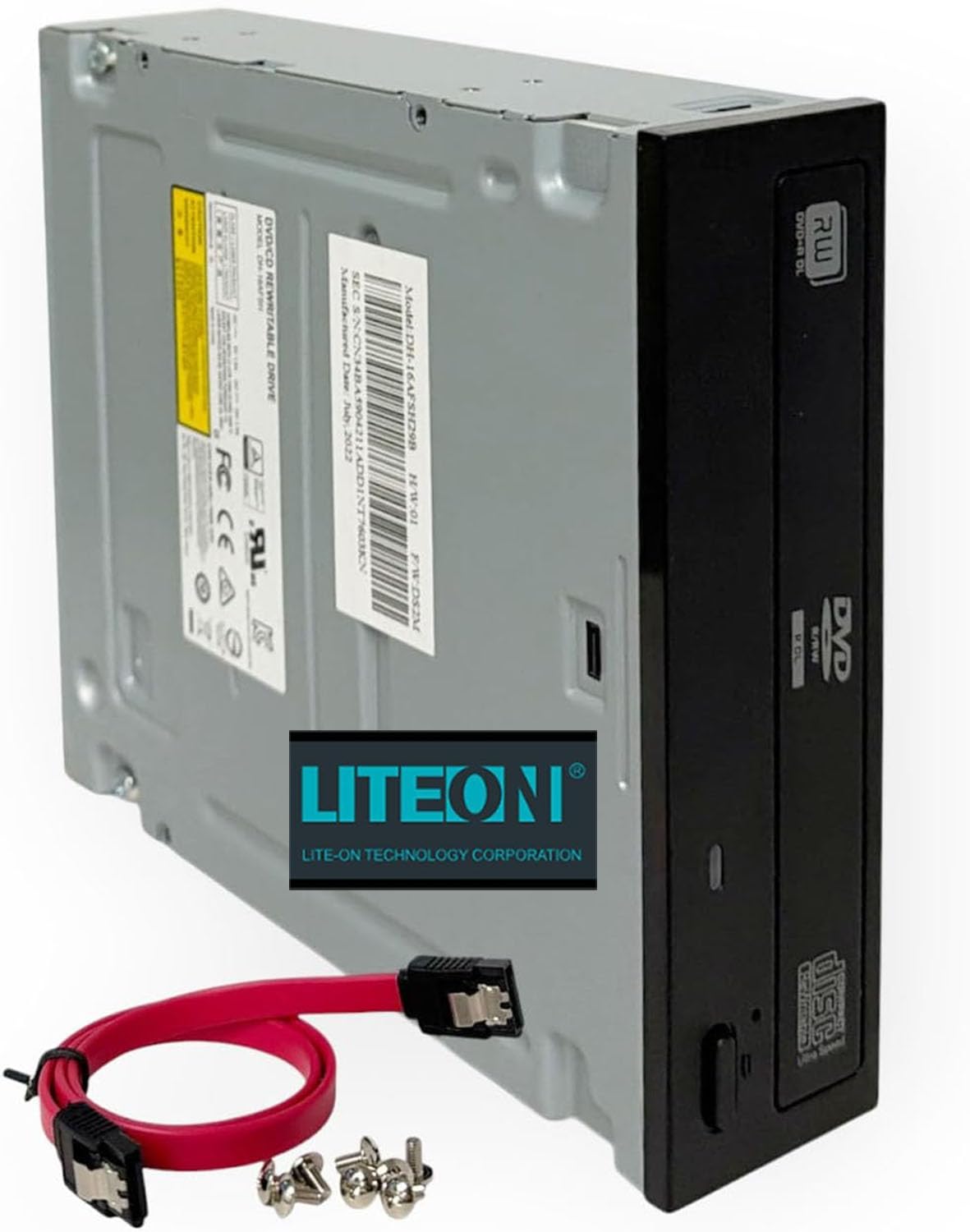
This internal drive shares the same 24x DVD write speed and SATA interface as the Lite-On 24X at position 1, but adds dual-layer (DVD±R DL) read and write support — meaning it can burn and read 8.5 GB discs, nearly double the capacity of a standard 4.7 GB single-layer DVD. That makes it the right choice if you are working with dual-layer movies or large data backups that spill past the single-layer limit. The drive measures 5.75 by 1.63 by 6.69 inches and fits into any standard 5.25-inch bay with the included SATA cable and screws.
The cache memory is 1.5 MB (a small memory buffer that helps prevent errors during burns), slightly smaller than the 2 MB cache on the other Lite-On unit, but for most users the difference is negligible at 24x write speeds. The drive is compatible with Windows and Linux without special drivers, and it works with PC duplicators, servers, and workstations — not just consumer desktops. One owner summed it up: “It’s a DVD drive. Worked perfectly.” Another noted it is “the best DVD player EVER” and praised its super-fast burning. Noise level gets mixed feedback: some call it very quiet, others find it noisy. It is note the drive ships without a power cable and the bundled software is missing from some units, though the SATA cable and screws are included.
Dual-layer advantage: If you need to burn 8.5 GB dual-layer discs for movies or large backups, this is the only drive in the list that officially supports it. The 24x write speed means those dual-layer burns finish in about eight to ten minutes.
The gotcha: Some units arrive missing the power cable and software, and the noise level is a roll of the dice — quiet for some, loud for others. Also, the button position (left or right) varies by drive revision, which can misalign with some PC faceplates.
Grab this for: a desktop or server build where you regularly burn dual-layer DVDs or need a durable SATA drive for a duplicator bank. It is the go-to for high-capacity optical storage.
Pass if: you need an external drive or you only burn standard 4.7 GB DVDs — the Lite-On 24X SATA at position 1 gives you the same speed for less money with a larger cache.
Understanding the Specs
Interface: SATA vs USB 3.0
The interface is the pipeline between your computer and the drive. SATA is an internal connection inside a desktop tower — it is direct, stable, and uses no conversion overhead. USB 3.0 is the external standard, offering theoretical speeds up to 5 gigabits per second, but real-world performance depends on the USB controller in your computer. For a permanent desktop installation, SATA is more reliable. For portability and laptop use, USB 3.0 is the only practical choice, and the difference in everyday use is small enough that most users will not notice.
Write Speed: 24x vs 8x
DVD write speeds are measured as multiples of 1.32 MB/s (the base 1x speed for DVD). A 24x drive writes at roughly 31.7 MB/s, completing a 4.7 GB disc in about four to five minutes. An 8x drive writes at about 10.6 MB/s, taking eight to ten minutes for the same disc. The gap matters most when burning multiple discs in a session — the 24x drive can burn three discs in the time an 8x drive burns two. For occasional use, the difference is not critical. For high-volume archiving, 24x saves real time.
Dual-Layer (DVD±R DL) Support
A dual-layer DVD holds 8.5 GB of data, nearly twice the 4.7 GB of a standard single-layer DVD. Not all drives can read or write dual-layer discs. If you plan to burn full-length movie discs (which often use dual-layer encoding) or large software archives, you need a drive that explicitly lists dual-layer read/write support. The BestDuplicator Lite-On Dual-Layer drive is the only one here that officially supports it, making it the right pick for anyone working with 8.5 GB media.
Cache Memory
The drive’s onboard cache temporarily holds data before writing it to the disc. A larger cache (2 MB vs 1.5 MB) helps prevent buffer underrun errors — the most common cause of ruined discs — during high-speed burns. For 24x burns, a 2 MB cache is the balance; smaller caches increase the risk of errors if the computer’s data stream pauses for even a split second. For 8x drives, the cache size matters less because the slower write speed gives the computer more time to feed data.
FAQ
Will an external DVD drive work with my MacBook?
Can I use a DVD drive with a Chromebook?
What is the difference between DVD-R and DVD+R?
How long does it take to burn a full DVD?
Do I need special software to use an external DVD drive?
Why does my computer not recognize the drive?
Can I play Blu-ray discs on a standard DVD drive?
Should I get an internal or external DVD drive?
Final Thoughts: The Verdict
For most buyers, the clear winner in the dvd drive category is the Lite-On 24X SATA because its combination of 24x write speed, rock-solid SATA stability, and a track record of error-free ripping makes it the best choice for anyone who needs reliable disc access. The catch is it needs a desktop tower. If you need a portable plug-and-play drive, the Rioddas External is the crowd favorite with over 40,000 ratings and genuine one-cable simplicity. And for the ultimate all-in-one hub that adds USB ports and card slots to your laptop bag, the ROOFULL 8-in-1 delivers premium build quality and a padded case that makes it travel-ready.
How We Picked
We do not accept paid placement. Every pick is matched to a real buyer and a real use-case; we do not hands-on test units.
Sources & Methodology
Specifications: manufacturer listings and product documentation. Review insights: verified customer reviews, as of July 2026. Pricing: not shown on this page (it changes often); check the current price via the retailer link.
As an Amazon Associate, WellFizz earns from qualifying purchases. This does not affect which products we feature.
Related Guides

Mo Maruf
I created WellFizz to bridge the gap between vague wellness advice and actionable solutions. My mission is simple: to decode the research and give you practical tools you can actually use.
Beyond the data, I am a passionate traveler. I believe that stepping away from the screen to explore new environments is essential for mental clarity and physical vitality.