Our readers keep the lights on and my smoothie glass nicely filled. As an Amazon Associate, I earn from qualifying purchases.
Specs are compiled from manufacturer listings and verified buyer reviews and can change over time — please confirm the key details on the product page before buying.
You want a PC that looks stunning through the glass, not a tangle of cables and a bulky power supply stealing the show. A dual chamber PC case solves that by hiding your PSU, drives, and wiring in a separate compartment, leaving the main window clean and illuminated. The real question is how much tower you actually need — and which of these builds earns the dual chamber pc case title for your setup. Here’s how they differ in airflow, GPU room, cooling support, and build ease.
I’m Mohammad Maruf — the founder and writer behind WellFizz. This guide is built by comparing the manufacturers’ published specifications and the patterns across verified customer reviews, so you get each pick’s real strengths and trade-offs instead of marketing spin.
From panoramic glass showpieces to budget-friendly fan-packed towers, here are the dual chamber cases worth your money in 2025.
Our Picks at a Glance


How To Choose The Best Dual Chamber PC Case
Focus on three specs: GPU length, radiator support, and the case’s physical footprint. Once you match those three, the remaining specs fall into place.
GPU and Radiator Clearance
Your graphics card is the largest component, so verify the maximum GPU length before purchasing — many of these cases accept cards up to 400mm (15.75 inches), which fits nearly every modern high-end GPU. If you plan liquid cooling, radiator support is equally critical; many models accept 360mm radiators on the side, top, or both.
Fan Placement Over Fan Count
More fans don’t automatically mean better cooling — where they sit and which direction they blow matters more. The best dual chamber designs pull cool air in from the bottom and side, then push hot air out the top and rear, creating a steady vertical flow that keeps your CPU and GPU happy.
Quick Comparison
| Model | Best For | Size | Weight | Fans Included | Amazon |
|---|---|---|---|---|---|
| MONTECH King 95 PRO★ Best Overall | Best Overall — Balanced Premium | Mid Tower | 26.1 lbs | 6 ARGB PWM | Amazon |
| H1 HYXN ATX CaseBest Value | Budget Runner-Up — 7 Fans | Mid Tower | 11 lbs | 7 ARGB PWM | Amazon |
| FOIFKIN F600Panoramic Pick | Value Pick — Panoramic Look | Mid Tower | — | 7 ARGB PWM | Amazon |
| Antec C5 ARGB | smooth Glass Mid-Range | Mid Tower | 7.6 kg | 7 ARGB PWM | Amazon |
| Antec C8 | Full Tower — Massive Space | Full Tower | 23.1 lbs | None | Amazon |
| Lian Li O11 Vision Compact | Premium Compact Glass | Mid Tower | 26.4 lbs | None | Amazon |
| be quiet! Light Base 600 DX | Quiet Flexibility | Mid Tower | 6 kg | None | Amazon |
| NZXT H9 Flow | Flagship Airflow | Mid Tower | 12.5 kg | 4 Fans | Amazon |
| Lian Li O11D EVO RGB | E-ATX Custom Builds | Mid Tower | 32.6 lbs | None | Amazon |
| Geometric Future M5 | Unique Showcase PSU | Mid Tower | — | 5 ARGB PWM | Amazon |
| HYTE Y70 Touch Infinite | Luxury Touchscreen Showpiece | Mid Tower | 24.4 lbs | None | Amazon |
In‑Depth Reviews
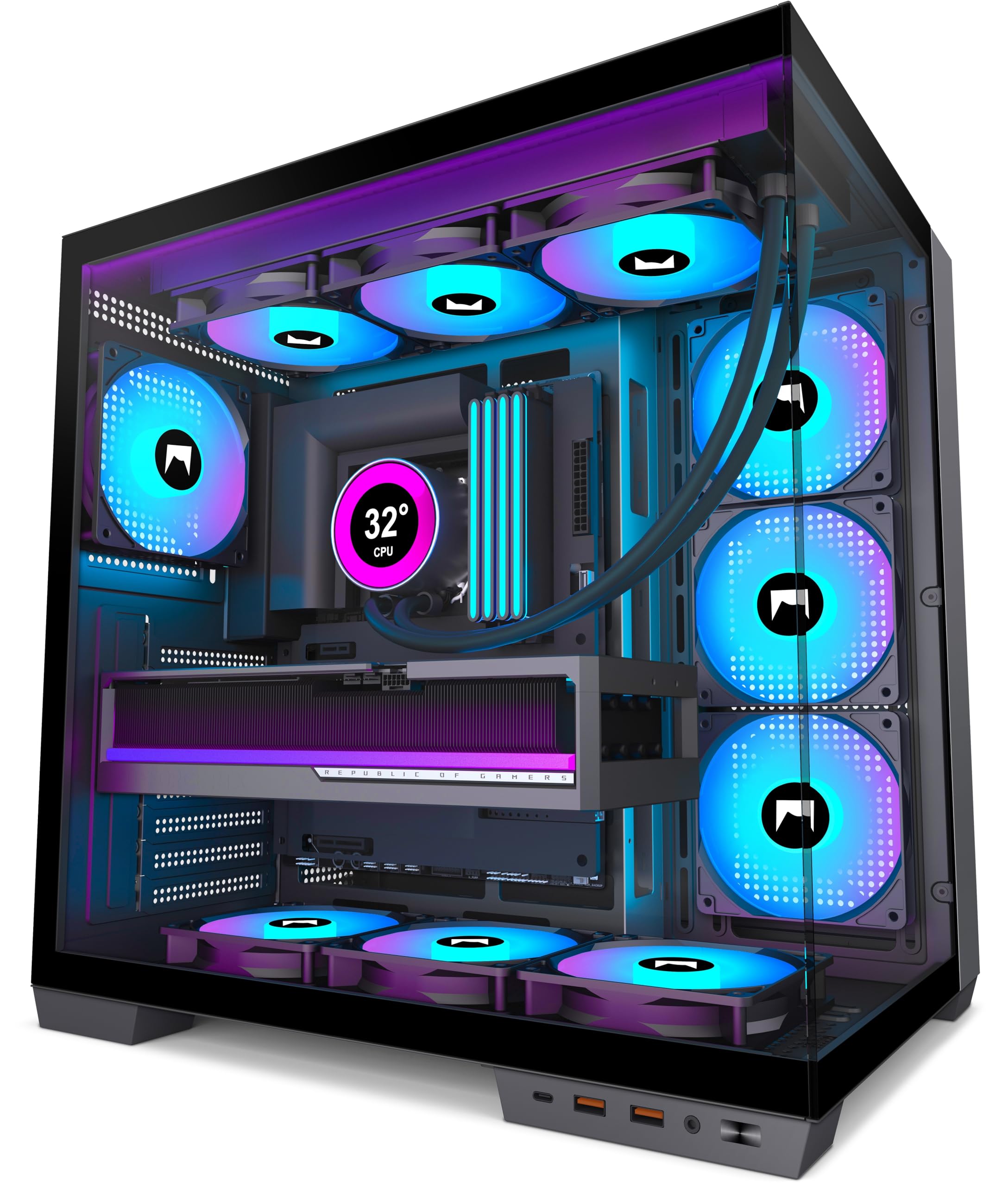
1. MONTECH King 95 PRO Dual-Chamber ATX Mid-Tower PC Gaming Case
Our pick — over 4.5★ from 500+ verified ratings; the strongest balance of quality and price.
The curved-glass centerpiece that makes a first build feel easy and a showpiece desk feel inevitable
You get the full aquarium look without the usual headaches, thanks to a sturdy curved tempered glass front that bends the view around your hardware. The dual chamber layout tucks your PSU, drives, and cables into their own compartment, which is why owners describe the interior as clean and the build as easy — you get 8 internal bays for storage and 26.1 pounds of solid, premium-feeling construction that sits confidently on a desk.
Cooling arrives ready to go with 2x 140mm and 4x 120mm ARGB PWM fans pre-installed, plus a fan hub so you’re not hunting for motherboard headers. Buyers report that the airflow is excellent through the mesh panels, and one owner noted it easily swallows a large GPU setup — the kind of card that makes other cases feel cramped. The toolless, all-sides-removable panels turn upgrades into a five-minute job rather than a frustrating wrestling match.
The honest trade-off is the footprint: at 17.4″D x 11.81″W x 18.7″H, it’s a chunk of real estate, and the 26.1-pound weight means it’s not something you’ll casually move around. That’s the price of the premium feel — one owner even noted it claims a quarter of their desk. The crowd consensus after 500+ ratings holds strong at 4.8 stars, making this the safest premium bet in the category.
What wins people over
- Curved glass front and dual chamber create the cleanest interior look
- Six pre-installed ARGB PWM fans with hub for instant airflow
- Toolless removable panels make building and upgrades quick
The size reality
- 26.1 pounds and a wide footprint demand serious desk space
- A tall CPU cooler can block the top lid latch from closing
Reach for this if: you want a premium-feeling, spacious showpiece that’s genuinely easy to build in and comes with fans ready to go
Look elsewhere if: your desk is tight — this is a heavy, wide tower that commits to its footprint
2. H1 HYXN ATX PC Case – Pre-Installed with 7 PWM ARGB Fans
Seven fans, a 270° glass view, and a featherweight frame that undercuts the competition
You get a panoramic 270° view of your components through two tempered glass panels, and the whole thing weighs just 11 pounds — a full 2.4x lighter than the MONTECH King 95 PRO above. That makes it the easy choice if you want the dual chamber look without needing a forklift to reposition your tower, and the 16.5″D x 11.2″W x 17.3″H footprint is noticeably more compact.
from the start you’re already cooled: 3x 120mm reverse-blade ARGB PWM fans on the bottom, 3 more on the side, and 1 forward-blade on the rear, all daisy-chained so you don’t need a separate controller. Owners rave about the airflow and call the noise level amazing, with one buyer summing it up: “This case is so worth it. Not complicated, no issues, great space.” The dual chamber design simplifies cable management, and Type-C 3.0 front I/O keeps modern devices plugged in without adapters.
The catch is the front I/O port placement — owners mention the ports sit on the bottom, which is a weird and inconvenient spot for daily plugging. Also, with 7 fans pulling power, a fan hub or controller is a smart add since a typical motherboard header handles roughly 1A while each fan draws 0.35A. It’s a minor planning note, not a dealbreaker, for this 4.5-star budget-friendly build.
Why it’s a steal
- Seven pre-installed ARGB PWM fans with daisy-chain simplicity
- 11-pound frame and compact size are easy to move and place
- Dual chamber layout keeps cable management clean and simple
Smart to know
- Front ports on the bottom are awkward for frequent access
- Seven fans may need a hub to avoid overloading motherboard headers
Grab it if: you want maximum pre-installed cooling and a light, compact dual chamber tower at a budget-friendly price
Think twice if: you plug USB drives in constantly — the bottom ports will test your patience
3. FOIFKIN F600 PC Case – Pre-Installed 7 PWM ARGB Fan
The fish-tank look with 7 fans and a 270° glass wrap that rivals cases double the price
The 270° tempered glass panoramic design is the headline here, letting you see your entire build from three sides through fully transparent high-hardness glass. Inside, the dual chamber layout separates the power supply and drives from your main components — buyers confirm this enhances both thermal performance and cable management, giving you a clean interior that shows off every part.
You get 7x 120mm ARGB PWM fans pre-installed (6 reverse-blade, 1 forward-blade) and support for GPUs up to 400mm (15.75 inches) and PSUs up to 200mm (7.87 inches). One owner running a full-size ATX board reports everything mounted easily and the airflow keeps their 5800x3d “cool and happy,” while another praises it as “built like a tank” with solid metal construction and magnetic top mesh. Storage options include 1x HDD and 2x SSDs.
The value story is strong — one buyer notes it’s about half the price of the Antec C8 Curve while delivering the same aesthetic. The honest notes: the included fans are functional but not premium-quiet, and a few customers note the GPU screw alignment can be finicky with certain cards. At 4.5 stars from a large owner base, this is a confident budget-friendly choice for the panoramic look.
The showpiece factor
- 270° panoramic glass wraps your build in uninterrupted views
- 7 pre-installed ARGB PWM fans and 10 internal bays for expansion
- Solid metal frame with hinged front glass and magnetic top mesh
Reality check
- Included fans are average, not quiet — budget for upgrades if noise matters
- GPU screw alignment can be tricky with certain graphics cards
Choose this for: the panoramic glass look and 7 fans at a price that undercuts the big-name fish tanks
Skip it for: silent builds — the stock fans are decent but not whisper-quiet
4. Antec C5 ARGB Mid-Tower ATX PC Case

A smooth glass front and side panel with a built-in fan controller for easy RGB harmony
Antec delivers a smooth look — the front and side panels meet with a continuous edge, forming one sheet of tempered glass that stands out from typical framed designs. The dual chamber layout provides a wide interior, and it supports back-connect motherboards, so you can hide nearly every cable behind the tray for a wire-free front view.
Cooling comes from 7 pre-installed ARGB PWM fans (fans with both addressable RGB lighting and pulse-width modulation for speed control), including 6 reverse-blade fans that push air correctly for this layout, all wired into a built-in ARGB and PWM fan controller to avoid messy cabling. Buyers praise the stunning ARGB lighting, and one notes it’s “not a cheap Chinese knock-off” — the quality and fit are genuinely impressive. The setup supports up to 10 fans and 360mm radiators, giving you room to grow into serious liquid cooling.
Assembly gets mixed reviews — some find it a breeze while others struggle, so it’s not the easiest first build. One owner notes the long fan cables in the back fold easily but stay manageable, and another replaced the PWM/ARGB header just for personal preference. At 4.6 stars across a solid base of 500+ ratings, the airflow is excellent even without top fans, with no thermal throttling reported under gaming load.
Built to impress
- smooth glass front and side create a premium unbroken view
- Built-in fan controller simplifies the 7-fan RGB setup
- Supports back-connect motherboards for a cable-free look
Watch for
- Assembly can be tricky for first-time builders
- Long fan cables in the back need careful folding
Best for: builders who want the smooth glass aesthetic with a controller that tames 7 fans
Not for: total beginners — the build is rewarding but not the simplest
5. Antec C8 Dual-Chamber Full-Tower E-ATX PC Case
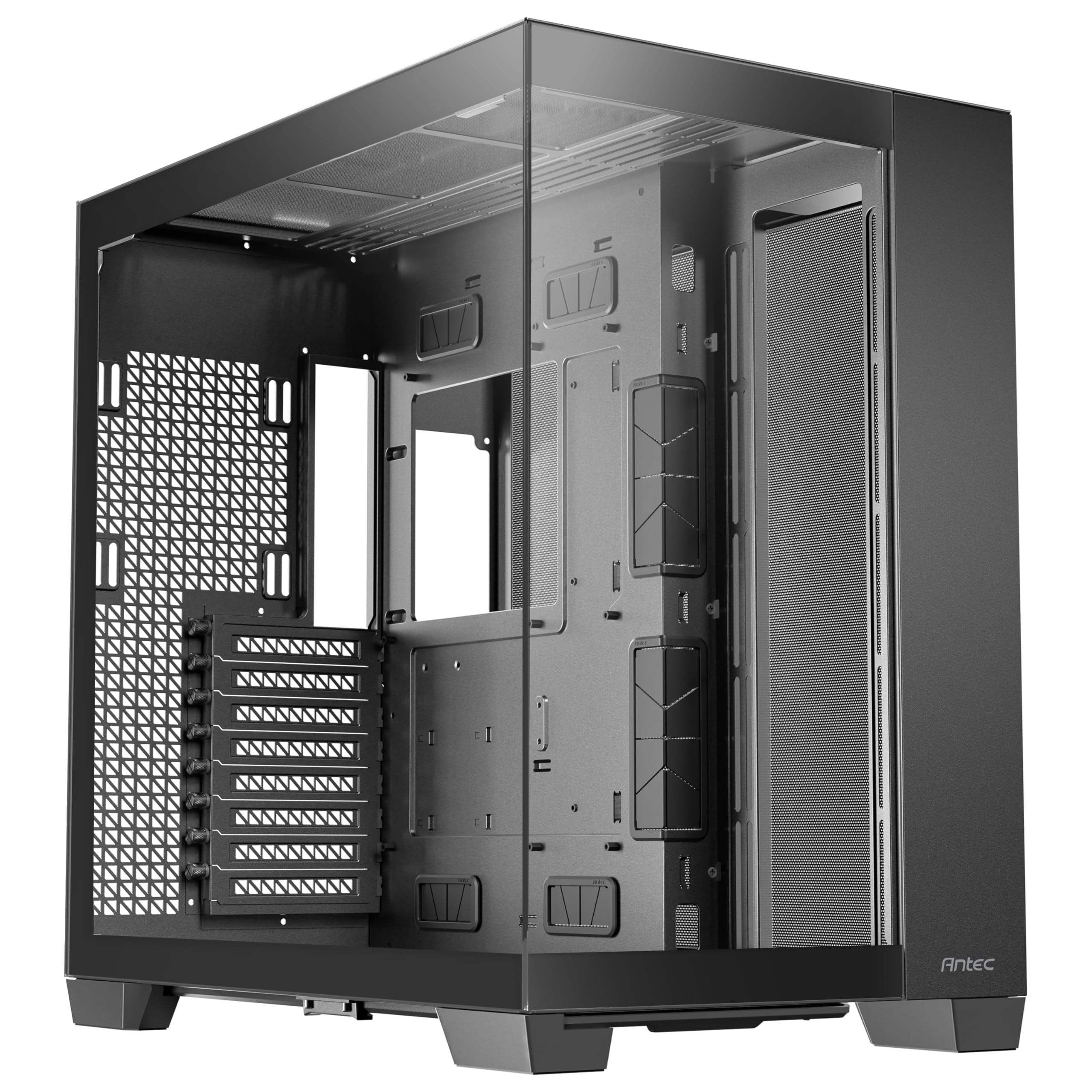
A cavernous full-tower that fits E-ATX boards, triple radiators, and a cat according to one owner
This is the case for people who plan big and upgrade bigger. The full-tower frame supports E-ATX motherboards alongside ATX, Micro-ATX, and ITX, with space for three 140mm fans or two 160mm fans on both the top and bottom. It even fits thick 360mm radiators on the top, bottom, and side simultaneously — a level of cooling flexibility that few cases offer.
One owner described the interior as cavernous enough to fit an E-ATX board, a giant GPU, six SATA drives, seven fans, a PS5, and a cat — which tells you everything about the scale here. The 8 expansion slots and 23.1-pound steel-and-glass build give you room for RTX 40-series cards and then some, with buyers reporting superb thermals: one saw CPU temps drop from 82-83°C compared to a previous case. The design is 98% tool-less with a single front-panel connector.
There’s a critical caveat: fans are not included, so you’ll need to budget for your own cooling setup. The sheer size is also a factor — one owner warns to “make sure you have space for it!” It’s the pick when you want ultimate expansion headroom and don’t mind a tower that dominates the room, and its 4.8-star rating from 450+ owners reflects that enthusiasm.
The expansion king
- Fits E-ATX boards, 8 slots, and triple 360mm radiators
- 98% tool-less design with one front-panel connector
- Cavernous space for huge GPUs and up to 6 SATA drives
Plan ahead
- No fans included — budget extra for cooling
- Massive footprint dominates your room or desk
Get it if: you’re building an E-ATX monster or custom loop with triple radiators and want room to grow
Pass if: you want a ready-to-cool case — there are no fans in the box
6. Lian Li O11 Vision Compact Black Tempered Glass Case

A patented three-panel glass design that hides AIO tubing while keeping the view uninterrupted
Lian Li’s compact take on the iconic O11 series delivers the panoramic look in a smaller package, with tempered glass on the front, top, and left side for an unobstructed view of your components. The clever part is the hidden AIO tubing — when you mount your liquid cooler on the side, the innovative design tucks the tubes into the second chamber so your build looks immaculate.
It’s built in collaboration with PCMasterRace and supports back-connect motherboards for a truly clean cable-free aesthetic. Buyers consistently call it one of the best cases they’ve used, praising the ample cable management space behind the motherboard tray and the compact form factor that still fits large GPUs and 360mm radiators. One owner, building PCs for 20 years, calls it the best they’ve ever used — high praise from a serious veteran.
The weight is the surprise here: at 26.4 pounds, it’s heavier than the full-tower Antec C8 above despite being more compact. The 4.8-star rating across 450+ owners reflects genuine enthusiasm, though it’s note there are no fans included, so you’ll build your own cooling configuration. A top mesh panel is included if you want to mount a 360 AIO on top instead of the glass.
Why it shines
- Three-panel glass gives an uninterrupted panoramic view
- Hidden AIO tubing design keeps the interior looking clean
- Back-connect motherboard support for cable-free builds
Know before buying
- 26.4 pounds is surprisingly heavy for a compact case
- No fans included — cooling is on you
Ideal for: builders who want the O11 look in a smaller footprint with hidden AIO tubing
Consider otherwise: if you want a ready-to-cool case — the price climbs once you add fans
7. be quiet! Light Base 600 DX Black PC Case

An aquarium case that flips inverted or lays flat, with a full glass front and side for maximum display
This is the shape-shifter of the group — the removable feet let you invert the entire layout or place it horizontally, adapting in seconds to whatever your desk setup demands. Perfect for left-side desk placement, as one owner highlighted, or for showing off your build from a different angle entirely. The fully windowed front and side panels turn it into a panoramic aquarium.
Lighting comes from a 1.33m ARGB LED strip with 77 LEDs that syncs with your motherboard for brilliant effects from every angle. The dual chamber design keeps cable management clean, and the case ships with hubs for 12 ARGB/PWM devices — plenty for a fully built system. It handles GPUs up to 400mm long, CPU coolers up to 170mm tall, and supports dual 360mm + 240mm radiators for serious liquid cooling.
Owners love the built-in GPU anti-sag bracket and the included hubs, with one buyer saying “I absolutely love this case!” Installed right from the start. A couple of fit-and-finish notes: only PSU screws are included (no drive screws), and the passthrough grommets can be stubborn to seat. The 4.6-star rating holds strong, and the reversible layout makes this a truly unique mid-range pick.
What makes it special
- Invertible or horizontal layout with removable feet
- 77-LED ARGB strip with motherboard sync
- Hubs for 12 ARGB/PWM devices and GPU anti-sag bracket included
Minor quirks
- Only PSU screws included — no drive screws in the box
- Some plastic parts can arrive slightly misaligned
Perfect for: left-side desk setups and builders who want layout flexibility no other case offers
Skip if: you want drives pre-screw-ready — you’ll need to source your own drive screws
8. NZXT H9 Flow Dual-Chamber ATX PC Case

The dual-chamber flagship with 420mm radiator support and wraparound glass that delivers top-tier airflow
NZXT’s flagship dual-chamber case is built for high-performance builds that need serious cooling, with wraparound tempered glass that shows off every component while perforated steel panels keep air moving. The tune airflow design includes angled front-right fans for efficient cooling — the kind of thoughtful engineering that keeps your expensive hardware running cool under pressure.
You get 4 fans in the box (three F140Q front-right and one F120Q rear) plus support for up to a 420mm radiator on both the top and front-right, with plenty of clearance for high-end graphics cards. The second chamber offers generous room for cable management with extra-wide channels, built-in Velcro straps, and tie-down points. One owner calls it the “best case for a water cooling loop,” fitting a GPU+CPU loop with dual reservoirs and a 360mm radiator with room to spare for a 420mm.
The one consistent complaint is the size — it’s LARGE, as multiple owners emphasize in caps. The front panel connectors and power button sit at the bottom, which one owner calls an “obvious wart” that’s hard to reach. Still, at 4.7 stars from over 400 ratings, the spaciousness, easy installation, and top-tier build quality make it a flagship worth considering. It’s back-connect ready for ASUS BTF and MSI Project Zero boards too.
The airflow flagship
- 420mm radiator support on top and front-right
- 4 included fans with tune angled placement
- Extra-wide cable channels with Velcro straps
Size matters
- Case is genuinely LARGE — measure your space first
- Front panel buttons at the bottom are awkward to reach
Choose this for: serious water-cooling loops and big radiators that need a flagship chassis
Pass on it if: you’re tight on space — this tower dominates whatever surface it sits on
9. Lian Li O11D EVO RGB E-ATX Gaming Dual Chamber Case

A reversible E-ATX chassis with 455.7mm of GPU room and dual RGB strips built for serious builders
Lian Li’s EVO RGB is the case for builders who want total control, starting with a reversible chassis that flips orientation to match your desk. The removable front support pillar opens up a completely uninterrupted view of everything inside, and the main compartment offers 455.7mm of GPU clearance with seven expansion slots — room for virtually any graphics card on the market.
The dual 1.5mm L-shaped RGB strips sit at the top and bottom of the tempered glass panels, controlled through the motherboard for beautiful lighting options. Two height options for motherboard installation let you adjust the internal layout for different fan and CPU cooler setups. Builders praise the well-thought-out cable management with Velcro straps and dual-layered clips, plus the PSU bracket that protrudes 15mm out for extra cable space.
At 32.6 pounds, this is the heaviest case in the lineup — it’s a substantial commitment. Reviewers point out the mesh panels can restrict airflow, so high static pressure fans are recommended for optimal cooling. One owner mentioned a 2.5″ SSD behind the motherboard tray can prevent the back panel from latching properly. Still, the 4.7-star rating from 400+ owners reflects its reputation as a stunning, versatile chassis for serious builders.
Builder’s playground
- Reversible chassis with removable front pillar
- 455.7mm GPU clearance and E-ATX support
- Dual RGB strips and adjustable motherboard height
Weight and airflow
- 32.6 pounds is the heaviest case here
- Mesh panels need high static pressure fans for best flow
Built for: experienced builders who want a reversible, customizable chassis with maximum GPU room
Not for: the faint-hearted — this is a heavy, hands-on case that rewards effort
10. Geometric Future M5 Tempered Glass Mid Tower E-ATX Case

A 1.2mm steel showpiece with a PSU display window and five 140mm ARGB fans already installed
The M5 stands out with its unique PSU shroud display window that shows off your power supply or sleeved cables with pride — a feature no other case in this lineup offers. The 0.8–1.2mm thick steel frame gives it impressive durability and structural strength, and the black/green color scheme adds a distinct lo-fi, almost steampunk vibe that one owner specifically chose over RGB-heavy alternatives.
You get 5x 140mm ARGB PWM fans pre-installed, delivering tune airflow with bright, quiet operation. The tool-free tempered glass panels make upgrades fast and low-maintenance, and the cooling potential is extreme: support for up to 420mm radiators and 10x 120mm fans. It fits E-ATX motherboards and GPUs up to 460mm, making it among the most accommodating mid-towers available.
The build quality earns serious praise — one owner, building for 40 years, calls it a favorite with top-notch fans keeping their 13600K at 32°C under an air cooler. The honest reality is this is not a beginner-friendly case: cable management requires patience, you’ll need zip ties and possibly extension cables, and the top PSU mount demands specific routing. It’s a beautiful case for experienced builders who want something different, earning 4.6 stars from 300+ owners.
Standout features
- PSU display window showcases your power supply
- Five 140mm ARGB PWM fans pre-installed
- 0.8-1.2mm steel frame for durability
The learning curve
- Not beginner-friendly — cable routing is challenging
- Top PSU mount needs specific cable routing expertise
Pick this for: experienced builders who want a unique PSU showcase with five 140mm fans ready to cool
Look elsewhere if: this is your first build — the cable management demands experience
11. HYTE Y70 Touch Infinite Modern Aesthetic Gaming PC Case
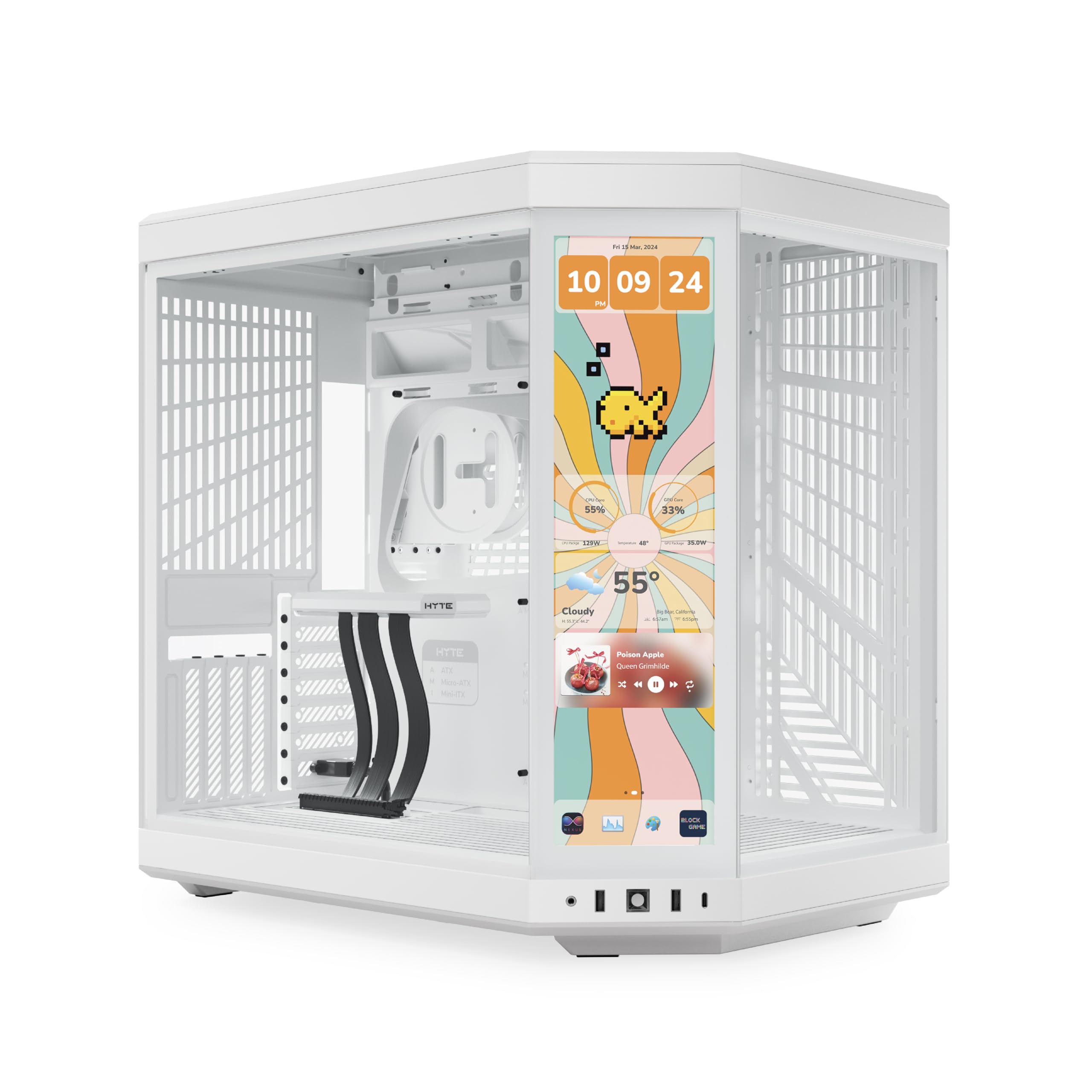
A 14.9-inch LCD touchscreen built into the case itself — the most distinctive dual chamber ever made
This is the case that turns heads before your PC even powers on, with an integrated 14.9″ LCD touchscreen running at 682 x 2560 (2.5K) resolution with a 60Hz refresh rate and 10-point multi-touch. Owners use it to display system info, Discord, and Spotify right on the case — one calls it their “dream case” that exceeded all expectations. The newer panel is 43% brighter than the previous version, making it genuinely usable in bright rooms.
The layout is equally impressive: a 3-piece panoramic glass design wraps around the dual chamber interior, and the included luxury PCIe 4.0 x 16 riser cable enables massive 4-slot vertical graphics mounting with a color-matched canopy. Cooling supports a 360mm radiator on the side (125mm thick) and an adjustable top (68mm thick), plus cold-floor cooling for a trio of 120mm or duo of 140mm fans, allowing up to 10 fans total. It’s spacious enough for almost any hardware, with a removable vertical GPU mount that fits cards up to 342mm.
The trade-offs are real: this is the premium-tier option here, and the touchscreen software can be slow and memory-hungry. One owner notes the case arrived with shipping struggles and only 9 motherboard standoffs (you may need 10). The 24.4-pound fully built weight is substantial. But for pure wow factor and functionality, the 4.7-star crowd agrees nothing else matches — one builder calls it the best case they’ve used out of six.
Why it’s special
- 14.9″ 2.5K touchscreen with 10-point multi-touch
- PCIe 4.0 riser cable for massive vertical GPU mounting
- 3-piece panoramic glass with dual chamber interior
The premium price
- Touchscreen software can feel slow and laggy
- Heavy at 24.4 pounds when fully built
Reach for it if: you want the most distinctive case available with a functional touchscreen and unlimited visual impact
skip it if: pure performance per dollar matters more than the wow factor — the software needs patience
Understanding the Specs
GPU Clearance
The maximum length of graphics card that fits inside the case. Dual chamber cases tend to be roomy — many here accept up to 400mm (15.75 inches), which covers all current high-end cards. Always check your specific GPU length against this number before buying, since a card that’s too long simply won’t fit no matter how much you want it to.
Radiator Support
This tells you the largest liquid cooling radiator the case can mount in each position. A 360mm radiator fits three 120mm fans and is the go-to for high-end CPUs, while larger 420mm support is rare and powerful. Check where the case mounts radiators — side, top, or bottom — and compare that to your cooler’s size.
Fan Configurations
The number of fans a case supports and how many come included. Dual chamber cases typically use a vertical airflow layout: intake from the bottom and side, exhaust from the top and rear. Some cases ship with 5-7 fans ready to go, while others expect you to supply your own cooling entirely.
Motherboard Support
Which motherboard sizes fit — ATX, Micro-ATX, Mini-ITX, or E-ATX. Most dual chamber cases handle ATX and smaller, while E-ATX support is the differentiator that allows larger, more feature-packed boards. If you plan to upgrade your motherboard later, choose a case that already supports the bigger form factor.
FAQ
What makes a case a dual chamber design?
Is a dual chamber case better for airflow than a traditional case?
Will my large GPU fit in a dual chamber case?
Can I mount a 360mm radiator in these cases?
Do dual chamber cases fit E-ATX motherboards?
How many fans do I actually need in a dual chamber case?
Are the included RGB fans in these cases any good?
Can I put my PC on a desk with a dual chamber case?
What is a back-connect motherboard and do I need one?
How much space do dual chamber cases take up?
Final Thoughts: The Verdict
Across the board, the dual chamber pc case winner is the MONTECH King 95 PRO because it balances premium curved-glass looks, six pre-installed ARGB fans, and genuinely easy builds at a mid-range price that the 4.8-star crowd clearly loves. If you want maximum cooling per dollar, the H1 HYXN ships with 7 fans and a featherweight frame. And for the ultimate showpiece that stops conversations, the HYTE Y70 Touch Infinite puts a working touchscreen on your case — nothing else comes close.
Every pick separates the PSU and drives from the main chamber, keeping the glass window tidy and airflow directed. Match the GPU clearance and radiator support to your hardware first, consider if you want fans included, and pick the footprint that suits your desk. Each case here simplifies cable management and component access, so upgrades stay quick and frustration-free.
How We Picked
We do not accept paid placement. Every pick is matched to a real buyer and a real use-case; we do not hands-on test units.
Sources & Methodology
Specifications: manufacturer listings and product documentation. Review insights: verified customer reviews, as of July 2026. Pricing: not shown on this page (it changes often); check the current price via the retailer link.
As an Amazon Associate, WellFizz earns from qualifying purchases. This does not affect which products we feature.
Related Guides

Mo Maruf
I created WellFizz to bridge the gap between vague wellness advice and actionable solutions. My mission is simple: to decode the research and give you practical tools you can actually use.
Beyond the data, I am a passionate traveler. I believe that stepping away from the screen to explore new environments is essential for mental clarity and physical vitality.