Our readers keep the lights on and my smoothie glass nicely filled. As an Amazon Associate, I earn from qualifying purchases.
Teenagers don’t just doodle—they build portfolios, explore digital painting, and learn animation on the go. But most drawing tablets either tether them to a bulky laptop or deliver such clunky software that the stylus ends up forgotten in a drawer. Finding a tablet that fits a teen’s budget, workspace, and skill curve without cutting crucial features—like pressure sensitivity or a battery-free pen—is the real balancing act.
I’m Mohammad Maruf — the founder and writer behind WellFizz. I’ve spent weeks analyzing pressure-level specs, screen-to-body ratios, stylus ergonomics, and compatibility quirks across every drawing tablet built for teen artists, students, and hobbyists.
Whether your teen needs a standalone device for the bus or a tethered pad for a desktop setup, this guide breaks down the best options. Here is your complete, spec-driven look at the best drawing tablet for teenager based on real hardware performance and everyday usability.
How To Choose The Best Drawing Tablet For Teenager
Not every drawing tablet is teenager-ready. Some require a powerful computer to run, others demand constant cable management, and a few just feel flimsy after a month of use. Focus on these factors to avoid a frustrating purchase.
Active Area vs Desk Space
A teen’s desk is often shared with textbooks, a laptop, and a phone. An 8×5-inch active area fits comfortably on a cramped surface while still providing enough room for natural wrist motion. Larger 10×6-inch pads give more canvas but take up real estate—measure the available space before choosing.
Pressure Sensitivity and Pen Feel
8192 levels of pressure sensitivity is the modern baseline for smooth line variation. The 16384-level pens (like XPPen’s X3 Pro) offer finer nuance but matter most for teens who already shade and layer. A battery-free stylus means no charging, no pairing, and no lost dongles—just pick it up and draw.
Tethered vs Standalone
Screenless tablets require a computer or phone to function. They are lighter, cheaper, and force the teen to look up at a monitor—a skill that takes practice. Standalone tablets (like the Frunsi T8 or XPPen Magic Drawing Pad) run apps directly, work anywhere, and feel more like a familiar phone or iPad, but cost more and have slower processors for heavy software.
Quick Comparison
On smaller screens, swipe sideways to see the full table.
| Model | Category | Best For | Key Spec | Amazon |
|---|---|---|---|---|
| XPPen Magic Drawing Pad | Standalone | Serious teen artists who want a dedicated device | 16384 pressure levels, 12.2″ display | Amazon |
| GAOMON PD1161 | Screen Tablet | Teens who need a screen but have a laptop | 11.6″ IPS screen, 8192 levels | Amazon |
| HUION Inspiroy 2 Large | Screenless | Dedicated sketching with a scroll wheel | 10.5×6.56″ area, scroll wheel | Amazon |
| XPPen Deco 01 V3 | Screenless | Teens who want the highest pressure sensitivity | 16384 levels, 10×6.25″ area | Amazon |
| HUION H950P | Screenless | Budget-conscious teens with a PC | 8×5″ area, 60° tilt support | Amazon |
| HUION Inspiroy 2 Small | Screenless | Ultra-portable for backpacks and small desks | Scroll wheel, 8192 levels | Amazon |
| Frunsi T8 | Standalone | Teens who want to draw anywhere without a PC | 8″ FHD display, Android 13 | Amazon |
In‑Depth Reviews
1. XPPen Magic Drawing Pad

The XPPen Magic Drawing Pad is the top-tier standalone option for teens who want a full creative device without needing a laptop. Its 12.2-inch AG-etched screen feels like paper, not glass, and the 2160×1440 resolution delivers crisp lines. The X3 Pro Slim stylus offers 16384 pressure levels—double the standard—so every brushstroke responds exactly to pressure changes, from the lightest sketch to a hard ink line. The 8000mAh battery supports up to 13 hours of continuous drawing, making it viable for a full school day of art class or bus rides.
With 8GB RAM and 256GB storage (expandable via microSD), it handles Clip Studio Paint, ibis Paint X, and SketchBook without stuttering. The Android 14 ecosystem allows downloading any app from Google Play, and the dual cameras add utility for reference photography. The matte, anti-glare glass is TÜV Rheinland certified for eye comfort—important for teens who draw for hours. The pen never needs charging or pairing, which eliminates a major hassle.
Some reviewers note that tilt implementation could be more refined, and the included keyboard case has a mediocre trackpad. The price sits at the premium end of the spectrum, but you are paying for a purpose-built standalone tablet that competes with devices costing much more. For a serious young artist, this removes every barrier to creation.
Why it’s great
- True paper-like matte screen with no glare
- Industry-leading 16K pressure sensitivity
- 13-hour battery life for all-day sketching
- Runs full Android apps, no computer needed
Good to know
- Premium price point
- Tilt recognition has some room for improvement
- Keyboard case trackpad is underwhelming
2. GAOMON PD1161

The GAOMON PD1161 delivers a full HD 11.6-inch IPS screen at a price that undercuts most display tablets. Teens who already own a laptop will appreciate drawing directly on the surface instead of looking up at a monitor. The matte film on the screen mimics paper texture and reduces glare, making it comfortable for extended sessions. Color accuracy is solid with 72% NTSC (100% sRGB) gamut, so final artwork appears true to intent.
The battery-free AP50 stylus provides 8192 levels of pressure sensitivity and 60 degrees of tilt support. The eight programmable press keys on the side let teens set shortcuts for undo, brush size, or zoom, speeding up their workflow. Setup is straightforward over HDMI and USB—just connect to a Windows or Mac laptop, install the driver, and the tablet becomes a second monitor. The included drawing glove and pen holder add nice value.
Reviewers praise the responsiveness and smooth gliding surface, but some note that the touch buttons are small and can be accidentally pressed during intense drawing sessions. Ghosting is noticeable on fast-moving elements. The tablet is not standalone and requires a computer for power and video signal—a factor to consider if your teen wants to draw in the car or away from a desk.
Why it’s great
- Full HD screen with paper-like matte finish
- Accurate color reproduction (100% sRGB)
- Battery-free pen with 8192 levels and tilt
- Eight customizable shortcut keys
Good to know
- Requires a computer via HDMI and USB
- Touch buttons are small and prone to accidental presses
- Noticeable ghosting in fast animation work
3. HUION Inspiroy 2 Large

The HUION Inspiroy 2 Large is a screenless tablet that maximizes active drawing space without breaking the bank. Its 10.5×6.56-inch area gives teens room to make broad strokes and sweeping gestures, which is especially helpful when learning proper arm movement instead of just wrist drawing. The scroll wheel is a standout feature—teens can map it to zoom, rotate the canvas, or adjust brush size without lifting the stylus.
The PW110 stylus uses PenTech 3.0, which reduces line wobble and lag to near-imperceptible levels. The silicone grip makes it comfortable for long study sessions. The tablet includes three sets of eight programmable keys, allowing teens to create custom profiles for Photoshop, Krita, and Clip Studio Paint. Setup is simple over USB-C, and it works with Mac, Windows, Linux, and Android devices running OS 6.0 or later.
User feedback highlights the smooth, responsive pen after calibration and the adjustable pressure sensitivity. Some reviewers mention that the Huion driver software has minor UI quirks, such as screen mapping issues in Linux or button conflicts with certain apps. The tablet is not standalone and must be tethered to a computer or phone. The large surface area may crowd a small desk.
Why it’s great
- Large 10.5×6.56-inch active area
- Programmable scroll wheel for zoom/rotate
- PenTech 3.0 with minimal lag and wobble
- Three sets of eight shortcut keys
Good to know
- Requires a computer or Android device
- Driver software has minor UI quirks
- Large footprint may not fit small desks
4. XPPen Deco 01 V3

The XPPen Deco 01 V3 is the first tablet in its price range to offer 16384 levels of pressure sensitivity, a spec typically reserved for premium devices. For teens who are moving into shading, watercolor-style blending, and fine linework, this extra resolution translates to smoother transitions and more natural brush behavior. The battery-free stylus supports 60 degrees of tilt recognition, and the 10×6.25-inch active area is generous enough for full-arm drawing.
Eight customizable shortcut keys sit on the side of the tablet, and the included USB-C to USB-C cable plus adapters makes connecting to modern laptops and Android devices seamless. The tablet is 8mm thin, making it easy to slip into a backpack alongside a laptop. A protective film, stylus stand, and artist glove are included in the box—nice extras that save upfront costs.
Reviewers highlight the excellent value and Linux support out of the box. Some report that Android compatibility is inconsistent—specifically with certain Samsung Galaxy phones—so it works best tethered to a PC or Mac. The pen lacks a distinctive shape, causing the side buttons to rotate in hand for some users. For teens who want the sharpest pressure response at this price tier, the Deco 01 V3 delivers.
Why it’s great
- Industry-leading 16K pressure sensitivity
- Large 10×6.25-inch active area
- USB-C connectivity with included adapters
- Includes protective film, glove, and stylus stand
Good to know
- Android compatibility is spotty with some phones
- Pen lacks shape, buttons can rotate in hand
- Best for PC/Mac, not mobile-first
5. HUION Inspiroy H950P

The HUION Inspiroy H950P is a compact, entry-level screenless tablet that punches above its price class. The 8×5-inch active surface fits comfortably on a laptop keyboard tray, making it ideal for teens who work in tight spaces. The battery-free PW100 stylus delivers 8192 levels of pressure sensitivity and 60 degrees of tilt support, giving beginners the control they need for line variation and shading from day one.
Eight customizable press keys sit at the top of the tablet, and the driver allows different shortcuts for different apps. The tablet is only 0.3 inches thick and weighs 1.76 pounds, so it travels easily in a backpack. It works with Windows, Mac, Linux, and Android devices running OS 6.0 or later. The included pen holder with eight replacement nibs and a cleaning cloth adds practical value.
Users consistently praise the solid build and smooth pen feel after calibration. A common drawback is the micro USB connection instead of USB-C, which feels dated and can be more fragile over time. Some reviewers note a 1-40% pressure sensitivity dead zone at the lightest touch, though this can be adjusted in software. For teens on a strict budget who already have a computer, this is a reliable, no-fuss starter tablet.
Why it’s great
- Excellent value for a feature-rich starter tablet
- 8192 pressure levels with 60° tilt
- Lightweight and ultra-portable
- Eight customizable shortcut keys
Good to know
- Micro USB connection (not USB-C)
- Light pressure sensitivity has a dead zone
- Requires a computer or Android device
6. HUION Inspiroy 2 Small

The HUION Inspiroy 2 Small is a no-frills screenless tablet built for portability. Its compact footprint fits on a desk corner or directly on top of a laptop keyboard, making it perfect for teens who draw in multiple locations throughout the day. Despite its small size, it includes a unique scroll wheel—rare at this price point—which teens can map to zoom, canvas rotation, or brush size for faster navigation.
PenTech 3.0 technology reduces line wobble and input lag, delivering a stable drawing experience that rivals more expensive tablets. The PW110 stylus has a slim body with a soft silicone grip and two side buttons. The tablet connects via USB-C and works with Windows, Mac, Linux, and Android devices. Six programmable press keys sit on the left side of the tablet.
Reviewers mention that the scroll wheel can be hard to push and that the nib wears down faster than expected. The rubber stoppers on the bottom are small, causing the tablet to slide on smooth surfaces. For teens who need an ultra-portable, budget-friendly option to pair with a laptop, this tablet delivers the core features without the bulk.
Why it’s great
- Compact enough to fit on a laptop keyboard
- Unique scroll wheel for zoom and canvas rotation
- PenTech 3.0 reduces lag and wobble
- USB-C connectivity
Good to know
- Scroll wheel is stiff to press
- Small rubber stoppers allow sliding
- Nib wears down relatively fast
7. Frunsi T8
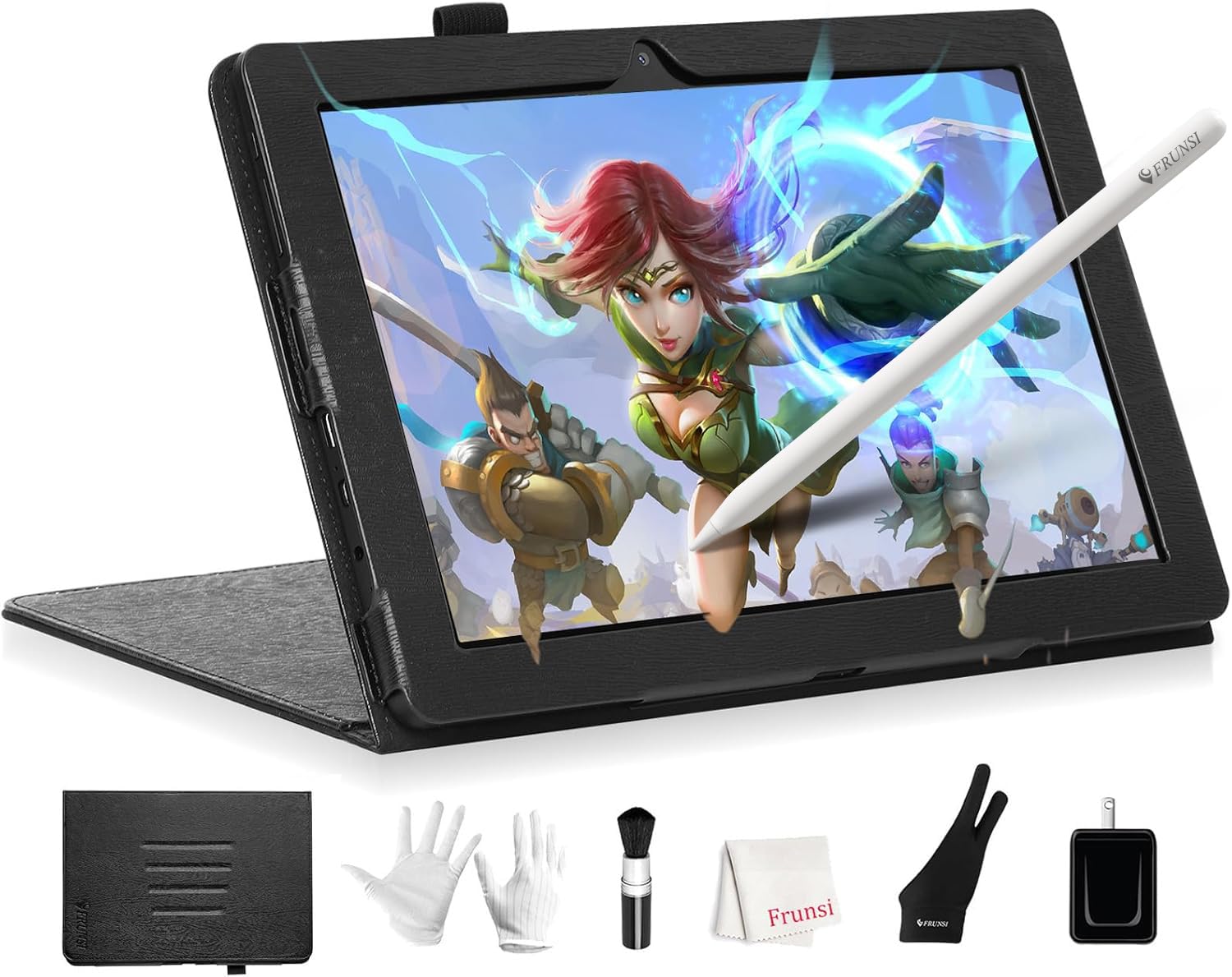
The Frunsi T8 (RubensTab T8) is a standalone drawing tablet that frees teens from needing a computer altogether. Running Android 13, it comes pre-installed with drawing apps and tutorials, so a teen can start creating right out of the box. The 8-inch FHD display (1200×800 resolution) is small but sharp enough for detailed work with apps like SketchBook, ibis Paint X, and Krita. The included detachable keyboard adds versatility for note-taking or typing.
Internally, it packs a quad-core CPU, 4GB RAM, and 64GB storage (expandable to 256GB). While not powerful enough for heavy 3D rendering, it handles 2D illustration and painting with acceptable performance. The 4000mAh battery is rated for up to 20 hours, though real-world use in SketchBook averages closer to 3.5 hours per charge. The stylus provides 2048 levels of pressure sensitivity—lower than the 8192 standard—but works well for beginners who are still learning pressure control.
Reviewers note some lag with heavy brushes and diagonal lines, which can be mitigated by enabling line smoothing in drawing apps. The tablet lacks palm rejection in many apps, requiring an artist glove for comfortable use. Customer service is frequently praised for fast warranty replacements. For teens who want a self-contained device to learn digital art without a laptop, this is the most affordable standalone option.
Why it’s great
- Standalone Android device, no computer required
- Includes detachable keyboard and screen protector
- Pre-installed drawing apps and tutorials
- Expandable storage up to 256GB
Good to know
- Only 2048 pressure sensitivity levels
- Lag with heavy brushes and diagonal strokes
- No native palm rejection in most drawing apps
- Battery life shorter in active use (~3.5 hours)
FAQ
Do I need a screen on the drawing tablet for my teenager?
Are standalone drawing tablets better than tethered ones for teenagers?
How many pressure sensitivity levels does a teenager really need?
Can a drawing tablet work with a Chromebook or Android phone?
What drawing software should a teenage beginner use?
Final Thoughts: The Verdict
For most users, the best drawing tablet for teenager winner is the XPPen Magic Drawing Pad because it combines a true paper-like screen, 16384 pressure levels, and standalone Android 14 operation—eliminating the need for a laptop while providing a premium drawing experience. If you want a tethered screen tablet that still lets your teen draw directly on the display, grab the GAOMON PD1161. And for a budget-conscious family that already has a computer, nothing beats the value of the HUION Inspiroy H950P—it delivers 8192 levels of pressure, tilt support, and a battery-free pen at a very accessible price.

Mo Maruf
I created WellFizz to bridge the gap between vague wellness advice and actionable solutions. My mission is simple: to decode the research and give you practical tools you can actually use.
Beyond the data, I am a passionate traveler. I believe that stepping away from the screen to explore new environments is essential for mental clarity and physical vitality.