Our readers keep the lights on and my smoothie glass nicely filled. As an Amazon Associate, I earn from qualifying purchases.
That slightly jittery cursor, the one that drifts past your target by a hair — that is the failure of a mediocre optical sensor, not your reflexes. For competitive gaming or precision design work, the sensor’s native DPI (dots per inch) range, its ability to track sub-micron movements without smoothing or acceleration, is the single spec that separates a reliable tool from a frustrating one.
I’m Mohammad Maruf — the founder and writer behind WellFizz. I’ve spent hundreds of hours dissecting sensor specifications, testing polling rates, and analyzing click latency data across dozens of gaming mice to understand which hardware truly delivers on its performance claims.
Whether you need pixel-perfect tracking for an FPS title or a responsive workhorse for all-day productivity, this guide cuts through the marketing to deliver a data-backed look at the best dpi mouse options available today.
How To Choose The Best DPI Mouse
Selecting the right high-precision mouse requires more than just picking the highest DPI number on the box. The sensor’s architecture, its native steps, and the way it handles lift-off distance all contribute to the feel of the cursor under your hand. Below are the three most critical factors to evaluate.
Native DPI Range vs. Advertised Maximum
A sensor’s true performance lives within its native DPI range. Many mice advertise absurdly high DPI ceilings (30,000 or more) but these numbers are often interpolated, resulting in jittery tracking at extreme settings. For almost all users, the sweet spot sits between 800 and 3,200 DPI. A sensor like Logitech’s HERO or Razer’s Focus Pro delivers clean, native tracking across this entire band without artificial smoothing.
Polling Rate and Click Latency
The polling rate — how often the mouse reports its position to the computer — directly impacts how responsive the cursor feels. Standard gaming mice offer 1,000 Hz (1 ms report rate), but premium models now push to 4,000 Hz or even 8,000 Hz. Higher polling rates reduce the delay between your hand movement and the on-screen cursor, which is critical for fast-twitch aiming in competitive shooters. Click latency, measured in milliseconds, also varies widely between switch types — optical switches (0.2 ms actuation) are significantly faster than traditional mechanical switches.
Lift-Off Distance and Surface Calibration
Lift-off distance (LOD) refers to how high you must lift the mouse before the sensor stops tracking. A low LOD prevents unwanted cursor movement when repositioning the mouse during a flick shot. Many high-end sensors now include surface calibration tools, often built into the companion software, that tune the sensor to your specific mouse pad or desk material. This is especially important for glass or hard-surface pads where standard sensors may struggle.
Quick Comparison
On smaller screens, swipe sideways to see the full table.
| Model | Category | Best For | Key Spec | Amazon |
|---|---|---|---|---|
| Razer Basilisk V3 35K | Wired Premium | All-around high DPI precision | 35K DPI Focus Pro Gen-2 sensor | Amazon |
| Logitech G502 Hero | Wired Mid-Range | Customizable weight & balance | 25,600 DPI HERO sensor | Amazon |
| GravaStar Mercury X | Wireless Premium | Ultra-lightweight wireless gaming | 32,000 DPI PAW 3950 sensor | Amazon |
| Corsair M65 RGB Ultra | Wired Premium | 8,000 Hz polling rate FPS | 26,000 DPI Marksman sensor | Amazon |
| Corsair Scimitar RGB Elite | Wired Mid-Range | MMO/MOBA with 12 side buttons | 18,000 DPI PixArt PMW3391 | Amazon |
| SteelSeries Rival 3 Gen 2 | Wired Budget | Budget-friendly 1:1 tracking | 8,500 DPI TrueMove Core | Amazon |
| Logitech G305 Lightspeed | Wireless Budget | Long battery wireless gaming | 12,000 DPI HERO sensor | Amazon |
In‑Depth Reviews
1. Razer Basilisk V3 35K

The Razer Basilisk V3 35K sets a new benchmark for wired precision mice with its Focus Pro 35K Optical Sensor Gen-2, which supports 1-DPI step adjustments for granular aiming control. The sensor tracks flawlessly across various surfaces, including glass, making it one of the most versatile options on this list. The HyperScroll Tilt Wheel adds a practical edge — switching between tactile scrolling and frictionless free-spin based on your scroll speed via Smart-Reel mode.
With 13 customizable controls — including a multi-function trigger ideal for push-to-talk or pinging — and 11-zone Chroma RGB underglow, this mouse is built for both marathon gaming sessions and productivity workflows. The Gen-3 optical switches actuate in just 0.2 ms with zero debounce delay, eliminating double-click issues entirely. The Speedflex Cable is woven for minimal drag, allowing faster, smoother swipes.
Users consistently praise the ergonomic shape, which comfortably supports 12-hour coding or gaming marathons. The only minor drawback is that the multi-function trigger sits slightly forward for some hand sizes, but the overall package remains the most accurate and feature-rich wired mouse at its tier.
Why it’s great
- 35K DPI with 1-step resolution adjustments
- HyperScroll Tilt Wheel with Smart-Reel auto-switching
- Gen-3 optical switches rated for 90M clicks
Good to know
- Multi-function trigger may feel slightly forward for small hands
- Requires Razer Synapse for full customization
2. Logitech G502 Hero

The Logitech G502 Hero remains a staple in the mid-range category thanks to its HERO 25K sensor, which delivers sub-micron tracking with zero smoothing or acceleration. This means movements as small as one millionth of a meter are registered with pinpoint accuracy. The wired design eliminates latency concerns while the adjustable weight system — five 3.6 g weights arranged in the chassis — lets you fine-tune the balance and overall heft to match your preferred playing style.
Beyond the sensor, the G502 offers 11 programmable buttons and a dual-mode hyper-fast scroll wheel that toggles between free-spin and notched scrolling. The mechanical switch button tensioning system uses metal springs and pivot hinges to deliver crisp, clean clicks with rapid feedback. The LIGHTSYNC RGB technology syncs lighting effects with over 300 games through Logitech G Hub, though the software has received mixed reviews for its resource usage.
Customer feedback highlights the excellent build quality and comfortable ergonomics for larger palms. The mouse is heavier than some ultra-light competitors, which can be an advantage for controlled, low-sensitivity aiming but may feel sluggish for fast flicks. The metal scroll wheel and textured side grips add to its premium feel.
Why it’s great
- 25,600 DPI HERO sensor with zero smoothing
- Adjustable weight tuning (up to 18 g)
- Hyper-fast scroll wheel with free-spin mode
Good to know
- Heavier than many modern ultralight mice
- G Hub software can be resource-heavy
3. GravaStar Mercury X
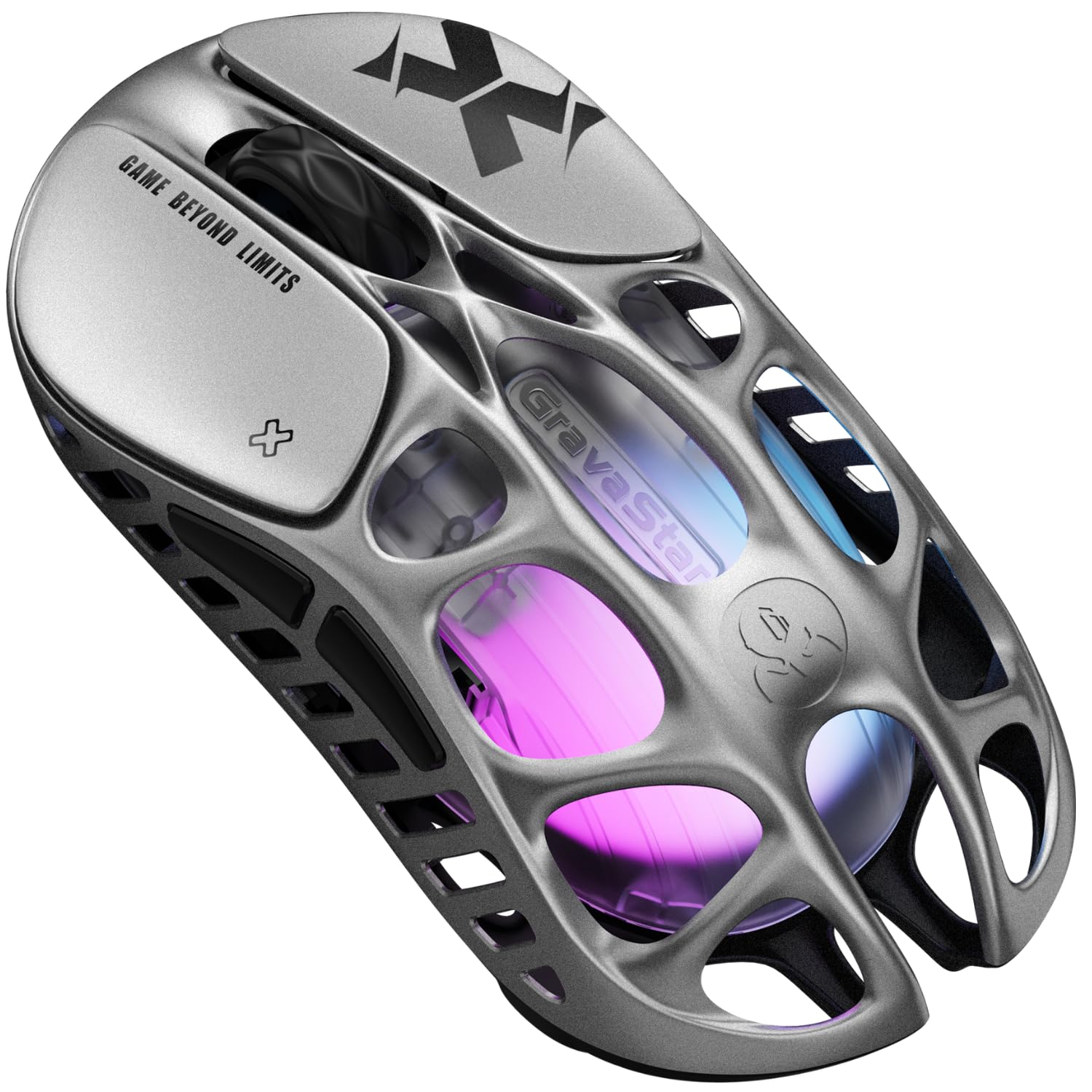
The GravaStar Mercury X is a wireless marvel that weighs only 49 grams thanks to its hollow magnesium alloy frame. The PAW3950 optical sensor reaches up to 32,000 DPI with a 1,000 Hz polling rate, providing pixel-perfect accuracy for fast-paced FPS, MOBA, and Battle Royale games. The tri-mode connectivity — Bluetooth, 2.4 GHz wireless, and USB-C wired — offers seamless switching between PC, laptop, console, and mobile devices.
The ventilated, honeycomb-like design actively reduces hand sweat and fatigue during extended sessions, while the ergonomic shape provides a natural palm grip. Five programmable buttons and dynamic RGB lighting are configured through an intuitive web-based software interface — no bloatware downloads required. The 2.4 GHz dongle delivers ultra-low-latency performance that rivals wired connections.
Users report that the mouse feels extremely light and fast, though some find the 49 g weight almost too light for their taste. Build quality is praised overall, though a small number of reviews note minor left-click dead zone inconsistencies. At its price point, the Mercury X offers an exceptional combination of wireless freedom, extreme weight reduction, and high-end sensor specs.
Why it’s great
- 49g magnesium alloy construction
- 32,000 DPI PAW3950 with 1,000 Hz polling
- Tri-mode connectivity (Bluetooth, 2.4 GHz, USB-C)
Good to know
- May feel too light for users preferring heavier mice
- Occasional reports of left-click inconsistencies
4. Corsair M65 RGB Ultra

The Corsair M65 RGB Ultra is built specifically for FPS gamers who demand the fastest possible response. The CORSAIR AXON Hyper-Processing Technology enables a native 8,000 Hz polling rate — eight times faster than standard 1,000 Hz mice — resulting in sub-millisecond input transmission. Combined with the MARKSMAN 26,000 DPI optical sensor that tracks at 650 IPS, this mouse captures every flick and micro-adjustment with surgical precision.
The anodized aluminum frame provides rigid durability while the tunable weight system lets you adjust the center of gravity. Sensor Fusion Control combines a six-axis gyro and accelerometer to maintain ultra-low lift-off distance, ensuring stable tracking when repositioning. Optical switches on left and right clicks deliver hyper-fast, precise responses rated to withstand years of heavy use.
Customer reviews highlight the excellent build and gaming performance, though some note the shape feels smaller than expected for large hands and the sniper button under the thumb can be triggered accidentally. The iCUE software offers deep customization but requires some patience to configure. For competitive FPS players who prioritize polling rate and lift-off control, the M65 RGB Ultra is a top-tier contender.
Why it’s great
- 8,000 Hz native polling rate
- 26,000 DPI Marksman sensor with 650 IPS
- Anodized aluminum frame with tunable weight
Good to know
- Compact shape may not suit large hands
- Sniper button can be accidentally pressed
5. Corsair Scimitar RGB Elite

The Corsair Scimitar RGB Elite is purpose-built for MMO and MOBA players who need instant access to a vast array of commands. The defining feature is the patented Key Slider Control System, which lets you reposition the 12 side buttons forward or backward to fit your grip perfectly. Under the hood, the custom PixArt PMW3391 sensor delivers up to 18,000 DPI in 1-DPI resolution steps for precise tracking.
With 17 fully programmable buttons total — 12 on the side, plus left, right, scroll, and DPI buttons — you can bind complex macros for ability rotations, item usage, or communication commands. The 50 million click-rated Omron switches provide tactile feedback and long-term reliability, while the braided cable and sturdy scroll wheel withstand extended gaming sessions. The contoured shape includes a right-side finger rest for added support.
Users consistently praise the Scimitar for its excellent fit and long-term durability, often citing it as a superior alternative to the Razer Naga for MMO gaming. The DPI adjustment can be tricky mid-game, but the overall build quality and button layout make it a favorite for genre-specific gamers. The iCUE software is required for full customization, which some users find complex.
Why it’s great
- 17 programmable buttons with adjustable side panel
- 18,000 DPI PixArt PMW3391 sensor
- 50M click-rated Omron switches
Good to know
- Requires iCUE software for button mapping
- Side buttons may feel crowded for small hands
6. SteelSeries Rival 3 Gen 2
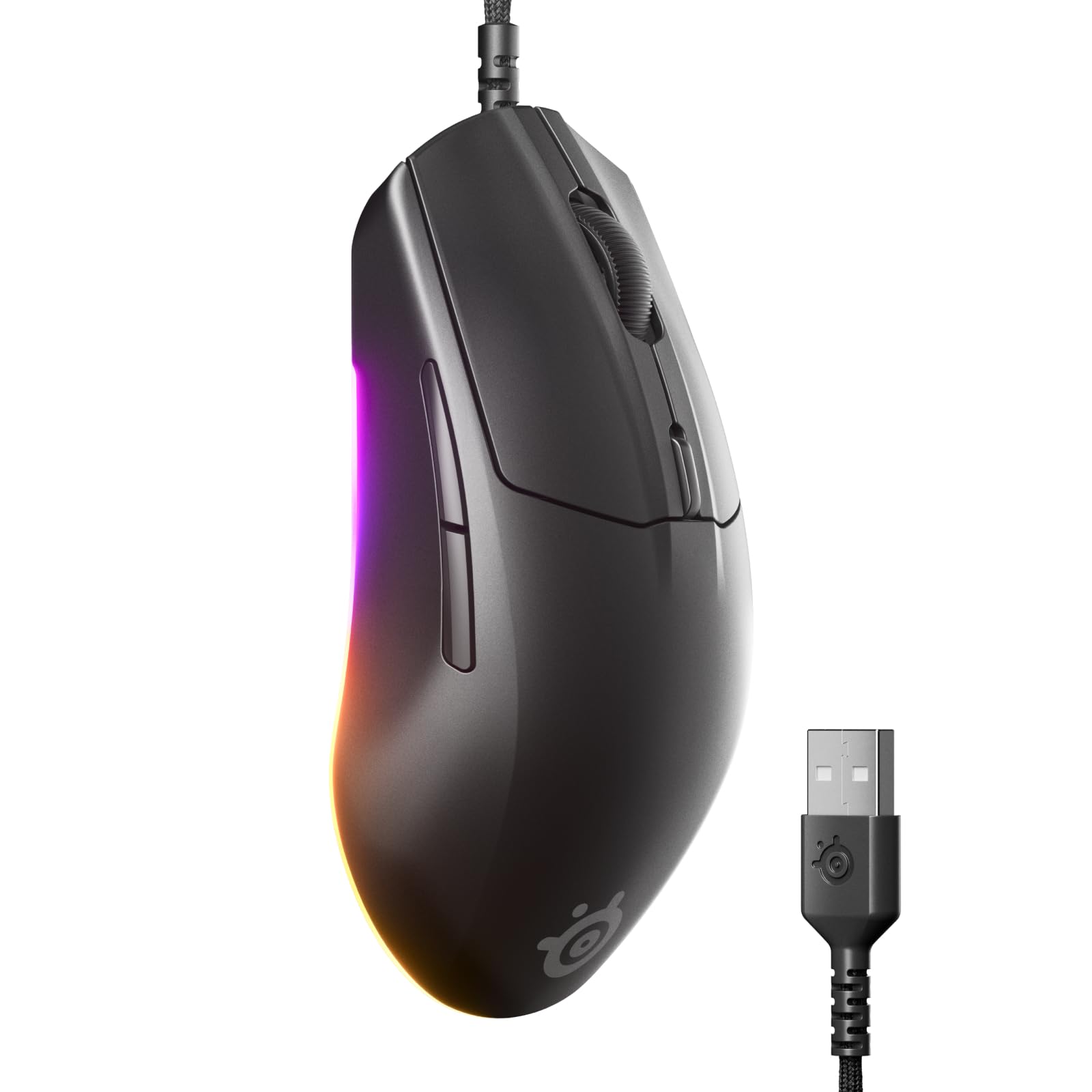
The SteelSeries Rival 3 Gen 2 proves that accurate 1:1 tracking doesn’t require a premium budget. Its TrueMove Core optical sensor (8,500 DPI) eschews artificial correction for true one-to-one movement translation, which is crucial for landing precise shots in competitive games. The click latency has been reduced to 1.35 ms, making it one of the fastest-responding budget mice available.
Weighing only 77 grams with a super mesh paracord cable that reduces drag, the Rival 3 Gen 2 feels light and agile during fast swipes. The 60 million click-rated mechanical switches offer durability well beyond its price tier, while the 3-zone RGB lighting lets you personalize the look. The ABS plastic chassis is smooth and easy to clean, though the rubber scroll wheel may collect debris over time.
User feedback is overwhelmingly positive, with many noting it’s a significant upgrade from generic office mice. The lightweight design works well for FPS titles, and the Mac-compatible software allows full button and lighting customization without bloat. The wired nature keeps latency at a minimum, making it a reliable entry-level choice for gamers on a strict budget.
Why it’s great
- 1:1 tracking with TrueMove Core sensor
- 77g lightweight design with paracord cable
- 60M click-rated switches
Good to know
- No top lighting or infinite scroll wheel
- Rubber wheel may attract dust
7. Logitech G305 Lightspeed

The Logitech G305 Lightspeed brings high-performance wireless gaming to a very accessible price point. Its HERO sensor offers up to 12,000 DPI with 400 IPS precision, while the LIGHTSPEED wireless technology delivers a lag-free, 1 ms report rate that rivals wired connections. The standout feature is the incredible 250-hour battery life from a single AA battery — switch to Endurance mode via G Hub to extend that to up to nine months.
Weighing only 3.4 ounces (96 grams), the G305 is light enough for quick flicks while still feeling substantial in hand. The compact, durable design includes built-in nano receiver storage in the body, making it a portable companion for laptops. Six programmable buttons and onboard memory let you store your DPI settings and button assignments, so your configuration travels with the mouse.
Users frequently highlight the responsive tracking, crisp clicks, and reliable Logitech build quality. Some note that the shape favors a claw or fingertip grip and may feel slightly small for palm grippers with large hands. The AA battery placement affects balance slightly, but the overall value — wireless freedom, excellent sensor, and months-long battery life — is hard to beat in its price tier.
Why it’s great
- 12,000 DPI HERO sensor with 400 IPS
- 250-hour battery life on a single AA
- LIGHTSPEED wireless with 1 ms report rate
Good to know
- Compact shape may not suit large palm grippers
- Requires USB-A dongle; no Bluetooth
FAQ
What DPI setting should I use for FPS gaming?
Is a higher DPI always better for a mouse?
Does polling rate affect DPI performance?
Can I use a gaming mouse for productivity work?
Final Thoughts: The Verdict
For most users, the best dpi mouse winner is the Razer Basilisk V3 35K because it combines the most advanced optical sensor (35K DPI with 1-step adjustments) with practical features like HyperScroll and a comfortable ergonomic shape. If you want adjustable weight tuning and a proven track record, grab the Logitech G502 Hero. And for an ultra-lightweight wireless experience, nothing beats the GravaStar Mercury X.

Mo Maruf
I created WellFizz to bridge the gap between vague wellness advice and actionable solutions. My mission is simple: to decode the research and give you practical tools you can actually use.
Beyond the data, I am a passionate traveler. I believe that stepping away from the screen to explore new environments is essential for mental clarity and physical vitality.