Our readers keep the lights on and my smoothie glass nicely filled. As an Amazon Associate, I earn from qualifying purchases.
Managing access for dozens of tenants, staff, and vendors without sacrificing security is the central challenge of any apartment building. Traditional master-key systems create a single point of failure — lose one key and you risk rekeying every unit. The right electronic lock solves this by offering per-user codes, audit trails, and remote management, but the sheer variety of protocols, build grades, and connectivity options can make the choice overwhelming.
I’m Mohammad Maruf — the founder and writer behind WellFizz. My research for this guide involved cross-referencing ANSI/BHMA grading standards, battery longevity tests, weather resistance ratings, and multi-tenant management features across nine distinct models to identify which designs actually hold up under the constant use of a multi-unit building.
Whether you are an owner managing a single rental or a superintendent overseeing dozens of doors, finding the right balance of durability and smart features defines the true door locks for apartment buildings.
How To Choose The Best Door Locks For Apartment Buildings
Selecting a lock for a multi-unit property requires a different set of priorities than a single-family home. You need to balance tenant privacy, maintenance simplicity, and physical durability against the risk of lockout calls and rekeying costs.
BHMA Grade: The Real Measure of Durability
The Builders Hardware Manufacturers Association (BHMA) grades locks from 1 to 3. Grade 3 is the residential baseline, suitable for light use. Grade 2 is the minimum standard for multi-family and light commercial applications — it withstands thousands of cycles without failing. Grade 1 is commercial grade, typically overbuilt for most apartment doors. Stick to Grade 2 or better for hallways and common entrances.
Access Management: Codes, Biometrics, and Remote Control
For a building owner, the ability to issue unique codes to each tenant, set temporary entry for maintenance, and instantly revoke access when someone moves out is the primary advantage of electronic locks. Some models offer built-in Wi-Fi for direct app control, while others require a separate hub for remote access. A hub-dependent lock can still be excellent, but factor that accessory cost into your budget if you need cloud connectivity.
Auto-Lock and Privacy Modes
Auto-lock is essential for keeping common doors secure after each entry. Look for a lock that allows you to customize the auto-lock delay (from a few seconds to several minutes). A passage or privacy mode is equally important — it lets tenants disengage the lock briefly during the day without triggering lockout alarms.
Quick Comparison
On smaller screens, swipe sideways to see the full table.
| Model | Category | Best For | Key Spec | Amazon |
|---|---|---|---|---|
| Schlage Plymouth FE595 | Premium Lever Lock | Common doors & hallways | Grade 2 / AAA; Flex-Lock mode | Amazon |
| Kwikset SmartCode 270 | Premium Keypad Deadbolt | Tenant unit doors | Grade 2 BHMA certified; SmartKey rekey | Amazon |
| eufy Security C33 | Mid-Range Smart Lock | Keyless entry with handle | Built-in Wi-Fi; 8 AA batteries | Amazon |
| Philips 4200 Series | Mid-Range Smart Lock | Direct Wi-Fi; no hub needed | 0.3s fingerprint; built-in Wi-Fi | Amazon |
| Philips DDL240X | Mid-Range Lock Set | All-in-one handle & deadbolt | Bluetooth; fingerprint & PIN | Amazon |
| Veise VE07-L | Mid-Range Smart Lock | Heavy-duty zinc alloy build | IP55 weatherproof; 8-in-1 access | Amazon |
| Sifely Model O | Entry-Level Smart Lock | Budget-friendly keyless entry | 5-in-1 access; 100+ fingerprint storage | Amazon |
| SMONET Y1 | Entry-Level Smart Lock | Rental & Airbnb management | 0.3s fingerprint; anti-peep keypad | Amazon |
| HIDALIFE HL668 4-Pack | Budget Multi-Pack | Multiple units on a budget | 4-pack; touchscreen; auto-lock | Amazon |
In‑Depth Reviews
1. Schlage Plymouth Keypad Lock with Lever Handle

The Schlage Plymouth FE595 is the gold standard for common-area doors and hallways in apartment buildings. Its Grade 2/AAA rating means it is built to survive thousands of locking cycles — far beyond the typical residential deadbolt. The keypad offers up to 19 unique user codes, which is enough for a small building without needing an app or Wi-Fi connection.
The Flex-Lock feature is a standout for multi-unit use: with the interior knob switch, you can set the lock to stay unlocked during the day and switch to auto-lock at night. This eliminates lockout calls from tenants while maintaining after-hours security. A single 9V battery powers the unit for up to two years, reducing maintenance rounds.
Installation is straightforward with a screwdriver, and the backlit keypad makes code entry easy in dim stairwells. The lack of any smart connectivity means no cloud dependencies or app troubleshooting, which is a genuine advantage for property managers who want a reliable, low-friction solution.
Why it’s great
- Grade 2 security certified for multi-unit durability
- Flex-Lock mode prevents accidental lockouts
- Two-year battery life on a single 9V
- Industry-leading warranty: limited lifetime mechanical
Good to know
- No Wi-Fi, app, or remote code management
- Maximum of 19 user codes
- Not a deadbolt — suitable for lever-handle doors
2. Kwikset SmartCode 270 Touchpad Deadbolt

Kwikset’s SmartCode 270 earns its premium status with Grade 2 BHMA certification, which is up to 2.5 times stronger than a standard Grade 3 deadbolt. For apartment building use, that extra cycle life translates to fewer replacement calls over the years. The satin nickel finish resists tarnishing in high-traffic corridors.
The SmartKey feature lets you rekey the lock to any existing KW1 key in seconds without removing the lock from the door. When a tenant moves out, you can generate a new key and clear the old codes simultaneously — no locksmith required. The lock supports up to 50 permanent user codes and 10 one-time codes, ideal for move-in days and contractor access.
Auto-lock can be set to 30 seconds, 1, 3, 5, or 10 minute delays, and the intrusion alarm sounds after three incorrect code entries. Vacation mode disables the keypad entirely, preventing tampering while the unit is empty. Twelve-month battery life with four AA batteries keeps maintenance intervals manageable.
Why it’s great
- Grade 2 certified for heavy multi-unit use
- SmartKey rekeying saves locksmith costs
- Vacation mode and intrusion alarm
- 50 user codes plus one-time codes
Good to know
- No Wi-Fi or app — manual code entry only
- Motor sound is audible on lock/unlock
- Requires correct latch hole size for hurricane doors
3. eufy Security Smart Lock C33

The eufy C33 integrates the fingerprint reader directly into the handle grip, making entry seamless for tenants carrying groceries or bags. It connects to your building’s Wi-Fi without needing a separate hub, allowing the property manager to remotely lock/unlock doors and view access logs from the app.
Powered by eight AA batteries, the C33 provides reliable, high-draw power for its motor and Wi-Fi radio. The auto-lock feature can be scheduled, and the anti-peep keypad allows random digits before the actual code — protecting PINs from prying eyes in shared hallways. The IP53 weather resistance handles rain and dust for exterior doors.
Installation takes about 15 minutes and requires no drilling, working with standard pre-drilled doors. The internal clutch mechanism ensures that the lock cannot be forced open even if the exterior is damaged. For buildings with existing eufy camera systems, the lock integrates into the same app ecosystem.
Why it’s great
- Built-in Wi-Fi eliminates need for hub
- Fingerprint reader in handle for quick access
- Internal clutch for forced-entry resistance
- IP53 weather rated for exterior doors
Good to know
- Wi-Fi requires re-pairing after network outage
- 8 AA batteries need periodic replacement
- Cloud-dependent for remote features
4. Philips 4200 Series WiFi Keypad Door Lock

The Philips 4200 Series connects directly to 2.4GHz Wi-Fi, bypassing the need for a separate gateway. This simplifies deployment across multiple units: mount the lock, connect to the tenant’s Wi-Fi, and the property manager can monitor access through the Philips Home Access App. The 0.3-second fingerprint reader is among the fastest in this price tier.
It supports permanent, one-time, periodic, and recurring PIN codes, making it ideal for managing housekeepers, maintenance workers, and short-term rentals. The auto-lock can be programmed from 0 to 180 seconds via the app, and the lever handle set is included — no need to purchase handles separately. The matte black finish and sleek design elevate the look of any apartment door.
Battery life is rated at up to six months with standard 1.5V alkaline batteries. The low-battery alert sends a notification to your phone before the lock stops working. Voice control via Alexa or Google Assistant adds another layer of convenience for tech-savvy tenants.
Why it’s great
- Direct Wi-Fi connection with no hub needed
- 0.3-second fingerprint recognition
- Multiple PIN types for tenant and guest management
- Complete handle set included in the box
Good to know
- Batteries not included — requires 1.5V alkaline only
- Auto-lock is off by default; must enable via app
- Designed for right-opening doors by default; left-hand requires reset
5. Philips Smart Lock with Handles DDL240X
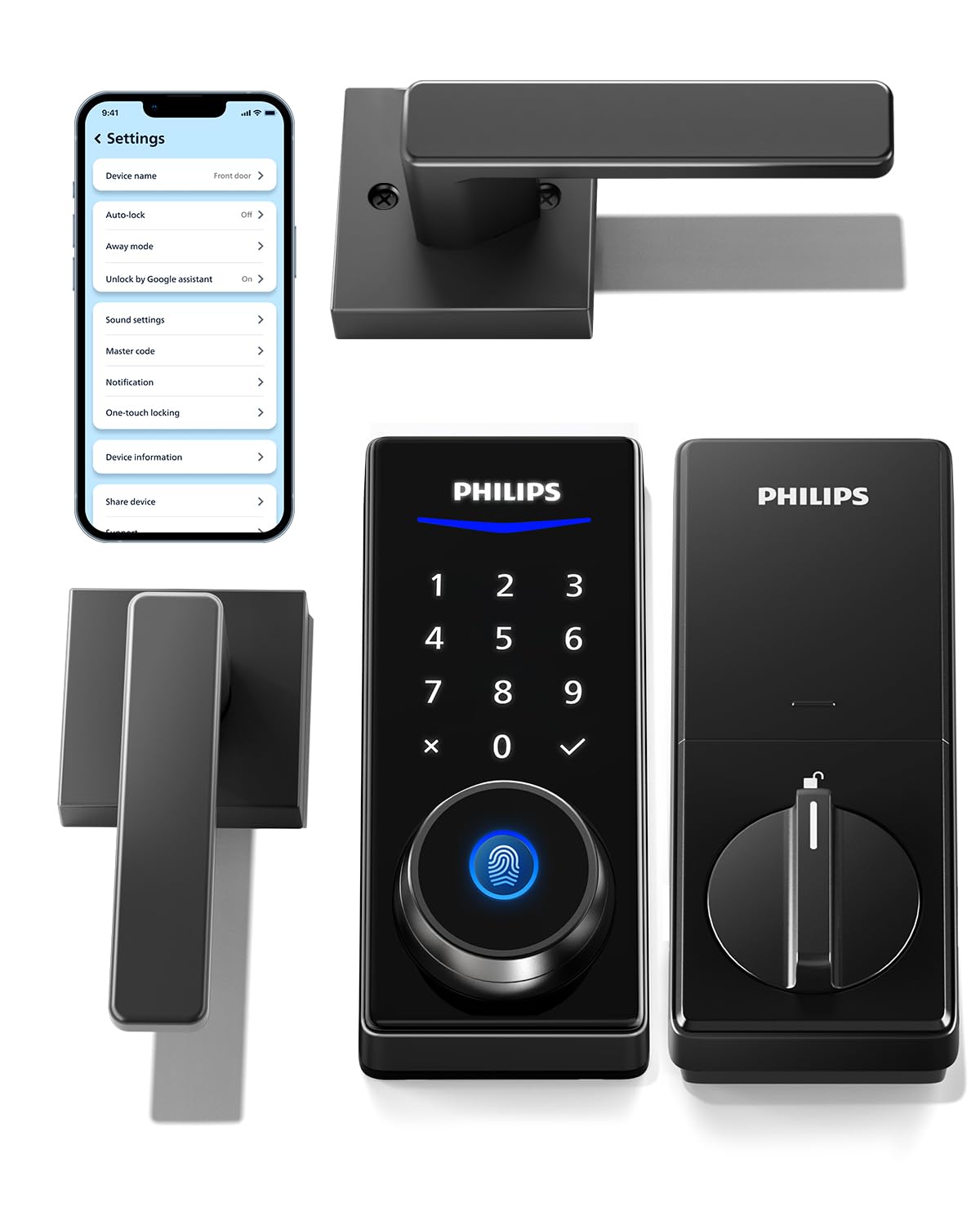
The Philips DDL240X comes as a complete door handle set with two lever handles and the smart lock mechanism. This is a practical choice for apartment buildings where you want to replace both the lock and the handle in one package. The Bluetooth connectivity works within 8-10 meters, allowing app control from inside the unit.
For remote access, you need the Philips Wi-Fi gateway (sold separately). The lock supports fingerprint, PIN codes, keys, and app unlocking. It stores up to 50 fingerprints and 100 user PINs, plus unlimited one-time codes. The powder-coated finish resists wear, and the metal construction feels substantial in hand.
Installation requires only a screwdriver and fits standard doors 1-3/8 to 1-3/4 inches thick. The auto-lock feature secures the door after each entry, though it lacks a sensor to confirm the door is fully closed — you need to ensure the door is shut for the auto-lock to engage properly.
Why it’s great
- Complete handle and lock set — no extra hardware
- 50 fingerprint capacity for family units
- Unlimited one-time PINs for guest access
- Sturdy metal build with powder-coated finish
Good to know
- Bluetooth only; Wi-Fi gateway sold separately for remote
- App setup can have glitches requiring customer support
- Fingerprint reader may be inconsistent for some users
6. Veise VE07-L Fingerprint Smart Lock

The Veise VE07-L is built with heavy-duty zinc alloy handles that resist scratching and corrosion, making it a strong candidate for exterior doors exposed to rain, sun, and temperature swings. Its IP55 weatherproof rating and operational range from -35°F to 160°F ensure reliable performance through all seasons.
The 8-in-1 access options include app, fingerprint, Apple Watch, web portal, codes, eKeys, fobs, and mechanical key. The AI-driven fingerprint sensor claims 99.9% recognition accuracy and stores 50+ fingerprints. The app and web portal can manage multiple properties and tenants from a single dashboard — a powerful feature for property owners with several buildings.
Anti-peep password technology allows you to type random digits before and after your real code, preventing shoulder surfers from stealing your PIN. The VE07-L also supports privacy mode, silent mode, and passage mode, giving tenants full control over their door’s behavior. The two-year warranty and US-based phone support add peace of mind for property managers.
Why it’s great
- IP55 rated for rain, dust, and extreme temperatures
- Zinc alloy construction resists scratching
- Web portal manages multiple properties
- Anti-peep password and privacy mode
Good to know
- Requires Veise G2 gateway for remote and voice control
- App doesn’t show lock status without manual query
- Fingerprint unlocks only; accidental touch causes delay
7. Sifely Fingerprint Smart Deadbolt
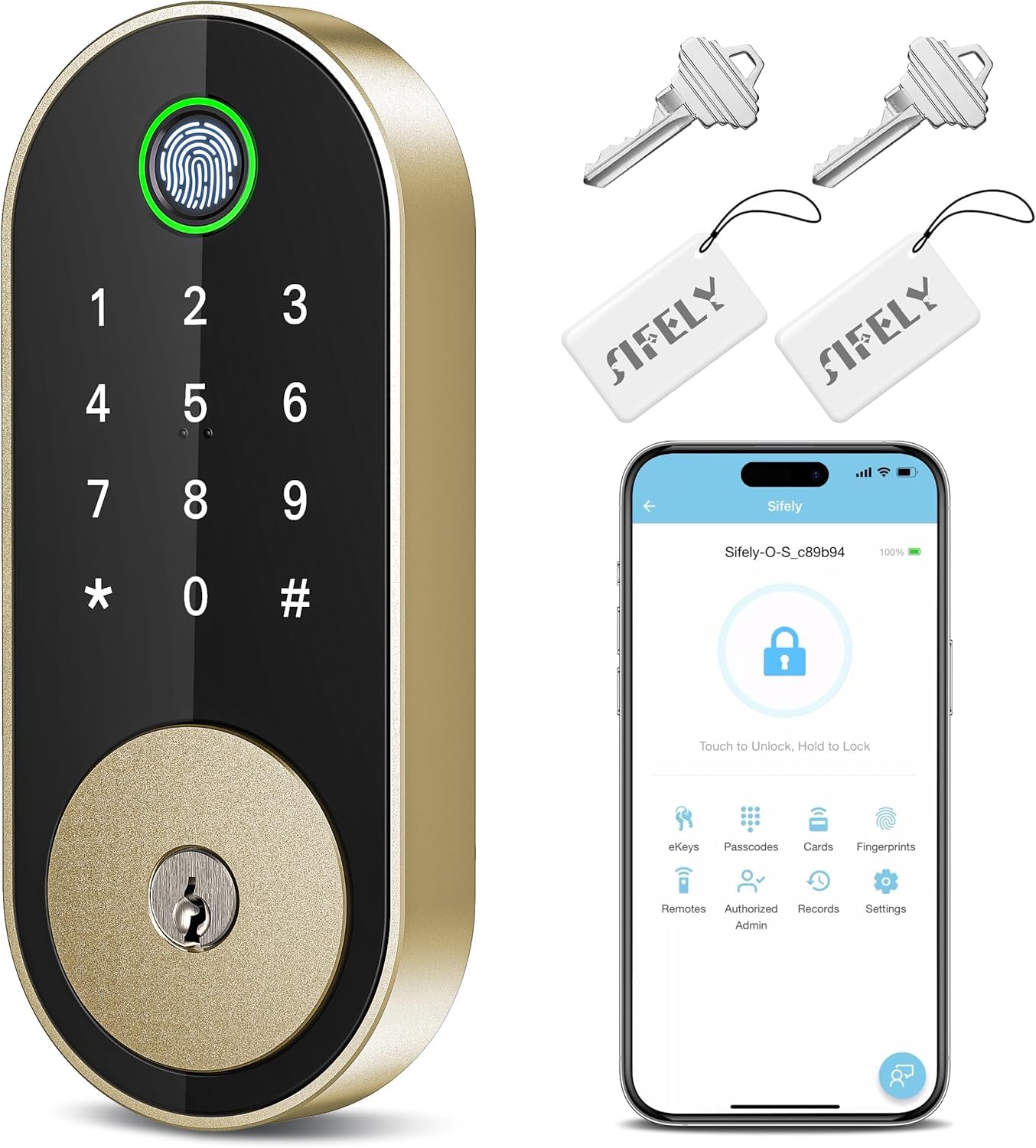
The Sifely Model O deadbolt is an affordable entry point into keyless apartment security. It offers five unlocking methods: fingerprint, keypad code, app, fob, and physical key. The fingerprint sensor stores over 100 fingerprints, which is generous for a budget-tier lock and useful for multi-tenant floors where many people need access.
Installation is genuinely DIY-friendly — customers report completing it in under 20 minutes with just a screwdriver, no drilling required. The lock fits both left and right-handed doors and includes auto-lock and one-touch lock features. The aluminum and zinc construction feels sturdy enough for daily apartment use.
The free app allows code management, access logs, and eKey sharing, though remote access requires the separately sold Sifely Gateway. The anti-peep code feature lets you add random digits before your PIN. For a building on a tight budget, this lock delivers core smart lock functionality without the premium price.
Why it’s great
- Very affordable entry into smart lock ecosystem
- Stores 100+ fingerprints for high-traffic access
- Quick 20-minute DIY installation
- Aluminum and zinc construction
Good to know
- Remote access requires separate gateway purchase
- Fingerprint sensor may need second attempt occasionally
- App features are limited compared to premium models
8. SMONET Front Door Lock Set Y1
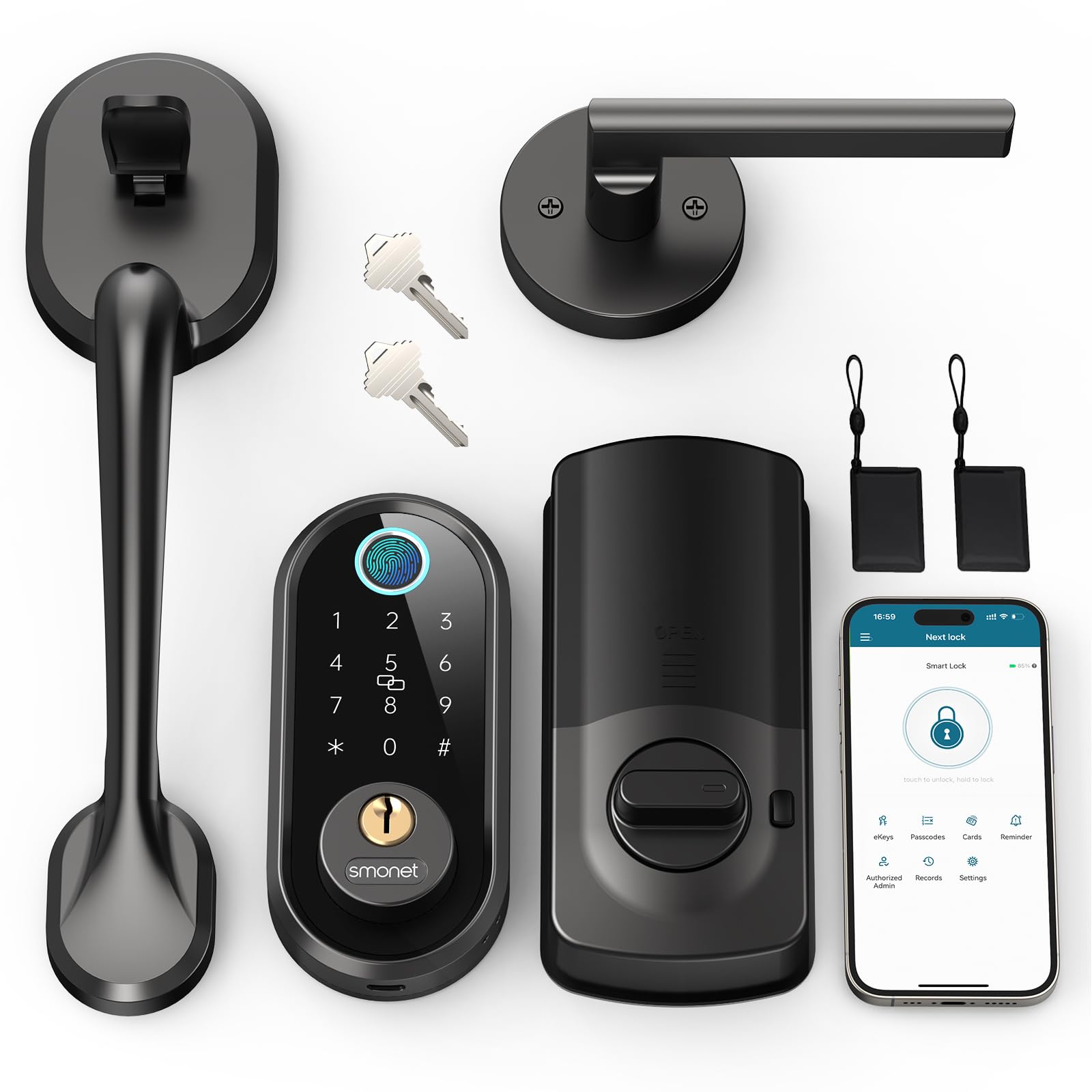
The SMONET Y1 is a complete front door lock set designed for rental and Airbnb management. It offers six unlocking methods: fingerprint, passcode, smartphone app, IC card, eKey sharing, and traditional keys. The 0.3-second fingerprint sensor is competitive with mid-range models at this price point.
The app allows you to create temporary passcodes for guests, cleaners, and delivery drivers, and you can monitor unlock activity remotely when paired with the optional gateway. The anti-peep keypad technology lets you type random numbers before your actual code, protecting against onlookers in shared building entries.
Installation fits standard US door preps and takes about 30 minutes. The auto-lock feature secures the door after a customizable delay. Some users report that battery life is shorter when Bluetooth is always on and auto-lock is enabled, so consider using lithium batteries for better longevity.
Why it’s great
- Six unlocking methods including IC card and eKey
- Temporary passcodes ideal for rentals and maintenance
- 0.3-second fast fingerprint sensor
- Complete handle and deadbolt set included
Good to know
- Gateway needed for remote and Alexa control
- Battery life can be short with constant Bluetooth
- Customer service is China-based; best contacted during evenings
9. HIDALIFE Keyless Entry Door Lock 4-Pack
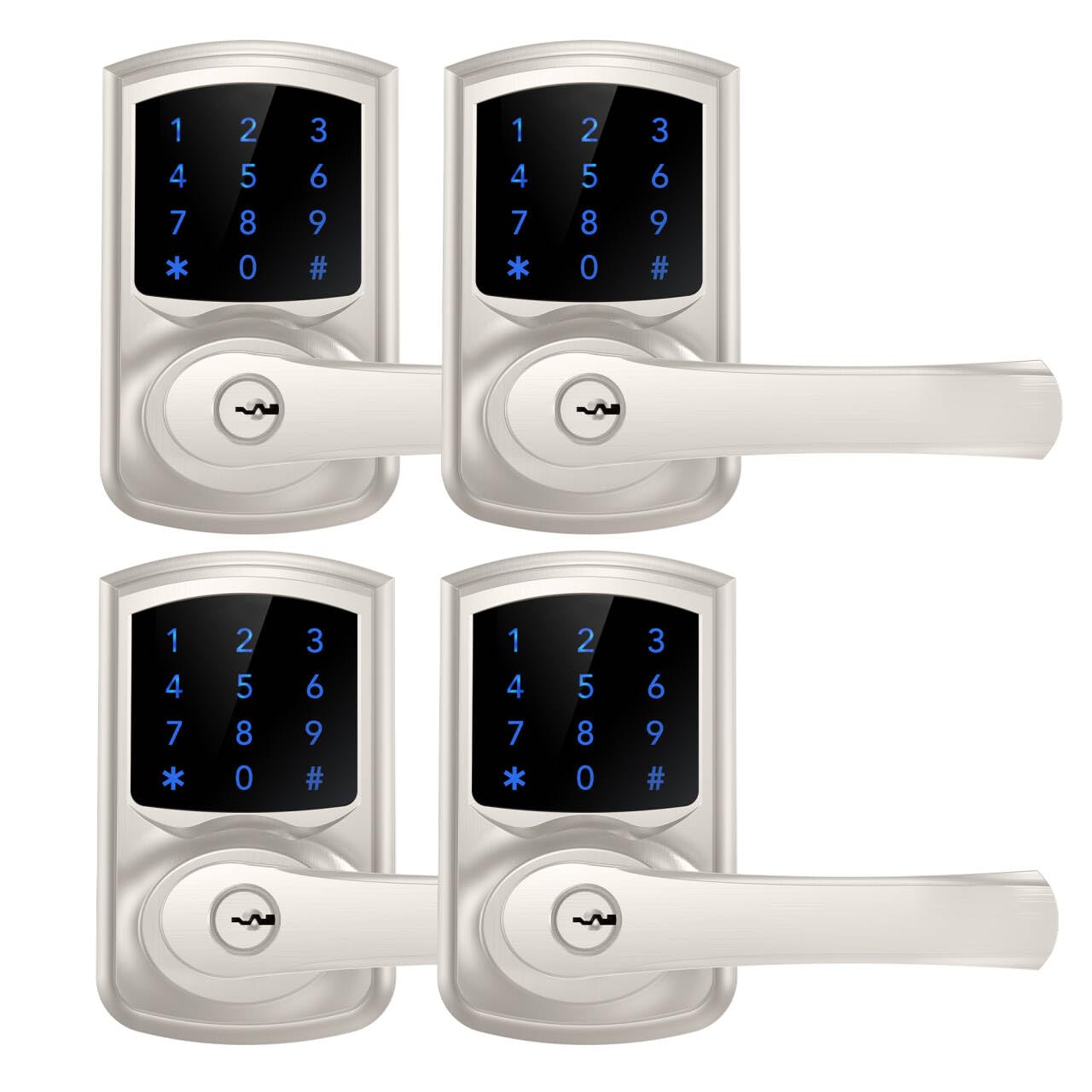
The HIDALIFE HL668 4-pack is designed for property managers who need to outfit multiple doors at once without breaking the budget. Each lock includes a touchscreen keypad with anti-peep password technology, an auto-lock feature that engages after five seconds, and a satin nickel finish that matches standard builder-grade hardware.
The interchangeable handle design fits both left and right-handed doors, and the adjustable latch accommodates 2-3/8 or 2-3/4 inch backsets. The zinc alloy construction feels solid, and users report that installation takes about 15 minutes per door. The set includes three keys per lock for mechanical backup.
Each lock supports multiple user codes, and programming is done directly on the touchscreen — no app or connectivity required. This simplicity is a double-edged sword: there is no remote management or access logging, but for buildings that just need basic keyless entry across many units, this pack delivers the lowest per-door cost.
Why it’s great
- Cost-effective multi-pack for multiple doors
- Simple programming on the touchscreen
- Auto-lock in 5 seconds for quick security
- Zinc alloy construction with satin nickel finish
Good to know
- No app, Wi-Fi, or remote management
- No glowing numbers on keypad until touched
- Some reports of lock failure within days
FAQ
What BHMA grade is best for apartment building doors?
Do I need Wi-Fi connectivity for each apartment lock?
Can I use the same master key across different brands of electronic locks?
How often do I need to change batteries in apartment door locks?
Final Thoughts: The Verdict
For most users, the best door locks for apartment buildings winner is the Schlage Plymouth FE595 because it combines Grade 2 security with a proven lever design and two-year battery life, perfect for common-area doors without smart connectivity complexity. If you want quick rekeying between tenants, grab the Kwikset SmartCode 270. And for a full smart lock with built-in Wi-Fi and fingerprint access, nothing beats the eufy Security C33.

Mo Maruf
I created WellFizz to bridge the gap between vague wellness advice and actionable solutions. My mission is simple: to decode the research and give you practical tools you can actually use.
Beyond the data, I am a passionate traveler. I believe that stepping away from the screen to explore new environments is essential for mental clarity and physical vitality.