Our readers keep the lights on and my smoothie glass nicely filled. As an Amazon Associate, I earn from qualifying purchases.
Piles of receipts, stacks of contracts, and that mounting pile of tax documents—everyone has a paper problem that a standard flatbed or multi-function printer just can’t solve. Dedicated document scanners are purpose-built tools that transform that chaos into organized digital files with speeds and features that all-in-one devices simply cannot match.
I’m Mohammad Maruf — the founder and writer behind WellFizz. For this guide, I’ve spent weeks analyzing hardware specifications, consumer feedback, and real-world performance data to identify the absolute best document scanner for every type of home office and small business need.
Whether you need to digitize business cards, process bulk invoices, or finally clear out a decade of paperwork, the best document scanner is the one that matches your volume, speed requirements, and workflow integration preferences.
How To Choose The Best Document Scanner
Choosing the right document scanner means looking past the marketing hype and focusing on three pillars: speed, capacity, and ecosystem. A scanner that matches your daily volume will pay for itself in time saved within weeks.
Speed and Duplex Capability
Scanners are rated in pages per minute (ppm) for single-sided scanning and images per minute (ipm) for duplex. A 25 ppm scanner that captures both sides in one pass effectively delivers 50 ipm. For personal use, 25-30 ppm is sufficient; for office environments, look for 40 ppm or higher.
Auto Document Feeder (ADF) Capacity
The ADF determines how many pages you can load at once. A 20-sheet feeder is fine for sporadic scanning, but a 50- to 100-sheet feeder lets you load a full document stack and walk away. For heavy users, this is the single most important spec.
Software and Workflow Integration
Hardware is only half the equation. Robust bundled software with OCR (optical character recognition), searchable PDF creation, and direct cloud upload to services like Google Drive, Dropbox, or QuickBooks can transform a scanner from a tool into a complete document management system.
Quick Comparison
On smaller screens, swipe sideways to see the full table.
| Model | Category | Best For | Key Spec | Amazon |
|---|---|---|---|---|
| Plustek PS186 | Mid-Range | Home office with barcode filing | 50-sheet ADF, 24-bit color depth | Amazon |
| Brother ADS-1300 | Budget-Friendly | Portable scanning on the go | 20-sheet ADF, 30 ppm speed | Amazon |
| Canon imageFORMULA R30 | Mid-Range | Large-volume digitization projects | 60-sheet ADF, plug-and-scan setup | Amazon |
| Canon imageFORMULA DR-C225 II | Mid-Range | Mixed media with sticky notes | 30-sheet ADF, upright space-saving design | Amazon |
| ScanSnap iX1300 | Mid-Range | Wireless scanning with minimal desk space | 30 ppm duplex, Wi-Fi connectivity | Amazon |
| ScanSnap iX2400 | Premium | High-speed batch scanning | 100-sheet ADF, 45 ppm duplex speed | Amazon |
| Brother ADS-3100 | Premium | Small office with security needs | 60-sheet ADF, USB 3.0, 40 ppm | Amazon |
| Epson DS-530X | Premium | High-volume office with TWAIN integration | 100-sheet ADF, 45 ppm, 7,000 daily duty | Amazon |
| Epson RapidReceipt RR-620W | Premium | Receipt and expense management | 100-sheet ADF, 4.3″ touchscreen, Wi-Fi | Amazon |
In‑Depth Reviews
1. Canon imageFORMULA R30

The Canon imageFORMULA R30 strikes a rare balance between high-volume capacity and dead-simple setup. With a 60-sheet automatic document feeder and true one-pass duplex scanning at 25 ppm, it handles thick stacks of mixed documents—invoices, contracts, business cards—without needing driver downloads. The scanner appears as a USB drive when plugged in, making it virtually foolproof for anyone who just wants to start scanning immediately.
Users report successfully scanning over 1,000-page double-sided projects in about three hours, a task that would take days with a flatbed. The built-in software automatically converts scans to searchable PDFs, applies deskew, and skips blank pages. The hardware is reliable with mixed media, handling sticky notes and stapled pages without the jams that plague cheaper units.
On the downside, the R30 cannot scan bound books, and a small number of users have encountered driver instability that required reinstallation after computer restarts. The unit weighs 6.6 pounds, so it is a dedicated desktop piece rather than a travel companion. For anyone needing to clear out a decade of paper in a weekend, this is the most practical pick available.
Why it’s great
- 60-sheet ADF handles large stacks without reloading
- True plug-and-scan with no software installation required
- Reliable duplex scanning with built-in blank page removal
Good to know
- Driver issues reported by some users after system restarts
- Cannot scan bound books or thick media
- No direct print output from the scanner itself
2. Epson DS-530X
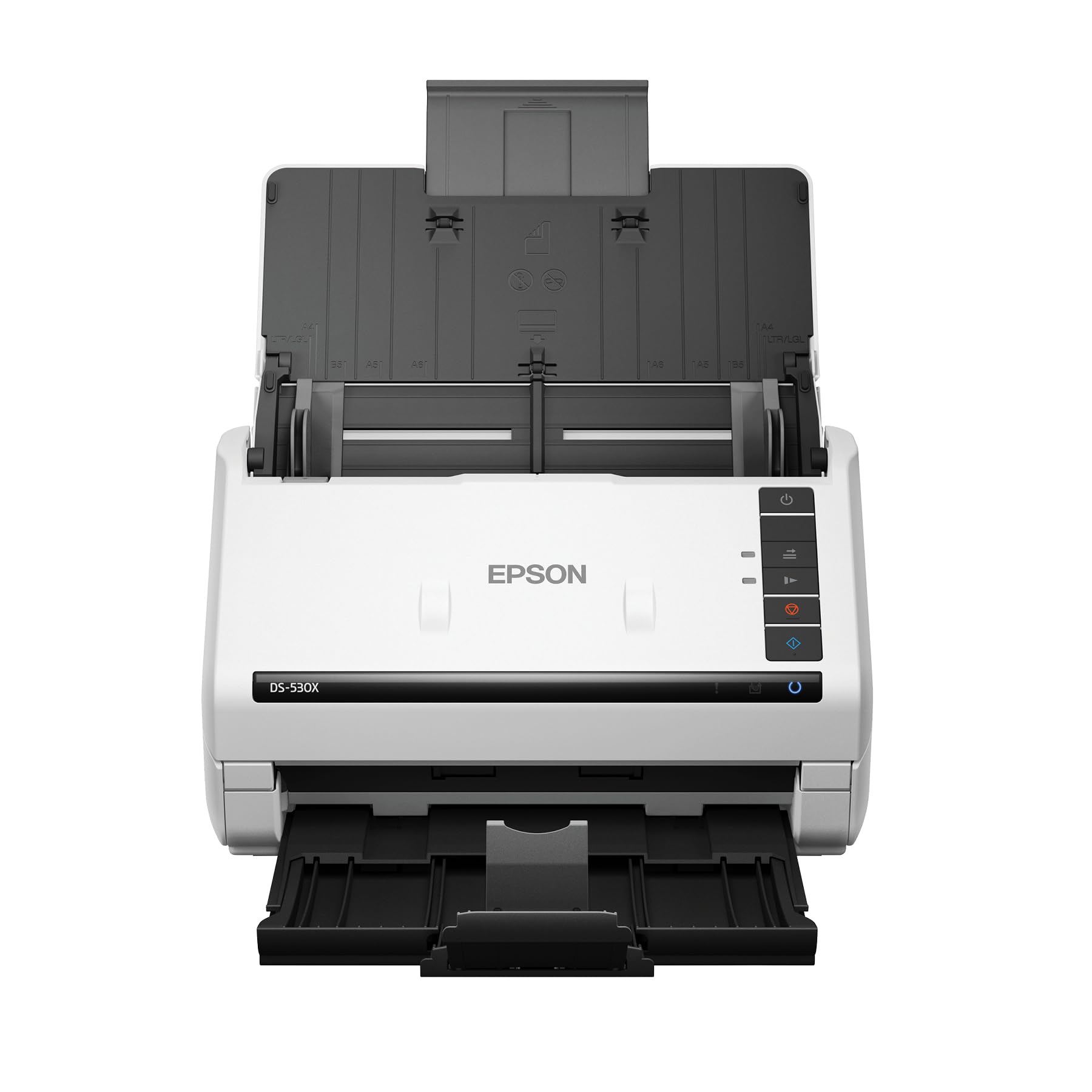
The Epson DS-530X is built for the office that never stops scanning. Its 100-page automatic document feeder and 45 ppm duplex speed mean you can load an entire filing cabinet drawer and let it run. The peak daily duty cycle of 7,000 sheets puts it in a class above consumer-grade equipment, with ultrasonic double-feed detection that catches overlapping pages before they become a jam.
This scanner includes both TWAIN and ISIS drivers, making it compatible with practically every document management system used in medical, legal, and financial offices. It can handle extra-long pages up to 240 inches and folded 11 x 17 sheets, giving it the versatility to process architectural drawings or continuous receipts. The 30-bit color depth ensures accurate reproduction of fine print and colored logos.
The primary trade-off is that the DS-530X is a wired USB-only device—no Wi-Fi or touchscreen. Its 8.2-pound chassis is meant to stay put. Some users have noted the accompanying software documentation can be unclear during initial setup. For a dedicated office scanner that integrates with professional workflows, this is the top performer.
Why it’s great
- 100-sheet ADF with 7,000-sheet daily duty cycle
- Ultrasonic double-feed detection prevents missed pages
- TWAIN and ISIS drivers for professional software integration
Good to know
- No wireless connectivity; USB only
- Heavier chassis not designed for portability
- Setup documentation could be more intuitive
3. ScanSnap iX2400

The ScanSnap iX2400 is the successor to the legendary iX1400 and it doubles down on what made that model great: raw speed and reliability. Clocking in at 45 pages per minute in duplex mode, it can process 80 images in under 60 seconds. The 100-sheet feeder lets you load two reams of paper and walk away, while the ScanSnap Home software automatically names, organizes, and saves files to your chosen folders.
One-touch operation is the iX2400’s defining feature. Press the single button and the scanner detects document size, adjusts color depth, removes image streaks, and de-skews crooked pages without any user intervention. It handles business cards, receipts, photos, and envelopes without needing to swap paper paths. Many users report these scanners lasting 7 years or more of regular use.
The iX2400 lacks Wi-Fi and TWAIN driver support, which may be a dealbreaker for users who need to integrate with legacy document management systems. The software, while powerful, requires extra clicks to disable pop-up confirmation windows if you want a fully automated workflow. For speed above all else in a dedicated paperless office setup, this scanner delivers.
Why it’s great
- Incredible 45 ppm duplex speed with 100-sheet ADF
- One-touch operation with automatic image correction
- Proven longevity with many units lasting 7+ years
Good to know
- No Wi-Fi or TWAIN driver support
- Software requires extra clicks for no-pop-up workflows
- Occasional upside-down scans on mixed document stacks
4. Canon imageFORMULA DR-C225 II

The Canon imageFORMULA DR-C225 II takes a unique approach with its upright, space-saving design—paper feeds from the top and ejects to the front, meaning it occupies a footprint roughly the size of a notebook. This orientation also allows for a built-in cable management system, keeping your desk clean. It scans both sides in one pass at 25 ppm with a 30-sheet ADF.
Where the DR-C225 II truly shines is in its ability to handle problematic media. Users report that it reliably processes pages with sticky notes, tape, and even staple holes without jamming. It supports direct scanning to cloud services including Dropbox, Google Drive, OneDrive, and Evernote, making it a strong choice for the cloud-first office. The included three-year warranty and US-based technical support add peace of mind.
The main limitation is that the scanner has no software or drivers included in the box—you must download them from Canon’s website. The double-feed detection sensor cannot be disabled, so it will occasionally stop on pages that have Post-It notes attached. For users who need a compact, reliable scanner that handles mixed media better than most, this upright workhorse is hard to beat.
Why it’s great
- Upright space-saving design with top feed and front eject
- Handles sticky notes, tape, and staple holes without jamming
- Three-year warranty with US-based support
Good to know
- No software or drivers included; must download separately
- Double-feed detection cannot be disabled
- 30-sheet ADF is smaller than some competitors
5. ScanSnap iX1300

The ScanSnap iX1300 is the answer for anyone who wants to reclaim their desk space without sacrificing capability. Its innovative design folds the output tray over the input feeder when not in use, shrinking the footprint to roughly the size of a closed laptop. Despite its compact size, it delivers 30 ppm duplex scanning with both USB and Wi-Fi connectivity, allowing you to send scans to Mac, PC, mobile devices, and cloud services.
The Quick Menu software lets you scan and drag-drop files to your most-used applications, streamlining workflows for receipts, photos, and documents. The scanner handles thick items and plastic cards through its manual feeder, while the ADF processes standard paper stacks. Users report scanning thousands of photos and entire semesters of college notes in hours instead of days. The auto-adjustment features correct skewed feeds and optimize color automatically.
Reliability is a concern for some: a subset of users report frequent paper jams, with the scanner pulling paper at an angle and wrinkling sheets. The auto-sizing feature can occasionally cut off document edges. For those who prioritize desk-space efficiency and wireless scanning over absolute heavy-duty reliability, the iX1300 offers a compelling trade-off.
Why it’s great
- Innovative foldable design saves significant desk space
- Dual USB and Wi-Fi connectivity for flexible placement
- Quick Menu drag-drop workflow is intuitive and fast
Good to know
- Some users experience frequent paper jams and wrinkling
- Auto-sizing feature can cut off document edges
- Not as reliable for heavy daily use as larger models
6. Plustek PS186

The Plustek PS186 brings advanced document management features to a mid-range price point. Its standout capability is barcode recognition—the scanner can automatically categorize documents based on 1D or 2D barcodes, routing them to different folders or file names without manual sorting. The 50-sheet ADF handles substantial stacks, and the single-touch button lets you assign up to 255 customized scan profiles for different workflow scenarios.
The included Plustek Image Processing Technology automatically rotates, crops, deskews, and removes blank pages. Scans can be saved directly to FTP servers or personal NAS devices, making this a strong option for network-centric offices. The compact footprint (roughly the size of a loaf of bread) fits well in tight spaces, and users report setup takes about 15 minutes.
Quality control is inconsistent. While many users praise its black-and-white document performance, color scan quality has been described as poor with visible lines. There are also reports of continuous multi-page feeding and loud screeching noises from some units. For basic document digitization with barcode sorting, the PS186 offers unique value, but it is not the best choice for color-critical work.
Why it’s great
- Barcode recognition for automatic document categorization
- 255 customizable one-touch scan profiles
- Direct scan to FTP and NAS for network workflows
Good to know
- Color scan quality is subpar with visible lines
- Reports of multi-page feeding and mechanical noise
- Customer support responsiveness is inconsistent
7. Brother ADS-3100

The Brother ADS-3100 is designed for security-conscious small offices. It features triple layer security to help safeguard sensitive documents and ensure secure connectivity to devices and networks—a critical consideration for medical, legal, and HR departments. With 40 ppm duplex speed and a 60-sheet ADF, it keeps pace with demanding scanning sessions while fitting on a standard desk.
This scanner supports direct scanning to USB flash drives, meaning you can run it without a connected computer. It handles business cards, ID cards, photos, receipts, and standard paper through the same feeder path. The bundled software includes seven applications for optimizing, enhancing, and customizing documents and workflows. Users report that the blank page skip feature is smart and reliable.
Some users have experienced feeding issues where the scanner pulls multiple pages at once, missing content in the process. Brother’s support has been criticized for being difficult to reach, relying on chat bots rather than human representatives. The driver download process is also confusing, with unclear instructions for finding the correct version for your operating system.
Why it’s great
- Triple layer security for sensitive document handling
- Direct scan to USB without a computer required
- Smart blank page skip and reliable duplex operation
Good to know
- Some units suffer from multi-page feeding issues
- Customer support is difficult to reach
- Driver download process is confusing for new users
8. Epson RapidReceipt RR-620W

The Epson RapidReceipt RR-620W is the most specialized scanner in this lineup, purpose-built for receipt and invoice management. Its AI-ready scanning technology extracts data from receipts and converts it into categorized information that syncs directly with QuickBooks, TurboTax, and Excel. The large 4.3-inch color touchscreen allows for computer-free scanning directly to email, cloud storage, or USB flash drives.
With 45 ppm duplex speed and a 100-sheet ADF, this scanner can process an entire shoebox of receipts in minutes. The ScanSmart AI PRO technology intelligently recognizes vendor names, amounts, dates, and categories, reducing manual data entry by approximately 80%. Both USB and Wi-Fi connectivity are included, providing flexible placement options in any office setup.
The bundled Power PDF software has a problematic activation process: the included flyer leads to a broken download link and non-working license code. Users are better off ignoring the third-party software entirely and using Epson’s own ScanSmart application. The scanner also requires careful page orientation for multi-page documents, and the exit tray can cause slight tilting on longer scans.
Why it’s great
- AI-ready data extraction syncs with accounting software
- Computer-free scanning via 4.3-inch color touchscreen
- 100-sheet ADF with 45 ppm duplex speed
Good to know
- Bundled Power PDF software has broken activation links
- Requires careful page orientation for multi-page documents
- Exit tray can cause slight tilting on long scans
9. Brother ADS-1300

The Brother ADS-1300 is the most portable and budget-friendly option in this selection, weighing just 3 pounds and measuring only 4 inches deep. Despite its small size, it delivers true single-pass duplex scanning at 30 pages per minute, making it a capable companion for remote workers and professionals who need to scan documents on the go. It is powered entirely through the USB cable, eliminating the need for a separate power outlet.
This scanner includes a dedicated card slot for business cards, ID badges, and plastic cards, plus the ability to scan single pages up to 197 inches long. The bundled three-software suite provides tools for file organization, OCR, and image enhancement. Users praise its easy setup, lightweight durability, and ability to scan both sides of a page quickly without any fuss.
The most significant drawback is that the ADS-1300 does not include a power cable. The AC adapter is listed as an optional accessory, which is easy to miss in the product description and has caused frustration among buyers. The 20-sheet ADF is also the smallest in this comparison, meaning you will need to reload frequently for larger jobs. For light, portable scanning needs where small size matters most, this is a solid entry point.
Why it’s great
- Ultra-portable at just 3 pounds and USB-powered
- 30 ppm duplex scanning in a compact footprint
- Dedicated card slot for IDs and business cards
Good to know
- No power cable included; AC adapter sold separately
- 20-sheet ADF requires frequent reloading
- Not ideal for high-volume daily scanning
FAQ
What does duplex scanning mean and why is it important?
Can a document scanner handle stapled or paperclipped pages?
How does OCR software work with a document scanner?
Is Wi-Fi connectivity necessary for a document scanner?
Final Thoughts: The Verdict
For most users, the best document scanner winner is the Canon imageFORMULA R30 because it combines a 60-sheet ADF, true plug-and-scan simplicity, and reliable duplex scanning at a mid-range price point. If you need professional TWAIN integration and a 100-sheet feeder, grab the Epson DS-530X. And for high-speed batch scanning with one-touch operation, nothing beats the ScanSnap iX2400.

Mo Maruf
I created WellFizz to bridge the gap between vague wellness advice and actionable solutions. My mission is simple: to decode the research and give you practical tools you can actually use.
Beyond the data, I am a passionate traveler. I believe that stepping away from the screen to explore new environments is essential for mental clarity and physical vitality.