Our readers keep the lights on and my smoothie glass nicely filled. As an Amazon Associate, I earn from qualifying purchases.
A dead hard drive doesn’t give you a warning—one second your files are there, the next you’re staring at a blank screen. A docking station HDD takes that panic off the table by turning any bare SATA drive into a plug-and-play backup or cloning device, no enclosure or screwdriver required. Whether you’re migrating an operating system, recovering old photos from a stack of retired drives, or running a two-drive backup routine, the right dock determines whether the job takes 20 minutes or half a day.
I’m Mohammad Maruf — the founder and writer behind WellFizz. My research process for this guide involved cross-referencing real-world transfer benchmarks from verified buyers, stress-testing power delivery specs across both 2.5‑inch and 3.5‑inch form factors, and evaluating offline cloning accuracy reports to separate reliable docks from frustrating duds.
No matter your workflow, the best docking station hdd for your setup hinges on a few critical specs: maximum drive capacity support, UASP protocol compatibility for faster transfers, and whether offline cloning or a built-in card reader matters more to your daily routine.
How To Choose The Best Docking Station HDD
Choosing a hard drive dock means looking past the generic “USB 3.0” label and focusing on three things: how much capacity each bay supports, whether the interface can push past the 5Gbps ceiling, and if you genuinely need a computer-free cloning button or just a fast transfer pipe.
Bay Count & Capacity Ceiling
Single-bay docks are fine if you only need to read one drive at a time, but dual-bay docks let you clone from A to B or transfer data between two drives without swapping cables. The real spec to check is the per-bay capacity limit—some units top out at 16TB, while others handle 48TB total (24TB per bay). If you work with 20TB or larger drives, make sure the dock explicitly supports that size; several budget models fail silently above 12TB.
UASP vs. Standard USB 3.0
USB 3.0’s theoretical 5Gbps is rarely the bottleneck with mechanical hard drives, but UASP (USB Attached SCSI Protocol) improves command queuing and reduces latency, which translates to noticeably faster multi-file transfers and more responsive access during backups. Docks that list UASP support generally outperform identical-looking units running the older Bulk-Only Transport protocol, especially when cloning large directories of small files.
Offline Clone — When a PC Isn’t Near
An offline cloning button lets you copy a source drive to a target drive without connecting to a computer at all. This is invaluable for IT pros, data recovery, or swapping out a failing system drive—just insert both drives, hold the clone button, and wait for the progress LEDs. The tradeoff is that the target drive must be equal to or larger than the source, and some docks limit the clone speed to whatever the internal controller supports, which can be slower than a PC-assisted transfer.
Quick Comparison
On smaller screens, swipe sideways to see the full table.
| Model | Category | Best For | Key Spec | Amazon |
|---|---|---|---|---|
| UGREEN Dual-Bay | Dual-Bay USB-C | High-capacity backups up to 48TB | 48TB capacity / USB 3.0 5Gbps | Amazon |
| SABRENT DS-UFNC | NVMe + SATA Dock | Multi-format cloning (M.2 + SATA) | 10Gbps / NVMe + 2.5” & 3.5” support | Amazon |
| SABRENT DS-UC1B | 10Gbps Single-Bay | Fast single-drive access & transfers | 10Gbps / Supports 20TB+ drives | Amazon |
| StarTech SDOCK2U33 | Standalone Duplicator | Pro-level sector-by-sector cloning | 10Gbps host / 28GB/min clone speed | Amazon |
| RSHTECH RSH-DS02 | Aluminum Dual-Bay | Durable build with card reader & USB ports | 6Gbps UASP / SD & USB 3.0 front ports | Amazon |
| ikuai DS02 | Dual-Bay with Extra Ports | Gaming console and PC drive swapping | 6Gbps UASP / 2x USB 3.0 + SD/TF reader | Amazon |
| BENFEI Dual-Bay | Budget Dual-Bay | Entry-level offline clone & backup | 5Gbps UASP / 12V/2.5A dedicated power | Amazon |
In‑Depth Reviews
1. UGREEN Dual-Bay Hard Drive Docking Station
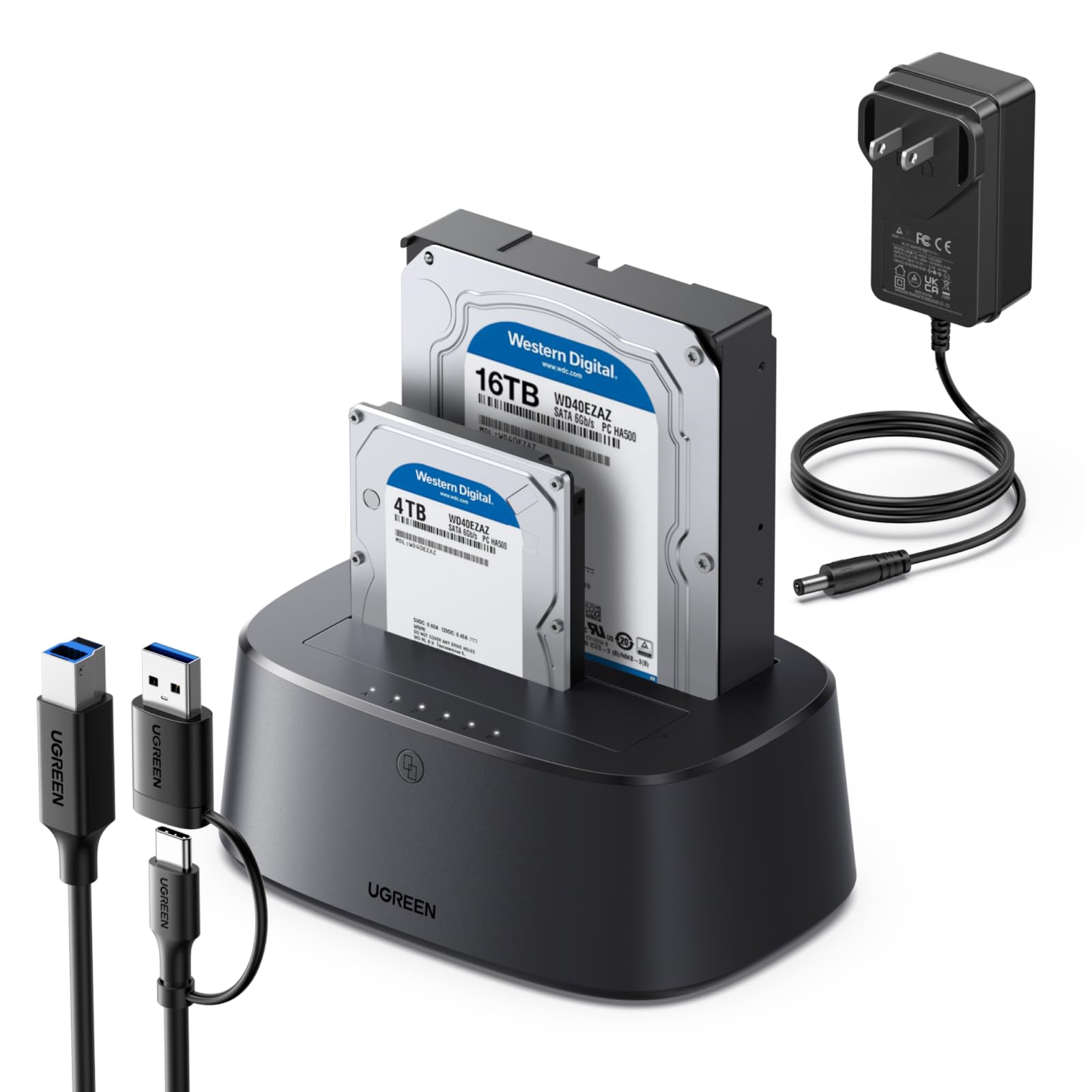
The UGREEN Dual-Bay dock stands out because it handles a combined 48TB—24TB per bay—making it one of the few mid-range docks ready for today’s largest SATA drives. Its USB 3.0 interface delivers the standard 5Gbps transfer ceiling, but the real win is the reliable offline cloning: users report that it powers on every time without the drive dropouts that plague cheaper alternatives. The 360-degree cooling vents and included dust cover also address two common longevity complaints with dual-bay docks—overheating and exposed connectors collecting debris.
Compatibility spans Windows, macOS, and Linux, with backward compatibility for SATA II and SATA I drives, so old 1TB spinners read just as easily as a new 22TB IronWolf. The plastic chassis feels lighter than aluminum rivals, but the anti-slip base keeps it planted during drive swaps. For anyone juggling multiple large drives—especially if you need to clone without a host PC—this is the most balanced pick in the sub-premium tier.
One tradeoff: the USB 3.0 connection (even with UASP) can’t match the 10Gbps throughput of USB 3.2 Gen 2 docks, but for mechanical hard drives that rarely exceed 250MB/s sustained anyway, the bottleneck is negligible. If you plan to use high-speed SATA SSDs frequently, you may want a 10Gbps option.
Why it’s great
- Industry-leading 48TB total capacity support
- Reliable offline clone without PC connection
- 360-degree ventilation and dust cover included
- Backward compatible with SATA I/II drives
Good to know
- Plastic build feels lighter than aluminum docks
- 5Gbps USB 3.0 limits SSD burst speeds
- Tiny printed user guide—check online PDF
2. SABRENT USB-C Lay Flat Docking Station (DS-UFNC)

The SABRENT DS-UFNC is the only dock in this roundup that handles both standard SATA drives and M.2 PCIe NVMe SSDs in a single unit, making it a true workstation peripheral rather than a simple drive reader. It runs at USB 3.2 Gen 2 speeds (10Gbps), which lets SATA SSDs saturate their bus and keeps NVMe transfers fast enough for large video files and OS cloning. The lay-flat design with a hinged top door makes tool-free swapping feel natural, and the inclusion of an offline clone function with a direction switch and progress LEDs takes the guesswork out of disk duplication.
Build quality is solid—an aluminum enclosure that dissipates heat well, even during sustained NVMe reads. It supports 2.5-inch and 3.5-inch SATA drives plus M.2 PCIe NVMe in 2242, 2260, and 2280 lengths. The included 12V power adapter ensures stable delivery to hungry 3.5-inch HDDs that can’t draw enough from USB bus power alone. Several users confirm it works flawlessly as a Time Machine backup destination on macOS, though the sleep-after-idle feature can unmount drives unexpectedly on some MacBook configurations.
The main drawback is the bulky external power brick and the fact that the dock is lightweight enough to slide around your desk when inserting SSDs if not held down. Still, for anyone who regularly works with both SATA and NVMe drives—upgrading laptops, cloning mixed-format drives, or just maintaining a diverse backup strategy—this dock consolidates what would otherwise require two separate devices.
Why it’s great
- Dual-format support: NVMe M.2 + SATA 2.5”/3.5”
- 10Gbps USB 3.2 Gen 2 for fast transfers
- Offline clone with direction switch and LED progress
- Aluminum housing for better heat dissipation
Good to know
- Bulky external power adapter isn’t USB-C powered
- Lightweight body can slide when inserting drives
- Sleep-after-idle may unmount drives on some Macs
3. SABRENT USB-C Hard Drive Docking Station (DS-UC1B)

The DS-UC1B strips away the multi-bay complexity and focuses on pure single-drive throughput—10Gbps over USB-C with SATA III support, making it one of the fastest single-bay docks available at its price point. It accepts both 2.5-inch and 3.5-inch drives in a tool-less design with a retractable dust cover over the SATA connector, which keeps the pins clean between uses. The dock ships with both a USB-A-to-C and a USB-C-to-C cable, removing the adapter hunt that plagues single-cable docks.
Despite the plastic enclosure, the unit feels solid in the hand, and the large rubber base keeps it planted during drive insertion. Several users report that it read 20TB drives without issue, and the hot-swappable nature means you can cycle through a stack of drives in seconds. Real-world benchmarks show SATA SSDs hitting close to 550MB/s sequential read, which is right at the SATA III ceiling—no bottleneck from the dock itself.
The catch is reliability variance: a small subset of buyers experienced power failures after short use, with some RMA experiences described as frustrating. If you get a good unit, it’s excellent for the price; the warranty support inconsistency, however, makes it slightly riskier than the UGREEN or StarTech alternatives for mission-critical environments.
Why it’s great
- True 10Gbps USB 3.2 Gen 2 performance
- Supports drives over 20TB without compatibility issues
- Dual cables (USB-A and USB-C) included
- Retractable dust cover protects SATA connector
Good to know
- Some units have reported early power failures
- Plastic enclosure lacks premium feel
- No lever or button for drive removal
4. StarTech Standalone Hard Drive Duplicator (SDOCK2U33)

StarTech’s SDOCK2U33 is the professional-grade option, built as a dedicated duplicator that performs sector-by-sector cloning at speeds up to 28GB per minute without any computer connection. This makes it ideal for IT shops that need to clone dozens of drives daily, or for forensic-level duplication where you need every sector—including empty ones—copied exactly. The toaster-style top loading with individual drive doors and eject buttons feels robust, and the dock also operates as a standard USB 3.2 Gen 2 (10Gbps) to SATA III interface when connected to a host PC.
Compatibility is broad, supporting 2.5-inch and 3.5-inch SATA HDDs and SSDs of any capacity (with a practical note that drives up to 12TB are guaranteed; larger drives may work but are not certified). The 2-year warranty and 24/5 multilingual technical support are genuinely useful for organizations that can’t afford downtime. The plastic body may feel less premium than the RSHTECH aluminum unit, but the build is purposefully durable for repeated daily use.
The primary limitation is the capacity ceiling—some users found that 22TB drives didn’t mount correctly, and StarTech’s official support acknowledged that while the dock is OS-independent, very high capacity drives may fall outside tested parameters. For anyone routinely cloning drives larger than 12TB, confirm compatibility before purchase. Otherwise, for speed and reliability in a cloning-focused workflow, this is the strongest performer in the lineup.
Why it’s great
- Standalone sector-by-sector clone up to 28GB/min
- 10Gbps USB 3.2 Gen 2 host connection
- 2-year warranty with lifetime technical support
- Tool-less toaster design with eject buttons
Good to know
- 22TB+ drives not officially supported
- Plastic body, not as premium as aluminum docks
- Higher price reflects pro-grade construction
5. RSHTECH USB 3.0 Aluminum Dual Bay Hard Drive Dock (RSH-DS02)

The RSHTECH RSH-DS02 distinguishes itself with an aluminum-accented chassis that provides better heat dissipation than all-plastic docks, plus a front panel that includes two USB 3.0 ports and an SD/Micro SD card reader. That makes it a true desktop hub rather than just a drive reader—you can offload camera photos via SD card while transferring data between two SATA drives simultaneously. The offline clone function works as expected with LED progress indicators at 25%, 50%, 75%, and 100% completion.
UASP support pushes data transfers up to 6Gbps, and the dedicated 12V/3A power supply (36W) ensures even two power-hungry 3.5-inch HDDs spin up without hesitation. Users consistently report read/write speeds around 370MB/s with SSDs, which is within the expected range for USB 3.0 with UASP—not quite the theoretical 6Gbps but still fast enough for large video files and OS backups. The automatic sleep mode after 10 minutes of inactivity saves power and reduces drive wear.
The main compromise is that the SD card reader operates at USB 2.0 speeds—fine for photo transfers but noticeably slow for high-bitrate video. Also, the two USB 3.0 ports and the SD/TF reader can’t be used simultaneously, which occasionally trips up users expecting full concurrent functionality. If you value build quality and desktop versatility over raw transfer speed, this aluminum dock beats the plastic competitors handily.
Why it’s great
- Aluminum construction for better heat management
- Built-in SD/Micro SD reader and 2x USB 3.0 ports
- Offline clone with LED progress indicators
- Automatic sleep mode reduces drive wear
Good to know
- SD card reader limited to USB 2.0 speeds
- Cannot use USB ports and SD reader simultaneously
- Thin SSDs may feel loose in SATA bays
6. ikuai SATA to USB 3.0 Dual Bay Hard Drive Dock (DS02)

The ikuai DS02 is the most feature-packed budget-friendly dual-bay dock in this guide, adding a Micro SD card reader to the typical SD slot plus two USB 3.0 front ports—all in a compact ABS-aluminum hybrid shell. It supports offline cloning from drive A to drive B (target must be equal or larger) and runs at up to 6Gbps with UASP. The 12V/3A power supply delivers the 36W needed to keep two 3.5-inch drives stable, and the automatic sleep mode kicks in after 10 idle minutes.
Broad compatibility extends beyond Windows and macOS to include PS4, PS4 Pro, Xbox 360, and Xbox One, making it a favorite for gamers who need to swap console hard drives without a desktop PC. Users report smooth 4K video editing performance with SSDs and reliable single-file transfers. The drive bays accept both 2.5-inch and 3.5-inch SATA drives up to 20TB each, though one reviewer noted that the replacement unit worked perfectly after an initial early failure—suggesting quality control can vary by batch.
The front USB and SD/TF card slots cannot be used simultaneously, and some users found the LED indicators dim to the point of being hard to read in bright rooms. If you’re looking for a versatile dock that serves double duty as a card reader hub, the ikuai delivers more ports per dollar than any other option here—just be prepared for potential QC variation and handle returns accordingly.
Why it’s great
- Two USB 3.0 ports plus SD and Micro SD reader
- Offline clone function and automatic sleep mode
- Compatible with gaming consoles (PS4, Xbox)
- Supports drives up to 20TB per bay
Good to know
- Front ports and SD reader can’t run concurrently
- Dim LED indicators can be hard to read
- Quality control varies between units
7. BENFEI Hard Drive Docking Station with Offline Clone
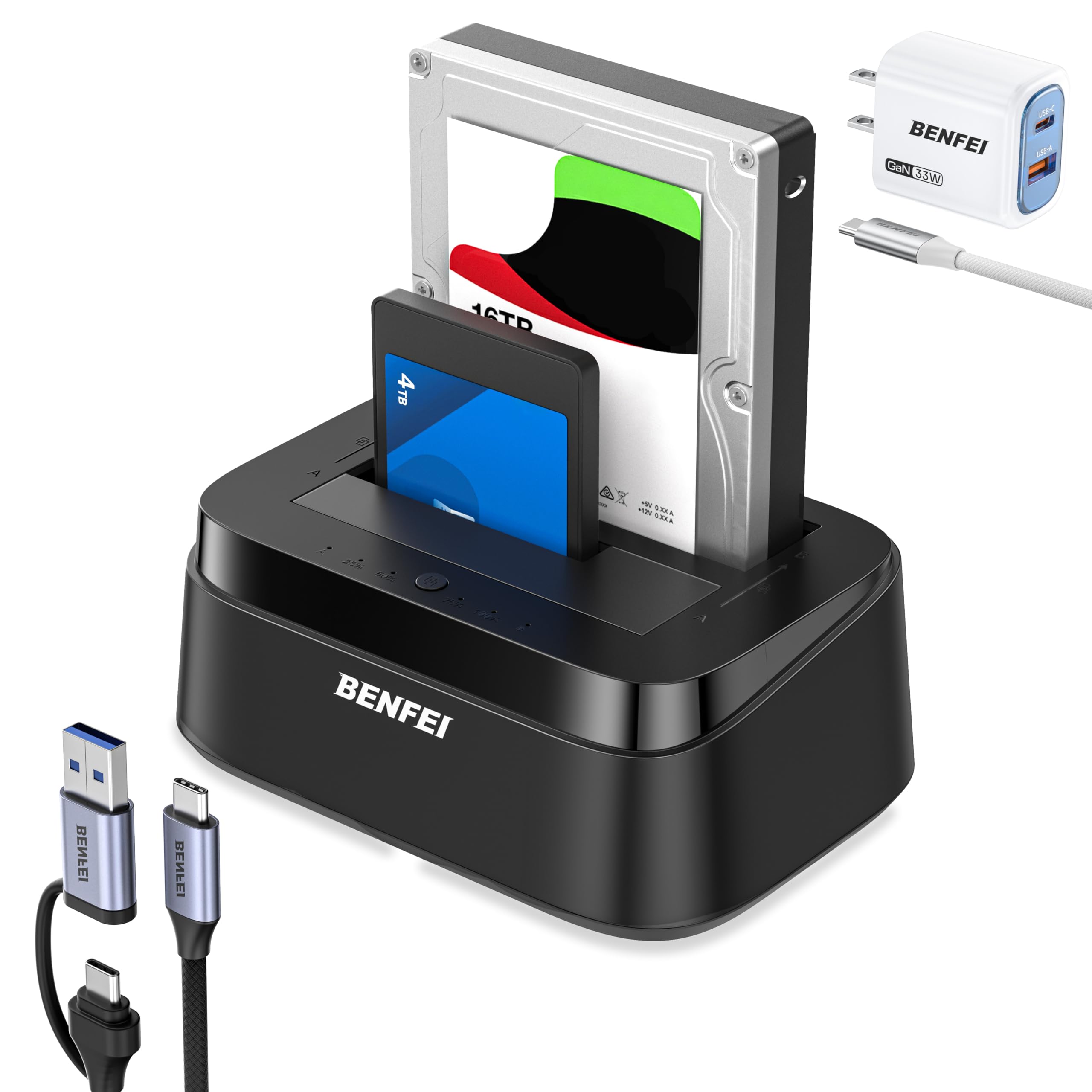
The BENFEI dual-bay dock punches above its price point with a dedicated 12V/2.5A power adapter, UASP support, and a one-button offline clone that works without a computer. Verified users report cloning a 900GB SSD in under 45 minutes with near-perfect SHA-512 hash accuracy—performance that rivals docks costing twice as much. The USB 3.1 Type-C interface provides the standard 5Gbps transfer ceiling, and backward compatibility means older SATA I/II drives are recognized without issue.
Tool-free installation is straightforward: slide the drive onto the connector and power on. The built-in power switch adds a layer of safety by preventing hot-plugging surges, and the 18-month warranty is longer than many mid-range competitors. For budget-constrained buyers who still need reliable drive cloning and dual-bay operation, this is the strongest value proposition in the lineup.
The tradeoffs are minor but real: the user guide has tiny print (check online), the plastic body doesn’t dissipate heat as well as aluminum alternatives, and one reviewer noted that not all desktop files transferred during clone—so verify your data afterward. If your budget is tight but you can’t compromise on core functionality, the BENFEI delivers surprisingly solid performance for the entry-level tier.
Why it’s great
- Excellent clone accuracy verified by real users
- Dedicated 12V/2.5A power supply for stable operation
- USB-C interface with UASP for faster transfers
- 18-month warranty beats many budget options
Good to know
- Plastic body doesn’t dissipate heat as well
- User guide has very small print
- Occasional file transfer omissions during clone
FAQ
Can I use a dual-bay dock to clone from a 2.5 inch SSD to a 3.5 inch HDD?
Why does my dock disconnect drives after 10 to 15 minutes of inactivity?
What happens if I use a dock that doesn’t support my 22TB hard drive?
Final Thoughts: The Verdict
For most users, the best docking station hdd winner is the UGREEN Dual-Bay because it combines a massive 48TB capacity ceiling, reliable offline cloning, and broad OS compatibility at a mid-range price that doesn’t force tradeoffs on build quality. If you need dual-format support for both SATA and NVMe M.2 drives, grab the SABRENT DS-UFNC for its 10Gbps throughput and tool-free versatility. And for IT professionals who clone drives daily and demand sector-by-sector accuracy, nothing beats the StarTech SDOCK2U33 with its 28GB/min standalone duplicator speed and 2-year warranty.

Mo Maruf
I created WellFizz to bridge the gap between vague wellness advice and actionable solutions. My mission is simple: to decode the research and give you practical tools you can actually use.
Beyond the data, I am a passionate traveler. I believe that stepping away from the screen to explore new environments is essential for mental clarity and physical vitality.