Our readers keep the lights on and my smoothie glass nicely filled. As an Amazon Associate, I earn from qualifying purchases.
A single USB-C port on your laptop is a bottleneck. It forces you to choose between charging, connecting a monitor, or plugging in a drive. A proper docking station for PC eliminates that trade-off, turning one cable into a full desk ecosystem with multiple displays, fast storage, and every peripheral connected at once.
I’m Mohammad Maruf — the founder and writer behind WellFizz. I’ve spent hundreds of hours analyzing port configurations, display protocol compatibility, and power delivery specifications to find the docking stations that actually deliver on their promises.
This guide covers seven models that range from smart LCD-equipped hubs to enterprise-grade Thunderbolt-class docks, all selected for their ability to expand a PC’s connectivity without introducing lag, instability, or thermal issues. Finding the right docking station for pc comes down to matching your display count, laptop power requirements, and data speed needs to the dock’s real-world specs.
How To Choose The Best Docking Station For PC
Not all docking stations handle multi-monitor workloads the same way. The wrong pick can leave you with mirrored displays, underpowered peripherals, or a laptop that drains battery while plugged in. Focus on these four criteria to narrow your options.
Display Output & Protocol Support
Count your monitors first. If you need three independent 4K displays, you need DisplayLink — a chipset that adds display output through USB data lanes, bypassing your laptop’s native video limit. Standard USB-C Alt Mode can drive two monitors on some systems, but triple-screen setups require DisplayLink on both Windows and macOS. Check whether the dock’s HDMI and DisplayPort ports support 4K@60Hz, not just 30Hz.
Power Delivery vs Laptop Wattage
A dock’s power delivery port must match your laptop’s charging input. Ultrabooks typically need 60-100W, while gaming laptops and mobile workstations can demand up to 140W or more. If the dock supplies less wattage than your laptop needs, the battery will discharge slowly during heavy use. Look for docks that list both input power (from the wall adapter) and output power (to your laptop) — a 100W PD port often requires a 120W or higher power adapter to deliver the full 100W.
Port Variety & Data Transfer Speed
Beyond video and charging, evaluate the USB ports. USB 3.2 Gen 2 ports at 10Gbps handle large file transfers and external SSDs without bottlenecking. Front-facing ports are convenient for daily plugging; rear ports keep cable management clean. SD and microSD card slots matter for photographers, and a dedicated headphone jack with Hi-Fi support preserves audio quality for conference calls.
Build Quality & Thermal Management
Aluminum housings dissipate heat better than plastic, which matters when the dock runs 8+ hours daily. Docks with built-in fans run cooler under sustained load but introduce noise. Passive cooling is silent but requires ventilation around the dock. For desk setups, check the cable length — short 3-foot cables may limit placement options, especially with tower-style docks.
Quick Comparison
On smaller screens, swipe sideways to see the full table.
| Model | Category | Best For | Key Spec | Amazon |
|---|---|---|---|---|
| MOKiN 17-in-1 | Mid-Range | Triple 4K with smart display | 3x HDMI + 2x DP, 100W PD | Amazon |
| Dell Pro Dock WD25 | Mid-Range | Enterprise laptop compatibility | Dell AI PC optimized, 100W PD | Amazon |
| TobenONE DisplayLink | Premium | Triple/quad 4K workstations | 3x HDMI + 3x DP, 120W adapter | Amazon |
| Plugable 12-in-1 | Premium | Triple 4K with lifetime support | 3x HDMI + 3x DP, 100W PD | Amazon |
| Anker Prime (14-Port, 160W) | Premium | Dual display with smart power | 2x HDMI, 160W total output | Amazon |
| Anker Prime DL7400 | Premium | Triple display with cooling fan | 2x HDMI + DP, 140W PD, DisplayLink | Amazon |
| RayCue 10-in-1 | High-End | Mac Studio SSD + multi-display | Dual SSD bays, 80Gbps, 2x HDMI 2.1 | Amazon |
In‑Depth Reviews
1. MOKiN 17-in-1 USB C Docking Station
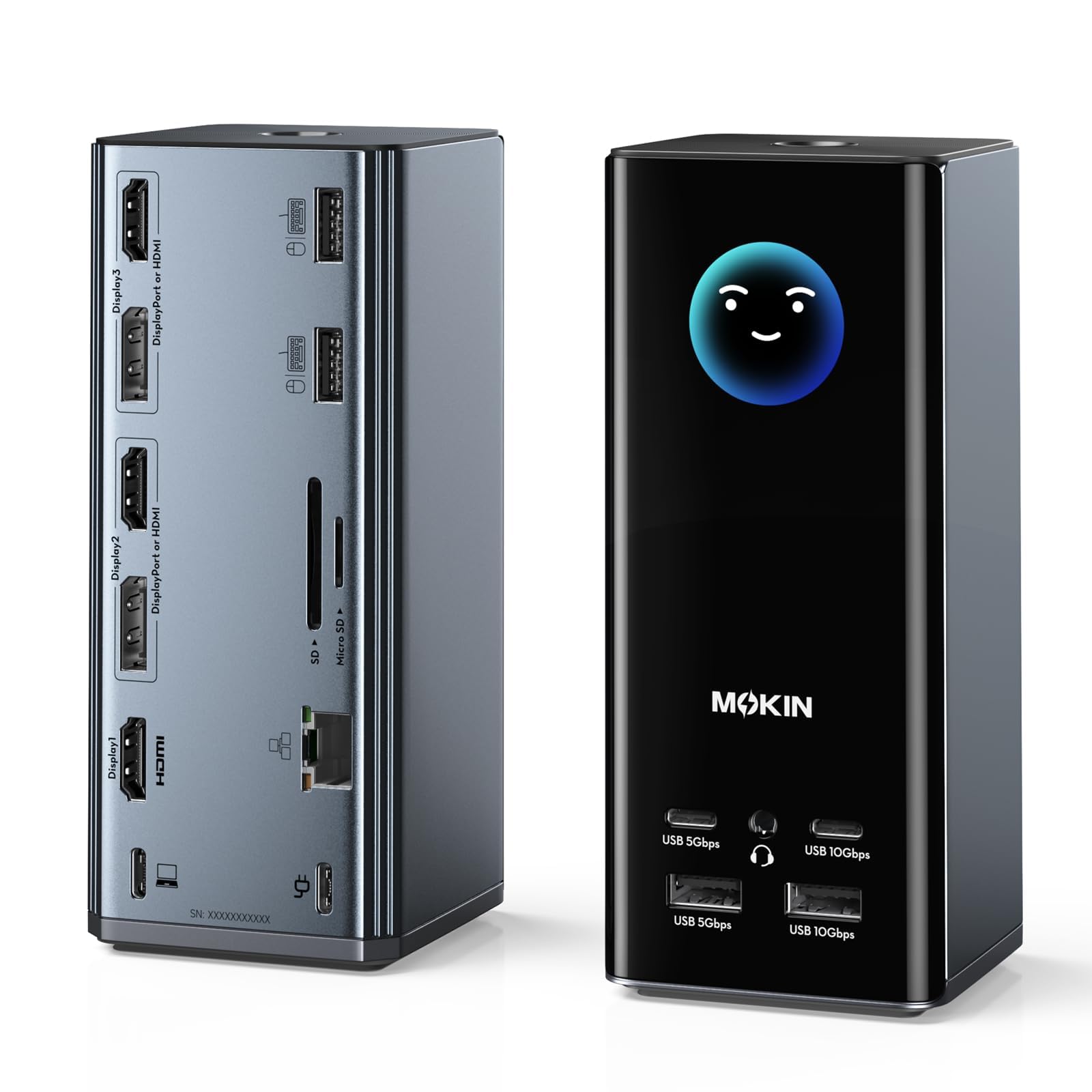
The MOKiN 17-in-1 stands out with its integrated LCD screen that displays real-time charging wattage, port status, and even local weather — a genuinely useful feature for anyone who wants to verify their dock is delivering the promised 100W power delivery at a glance. Beyond the screen, this dock packs three HDMI and two DisplayPort outputs, letting you mix video interfaces across three independent 4K@60Hz monitors.
The silicone suction cups on the base keep the vertical tower planted, and the physical lock button doubles as a privacy screen shortcut. With six USB ports including two 10Gbps Type-C and two 10Gbps Type-A, data transfers from external SSDs feel snappy. The Ethernet port runs at 1Gbps, which covers most wired office needs without bottlenecks.
Some users report the built-in WiFi broadcasts an open network that raises security flags, and the dock’s tower design can tip if cables are crowded. Compatibility is best with Windows laptops that have a full-featured USB-C or Thunderbolt port — macOS users on Silicon chips may not get full triple-display support without DisplayLink. For a Windows-centric multi-monitor setup, this is a strong mid-range contender with a unique visual feedback advantage.
Why it’s great
- Innovative LCD screen shows real-time power, resolution, and weather
- Flexible video port combo with 3x HDMI and 2x DP for triple 4K@60Hz
- 100W USB-C PD passthrough keeps laptops charged during heavy use
Good to know
- Integrated WiFi may create an unsecured open network
- Vertical tower design can tip with heavy cable bundles
- Does not support triple-display on all macOS Apple Silicon systems natively
2. Dell Pro Dock WD25
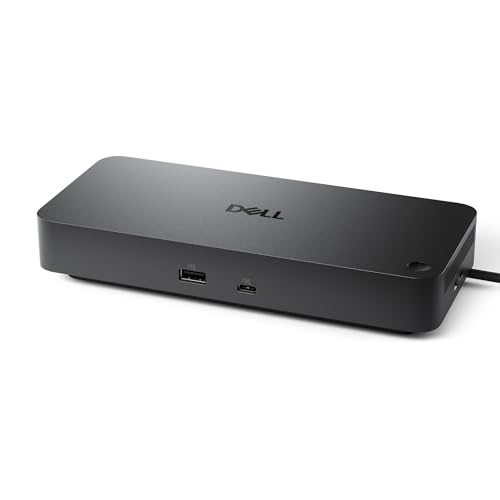
The Dell Pro Dock WD25 is built for the modern IT-managed workplace, delivering up to 100W of power to Dell AI PCs and non-Dell laptops alike. It supports native four high-resolution displays, which few docks in this price tier can claim. The ambidextrous USB-C cable routes left or right, a thoughtful detail for crowded desks and cable management.
With six USB ports including USB 3.2 Gen 2 support, this dock handles peripherals and storage without bandwidth complaints. The connection is truly plug-and-play — multiple verified buyer reports confirm no driver installation needed with Dell Latitude and XPS laptops, and it works with MacBook Air M4 for single-monitor duty via the HDMI port.
Sustainability is built in: 65% postconsumer recycled materials and up to 72% less standby power consumption compared to previous generations. The dock also supports Ubuntu 24.04 and ChromeOS 137, giving it cross-platform reach. The major limitation is the single HDMI port — users wanting more than one display must use DisplayPort or a USB-C to DP adapter.
Why it’s great
- True plug-and-play with Dell laptops, no drivers needed
- Supports up to four external displays on compatible systems
- Designed for AI PC compatibility and enterprise manageability
Good to know
- Only one HDMI port — multi-monitor requires DisplayPort adapters
- Premium build cost may not fit every budget
- Non-Dell laptops may not reach full four-monitor capability
3. TobenONE DisplayLink Docking Station

The TobenONE dock delivers 18 ports with a 120W power adapter included, meaning you don’t need your laptop’s original charger. The DisplayLink chipset enables three to four external 4K@60Hz monitors on a single USB-C connection, which is critical for Mac users who otherwise hit Apple Silicon’s native two-display cap. The three HDMI and three DisplayPort outputs offer enormous flexibility in monitor arrangement.
Data transfer runs at 10Gbps through six USB ports — three Type-A 3.1 and two Type-C — plus dedicated SD/TF card slots. The dock runs cool under load, and many users report it works across Windows, macOS 11+, and ChromeOS without display lag for productivity apps. The Ethernet port delivers gigabit wired networking, keeping your connection stable during video calls.
DisplayLink drivers are mandatory, which some non-technical users find off-putting. A known catch: DRM-protected streaming services like Netflix may show a black screen on external monitors due to screen recording API limitations. The dock also requires manual power-on via the physical button after a complete shutdown. For financial analysts, developers, and content creators who need real monitor real estate, the TobenONE is a proven workhorse.
Why it’s great
- Triple/quad 4K@60Hz via DisplayLink for Mac and Windows
- 120W adapter powers laptop and dock with no extra brick
- Excellent customer support with lifetime engineering access
Good to know
- Requires DisplayLink driver installation and macOS permissions
- DRM streaming (Netflix, Prime) blocked on external displays
- Some users report HDMI 3 signal loss after months of use
4. Plugable 12-in-1 USB C Triple Monitor Dock

The Plugable 12-in-1 dock brings six video ports (three HDMI, three DisplayPort) to the table, giving you total freedom to connect any combination of three displays up to 4K@60Hz. It works with USB-C, USB4, and Thunderbolt systems, including Apple Silicon Macs that normally cap display output — thanks to onboard DisplayLink technology that handles the video processing.
Six USB 3.0 ports (five Type-A, one Type-C) run at 5Gbps, enough for keyboards, mice, webcams, and external drives without stuttering. The 100W power delivery feeds most ultrabooks all day, and the built-in Gigabit Ethernet port provides wired network stability. Audio passes through a 3.5mm TRRS jack for headsets.
The standout feature here is Plugable’s 2-year warranty and lifetime support from a North American-based team — rare in this price bracket. Some users note the 100W PD may not fully charge high-wattage gaming laptops, and a few report docks failing after several months. For the pre-sale and post-sale support alone, this is a safe recommendation for professionals who value reliability and phone-answer service.
Why it’s great
- Six video ports allow flexible HDMI/DisplayPort monitor combinations
- 2-year warranty and lifetime North American customer support
- Works with M1/M2/M3/M4 Macs via DisplayLink for triple display
Good to know
- 100W PD may not fully power high-wattage gaming laptops
- Intermittent hardware failures reported by some long-term users
- Requires DisplayLink driver for triple-screen on macOS
5. Anker Prime Docking Station (14-Port, 160W)

The Anker Prime is designed for users who need serious power management. Its 160W total output can charge up to four devices simultaneously via three USB-C ports (100W max each) and one USB-A port (12W). The front-facing smart display toggles between showing total power draw, individual port speeds, and charging status — a real-time dashboard that helps you monitor the dock’s health.
Dual HDMI ports support two external monitors, with resolutions up to 2K@60Hz on DisplayPort 1.4 laptops or 1080p@60Hz on DP 1.2 systems. Ten USB ports in total provide ample connectivity, with 10Gbps speeds on the high-speed ports. The compact vertical design keeps the footprint small on a cluttered desk.
This dock does not have a DisplayPort connector, SD card reader, or Thunderbolt 4 speed — it’s a pure USB-C hub with smart charging features. On macOS, the two external HDMI displays mirror rather than extend, limiting Mac users to one extended screen. The included 3-foot USB-C cable may also be too short for some desk layouts. For Windows power users who prioritize charging speed and port count, this is a well-built option.
Why it’s great
- 160W total power output charges laptop, tablet, and phone simultaneously
- Smart LCD display shows real-time wattage and data speeds per port
- Compact vertical design saves desk space while offering 14 total ports
Good to know
- No DisplayPort output, no SD card reader
- macOS limits dual HDMI displays to mirrored mode
- Short 3-foot upstream cable limits placement flexibility
6. Anker Prime Docking Station DL7400
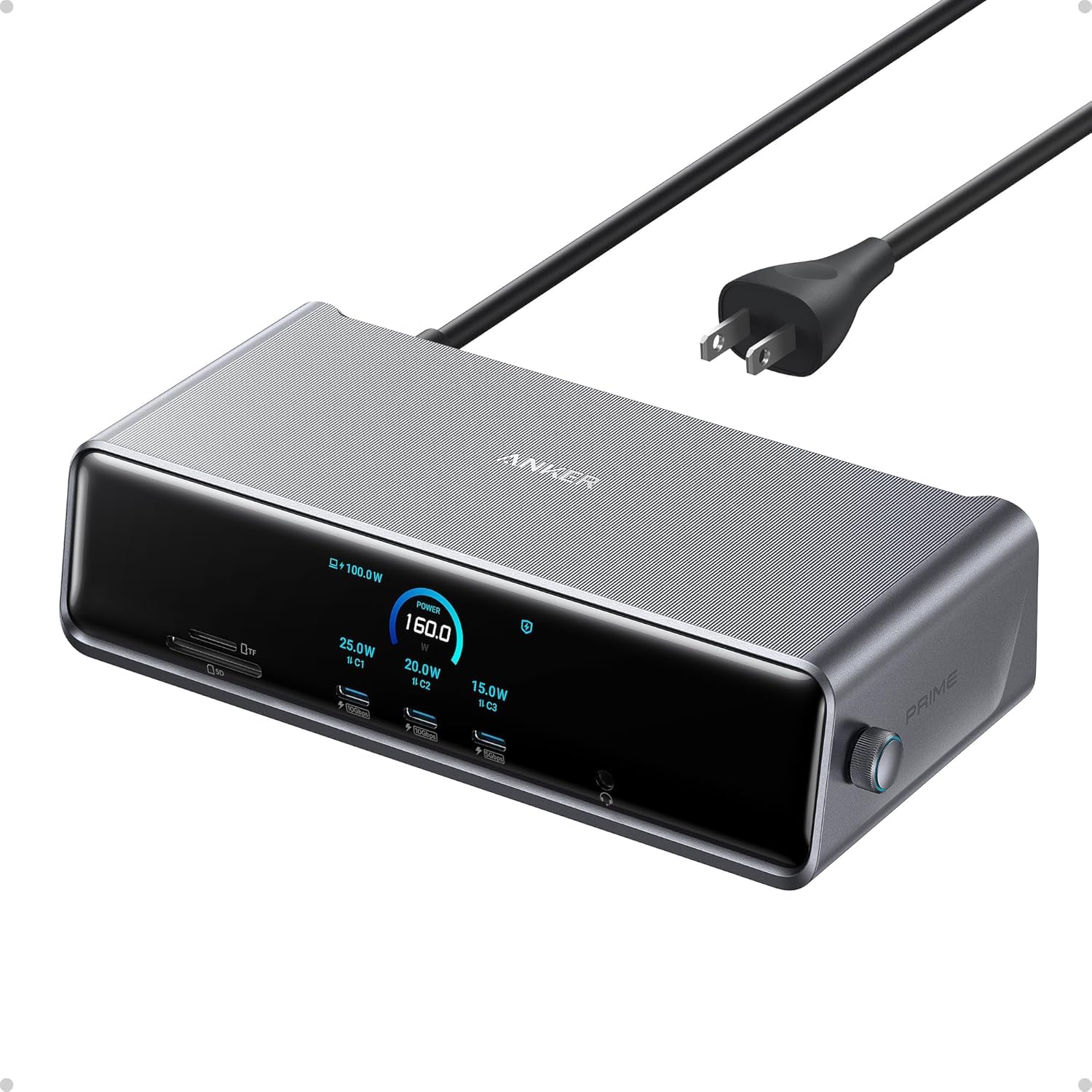
The Anker Prime DL7400 takes the previous model’s smart display and adds DisplayLink for triple 4K@60Hz output, a built-in cooling fan, and a 2.5Gbps Ethernet port. The fan and ActiveShield 3.0 technology keep the dock thermally stable even when driving three monitors and charging a laptop at full 140W through the upstream port.
Port selection is comprehensive: two HDMI ports plus one DisplayPort for video, two front 100W USB-C ports for high-speed device charging, and dedicated SD/TF card slots. The 2.5Gbps Ethernet is a significant upgrade over the 1Gbps ports found on most docks — useful for NAS workflows and large file transfers on wired networks.
DisplayLink driver installation is mandatory and, as with all DisplayLink docks, DRM-protected streaming may show a black screen on external displays. Some users report intermittent display dropouts requiring a reset. The dock runs warm even with the fan, and the loudest complaint is that the fan can be audible in quiet rooms. For professionals who need triple screens and fast charging from a single USB-C cable, the DL7400 delivers premium performance at a premium cost.
Why it’s great
- Triple 4K@60Hz via DisplayLink for Windows laptops
- Active cooling fan prevents thermal throttling under sustained load
- 2.5Gbps Ethernet for faster wired networking than standard docks
Good to know
- Fan produces audible noise in quiet environments
- DisplayLink driver blocks Netflix and similar DRM content on external screens
- Setup requires driver installation and may need configuration tweaks
7. RayCue 10-in-1 Docking Station for Mac Studio
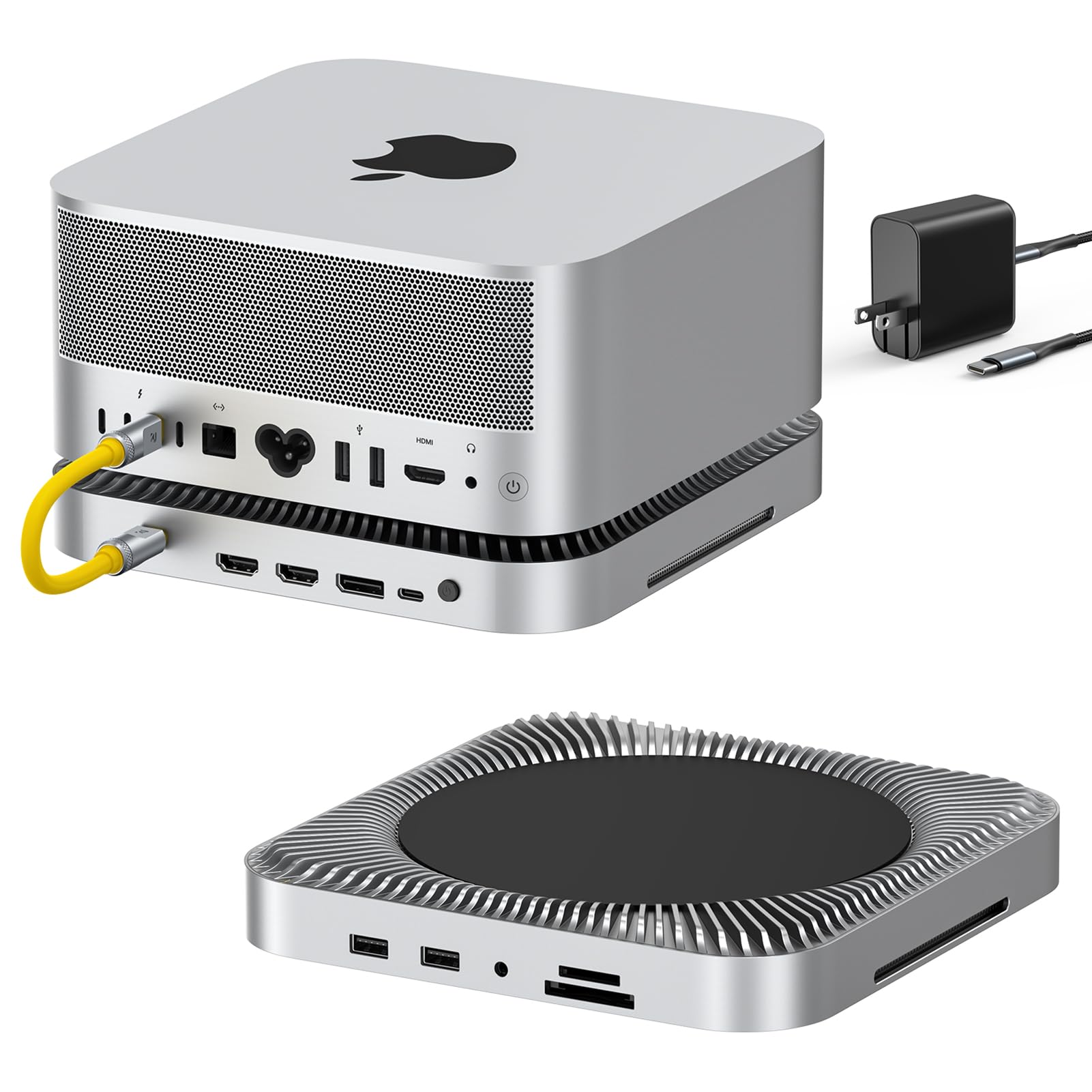
The RayCue dock is purpose-built for Mac Studio M4 Max/M3 Ultra and Mac Mini users who need massive local storage and high-bandwidth video. Dual NVMe SSD bays support up to 16TB total with RAID 0/1, delivering 80Gbps combined throughput (40Gbps per drive). For video editors and photographers moving large raw files, this eliminates the need for a separate external enclosure cluttering the desk.
Video output includes two HDMI 2.1 ports (8K@30Hz or 4K@144Hz) and one DisplayPort 2.1, giving Mac Studio users flexible multi-display options that surpass the built-in Thunderbolt ports in refresh rate capability. A CFexpress Type A/B card reader at 10Gbps handles high-speed camera media, and the Hi-Fi 96kHz audio jack provides clean sound output for professional monitoring.
The precision-milled aluminum alloy body matches the Mac Studio aesthetic perfectly and stacks underneath it, saving desk surface area. Some users caution that the included manual is sparse and the tiny drive screws can be fiddly. The 80Gbps is shared between two drives — single drive throughput maxes at 40Gbps. For creative professionals already invested in the Apple ecosystem, this dock turns a Mac Studio into a true production hub.
Why it’s great
- Dual NVMe SSD bays with RAID support, up to 16TB total storage
- HDMI 2.1 and DisplayPort 2.1 support 4K@144Hz or 8K@30Hz
- Matches Mac Studio design, stacks underneath for zero footprint
Good to know
- Limited to Mac Studio and Mac Mini — not for general PC use
- 80Gbps is combined; single drive runs at 40Gbps
- Included manual is minimal with small component screws
FAQ
Can I use a docking station with any Windows laptop?
Why do DisplayLink docks block Netflix on external monitors?
Does a docking station charge my laptop as fast as the original charger?
Final Thoughts: The Verdict
For most users, the best docking station for pc winner is the MOKiN 17-in-1 because it combines triple 4K display support, 100W power delivery, and a unique smart LCD screen at a mid-range price point without requiring DisplayLink drivers on Windows. If you need triple displays on a Mac or want a 120W power adapter included with lifetime support, grab the TobenONE DisplayLink. And for creative professionals running a Mac Studio with massive local storage needs, nothing beats the RayCue 10-in-1 with its dual SSD bays and HDMI 2.1 video output.

Mo Maruf
I created WellFizz to bridge the gap between vague wellness advice and actionable solutions. My mission is simple: to decode the research and give you practical tools you can actually use.
Beyond the data, I am a passionate traveler. I believe that stepping away from the screen to explore new environments is essential for mental clarity and physical vitality.