Our readers keep the lights on and my smoothie glass nicely filled. As an Amazon Associate, I earn from qualifying purchases.
Unlocking a triple-monitor setup from a single USB-C port is the benchmark of a modern workstation, yet most docks introduce complex driver conflicts, port limitations, or power delivery shortfalls that undermine the very productivity they promise. The right hub eliminates the adapter tangle and delivers stable 4K or 6K output across multiple screens without compromising data speeds or charging, turning a chaotic desk into a command center.
I’m Mohammad Maruf — the founder and writer behind WellFizz. This guide compiles weeks of spec-sheet analysis, real-world user feedback, and cross-referencing of DisplayLink, Thunderbolt, and USB-C compatibility matrices to pinpoint which docking stations actually deliver on their triple- and quad-display claims for both Mac and Windows environments.
After filtering for resolution support, port variety, build integrity, and sustained power output, the best docking station for multiple monitors emerges as a clear choice for anyone moving beyond a single external display.
How To Choose The Best Docking Station For Multiple Monitors
Multi-monitor docking stations are not all equal. Choosing the wrong one often means capped refresh rates, dropped connections, or insufficient laptop power. Focus on these factors to avoid costly returns.
Display Protocol & OS Limitations
The largest divide exists between Windows and macOS multi-monitor support. Many docks rely on DisplayLink technology to bypass Apple’s native limit of one external display on M-series chips. Without a DisplayLink driver, a MacBook Air or Pro will never drive more than two screens from a single cable. Windows users, by contrast, can often run three or four monitors natively if the laptop’s USB-C port supports DisplayPort Alt Mode and the dock has enough video outputs.
Power Delivery & Thermal Management
A dock that drives three 4K monitors while charging a 16-inch laptop needs substantial wattage. Look for at least 85W PD output for larger machines; 100W or 140W is ideal for sustained load. Equally important is thermal design — docks that lack active cooling or aluminum heat sink bodies often throttle charging speed or drop display signals when pushed for hours. Fanless units with extensive venting or metal chassis handle heat better than sealed plastic enclosures.
Port Configuration & Data Bandwidth
Not all USB ports on a dock are equal. Many budget units mix USB 3.2 Gen 2 (10Gbps) ports with slower USB 2.0 (480Mbps) ports designed for keyboards and mice. For external SSDs and video peripherals, prioritize docks that label high-speed ports clearly. Also verify the upstream cable — some docks require a 10Gbps-rated USB-C cable to reach full display and charging performance, and a substandard cable is a common hidden cause of intermittent failures.
Quick Comparison
On smaller screens, swipe sideways to see the full table.
| Model | Category | Best For | Key Spec | Amazon |
|---|---|---|---|---|
| CalDigit TS5 Thunderbolt 5 Dock | Thunderbolt 5 | Dual 8K 60Hz / Mac & Windows power users | 140W PD / 240W PSU | Amazon |
| Lenovo ThinkPad Thunderbolt 5 Smart Dock 7500 | Thunderbolt 5 | Three 8K 60Hz / Commercial IT management | 180W PD / 120Gbps | Amazon |
| iVANKY FusionDock Max 1 | Mac-only TB4 | Quad 6K 60Hz / M1-M5 Max MacBook | 40Gbps / 4x downstream TB4 | Amazon |
| WAVLINK DisplayLink Dock | Quad Display | Quad 4K 60Hz / Multi-OS versatility | 180W PSU / 100W PD | Amazon |
| Plugable 12-in-1 Triple 4K Dock | DisplayLink | Triple 4K 60Hz / Mac & Windows | 100W PD / 3x HDMI + 3x DP | Amazon |
| Anker Prime Docking Station DL7400 | DisplayLink + Fan | Triple 4K 60Hz / Windows with cooling | 140W PD / Smart Display | Amazon |
| TobenONE DisplayLink Dock | DisplayLink | Triple 4K 60Hz / Mac KVM setups | 120W PSU / 100W PD | Amazon |
| MOKiN Smart LCD Dock | DisplayLink | Triple 4K 60Hz / Mac with driver support | 10Gbps USB / 18 ports | Amazon |
| Baseus Spacemate 11-in-1 | Compact Stand | Triple 4K 60Hz / Budget-conscious Windows | 100W PD / 10Gbps USB | Amazon |
In‑Depth Reviews
1. CalDigit TS5 Thunderbolt 5 Dock
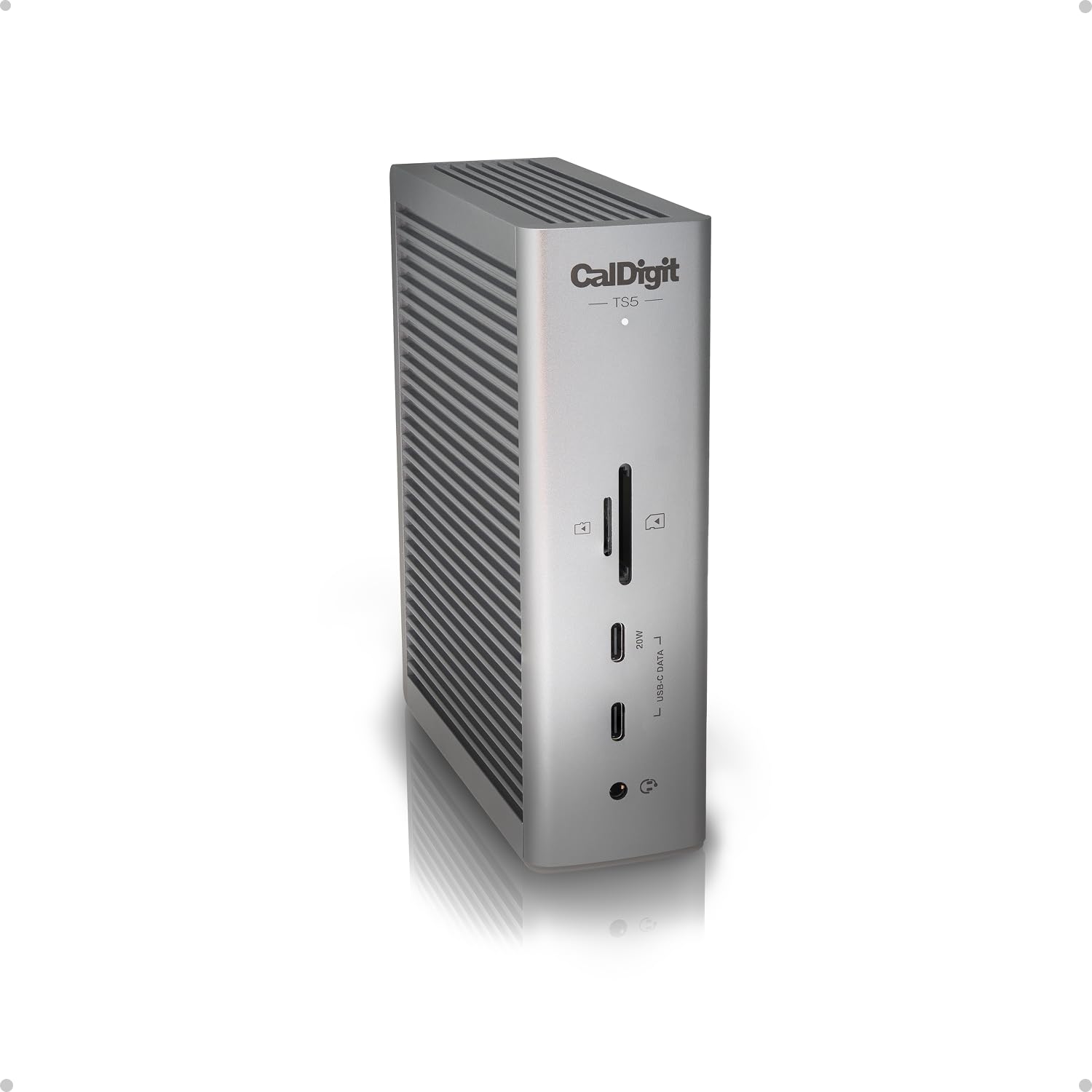
The CalDigit TS5 sits at the absolute peak of Thunderbolt 5 performance. Its 240W power supply allows the host port to deliver a sustained 140W — enough to keep a 16-inch MacBook Pro at full charge even under heavy GPU load — while all downstream ports operate at their full rated speed simultaneously. Users confirm that the dock drives dual 8K 60Hz displays on compatible Macs and delivers 2.5GbE wired networking without any bandwidth sharing compromises.
The aluminum chassis doubles as a heatsink, keeping internal temperatures in check during extended sessions. Real-world reports highlight the TS5’s ability to charge an M5 Max MacBook Pro, run two Studio Displays, fast-charge an iPad Pro, and connect a 10GbE adapter — all through a single host cable. The included 1-meter braided Thunderbolt 5 cable is high quality, though some users wish for a longer option out of the box.
Compatibility is excellent across Thunderbolt 5, Thunderbolt 4, and USB4 v2 hosts, though older Thunderbolt 3 machines will see reduced display and bandwidth capability. A small number of users on M5 Max machines report intermittent network drops, which CalDigit acknowledges as a known driver issue under investigation. For anyone building a future-proof workstation, this dock is the gold standard.
Why it’s great
- Sustained 140W PD via 240W PSU — no throttling under load
- Dual 8K 60Hz or dual 6K 60Hz with full color depth
- Aluminum heatsink design runs consistently cool
- 2.5GbE Ethernet with full PCIe bandwidth
Good to know
- Intermittent network drop issue on M5 Max MacBooks reported
- 1m host cable is short for some desk layouts
- High upfront investment compared to DisplayLink alternatives
2. Lenovo ThinkPad Thunderbolt 5 Smart Dock 7500
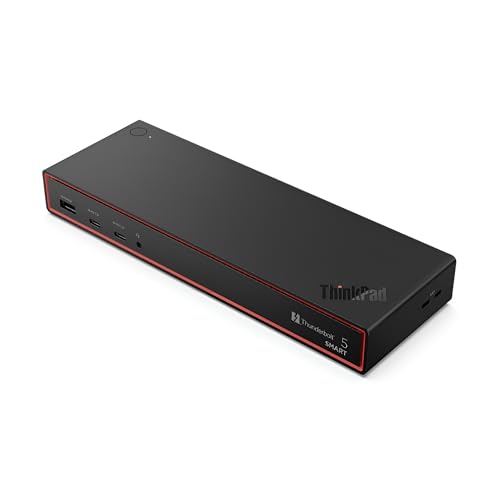
Lenovo’s Thunderbolt 5 dock pushes the envelope with 120Gbps data throughput and an extraordinary display ceiling: up to three 8K 60Hz monitors or a combination of two 4K 240Hz and two 4K 120Hz screens. The 180W Power Delivery 3.1 output can rapidly charge demanding ThinkPad mobile workstations and other high-wattage laptops without requiring a separate AC adapter. The Eclipse Black industrial design fits cleanly into corporate and enterprise environments.
For IT departments, the cloud-based Lenovo Accessories Fleet Manager accessible via AWS adds remote configuration, firmware updates, and fleet-wide diagnostics — a unique feature for enterprise deployment. Port selection includes one HDMI 2.1, two DisplayPort 2.1, Thunderbolt 5 downstream, USB-A/C mixed ports, and a 2.5GbE RJ45. The slim 9.25-inch profile saves desk space compared to bulkier docks.
Compatibility is not universal. The dock struggles with some Lenovo ThinkPad models — notably the P16v Gen 1 — where Thunderbolt charging fails entirely. The single HDMI port may force users into DisplayPort adapters for dual HDMI monitor setups. Buyers should check Lenovo’s official compatibility matrix before purchasing. For a supported laptop, this is the most powerful enterprise docking station available.
Why it’s great
- Three 8K 60Hz display support for extreme multi-monitor rigs
- 180W PD 3.1 charging through Thunderbolt 5
- Cloud-based IT fleet management tools included
- High-refresh-rate support at 4K 240Hz
Good to know
- Incompatible with specific ThinkPad models (P16v, some T-series)
- Only one HDMI port; dual HDMI requires adapter workaround
- Compatibility matrix on Lenovo.com is cumbersome to navigate
3. iVANKY FusionDock Max 1
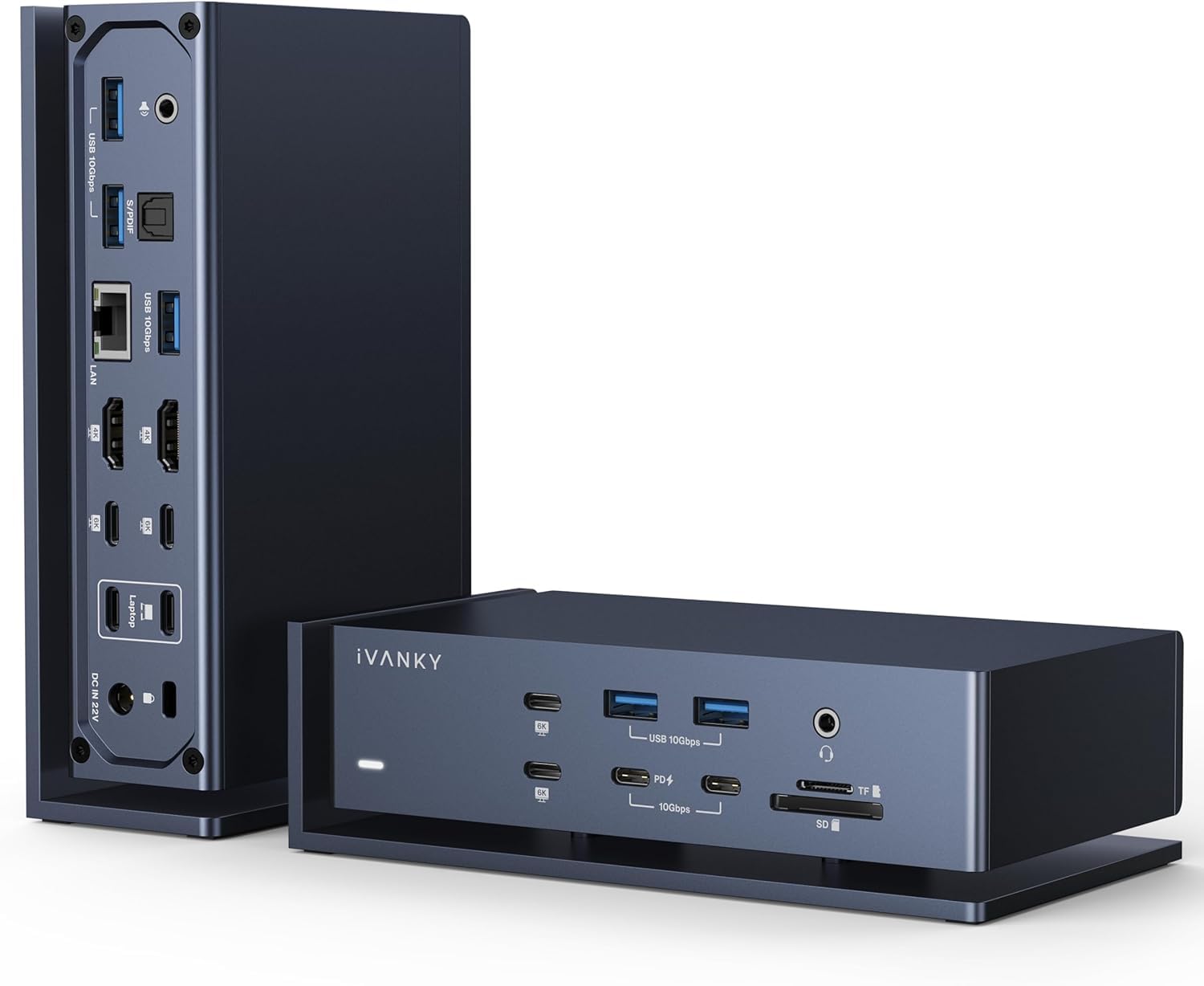
Designed exclusively for M1 through M5 Max MacBook Pro and Air models, the iVANKY FusionDock Max 1 uses a dual-upstream Thunderbolt 4 design to unlock four downstream TB4 ports — more than most docks offer. This architecture enables the dock to drive up to four 6K 60Hz displays on Max chips or two 6K screens on Pro chips, creating a seamless digital canvas for video editors, 3D artists, and financial traders who rely on pixel-level precision across multiple monitors.
The 180W DC adapter delivers 100W sustained PD to the host MacBook while supplying 20W to connected accessories. Integrated SD 4.0 and microSD 4.0 card readers hit 312MB/s transfer speeds, and the dedicated Optical Audio (Toslink) port appeals to audio professionals who need interference-free output. User reports confirm that the dock runs warm — a consequence of the high-power density — but the internal fan stays quiet during typical workloads.
Compatibility is strictly limited to Apple Silicon Macs. Windows machines and Intel-based Macs are not supported. The dual-upstream cable design has evolved; early units with a split dual-block cable caused disconnects, but iVANKY now ships a revised single-split cable that resolves most instability. Customer support is responsive, often sending replacements for units with any HDMI port issues. This dock is unmatched for pro Mac users who need maximum display real estate.
Why it’s great
- Quad 6K 60Hz display support on M1-M5 Max MacBooks
- Four downstream Thunderbolt 4 ports for daisy-chaining
- SD 4.0 card reader at 312MB/s professional speed
- Optical Audio output for studio-quality sound
Good to know
- Not compatible with Windows, ChromeOS, or Intel Macs
- Runs hot under sustained load; internal fan audible in quiet rooms
- Some units require replacement cable revision for stability
4. WAVLINK DisplayLink Docking Station

The WAVLINK dock stands out for its quad-monitor capability at 5K ultrawide or 4K 60Hz resolutions, making it one of the few docks in its tier to drive four fully independent displays from a single USB-C connection. With four HDMI and four DisplayPort outputs, users have total flexibility to mix and match connections. The 180W power supply provides 100W host charging, which is sufficient for most productivity laptops.
Network performance gets a boost from the 2.5Gbps Ethernet port, twice the speed of standard gigabit docks. The included 2-in-1 USB-C to USB-A/C cable and SD 4.0 card reader offer flexibility for content creators who need fast media ingestion. The dock is compatible with Thunderbolt 3/4/5, USB4, and standard USB-C hosts across Windows, macOS, ChromeOS, and even Ubuntu Linux — rare cross-platform support in this category.
Long-term reliability concerns temper the impressive spec sheet. Multiple user reviews report random screen flickers, Ethernet disconnects, and charging failures after several months of daily use. Driver updates and cable swaps do not always resolve these issues. The dock works well at first, but buy with the understanding that longevity may require manufacturer support. The angled port placement on the rear is also awkward for cable management.
Why it’s great
- Quad 5K ultrawide or 4K 60Hz from one USB-C cable
- Four HDMI plus four DisplayPort outputs for mix-and-match
- Cross-platform support includes Windows, Mac, ChromeOS, Linux
- 2.5Gbps Ethernet for faster network file transfers
Good to know
- Reported intermittent flickering and connection drops after months
- Rear port arrangement makes cable routing difficult
- Firmware updates may not fix all long-term reliability gaps
5. Plugable 12-in-1 USB C Triple Monitor Docking Station

Plugable delivers a well-rounded triple-monitor solution with three HDMI and three DisplayPort ports — an unusual level of video output redundancy at this price point. The DisplayLink driver approach allows macOS users (including M1, M2, M3, M4, and Neo Macs) to extend three 4K 60Hz displays from a single USB-C cable, bypassing Apple’s native single-external-display limit. Windows and ChromeOS machines benefit from the same high-resolution support without additional software complexity.
The 100W power delivery keeps most laptops charged during the workday, though high-power gaming laptops like the MSI Raider GE76 (240W PSU) may not detect the dock as a power source at all. Six USB 3.0 ports offer plenty of connectivity for peripherals, and the built-in 3.5mm audio jack supports both headphones and headsets. Plugable backs the unit with a 2-year defect warranty and lifetime North American-based support, which is a genuine advantage in a category where long-term help varies widely.
Some units fail entirely after a few days or weeks, but Plugable’s customer service history is strong — replacements are often shipped quickly. One known issue: the Ethernet port can stop functioning after macOS updates, though Plugable provides a workaround USB Ethernet adapter. For users who want a reliable triple-monitor dock with proven support, this is a safe mid-range bet.
Why it’s great
- Three HDMI plus three DisplayPort for flexible monitor connections
- 100W PD keeps most laptops charged during use
- 2-year warranty and lifetime North American-based support
- Works with Mac, Windows, ChromeOS via DisplayLink driver
Good to know
- Ethernet port may fail after macOS system updates
- Insufficient charging for high-wattage laptops (240W+ PSU)
- A small percentage of units arrive defective or fail early
6. Anker Prime Docking Station DL7400
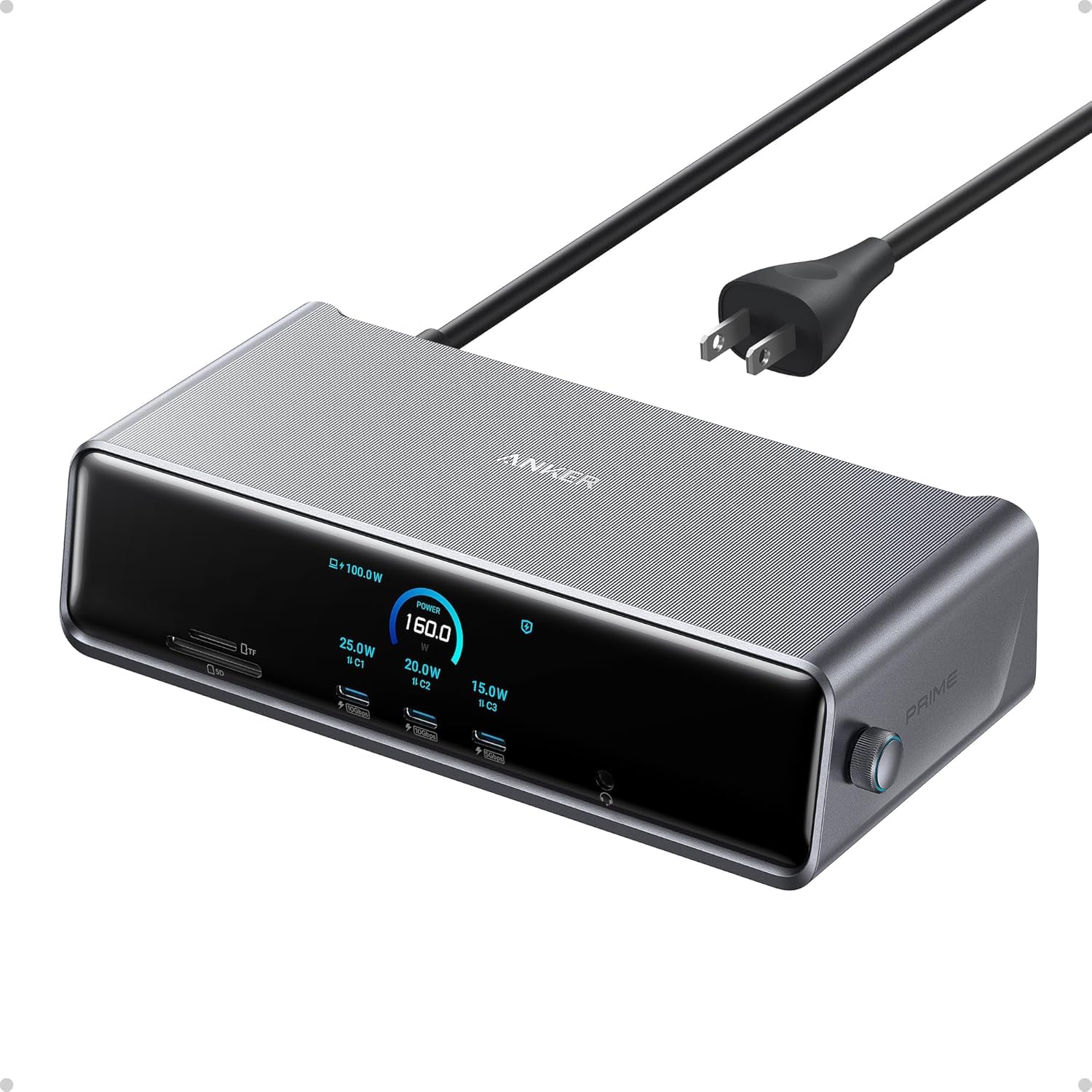
Anker’s DL7400 brings a unique combination of DisplayLink triple-display support, a built-in fan, and a real-time smart display that shows charging power, fan mode, and connection status. The 140W PD upstream port charges the host laptop at full speed while two front USB-C ports each deliver 100W for fast-charging additional devices. With two HDMI and one DisplayPort output, the dock handles triple 4K 60Hz on Windows 10/11, and the included ActiveShield 3.0 thermal management ensures consistent performance despite the high power density.
The smart display is genuinely useful — users report checking charging wattage and fan behavior without needing any software. The 2.5Gbps Ethernet port and SD/TF card slots round out the 14-port array. Build quality is typical Anker premium: a dense, well-ventilated Phantom Gray chassis that resists scratches and feels heavy in the hand. The 6-foot AC power cord provides plenty of reach for under-desk mounting.
Setup requires the latest DisplayLink driver installation, and non-tech users may find the initial configuration confusing. DRM-protected streaming services like Netflix and Disney+ will show a black screen while audio continues — a DisplayLink limitation, not a dock defect. A few users report intermittent monitor connection loss requiring a dock reset, but most find the dock stable after initial setup. For Windows power users who need active cooling and informative feedback, this is a compelling choice.
Why it’s great
- Built-in fan with ActiveShield 3.0 thermal management
- Smart display shows real-time charging and fan status
- 140W PD upstream plus two 100W front USB-C ports
- 2.5Gbps Ethernet for fast wired networking
Good to know
- Requires DisplayLink driver — not plug-and-play for all users
- DRM streaming black screen due to DisplayLink architecture
- Intermittent monitor reset needed in rare cases
7. TobenONE DisplayLink Docking Station

The TobenONE dock is built around the DisplayLink chipset, offering triple 4K 60Hz on macOS and up to quad 4K 60Hz on Windows laptops with USB-C video output support. The 18-port array includes three HDMI, three DisplayPort, two USB-C, four USB 3.2, and SD/TF card slots — enough for a fully wired workstation. The included 120W power adapter provides 100W PD to the host and 18W to the front USB-C port for accessory charging.
User feedback is notably positive for KVM and dual-computer setups. The dock easily switches between a MacBook and a Windows laptop via a single cable, retaining monitor assignments and peripheral connections. The compact 4.3-inch cube design saves desk space, and the unit runs cool even after hours of extended display use. Customer support is responsive, often offering full refunds or replacements for units with the occasional HDMI port failure after extended use.
There are two known quirks. First, when a MacBook runs with the lid closed, the system may mistakenly think the lid is open, requiring a manual flip to reset. Second, DisplayLink’s DRM limitation blocks Netflix and similar services via HDMI. Neither issue is unique to TobenONE, but both are worth noting for lid-closed workstation users and streaming viewers. For a mid-range DisplayLink dock with strong multi-OS support, this is a reliable option.
Why it’s great
- Triple 4K 60Hz on Mac, quad 4K 60Hz on Windows
- 120W PSU with 100W PD for consistent laptop charging
- Works well in dual-computer KVM setups
- Compact cube design with many port options
Good to know
- MacBook lid-closed mode may trigger false lid-open detection
- DisplayLink blocks DRM streaming (Netflix, etc.) via HDMI
- Occasional HDMI port failure after several months
8. MOKiN Smart LCD Docking Station
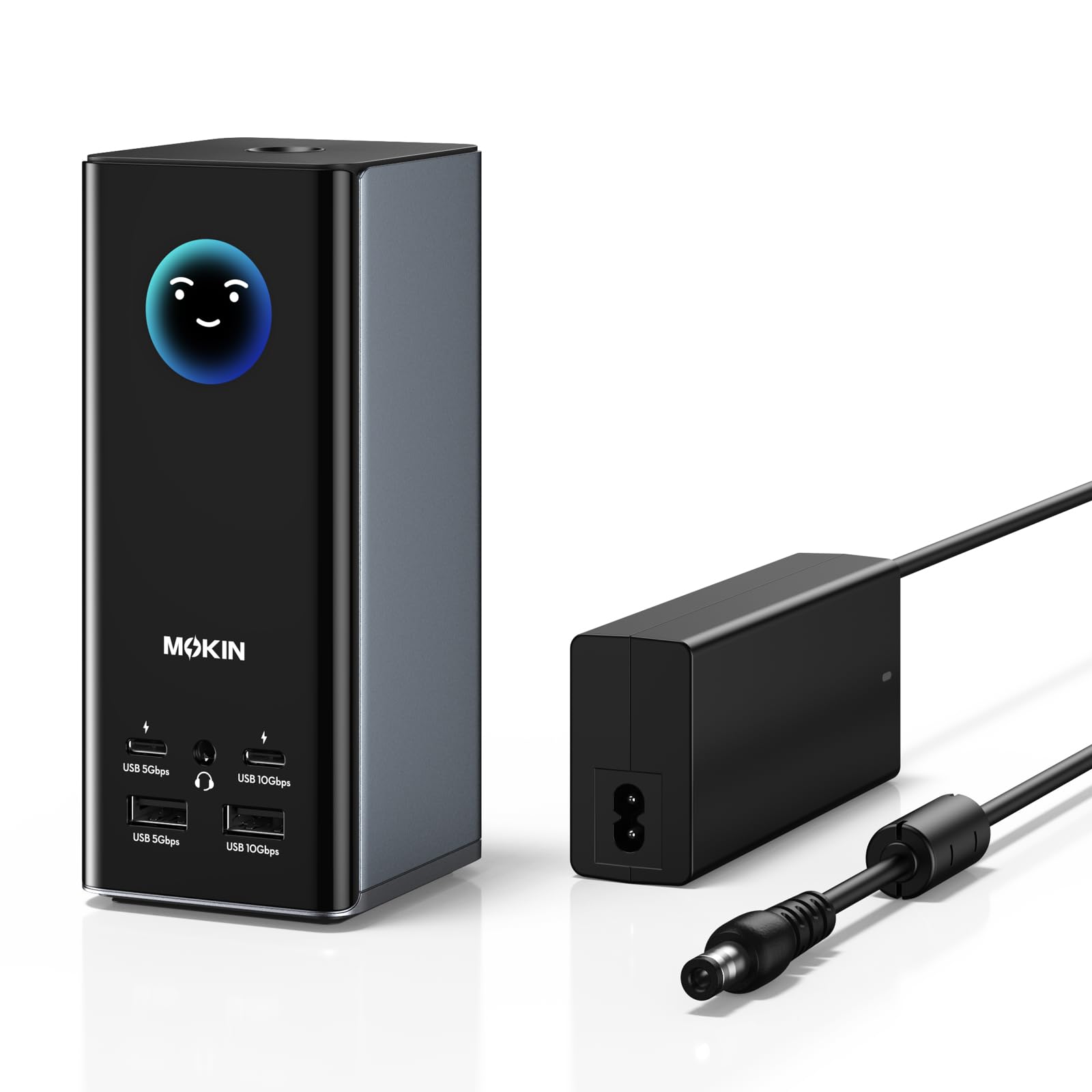
MOKiN’s smart LCD dock combines triple 4K 60Hz display support with a built-in LCD panel that shows connection status for each port type. The 18-port layout features three HDMI and two DisplayPort outputs, plus 10Gbps USB-C and USB-A ports for fast file transfers. The vertical upright design with a magnetic base and an 80cm cable helps organize the desk, and the built-in screen-lock button adds a layer of security for sensitive information.
The dock supports Windows and macOS via an SM77x DisplayLink driver — Windows 10 and above auto-install the driver, while macOS requires a manual download. Data transfer speeds hit 10Gbps on USB 3.2 Gen 2 ports, and the included 150W DC power adapter ensures adequate power delivery. The innovative LCD dashboard eliminates guesswork: each port’s status is visible at a glance, which is genuinely useful for troubleshooting connection issues.
However, reliability and security concerns temper enthusiasm. One user discovered that the dock broadcasts an open SSID with direct access to an internal Arduino server for firmware upload — a serious security vulnerability if left unpatched. Other reports note complete failure after about a month of use, and compatibility with the latest macOS versions (Ventura and later) is inconsistent. For the price, the feature set is compelling, but prospective buyers should confirm firmware status and macOS compatibility before purchasing.
Why it’s great
- Built-in LCD display shows real-time port connection status
- 18 ports including 3 HDMI and 2 DP for flexible display setups
- 10Gbps USB 3.2 Gen 2 for fast data transfers
- Upright magnetic base design saves desk space
Good to know
- Unsecured open SSID poses a network security risk
- Compatibility with latest macOS versions is inconsistent
- Some units fail completely after a month of use
9. Baseus Spacemate Docking Station

The Baseus Spacemate is an 11-in-1 USB-C dock that delivers triple 4K display support via two HDMI and two DisplayPort outputs, plus 10Gbps USB-C and USB-A data ports, Gigabit Ethernet, and a 3.5mm audio jack. The upright aluminum design with an 80cm cable and magnetic base keeps the workspace tidy, and the built-in LED digital screen shows connection status for each port. The 100W PD input supports pass-through charging to the laptop at up to 85W, provided you supply your own 65W or higher adapter.
For Windows users, the triple-display mode works seamlessly — just plug in the USB-C cable and the dock handles monitor extension, peripheral connections, and charging. MacOS systems, however, are limited to extending only one display due to platform restrictions; triple display is not supported on Apple Silicon. The dock has been recommended by Forbes, ZDNet, and Tom’s Guide, and its shortlisting in the Innovation Awards reflects strong industrial design.
Quality control is inconsistent. Several users report receiving defective units with nonfunctional USB ports or display outputs, though Baseus customer support is proactive about replacements. The built-in cable is non-removable, which means a worn cable forces a full replacement. The lack of an included power adapter is a notable omission — users must purchase a 100W adapter separately for full functionality. For budget-conscious Windows users who accept these caveats, this dock offers good value.
Why it’s great
- Triple 4K display support via HDMI and DisplayPort on Windows
- 10Gbps USB 3.2 Gen 2 for fast file transfers
- Upright aluminum design with magnetic base saves desk space
- Media-recommended by Forbes, ZDNet, Tom’s Guide
Good to know
- No power adapter included — separate 100W adapter required
- Mac triple-display mode not supported; only one external display
- Non-removable cable means full replacement if cable wears
- Occasional defective units require customer service exchange
FAQ
Can I run three external monitors on a MacBook Air M2 with a docking station?
What is the difference between Thunderbolt 4 and Thunderbolt 5 for multi-monitor setups?
Why does my docking station lose Ethernet connection after a macOS update?
Final Thoughts: The Verdict
For most users, the best docking station for multiple monitors winner is the CalDigit TS5 because it delivers true future-proofing through Thunderbolt 5’s 140W PD, 240W PSU, and dual 8K display support without throttling under load. If you want a premium enterprise dock with 180W PD and fleet management tools, grab the Lenovo ThinkPad Thunderbolt 5 Smart Dock 7500. And for Mac-only users who need quad 6K displays, nothing beats the iVANKY FusionDock Max 1.

Mo Maruf
I created WellFizz to bridge the gap between vague wellness advice and actionable solutions. My mission is simple: to decode the research and give you practical tools you can actually use.
Beyond the data, I am a passionate traveler. I believe that stepping away from the screen to explore new environments is essential for mental clarity and physical vitality.