Our readers keep the lights on and my smoothie glass nicely filled. As an Amazon Associate, I earn from qualifying purchases.
The difference between a pre-built network attached storage box and a DIY NAS isn’t just the price tag — it’s the freedom to pick every component, from the backplane’s SATA ports to the exact CPU that handles your Plex transcodes. A DIY approach means you control the OS, the RAID level, and the upgrade path, which matters when your media library grows faster than you planned.
I’m Mohammad Maruf — the founder and writer behind WellFizz. I’ve spent hundreds of hours analyzing motherboard specs, chassis thermals, and power supply efficiencies across dozens of builds to understand what truly separates a reliable home server from a frustrating project.
This guide breaks down the best options for building your own private cloud, covering cases, motherboards, and power supplies so you can assemble a system that fits your space and your data needs. You’ll find my research-backed picks for the best diy nas components available right now.
How To Choose The Best DIY NAS Components
Building your own NAS means you get to balance capacity, performance, and power draw exactly how you want. The three core decisions — case, motherboard, and power supply — lock in your future upgrade options, so getting them right from the start saves you from rebuilding later.
Case Capacity and Form Factor
The chassis determines how many 3.5-inch drives you can install and what size motherboard fits. Mini-ITX cases keep things compact but limit expansion, while MATX cases give you room for a PCIe HBA card if you need more SATA ports. Pay close attention to whether the backplane is hot-swap capable and whether the included fans are adequate for cooling eight or more spinning drives under sustained load.
Motherboard Connectivity and CPU Choice
The onboard SATA count, M.2 slots, and network interface define your NAS’s limits. Look for a board with at least four SATA ports and a 2.5GbE port for future-proofed file transfers. The CPU should match your workload — an Intel N100 sips power and handles basic file serving, while a Ryzen 9 or higher-end Intel Core chip is needed for real-time Plex transcoding or running multiple Docker containers.
Power Supply Reliability
A NAS runs 24/7 for years, so the PSU must be efficient and stable. Flex ATX units fit compact cases but often use small 40mm fans that can be noisy. Look for 80 Plus Gold certification and Japanese capacitors. If your case supports it, an SFX or ATX power supply runs quieter and offers more headroom for future drive additions.
Quick Comparison
On smaller screens, swipe sideways to see the full table.
| Model | Category | Best For | Key Spec | Amazon |
|---|---|---|---|---|
| MINISFORUM BD895i SE | Premium Motherboard | High‑performance server | 16 Cores / 32 Threads | Amazon |
| ASUS ROG STRIX B860-I | Premium Motherboard | AI‑ready home lab | Thunderbolt 4 + WiFi 7 | Amazon |
| GIGABYTE B760I AORUS PRO | Mid-Range Motherboard | LGA 1700 ITX builds | 8+1+1 Digital VRM | Amazon |
| WayPonDEV CM3588 NAS Kit | ARM Single Board | Low‑power, compact NAS | 4x NVMe SSD support | Amazon |
| FSP FlexGURU Pro 500W | Premium PSU | SFF and 1U enclosures | 80 Plus Gold efficiency | Amazon |
| ASRock B650I Lightning WiFi | Mid-Range Motherboard | AMD AM5 Mini-ITX | PCIe 5.0 M.2 slot | Amazon |
| N100 Industrial Motherboard | Budget Motherboard | Low‑power file server | 4x 2.5GbE i226 ports | Amazon |
| 8-Bay NAS Chassis (White) | Mid-Range Case | MATX builds with 8 drives | Supports ATX/SFX/Flex PSU | Amazon |
| 8 + 2 Bay DIY NAS Case | Budget Case | Compact ITX with 8 drives | Hot‑swap backplane included | Amazon |
In‑Depth Reviews
1. MINISFORUM BD895i SE Mini ITX Motherboard
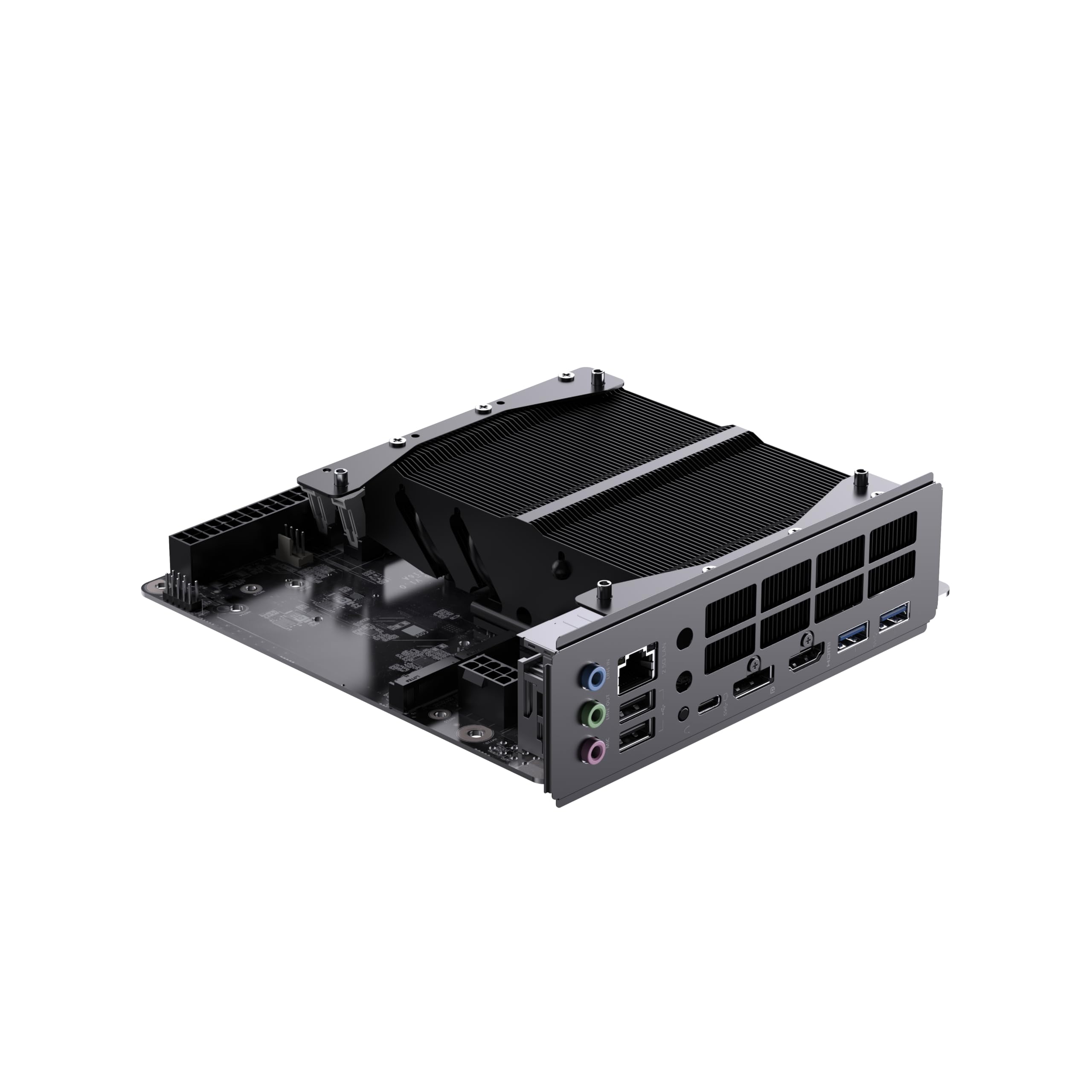
The MINISFORUM BD895i SE packs a 16-core / 32-thread AMD Ryzen 9 8945HX onto a Mini-ITX board, making it one of the most powerful single-board compute platforms for a DIY NAS. The onboard Radeon 610M graphics can handle 8K video output, and the PCIe 5.0 x16 slot allows you to add a GPU for transcoding or even a high-end HBA for extra SATA ports.
Dual DDR5 SO-DIMM slots support up to 96GB of RAM, and the two PCIe 4.0 M.2 slots provide blistering NVMe speeds for cache or a boot drive. The board includes a single 2.5GbE port and four USB 3.2 Type-A ports, though you’ll need to supply your own Wi-Fi card via the M.2 E-key slot. The advanced heatsink design keeps the 8945HX cool under sustained loads, provided you add a 120mm fan.
Be aware there are no onboard SATA ports — you’ll need to use the PCIe slot to add a SATA controller if you want to attach multiple 3.5-inch drives. The BIOS is feature-rich with PBO and curve optimizer support, letting you undervolt for better efficiency. This board is ideal for users who need raw CPU power for virtualization or media encoding without sacrificing a small footprint.
Why it’s great
- Exceptional 16-core performance in a Mini-ITX footprint
- PCIe 5.0 slot enables future GPU or HBA upgrades
- Power efficient considering the core count
Good to know
- No onboard SATA ports — requires a PCIe SATA card
- CPU is soldered and not upgradeable
- Requires non-standard cooling due to FL1 socket
2. ASUS ROG STRIX B860-I GAMING WIFI

The ASUS ROG STRIX B860-I is a premium Mini-ITX board built for Intel Core Ultra Series 2 processors, featuring a robust 10+1+2+1 power stage design with 80A stages. This board supports DDR5 memory up to 8000MHz, which is relevant for users running memory-intensive virtual machines or database workloads on their NAS.
Connectivity is future-proof with 2.5GbE LAN, built-in WiFi 7, and a Thunderbolt 4 port that offers 40Gbps for external storage or high-speed networking. The two M.2 slots support PCIe 5.0 on the primary slot for ultra-fast cache drives. The integrated I/O shield and massive VRM heatsinks with an L-shaped heatpipe keep temperatures in check even under prolonged load.
Windows 11 is required for full driver support, and initial setup may need a network driver workaround. The board’s compact layout makes cable management tight, so plan your cooling order carefully. This is a premium foundation for a powerful home server that can double as a workstation.
Why it’s great
- Thunderbolt 4 and WiFi 7 for cutting-edge connectivity
- High-phase VRM handles demanding CPUs
- Advanced thermal solution with heatpipe
Good to know
- Requires Windows 11 for full driver compatibility
- Limited SATA ports for a dedicated NAS build
- Premium price point targets high-end builds
3. GIGABYTE B760I AORUS PRO

The GIGABYTE B760I AORUS PRO supports 12th, 13th, and 14th Gen Intel processors, making it a versatile choice for a DIY NAS where you might find a great deal on a last-gen CPU. The 8+1+1 digital VRM with a 10-layer PCB provides stable power delivery, and the direct 8-pin CPU power connector ensures clean voltage under load. Two PCIe 4.0 M.2 slots come with layered heatsinks that keep NVMe drives cool during extended transfers.
The board features Intel 2.5GbE LAN, WiFi 6E, and a USB 3.2 Gen 2×2 Type-C port for fast external backups. BIOS Flashback allows you to update the BIOS without a CPU, which is handy if you’re pairing it with a 14th-gen processor. The integrated I/O shield simplifies installation in tight ITX cases, and the Realtek ALC897 audio codec is fine for a server that occasionally doubles as a media player.
Some users report that the primary M.2 heatsink doesn’t make perfect contact with Gen4 SSDs right out of the box — a small thermal pad adjustment solves it. The board lacks a PCIe 5.0 M.2 slot, but for a file server, PCIe 4.0 bandwidth is more than sufficient.
Why it’s great
- Broad LGA 1700 CPU compatibility (12th-14th Gen)
- Reliable 2.5GbE and WiFi 6E connectivity
- BIOS Flashback for easy updates
Good to know
- M.2 heatsink may need thermal pad adjustment
- No PCIe 5.0 support for storage
- Limited to two SATA ports for storage
4. WayPonDEV CM3588 NAS Kit

The WayPonDEV CM3588 is an ARM-based single-board NAS kit powered by the Rockchip RK3588 SoC, which integrates a 2.4GHz octa-core CPU, a 6 TOPS NPU, and a Mali-G610 GPU. This board is designed specifically for storage: it supports four NVMe SSDs directly, each capable of read/write speeds around 1GB/s, making it a fast and compact all-flash NAS solution. The kit includes 8GB of LPDDR4X and 64GB of eMMC storage, though higher configurations are available.
Besides the four NVMe slots, the carrier board offers dual HDMI 2.0 outputs, one HDMI input, two USB 3.0 ports, one USB 2.0 port, and a 2.5GbE Ethernet port. The board supports OpenMediaVault, Ubuntu, Debian, and even Android, giving you plenty of OS flexibility. The 8K video encoder means this board can handle live transcoding or surveillance camera feeds without breaking a sweat.
The included power supply is reliable, but the board runs warm under load — adding a fan is recommended for sustained NAS operation. The software support is solid, but initial setup via USB-C to eMMC can be tricky; many users find it easier to flash an SD card first. This is a great option for a low-power, quiet home server that doesn’t need spinning hard drives.
Why it’s great
- Supports four NVMe SSDs for an all-flash array
- Low power draw with fanless operation possible
- 8K video encode/decode capabilities
Good to know
- No SATA ports — limited to NVMe storage
- Initial OS setup requires tinkering
- Documentation is sparse for beginners
5. FSP FlexGURU Pro 500W
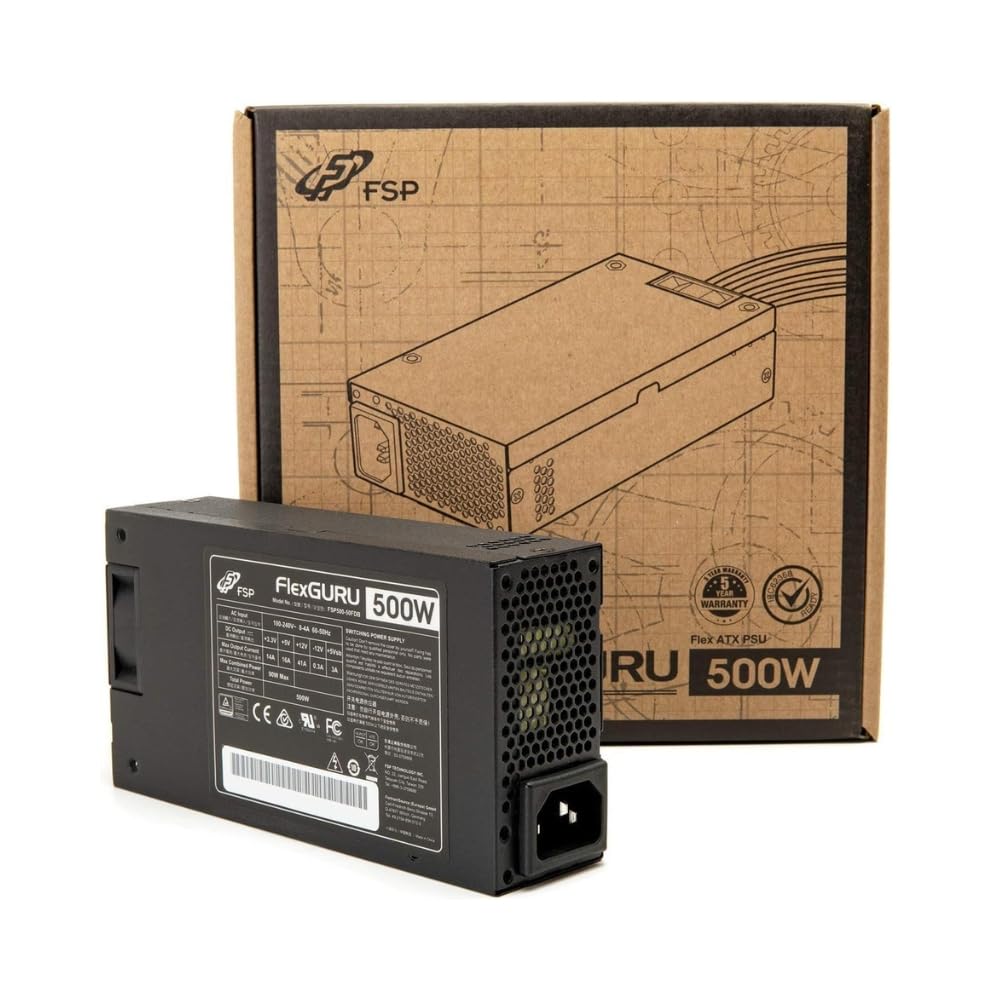
The FSP FlexGURU Pro is a Flex ATX power supply delivering 500W with 80 Plus Gold certification, meaning up to 90% efficiency under typical loads. This matters for a 24/7 NAS build where every watt of heat saved reduces fan noise and lowers your electric bill. The unit uses premium Japanese electrolytic capacitors for long-term reliability, which is critical for a server that runs for years without a break.
The 40mm dual-ball bearing fan uses intelligent speed control to stay quiet at low loads, though it can ramp up audibly under high stress. The all-black round cables make routing easier in tight ITX chassis, and the included universal mounting bracket ensures compatibility with most small-form-factor cases. Safety protections include UVP, OVP, SCP, OPP, and OTP, providing a stable power foundation for a multi-drive array.
The non-modular design means extra cables to stash inside your case, which can be a challenge in sub-5-liter enclosures. The 500W rating is enough for a NAS with an efficient CPU and up to eight drives, but you’ll want more headroom if you add a discrete GPU.
Why it’s great
- High efficiency reduces heat and power costs
- Japanese capacitors for long service life
- Includes universal bracket for SFF cases
Good to know
- Non-modular cables complicate tight builds
- 40mm fan can be audible under heavy load
- Premium pricing for the Flex ATX form factor
6. ASRock B650I Lightning WiFi

The ASRock B650I Lightning WiFi is a Mini-ITX board for the AM5 platform, supporting AMD Ryzen 9000, 8000, and 7000 series processors. The 8+2+1 phase power delivery with Dr.MOS components ensures stable voltage to the CPU, which is important for reliable 24/7 operation. The board features a PCIe 5.0 M.2 slot for the fastest NVMe cache drives, plus a second PCIe 4.0 M.2 slot on the back for additional storage.
Connectivity includes Phantom Gaming 2.5G LAN, Intel WiFi 6E, and multiple USB 3.2 Gen2 ports including front and rear Type-C. The Realtek ALC897 audio codec with Nahimic Audio is more than adequate for a server that also handles media playback. BIOS Flashback and the ASRock Auto Driver Installer streamline the initial setup process.
Some users have reported issues with sleep/wake instability and CPU degradation over extended periods, though these seem to affect a minority. The board lacks a second front-side M.2 slot, which is a space limitation typical of ITX. For a balanced AM5 DIY NAS, this board offers excellent features at a reasonable price.
Why it’s great
- PCIe 5.0 M.2 for ultra-fast cache drives
- WiFi 6E and 2.5GbE included
- BIOS Flashback for easy updates
Good to know
- Reports of instability on some units
- Only one front-side M.2 slot
- Limited SATA ports for HDD arrays
7. N100 Industrial Motherboard

This N100-based Mini-ITX board is built specifically for NAS and firewall applications, featuring four Intel i226 2.5GbE ports. The quad LAN setup makes it ideal for a router or a multi-subnet NAS where you need separate interfaces for management, storage, and client traffic. The Intel N100 is a low-power 4-core/4-thread processor that draws minimal power while offering enough performance for file serving, basic Plex transcoding, and Docker containers.
The board includes six SATA 3.0 ports (one native, five via JMB585 chip), one M.2 NVMe slot, and one M.2 slot that supports NVMe or NGFF. A single DDR5 SO-DIMM slot supports up to 16GB of RAM. Dual 4K display outputs (HDMI 2.0 and DP 1.4) allow this board to double as a workstation or media player.
A major caveat is the complete lack of documentation — you’ll need to interpret the board’s silkscreening to figure out front-panel headers and power connections. Some units have had faulty memory controllers, and the CPU cooling is marginal for sustained loads. This board is strictly for experienced builders who are comfortable troubleshooting without a manual.
Why it’s great
- Four 2.5GbE ports for advanced networking
- Six SATA ports support large drive arrays
- Low power consumption for 24/7 operation
Good to know
- No documentation or support from seller
- Inconsistent quality control across units
- Limited single-channel DDR5 memory
8. AUDHEID 8-Bay NAS Chassis (White)

The AUDHEID 8-Bay chassis supports MATX, ITX, and uATX motherboards, and offers three power supply configurations: eight 3.5-inch drives with a Flex PSU, six drives with an SFX-L/SFX PSU, or four drives with a standard ATX power supply. This flexibility lets you choose your PSU based on noise preference and budget. The hot-swap backplane uses four large 4-pin Molex connectors plus independent SATA interfaces for each drive.
The case uses a top-and-bottom structure where the PSU and PCIe devices sit above the drive cage, improving heat dissipation. The magnetic front panel makes drive access quick, and the rear fan frame accommodates standard 80mm or 92mm fans. The white finish gives it a clean, modern look that fits well in a living room or office.
Build quality is decent for the price, but the included screws are excessive and poorly labeled, and the SATA backplane has been reported to fail after 12-18 months in some units. The Flex PSU required for the full 8-drive configuration can be loud. Consider this chassis if you prioritize drive capacity and PSU flexibility.
Why it’s great
- Accepts Flex, SFX, or ATX power supplies
- Hot-swap backplane for easy drive swaps
- Magnetic front panel for quick access
Good to know
- Backplane failures reported after extended use
- Poor documentation and screw organization
- Flex PSU required for full 8-bay capacity
9. KCMconmey 8 + 2 Bay DIY NAS Case

The KCMconmey 8+2 Bay case is a compact Mini-ITX chassis that holds eight 3.5-inch drives and two additional 2.5-inch drives, making it one of the highest-density ITX cases available. It includes a hot-swap backplane and two pre-installed 80mm fans. The front panel offers two USB 3.0 ports for quick external backups. The all-steel construction feels sturdy for the price.
Thermal performance is the biggest concern here. Multiple users report that 7200RPM drives can exceed 50°C under sustained load, even with the stock fans replaced by Noctua units. The Molex power connectors required for the backplane are an outdated design that complicates cable routing. The case supports a single slot full-height PCIe card, so you can add a 10GbE NIC or a simple GPU.
The drive locks are cheap plastic and the power/reset buttons are tiny, but for the price, you get a functional 8-bay hot-swap chassis. If you use 5400RPM drives and add a small intake fan, temperatures stay manageable. This is an entry-level option for builders on a tight budget who need maximum drive density in a small footprint.
Why it’s great
- Highest drive density in a Mini-ITX form factor
- Hot-swap backplane included at low cost
- Front USB 3.0 for easy external access
Good to know
- Severe thermal issues with 7200RPM drives
- Backplane uses outdated Molex connectors
- Stock fans are loud and ineffective
FAQ
Can I use a gaming motherboard for a DIY NAS?
How many drives can a Flex ATX power supply handle?
What operating system should I use for a DIY NAS?
Final Thoughts: The Verdict
For most users, the best diy nas winner is the MINISFORUM BD895i SE because it combines 16-core CPU power, PCIe 5.0 expansion, and a tiny footprint — ideal for a high-performance server that can handle virtualization, transcoding, and file storage simultaneously. If you want low power draw and an all-flash array, grab the WayPonDEV CM3588. And for a budget-friendly 8-bay build with great networking, nothing beats the N100 Industrial Motherboard paired with the KCMconmey 8+2 Bay Case.

Mo Maruf
I created WellFizz to bridge the gap between vague wellness advice and actionable solutions. My mission is simple: to decode the research and give you practical tools you can actually use.
Beyond the data, I am a passionate traveler. I believe that stepping away from the screen to explore new environments is essential for mental clarity and physical vitality.