Our readers keep the lights on and my smoothie glass nicely filled. As an Amazon Associate, I earn from qualifying purchases.
For families spread across cities or generations, the static photo album on a phone doesn’t cut it anymore. A digital photo frame turns a wall or a desk into a constantly updating gallery of life’s best moments, from a toddler’s first steps to a weekend hike, all without anyone having to print, frame, or manually swap a single picture.
I’m Mohammad Maruf — the founder and writer behind WellFizz. My research into digital photo frames involves cross-referencing dozens of spec sheets, reviewing thousands of customer experiences, and identifying the real-world differences in touch responsiveness, app ecosystems, and storage architecture that determine whether a frame becomes a beloved family hub or a forgotten gadget.
This guide breaks down the top options available, focusing on display quality, storage flexibility, and sharing simplicity to help you find the best digital photo frames under $100 that will actually get used and loved every day.
How To Choose The Best Digital Photo Frames Under $100
The right digital photo frame balances a sharp display with a user-friendly sharing app and enough storage to hold your growing library of memories. Under the hundred-dollar mark, you don’t need to compromise on the core experience if you know which specs to prioritize.
Screen Size and Resolution
Most frames in this price range land at 10.1 inches with a 1280×800 HD resolution. That’s a solid baseline for clear, vibrant images. Some larger entry-level options push to 15.6 inches with Full HD (1920×1080), which gives you a more immersive viewing experience but demands higher pixel density to keep images sharp. An IPS panel is non-negotiable — it keeps colors accurate and the image visible from wide seating angles around a room or kitchen table.
Storage Capacity and Expansion
Built-in memory typically ranges from 16GB to 64GB. A 16GB frame holds roughly 4,000 to 5,000 standard-resolution photos, which is plenty for a year of family snapshots. If you plan to keep the frame running for years without deleting old favorites, 32GB or 64GB offers more breathing room. The ability to expand via a microSD card or USB drive is important — it allows you to load a curated collection from a computer backup without relying solely on WiFi uploads.
App Ecosystem and Sharing Ease
Not all sharing apps are equal. Frameo is the most widely adopted platform — it offers a smooth multi-user setup, caption support, and emoji reactions, making it ideal for families with multiple contributors. Uhale provides similar functionality with a focus on privacy certifications. PhotoSpring prides itself on a no-subscription model with email and web-based uploads. For elderly recipients, the simplest interface with the fewest login steps wins every time.
Quick Comparison
On smaller screens, swipe sideways to see the full table.
| Model | Category | Best For | Key Spec | Amazon |
|---|---|---|---|---|
| BIGASUO 15.6″ | Premium | Large screen, family hub | 64GB, 1920×1080 IPS | Amazon |
| PhotoSpring 10″ | Premium | No subscription, email upload | 32GB, 10.1″ Touch | Amazon |
| Uhale 10.1″ | Mid-Range | Touch screen, easy for elderly | 16GB, 10.1″ IPS Touch | Amazon |
| RCA 10.1″ | Mid-Range | High storage, reliable brand | 32GB, 1280×800 IPS Touch | Amazon |
| FLYRUIT 10.1″ | Mid-Range | Frameo app, great gift | 32GB, 1280×800 IPS Touch | Amazon |
| NETTIPS 10.1″ | Mid-Range | Budget-friendly, easy setup | 16GB, 1280×800 IPS Touch | Amazon |
| Dragon Touch 10.1″ | Value | HD display, thoughtful design | 32GB, 1080p Touch | Amazon |
In‑Depth Reviews
1. BIGASUO Digital Picture Frame 15.6″

The BIGASUO is the largest frame in this guide at 15.6 inches, offering a Full HD 1920×1080 IPS display that makes every photo feel like a mini canvas. The bezel-free design means the image fills nearly the entire front surface, giving it a clean, modern look on a tabletop or mounted on a wall. Its 64GB of internal storage is the highest capacity found here, capable of holding over 100,000 photos before you ever need to rely on an SD card.
Powered by the Frameo app, it supports instant sharing from unlimited family members, including captions and emoji reactions. The touchscreen interface is responsive, and the auto-rotate sensor switches between portrait and landscape seamlessly. The built-in sleep timer and schedule are thoughtful touches for energy-conscious households who don’t want the display glowing all night.
At this price point, you get a massive screen and the largest internal storage available, making it ideal for grandparents who want to see the grandkids’ photos in big, sharp detail. The only consideration is that the 15.6-inch size requires more dedicated surface space than the common 10-inch frames, so measure your intended spot before buying.
Why it’s great
- Full HD 1920×1080 IPS screen with wide viewing angles
- Massive 64GB storage holds over 100,000 photos
- Full-screen bezel-less design for a premium look
- Frameo app supports unlimited contributors with captions
Good to know
- Larger footprint requires more table or wall space
- SD card/USB expansion requires FAT32 format
- Must stay plugged in to a power outlet at all times
2. PhotoSpring 10″ WiFi Digital Picture Frame

PhotoSpring stands out for its zero-subscription model — there are no hidden fees for photo storage, video playback, or multi-user sharing. The frame accepts uploads via email, the PhotoSpring app, or a web portal, giving family members multiple ways to send pictures without needing to download yet another app. The 10-inch 1280×800 IPS display delivers vibrant colors and sharp detail that handles both photos and videos up to five minutes long.
The frame uses a real wood material for the outer border, giving it a more natural, furniture-like appearance that blends into a living room or bedroom better than standard all-plastic frames. Setup is genuinely five minutes or less, and the touch interface is responsive enough for quick adjustments to slideshow timing, brightness, and playback order. The 32GB internal storage holds around 40,000 photos.
Customer support from the USA-based company is a highlight, with multiple reviews praising their willingness to remotely fix software issues even outside the warranty period. The main trade-off is that the frame lacks a motion sensor, so you’ll want to set the sleep schedule to keep it from running 24/7. Also, the shuffle mode tends to repeat clusters of photos rather than true randomness.
Why it’s great
- No subscription fees for any features, ever
- Accepts uploads via email, app, or web portal
- Real wood frame design looks more like furniture
- Excellent USA-based customer support
Good to know
- No motion detection sensor for auto on/off
- Shuffle mode tends to be uneven
- 10-inch screen may feel small for detail-heavy photos
3. Uhale Digital Picture Frame 10.1″

The Uhale frame delivers a compelling mix of features at an accessible price point. Its 10.1-inch IPS touchscreen runs at 1280×800 resolution, providing crisp, vibrant images that look great from any seat in the room. The touch navigation is intuitive enough for users of any age, which is critical for a gift meant for grandparents or older relatives who may not be comfortable with complex tech.
The Uhale app is certified by TRUSTe and claims compliance with CCPA and GDPR privacy standards, adding a layer of security for families concerned about where their photos are stored. The 16GB internal memory holds roughly 20,000 to 30,000 photos, and the auto-rotate sensor works smoothly when switching between landscape and portrait orientations. There is no limit on the number of app users who can share photos and videos (up to 30 seconds each) to the frame.
Setup takes just a few minutes, and the included 360-day quality guarantee offers peace of mind for a gift purchase. The main concern reported by some users is that the system software can eat into the available storage if not managed carefully. A microSD card slot provides a backup expansion path, but users should be comfortable managing files through the app to avoid running out of space.
Why it’s great
- Responsive touchscreen easy for elderly users to navigate
- Privacy certified with CCPA and GDPR compliance
- Auto-rotate sensor for flexible placement
- Unlimited app users for family sharing
Good to know
- 16GB storage can fill quickly with videos
- System software may consume free space over time
- MicroSD card needed for significant expansion
4. RCA 10.1” WiFi Digital Picture Frame

The RCA frame doubles the entry-level storage standard with 32GB built in, enough to store over 60,000 photos before needing any external expansion. Its 10.1-inch HD IPS touchscreen at 1280×800 resolution delivers clear, bright images, and the touch controls let you adjust slideshow timing, playback mode, brightness, and sleep settings without needing the app. The included detachable stand works for tabletop display, and VESA-compatible mounting holes let you hang it on the wall.
Sharing works through the Uhale app, which is the same ecosystem used by the Uhale-branded frame. This means you can mix and match frames from different brands and still manage them from a single app. The auto-rotate feature handles both portrait and landscape orientations, and the 16:10 aspect ratio fits standard digital photos with minimal letterboxing. A USB port and SD card slot allow expansion up to 64GB externally.
Multiple reviews mention the frame works perfectly as a gift for elderly relatives with dementia, praising the sturdy build and the simple, reliable interface. Some users found the included QR code setup confusing and preferred using the 10-digit code printed in the manual instead. The slideshow transitions are limited to three options, which isn’t a dealbreaker but shows a lack of customization compared to the Frameo-based frames.
Why it’s great
- 32GB internal storage stores over 60,000 photos
- Wall-mountable with detachable stand for tabletop use
- Responsive touch controls for full slideshow customization
- Works with the widely compatible Uhale app ecosystem
Good to know
- QR code setup can be confusing, use the 10-digit code
- Only 3 slideshow transition styles available
- App-based sharing requires WiFi at all times
5. FLYRUIT 10.1″ Digital Picture Frame

The FLYRUIT frame is built around the Frameo app, the most popular digital frame sharing platform on the market. This means any family member or friend who already has a Frameo frame can send photos to this new frame using their existing app without any additional setup. The 10.1-inch IPS display at 1280×800 provides vivid colors and sharp detail, and the touch navigation is fluid and responsive. With 32GB of built-in storage, it holds roughly 10,000 photos at standard resolution.
One standout feature is the motion sensor — the frame enters sleep mode when no one is in the room and wakes up when it detects movement, saving energy and preventing screen burn-in. The Greeting and React features let users send themed picture messages and emoji responses directly to the frame, making it feel more interactive than a static slideshow. The device also supports offline photo transfer via microSD card, USB-C drive, or USB-C cable from a computer for those who prefer not to use WiFi.
Unboxing and initial setup take minutes, and the included power adapter is the only one recommended for reliable operation. A few users note that the frame must remain plugged in constantly, but that’s standard for WiFi-enabled frames. The auto-rotate sensor works well, and the built-in sleep schedule is easy to customize, making this a versatile choice for any household.
Why it’s great
- Motion sensor saves energy and extends screen life
- Frameo app supports unlimited family contributors
- 32GB storage with SD card and USB-C expansion options
- Greeting and React features add interactive fun
Good to know
- Only works with 2.4GHz WiFi networks
- Must stay plugged in to the original power adapter
- Offline transfer requires FAT32 formatted media
6. NETTIPS 10.1″ Digital Photo Frame
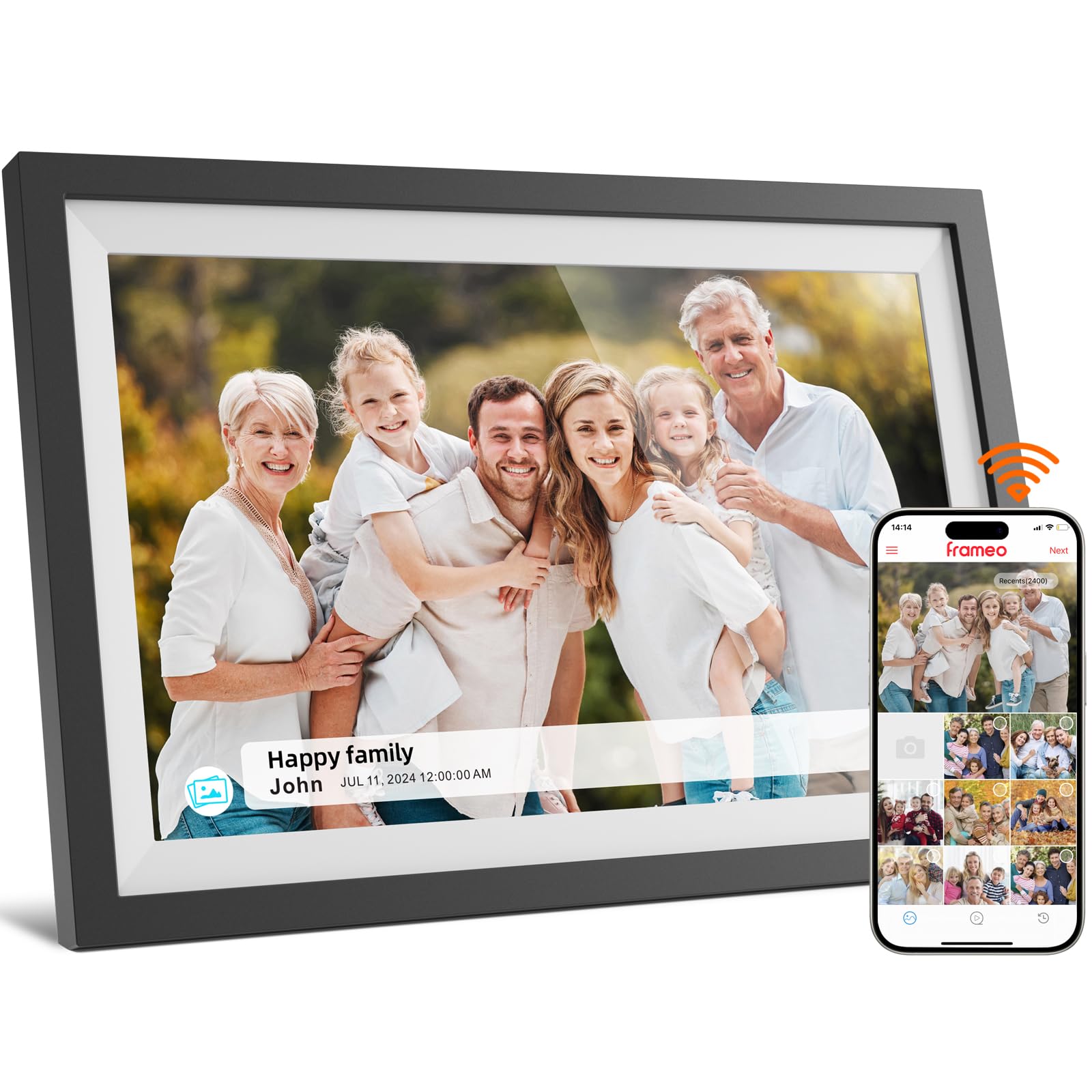
The NETTIPS frame offers the most budget-friendly entry point into the Frameo ecosystem without sacrificing display quality. The 10.1-inch IPS touchscreen delivers the same 1280×800 resolution found on more expensive frames, providing clear, vibrant images with wide viewing angles. The 16GB internal storage holds approximately 4,000 photos at 3MB each, which is plenty for a year’s worth of family highlights, and it supports expansion via microSD card up to 32GB.
Setup is streamlined — connect to WiFi, download the Frameo app, and use the unique pairing code to link the frame. Multiple family members can send photos and videos (up to 15 seconds) from anywhere in the world. The frame also displays the time, date, and temperature, giving it a practical function even when not cycling through photos. The auto-rotate sensor and customizable slideshow speeds make it easy to fit any decor style.
Customer support is a strong point, with a 365-day protection plan that includes 30-day risk-free returns and a one-year full replacement warranty. The frame’s plastic build is lightweight at 1.7 pounds, making it easy to move between rooms or pack for a trip. The main caveat is the limited 16GB storage, which fills faster if you load many videos or high-resolution images, but the SD card slot provides a simple upgrade path.
Why it’s great
- Excellent value with the robust Frameo app ecosystem
- Displays time, date, and temperature alongside photos
- 365-day warranty with 30-day risk-free returns
- Customizable slideshow with auto-rotate in both orientations
Good to know
- 16GB storage fills faster with videos and high-res photos
- Expansion limited to 32GB microSD cards
- Plastic build feels less substantial than premium models
7. Dragon Touch Frameo 10.1″
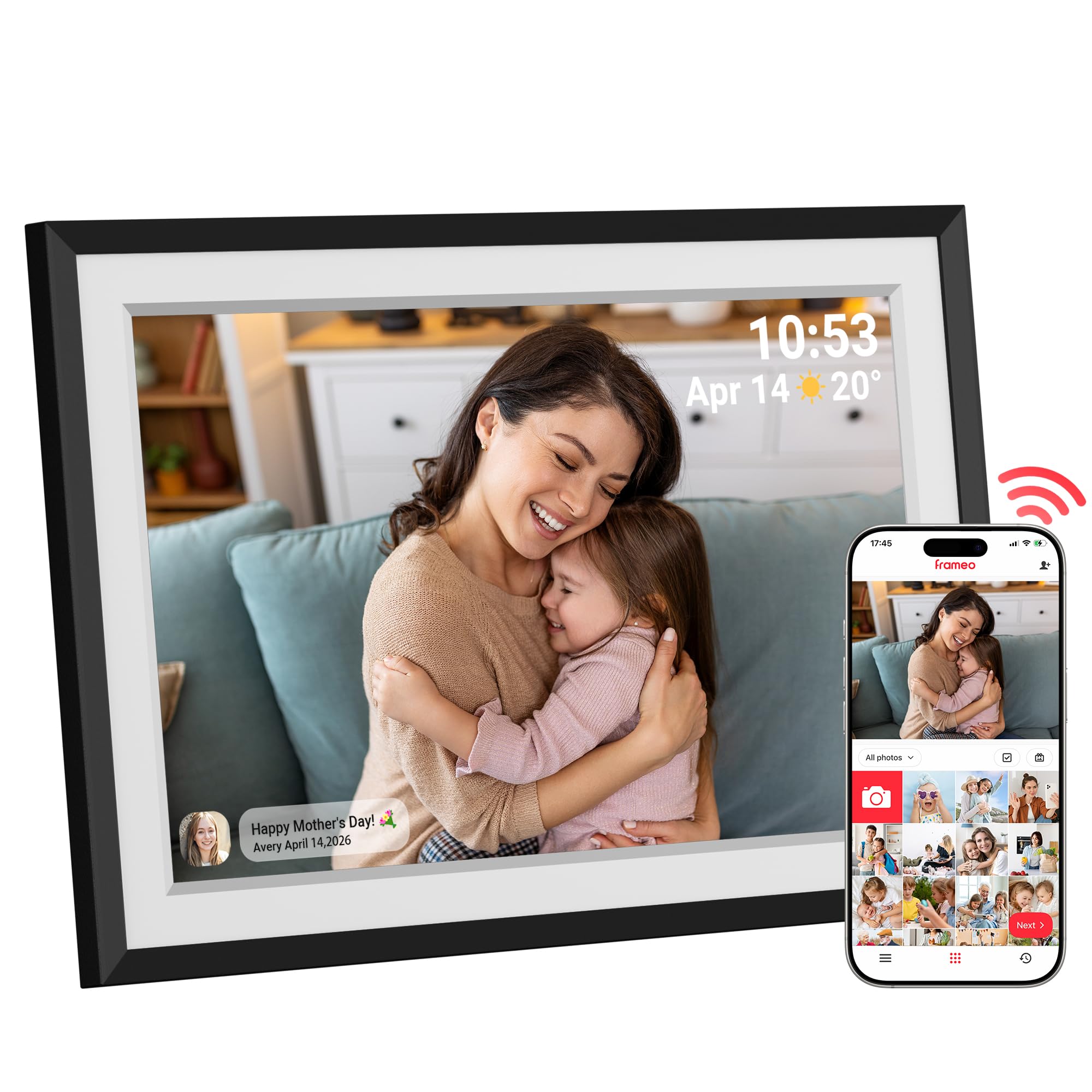
The Dragon Touch frame upgrades the standard resolution to 1080p, making it one of the sharper displays available in this budget range. Its 10.1-inch touchscreen delivers rich colors and crisp details that really make family photos pop. The built-in 32GB storage offers a solid balance between entry-level and high-capacity, and the microSD slot allows expansion up to 32GB more. The auto-rotate sensor works smoothly, and the display supports both landscape and portrait orientations.
The Frameo app integration provides a seamless multi-user sharing experience, with support for captions, emojis, and video clips. The frame also includes useful extras like weather display, clock, and alarm functions. The slideshow is fully customizable with adjustable speed, transitions, and brightness settings. The touchscreen is responsive enough for quick menu navigation without feeling laggy.
Reviewers consistently mention the frame as an ideal gift for moms, grandmas, and wives, thanks to its sleek black design and the built-in white mat border that gives it a classic printed-photo look. One potential limitation is the audio — the speakers are located on the back, so video sound can be muffled when the frame is wall-mounted. For tabletop use, the sound is adequate for short clips. The frame lacks a motion sensor, so you’ll want to rely on the sleep schedule for energy management.
Why it’s great
- 1080p resolution for sharper, more detailed images
- Includes weather, clock, and alarm functions
- Sleek design with built-in white mat border
- Generous 32GB storage with microSD expansion
Good to know
- Rear-facing speakers reduce video audio quality when mounted
- No motion sensor for automatic on/off
- Slideshow transitions are limited in variety
FAQ
Can I use a digital photo frame without WiFi?
How many people can send photos to a single frame?
Do digital frames have a sleep mode to save power?
Can I rotate the frame to show portrait photos?
Final Thoughts: The Verdict
For most users, the digital photo frames under $100 winner is the Uhale 10.1-inch because it combines a responsive touchscreen, unlimited family sharing, and an intuitive app that works for all ages right out of the box. If you want the largest possible display and the most storage capacity, grab the BIGASUO 15.6-inch with 64GB and Full HD resolution for a truly immersive viewing experience. And for a no-subscription, email-friendly setup that looks like real furniture, nothing beats the PhotoSpring 10-inch with its wood frame design and excellent USA-based customer support.

Mo Maruf
I created WellFizz to bridge the gap between vague wellness advice and actionable solutions. My mission is simple: to decode the research and give you practical tools you can actually use.
Beyond the data, I am a passionate traveler. I believe that stepping away from the screen to explore new environments is essential for mental clarity and physical vitality.