Our readers keep the lights on and my smoothie glass nicely filled. As an Amazon Associate, I earn from qualifying purchases.
A digital photo frame that simply displays a slideshow feels almost old-fashioned today. The real value lies in a frame that *automatically* updates with new pictures from family and friends, bridging the distance between generations. You want a screen that delivers sharp, vibrant images without the fiddly setup or recurring fees that plague so many models on the market.
I’m Mohammad Maruf — the founder and writer behind WellFizz. I’ve spent countless hours analyzing the hardware specifications, screen resolutions, storage capacities, and real-world user experiences of dozens of frames to find the ones that truly deliver on their promise of effortless, continuous slideshows.
After comparing screen quality, storage options, and sharing ecosystems, these picks represent the best digital photo frame with slideshow that balances ease of use, display quality, and long-term value for your family.
How To Choose The Best Digital Photo Frame With Slideshow
A great slideshow frame is invisible — the screen technology, storage method, and sharing interface should all work together so you only notice the memories. Here’s what separates a truly excellent frame from a frustrating one.
Screen Resolution and Panel Quality
Resolution dictates how sharp your photos appear. A 1920×1080 Full HD panel on a 15.6-inch frame offers significantly more detail than a 1280×800 panel on a 10-inch frame, especially when viewing group shots or landscapes. Equally crucial is the panel technology — IPS (In-Plane Switching) maintains color accuracy and brightness even when viewed from an angle, which matters when the frame sits on a countertop or shelf where people walk by at an angle.
Storage: Local vs. Cloud
Storage determines how many photos the frame can hold and how you add new ones. Built-in memory (32GB to 64GB) holds tens of thousands of photos locally, which means the slideshow works even when the Wi-Fi goes down. Cloud-based frames like Aura offer unlimited storage without a subscription, but rely on constant internet access to retrieve your library. The tradeoff is between offline reliability and the convenience of not managing physical storage.
Sharing Ecosystem and App Quality
The way photos arrive on the frame is the most frequent source of user frustration. Frames using the Frameo platform allow anyone with a smartphone to send pictures via a free app, while proprietary systems like Skylight and Aura use dedicated apps or email addresses. A good ecosystem should let multiple family members contribute without requiring them all to sign up for a new account or navigate complex settings.
Additional Smart Features
Beyond slideshows, frames now offer calendar sync, weather widgets, auto-rotation between portrait and landscape, and sleep timers. A motion sensor that turns the display on when someone enters the room can extend the frame’s lifespan and reduce power consumption. Think about where you’ll place the frame — wall mounting vs. tabletop stand — and whether the included accessories support that setup.
Quick Comparison
On smaller screens, swipe sideways to see the full table.
| Model | Category | Best For | Key Spec | Amazon |
|---|---|---|---|---|
| BIGASUO 15.6″ | Mid-Range | Large, vivid family slideshow | 15.6″ 1920×1080 IPS / 64GB | Amazon |
| Flyruit 15.6″ | Mid-Range | Highly customizable slideshow | 15.6″ 1920×1080 IPS / 32GB | Amazon |
| Skylight 10″ | Premium | Hassle-free email sharing | 10″ 1280×800 / 8GB | Amazon |
| Nixplay 10.1″ | Premium | Multi-frame management | 10.1″ HD / Wi-Fi | Amazon |
| Divoom Times Frame | Premium | Unique desk-display aesthetics | 10.1″ Transparent / 64GB | Amazon |
| Aura Carver 10.1″ | Premium | True set-and-forget slideshow | 10.1″ HD / Free Cloud | Amazon |
| Cozyla 17″ | Premium | Maximum screen real estate | 17″ QXGA / Unlimited Cloud | Amazon |
In‑Depth Reviews
1. BIGASUO Digital Picture Frame 15.6″

The BIGASUO frame lands the top spot because it delivers the most critical feature for a slideshow-first frame: a large, high-resolution display with a nearly borderless design. The 15.6-inch 1920×1080 IPS panel produces sharp, color-accurate images that fill the screen edge-to-edge, eliminating the dark borders that plague smaller or lower-resolution frames. Reviewers consistently note that the picture quality and size make the frame feel like a living gallery piece rather than a gadget.
The Frameo app ecosystem works flawlessly for sharing — multiple family members can send photos and videos from anywhere, and the frame supports unlimited contributors without forcing anyone to create a separate account. The 64GB of onboard storage can hold over 100,000 photos, which means your slideshow keeps running even during a Wi-Fi outage. The touchscreen interface is responsive, and features like auto-rotation and a sleep timer for nighttime add practical daily value.
Setup takes just a few minutes via the app, and the wall-mountable form factor fits nicely into a living room or hallway. Some users report that SD cards larger than 32GB require formatting to FAT32 for compatibility, but the internal storage is so generous that you may never need external media. For a mid-range price, this frame offers the best balance of screen size, resolution, and user-friendly sharing.
Why it’s great
- Large 15.6″ borderless screen with Full HD resolution
- 64GB built-in storage handles 100,000+ photos
- Frameo app allows unlimited contributors with no subscriptions
Good to know
- SD card compatibility limited to FAT32 format
- Plastic frame build feels lightweight
2. Flyruit 15.6″ Large Digital Photo Frame

The Flyruit frame matches the BIGASUO on screen size and resolution — a 15.6-inch 1920×1080 IPS panel with vivid colors — but at a slightly lower price point. What sets it apart is its broader connectivity: it supports Wi-Fi, full-sized SD cards, USB drives, and USB-C direct connection from a computer. That flexibility is critical if you want to load photos without relying solely on a smartphone app, especially for older relatives who may be more comfortable with a USB stick.
Running on the Frameo platform, it inherits all the strengths of that ecosystem: free app, unlimited contributors, support for both photos and short videos, and features like “Greeting” themed picture messages and “React” emoji responses. The 32GB internal storage holds roughly 10,000 photos, which is sufficient for most families, though power users may prefer the 64GB of our top pick. The frame also includes a sleep timer to save energy and auto-rotation between portrait and landscape modes.
Some users have noted that the visible power cord can look a bit tacky when wall-mounted, and the frame’s orientation (portrait vs landscape) is a one-time hardware decision that can’t be easily changed after mounting. If you need multiple orientations, buying two frames is the suggested workaround. For the price, this is a solid entry point into a large-sized slideshow frame with excellent app support.
Why it’s great
- Multiple loading methods: Wi-Fi, SD, USB, USB-C
- Frameo app with emoji reactions and greeting features
- Auto-rotate and sleep timer included
Good to know
- 32GB storage is half of the top pick’s capacity
- Wall-mounted cord can be visually distracting
3. Skylight Frame 10″

Skylight has built a strong reputation as the “grandparent-friendly” digital frame, and for good reason. The 10-inch 1280×800 touchscreen is smaller than the premium picks, but the interface is deliberately simple: plug it in, connect to Wi-Fi, and it generates a unique email address. Anyone can send photos to that address from their phone or computer without installing a dedicated app — a genuine convenience for extended family who may not be tech-savvy.
The 8GB of built-in storage is modest, but Skylight offers cloud-based storage that eliminates the need for SD cards entirely. You can also use the frame in offline mode with pre-loaded photos via USB drag-and-drop from a computer. Gift Mode allows you to preload photos and personalize the frame before giving it, which makes it a popular choice for birthdays and holidays. Reviewers consistently praise how easy it is to set up remotely for elderly parents.
The resolution is noticeably lower than the 1080p panels on larger frames, so cropped or tightly-framed photos may appear slightly softer. The frame’s design is clean and minimalist, but the lack of SD card support limits local storage expansion. For families who value simplicity over maximum resolution, the Skylight frame is a reliable, low-friction way to keep a slideshow running daily.
Why it’s great
- Emailed photos require no app installation
- Gift Mode lets you preload content before gifting
- Cloud-based storage with USB drag-and-drop option
Good to know
- 8GB storage is limited compared to competitors
- 1280×800 resolution is not Full HD
4. Nixplay Digital Picture Frame 10.1″

Nixplay positions itself as a smart frame first and a slideshow device second, and its feature set reflects that philosophy. The 10.1-inch HD touchscreen is complemented by AI technology that automatically centers faces in photos, rotates images between portrait and landscape, and powers the frame on or off with a built-in activity sensor. You can also cast photos to a TV with one tap, making it a versatile tool for family gatherings.
The Nixplay app allows you to manage multiple frames from a single account, so you can control frames in different homes — handy for sending photos to both grandparents’ houses simultaneously. Photos can be uploaded via the app, web browser, or even by email directly to the frame. The frame supports video clips with sound, and a paid subscription unlocks longer video uploads. The design is sleek with a matte black finish that blends into most decor.
Some users have reported resolution limitations with photos taken on high-megapixel smartphones — images from a Google Pixel 4XL failed to display correctly until resized. Additionally, sharing photos requires the recipient to have a Nixplay account, which adds friction compared to the email-based Skylight system. If you have multiple frames to manage and want smart-home integration, Nixplay is a capable choice, but the sharing model may not suit every family.
Why it’s great
- AI face-centering and auto-rotation for perfect framing
- Motion sensor turns display on/off automatically
- Multi-frame management from a single app account
Good to know
- High-res smartphone photos may need resizing
- Sharing requires recipients to have Nixplay accounts
5. Divoom Times Frame 10.1″
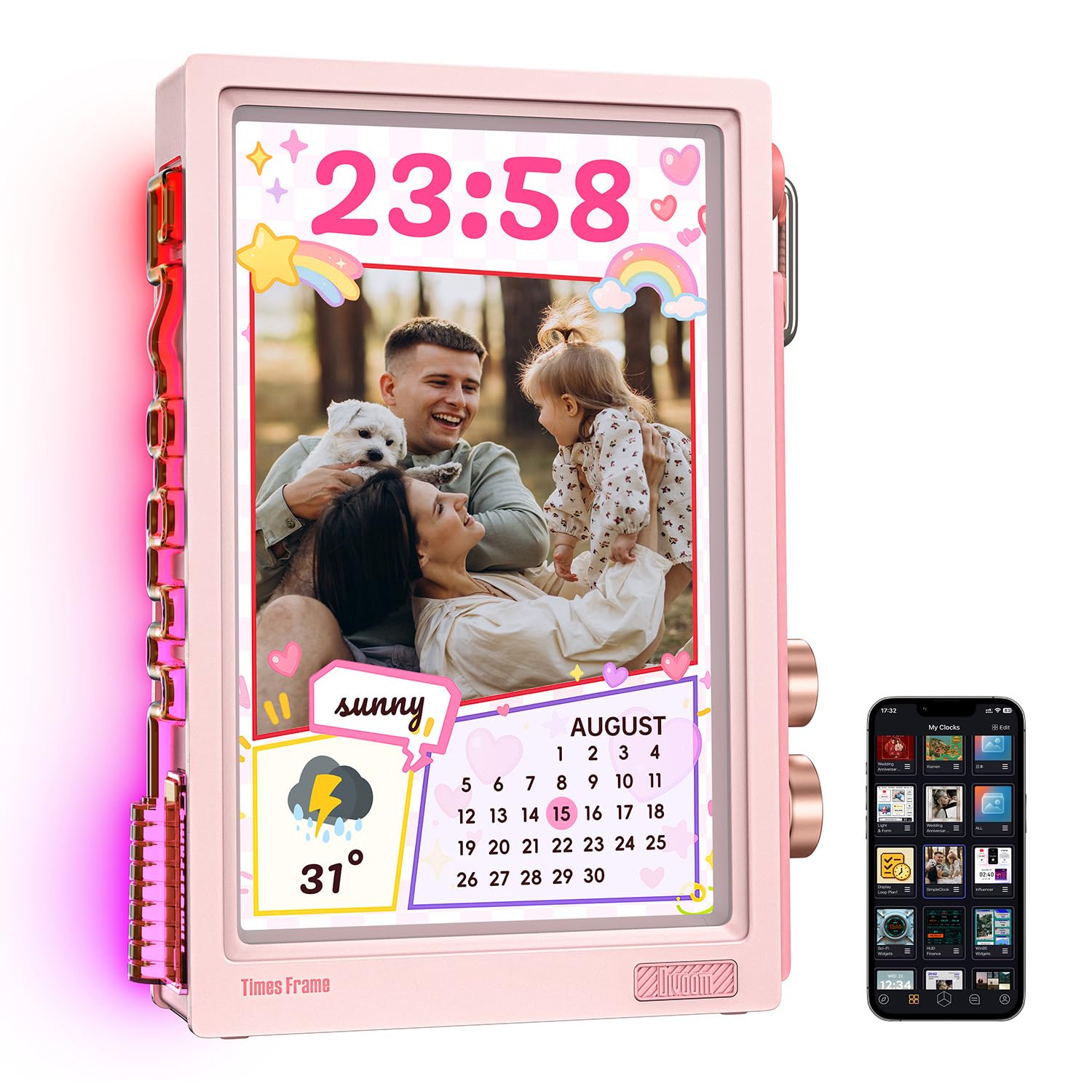
The Divoom Times Frame is unlike any other on this list. Instead of a standard rectangular panel, it uses a floating transparent IPS display that creates a layered visual depth, with customizable RGB edge lighting around the frame. This makes it a true showpiece for a desk, shelf, or nightstand — it doubles as a smart dashboard with over 400 clock faces, weather widgets, calendar reminders, to-do lists, stock tickers, and even live subscriber counts for content creators.
Despite its flashy design, the Times Frame is a serious slideshow device. It includes 64GB of built-in storage (enough for roughly 700,000 photos or 6,000 minutes of video), encrypted photo transfers, and offline slideshow playback that works even without an internet connection. The free Divoom app lets you send photos, short videos, pixel emojis, and text notes instantly, with no subscription fees. It also supports AI-generated image creation in different artistic styles, which adds a creative layer to your slideshow.
The screen is not as bright as standard IPS panels, and it can suffer glare in brightly lit rooms. The frame is designed for vertical orientation only, which may limit placement options. The backlight can be too strong for dark bedrooms, making the sleep timer feature essential. For users who want a frame that doubles as a decorative object and a productivity tool, the Divoom Times Frame is a fascinating, conversation-starting choice.
Why it’s great
- Unique transparent display with RGB edge lighting
- 64GB local storage with offline slideshow playback
- Multifunctional: clock, weather, calendar, stock ticker
Good to know
- Screen can be dim and prone to glare
- Vertical orientation only; no landscape mode
6. Aura Carver 10.1″

The Aura Carver has earned consistent praise from Wirecutter, WIRED, and Oprah Daily as the best digital photo frame for gifting, and it lives up to that reputation. The 10.1-inch HD display is calibrated for exceptional color accuracy and saturation, and it includes an ambient light sensor that automatically adjusts brightness to match the room’s lighting conditions. This means your photos always look their best without you manually tweaking settings.
Aura’s cloud storage is genuinely free and unlimited — no subscription fees, no “storage full” messages, no ads. You can add photos and videos via the free app, email, text message, iCloud, or Google Photos. Family members can also contribute without creating accounts; they simply download the app and connect to the frame. The frame supports iOS Live Photos and up to 30 seconds of video with sound. The one-minute setup process is consistently praised by reviewers, even for non-tech-savvy grandparents.
The frame’s touch controls are located on the top edge rather than on the screen itself, which prevents fingerprints on the display but can feel less intuitive. The price is on the higher side of the mid-range tier, but the lack of any recurring costs and the premium display quality justify the investment. If you want a frame that is as close to “set it and forget it” as possible, the Aura Carver is the benchmark.
Why it’s great
- Unlimited, truly free cloud storage with no subscription
- Auto-brightness adjusts to room lighting
- One-minute setup praised by all types of users
Good to know
- Top-edge touch controls instead of on-screen touch
- Premium pricing compared to Frameo-based frames
7. Cozyla Frame 17″
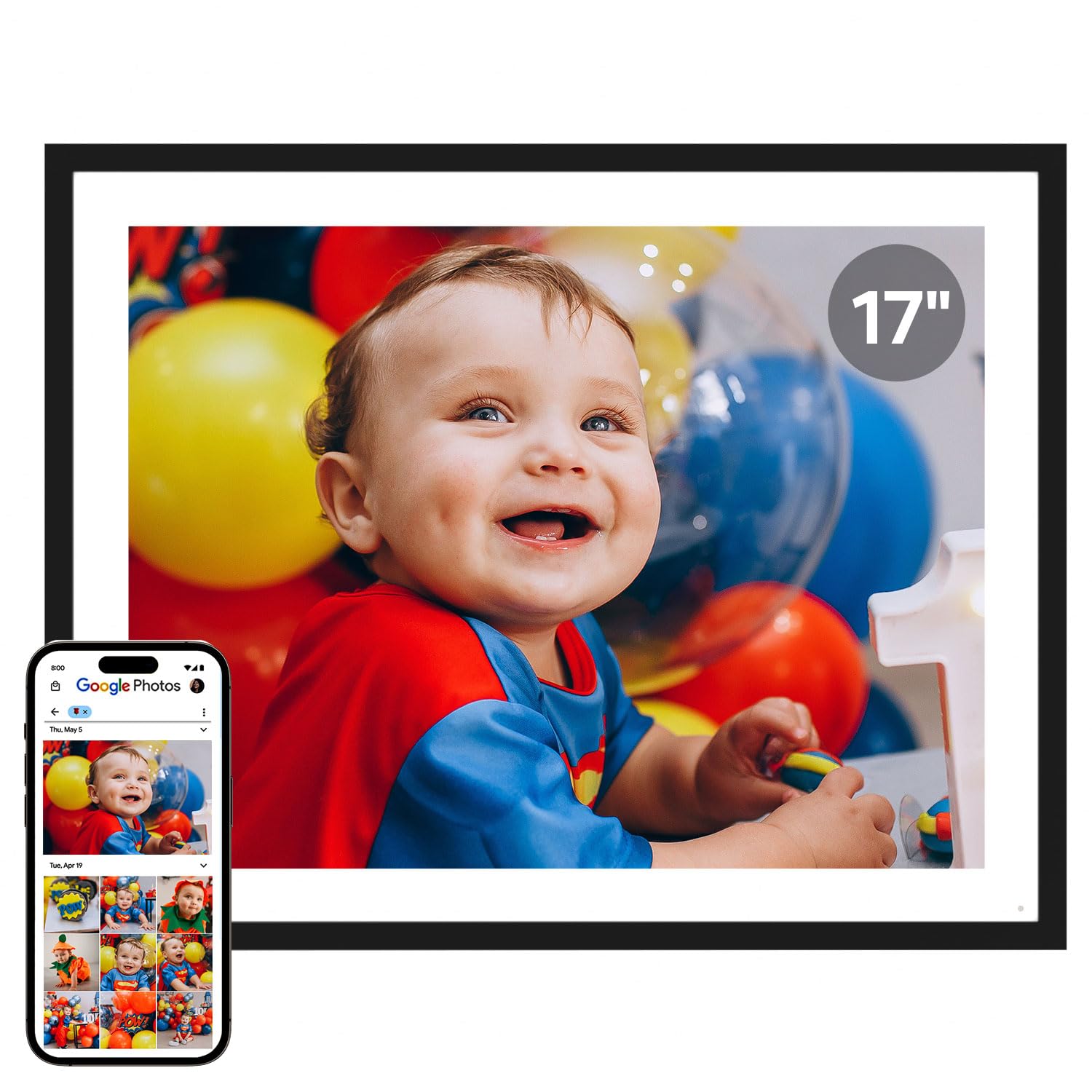
The Cozyla Frame dominates in sheer screen size — its 17-inch QXGA display offers the largest viewing area on this list, and the 4:3 aspect ratio means most standard photo prints fit without awkward cropping. This makes it ideal for wall mounting in a living room or hallway where you want the frame to feel like a real piece of art. The display is bright and crisp, with vivid color reproduction that does justice to high-resolution photos.
Cozyla offers unlimited cloud storage with bank-level AWS encryption, and there are no subscription fees. Photos and long videos can be shared via the Cozyla app, Google Photos (though support was reportedly dropping in spring 2025), email, or web upload. A standout feature is the built-in AI restoration tool that can sharpen blurry or damaged old photos, and the voice recording feature lets you add audio stories to images, creating a richer slideshow experience than a simple picture loop.
The frame has some trade-offs. The stand is reported to feel flimsy for such a large display, and the lack of SD card expansion means you rely entirely on cloud or direct uploads. Some users reported that video playback is not supported, and emailing photos individually can be cumbersome for large batches. For those who prioritize maximum screen real estate and are comfortable with a cloud-only workflow, the Cozyla Frame delivers an immersive, gallery-quality slideshow.
Why it’s great
- Largest 17″ QXGA display with 4:3 aspect ratio
- Unlimited cloud storage with no subscription fees
- AI photo restoration and voice recording features
Good to know
- Stand feels flimsy for the size
- Google Photos support may be discontinued
FAQ
Can I use a digital photo frame without a Wi-Fi connection?
How do digital photo frame apps differ between brands?
What resolution do I need for a good slideshow experience?
Can I share videos on a digital photo frame?
What is “Gift Mode” on a digital photo frame?
Final Thoughts: The Verdict
For most users, the best digital photo frame with slideshow winner is the BIGASUO 15.6″ because it combines the largest practical screen size with vibrant Full HD resolution, generous 64GB storage, and the open Frameo sharing ecosystem at a mid-range price. If you want a true set-and-forget experience with unlimited free cloud storage, grab the Aura Carver 10.1″. And for maximum screen impact as a gallery piece, nothing beats the Cozyla 17″.

Mo Maruf
I created WellFizz to bridge the gap between vague wellness advice and actionable solutions. My mission is simple: to decode the research and give you practical tools you can actually use.
Beyond the data, I am a passionate traveler. I believe that stepping away from the screen to explore new environments is essential for mental clarity and physical vitality.