Our readers keep the lights on and my smoothie glass nicely filled. As an Amazon Associate, I earn from qualifying purchases.
The promise of a digital pen is simple: write or draw on a screen with the same natural feel as ink on paper. Yet the reality often involves laggy strokes, finicky Bluetooth pairing, or a battery that dies mid-thought. Picking the right one means matching the pen’s technology to your specific device and your workflow, whether that means a battery-free stylus for an E Ink tablet or a smart pen that digitizes actual paper notes.
I’m Mohammad Maruf — the founder and writer behind WellFizz. I’ve spent hours parsing the EMR versus MPP protocols, cross-referencing pressure sensitivity specs, and reading through hundreds of user reports to separate the pens that deliver a seamless experience from those that frustrate.
Whether you need a replacement for a lost HP stylus or a complete smart note-taking system, this guide to the best digital pen will help you find the right pairing without wasting money on the wrong protocol.
How To Choose The Best Digital Pen
The single biggest mistake buyers make is assuming any stylus works with any touchscreen. Unlike your finger, a digital pen requires a specific communication protocol that must match your device. Understanding the core tech is the first step.
EMR vs. Active Capacitive vs. MPP
EMR (Electro-Magnetic Resonance) pens are powered by the digitizer layer in the screen itself — they need no battery, no charging, and no Bluetooth pairing. Wacom, STAEDTLER Noris, and most reMarkable-compatible pens use this system. Active capacitive pens (like Microsoft MPP 2.0) require an internal battery to generate a signal the screen can detect. They offer similar pressure sensitivity but need periodic charging. Smart pens like the Ophaya series bridge analog and digital worlds, using a camera to read dot patterns on special paper.
Pressure Sensitivity and Tilt
Most modern digital pens offer 4096 levels of pressure sensitivity, which is more than enough for natural line variation. The real differentiator is tilt response — a pen that accurately reads angle lets you shade and draw as you would with a pencil. EMR pens generally have superior tilt response because the digitizer tracks the pen’s angle directly.
Palm Rejection and Latency
Palm rejection prevents the screen from registering your hand while writing. EMR pens handle this naturally because the digitizer only reads the pen’s signal. Capacitive pens rely on software-based rejection, which can sometimes falter. Latency — the delay between moving the pen and seeing the stroke — is determined mostly by your device’s screen refresh rate and processing power, not the pen itself.
Quick Comparison
On smaller screens, swipe sideways to see the full table.
| Model | Category | Best For | Key Spec | Amazon |
|---|---|---|---|---|
| EVACH MPP 2.0 Tilt Pen | Mid-Range | HP 2-in-1 Laptop Users | 4096 Pressure, MPP 2.0 Protocol | Amazon |
| Wacom Dr. Grip Digital Pen | Mid-Range | Long Drawing Sessions | Battery-Free, 4096 Levels | Amazon |
| STAEDTLER Noris Jumbo | Mid-Range | E Ink Tablet Note-Taking | Battery-Free, Eraser Tip | Amazon |
| Abasuto EMR Stylus | Value | reMarkable 2 Replacement | EMR, Magnetic Attachment | Amazon |
| Ophaya Sync Smart Pen (5-Pack) | Premium | Paper-to-Digital Workflow | OCR, Audio Recording | Amazon |
| Ophaya 2-in-1 Smart Pen Set | Premium | Journaling & Creative Work | Dot-Code, Offline Storage | Amazon |
| Ophayapen Smart Sync Pen (3-in-1) | Premium | College & Office Note-Taking | Aluminum Body, Writing Board | Amazon |
In‑Depth Reviews
1. EVACH MPP 2.0 Tilt Pen

Designed specifically for HP 2-in-1 laptops like the Envy X360, Spectre X360, and Pavilion X360, this pen uses the MPP 2.0 protocol for low-latency input. Its 4096 levels of pressure sensitivity deliver smooth line transitions, and the tilt support adds natural shading for sketching or annotations. The slim aluminum barrel, at 6.3 inches long and just 18 grams, feels balanced and familiar in hand.
Charging is straightforward — a 30-minute charge provides hours of use, and the magnetic barrel lets you attach it to the laptop’s side for storage. Two replacement nibs are included, extending the pen’s lifespan. Users consistently report easy Bluetooth-free pairing and no perceptible lag when writing or drawing.
The only minor confusion reported involves the power state — the pen activates when the tip is pressed and cannot be manually turned off without plugging it into the charger. For daily use, this is largely irrelevant, as the auto-wake feature works reliably. If you own a compatible HP 2-in-1, this is the most straightforward and responsive replacement available.
Why it’s great
- Plug-and-play pairing with HP 2-in-1s via MPP 2.0
- Fast 30-minute charge with long battery life
- Magnetic attachment prevents losing the pen
Good to know
- Cannot be powered off manually without the charger plugged in
- Only compatible with HP touchscreen laptops (2020-2025 models)
2. Wacom Dr. Grip Digital Pen

Wacom’s collaboration with Pilot brings the beloved Dr. Grip pen body into the digital realm. This battery-free EMR pen weighs only 15 grams and features a thick rubberized grip that reduces hand fatigue during long drawing or note-taking sessions. With 4096 levels of pressure sensitivity and tilt response, it delivers the precise stroke control expected from a Wacom product.
Compatibility covers the Wacom One lineup (12, 13 touch, S, and M models) as well as some third-party EMR devices like Supernote and Onyx Boox. The nib is surprisingly durable — several users report it lasting over a year of heavy use with no degradation in accuracy. The pen’s slim, standard-pen profile makes it easy to store in a case or pencil holder.
The trade-off is a lack of side buttons and a built-in eraser, features some artists rely on for shortcut access. The nib itself feels smooth on some screens, which can reduce tactile feedback compared to a textured pen tip. For comfort and reliability, especially during hours of creative work, this pen remains a top-tier option.
Why it’s great
- Battery-free operation means zero charging worries
- Ergonomic Dr. Grip design reduces hand strain
- Durable replacement nib that lasts over a year
Good to know
- No side buttons or eraser function on the barrel
- Tip may feel slippery on certain glass screens
3. STAEDTLER Noris Jumbo Digital Stylus

Inspired by the classic Noris pencil, this stylus offers a familiar wood-like feel with a thick triangular barrel that promotes proper grip. It works with any EMR device — Kindle Scribe, reMarkable 2, BOOX, Supernote, and Samsung Galaxy Tab — and requires no battery or pairing. The built-in eraser on the top end functions just like a pencil eraser, letting you flip and erase naturally.
At 10 grams, it is notably lightweight, and the softer tip material provides a pleasant friction feedback that mimics real paper more closely than hard plastic nibs. Users report accurate stroke capture with the full 4096 pressure levels, and the palm rejection works flawlessly since it uses EMR technology. The package includes five replacement nibs and a removal tool.
Build quality is a mixed bag — the wood-textured barrel can feel less premium than all-aluminum options, and some users have reported the eraser cap coming loose over time. The shorter length (5.5 inches) may also be an adjustment for those used to longer pens. For E Ink tablet users who value natural writing friction and a genuine pencil feel, this is the standout choice.
Why it’s great
- True pencil feel with soft, paper-like tip friction
- Functional eraser on the top end
- No batteries, pairing, or charging ever needed
Good to know
- Eraser cap can loosen over time
- Shorter barrel may not suit all hand sizes
4. Abasuto EMR Stylus Pen

Built as an affordable replacement for the reMarkable 2 stylus, this pen uses EMR technology and requires no charging or pairing. It includes an eraser on the rear end, a magnetic side for attaching to compatible devices, and five replacement nibs stored in a small container with a tweezer for easy swaps. The 4096 pressure sensitivity and tilt support deliver accurate shading and line variation.
The plastic barrel is lightweight at 13 grams but still provides enough heft for controlled writing. Users praise the responsive palm rejection, smooth stroke capture, and solid magnetic retention on the reMarkable 2. The eraser works well for quick corrections without navigating on-screen menus.
A notable concern involves the eraser material — some users report it leaving dark streaks or micro-scratches on the screen. If you purchase this pen, it is wise to test the eraser on a screen protector or avoid heavy erasing pressure. For the price, it offers the core EMR experience without the premium markup of official accessories.
Why it’s great
- Strong magnetic attachment keeps it secure on devices
- Comes with five replacement tips in a handy container
- Full 4096 pressure sensitivity and tilt support
Good to know
- Eraser material can cause micro-scratches on unprotected screens
- Plastic build feels less premium than metal alternatives
5. Ophaya Sync Smart Pen (5-Pack Notebook)
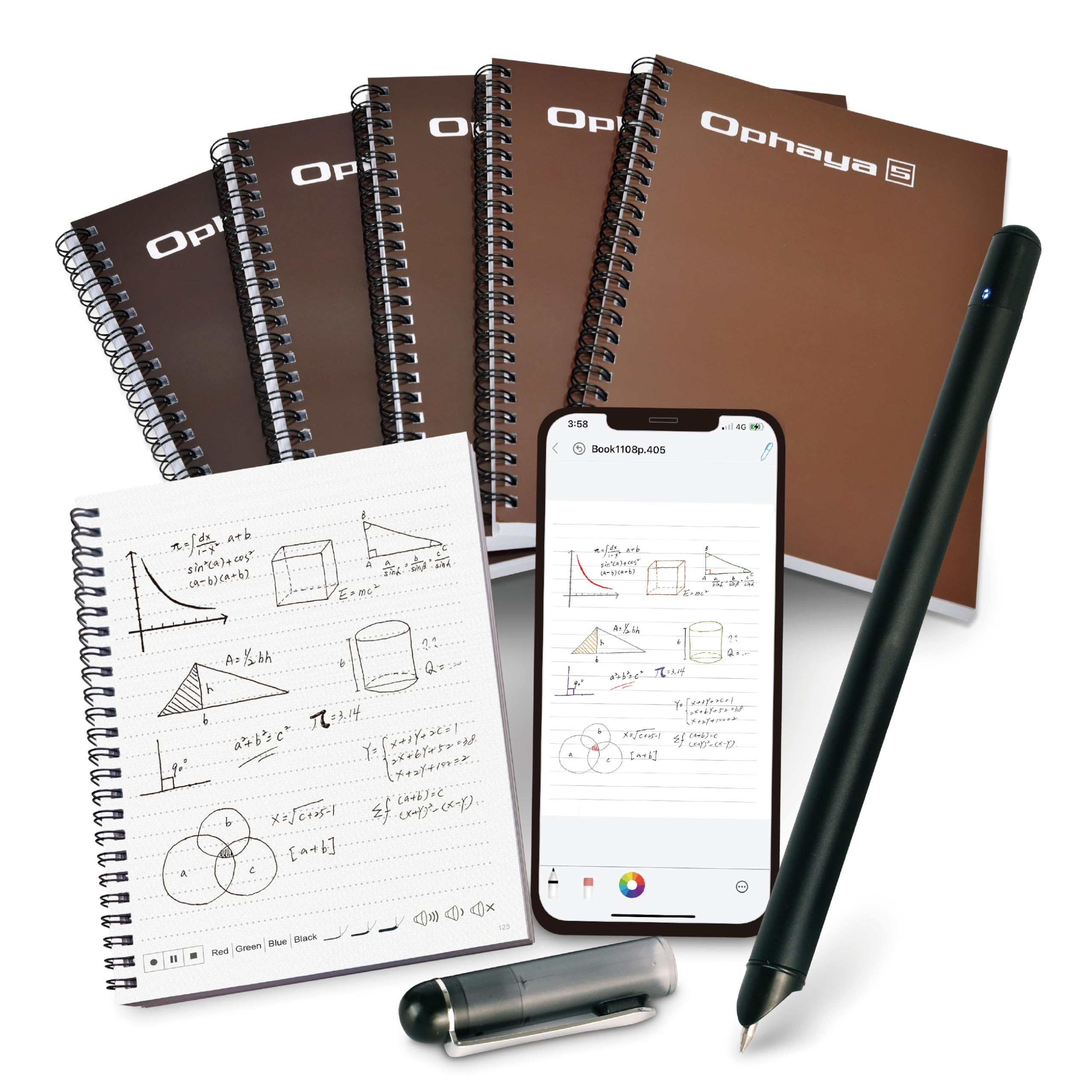
The Ophaya Sync Smart Pen bridges the gap between analog writing and digital organization. Write on the included A5 notebooks, and the pen’s infrared camera reads the dot-code pattern to capture your strokes in real time. The Ophaya Pro+ app (iOS and Android) syncs instantly, converts handwriting to editable text via OCR, and even records audio linked to specific written sections.
This system shines in academic and professional settings where you need to revisit lectures or meetings. Tap a word in your notes, and the app plays back the audio recorded at that exact moment. The pen itself writes with standard ballpoint ink refills, so you get the tactile feel of pen on paper. Offline storage saves up to 1000 pages when no phone is connected.
The biggest drawback is the reliance on proprietary dot-code paper. If you run out of notebooks and cannot find replacements, the smart features become useless. The pen cap serves as the power switch, making it easy to accidentally leave the pen on and drain the battery. For those committed to a hybrid workflow, however, this is an excellent choice.
Why it’s great
- Real-time handwriting digitization with OCR conversion
- Audio recording synced to written notes
- Offline storage with auto-sync when reconnected
Good to know
- Requires proprietary dot-code notebooks to function
- Pen cap is the only power switch — easy to lose or forget
6. Ophaya 2-in-1 Smart Pen Writing Set

This set bundles a digital smart pen with a dot-code B5 notebook, a writing board, ink refills, and a USB cable. The high-speed infrared camera captures strokes at any 360-degree angle, ensuring nothing is missed. Audio recording is tied to specific pages — tap the record button on the notebook and the pen captures sound alongside your writing.
The locked-button feature on the notepad allows up to 50,000 uses, making this a reusable system without paper waste. Offline storage holds roughly 1000 pages, and sharing supports multiple formats including PDF, PNG, GIF, and MP4. Users find it intuitive for journaling, lesson planning, and creative brainstorming.
As with the other Ophaya models, you are buying into a closed ecosystem. The pen relies on the proprietary dot-code paper, and the app experience varies. Some users find the handwriting-to-text recognition less accurate for non-English scripts. For creative work and journaling where visual organization matters more than OCR perfection, this set offers a polished experience.
Why it’s great
- Reusable notepad with up to 50,000 uses
- 360-degree stroke capture with no missed angles
- Audio recording tied directly to written pages
Good to know
- Closed ecosystem requires specific paper and app
- OCR accuracy varies for languages other than English
7. Ophayapen Smart Sync Pen (3-in-1)
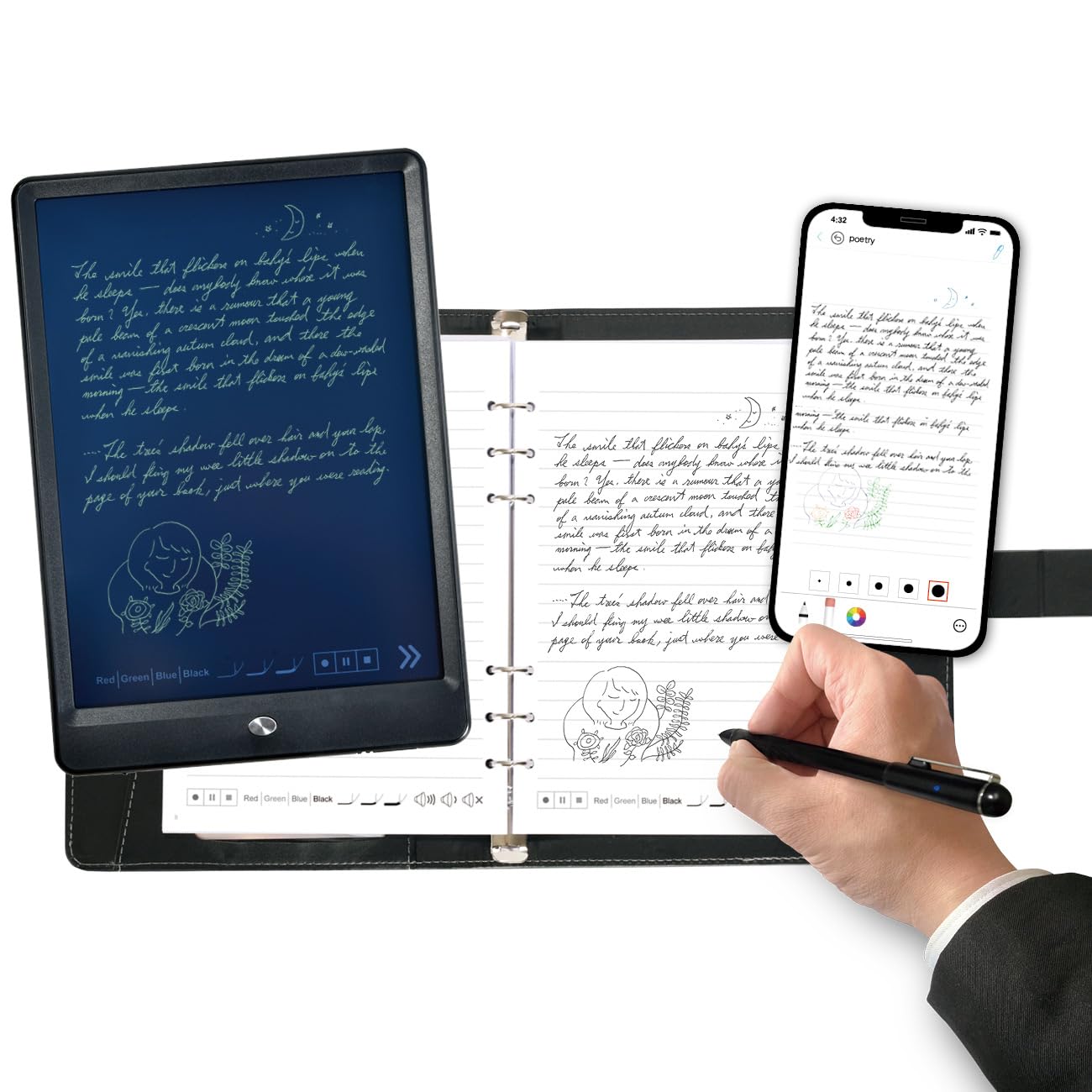
This premium kit includes a smart pen, an A5 PU notebook, a reusable writing board, and four ballpoint refills. The pen body is aluminum, giving it a more substantial and durable feel than the all-plastic versions. The Ophaya Pro+ app handles real-time sync, OCR conversion, keyword search, and multi-format export (PDF, Word, PNG, GIF, MP4).
The handwriting-to-text conversion is notably accurate for clear handwriting, and the searchable notes feature is a genuine productivity booster — you can find specific information by keyword, tag, or timestamp. Offline storage ensures you never lose work in areas without connectivity, and the content auto-syncs once the app reconnects. Users appreciate the ability to choose different pen thicknesses and colors within the app.
The primary complaint centers on the app’s user interface, which some find clunky compared to competitors like Livescribe Echo. Audio recording picks up phone notifications if apps are running, and there is no on-pen audio playback control. For a student or professional willing to learn the app’s quirks, the 3-in-1 set provides the most complete paper-to-digital workflow in this list.
Why it’s great
- Aluminum build feels premium and durable
- Accurate OCR with keyword searchable notes
- Reusable writing board plus paper notebook included
Good to know
- App interface is less polished than some competitors
- Audio recording captures ambient phone notifications
FAQ
How do I know if a digital pen is compatible with my device?
Do I need to replace the nib on my digital pen?
Final Thoughts: The Verdict
For most users, the best digital pen winner is the EVACH MPP 2.0 Tilt Pen because it delivers the perfect balance of performance, compatibility, and price for HP 2-in-1 laptop owners. If you want a battery-free experience with a comfortable grip for long creative sessions, grab the Wacom Dr. Grip Digital Pen. And for a complete paper-to-digital workflow with OCR and audio recording, nothing beats the Ophaya Sync Smart Pen.

Mo Maruf
I created WellFizz to bridge the gap between vague wellness advice and actionable solutions. My mission is simple: to decode the research and give you practical tools you can actually use.
Beyond the data, I am a passionate traveler. I believe that stepping away from the screen to explore new environments is essential for mental clarity and physical vitality.